<?php
$debug=0;
/*
Growatt
Function 4 Read Input register
registers 0-224

*/

// Include Php Serial Modbus Class
require 'PhpSerialModbus.php';

// Create an instance of the class
$modbus = new PhpSerialModbus;

// Initialize port. pdf page 3
//Rpi 3B ports are ordered top to bottom, left to right viewed by looking from the end
//0-2
//1-3
//multiple /dev/ttyUSB? are assigned starting with 0 as discovered in that sequence
//To boot with two tty deivices, plug them into ports 0 and 1 and they will be assigned USB 0 and 1
$modbus->deviceInit('/dev/ttyGW',9600,'none',8,2,'none');

// Open port
$modbus->deviceOpen();

// Enable debug
$modbus->debug = $debug;

echo "\n<html><body><p>Read Input Registers</p><ul>";

# read registers 0-224 in groups of 15
$regnos = array(); #Register Numbers 0-224
#0 to 15
$startingaddress = str_pad(dechex(0), 4, "0", STR_PAD_LEFT); 
//echo "\n$startingaddress\t";
$Numberofpoints  = str_pad(dechex(15), 4, "0", STR_PAD_LEFT); 
//echo "\n$Numberofpoints\n";
$result=$modbus->sendQuery(1,4,"$startingaddress", 16);
if($debug) print_r($result);
$air = array("Standby","PV and Grid Combinmed Discharge","Discharge","Fault","Flash","PV charge","AC charge","Combine charge","Combine charge and Bypass","PV charge and Bypass","AC charge and Bypass","Bypass","PV charge and Discharge");
//for($i=0; $i < 13; $i++) {  echo "$i $air[$i]\n"; };
$a_i = array(0,20,24,28);
foreach($a_i as $i) {
    $j = $i+1;
    $register = str_pad($i,3," ", STR_PAD_LEFT);
    $register = $register/2;
    $register = $i/2;
    $hex = $result[$i].$result[$j];
    $dec = hexdec($hex);
//    echo $register," ", 'hex Word ', $hex," decimal ", hexdec($hex);
    if ($register==0) {
      $SystemStatus = $air[$dec]; 
                      }
    if ($register==10) $OutputPowerW = strval($dec*0.1);
//    if ($register==10) $OutputPowerW = strval(73);
    if ($register==12) $OutputPowerVA = (hexdec($hex)*0.1);
    if ($register==14) $ACchargePowerW = (hexdec($hex)*0.1);
    if ($register==16) $ACchargePowerVA = (hexdec($hex)*0.1);
    $regnos[] = $result[$i] . $result[$j];
}

$myFile = "systemstatus.txt";
$fh = fopen($myFile, 'w') or die("can't open file");
fwrite($fh, $SystemStatus);
fclose($fh);

//print_r($result);#16 to 31

$startingaddress = str_pad(dechex(16), 4, "0", STR_PAD_LEFT); 
//echo "\n$startingaddress\t";
$Numberofpoints  = str_pad(dechex(16), 4, "0", STR_PAD_LEFT); 
//echo "\n$Numberofpoints\n";
$result=$modbus->sendQuery(1,4,"$startingaddress", 16);
if($debug) print_r($result);
//echo "<html><body><p>Read Input Registers</p><pre>\n";
$a_i = array(0,2,4,6,8,10,12,14,16,18,20,22,24,26,28,30);
foreach($a_i as $i) {
    $j = $i+1;
    $register = $i/2;
    $register = str_pad($register+16,3," ", STR_PAD_LEFT);
    $hex = $result[$i].$result[$j];
    $hexout = hexdec($hex);
//    $lineout = "hex $register\tword ".$hex."\tdecimal ".$hexout; echo $lineout;
    //echo " hex Word  $hex \tdecimal ", hexdec($hex);
    if ($register==16) $ACchargePower = (hexdec($hex)*0.1);
    if ($register==17) $BatteryVoltage = hexdec($hex)*0.01;
    if ($register==18) $BatterySOC = hexdec($hex);
    if ($register==19) $BussVoltage = hexdec($hex)*0.1;
    if ($register==20) $GridVoltage = hexdec($hex)*0.1;
    if ($register==21) $LineFrequencyHz = hexdec($hex)*0.01;
    if ($register==22) $ACoutputVoltage = hexdec($hex)*0.1;
    if ($register==23) $ACoutputFrequencyHz = hexdec($hex)*0.01;
    if ($register==24) $OutputDCvolt = hexdec($hex)*0.1;
    if ($register==25) $InverterTemperatureC = hexdec($hex)*0.1;
    if ($register==25) $InverterTemperatureF = (hexdec($hex)*0.1)*9/5+32;
    if ($register==26) $DCDCtemperatureC = hexdec($hex)*0.1;
    if ($register==26) $DCDCtemperatureF = (hexdec($hex)*0.1)*9/5+32;
    if ($register==27) $ACoutputLoad = hexdec($hex)*0.1;
    if ($register==30) $ACinputWatts = hexdec($hex)*0.1;
//    echo chr(10); 
    $regnos[] = $result[$i] . $result[$j];
}
$systemstatus = file_get_contents('systemstatus.txt');
echo "\n<li>$systemstatus"; //echo $SystemStatus;
echo "\n<li>Output Power in watts = $OutputPowerW"; //echo $OutputPowerW;
echo "\n<li>Output Power in volt-amps = $OutputPowerVA";
echo "\n<li>AC charge power watts = $ACchargePowerW";
//echo "\n<li>AC charge power in volt-amps = $ACchargePowerVA";
echo "\n<li>AC Charge Power = $ACchargePower";
echo "\n<li>Battery Voltage = $BatteryVoltage";
echo "\n<li>Battery SOC = $BatterySOC";
echo "\n<li>Buss Voltage = $BussVoltage";
echo "\n<li>Grid Voltage = $GridVoltage";
echo "\n<li>Line Frequency Hz = $LineFrequencyHz";
echo "\n<li>AC outout voltage = $ACoutputVoltage";
echo "\n<li>AC output frequency Hz = $ACoutputFrequencyHz";
echo "\n<li>Inverter Temperature C = $InverterTemperatureC";
echo "\n<li>Inverter Temperature F = $InverterTemperatureF";
echo "\n<li>DC-DC-Temperature C = $DCDCtemperatureC";
echo "\n<li>DC-DC-Temperature F = $DCDCtemperatureF";
echo "\n<li>AC outout load Watts = $ACoutputLoad";
echo "\n<li>AC input load watts = $ACoutputFrequencyHz";
echo "\n</ul></body></html>";
echo "\n";

$modbus->deviceClose();

?>
<?php
# PHPlot - 
require_once 'phplot.php';
$debug = 0;

$db = new SQLite3('aiox.db') or die('Unable to open database');
$sql =  "PRAGMA busy_timeout=6000";

#get today's as-of dt for title
$sql = "select substr(serial,1,2), max(dt) from ir " ;
if($debug) echo "\n$sql";
list($serial, $dtasof) = $db->query($sql)->fetchArray(SQLITE3_NUM);
if($debug) echo "\n $serial, $dtasof";

$title = " GW Watts 193 Hours $dtasof v2";

# Data for plot #1:
$y_title1 = 'SOC%';

$data1 = array();
#select  dt, systemstatusid as ss, Ppv1 as 'Solar:', AC_InWatt as 'Import:', OP_Watt as 'Consumption Power:', Bat_Watt as 'Dis(Charge) +(-)'  from ir order by dt desc limit 7;
$sql = "select case  when strftime('%M', dt) = '00' then strftime('%H', dt) else '.' end ,  systemstatusid from ir order by dt" ;

if($debug) echo "\n$sql";
$qr = $db->query($sql);
while($row = $qr->fetchArray(SQLITE3_NUM)) {	
  $data1[] = $row;
 if($debug) echo'.';
}
 if($debug) print_r($data1);

$legend1 = array('SyStatus');

# Data for plot #2: 
$y_title2 = 'Volts';

$data2 = array();
#select  dt, systemstatusid as ss, Ppv1 as 'Solar:', AC_InWatt as 'Import:', OP_Watt as 'Consumption Power:', Bat_Watt as 'Dis(Charge) +(-)'  from ir order by dt desc limit 7;
$sql = "select NULL, Ppv1, AC_InWatt, Bat_Watt, OP_Watt  from ir order by dt" ; 
if($debug) echo "\n$sql";
$qr = $db->query($sql);
while($row = $qr->fetchArray(SQLITE3_NUM)) {	
  $data2[] = $row;
 if($debug) echo'.';
}
 if($debug) print_r($data2);

$legend2 = array('Solar', 'Import', 'Consumption', 'Dis(Charge) +(-)');
# 
$plot = new PHPlot(800, 400);
$plot->SetImageBorderType('plain'); // For presentation in the manual
$plot->SetPrintImage(False); // Defer output until the end
$plot->SetTitle($title);
$plot->SetLightGridColor('black'); // So grid stands out from background

# Plot 1
# Set margins to leave room for plot 2 Y title on the right.
$plot->SetMarginsPixels(56, 56);
#$plot->SetPlotBgColor('gray');
$plot->SetDrawPlotAreaBackground(True);
$plot->SetPlotType('linepoints');
$plot->SetDataType('text-data');
$plot->SetDataValues($data1);
$plot->SetYTitle($y_title1);
# Set and position legend #1:
$plot->SetLegend($legend1);
$plot->SetLegendPixels(180, 27);
$plot->SetLegendUseShapes(true); #false = boxes or true = shapes
# Colors are significant to this data:
$plot->SetDataColors(array('black'));
$plot->SetPointShapes(array('dot','circle','up','down'));
$plot->SetPointSizes(array('1','1','6','3'));

# Specify Y range of these data sets:
$plot->SetPlotAreaWorld(NULL, NULL, NULL, NULL);
#$plot->SetYTickIncrement(500);
$plot->SetXTitle('Hours');
$plot->SetXTickLabelPos('none');
$plot->SetXTickPos('none');
# Format Y tick labels as integers, with thousands separator:
#$plot->SetYLabelType('data', 0);
$plot->DrawGraph();

# Plot 2
$plot->SetDrawPlotAreaBackground(False); // Cancel background
$plot->SetDrawYGrid(False); // Cancel grid, already drawn
$plot->SetPlotType('linepoints');
$plot->SetDataValues($data2);
# Set Y title for plot #2 and position it on the right side:
$plot->SetYTitle($y_title2, 'plotright');
# Set and position legend #2:
$plot->SetLegend($legend2);
$plot->SetLegendPixels(58, 27);
$plot->SetLegendUseShapes(true); #false = boxes or true = shapes
# Colors are significant to this data:
$plot->SetDataColors(array('navy'));
# Specify Y range of this data set:
$plot->SetPlotAreaWorld(NULL, NULL, NULL, NULL);
$plot->SetYTickIncrement(100);
$plot->SetYTickPos('plotright');
$plot->SetYTickLabelPos('plotright');
$plot->SetDataColors(array( 'gold','navy', 'maroon', 'red')); #('gold', 'navy', 'maroon', 'red'));
$plot->SetPointShapes(array('diamond','circle','up','down'));
$plot->SetPointSizes(array('6','2','5','5'));
# Format Y tick labels as integers with trailing percent sign:
$plot->SetYLabelType('data',0);
#$plot->SetYTickAnchor(3.2);
$plot->DrawGraph();

# Now output the graph with both plots:
if(!$debug) $plot->PrintImage();

<?php
$debug=0;
/*
Growatt
Function 4 Read Input register
registers 0-224

*/

// Include Php Serial Modbus Class
require 'PhpSerialModbus.php';

// Create an instance of the class
$modbus = new PhpSerialModbus;

// Initialize port. pdf page 3
//Rpi 3B ports are ordered top to bottom, left to right viewed by looking from the end
//0-2
//1-3
//multiple /dev/ttyUSB? are assigned starting with 0 as discovered in that sequence
//To boot with two tty deivices, plug them into ports 0 and 1 and they will be assigned USB 0 and 1
$modbus->deviceInit('/dev/ttyGW',9600,'none',8,2,'none');

// Open port
$modbus->deviceOpen();

// Enable debug
$modbus->debug = $debug;

# read registers 0-224 in groups of 15
$regnos = array(); #Register Numbers 0-224

#0 to 14
$startingaddress = str_pad(dechex(16), 4, "0", STR_PAD_LEFT); 
//echo "\n$startingaddress\t";
$Numberofpoints  = str_pad(dechex(16), 4, "0", STR_PAD_LEFT); 
//echo "\n$Numberofpoints\n";
$result=$modbus->sendQuery(1,4,"$startingaddress", 16);
if($debug) print_r($result);
echo "<html><body><p>Read Input Registers</p><pre>\n";
for($i=0; $i < 32; $i+=2) {
    $j = $i+1;
    $register = $i/2;
    $register = str_pad($register+16,3," ", STR_PAD_LEFT);
    $hex = $result[$i].$result[$j];
    $hexout = hexdec($hex);
    $hex7e = $hexout & 0x7c;
    $lineout = "hex $register\tword ".$hex."\tdecimal ".$hexout; echo $lineout;
    //echo " hex Word  $hex \tdecimal ", hexdec($hex);
    if ($register==16) echo "\tAC charge power = ", (hexdec($hex)*0.1)," va";
    if ($register==17) echo "\tBattery voltage ",hexdec($hex)*0.01;
    if ($register==18) echo "\tBattery SOC ",hexdec($hex),"% (0, 25, 50, 75, 100)";
    if ($register==19) echo "\tBuss voltage ",hexdec($hex)*0.1;
    if ($register==20) echo "\tGrid voltage ",hexdec($hex)*0.1;
    if ($register==21) echo "\tLine frequency Hz ",hexdec($hex)*0.01;
    if ($register==22) echo "\tOutput voltage ",hexdec($hex)*0.1;
    if ($register==23) echo "\tAC output frequency Hz ",hexdec($hex)*0.01;
    if ($register==24) echo "\tOutput DC volt ",hexdec($hex)*0.1;
    if ($register==25) echo "\tInverter temperature ",hexdec($hex)*0.1,"C ",(hexdec($hex)*0.1)*9/5+32,"F $hex7e";
    if ($register==26) echo "\tDC-DC temperature ",hexdec($hex)*0.1,"C ",(hexdec($hex)*0.1)*9/5+32,"F $hex7e";
    if ($register==27) echo "\tAC output load ",hexdec($hex)*0.1, "%";
    if ($register==30) echo "\tAC input ",hexdec($hex)*0.1, " Watts";
    echo chr(10); 
    $regnos[] = $result[$i] . $result[$j];
}
echo "</pre></body></html>\n";
$modbus->deviceClose();


?>
<?php
$debug=0;
/*
Growatt
Function 3 Read holding register
0-162
*/
$debug = 0;

// Include Php Serial Modbus Class
require 'PhpSerialModbus.php';

// Create an instance of the class
$modbus = new PhpSerialModbus;

// Initialize port. pdf page 3
$modbus->deviceInit('/dev/ttyGW',9600,'none',8,2,'none');
//print_r($modbus);
//sleep(9);

// Open port
$modbus->deviceOpen();
//print_r($modbus);
//sleep(9);

# read registers 0-162
$regnos = array(); #Register Numbers 0-162

$startingaddress = str_pad(dechex(34), 4, "0", STR_PAD_LEFT); echo "\n$startingaddress\n";
echo "starting address = $startingaddress \n";
$Numberofpoints  = str_pad(dechex(15), 4, "0", STR_PAD_LEFT); echo "\n$Numberofpoints\n";
$result=$modbus->sendQuery(1,3,"$startingaddress", 1);
print_r($result);

$modbus->deviceClose();

?>
<?php
$debug=0;
/*
Growatt
Function 3 Read holding register
0-162
*/
$debug = 0;

// Include Php Serial Modbus Class
require 'PhpSerialModbus.php';

// Create an instance of the class
$modbus = new PhpSerialModbus;

// Initialize port. pdf page 3
$modbus->deviceInit('/dev/ttyGW',9600,'none',8,2,'none');
//print_r($modbus);
//sleep(9);

// Open port
$modbus->deviceOpen();
//print_r($modbus);
//sleep(9);

// Enable debug
$modbus->debug = $debug;

# read registers 0-162
$regnos = array(); #Register Numbers 0-162

$startingaddress = str_pad(dechex(24), 4, "0", STR_PAD_LEFT); echo "\n$startingaddress\n";
echo "starting address = $startingaddress \n";
$Numberofpoints  = str_pad(dechex(15), 4, "0", STR_PAD_LEFT); echo "\n$Numberofpoints\n";
$result=$modbus->sendQuery(1,3,"$startingaddress", 15);
if($debug) print_r($result);
//print ("1,3,$startingaddress,15");
//print_r($result);
//sleep(9);

print "pre";
for($i=0; $i < 30; $i+=2) {
    $j = $i+1;
    #echo $i/2+24, '<br> Word = ', $result[$i] . $result[$j], chr(10);
  //  print $result[$i];
    //print $result[$j];
    $item = $i / 2;
//    print $item;
    $item1 = $item + 24;
    $item2 = $result[$i];
    $item3 = $result[$j];
    print "<br> $item1 Word $item2 $item3";
    $regnos[] = $result[$i] . $result[$j];
}
print "</pre>";
//echo "print_r regnos";
//print_r($regnos);
$modbus->deviceClose();

?>
<html>
 <head>
  <meta http-equiv="refresh" content="720">
  <title>NC8Q battery history</title>
 </head>
 <body>
<IMG SRC="dbbo25.php">
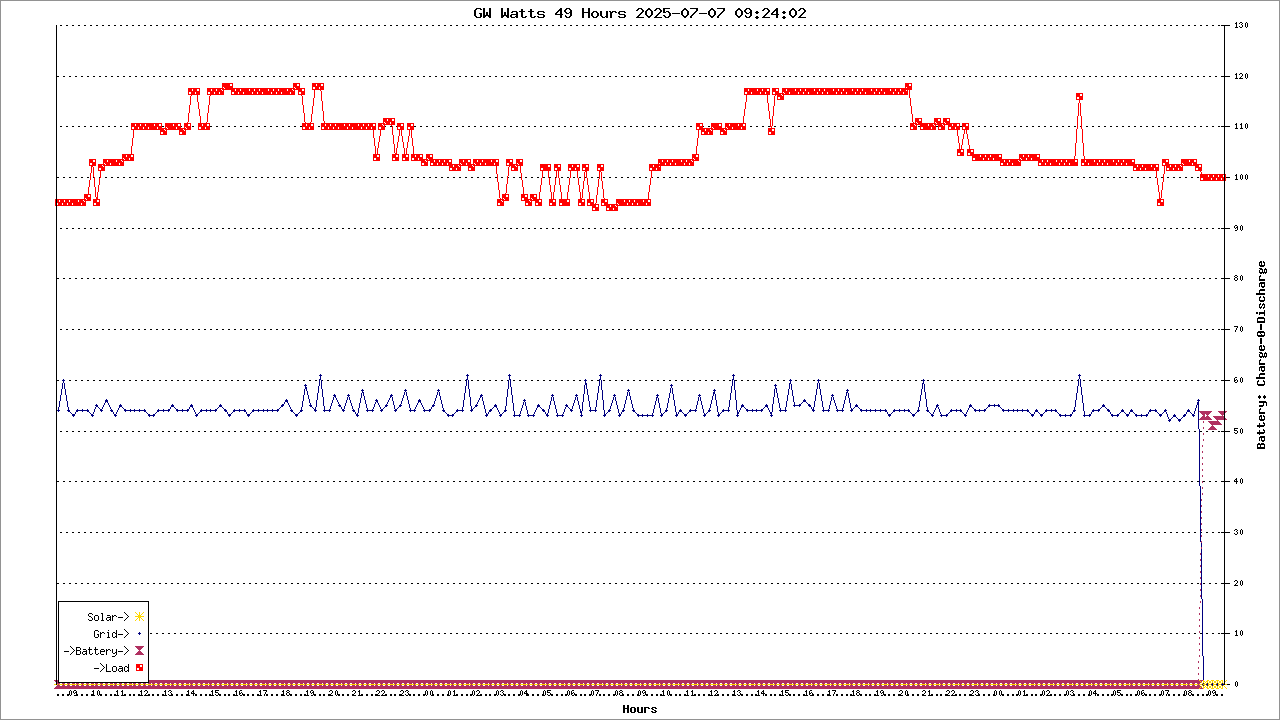
<IMG SRC="dbbo49.php">
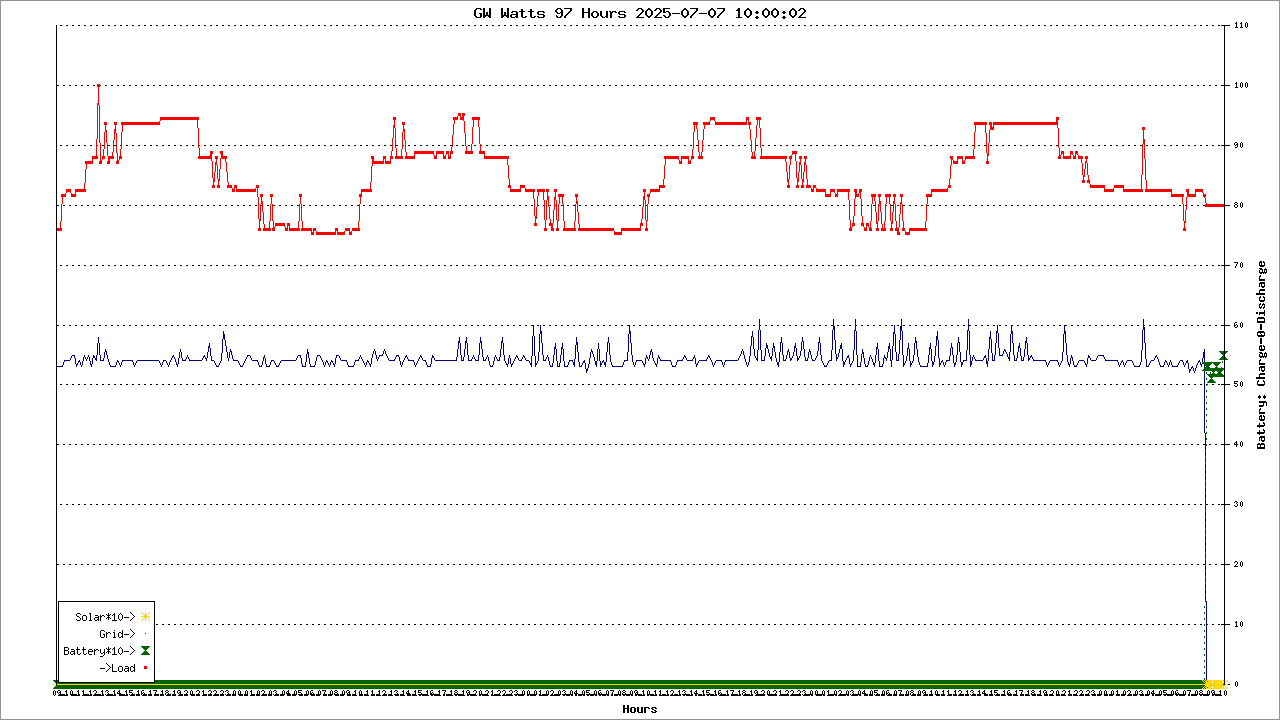
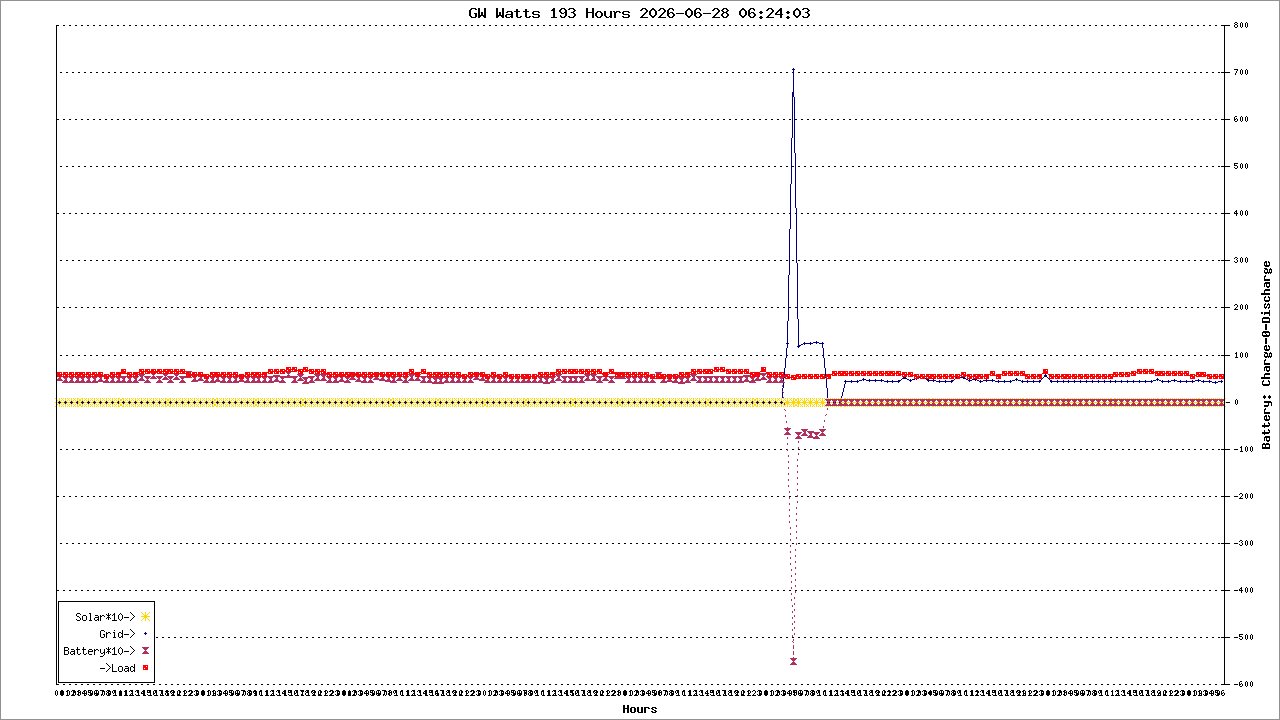
<IMG SRC="dbbo97.php">
<IMG SRC="dbbo193.php">
</center>
 </body>
</html>


<?php
$debug = 1;
/*
hex data is collectd in table hrx
re-builds table hr by converting from table hrx
1. drop/create hr table
2. read hrx table; decode/; scatter fields to hrtable
*/
$db = new SQLite3('ramdisk/aiox.db') or die ('Unable to open database');
$sql =  "PRAGMA busy_timeout=20000";
$db->exec($sql);

#1111111111111111111111111111111111
# insert discovered variable name(s).  Keep in seq by Program Number
#Columns
#Variable Name, MODBUSRegNO, Value, Unit, Program/Alias
$sql = "drop table if exists hr; CREATE TABLE if not exists hr (
serial text
, dt text

, Standby      text         --0 0-1     P04
, OutputConfigId text       --1 0-3     P01
, ChargeConfigId text       --2 0-2     P14
, ACInModelId text          --8 0-2     P03
, OutputVoltTypeId text     --9 0-6     P08
, MaxChargeCurr num         --34 A      P02
, BulkChargeVolt   num      --35 0.1V   P19
, FloatChargeVolt num       --36 0.1V   P20
, BatLowToUtiVolt num       --37 0.1V   P12
, ACChargeCurr num          --38 0.1V   P11
, BatteryTypeId text        --39 0-4    P05
, PRIMARY KEY(serial, dt)
)";
if($debug) echo "\n<BR>$sql \n";
$db->exec($sql);

#22222222222222222222222222222222222222222222222

$sql = "select serial, dt, csv from hrx order by dt $sql =  "PRAGMA busy_timeout=20000";
$db->exec($sql);
$sql =  "PRAGMA busy_timeout=20000";
$db->exec($sql);
";
$qr = $db->query($sql);
while(list($serial, $dt, $csv) = $qr->fetchArray(SQLITE3_NUM)) {
    $hrxa = array();
    $hrxa = explode(',', $csv);
#    print_r($hrxa);
    #scatter
# Scatter array into discrete variable names.
$Standby            = hexdec($hrxa[0]);
$OutputConfigId       = hexdec($hrxa[1]) ;
$ChargeConfigId       = hexdec($hrxa[2]) ; 
$ACInModelId          = hexdec($hrxa[8]) ; 
$OutputVoltTypeId     = hexdec($hrxa[18]) ;
$MaxChargeCurr      = hexdec($hrxa[34]) ;
$BulkChargeVolt     = hexdec($hrxa[35]) * 0.1;
$FloatChargeVolt    = hexdec($hrxa[36]) * 0.1;
$BatLowToUtiVolt    = hexdec($hrxa[37]) * 0.1;
$ACChargeCurr       = hexdec($hrxa[38]) ;
$BatteryTypeId        = hexdec($hrxa[39]) ; 

    #gather & write to table hr
$sql = "insert into hr values(
'$serial', '$dt'
,$Standby
,$OutputConfigId
,$ChargeConfigId
,$ACInModelId
,$OutputVoltTypeId
,$MaxChargeCurr
,$BulkChargeVolt
,$FloatChargeVolt
,$BatLowToUtiVolt
,$ACChargeCurr
,$BatteryTypeId
)";
if($debug) echo "\n<BR>$sql \n";
$db->exec($sql);
};

    print_r($hrxa);

function hexdecs($hex)
{
//http://php.net/manual/en/function.hexdec.php#97172
    // ignore non hex characters
    $hex = preg_replace('/[^0-9A-Fa-f]/', '', $hex);
   
    // converted decimal value:
    $dec = hexdec($hex);
   
    // maximum decimal value based on length of hex + 1:
    //   number of bits in hex number is 8 bits for each 2 hex -> max = 2^n
    //   use 'pow(2,n)' since '1 << n' is only for integers and therefore limited to integer size.
    $max = pow(2, 4 * (strlen($hex) + (strlen($hex) % 2)));
   
    // complement = maximum - converted hex:
    $_dec = $max - $dec;
   
    // if dec value is larger than its complement we have a negative value (first bit is set)
    return $dec > $_dec ? -$_dec : $dec;
}

?>

<?php
$debug = 1;
/*
hex data is collectd in table irx
re-builds table ir by converting from table irx
1. drop/create ir table
2. read irx table; decode/; scatter fields to irtable
*/
$db = new SQLite3('aiox.db') or die ('Unable to open database');
$sql =  "PRAGMA busy_timeout=20000";
$db->exec($sql);

#1111111111111111111111111111111111
# insert discovered variable name(s).  Keep in seq by regNO
$sql = "drop table if exists ir; CREATE TABLE if not exists ir (
serial text
, dt text
, SystemStatusId text --0
, Vpv1 num          --1 0.1V
, Ppv1 num          --3,4 0.1W
, Buck1Cur num      --7 0.1A
, OP_Watt num       --9 0.1W
, OP_VA num         --11 0.1VA
, ACChr_Watt num    --13 0.1VA
, ACChr_VA num      --15 0.1VA
, BatVolt num       --17
, BatSOC num        --18 %
, BusVolt num       --19 0.1V
, GridVolt num      --20 0.1V
, LineFreq num      --21 0.01Hz
, OutputFreq num    --23
, WorkTime num      --30,31
, AC_InWatt num     --36-37 0.1W
, AC_InVA num       --38-39  0.1W
, Epv1_today num    --48,49 0.1kWh
, Epv1_total num    --50,51 0.1kWh
, Eac_chrToday num    --56-57 0.1kWh
, Eac_chrTotal num    --58-59 0.1kWh
, Ebat_dischrToday num    --60,61 0.1kWh
, Ebat_dischrTotal num    --62,63 0.1kWh
, Eac_dischrToday num    --64-65 0.1kWh
, Eac_dischrTotal num    --66-67 0.1kWh
, Bat_Watt num          --77 0.1W
, Eop_dischrToday num    --85-86 0.1kWh
, Eop_dischrTotal num    --87-88 0.1kWh
, PRIMARY KEY(serial, dt)
)";
if($debug) echo "\n<BR>$sql \n";
$db->exec($sql);

#22222222222222222222222222222222222222222222222

$sql = "select dt, csv from irx";
$qr = $db->query($sql);
while(list($dt, $csv) = $qr->fetchArray(SQLITE3_NUM)) {
    $irxa = array();
    $irxa = explode(',', $csv);
    #scatter
# Scatter array into discrete variable names.
$serial     = "UKDGBMF010";
$SystemStatusId  = hexdec($irxa[0]);
$Vpv1       = hexdec($irxa[1]) * 0.1;
$Ppv1       = hexdec($irxa[3] . $irxa[4]) * 0.1; 
$Buck1Cur   = hexdec($irxa[7]) * 0.1;
$OP_Watt    = hexdec($irxa[9] . $irxa[10]) * 0.1;
$OP_VA      = hexdec($irxa[11] . $irxa[12]) * 0.1;
$ACChr_Watt = hexdec($irxa[13] . $irxa[14]) * 0.1;
$ACChr_VA   = hexdec($irxa[15] . $irxa[16]) * 0.1;
$BatVolt    = hexdec($irxa[17]) * 0.01;
$BatSOC     = hexdec($irxa[18]) ;
$BusVolt    = hexdec($irxa[19]) * 0.1;
$GridVolt  = hexdec($irxa[20]) * 0.1;
$LineFreq   = hexdec($irxa[21]) * 0.01;
$OutputFreq = hexdec($irxa[22]) * 0.1;
$WorkTime   = hexdec($irxa[30] . $irxa[31]) * 0.5; #Seconds
$AC_InWatt = hexdec($irxa[36] . $irxa[37]) * 0.1;
$AC_InVA   = hexdec($irxa[38] . $irxa[39]) * 0.1;
$Epv1_today = hexdec($irxa[48] . $irxa[49]) * 0.1; 
$Epv1_total = hexdec($irxa[50] . $irxa[51]) * 0.1; 
$Eac_chrToday = hexdec($irxa[56] . $irxa[57]) * 0.1; 
$Eac_chrTotal = hexdec($irxa[58] . $irxa[59]) * 0.1; 
$Ebat_dischrToday = hexdec($irxa[60] . $irxa[61]) * 0.1; 
$Ebat_dischrTotal = hexdec($irxa[62] . $irxa[63]) * 0.1; 
$Eac_dischrToday = hexdec($irxa[64] . $irxa[65]) * 0.1; 
$Eac_dischrTotal = hexdec($irxa[66] . $irxa[67]) * 0.1; 
$Bat_Watt       = hexdecs($irxa[77] . $irxa[78]) * 0.1; #signed 32bit word
$Eop_dischrToday = hexdec($irxa[85] . $irxa[86]) * 0.1; 
$Eop_dischrTotal = hexdec($irxa[87] . $irxa[88]) * 0.1;

    #gather & write to table ir; be sure to enclose TEXT values in 's !!
$sql = "insert into ir values(
'$serial',
'$dt',
'$SystemStatusId',  
$Vpv1, $Ppv1, $Buck1Cur,
$OP_Watt, $OP_VA,
$ACChr_Watt, $ACChr_VA, 
$BatVolt, $BatSOC, 
$BusVolt, $GridVolt,
$LineFreq, $OutputFreq,
$WorkTime, 
$AC_InWatt, $AC_InVA,
$Epv1_today, $Epv1_total, 
$Eac_chrToday, $Eac_chrTotal, 
$Ebat_dischrToday, $Ebat_dischrTotal,
$Eac_dischrToday, $Eac_dischrTotal,
$Bat_Watt,
$Eop_dischrToday, $Eop_dischrTotal
)";
if($debug) echo "\n<BR>$sql \n";
$db->exec($sql);
};

function hexdecs($hex)
{
//http://php.net/manual/en/function.hexdec.php#97172
    // ignore non hex characters
    $hex = preg_replace('/[^0-9A-Fa-f]/', '', $hex);
   
    // converted decimal value:
    $dec = hexdec($hex);
   
    // maximum decimal value based on length of hex + 1:
    //   number of bits in hex number is 8 bits for each 2 hex -> max = 2^n
    //   use 'pow(2,n)' since '1 << n' is only for integers and therefore limited to integer size.
    $max = pow(2, 4 * (strlen($hex) + (strlen($hex) % 2)));
   
    // complement = maximum - converted hex:
    $_dec = $max - $dec;
   
    // if dec value is larger than its complement we have a negative value (first bit is set)
    return $dec > $_dec ? -$_dec : $dec;
}

?>

<?php
# PHPlot - 
require_once 'phplot.php';
$debug = 0;

$db = new SQLite3('aiox.db') or die('Unable to open database');
$sql =  "PRAGMA busy_timeout=6000";

#get today's as-of dt for title
$sql = "select substr(serial,1,2), max(dt) from ir " ;
if($debug) echo "\n$sql";
list($serial, $dtasof) = $db->query($sql)->fetchArray(SQLITE3_NUM);
if($debug) echo "\n $serial, $dtasof";

$title = " GW Battery 193 Hours $dtasof ";

# Data for plot #1:
$y_title1 = 'SOC%';

$data1 = array();
#$sql = "select case  when strftime('%M', dt) = '00' then strftime('%H', dt) else '' end ,  BatSOC,  -Bat_Watt from period25hrs order by dt" ;
$sql = "select case  when strftime('%M', dt) = '00' then strftime('%H', dt) else '.' end ,  BatSOC from ir order by dt" ;
#@# where dt >= (select datetime(max(dt), '-25 hour') from period25hrs) order by dt" ;
#@#  where date(dt) = (select date(max(dt)) from period25hrs) order by dt";

if($debug) echo "\n$sql";
$qr = $db->query($sql);
while($row = $qr->fetchArray(SQLITE3_NUM)) {	
  $data1[] = $row;
 if($debug) echo'.';
}
 if($debug) print_r($data1);

$legend1 = array('SOC%');

# Data for plot #2: 
$y_title2 = 'Volts';

$data2 = array();
#$sql = "select NULL, BatVolt, 8*3.375, 25.6  from ir order by dt" ; #Balance, AGM Low Float, AGM 50%
$sql = "select NULL, BatVolt, 8*3.45, 25.6  from ir order by dt" ; #Balance, LiFePO4 100% SOC, SOC 10% 20221202
if($debug) echo "\n$sql";
$qr = $db->query($sql);
while($row = $qr->fetchArray(SQLITE3_NUM)) {	
  $data2[] = $row;
 if($debug) echo'.';
}
 if($debug) print_r($data2);

#$legend2 = array('Bat', 'BMS Bal', 'Low Bat');
$legend2 = array('Bat', 'Charge target', 'SOC 10%');

# battery cell voltage range
#    list($bulknbr) = $db->query( "select count(*) from ir where charge_state = 5 and dt > datetime('now','localtime','-1 days')" )->fetchArray(SQLITE3_NUM);
#$sql = "select min(25.6, min(BatVolt))-0.1, max(28.2, max(BatVolt))+0.1  from ir  order by dt" ; 
$sql = "select min(25.6, min(BatVolt))-0.1, max(28.0, max(BatVolt))+0.1  from ir  order by dt" ; #20221202 
if($debug) echo "\n$sql";
list($lv, $uv) = $db->query($sql)->fetchArray(SQLITE3_NUM);

# 
$plot = new PHPlot(1280, 620);
$plot->SetImageBorderType('plain'); // For presentation in the manual
$plot->SetPrintImage(False); // Defer output until the end
$plot->SetTitle($title);
$plot->SetLightGridColor('black'); // So grid stands out from background

# Plot 1
# Set margins to leave room for plot 2 Y title on the right.
$plot->SetMarginsPixels(56, 56);
#$plot->SetPlotBgColor('gray');
$plot->SetDrawPlotAreaBackground(True);
$plot->SetPlotType('linepoints');
$plot->SetDataType('text-data');
$plot->SetDataValues($data1);
$plot->SetYTitle($y_title1);
# Set and position legend #1:
$plot->SetLegendUseShapes(true); #false = boxes or true = shapes  ####<===== add this line
$plot->SetLegend($legend1);
$plot->SetLegendPixels(58, 27);
# Colors are significant to this data:
$plot->SetDataColors(array('navy', 'maroon'));

# Specify Y range of these data sets:
$plot->SetPlotAreaWorld(NULL, NULL, NULL, NULL);
#$plot->SetYTickIncrement(500);
$plot->SetXTitle('Hours');
$plot->SetXTickLabelPos('none');
$plot->SetXTickPos('none');
# Format Y tick labels as integers, with thousands separator:
#$plot->SetYLabelType('data', 0);
$plot->SetPointSizes('5','9');
$plot->SetLineWidths('1','9');
$plot->SetPointShapes('circle','cross');
$plot->SetPlotType('squared');
$plot->DrawGraph();

# Plot 2
$plot->SetDrawPlotAreaBackground(False); // Cancel background
$plot->SetDrawYGrid(False); // Cancel grid, already drawn
$plot->SetPlotType('linepoints');
$plot->SetDataValues($data2);
# Set Y title for plot #2 and position it on the right side:
$plot->SetYTitle($y_title2, 'plotright');
# Set and position legend #2:
$plot->SetLegend($legend2);
$plot->SetLegendPixels(400, 25);
# Colors are significant to this data:
$plot->SetDataColors(array('navy'));
# Specify Y range of this data set:
$plot->SetPlotAreaWorld(NULL, $lv, NULL, $uv);
$plot->SetYTickIncrement(.2);
$plot->SetYTickPos('plotright');
$plot->SetYTickLabelPos('plotright');
$plot->SetDataColors(array('black', 'gold', 'orchid'));
# Format Y tick labels as integers with trailing percent sign:
$plot->SetYLabelType('data', 2);
$plot->SetYTickAnchor(3.2);
$plot->SetPointSizes('5','5','5','5');
$plot->SetLineWidths('1','1','1','4');
$plot->SetPointShapes('dot','cross','line');
$plot->DrawGraph();

# Now output the graph with both plots:
if(!$debug) $plot->PrintImage();
################################################################################################################################################


<?php
echo chr(hexdec(55)), chr(hexdec(44)), chr(hexdec(47)), chr(hexdec(42)), chr(77), PHP_EOL;
?>
<html>
 <head>
  <meta http-equiv="refresh" content="90">
  <title>VAN-Dashboard</title>
 </head>
 <body>
<IMG SRC="dashboardbatteryoverlay60.php">
<IMG SRC="dashboardwatts60.php">
<IMG SRC="dashboardkwhs60.php">
</center>
 </body>
</html>

<?php
# PHPlot - 
require_once 'phplot.php';
$debug = 0;

$db = new SQLite3('ramdisk/aiox.db') or die('Unable to open database');
$sql =  "PRAGMA busy_timeout=6000";

#get today's as-of dt for title
$sql = "select substr(serial,1,2), max(dt) from period25hrs " ;
if($debug) echo "\n$sql";
list($serial, $dtasof) = $db->query($sql)->fetchArray(SQLITE3_NUM);
if($debug) echo "\n $serial, $dtasof";

$title = " GW Battery 25 Hours $dtasof ";

# Data for plot #1:
$y_title1 = 'SOC%';

$data1 = array();
#$sql = "select case  when strftime('%M', dt) = '00' then strftime('%H', dt) else '' end ,  BatSOC,  -Bat_Watt from period25hrs order by dt" ;
$sql = "select case  when strftime('%M', dt) = '00' then strftime('%H', dt) else '.' end ,  BatSOC from period25hrs order by dt" ;
#@# where dt >= (select datetime(max(dt), '-25 hour') from period25hrs) order by dt" ;
#@#  where date(dt) = (select date(max(dt)) from period25hrs) order by dt";

if($debug) echo "\n$sql";
$qr = $db->query($sql);
while($row = $qr->fetchArray(SQLITE3_NUM)) {	
  $data1[] = $row;
 if($debug) echo'.';
}
 if($debug) print_r($data1);

$legend1 = array('SOC%');

# Data for plot #2: 
$y_title2 = 'Volts';

$data2 = array();
$sql = "select NULL, BatVolt, 8*3.45, 25.6  from period25hrs order by dt" ; #Balance, AGM Low Float, AGM 50%
if($debug) echo "\n$sql";
$qr = $db->query($sql);
while($row = $qr->fetchArray(SQLITE3_NUM)) {	
  $data2[] = $row;
 if($debug) echo'.';
}
 if($debug) print_r($data2);

$legend2 = array('Bat', 'BMS Bal', 'Low Bat');

# battery cell voltage range
#    list($bulknbr) = $db->query( "select count(*) from period25hrs where charge_state = 5 and dt > datetime('now','localtime','-1 days')" )->fetchArray(SQLITE3_NUM);
$sql = "select min(25.6, min(BatVolt))-0.1, max(28.2, max(BatVolt))+0.1  from period25hrs  order by dt" ; 
if($debug) echo "\n$sql";
list($lv, $uv) = $db->query($sql)->fetchArray(SQLITE3_NUM);

# 
$plot = new PHPlot(800, 400);
$plot->SetImageBorderType('plain'); // For presentation in the manual
$plot->SetPrintImage(False); // Defer output until the end
$plot->SetTitle($title);
$plot->SetLightGridColor('black'); // So grid stands out from background

# Plot 1
# Set margins to leave room for plot 2 Y title on the right.
$plot->SetMarginsPixels(56, 56);
$plot->SetPlotBgColor('gray');
$plot->SetDrawPlotAreaBackground(True);
$plot->SetPlotType('linepoints');
$plot->SetDataType('text-data');
$plot->SetDataValues($data1);
$plot->SetYTitle($y_title1);
# Set and position legend #1:
$plot->SetLegend($legend1);
$plot->SetLegendPixels(300, 25);
# Colors are significant to this data:
$plot->SetDataColors(array('navy', 'maroon'));

# Specify Y range of these data sets:
$plot->SetPlotAreaWorld(NULL, NULL, NULL, NULL);
#$plot->SetYTickIncrement(500);
$plot->SetXTitle('Hours');
$plot->SetXTickLabelPos('none');
$plot->SetXTickPos('none');
# Format Y tick labels as integers, with thousands separator:
#$plot->SetYLabelType('data', 0);
$plot->DrawGraph();

# Plot 2
$plot->SetDrawPlotAreaBackground(False); // Cancel background
$plot->SetDrawYGrid(False); // Cancel grid, already drawn
$plot->SetPlotType('linepoints');
$plot->SetDataValues($data2);
# Set Y title for plot #2 and position it on the right side:
$plot->SetYTitle($y_title2, 'plotright');
# Set and position legend #2:
$plot->SetLegend($legend2);
$plot->SetLegendPixels(400, 25);
# Colors are significant to this data:
$plot->SetDataColors(array('navy'));
# Specify Y range of this data set:
$plot->SetPlotAreaWorld(NULL, $lv, NULL, $uv);
$plot->SetYTickIncrement(.2);
$plot->SetYTickPos('plotright');
$plot->SetYTickLabelPos('plotright');
$plot->SetDataColors(array('black', 'gold', 'orchid'));
# Format Y tick labels as integers with trailing percent sign:
$plot->SetYLabelType('data', 2);
$plot->SetYTickAnchor(3.2);
$plot->DrawGraph();

# Now output the graph with both plots:
if(!$debug) $plot->PrintImage();
################################################################################################################################################

<?php
# PHPlot - 
require_once 'phplot.php';
$debug = 0;

$db = new SQLite3('ramdisk/aiox.db') or die('Unable to open database');
$sql =  "PRAGMA busy_timeout=6000";

#get today's as-of dt for title
$sql = "select substr(serial,1,2), max(dt) from period25hrs " ;
if($debug) echo "\n$sql";
list($serial, $dtasof) = $db->query($sql)->fetchArray(SQLITE3_NUM);
if($debug) echo "\n $serial, $dtasof";

$title = " GW Battery 25 Hours $dtasof ";

# Data for plot #1:
$y_title1 = 'SOC%';

$data1 = array();
#$sql = "select case  when strftime('%M', dt) = '00' then strftime('%H', dt) else '' end ,  BatSOC,  -Bat_Watt from period25hrs order by dt" ;
$sql = "select case  when strftime('%M', dt) = '00' then strftime('%H', dt) else '.' end ,  BatSOC from period25hrs order by dt" ;
#@# where dt >= (select datetime(max(dt), '-25 hour') from period25hrs) order by dt" ;
#@#  where date(dt) = (select date(max(dt)) from period25hrs) order by dt";

if($debug) echo "\n$sql";
$qr = $db->query($sql);
while($row = $qr->fetchArray(SQLITE3_NUM)) {	
  $data1[] = $row;
 if($debug) echo'.';
}
 if($debug) print_r($data1);

$legend1 = array('SOC%');

# Data for plot #2: 
$y_title2 = 'Volts';

$data2 = array();
$sql = "select NULL, BatVolt, 8*3.375, 25.6  from period25hrs order by dt" ; #Balance, AGM Low Float, AGM 50%
if($debug) echo "\n$sql";
$qr = $db->query($sql);
while($row = $qr->fetchArray(SQLITE3_NUM)) {	
  $data2[] = $row;
 if($debug) echo'.';
}
 if($debug) print_r($data2);

$legend2 = array('Bat', 'BMS Bal', '10% Bat');

# battery cell voltage range
#    list($bulknbr) = $db->query( "select count(*) from period25hrs where charge_state = 5 and dt > datetime('now','localtime','-1 days')" )->fetchArray(SQLITE3_NUM);
$sql = "select min(25.6, min(BatVolt))-0.1, max(28.2, max(BatVolt))+0.1  from period25hrs  order by dt" ; 
if($debug) echo "\n$sql";
list($lv, $uv) = $db->query($sql)->fetchArray(SQLITE3_NUM);

# 
$plot = new PHPlot(800, 400);
$plot->SetImageBorderType('plain'); // For presentation in the manual
$plot->SetPrintImage(False); // Defer output until the end
$plot->SetTitle($title);
$plot->SetLightGridColor('black'); // So grid stands out from background

# Plot 1
# Set margins to leave room for plot 2 Y title on the right.
$plot->SetMarginsPixels(56, 56);
#$plot->SetPlotBgColor('gray');
$plot->SetDrawPlotAreaBackground(True);
#$plot->SetPlotType('linepoints');
$plot->SetPlotType('squared');
$plot->SetDataType('text-data');
$plot->SetDataValues($data1);
$plot->SetYTitle($y_title1);
# Set and position legend #1:
$plot->SetLegend($legend1);
$plot->SetLegendPixels(58, 331);
#$plot->SetLegendPixels(128, 27);
$plot->SetLegendUseShapes(true); #false = boxes or true = shapes
# Colors are significant to this data:
$plot->SetDataColors(array('navy', 'maroon'));
$plot->SetPointShapes(array('circle','circle','line'));
$plot->SetPointSizes(array('5','5','5','5'));
$plot->SetLineWidths(array('1','2','2','4'));

# Specify Y range of these data sets:
$plot->SetPlotAreaWorld(NULL, NULL, NULL, NULL);
#$plot->SetYTickIncrement(500);
$plot->SetXTitle('Hours');
$plot->SetXTickLabelPos('none');
$plot->SetXTickPos('none');
# Format Y tick labels as integers, with thousands separator:
#$plot->SetYLabelType('data', 0);
$plot->DrawGraph();

# Plot 2
$plot->SetDrawPlotAreaBackground(False); // Cancel background
$plot->SetDrawYGrid(False); // Cancel grid, already drawn
$plot->SetPlotType('linepoints');
$plot->SetDataValues($data2);
# Set Y title for plot #2 and position it on the right side:
$plot->SetYTitle($y_title2, 'plotright');
# Set and position legend #2:
$plot->SetLegend($legend2);
#$plot->SetLegendPixels(58, 27);
$plot->SetLegendPixels(128, 297);$plot->SetLegendUseShapes(true); #false = boxes or true = shapes
# Colors are significant to this data:
$plot->SetDataColors(array('navy'));
# Specify Y range of this data set:
$plot->SetPlotAreaWorld(NULL, $lv, NULL, $uv);
$plot->SetYTickIncrement(.2);
$plot->SetYTickPos('plotright');
$plot->SetYTickLabelPos('plotright');
$plot->SetDataColors(array('black', 'gold', 'orchid'));
$plot->SetPointShapes(array('hourglass','line','line'));
$plot->SetPointSizes(array('5','5','5','5'));
$plot->SetLineWidths(array('1','2','2','4'));
# Format Y tick labels as integers with trailing percent sign:
$plot->SetYLabelType('data', 2);
$plot->SetYTickAnchor(3.2);
$plot->DrawGraph();

# Now output the graph with both plots:
if(!$debug) $plot->PrintImage();
################################################################################################################################################

<?php
# PHPlot - 
require_once 'phplot.php';
$debug = 0;

$db = new SQLite3('ramdisk/aiox.db') or die('Unable to open database');
$sql =  "PRAGMA busy_timeout=6000";

#get today's as-of dt for title
$sql = "select substr(serial,1,2), max(dt) from period25hrs " ;
if($debug) echo "\n$sql";
list($serial, $dtasof) = $db->query($sql)->fetchArray(SQLITE3_NUM);
if($debug) echo "\n $serial, $dtasof";

$title = " GW Battery 25 Hours $dtasof ";

# Data for plot #1:
$y_title1 = 'SOC%';

$data1 = array();
#$sql = "select case  when strftime('%M', dt) = '00' then strftime('%H', dt) else '' end ,  BatSOC,  -Bat_Watt from period25hrs order by dt" ;
$sql = "select case  when strftime('%M', dt) = '00' then strftime('%H', dt) else '.' end ,  BatSOC from period25hrs order by dt" ;
#@# where dt >= (select datetime(max(dt), '-25 hour') from period25hrs) order by dt" ;
#@#  where date(dt) = (select date(max(dt)) from period25hrs) order by dt";

if($debug) echo "\n$sql";
$qr = $db->query($sql);
while($row = $qr->fetchArray(SQLITE3_NUM)) {	
  $data1[] = $row;
 if($debug) echo'.';
}
 if($debug) print_r($data1);

$legend1 = array('SOC%');

# Data for plot #2: 
$y_title2 = 'Volts';

$data2 = array();
#$sql = "select NULL, BatVolt, 8*3.45, 25.6  from period25hrs order by dt" ; #Balance, AGM Low Float, AGM 50%
$sql = "select NULL, BatVolt, 8*3.4, 25.6  from period25hrs order by dt" ; #Balance, LiFePO4 100% SOC, SOC 10% 20221202
if($debug) echo "\n$sql";
$qr = $db->query($sql);
while($row = $qr->fetchArray(SQLITE3_NUM)) {	
  $data2[] = $row;
 if($debug) echo'.';
}
 if($debug) print_r($data2);

#$legend2 = array('Bat', 'BMS Bal', 'Low Bat');
$legend2 = array('Bat', 'Charge target', 'SOC 10%');

# battery cell voltage range
#    list($bulknbr) = $db->query( "select count(*) from period25hrs where charge_state = 5 and dt > datetime('now','localtime','-1 days')" )->fetchArray(SQLITE3_NUM);
#$sql = "select min(25.6, min(BatVolt))-0.1, max(28.2, max(BatVolt))+0.1  from period25hrs  order by dt" ; 
$sql = "select min(25.6, min(BatVolt))-0.1, max(28.0, max(BatVolt))+0.1  from period25hrs  order by dt" ; #20221202 
if($debug) echo "\n$sql";
list($lv, $uv) = $db->query($sql)->fetchArray(SQLITE3_NUM);

# 
$plot = new PHPlot(800, 400);
$plot->SetImageBorderType('plain'); // For presentation in the manual
$plot->SetPrintImage(False); // Defer output until the end
$plot->SetTitle($title);
$plot->SetLightGridColor('black'); // So grid stands out from background

# Plot 1
# Set margins to leave room for plot 2 Y title on the right.
$plot->SetMarginsPixels(56, 56);
#$plot->SetPlotBgColor('gray');
$plot->SetDrawPlotAreaBackground(True);
$plot->SetPlotType('linepoints');
$plot->SetDataType('text-data');
$plot->SetDataValues($data1);
$plot->SetYTitle($y_title1);
# Set and position legend #1:
$plot->SetLegendUseShapes(true);
$plot->SetLegend($legend1);
$plot->SetLegendPixels(300, 25);
# Colors are significant to this data:
$plot->SetDataColors(array('navy', 'maroon'));

# Specify Y range of these data sets:
$plot->SetPlotAreaWorld(NULL, NULL, NULL, NULL);
#$plot->SetYTickIncrement(500);
$plot->SetXTitle('Hours');
$plot->SetXTickLabelPos('none');
$plot->SetXTickPos('none');
# Format Y tick labels as integers, with thousands separator:
#$plot->SetYLabelType('data', 0);
$plot->SetPointSizes('5','9');
$plot->SetLineWidths('1','9');
$plot->SetPointShapes(array('circle','cross'));
$plot->SetPlotType('squared');
$plot->DrawGraph();

# Plot 2
$plot->SetDrawPlotAreaBackground(False); // Cancel background
$plot->SetDrawYGrid(False); // Cancel grid, already drawn
$plot->SetPlotType('linepoints');
$plot->SetDataValues($data2);
# Set Y title for plot #2 and position it on the right side:
$plot->SetYTitle($y_title2, 'plotright');
# Set and position legend #2:
$plot->SetLegend($legend2);
$plot->SetLegendPixels(58, 27);
# Colors are significant to this data:
$plot->SetDataColors(array('navy'));
# Specify Y range of this data set:
$plot->SetPlotAreaWorld(NULL, $lv, NULL, $uv);
$plot->SetYTickIncrement(.2);
$plot->SetYTickPos('plotright');
$plot->SetYTickLabelPos('plotright');
$plot->SetDataColors(array('black', 'gold', 'orchid'));
# Format Y tick labels as integers with trailing percent sign:
$plot->SetYLabelType('data', 2);
$plot->SetYTickAnchor(3.2);
$plot->SetPointSizes('5','5','5','5');
$plot->SetLineWidths('1','1','1','4');
$plot->SetPointShapes(array('dot','cross','line'));
$plot->DrawGraph();

# Now output the graph with both plots:
if(!$debug) $plot->PrintImage();
################################################################################################################################################

<?php
# PHPlot - 
require_once 'phplot.php';
$debug = 0;

$db = new SQLite3('ramdisk/aiox.db') or die('Unable to open database');
$sql =  "PRAGMA busy_timeout=6000";

#get today's as-of dt for title
$sql = "select substr(serial,1,2), max(dt) from period25hrs " ;
if($debug) echo "\n$sql";
list($serial, $dtasof) = $db->query($sql)->fetchArray(SQLITE3_NUM);
if($debug) echo "\n $serial, $dtasof";
$period = 'select * from ir order by dt desc limit 60';
$title = " GW Battery, Last 60, $dtasof ";

# Data for plot #1:
$y_title1 = 'SOC%';

$data1 = array();
#$sql = "select case  when strftime('%M', dt) = '00' then strftime('%H', dt) else '' end ,  BatSOC,  -Bat_Watt from period25hrs order by dt" ;
$sql = "select case  when strftime('%M', dt) = '00' then strftime('%H', dt) else '.' end ,  BatSOC from ($period) order by dt" ;
#@# where dt >= (select datetime(max(dt), '-25 hour') from period25hrs) order by dt" ;
#@#  where date(dt) = (select date(max(dt)) from period25hrs) order by dt";

if($debug) echo "\n$sql";
$qr = $db->query($sql);
while($row = $qr->fetchArray(SQLITE3_NUM)) {	
  $data1[] = $row;
 if($debug) echo'.';
}
 if($debug) print_r($data1);

$legend1 = array('SOC%');

# Data for plot #2: 
$y_title2 = 'Volts';

$data2 = array();
$sql = "select NULL, BatVolt, 8*3.45, 23  from period25hrs order by dt" ; #Balance, AGM Low Float, AGM 50%
if($debug) echo "\n$sql";
$qr = $db->query($sql);
while($row = $qr->fetchArray(SQLITE3_NUM)) {	
  $data2[] = $row;
 if($debug) echo'.';
}
 if($debug) print_r($data2);

$legend2 = array('Bat', 'BMS Bal', 'Low Bat');

# battery cell voltage range
#    list($bulknbr) = $db->query( "select count(*) from period25hrs where charge_state = 5 and dt > datetime('now','localtime','-1 days')" )->fetchArray(SQLITE3_NUM);
$sql = "select min(23, min(BatVolt))-0.1, max(28.2, max(BatVolt))+0.1  from period25hrs  order by dt" ; 
if($debug) echo "\n$sql";
list($lv, $uv) = $db->query($sql)->fetchArray(SQLITE3_NUM);

# 
$plot = new PHPlot(800, 400);
$plot->SetImageBorderType('plain'); // For presentation in the manual
$plot->SetPrintImage(False); // Defer output until the end
$plot->SetTitle($title);
$plot->SetLightGridColor('black'); // So grid stands out from background

# Plot 1
# Set margins to leave room for plot 2 Y title on the right.
$plot->SetMarginsPixels(56, 56);
$plot->SetPlotBgColor('gray');
$plot->SetDrawPlotAreaBackground(True);
$plot->SetPlotType('linepoints');
$plot->SetDataType('text-data');
$plot->SetDataValues($data1);
$plot->SetYTitle($y_title1);
# Set and position legend #1:
$plot->SetLegend($legend1);
$plot->SetLegendPixels(300, 25);
# Colors are significant to this data:
$plot->SetDataColors(array('navy', 'maroon'));

# Specify Y range of these data sets:
$plot->SetPlotAreaWorld(NULL, NULL, NULL, NULL);
#$plot->SetYTickIncrement(500);
$plot->SetXTitle('Hours');
$plot->SetXTickLabelPos('none');
$plot->SetXTickPos('none');
# Format Y tick labels as integers, with thousands separator:
#$plot->SetYLabelType('data', 0);
$plot->DrawGraph();

# Plot 2
$plot->SetDrawPlotAreaBackground(False); // Cancel background
$plot->SetDrawYGrid(False); // Cancel grid, already drawn
$plot->SetPlotType('linepoints');
$plot->SetDataValues($data2);
# Set Y title for plot #2 and position it on the right side:
$plot->SetYTitle($y_title2, 'plotright');
# Set and position legend #2:
$plot->SetLegend($legend2);
$plot->SetLegendPixels(400, 25);
# Colors are significant to this data:
$plot->SetDataColors(array('navy'));
# Specify Y range of this data set:
$plot->SetPlotAreaWorld(NULL, $lv, NULL, $uv);
$plot->SetYTickIncrement(.2);
$plot->SetYTickPos('plotright');
$plot->SetYTickLabelPos('plotright');
$plot->SetDataColors(array('black', 'gold', 'orchid'));
# Format Y tick labels as integers with trailing percent sign:
$plot->SetYLabelType('data', 2);
$plot->SetYTickAnchor(3.2);
$plot->DrawGraph();

# Now output the graph with both plots:
if(!$debug) $plot->PrintImage();
################################################################################################################################################

<?php
# PHPlot - 
require_once 'phplot.php';
$debug = 0;

$db = new SQLite3('ramdisk/aiox.db') or die('Unable to open database');
$sql =  "PRAGMA busy_timeout=6000";

#get today's as-of dt for title
$sql = "select substr(serial,1,2), max(dt) from period25hrs " ;
if($debug) echo "\n$sql";
list($serial, $dtasof) = $db->query($sql)->fetchArray(SQLITE3_NUM);
if($debug) echo "\n $serial, $dtasof";

$title = " GW Battery 25 Hours V2 $dtasof ";

# Data for plot #1:
$y_title1 = 'SOC%';

$data1 = array();
#$sql = "select case  when strftime('%M', dt) = '00' then strftime('%H', dt) else '' end ,  BatSOC,  -Bat_Watt from period25hrs order by dt" ;
$sql = "select case  when strftime('%M', dt) = '00' then strftime('%H', dt) else '.' end ,  nullif(Vpv1,0), nullif(Buck1Cur,0), case when BatSOC < 100 then batsoc end from period25hrs order by dt" ;
#@# where dt >= (select datetime(max(dt), '-25 hour') from period25hrs) order by dt" ;
#@#  where date(dt) = (select date(max(dt)) from period25hrs) order by dt";

if($debug) echo "\n$sql";
$qr = $db->query($sql);
while($row = $qr->fetchArray(SQLITE3_NUM)) {	
  $data1[] = $row;
 if($debug) echo'.';
}
 if($debug) print_r($data1);

$legend1 = array('PVvolts', 'Chg Amps', 'SOC% < 100');

# Data for plot #2: 
$y_title2 = 'Volts';

$data2 = array();
#Adjust for sane volts between over and low voltage disconnect
$sql = "select NULL, min(2*15,Max(2*9.5, batvolt)), case when batvolt > 27.6 then 27.6 end , case when batvolt < 25.6 then 25.6 end , case when batvolt < 24 then 24 end  from period25hrs order by dt" ; 
if($debug) echo "\n$sql";
$qr = $db->query($sql);
while($row = $qr->fetchArray(SQLITE3_NUM)) {	
  $data2[] = $row;
 if($debug) echo'.';
}
 if($debug) print_r($data2);

$legend2 = array('BatVolts', 'BMS Bal', 'Low Bat', 'Bat2Utl');

# battery cell voltage range
#    list($bulknbr) = $db->query( "select count(*) from period25hrs where charge_state = 5 and dt > datetime('now','localtime','-1 days')" )->fetchArray(SQLITE3_NUM);
$sql = "select min(22, min(BatVolt))-0.1, max(28.2, max(BatVolt))+0.1  from period25hrs  order by dt" ; 
if($debug) echo "\n$sql";
list($lv, $uv) = $db->query($sql)->fetchArray(SQLITE3_NUM);

# 
$plot = new PHPlot(1000, 400);
$plot->SetImageBorderType('plain'); // For presentation in the manual
$plot->SetPrintImage(False); // Defer output until the end
$plot->SetTitle($title);
$plot->SetLightGridColor('black'); // So grid stands out from background

#$plot->SetPointShapes(array('star','plus','target','hourglass'));
#$plot->SetDataColors(array( 'gold','navy', 'red', 'maroon')); 

# Plot 1
# Set margins to leave room for plot 2 Y title on the right.
$plot->SetMarginsPixels(56, 56);
#$plot->SetPlotBgColor('gray');
$plot->SetDrawPlotAreaBackground(True);
$plot->SetPlotType('points');
$plot->SetDataType('text-data');
$plot->SetDataValues($data1);
$plot->SetYTitle($y_title1);
# Set and position legend #1:
$plot->SetLegend(array('PVvolts', 'Chg Amps', 'SOC% < 100'));
$plot->SetLegendPixels(300, 25);
$plot->SetLegendUseShapes(true); #false = boxes or true = shapes
# Colors are significant to this data:
$plot->SetPointShapes(array('star','star','hourglass'));
$plot->SetDataColors(array('blue', 'maroon', 'navy'));

# Specify Y range of these data sets:
$plot->SetPlotAreaWorld(NULL, NULL, NULL, NULL);
#$plot->SetYTickIncrement(500);
$plot->SetXTitle('Hours');
$plot->SetXTickLabelPos('none');
$plot->SetXTickPos('none');
# Format Y tick labels as integers, with thousands separator:
#$plot->SetYLabelType('data', 0);
$plot->DrawGraph();

# Plot 2
$plot->SetDrawPlotAreaBackground(False); // Cancel background
$plot->SetDrawYGrid(False); // Cancel grid, already drawn
$plot->SetPlotType('points');
$plot->SetDataValues($data2);
# Set Y title for plot #2 and position it on the right side:
$plot->SetYTitle($y_title2, 'plotright');
# Set and position legend #2:
$plot->SetLegend($legend2);
$plot->SetLegendPixels(400, 25);
$plot->SetLegendUseShapes(true); #false = boxes or true = shapes
# Colors are significant to this data:
$plot->SetDataColors(array('navy'));
# Specify Y range of this data set:
$plot->SetPlotAreaWorld(NULL, NULL, NULL, $uv);
$plot->SetYTickIncrement(.2);
$plot->SetYTickPos('plotright');
$plot->SetYTickLabelPos('plotright');
$plot->SetPointShapes(array('hourglass','box','box','box'));
$plot->SetDataColors(array('black', 'yellow', 'orange', 'red'));
# Format Y tick labels as integers with trailing percent sign:
$plot->SetYLabelType('data', 2);
#$plot->SetYTickAnchor(3.2);
$plot->DrawGraph();

# Now output the graph with both plots:
if(!$debug) $plot->PrintImage();
################################################################################################################################################

<?php
# PHPlot - 
require_once 'phplot.php';
$debug = 0;

$db = new SQLite3('ramdisk/aiox.db') or die('Unable to open database');
$sql =  "PRAGMA busy_timeout=6000";

#get today's as-of dt for title
$sql = "select substr(serial,1,2), max(dt) from period25hrs " ;
if($debug) echo "\n$sql";
list($serial, $dtasof) = $db->query($sql)->fetchArray(SQLITE3_NUM);
if($debug) echo "\n $serial, $dtasof";

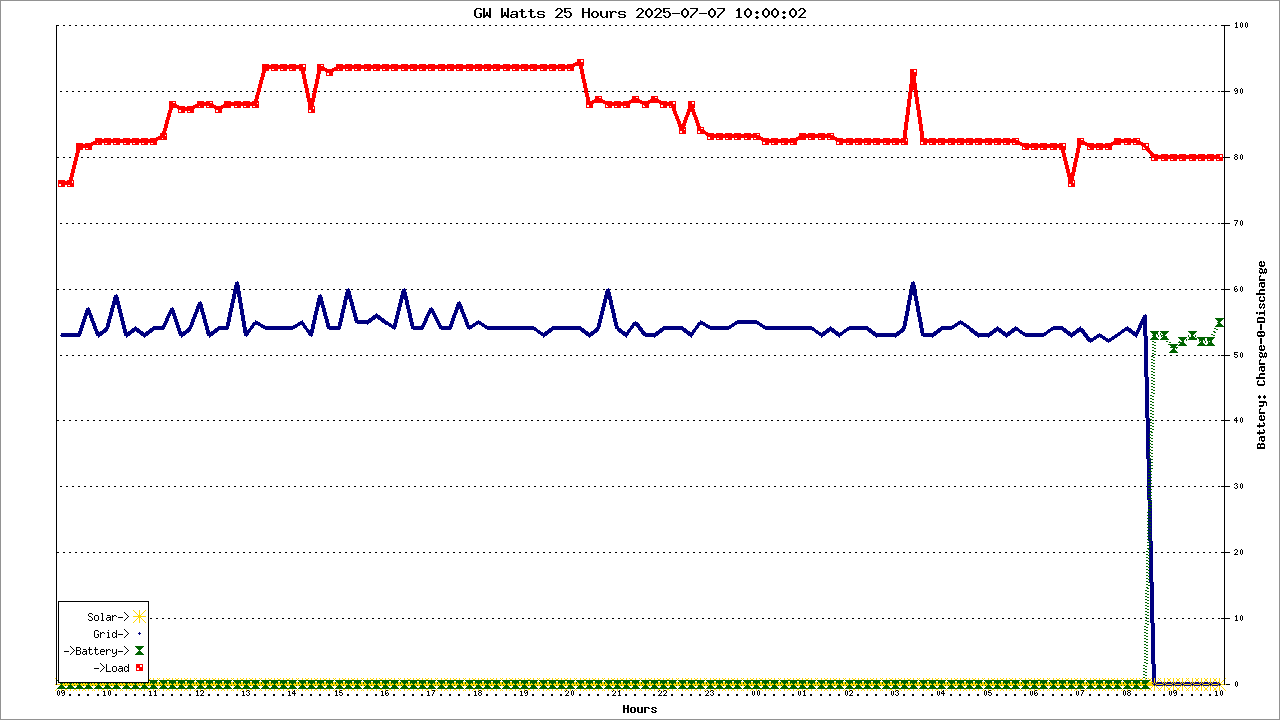
$title = " GW Watts 25 Hours $dtasof ";

# Data for plot #1:
$y_title1 = 'SOC%';

$data1 = array();
#select  dt, systemstatusid as ss, Ppv1 as 'Solar:', AC_InWatt as 'Import:', OP_Watt as 'Consumption Power:', Bat_Watt as 'Dis(Charge) +(-)'  from ir order by dt desc limit 7;
$sql = "select case  when strftime('%M', dt) = '00' then strftime('%H', dt) else '.' end ,  systemstatusid from period25hrs order by dt" ;

if($debug) echo "\n$sql";
$qr = $db->query($sql);
while($row = $qr->fetchArray(SQLITE3_NUM)) {	
  $data1[] = $row;
 if($debug) echo'.';
}
 if($debug) print_r($data1);

$legend1 = array('SyStatus');

# Data for plot #2: 
$y_title2 = 'Volts';

$data2 = array();
#select  dt, systemstatusid as ss, Ppv1 as 'Solar:', AC_InWatt as 'Import:', OP_Watt as 'Consumption Power:', Bat_Watt as 'Dis(Charge) +(-)'  from ir order by dt desc limit 7;
$sql = "select NULL, Ppv1, AC_InWatt, Bat_Watt, OP_Watt  from period25hrs order by dt" ; 
if($debug) echo "\n$sql";
$qr = $db->query($sql);
while($row = $qr->fetchArray(SQLITE3_NUM)) {	
  $data2[] = $row;
 if($debug) echo'.';
}
 if($debug) print_r($data2);

$legend2 = array('Solar', 'Import', 'Consumption', 'Dis(Charge) +(-)');
# 
$plot = new PHPlot(800, 400);
$plot->SetImageBorderType('plain'); // For presentation in the manual
$plot->SetPrintImage(False); // Defer output until the end
$plot->SetTitle($title);
$plot->SetLightGridColor('black'); // So grid stands out from background

# Plot 1
# Set margins to leave room for plot 2 Y title on the right.
$plot->SetMarginsPixels(56, 56);
$plot->SetPlotBgColor('gray');
$plot->SetDrawPlotAreaBackground(True);
$plot->SetPlotType('linepoints');
$plot->SetDataType('text-data');
$plot->SetDataValues($data1);
$plot->SetYTitle($y_title1);
# Set and position legend #1:
$plot->SetLegend($legend1);
$plot->SetLegendPixels(300, 25);
# Colors are significant to this data:
$plot->SetDataColors(array('black'));

# Specify Y range of these data sets:
$plot->SetPlotAreaWorld(NULL, NULL, NULL, NULL);
#$plot->SetYTickIncrement(500);
$plot->SetXTitle('Hours');
$plot->SetXTickLabelPos('none');
$plot->SetXTickPos('none');
# Format Y tick labels as integers, with thousands separator:
#$plot->SetYLabelType('data', 0);
$plot->DrawGraph();

# Plot 2
$plot->SetDrawPlotAreaBackground(False); // Cancel background
$plot->SetDrawYGrid(False); // Cancel grid, already drawn
$plot->SetPlotType('linepoints');
$plot->SetDataValues($data2);
# Set Y title for plot #2 and position it on the right side:
$plot->SetYTitle($y_title2, 'plotright');
# Set and position legend #2:
$plot->SetLegend($legend2);
$plot->SetLegendPixels(400, 25);
# Colors are significant to this data:
$plot->SetDataColors(array('navy'));
# Specify Y range of this data set:
$plot->SetPlotAreaWorld(NULL, NULL, NULL, NULL);
$plot->SetYTickIncrement(100);
$plot->SetYTickPos('plotright');
$plot->SetYTickLabelPos('plotright');
$plot->SetDataColors(array( 'gold','navy', 'maroon', 'red')); #('gold', 'navy', 'maroon', 'red'));
# Format Y tick labels as integers with trailing percent sign:
$plot->SetYLabelType('data',0);
#$plot->SetYTickAnchor(3.2);
$plot->DrawGraph();

# Now output the graph with both plots:
if(!$debug) $plot->PrintImage();
################################################################################################################################################

<?php
# PHPlot Example: Area chart, 6 areas.
require_once 'phplot.php';
$debug = 0;
#need a historical report
#select  dt,  Epv1_today, Eac_chrToday + Eac_dischrToday,  Eop_dischrToday, Ebat_dischrToday from ir, (select  date(dt) as day, max(dt) as dt from ir group by day) as l using(dt);

/*
.open ':memory:'
attach database '/var/www/html/AIO/aiox.db' as ssd;
attach database '/var/www/html/AIO/ramdisk/aiox.db' as ram;
*/

$db = new SQLite3(':memory:') or die('Unable to open database');
$db->exec("");
$db->exec("attach database '/var/www/html/AIO/ramdisk/aiox.db' as ram");
$db->exec("attach database '/var/www/html/AIO//aiox.db' as ssd");

$db->loadExtension('libsqlitefunctions.so');
$sql =  "PRAGMA busy_timeout=6000";

#get today's as-of dt for title
$sql = "select max(dt)from ssd.ir " ;
if($debug) echo "\n$sql";
list($dtasof) = $db->query($sql)->fetchArray(SQLITE3_NUM);
if($debug) echo "\n  $dtasof";

$data = array();
$sql = "select strftime('%d',dt),  Epv1_today, Eac_chrToday + Eac_dischrToday,  Eop_dischrToday, Ebat_dischrToday from (select * from ssd.ir) as u join (select max(dt) as dt from ssd.ir group by date(dt) order by dt desc limit 30) using (dt) order by dt ;

#@# where dt >= (select datetime(max(dt), '-25 hour') from ir) order by dt" ;
#@#  where date(dt) = (select date(max(dt)) from ir) order by dt";

if($debug) echo "\n$sql";
$qr = $db->query($sql);
while($row = $qr->fetchArray(SQLITE3_NUM)) {	
  $data[] = $row;
 if($debug) echo'.';
}
 if($debug) print_r($data);

$plot = new PHPlot(800, 400);
$plot->SetImageBorderType('plain');
$plot->SetMarginsPixels(56, 56);
$plot->SetLightGridColor('black');

$plot->SetPlotType('linepoints');
$plot->SetDataType('text-data');
$plot->SetDataValues($data);

# Main plot title:
$plot->SetTitle("GW kWhs 30 Days as-of sweep $dtasof");
$plot->SetXTitle('Day of Month');

# Set Y data limits, tick increment, and titles:
$plot->SetPlotAreaWorld(NULL, 0, NULL, NULL);
$plot->SetYTickIncrement(.2);
$plot->SetYTitle('kWhs','plotright');
$plot->SetYTickPos('plotright');
$plot->SetYTickLabelPos('plotright');

# Colors are significant to this data:
$plot->SetDataColors(array('#FF9000', 'navy', 'red', 'maroon'));
#$plot->SetPlotBgColor('grey');
$plot->SetDrawPlotAreaBackground(True);

$plot->SetLegend(array('Solar->', 'Grid->', '->Load', '->Battery'));
$plot->SetLegendPixels(400, 25);
$plot->SetLegendUseShapes(true); #false = boxes or true = shapes

# Turn off X tick labels and ticks because they don't apply here:
$plot->SetXTickLabelPos('none');
$plot->SetXTickPos('none');

 if(!$debug) $plot->DrawGraph();
?>
<?php
# PHPlot Example: Area chart, 6 areas.
require_once 'phplot.php';
$debug = 0;

$db = new SQLite3('ramdisk/aiox.db') or die('Unable to open database');
$db->loadExtension('libsqlitefunctions.so');
$sql =  "PRAGMA busy_timeout=6000";

#get today's as-of dt for title
$sql = "select max(dt)from ir " ;
if($debug) echo "\n$sql";
list($dtasof) = $db->query($sql)->fetchArray(SQLITE3_NUM);
if($debug) echo "\n  $dtasof";
$period = 'select * from ir order by dt desc limit 60';

$data = array();
$sql = "select case  when strftime('%M', dt) = '00' then strftime('%H', dt) else '' end as Hour,  Epv1_today, Eac_chrToday + Eac_dischrToday,  Eop_dischrToday, Ebat_dischrToday from ($period) order by dt" ;
#@# where dt >= (select datetime(max(dt), '-25 hour') from ir) order by dt" ;
#@#  where date(dt) = (select date(max(dt)) from ir) order by dt";

if($debug) echo "\n$sql";
$qr = $db->query($sql);
while($row = $qr->fetchArray(SQLITE3_NUM)) {	
  $data[] = $row;
 if($debug) echo'.';
}
 if($debug) print_r($data);

$plot = new PHPlot(800, 400);
$plot->SetImageBorderType('plain');
$plot->SetMarginsPixels(56, 56);
$plot->SetLightGridColor('black');

$plot->SetPlotType('linepoints');
$plot->SetDataType('text-data');
$plot->SetDataValues($data);

# Main plot title:
$plot->SetTitle("GW kWhs, Last 60, $dtasof");
$plot->SetXTitle('Hours');

# Set Y data limits, tick increment, and titles:
$plot->SetPlotAreaWorld(NULL, 0, NULL, NULL);
$plot->SetYTickIncrement(.2);
$plot->SetYTitle('kWhs','plotright');
$plot->SetYTickPos('plotright');
$plot->SetYTickLabelPos('plotright');

# Colors are significant to this data:
$plot->SetDataColors(array('gold', 'navy', 'red', 'maroon'));
$plot->SetPlotBgColor('grey');
$plot->SetDrawPlotAreaBackground(True);

$plot->SetLegend(array('Solar', 'Grid', 'Load', 'BatDischg'));
$plot->SetLegendPixels(400, 25);
#$plot->SetLegendUseShapes(true); #false = boxes or true = shapes

# Turn off X tick labels and ticks because they don't apply here:
$plot->SetXTickLabelPos('none');
$plot->SetXTickPos('none');

 if(!$debug) $plot->DrawGraph();
?>
<?php
# PHPlot Example: Area chart, 6 areas.
require_once 'phplot.php';
$debug = 0;

$db = new SQLite3('ramdisk/aiox.db') or die('Unable to open database');
$db->loadExtension('libsqlitefunctions.so');
$sql =  "PRAGMA busy_timeout=6000";

#get today's as-of dt for title
$sql = "select max(dt)from ir " ;
if($debug) echo "\n$sql";
list($dtasof) = $db->query($sql)->fetchArray(SQLITE3_NUM);
if($debug) echo "\n  $dtasof";

$data = array();
$sql = "select case  when strftime('%M', dt) = '00' then strftime('%H', dt) else '' end as Hour,  Epv1_today, Eac_chrToday + Eac_dischrToday,  Eop_dischrToday, Ebat_dischrToday from period25hrs order by dt" ;
#@# where dt >= (select datetime(max(dt), '-25 hour') from ir) order by dt" ;
#@#  where date(dt) = (select date(max(dt)) from ir) order by dt";

if($debug) echo "\n$sql";
$qr = $db->query($sql);
while($row = $qr->fetchArray(SQLITE3_NUM)) {	
  $data[] = $row;
 if($debug) echo'.';
}
 if($debug) print_r($data);

$plot = new PHPlot(800, 400);
$plot->SetImageBorderType('plain');
$plot->SetMarginsPixels(56, 56);
$plot->SetLightGridColor('black');

$plot->SetPlotType('linepoints');
$plot->SetDataType('text-data');
#
##$plot->SetPointShapes(array('circle','dot','down','up'));
$plot->SetPointSizes(array('6','6','6','6'));
#
$plot->SetDataValues($data);

# Main plot title:
$plot->SetTitle("GW kWhs 25 Hours $dtasof");
$plot->SetXTitle('Hours');

# Set Y data limits, tick increment, and titles:
$plot->SetPlotAreaWorld(NULL, 0, NULL, NULL);
$plot->SetYTickIncrement(.2);
$plot->SetYTitle('kWhs','plotright');
$plot->SetYTickPos('plotright');
$plot->SetYTickLabelPos('plotright');

# Colors are significant to this data:
#$plot->SetDataColors(array('#FF9000', 'navy', 'red', 'maroon'));
$plot->SetDataColors(array('gold', 'navy', 'red', 'maroon'));
$plot->SetPointShapes(array('star','plus','target','hourglass'));
$plot->SetLegendUseShapes(true);
#$plot->SetPlotBgColor('grey');
$plot->SetDrawPlotAreaBackground(True);

$plot->SetLegend(array('Solar->', 'Grid->', '->Load', '->Battery'));
$plot->SetLegendPixels(60, 27);
#$plot->SetLegendUseShapes(true); #false = boxes or true = shapes

# Turn off X tick labels and ticks because they don't apply here:
$plot->SetXTickLabelPos('none');
$plot->SetXTickPos('none');

 if(!$debug) $plot->DrawGraph();
?>
<html>
 <head>
  <meta http-equiv="refresh" content="90">
  <title>EIS 25hr PKG Rule2</title>
 </head>
 <body>

<IMG SRC="eis-kwhs-avg-25hrs-v2.php">

<IMG SRC="eis-watts-avg-25hrs-v1.php">

<IMG SRC="eis-battery-status-avg-25hr-v1.php">

<IMG SRC="eis-battery-status-avg-ramdisk-v1.php">

</center>
 </body>
</html>

<?php
# PHPlot Example: Area chart, 6 areas.
require_once 'phplot.php';
$debug = 0;
#need a historical report
#select  dt,  Epv1_today, Eac_chrToday + Eac_dischrToday,  Eop_dischrToday, Ebat_dischrToday from ir, (select  date(dt) as day, max(dt) as dt from ir group by day) as l using(dt);

/*
.open ':memory:'
attach database '/var/www/html/AIO/aiox.db' as ssd;
attach database '/var/www/html/AIO/ramdisk/aiox.db' as ram;
*/

$db = new SQLite3(':memory:') or die('Unable to open database');
#$db->exec("");
$db->exec("attach database '/var/www/html/AIO/ramdisk/aiox.db' as ram");
#$db->exec("attach database '/var/www/html/AIO//aiox.db' as ssd");

$db->loadExtension('libsqlitefunctions.so');
$sql =  "PRAGMA busy_timeout=6000";

#get today's as-of dt for title
$sql = "select max(date(dt, '-30 day')),  max(dt)  from  ir " ;
if($debug) echo "\n$sql";
list($dtfrom, $dtasof) = $db->query($sql)->fetchArray(SQLITE3_NUM);
if($debug) echo "\n$dtfrom,   $dtasof";

$data = array();
#$sql = "select strftime('%d',dt),  Epv1_today, Eac_chrToday + Eac_dischrToday,  Eop_dischrToday, Ebat_dischrToday from (select * from ssd.ir) as u join (select max(dt) as dt from ssd.ir group by date(dt) order by dt desc limit 30) using (dt) order by dt";

$sql = "select strftime('%d',ir.dt), max(Epv1_today), max(Eac_chrToday + Eac_dischrToday), max(Eop_dischrToday), max(Ebat_dischrToday) from  ir,  (select max(dt) as dt from  ir where dt > '$dtfrom' and systemstatusid in('8', '12') group by date(dt)) as s where date(ir.dt) = date(s.dt) and ir.dt > s.dt group by date(ir.dt) " ; 

if($debug) echo "\n$sql";
$qr = $db->query($sql);
while($row = $qr->fetchArray(SQLITE3_NUM)) {	
  $data[] = $row;
 if($debug) echo'.';
}
 if($debug) print_r($data);

$plot = new PHPlot(800, 400);
$plot->SetImageBorderType('plain');
$plot->SetMarginsPixels(56, 56);
$plot->SetLightGridColor('black');

$plot->SetPlotType('linepoints');
$plot->SetDataType('text-data');
$plot->SetDataValues($data);

# Main plot title:
$plot->SetTitle("GW kWhs ramdisk From:$dtfrom - To:$dtasof");
$plot->SetXTitle('Day of Month');

# Set Y data limits, tick increment, and titles:
$plot->SetPlotAreaWorld(NULL, 0, NULL, NULL);
$plot->SetYTickIncrement(.2);
$plot->SetYTitle('kWhs','plotright');
$plot->SetYTickPos('plotright');
$plot->SetYTickLabelPos('plotright');

# Colors are significant to this data:
$plot->SetPointShapes(array('star','plus','target','hourglass'));
$plot->SetDataColors(array('gold', 'navy', 'red', 'maroon'));
#$plot->SetDataColors(array('black', 'navy', 'red', 'maroon'));
$plot->SetPointSizes(array('12','9','9','9'));
#$plot->SetPlotBgColor('grey');
$plot->SetDrawPlotAreaBackground(True);

$plot->SetLegend(array('Solar->', 'Grid->', '->Load', '->Battery'));
$plot->SetLegendPixels(400, 25);
$plot->SetLegendUseShapes(true); #false = boxes or true = shapes

# Turn off X tick labels and ticks because they don't apply here:
$plot->SetXTickLabelPos('none');
$plot->SetXTickPos('none');

 if(!$debug) $plot->DrawGraph();
?>
<?php
# PHPlot Example: Area chart, 6 areas.
require_once 'phplot.php';
$debug = 0;
#need a historical report
#select  dt,  Epv1_today, Eac_chrToday + Eac_dischrToday,  Eop_dischrToday, Ebat_dischrToday from ir, (select  date(dt) as day, max(dt) as dt from ir group by day) as l using(dt);

/*
.open ':memory:'
attach database '/var/www/html/AIO/aiox.db' as ssd;
attach database '/var/www/html/AIO/ramdisk/aiox.db' as ram;
*/

$db = new SQLite3(':memory:') or die('Unable to open database');
#$db->exec("");
#$db->exec("attach database '/var/www/html/AIO/ramdisk/aiox.db' as ram");
$db->exec("attach database '/var/www/html/AIO//aiox.db' as ssd");

$db->loadExtension('libsqlitefunctions.so');
$sql =  "PRAGMA busy_timeout=6000";

#get today's as-of dt for title
$sql = "select max(date(dt, '-30 day')),  max(dt)  from  ir " ;
if($debug) echo "\n$sql";
list($dtfrom, $dtasof) = $db->query($sql)->fetchArray(SQLITE3_NUM);
if($debug) echo "\n$dtfrom,   $dtasof";

$data = array();

$sql = "select strftime('%d',ir.dt), max(Epv1_today), max(Eac_chrToday + Eac_dischrToday), max(Eop_dischrToday), max(Ebat_dischrToday) from  ir,  (select max(dt) as dt from  ir where dt > '$dtfrom' and systemstatusid in('8', '12') group by date(dt)) as s where date(ir.dt) = date(s.dt) and ir.dt > s.dt group by date(ir.dt) " ; 

if($debug) echo "\n$sql";
$qr = $db->query($sql);
while($row = $qr->fetchArray(SQLITE3_NUM)) {	
  $data[] = $row;
 if($debug) echo'.';
}
 if($debug) print_r($data);

$plot = new PHPlot(800, 400);
$plot->SetImageBorderType('plain');
$plot->SetMarginsPixels(56, 56);
$plot->SetLightGridColor('black');

$plot->SetPlotType('linepoints');
$plot->SetDataType('text-data');
$plot->SetDataValues($data);

# Main plot title:
$plot->SetTitle("GW Daily kWhs ssd From:$dtfrom");
$plot->SetXTitle('Day of Month');

# Set Y data limits, tick increment, and titles:
$plot->SetPlotAreaWorld(NULL, 0, NULL, NULL);
$plot->SetYTickIncrement(.2);
$plot->SetYTitle('kWhs','plotright');
$plot->SetYTickPos('plotright');
$plot->SetYTickLabelPos('plotright');

# Colors are significant to this data:
$plot->SetDataColors(array('gold', 'navy', 'red', 'maroon'));
#$plot->SetPlotBgColor('grey');
$plot->SetDrawPlotAreaBackground(True);

$plot->SetLegend(array('Solar->', 'Grid->', '->Load', '->Battery'));
$plot->SetLegendPixels(400, 25);
$plot->SetLegendUseShapes(true); #false = boxes or true = shapes

# Turn off X tick labels and ticks because they don't apply here:
$plot->SetXTickLabelPos('none');
$plot->SetXTickPos('none');

 if(!$debug) $plot->DrawGraph();
?>
<?php
# PHPlot Example: Area chart, 6 areas.
require_once 'phplot.php';
$debug = 0;

$db = new SQLite3('ramdisk/aiox.db') or die('Unable to open database');
$db->loadExtension('libsqlitefunctions.so');
$sql =  "PRAGMA busy_timeout=6000";

#get today's as-of dt for title
$sql = "select max(dt) from ir " ;
if($debug) echo "\n$sql";
list($dtasof) = $db->query($sql)->fetchArray(SQLITE3_NUM);
if($debug) echo "\n $dtasof";

$data = array();
$sql = "select case  when strftime('%M', dt) = '00' then strftime('%H', dt) else '.' end as Hour,  Ppv1, AC_InWatt, Bat_Watt, OP_VA*0.8 from ir where strftime('%M', dt) % 20 = 0 order by dt" ;
#@# where dt >= (select datetime(max(dt), '-193 hour') from ir) order by dt" ;
#@#  where date(dt) = (select date(max(dt)) from ir) order by dt";

if($debug) echo "\n$sql";
$qr = $db->query($sql);
while($row = $qr->fetchArray(SQLITE3_NUM)) {	
  $data[] = $row;
 if($debug) echo'.';
}
 if($debug) print_r($data);

$plot = new PHPlot(1280, 720);
#$plot->SetPointShapes('circle','cross','down','up');
$plot->SetImageBorderType('plain');
$plot->SetMarginsPixels(56,56);
$plot->SetLightGridColor('black');

$plot->SetPlotType('linepoints');
$plot->SetDataType('text-data');
$plot->SetDataValues($data);

# Main plot title:
$plot->SetTitle("GW Watts 193 Hours $dtasof");
$plot->SetXTitle('Hours');

# Set Y data limits, tick increment, and titles:
$plot->SetPlotAreaWorld(NULL, Null, NULL, NULL);
#$plot->SetYTickIncrement(50);
$plot->SetYTitle('Battery: Charge-0-Discharge', 'plotright');
$plot->SetYTickPos('plotright');
$plot->SetYTickLabelPos('plotright');

# Colors are significant to this data:
#
$plot->SetPointSizes(array('9','3','6','4'));
$plot->SetLineWidths(array('1','1','1','1'));
$plot->SetPointShapes(array('star','plus','hourglass','target'));
$plot->SetPlotType('linepoints','linepoints','linepoints','squared');
#
$plot->SetDataColors(array('gold', 'navy', 'maroon', 'red'));
#$plot->SetBackgroundColor('grey');
#$plot->SetPlotBgColor('grey');
$plot->SetLegendUseShapes(true);
$plot->SetDrawPlotAreaBackground(True);
$plot->SetLegend(array('Solar*10->', 'Grid->', 'Battery*10->', '->Load'));
$plot->SetLegendPixels(58,601);
#$plot->SetLegendUseShapes(true); #false = boxes or true = shapes

# Turn off X tick labels and ticks because they don't apply here:
$plot->SetXTickLabelPos('none');
$plot->SetXTickPos('none');

 if(!$debug) $plot->DrawGraph();
?>
<?php
# PHPlot - 
require_once 'phplot.php';
$debug = 0;

$db = new SQLite3('ramdisk/aiox.db') or die('Unable to open database');
$sql =  "PRAGMA busy_timeout=6000";

#get today's as-of dt for title
$sql = "select substr(serial,1,2), max(dt) from ir " ;
if($debug) echo "\n$sql";
list($serial, $dtasof) = $db->query($sql)->fetchArray(SQLITE3_NUM);
if($debug) echo "\n $serial, $dtasof";

$title = " GW Watts 193 Hours $dtasof v2";

# Data for plot #1:
$y_title1 = 'SOC%';

$data1 = array();
#select  dt, systemstatusid as ss, Ppv1 as 'Solar:', AC_InWatt as 'Import:', OP_Watt as 'Consumption Power:', Bat_Watt as 'Dis(Charge) +(-)'  from ir order by dt desc limit 7;
$sql = "select case  when strftime('%M', dt) = '00' then strftime('%H', dt) else '.' end ,  systemstatusid from ir order by dt" ;

if($debug) echo "\n$sql";
$qr = $db->query($sql);
while($row = $qr->fetchArray(SQLITE3_NUM)) {	
  $data1[] = $row;
 if($debug) echo'.';
}
 if($debug) print_r($data1);

$legend1 = array('SyStatus');

# Data for plot #2: 
$y_title2 = 'Watts';

$data2 = array();
#select  dt, systemstatusid as ss, Ppv1 as 'Solar:', AC_InWatt as 'Import:', OP_Watt as 'Consumption Power:', Bat_Watt as 'Dis(Charge) +(-)'  from ir order by dt desc limit 7;
$sql = "select NULL, Ppv1, AC_InWatt, Bat_Watt, OP_Watt  from ir order by dt" ; 
if($debug) echo "\n$sql";
$qr = $db->query($sql);
while($row = $qr->fetchArray(SQLITE3_NUM)) {	
  $data2[] = $row;
 if($debug) echo'.';
}
 if($debug) print_r($data2);

$legend2 = array('Solar', 'Import', 'Consumption', 'Dis(Charge) +(-)');
# 
$plot = new PHPlot(800, 400);
$plot->SetImageBorderType('plain'); // For presentation in the manual
$plot->SetPrintImage(False); // Defer output until the end
$plot->SetTitle($title);
$plot->SetLightGridColor('black'); // So grid stands out from background

# Plot 1
# Set margins to leave room for plot 2 Y title on the right.
$plot->SetMarginsPixels(56, 56);
#$plot->SetPlotBgColor('gray');
$plot->SetDrawPlotAreaBackground(True);
$plot->SetPlotType('linepoints');
$plot->SetDataType('text-data');
$plot->SetDataValues($data1);
$plot->SetYTitle($y_title1);
# Set and position legend #1:
$plot->SetLegend($legend1);
$plot->SetLegendPixels(58, 27);
$plot->SetLegendUseShapes(true); #false = boxes or true = shapes
# Colors are significant to this data:
$plot->SetDataColors(array('black'));
$plot->SetPointShapes(array('dot','circle','up','down'));
$plot->SetPointSizes(array('1','1','6','3'));

# Specify Y range of these data sets:
$plot->SetPlotAreaWorld(NULL, NULL, NULL, NULL);
#$plot->SetYTickIncrement(500);
$plot->SetXTitle('Hours');
$plot->SetXTickLabelPos('none');
$plot->SetXTickPos('none');
# Format Y tick labels as integers, with thousands separator:
#$plot->SetYLabelType('data', 0);
$plot->DrawGraph();

# Plot 2
$plot->SetDrawPlotAreaBackground(False); // Cancel background
$plot->SetDrawYGrid(False); // Cancel grid, already drawn
$plot->SetPlotType('linepoints');
$plot->SetDataValues($data2);
# Set Y title for plot #2 and position it on the right side:
$plot->SetYTitle($y_title2, 'plotright');
# Set and position legend #2:
$plot->SetLegend($legend2);
$plot->SetLegendPixels(58, 281);
$plot->SetLegendUseShapes(true); #false = boxes or true = shapes
# Colors are significant to this data:
$plot->SetDataColors(array('navy'));
# Specify Y range of this data set:
$plot->SetPlotAreaWorld(NULL, NULL, NULL, NULL);
$plot->SetYTickIncrement(100);
$plot->SetYTickPos('plotright');
$plot->SetYTickLabelPos('plotright');
#$plot->SetDataColors(array( 'gold','navy', 'maroon', 'red')); #('gold', 'navy', 'maroon', 'red'));
$plot->SetDataColors(array( '#ff9000','navy', 'maroon', 'red')); #('gold', 'navy', 'maroon', 'red'));
$plot->SetPointShapes(array('diamond','circle','up','down'));
$plot->SetPointSizes(array('6','2','5','5'));
# Format Y tick labels as integers with trailing percent sign:
$plot->SetYLabelType('data',0);
#$plot->SetYTickAnchor(3.2);
$plot->DrawGraph();

# Now output the graph with both plots:
if(!$debug) $plot->PrintImage();

<?php
# PHPlot Example: Area chart, 6 areas.
require_once 'phplot.php';
$debug = 0;

$db = new SQLite3('ramdisk/aiox.db') or die('Unable to open database');
$db->loadExtension('libsqlitefunctions.so');
$sql =  "PRAGMA busy_timeout=6000";

#get today's as-of dt for title
$sql = "select max(dt) from ir " ;
if($debug) echo "\n$sql";
list($dtasof) = $db->query($sql)->fetchArray(SQLITE3_NUM);
if($debug) echo "\n $dtasof";

$data = array();
$sql = "select case  when strftime('%M', dt) = '00' then strftime('%H', dt) else '.' end as Hour,  Ppv1, AC_InWatt, Bat_Watt, OP_Watt from period25hrs order by dt" ;
#@# where dt >= (select datetime(max(dt), '-25 hour') from ir) order by dt" ;
#@#  where date(dt) = (select date(max(dt)) from ir) order by dt";

if($debug) echo "\n$sql";
$qr = $db->query($sql);
while($row = $qr->fetchArray(SQLITE3_NUM)) {	
  $data[] = $row;
 if($debug) echo'.';
}
 if($debug) print_r($data);

$plot = new PHPlot(800, 400);
$plot->SetImageBorderType('plain');
$plot->SetMarginsPixels(56,56);
$plot->SetLightGridColor('black');

$plot->SetPlotType('linepoints');
$plot->SetDataType('text-data');
$plot->SetDataValues($data);

# Main plot title:
$plot->SetTitle("GW Watts 25 Hours $dtasof");
$plot->SetXTitle('Hours');

# Set Y data limits, tick increment, and titles:
$plot->SetPlotAreaWorld(NULL, Null, NULL, NULL);
#$plot->SetYTickIncrement(50);
$plot->SetYTitle('Battery: Charge-0-Discharge', 'plotright');
$plot->SetYTickPos('plotright');
$plot->SetYTickLabelPos('plotright');

# Colors are significant to this data:
#$plot->SetDataColors(array('gold', 'navy', 'maroon', 'red'));
$plot->SetDataColors(array('#ff9000', 'navy', 'maroon', 'red'));
#$plot->SetBackgroundColor('grey');
$plot->SetPlotBgColor('grey');
$plot->SetDrawPlotAreaBackground(True);
$plot->SetLegend(array('Solar->', 'Grid->', '->Battery->', '->Load'));
$plot->SetLegendPixels(400, 280);
#$plot->SetLegendUseShapes(true); #false = boxes or true = shapes

# Turn off X tick labels and ticks because they don't apply here:
$plot->SetXTickLabelPos('none');
$plot->SetXTickPos('none');

 if(!$debug) $plot->DrawGraph();
?>
<?php
# PHPlot Example: Area chart, 6 areas.
require_once 'phplot.php';
$debug = 0;

$db = new SQLite3('ramdisk/aiox.db') or die('Unable to open database');
$db->loadExtension('libsqlitefunctions.so');
$sql =  "PRAGMA busy_timeout=6000";

#get today's as-of dt for title
$sql = "select max(dt) from ir " ;
if($debug) echo "\n$sql";
list($dtasof) = $db->query($sql)->fetchArray(SQLITE3_NUM);
if($debug) echo "\n $dtasof";

$data = array();
$sql = "select case  when strftime('%M', dt) = '00' then strftime('%H', dt) else '.' end as Hour,  Ppv1, AC_InWatt, Bat_Watt, OP_Watt from period25hrs order by dt" ;
#@# where dt >= (select datetime(max(dt), '-25 hour') from ir) order by dt" ;
#@#  where date(dt) = (select date(max(dt)) from ir) order by dt";

if($debug) echo "\n$sql";
$qr = $db->query($sql);
while($row = $qr->fetchArray(SQLITE3_NUM)) {	
  $data[] = $row;
 if($debug) echo'.';
}
 if($debug) print_r($data);

$plot = new PHPlot(800, 400);
$plot->SetImageBorderType('plain');
$plot->SetMarginsPixels(56,56);
$plot->SetLightGridColor('black');

$plot->SetPlotType('linepoints');
$plot->SetDataType('text-data');
$plot->SetDataValues($data);

# Main plot title:
$plot->SetTitle("@@@GW Watts 25 Hours $dtasof");
$plot->SetXTitle('Hours');

# Set Y data limits, tick increment, and titles:
$plot->SetPlotAreaWorld(NULL, Null, NULL, NULL);
#$plot->SetYTickIncrement(50);
$plot->SetYTitle('Battery: Charge-0-Discharge', 'plotright');
$plot->SetYTickPos('plotright');
$plot->SetYTickLabelPos('plotright');

# Colors are significant to this data:
$plot->SetDataColors(array('gold', 'navy', 'maroon', 'red'));
#$plot->SetBackgroundColor('grey');
$plot->SetPlotBgColor('grey');
$plot->SetDrawPlotAreaBackground(True);
$plot->SetLegend(array('Solar->', 'Grid->', '->Battery->', '->Load'));
$plot->SetLegendPixels(400, 280);
#$plot->SetLegendUseShapes(true); #false = boxes or true = shapes

# Turn off X tick labels and ticks because they don't apply here:
$plot->SetXTickLabelPos('none');
$plot->SetXTickPos('none');

 if(!$debug) $plot->DrawGraph();
?>
<?php
# PHPlot Example: Area chart, 6 areas.
require_once 'phplot.php';
$debug = 0;

$db = new SQLite3('ramdisk/aiox.db') or die('Unable to open database');
$db->loadExtension('libsqlitefunctions.so');
$sql =  "PRAGMA busy_timeout=6000";

#get today's as-of dt for title
$sql = "select max(dt) from ir " ;
if($debug) echo "\n$sql";
list($dtasof) = $db->query($sql)->fetchArray(SQLITE3_NUM);
if($debug) echo "\n $dtasof";

$data = array();
$sql = "select case  when strftime('%M', dt) = '00' then strftime('%H', dt) else '.' end as Hour,  Ppv1, AC_InWatt, Bat_Watt, OP_Watt from period25hrs order by dt" ;
#@# where dt >= (select datetime(max(dt), '-25 hour') from ir) order by dt" ;
#@#  where date(dt) = (select date(max(dt)) from ir) order by dt";

if($debug) echo "\n$sql";
$qr = $db->query($sql);
while($row = $qr->fetchArray(SQLITE3_NUM)) {	
  $data[] = $row;
 if($debug) echo'.';
}
 if($debug) print_r($data);

$plot = new PHPlot(800, 400);
$plot->SetImageBorderType('plain');
$plot->SetMarginsPixels(56,56);
$plot->SetLightGridColor('black');

$plot->SetPlotType('linepoints');
$plot->SetDataType('text-data');
$plot->SetDataValues($data);

# Main plot title:
$plot->SetTitle("v22112115 GW Watts 25 Hours $dtasof");
$plot->SetXTitle('Hours');

# Set Y data limits, tick increment, and titles:
$plot->SetPlotAreaWorld(NULL, Null, NULL, NULL);
#$plot->SetYTickIncrement(50);
$plot->SetYTitle('Battery: Charge-0-Discharge', 'plotright');
$plot->SetYTickPos('plotright');
$plot->SetYTickLabelPos('plotright');

# Colors are significant to this data:
#$plot->SetDataColors(array('gold', 'navy', 'maroon', 'red'));
$plot->SetDataColors(array('#ff9000', 'navy', 'maroon', 'red'));
#$plot->SetBackgroundColor('grey');
$plot->SetPlotBgColor('grey');
$plot->SetDrawPlotAreaBackground(True);
$plot->SetLegend(array('Solar->', 'Grid->', '->Battery->', '->Load'));
$plot->SetLegendPixels(400, 280);
#$plot->SetLegendUseShapes(true); #false = boxes or true = shapes

# Turn off X tick labels and ticks because they don't apply here:
$plot->SetXTickLabelPos('none');
$plot->SetXTickPos('none');

 if(!$debug) $plot->DrawGraph();
?>
<?php
# PHPlot Example: Area chart, 6 areas.
require_once 'phplot.php';
$debug = 0;

$db = new SQLite3('ramdisk/aiox.db') or die('Unable to open database');
$db->loadExtension('libsqlitefunctions.so');
$sql =  "PRAGMA busy_timeout=6000";

#get today's as-of dt for title
$sql = "select max(dt) from ir " ;
if($debug) echo "\n$sql";
list($dtasof) = $db->query($sql)->fetchArray(SQLITE3_NUM);
if($debug) echo "\n $dtasof";

$data = array();
$sql = "select case  when strftime('%M', dt) = '00' then strftime('%H', dt) else '.' end as Hour,  Ppv1, AC_InWatt, Bat_Watt, OP_Watt from period25hrs order by dt" ;
#@# where dt >= (select datetime(max(dt), '-25 hour') from ir) order by dt" ;
#@#  where date(dt) = (select date(max(dt)) from ir) order by dt";

if($debug) echo "\n$sql";
$qr = $db->query($sql);
while($row = $qr->fetchArray(SQLITE3_NUM)) {	
  $data[] = $row;
 if($debug) echo'.';
}
 if($debug) print_r($data);

$plot = new PHPlot(800, 400);
$plot->SetImageBorderType('plain');
$plot->SetMarginsPixels(56,56);
$plot->SetLightGridColor('black');

$plot->SetPlotType('linepoints');
$plot->SetDataType('text-data');
$plot->SetDataValues($data);

# Main plot title:
$plot->SetTitle("GW Watts 25 Hours $dtasof");
$plot->SetXTitle('Hours');

# Set Y data limits, tick increment, and titles:
$plot->SetPlotAreaWorld(NULL, Null, NULL, NULL);
#$plot->SetYTickIncrement(50);
$plot->SetYTitle('Battery: Charge-0-Discharge', 'plotright');
$plot->SetYTickPos('plotright');
$plot->SetYTickLabelPos('plotright');

# Colors are significant to this data:
#
$plot->SetPointSizes(array('6','1','6','6'));
$plot->SetLineWidths('1','1','1','1');
$plot->SetPointShapes(array('circle','dot','down','up'));
$plot->SetPlotType('linepoints','linepoints','linepoints','squared');
#
#$plot->SetDataColors(array('gold', 'navy', 'maroon', 'red'));
$plot->SetDataColors(array('#ff9000', 'navy', 'maroon', 'red'));
#$plot->SetBackgroundColor('grey');
#$plot->SetPlotBgColor('grey');
$plot->SetLegendUseShapes(true);
$plot->SetDrawPlotAreaBackground(True);
$plot->SetLegend(array('Solar->', 'Grid->', '->Battery->', '->Load'));
$plot->SetLegendPixels(58, 27);
#$plot->SetLegendUseShapes(true); #false = boxes or true = shapes

# Turn off X tick labels and ticks because they don't apply here:
$plot->SetXTickLabelPos('none');
$plot->SetXTickPos('none');

 if(!$debug) $plot->DrawGraph();
?>
<?php
# PHPlot Example: Area chart, 6 areas.
require_once 'phplot.php';
$debug = 0;

$db = new SQLite3('ramdisk/aiox.db') or die('Unable to open database');
$db->loadExtension('libsqlitefunctions.so');
$sql =  "PRAGMA busy_timeout=6000";

#get today's as-of dt for title
$sql = "select max(dt) from ir " ;
if($debug) echo "\n$sql";
list($dtasof) = $db->query($sql)->fetchArray(SQLITE3_NUM);
if($debug) echo "\n $dtasof";

# Until I fix my load-watts register, I am using OP_VA instead of OP_Watt
#
$data = array();
$sql = "select case  when strftime('%M', dt) = '00' then strftime('%H', dt) else '.' end as Hour,  Ppv1, AC_InWatt, Bat_Watt, OP_VA*0.8 from period25hrs where strftime('%M', dt) % 12 = 0 order by dt" ;
#@# where dt >= (select datetime(max(dt), '-25 hour') from ir) order by dt" ;
#@#  where date(dt) = (select date(max(dt)) from ir) order by dt";

if($debug) echo "\n$sql";
$qr = $db->query($sql);
while($row = $qr->fetchArray(SQLITE3_NUM)) {	
  $data[] = $row;
 if($debug) echo'.';
}
 if($debug) print_r($data);

$plot = new PHPlot(1280, 720);
$plot->SetImageBorderType('plain');
$plot->SetMarginsPixels(56,56);
$plot->SetLightGridColor('black');

$plot->SetPlotType('linepoints');
$plot->SetDataType('text-data');
$plot->SetDataValues($data);

# Main plot title:
$plot->SetTitle("GW Watts 25 Hours $dtasof");
$plot->SetXTitle('Hours');

# Set Y data limits, tick increment, and titles:
$plot->SetPlotAreaWorld(NULL, Null, NULL, NULL);
#$plot->SetYTickIncrement(50);
$plot->SetYTitle('Battery: Charge-0-Discharge', 'plotright');
$plot->SetYTickPos('plotright');
$plot->SetYTickLabelPos('plotright');

# Colors are significant to this data:
#
$plot->SetPointSizes(array('12','3','9','7'));
$plot->SetLineWidths('4','1','3','2');
$plot->SetPointShapes(array('star','dot','hourglass','target'));
$plot->SetPlotType('linepoints','linepoints','linepoints','squared');
#
#$plot->SetDataColors(array('#ff9000', 'navy', 'maroon', 'red'));
#$plot->SetDataColors(array('gold', 'navy', 'maroon', 'red'));
$plot->SetDataColors(array('gold', 'navy', 'DarkGreen', 'red'));
#$plot->SetBackgroundColor('grey');
#$plot->SetPlotBgColor('grey');
$plot->SetLegendUseShapes(true);
$plot->SetDrawPlotAreaBackground(True);
$plot->SetLegend(array('Solar->', 'Grid->', '->Battery->', '->Load'));
$plot->SetLegendPixels(58, 601);
#$plot->SetLegendUseShapes(true); #false = boxes or true = shapes

# Turn off X tick labels and ticks because they don't apply here:
$plot->SetXTickLabelPos('none');
$plot->SetXTickPos('none');

 if(!$debug) $plot->DrawGraph();
?>
<?php
# PHPlot Example: Area chart, 6 areas.
require_once 'phplot.php';
$debug = 0;

$db = new SQLite3('ramdisk/aiox.db') or die('Unable to open database');
$db->loadExtension('libsqlitefunctions.so');
$sql =  "PRAGMA busy_timeout=6000";

#get today's as-of dt for title
$sql = "select max(dt) from ir " ;
if($debug) echo "\n$sql";
list($dtasof) = $db->query($sql)->fetchArray(SQLITE3_NUM);
if($debug) echo "\n $dtasof";

$data = array();
#$sql = "select case  when strftime('%M', dt) = '00' then strftime('%H', dt) else '.' end as Hour,  Ppv1, AC_InWatt, Bat_Watt, OP_Watt from period49hrs order by dt" ;
$sql = "select case  when strftime('%M', dt) = '00' then strftime('%H', dt) else '.' end as Hour,  Ppv1, AC_InWatt, Bat_Watt, OP_VA from period49hrs order by dt" ;
#@# where dt >= (select datetime(max(dt), '-49 hour') from ir) order by dt" ;
#@#  where date(dt) = (select date(max(dt)) from ir) order by dt";

if($debug) echo "\n$sql";
$qr = $db->query($sql);
while($row = $qr->fetchArray(SQLITE3_NUM)) {	
  $data[] = $row;
 if($debug) echo'.';
}
 if($debug) print_r($data);

$plot = new PHPlot(1280, 720);
$plot->SetImageBorderType('plain');
$plot->SetMarginsPixels(56,56);
$plot->SetLightGridColor('black');

$plot->SetPlotType('linepoints');
$plot->SetDataType('text-data');
$plot->SetDataValues($data);

# Main plot title:
$plot->SetTitle("GW Watts 49 Hours $dtasof");
$plot->SetXTitle('Hours');

# Set Y data limits, tick increment, and titles:
$plot->SetPlotAreaWorld(NULL, Null, NULL, NULL);
#$plot->SetYTickIncrement(50);
$plot->SetYTitle('Battery: Charge-0-Discharge', 'plotright');
$plot->SetYTickPos('plotright');
$plot->SetYTickLabelPos('plotright');

# Colors are significant to this data:
#
$plot->SetPointSizes(array('9','3','8','7'));
$plot->SetLineWidths(array('1','1','1','1'));
$plot->SetPointShapes(array('star','plus','hourglass','target'));
$plot->SetPlotType('linepoints','linepoints','linepoints','linepoints','squared');
#
$plot->SetDataColors(array('gold', 'navy', 'maroon', 'red'));
#$plot->SetBackgroundColor('grey');
#$plot->SetPlotBgColor('grey');
$plot->SetLegendUseShapes(true);
$plot->SetDrawPlotAreaBackground(True);
$plot->SetLegend(array('Solar->', 'Grid->', '->Battery->', '->Load'));
$plot->SetLegendPixels(58,601);
#$plot->SetLegendUseShapes(true); #false = boxes or true = shapes

# Turn off X tick labels and ticks because they don't apply here:
$plot->SetXTickLabelPos('none');
$plot->SetXTickPos('none');

 if(!$debug) $plot->DrawGraph();
?>
<?php
# PHPlot - 
require_once 'phplot.php';
$debug = 0;

$db = new SQLite3('ramdisk/aiox.db') or die('Unable to open database');
$sql =  "PRAGMA busy_timeout=6000";

#get today's as-of dt for title
$sql = "select substr(serial,1,2), max(dt) from period49hrs " ;
if($debug) echo "\n$sql";
list($serial, $dtasof) = $db->query($sql)->fetchArray(SQLITE3_NUM);
if($debug) echo "\n $serial, $dtasof";

$title = " GW Watts 49 Hours $dtasof v2";

# Data for plot #1:
$y_title1 = 'SOC%';

$data1 = array();
#select  dt, systemstatusid as ss, Ppv1 as 'Solar:', AC_InWatt as 'Import:', OP_Watt as 'Consumption Power:', Bat_Watt as 'Dis(Charge) +(-)'  from ir order by dt desc limit 7;
$sql = "select case  when strftime('%M', dt) = '00' then strftime('%H', dt) else '.' end ,  systemstatusid from period49hrs order by dt" ;

if($debug) echo "\n$sql";
$qr = $db->query($sql);
while($row = $qr->fetchArray(SQLITE3_NUM)) {	
  $data1[] = $row;
 if($debug) echo'.';
}
 if($debug) print_r($data1);

$legend1 = array('SyStatus');

# Data for plot #2: 
$y_title2 = 'Watts';

$data2 = array();
#select  dt, systemstatusid as ss, Ppv1 as 'Solar:', AC_InWatt as 'Import:', OP_Watt as 'Consumption Power:', Bat_Watt as 'Dis(Charge) +(-)'  from ir order by dt desc limit 7;
$sql = "select NULL, Ppv1, AC_InWatt, Bat_Watt, OP_Watt  from period49hrs order by dt" ; 
if($debug) echo "\n$sql";
$qr = $db->query($sql);
while($row = $qr->fetchArray(SQLITE3_NUM)) {	
  $data2[] = $row;
 if($debug) echo'.';
}
 if($debug) print_r($data2);

$legend2 = array('Solar', 'Import', 'Consumption', 'Dis(Charge) +(-)');
# 
$plot = new PHPlot(800, 400);
$plot->SetImageBorderType('plain'); // For presentation in the manual
$plot->SetPrintImage(False); // Defer output until the end
$plot->SetTitle($title);
$plot->SetLightGridColor('black'); // So grid stands out from background

# Plot 1
# Set margins to leave room for plot 2 Y title on the right.
$plot->SetMarginsPixels(56, 56);
#$plot->SetPlotBgColor('gray');
$plot->SetDrawPlotAreaBackground(True);
$plot->SetPlotType('linepoints');
$plot->SetDataType('text-data');
$plot->SetDataValues($data1);
$plot->SetYTitle($y_title1);
# Set and position legend #1:
$plot->SetLegend($legend1);
$plot->SetLegendPixels(58, 27);
$plot->SetLegendUseShapes(true); #false = boxes or true = shapes
# Colors are significant to this data:
$plot->SetDataColors(array('black'));
$plot->SetPointShapes(array('dot','circle','up','down'));
$plot->SetPointSizes(array('1','1','6','3'));

# Specify Y range of these data sets:
$plot->SetPlotAreaWorld(NULL, NULL, NULL, NULL);
#$plot->SetYTickIncrement(500);
$plot->SetXTitle('Hours');
$plot->SetXTickLabelPos('none');
$plot->SetXTickPos('none');
# Format Y tick labels as integers, with thousands separator:
#$plot->SetYLabelType('data', 0);
$plot->DrawGraph();

# Plot 2
$plot->SetDrawPlotAreaBackground(False); // Cancel background
$plot->SetDrawYGrid(False); // Cancel grid, already drawn
$plot->SetPlotType('linepoints');
$plot->SetDataValues($data2);
# Set Y title for plot #2 and position it on the right side:
$plot->SetYTitle($y_title2, 'plotright');
# Set and position legend #2:
$plot->SetLegend($legend2);
$plot->SetLegendPixels(58, 281);
$plot->SetLegendUseShapes(true); #false = boxes or true = shapes
# Colors are significant to this data:
$plot->SetDataColors(array('navy'));
# Specify Y range of this data set:
$plot->SetPlotAreaWorld(NULL, NULL, NULL, NULL);
$plot->SetYTickIncrement(100);
$plot->SetYTickPos('plotright');
$plot->SetYTickLabelPos('plotright');
$plot->SetDataColors(array( '#ff9000','navy', 'maroon', 'red')); #('gold', 'navy', 'maroon', 'red'));
#$plot->SetDataColors(array( 'gold','navy', 'maroon', 'red')); #('gold', 'navy', 'maroon', 'red'));
$plot->SetPointShapes(array('diamond','circle','up','down'));
$plot->SetPointSizes(array('6','2','5','5'));
# Format Y tick labels as integers with trailing percent sign:
$plot->SetYLabelType('data',0);
#$plot->SetYTickAnchor(3.2);
$plot->DrawGraph();

# Now output the graph with both plots:
if(!$debug) $plot->PrintImage();

<?php
# PHPlot Example: Area chart, 6 areas.
require_once 'phplot.php';
$debug = 0;

$db = new SQLite3('ramdisk/aiox.db') or die('Unable to open database');
$db->loadExtension('libsqlitefunctions.so');
$sql =  "PRAGMA busy_timeout=6000";

#get today's as-of dt for title
$sql = "select max(dt) from ir " ;
if($debug) echo "\n$sql";
list($dtasof) = $db->query($sql)->fetchArray(SQLITE3_NUM);
if($debug) echo "\n $dtasof";

$sql = "select SystemStatusId, SystemStatus from irv1 order by dt desc limit 1";
if($debug) echo "\n$sql";
list($SystemStatusId, $SystemStatus) = $db->query($sql)->fetchArray(SQLITE3_NUM);
if($debug) echo "\n $SystemStatusId, $SystemStatus";

$period = 'select * from ir order by dt desc limit 60';

$data = array();
$sql = "select case  when strftime('%M', dt) = '00' then strftime('%H', dt) else '.' end as Hour,  Ppv1, AC_InWatt, Bat_Watt, OP_Watt from ($period) order by dt" ;
#@# where dt >= (select datetime(max(dt), '-25 hour') from ir) order by dt" ;
#@#  where date(dt) = (select date(max(dt)) from ir) order by dt";

if($debug) echo "\n$sql";
$qr = $db->query($sql);
while($row = $qr->fetchArray(SQLITE3_NUM)) {	
  $data[] = $row;
 if($debug) echo'.';
}
 if($debug) print_r($data);

$plot = new PHPlot(800, 400);
$plot->SetImageBorderType('plain');
$plot->SetMarginsPixels(56,56);
$plot->SetLightGridColor('black');

$plot->SetPlotType('linepoints');
$plot->SetDataType('text-data');
$plot->SetDataValues($data);

# Main plot title:
$plot->SetTitle("GW Watts, Last 60, $dtasof, $SystemStatusId, $SystemStatus");
$plot->SetXTitle('Hours');

# Set Y data limits, tick increment, and titles:
$plot->SetPlotAreaWorld(NULL, Null, NULL, NULL);
#$plot->SetYTickIncrement(50);
$plot->SetYTitle('Battery: Charge-0-Discharge', 'plotright');
$plot->SetYTickPos('plotright');
$plot->SetYTickLabelPos('plotright');

# Colors are significant to this data:
$plot->SetDataColors(array('#ff9000', 'navy', 'maroon', 'red'));
#$plot->SetDataColors(array('gold', 'navy', 'maroon', 'red'));
#$plot->SetBackgroundColor('grey');
$plot->SetPlotBgColor('grey');
$plot->SetDrawPlotAreaBackground(True);
$plot->SetLegend(array('Solar->', 'Grid->', '<-Bat->', '->Load'));
$plot->SetLegendPixels(2, 160);
#$plot->SetLegendUseShapes(true); #false = boxes or true = shapes

# Turn off X tick labels and ticks because they don't apply here:
$plot->SetXTickLabelPos('none');
$plot->SetXTickPos('none');

 if(!$debug) $plot->DrawGraph();
?>
<?php
# PHPlot Example: Area chart, 6 areas.
require_once 'phplot.php';
$debug = 0;

$db = new SQLite3('ramdisk/aiox.db') or die('Unable to open database');
$db->loadExtension('libsqlitefunctions.so');
$sql =  "PRAGMA busy_timeout=6000";

#get today's as-of dt for title
$sql = "select max(dt) from ir " ;
if($debug) echo "\n$sql";
list($dtasof) = $db->query($sql)->fetchArray(SQLITE3_NUM);
if($debug) echo "\n $dtasof";

$data = array();
#$sql = "select case  when strftime('%M', dt) = '00' then strftime('%H', dt) else '.' end as Hour,  Ppv1, AC_InWatt, Bat_Watt, OP_VA*0.8 from period97hrs where strftime('%M', dt) % 20 = 0 order by dt" ;
$sql = "select case  when strftime('%M', dt) = '00' then strftime('%H', dt) else '.' end as Hour,  Ppv1, AC_InWatt, Bat_Watt, OP_VA*0.8 from period97hrs where strftime('%M', dt) % 12 = 0 order by dt" ;
#@# where dt >= (select datetime(max(dt), '-97 hour') from ir) order by dt" ;
#@#  where date(dt) = (select date(max(dt)) from ir) order by dt";

if($debug) echo "\n$sql";
$qr = $db->query($sql);
while($row = $qr->fetchArray(SQLITE3_NUM)) {	
  $data[] = $row;
 if($debug) echo'.';
}
 if($debug) print_r($data);

$plot = new PHPlot(1280, 720);
#$plot->SetPointShapes('circle','cross','down','hourglass');
$plot->SetImageBorderType('plain');
$plot->SetMarginsPixels(56,56);
$plot->SetLightGridColor('black');

$plot->SetPlotType('linepoints');
$plot->SetDataType('text-data');
$plot->SetDataValues($data);

# Main plot title:
$plot->SetTitle("GW Watts 97 Hours $dtasof");
$plot->SetXTitle('Hours');

# Set Y data limits, tick increment, and titles:
$plot->SetPlotAreaWorld(NULL, Null, NULL, NULL);
#$plot->SetYTickIncrement(50);
$plot->SetYTitle('Battery: Charge-0-Discharge', 'plotright');
$plot->SetYTickPos('plotright');
$plot->SetYTickLabelPos('plotright');

# Colors are significant to this data:
#
$plot->SetPointSizes(array('9','1','8','3'));
$plot->SetLineWidths(array('1','1','1','1'));
$plot->SetPointShapes(array('star','cross','hourglass','target'));
$plot->SetPlotType('linepoints','linepoints','linepoints','squared');
#
$plot->SetDataColors(array('gold', 'navy', 'DarkGreen', 'red'));
#$plot->SetDataColors(array('gold', 'navy', 'maroon', 'red'));
#$plot->SetBackgroundColor('grey');
#$plot->SetPlotBgColor('grey');
$plot->SetLegendUseShapes(true);
$plot->SetDrawPlotAreaBackground(True);
$plot->SetLegend(array('Solar*10->', 'Grid->', 'Battery*10->', '->Load'));
$plot->SetLegendPixels(58,601);
#$plot->SetLegendUseShapes(true); #false = boxes or true = shapes

# Turn off X tick labels and ticks because they don't apply here:
$plot->SetXTickLabelPos('none');
$plot->SetXTickPos('none');

 if(!$debug) $plot->DrawGraph();
?>
<?php
# PHPlot - 
require_once 'phplot.php';
$debug = 0;

$db = new SQLite3('ramdisk/aiox.db') or die('Unable to open database');
$sql =  "PRAGMA busy_timeout=6000";

#get today's as-of dt for title
$sql = "select substr(serial,1,2), max(dt) from period97hrs " ;
if($debug) echo "\n$sql";
list($serial, $dtasof) = $db->query($sql)->fetchArray(SQLITE3_NUM);
if($debug) echo "\n $serial, $dtasof";

$title = " GW Watts 97 Hours $dtasof v2";

# Data for plot #1:
$y_title1 = 'SOC%';

$data1 = array();
#select  dt, systemstatusid as ss, Ppv1 as 'Solar:', AC_InWatt as 'Import:', OP_Watt as 'Consumption Power:', Bat_Watt as 'Dis(Charge) +(-)'  from ir order by dt desc limit 7;
$sql = "select case  when strftime('%M', dt) = '00' then strftime('%H', dt) else '.' end ,  systemstatusid from period97hrs order by dt" ;

if($debug) echo "\n$sql";
$qr = $db->query($sql);
while($row = $qr->fetchArray(SQLITE3_NUM)) {	
  $data1[] = $row;
 if($debug) echo'.';
}
 if($debug) print_r($data1);

$legend1 = array('SyStatus');

# Data for plot #2: 
$y_title2 = 'Watts';

$data2 = array();
#select  dt, systemstatusid as ss, Ppv1 as 'Solar:', AC_InWatt as 'Import:', OP_Watt as 'Consumption Power:', Bat_Watt as 'Dis(Charge) +(-)'  from ir order by dt desc limit 7;
$sql = "select NULL, Ppv1, AC_InWatt, Bat_Watt, OP_Watt  from period97hrs order by dt" ; 
if($debug) echo "\n$sql";
$qr = $db->query($sql);
while($row = $qr->fetchArray(SQLITE3_NUM)) {	
  $data2[] = $row;
 if($debug) echo'.';
}
 if($debug) print_r($data2);

$legend2 = array('Solar', 'Import', 'Consumption', 'Dis(Charge) +(-)');
# 
$plot = new PHPlot(800, 400);
$plot->SetImageBorderType('plain'); // For presentation in the manual
$plot->SetPrintImage(False); // Defer output until the end
$plot->SetTitle($title);
$plot->SetLightGridColor('black'); // So grid stands out from background

# Plot 1
# Set margins to leave room for plot 2 Y title on the right.
$plot->SetMarginsPixels(56, 56);
#$plot->SetPlotBgColor('gray');
$plot->SetDrawPlotAreaBackground(True);
$plot->SetPlotType('linepoints');
$plot->SetDataType('text-data');
$plot->SetDataValues($data1);
$plot->SetYTitle($y_title1);
# Set and position legend #1:
$plot->SetLegend($legend1);
$plot->SetLegendPixels(58, 27);
$plot->SetLegendUseShapes(true); #false = boxes or true = shapes
# Colors are significant to this data:
$plot->SetDataColors(array('black'));
$plot->SetPointShapes(array('dot','circle','up','down'));
$plot->SetPointSizes(array('1','1','6','3'));

# Specify Y range of these data sets:
$plot->SetPlotAreaWorld(NULL, NULL, NULL, NULL);
#$plot->SetYTickIncrement(500);
$plot->SetXTitle('Hours');
$plot->SetXTickLabelPos('none');
$plot->SetXTickPos('none');
# Format Y tick labels as integers, with thousands separator:
#$plot->SetYLabelType('data', 0);
$plot->DrawGraph();

# Plot 2
$plot->SetDrawPlotAreaBackground(False); // Cancel background
$plot->SetDrawYGrid(False); // Cancel grid, already drawn
$plot->SetPlotType('linepoints');
$plot->SetDataValues($data2);
# Set Y title for plot #2 and position it on the right side:
$plot->SetYTitle($y_title2, 'plotright');
# Set and position legend #2:
$plot->SetLegend($legend2);
$plot->SetLegendPixels(58, 281);
$plot->SetLegendUseShapes(true); #false = boxes or true = shapes
# Colors are significant to this data:
$plot->SetDataColors(array('navy'));
# Specify Y range of this data set:
$plot->SetPlotAreaWorld(NULL, NULL, NULL, NULL);
$plot->SetYTickIncrement(100);
$plot->SetYTickPos('plotright');
$plot->SetYTickLabelPos('plotright');
$plot->SetDataColors(array( '#ff9000','navy', 'maroon', 'red')); #('gold', 'navy', 'maroon', 'red'));
#$plot->SetDataColors(array( 'gold','navy', 'maroon', 'red')); #('gold', 'navy', 'maroon', 'red'));
$plot->SetPointShapes(array('diamond','circle','up','down'));
$plot->SetPointSizes(array('6','2','5','5'));
# Format Y tick labels as integers with trailing percent sign:
$plot->SetYLabelType('data',0);
#$plot->SetYTickAnchor(3.2);
$plot->DrawGraph();

# Now output the graph with both plots:
if(!$debug) $plot->PrintImage();

<?php
# PHPlot Example: Area chart, 6 areas.
require_once 'phplot.php';
$debug = 0;

$db = new SQLite3('ramdisk/aiox.db') or die('Unable to open database');
$db->loadExtension('libsqlitefunctions.so');
$sql =  "PRAGMA busy_timeout=6000";

#get today's as-of dt for title
$sql = "select max(dt) from ir " ;
if($debug) echo "\n$sql";
list($dtasof) = $db->query($sql)->fetchArray(SQLITE3_NUM);
if($debug) echo "\n $dtasof";

$data = array();
$sql = "select case  when strftime('%M', dt) = '00' then strftime('%H', dt) else '.' end as Hour,  Ppv1, AC_InWatt, Bat_Watt, OP_Watt from period25hrs order by dt" ;
#@# where dt >= (select datetime(max(dt), '-25 hour') from ir) order by dt" ;
#@#  where date(dt) = (select date(max(dt)) from ir) order by dt";

if($debug) echo "\n$sql";
$qr = $db->query($sql);
while($row = $qr->fetchArray(SQLITE3_NUM)) {	
  $data[] = $row;
 if($debug) echo'.';
}
 if($debug) print_r($data);

$plot = new PHPlot(800, 400);
$plot->SetImageBorderType('plain');
$plot->SetMarginsPixels(56,56);
$plot->SetLightGridColor('black');

$plot->SetPlotType('linepoints');
$plot->SetDataType('text-data');
$plot->SetDataValues($data);

# Main plot title:
$plot->SetTitle("GW Watts 25 Hours $dtasof");
$plot->SetXTitle('Hours');

# Set Y data limits, tick increment, and titles:
$plot->SetPlotAreaWorld(NULL, Null, NULL, NULL);
#$plot->SetYTickIncrement(50);
$plot->SetYTitle('Battery: Charge-0-Discharge', 'plotright');
$plot->SetYTickPos('plotright');
$plot->SetYTickLabelPos('plotright');

# Colors are significant to this data:
#
$plot->SetPointSizes(array('6','1','6','6'));
$plot->SetLineWidths('1','1','1','1');
$plot->SetPointShapes(array('circle','dot','down','up'));
$plot->SetPlotType('linepoints','linepoints','linepoints','squared');
#
#$plot->SetDataColors(array('gold', 'navy', 'maroon', 'red'));
$plot->SetDataColors(array('#ff9000', 'navy', 'maroon', 'red'));
#$plot->SetBackgroundColor('grey');
#$plot->SetPlotBgColor('grey');
$plot->SetLegendUseShapes(true);
$plot->SetDrawPlotAreaBackground(True);
$plot->SetLegend(array('Solar->', 'Grid->', '->Battery->', '->Load'));
$plot->SetLegendPixels(58, 27);
#$plot->SetLegendUseShapes(true); #false = boxes or true = shapes

# Turn off X tick labels and ticks because they don't apply here:
$plot->SetXTickLabelPos('none');
$plot->SetXTickPos('none');

 if(!$debug) $plot->DrawGraph();
?>
<?php
# PHPlot - 
require_once 'phplot.php';
$debug = 0;

$db = new SQLite3('ramdisk/aiox.db') or die('Unable to open database');
$sql =  "PRAGMA busy_timeout=6000";

#get today's as-of dt for title
$sql = "select substr(serial,1,2), max(dt) from period25hrs " ;
if($debug) echo "\n$sql";
list($serial, $dtasof) = $db->query($sql)->fetchArray(SQLITE3_NUM);
if($debug) echo "\n $serial, $dtasof";

$title = " GW Watts 25 Hours with System Status $dtasof ";

# Data for plot #1:
$y_title1 = 'SOC%';

$data1 = array();
#select  dt, systemstatusid as ss, Ppv1 as 'Solar:', AC_InWatt as 'Import:', OP_Watt as 'Consumption Power:', Bat_Watt as 'Dis(Charge) +(-)'  from ir order by dt desc limit 7;
$sql = "select case  when strftime('%M', dt) = '00' then strftime('%H', dt) else '.' end ,  systemstatusid from period25hrs order by dt" ;

if($debug) echo "\n$sql";
$qr = $db->query($sql);
while($row = $qr->fetchArray(SQLITE3_NUM)) {	
  $data1[] = $row;
 if($debug) echo'.';
}
 if($debug) print_r($data1);

$legend1 = array('SyStatus');

# Data for plot #2: 
$y_title2 = 'Watts';

$data2 = array();
#select  dt, systemstatusid as ss, Ppv1 as 'Solar:', AC_InWatt as 'Import:', OP_Watt as 'Consumption Power:', Bat_Watt as 'Dis(Charge) +(-)'  from ir order by dt desc limit 7;
$sql = "select NULL, Ppv1, AC_InWatt, Bat_Watt, OP_Watt  from period25hrs order by dt" ; 
if($debug) echo "\n$sql";
$qr = $db->query($sql);
while($row = $qr->fetchArray(SQLITE3_NUM)) {	
  $data2[] = $row;
 if($debug) echo'.';
}
 if($debug) print_r($data2);

$legend2 = array('Solar', 'Import', 'Consumption', 'Dis(Charge) +(-)');
# 
$plot = new PHPlot(800, 400);
$plot->SetImageBorderType('plain'); // For presentation in the manual
$plot->SetPrintImage(False); // Defer output until the end
$plot->SetTitle($title);
$plot->SetLightGridColor('black'); // So grid stands out from background

# Plot 1
# Set margins to leave room for plot 2 Y title on the right.
$plot->SetMarginsPixels(56, 56);
#$plot->SetPlotBgColor('gray');
$plot->SetDrawPlotAreaBackground(True);
$plot->SetPlotType('linepoints');
$plot->SetDataType('text-data');
$plot->SetDataValues($data1);
$plot->SetYTitle($y_title1);
# Set and position legend #1:
$plot->SetLegendUseShapes(true);
$plot->SetLegend($legend1);
$plot->SetLegendPixels(190, 27);
# Colors are significant to this data:
$plot->SetDataColors(array('black'));

# Specify Y range of these data sets:
$plot->SetPlotAreaWorld(NULL, NULL, NULL, NULL);
#$plot->SetYTickIncrement(500);
$plot->SetXTitle('Hours');
$plot->SetXTickLabelPos('none');
$plot->SetXTickPos('none');
# Format Y tick labels as integers, with thousands separator:
#$plot->SetYLabelType('data', 0);
$plot->SetPointSizes(array('1','1'));
$plot->SetLineWidths(array('1','1'));
#$plot->SetPointShapes('circle','cross');
$plot->SetPlotType('squared'); 
$plot->DrawGraph();

# Plot 2
$plot->SetDrawPlotAreaBackground(False); // Cancel background
$plot->SetDrawYGrid(False); // Cancel grid, already drawn
$plot->SetPlotType('linepoints');
$plot->SetDataValues($data2);
# Set Y title for plot #2 and position it on the right side:
$plot->SetYTitle($y_title2, 'plotright');
# Set and position legend #2:
$plot->SetLegend($legend2);
$plot->SetLegendPixels(60, 27);
# Colors are significant to this data:
$plot->SetDataColors(array('navy'));
# Specify Y range of this data set:
$plot->SetPlotAreaWorld(NULL, NULL, NULL, NULL);
$plot->SetYTickIncrement(100);
$plot->SetYTickPos('plotright');
$plot->SetYTickLabelPos('plotright');
$plot->SetDataColors(array( '#ff9000','navy', 'maroon', 'red')); #('gold', 'navy', 'maroon', 'red'));
#$plot->SetDataColors(array( 'gold','navy', 'maroon', 'red')); #('gold', 'navy', 'maroon', 'red'));
# Format Y tick labels as integers with trailing percent sign:
$plot->SetYLabelType('data',0);
#$plot->SetYTickAnchor(3.2);
#$plot->SetYLabelType('data', 0);
$plot->SetPointShapes(array('circle','dot','down','up'));
$plot->SetPointSizes(array('6','1','6','3'));
#$plot->SetLineWidths('1','9');
#$plot->SetPointShapes('circle','cross');
$plot->DrawGraph();

# Now output the graph with both plots:
if(!$debug) $plot->PrintImage();
################################################################################################################################################

<?php
# PHPlot - 
require_once 'phplot.php';
$debug = 0;

$db = new SQLite3('ramdisk/aiox.db') or die('Unable to open database');
$sql =  "PRAGMA busy_timeout=6000";

#get today's as-of dt for title
$sql = "select substr(serial,1,2), max(dt) from period25hrs " ;
if($debug) echo "\n$sql";
list($serial, $dtasof) = $db->query($sql)->fetchArray(SQLITE3_NUM);
if($debug) echo "\n $serial, $dtasof";

$title = " GW Watts 25 Hours with System Status $dtasof ";

# Data for plot #1:
$y_title1 = 'SOC%';

$data1 = array();
#select  dt, systemstatusid as ss, Ppv1 as 'Solar:', AC_InWatt as 'Import:', OP_Watt as 'Consumption Power:', Bat_Watt as 'Dis(Charge) +(-)'  from ir order by dt desc limit 7;
$sql = "select case  when strftime('%M', dt) = '00' then strftime('%H', dt) else '.' end ,  systemstatusid from period25hrs order by dt" ;

if($debug) echo "\n$sql";
$qr = $db->query($sql);
while($row = $qr->fetchArray(SQLITE3_NUM)) {	
  $data1[] = $row;
 if($debug) echo'.';
}
 if($debug) print_r($data1);

$legend1 = array('SyStatus');

# Data for plot #2: 
$y_title2 = 'Watts';

$data2 = array();
#select  dt, systemstatusid as ss, Ppv1 as 'Solar:', AC_InWatt as 'Import:', OP_Watt as 'Consumption Power:', Bat_Watt as 'Dis(Charge) +(-)'  from ir order by dt desc limit 7;
$sql = "select NULL, Ppv1, AC_InWatt, Bat_Watt, OP_Watt  from period25hrs order by dt" ; 
if($debug) echo "\n$sql";
$qr = $db->query($sql);
while($row = $qr->fetchArray(SQLITE3_NUM)) {	
  $data2[] = $row;
 if($debug) echo'.';
}
 if($debug) print_r($data2);

$legend2 = array('Solar', 'Import', 'Consumption', 'Dis(Charge) +(-)');
# 
$plot = new PHPlot(800, 400);
$plot->SetImageBorderType('plain'); // For presentation in the manual
$plot->SetPrintImage(False); // Defer output until the end
$plot->SetTitle($title);
$plot->SetLightGridColor('black'); // So grid stands out from background

# Plot 1
# Set margins to leave room for plot 2 Y title on the right.
$plot->SetMarginsPixels(56, 56);
#$plot->SetPlotBgColor('gray');
$plot->SetDrawPlotAreaBackground(True);
$plot->SetPlotType('linepoints');
$plot->SetDataType('text-data');
$plot->SetDataValues($data1);
$plot->SetYTitle($y_title1);
# Set and position legend #1:
$plot->SetLegendUseShapes(true);
$plot->SetLegend($legend1);
$plot->SetLegendPixels(190, 27);
# Colors are significant to this data:
$plot->SetDataColors(array('black'));

# Specify Y range of these data sets:
$plot->SetPlotAreaWorld(NULL, NULL, NULL, NULL);
#$plot->SetYTickIncrement(500);
$plot->SetXTitle('Hours');
$plot->SetXTickLabelPos('none');
$plot->SetXTickPos('none');
# Format Y tick labels as integers, with thousands separator:
#$plot->SetYLabelType('data', 0);
$plot->SetPointSizes(array('1','1'));
$plot->SetLineWidths(array('1','1'));
#$plot->SetPointShapes('circle','cross');
$plot->SetPlotType('squared'); 
$plot->DrawGraph();

# Plot 2
$plot->SetDrawPlotAreaBackground(False); // Cancel background
$plot->SetDrawYGrid(False); // Cancel grid, already drawn
$plot->SetPlotType('linepoints');
$plot->SetDataValues($data2);
# Set Y title for plot #2 and position it on the right side:
$plot->SetYTitle($y_title2, 'plotright');
# Set and position legend #2:
$plot->SetLegend($legend2);
$plot->SetLegendPixels(60, 27);
# Colors are significant to this data:
$plot->SetDataColors(array('navy'));
# Specify Y range of this data set:
$plot->SetPlotAreaWorld(NULL, NULL, NULL, NULL);
$plot->SetYTickIncrement(100);
$plot->SetYTickPos('plotright');
$plot->SetYTickLabelPos('plotright');
$plot->SetDataColors(array( '#ff9000','navy', 'maroon', 'red')); #('gold', 'navy', 'maroon', 'red'));
#$plot->SetDataColors(array( 'gold','navy', 'maroon', 'red')); #('gold', 'navy', 'maroon', 'red'));
# Format Y tick labels as integers with trailing percent sign:
$plot->SetYLabelType('data',0);
#$plot->SetYTickAnchor(3.2);
#$plot->SetYLabelType('data', 0);
$plot->SetPointShapes(array('circle','dot','down','up'));
$plot->SetPointSizes(array('6','1','6','3'));
#$plot->SetLineWidths('1','9');
#$plot->SetPointShapes('circle','cross');
$plot->DrawGraph();

# Now output the graph with both plots:
if(!$debug) $plot->PrintImage();
################################################################################################################################################

<?php
# PHPlot - 
require_once 'phplot.php';
$debug = 0;

$db = new SQLite3('ramdisk/aiox.db') or die('Unable to open database');
$sql =  "PRAGMA busy_timeout=6000";

#get today's as-of dt for title
$sql = "select substr(serial,1,2), max(dt) from period25hrs " ;
if($debug) echo "\n$sql";
list($serial, $dtasof) = $db->query($sql)->fetchArray(SQLITE3_NUM);
if($debug) echo "\n $serial, $dtasof";

$title = " GW Watts 25 Hours $dtasof v2";

# Data for plot #1:
$y_title1 = 'SOC%';

$data1 = array();
#select  dt, systemstatusid as ss, Ppv1 as 'Solar:', AC_InWatt as 'Import:', OP_Watt as 'Consumption Power:', Bat_Watt as 'Dis(Charge) +(-)'  from ir order by dt desc limit 7;
$sql = "select case  when strftime('%M', dt) = '00' then strftime('%H', dt) else '.' end ,  systemstatusid from period25hrs order by dt" ;

if($debug) echo "\n$sql";
$qr = $db->query($sql);
while($row = $qr->fetchArray(SQLITE3_NUM)) {	
  $data1[] = $row;
 if($debug) echo'.';
}
 if($debug) print_r($data1);

$legend1 = array('SyStatus');

# Data for plot #2: 
$y_title2 = 'Watts';

$data2 = array();
#select  dt, systemstatusid as ss, Ppv1 as 'Solar:', AC_InWatt as 'Import:', OP_Watt as 'Consumption Power:', Bat_Watt as 'Dis(Charge) +(-)'  from ir order by dt desc limit 7;
#$sql = "select NULL, Ppv1, AC_InWatt, Bat_Watt, OP_Watt  from period25hrs order by dt" ; 
$sql = "select NULL, Ppv1, AC_InWatt, Bat_Watt, OP_VA*0.7  from period25hrs order by dt" ; 
if($debug) echo "\n$sql";
$qr = $db->query($sql);
while($row = $qr->fetchArray(SQLITE3_NUM)) {	
  $data2[] = $row;
 if($debug) echo'.';
}
 if($debug) print_r($data2);

$legend2 = array('Solar', 'Import', 'Consumption', 'Dis(Charge) +(-)');
# 
$plot = new PHPlot(800, 400);
$plot->SetImageBorderType('plain'); // For presentation in the manual
$plot->SetPrintImage(False); // Defer output until the end
$plot->SetTitle($title);
$plot->SetLightGridColor('black'); // So grid stands out from background

# Plot 1
# Set margins to leave room for plot 2 Y title on the right.
$plot->SetMarginsPixels(56, 56);
#$plot->SetPlotBgColor('gray');
$plot->SetDrawPlotAreaBackground(True);
$plot->SetPlotType('linepoints');
$plot->SetDataType('text-data');
$plot->SetDataValues($data1);
$plot->SetYTitle($y_title1);
# Set and position legend #1:
$plot->SetLegend($legend1);
$plot->SetLegendPixels(58, 327);
$plot->SetLegendUseShapes(true); #false = boxes or true = shapes
# Colors are significant to this data:
$plot->SetDataColors(array('black'));
$plot->SetPointShapes(array('halfline','circle','hourglass','down'));
$plot->SetPointSizes(array('9','1','6','3'));

# Specify Y range of these data sets:
$plot->SetPlotAreaWorld(NULL, NULL, NULL, NULL);
#$plot->SetYTickIncrement(500);
$plot->SetXTitle('Hours');
$plot->SetXTickLabelPos('none');
$plot->SetXTickPos('none');
# Format Y tick labels as integers, with thousands separator:
#$plot->SetYLabelType('data', 0);
$plot->DrawGraph();

# Plot 2
$plot->SetDrawPlotAreaBackground(False); // Cancel background
$plot->SetDrawYGrid(False); // Cancel grid, already drawn
$plot->SetPlotType('linepoints');
$plot->SetDataValues($data2);
# Set Y title for plot #2 and position it on the right side:
$plot->SetYTitle($y_title2, 'plotright');
# Set and position legend #2:
$plot->SetLegend($legend2);
$plot->SetLegendPixels(135, 277);
$plot->SetLegendUseShapes(true); #false = boxes or true = shapes
# Colors are significant to this data:
$plot->SetDataColors(array('navy'));
# Specify Y range of this data set:
$plot->SetPlotAreaWorld(NULL, NULL, NULL, NULL);
$plot->SetYTickIncrement(100);
$plot->SetYTickPos('plotright');
$plot->SetYTickLabelPos('plotright');
#$plot->SetDataColors(array( '#FF9000','navy', 'maroon', 'red')); #('gold', 'navy', 'maroon', 'red'));
$plot->SetDataColors(array( 'gold','navy', 'maroon', 'red')); #('gold', 'navy', 'maroon', 'red'));
$plot->SetPointShapes(array('star','plus','hourglass','target'));
$plot->SetPointSizes(array('9','2','5','5'));
# Format Y tick labels as integers with trailing percent sign:
$plot->SetYLabelType('data',0);
#$plot->SetYTickAnchor(3.2);
$plot->DrawGraph();

# Now output the graph with both plots:
if(!$debug) $plot->PrintImage();

<?php
# PHPlot Example: Area chart, 6 areas.
require_once 'phplot.php';
$debug = 0;
#need a historical report
#select  dt,  Epv1_today, Eac_chrToday + Eac_dischrToday,  Eop_dischrToday, Ebat_dischrToday from ir, (select  date(dt) as day, max(dt) as dt from ir group by day) as l using(dt);

/*
.open ':memory:'
attach database '/var/www/html/AIO/aiox.db' as ssd;
attach database '/var/www/html/AIO/ramdisk/aiox.db' as ram;
*/

# open ssd
$db = new SQLite3('aiox.db') or die('Unable to open database');
$sql =  "PRAGMA busy_timeout=6000";

$db->loadExtension('libsqlitefunctions.so');
$sql =  "PRAGMA busy_timeout=6000";

#get today's as-of dt for title
$sql = "select max(dt)from ir " ;
if($debug) echo "\n$sql";
list($dtasof) = $db->query($sql)->fetchArray(SQLITE3_NUM);
if($debug) echo "\n  $dtasof";

$data = array();
$sql = "select strftime('%W',dt) as day,  Epv1_today, Eac_chrToday + Eac_dischrToday,  Eop_dischrToday, Ebat_dischrToday from (select * from ir) as u join (select max(dt) as dt from ir group by strftime('%Y%W', dt) order by dt desc limit 30) using (dt) order by dt limit 30";

#@# where dt >= (select datetime(max(dt), '-25 hour') from ir) order by dt" ;
#@#  where date(dt) = (select date(max(dt)) from ir) order by dt";

if($debug) echo "\n$sql";
$qr = $db->query($sql);
while($row = $qr->fetchArray(SQLITE3_NUM)) {	
  $data[] = $row;
 if($debug) echo'.';
}
 if($debug) print_r($data);

$plot = new PHPlot(800, 400);
$plot->SetImageBorderType('plain');
$plot->SetMarginsPixels(56, 56);
$plot->SetLightGridColor('black');

$plot->SetPlotType('linepoints');
$plot->SetDataType('text-data');
$plot->SetDataValues($data);

# Main plot title:
$plot->SetTitle("GW kWhs 30 Weekly Averages Ending $dtasof");
$plot->SetXTitle('Week');

# Set Y data limits, tick increment, and titles:
$plot->SetPlotAreaWorld(NULL, 0, NULL, NULL);
$plot->SetYTickIncrement(.2);
$plot->SetYTitle('kWhs','plotright');
$plot->SetYTickPos('plotright');
$plot->SetYTickLabelPos('plotright');

# Colors are significant to this data:
$plot->SetDataColors(array('gold', 'navy', 'red', 'maroon'));
#$plot->SetPlotBgColor('grey');
$plot->SetDrawPlotAreaBackground(True);

$plot->SetLegend(array('Solar->', 'Grid->', '->Load', '->Battery'));
$plot->SetLegendPixels(400, 25);
$plot->SetLegendUseShapes(true); #false = boxes or true = shapes

# Turn off X tick labels and ticks because they don't apply here:
$plot->SetXTickLabelPos('none');
$plot->SetXTickPos('none');

 if(!$debug) $plot->DrawGraph();
?>
<html>
 <head>
  <meta http-equiv="refresh" content="90">
  <title>Dashboard battery last 97 hours</title>
 </head>
 <body>
<IMG SRC="dbbo97.php">
</center>
 </body>
</html>

<html>
 <head>
  <meta http-equiv="refresh" content="90">
  <title>Dashboard battery last xx hours</title>
 </head>
 <body>
<IMG SRC="dbbo49.php">
<IMG SRC="dbbo97.php">
</center>
 </body>
</html>

<html>
 <head>
  <meta http-equiv="refresh" content="90">
  <title>Dashboard battery last 97 hours</title>
 </head>
 <body>
<IMG SRC="dbbo97.php">
</center>
 </body>
</html>

<html>
 <head>
  <meta http-equiv="refresh" content="90">
  <title>Dashboard battery last xx hours</title>
 </head>
 <body>
<IMG SRC="dbbo97.php">
</center>
 </body>
</html>

<?php
# PHPlot - 
require_once 'phplot.php';
$debug = 0;

$db = new SQLite3('ramdisk/aiox.db') or die('Unable to open database');
$sql =  "PRAGMA busy_timeout=6000";

#get today's as-of dt for title
$sql = "select substr(serial,1,2), max(dt) from ir " ;
if($debug) echo "\n$sql";
list($serial, $dtasof) = $db->query($sql)->fetchArray(SQLITE3_NUM);
if($debug) echo "\n $serial, $dtasof";

$title = " GW Battery 193 Hours $dtasof ";

# Data for plot #1:
$y_title1 = 'SOC%';

$data1 = array();
#$sql = "select case  when strftime('%M', dt) = '00' then strftime('%H', dt) else '' end ,  BatSOC,  -Bat_Watt from period25hrs order by dt" ;
$sql = "select case  when strftime('%M', dt) = '00' then strftime('%H', dt) else '.' end ,  BatSOC from ir where strftime('%M', dt) % 20 = 0 order by dt" ;
#@# where dt >= (select datetime(max(dt), '-25 hour') from period25hrs) order by dt" ;
#@#  where date(dt) = (select date(max(dt)) from period25hrs) order by dt";

if($debug) echo "\n$sql";
$qr = $db->query($sql);
while($row = $qr->fetchArray(SQLITE3_NUM)) {	
  $data1[] = $row;
 if($debug) echo'.';
}
 if($debug) print_r($data1);

$legend1 = array('SOC%');

# Data for plot #2: 
$y_title2 = 'Volts';

$data2 = array();
#$sql = "select NULL, BatVolt, 8*3.375, 25.6  from ir order by dt" ; #Balance, AGM Low Float, AGM 50%
$sql = "select NULL, BatVolt, 8*3.375, 25.6  from ir where strftime('%M', dt) % 20 = 0 order by dt" ; #Balance, LiFePO4 100% SOC, SOC 10% 20221202
if($debug) echo "\n$sql";
$qr = $db->query($sql);
while($row = $qr->fetchArray(SQLITE3_NUM)) {	
  $data2[] = $row;
 if($debug) echo'.';
}
 if($debug) print_r($data2);

#$legend2 = array('Bat', 'BMS Bal', 'Low Bat');
$legend2 = array('Bat', 'Charge target', 'SOC 10%');

# battery cell voltage range
#    list($bulknbr) = $db->query( "select count(*) from ir where charge_state = 5 and dt > datetime('now','localtime','-1 days')" )->fetchArray(SQLITE3_NUM);
#$sql = "select min(25.6, min(BatVolt))-0.1, max(28.2, max(BatVolt))+0.1  from ir  order by dt" ; 
$sql = "select min(25.6, min(BatVolt))-0.1, max(28.0, max(BatVolt))+0.1  from ir  order by dt" ; #20221202 
if($debug) echo "\n$sql";
list($lv, $uv) = $db->query($sql)->fetchArray(SQLITE3_NUM);

# 
$plot = new PHPlot(1280, 620);
$plot->SetImageBorderType('plain'); // For presentation in the manual
$plot->SetPrintImage(False); // Defer output until the end
$plot->SetTitle($title);
$plot->SetLightGridColor('black'); // So grid stands out from background

# Plot 1
# Set margins to leave room for plot 2 Y title on the right.
$plot->SetMarginsPixels(56, 56);
#$plot->SetPlotBgColor('gray');
$plot->SetDrawPlotAreaBackground(True);
$plot->SetPlotType('linepoints');
$plot->SetDataType('text-data');
$plot->SetDataValues($data1);
$plot->SetYTitle($y_title1);
# Set and position legend #1:
$plot->SetLegendUseShapes(true); #false = boxes or true = shapes  ####<===== add this line
$plot->SetLegend($legend1);
$plot->SetLegendPixels(58, 27);
# Colors are significant to this data:
$plot->SetDataColors(array('navy', 'maroon'));

# Specify Y range of these data sets:
$plot->SetPlotAreaWorld(NULL, NULL, NULL, NULL);
#$plot->SetYTickIncrement(500);
$plot->SetXTitle('Hours');
$plot->SetXTickLabelPos('none');
$plot->SetXTickPos('none');
# Format Y tick labels as integers, with thousands separator:
#$plot->SetYLabelType('data', 0);
$plot->SetPointSizes('5','9');
$plot->SetLineWidths('1','9');
$plot->SetPointShapes('circle','cross');
$plot->SetPlotType('squared');
$plot->DrawGraph();

# Plot 2
$plot->SetDrawPlotAreaBackground(False); // Cancel background
$plot->SetDrawYGrid(False); // Cancel grid, already drawn
$plot->SetPlotType('linepoints');
$plot->SetDataValues($data2);
# Set Y title for plot #2 and position it on the right side:
$plot->SetYTitle($y_title2, 'plotright');
# Set and position legend #2:
$plot->SetLegend($legend2);
$plot->SetLegendPixels(400, 25);
# Colors are significant to this data:
$plot->SetDataColors(array('navy'));
# Specify Y range of this data set:
$plot->SetPlotAreaWorld(NULL, $lv, NULL, $uv);
$plot->SetYTickIncrement(.2);
$plot->SetYTickPos('plotright');
$plot->SetYTickLabelPos('plotright');
$plot->SetDataColors(array('black', 'gold', 'orchid'));
# Format Y tick labels as integers with trailing percent sign:
$plot->SetYLabelType('data', 2);
$plot->SetYTickAnchor(3.2);
$plot->SetPointSizes('5','5','5','5');
$plot->SetLineWidths('1','1','1','4');
#$plot->SetPointShapes('dot','cross','line');
$plot->SetPointShapes(array('hourglass','line','line'));
$plot->DrawGraph();

# Now output the graph with both plots:
if(!$debug) $plot->PrintImage();
################################################################################################################################################

<?php
# PHPlot - 
require_once 'phplot.php';
$debug = 0;

$db = new SQLite3('ramdisk/aiox.db') or die('Unable to open database');
$sql =  "PRAGMA busy_timeout=6000";

#get today's as-of dt for title
$sql = "select substr(serial,1,2), max(dt) from period25hrs " ;
if($debug) echo "\n$sql";
list($serial, $dtasof) = $db->query($sql)->fetchArray(SQLITE3_NUM);
if($debug) echo "\n $serial, $dtasof";

$title = " GW Battery 25 Hours $dtasof ";

# Data for plot #1:
$y_title1 = 'SOC%';

$data1 = array();
#$sql = "select case  when strftime('%M', dt) = '00' then strftime('%H', dt) else '' end ,  BatSOC,  -Bat_Watt from period25hrs order by dt" ;
$sql = "select case  when strftime('%M', dt) = '00' then strftime('%H', dt) else '.' end ,  BatSOC from period25hrs order by dt" ;
#@# where dt >= (select datetime(max(dt), '-25 hour') from period25hrs) order by dt" ;
#@#  where date(dt) = (select date(max(dt)) from period25hrs) order by dt";

if($debug) echo "\n$sql";
$qr = $db->query($sql);
while($row = $qr->fetchArray(SQLITE3_NUM)) {	
  $data1[] = $row;
 if($debug) echo'.';
}
 if($debug) print_r($data1);

$legend1 = array('SOC%');

# Data for plot #2: 
$y_title2 = 'Volts';

$data2 = array();
#$sql = "select NULL, BatVolt, 8*3.375, 25.6  from period25hrs order by dt" ; #Balance, AGM Low Float, AGM 50%
$sql = "select NULL, BatVolt, 8*3.375, 25.6  from period25hrs order by dt" ; #Balance, LiFePO4 100% SOC, SOC 10% 20221202
if($debug) echo "\n$sql";
$qr = $db->query($sql);
while($row = $qr->fetchArray(SQLITE3_NUM)) {	
  $data2[] = $row;
 if($debug) echo'.';
}
 if($debug) print_r($data2);

#$legend2 = array('Bat', 'BMS Bal', 'Low Bat');
$legend2 = array('Bat', 'Charge target', 'SOC 10%');

# battery cell voltage range
#    list($bulknbr) = $db->query( "select count(*) from period25hrs where charge_state = 5 and dt > datetime('now','localtime','-1 days')" )->fetchArray(SQLITE3_NUM);
#$sql = "select min(25.6, min(BatVolt))-0.1, max(28.2, max(BatVolt))+0.1  from period25hrs  order by dt" ; 
$sql = "select min(25.6, min(BatVolt))-0.1, max(28.0, max(BatVolt))+0.1  from period25hrs  order by dt" ; #20221202 
if($debug) echo "\n$sql";
list($lv, $uv) = $db->query($sql)->fetchArray(SQLITE3_NUM);

# 
$plot = new PHPlot(1280, 620);
$plot->SetImageBorderType('plain'); // For presentation in the manual
$plot->SetPrintImage(False); // Defer output until the end
$plot->SetTitle($title);
$plot->SetLightGridColor('black'); // So grid stands out from background

# Plot 1
# Set margins to leave room for plot 2 Y title on the right.
$plot->SetMarginsPixels(56, 56);
#$plot->SetPlotBgColor('gray');
$plot->SetDrawPlotAreaBackground(True);
$plot->SetPlotType('linepoints');
$plot->SetDataType('text-data');
$plot->SetDataValues($data1);
$plot->SetYTitle($y_title1);
# Set and position legend #1:
$plot->SetLegendUseShapes(true); #false = boxes or true = shapes  ####<===== add this line
$plot->SetLegend($legend1);
$plot->SetLegendPixels(58, 27);
# Colors are significant to this data:
$plot->SetDataColors(array('navy', 'maroon'));

# Specify Y range of these data sets:
$plot->SetPlotAreaWorld(NULL, NULL, NULL, NULL);
#$plot->SetYTickIncrement(500);
$plot->SetXTitle('Hours');
$plot->SetXTickLabelPos('none');
$plot->SetXTickPos('none');
# Format Y tick labels as integers, with thousands separator:
#$plot->SetYLabelType('data', 0);
$plot->SetPointSizes('5','9');
$plot->SetLineWidths(array('3','9'));
$plot->SetPointShapes(array('dot','dot'));
$plot->SetPlotType('squared');
$plot->DrawGraph();

# Plot 2
$plot->SetDrawPlotAreaBackground(False); // Cancel background
$plot->SetDrawYGrid(False); // Cancel grid, already drawn
$plot->SetPlotType('linepoints');
$plot->SetDataValues($data2);
# Set Y title for plot #2 and position it on the right side:
$plot->SetYTitle($y_title2, 'plotright');
# Set and position legend #2:
$plot->SetLegend($legend2);
$plot->SetLegendPixels(400, 25);
# Colors are significant to this data:
##$plot->SetDataColors(array('navy'));
# Specify Y range of this data set:
$plot->SetPlotAreaWorld(NULL, $lv, NULL, $uv);
$plot->SetYTickIncrement(.2);
$plot->SetYTickPos('plotright');
$plot->SetYTickLabelPos('plotright');
$plot->SetDataColors(array('black', 'gold', 'orchid','DarkGreen','red'));
# Format Y tick labels as integers with trailing percent sign:
$plot->SetYLabelType('data', 2);
$plot->SetYTickAnchor(3.2);
$plot->SetPointSizes(array('9','3','5','9','9'));
#('','ChargeTarget','SOC 10%','','')
$plot->SetLineWidths(array('1','3','3','4','9'));
$plot->SetPointShapes(array('hourglass','cross','halfline','line','line'));
#$plot->SetPointShapes('hourglass','cross','line');
$plot->DrawGraph();

# Now output the graph with both plots:
if(!$debug) $plot->PrintImage();
################################################################################################################################################

<?php
# PHPlot - 
require_once 'phplot.php';
$debug = 0;

$db = new SQLite3('ramdisk/aiox.db') or die('Unable to open database');
$sql =  "PRAGMA busy_timeout=6000";

#get today's as-of dt for title
$sql = "select substr(serial,1,2), max(dt) from period49hrs " ;
if($debug) echo "\n$sql";
list($serial, $dtasof) = $db->query($sql)->fetchArray(SQLITE3_NUM);
if($debug) echo "\n $serial, $dtasof";

$title = " GW Battery 49 Hours $dtasof ";

# Data for plot #1:
$y_title1 = 'SOC%';

$data1 = array();
#$sql = "select case  when strftime('%M', dt) = '00' then strftime('%H', dt) else '' end ,  BatSOC,  -Bat_Watt from period25hrs order by dt" ;
$sql = "select case  when strftime('%M', dt) = '00' then strftime('%H', dt) else '.' end ,  BatSOC from period49hrs where strftime('%M', dt) % 20 = 0 order by dt" ;
#@# where dt >= (select datetime(max(dt), '-25 hour') from period25hrs) order by dt" ;
#@#  where date(dt) = (select date(max(dt)) from period25hrs) order by dt";

if($debug) echo "\n$sql";
$qr = $db->query($sql);
while($row = $qr->fetchArray(SQLITE3_NUM)) {	
  $data1[] = $row;
 if($debug) echo'.';
}
 if($debug) print_r($data1);

$legend1 = array('SOC%');

# Data for plot #2: 
$y_title2 = 'Volts';

$data2 = array();
#$sql = "select NULL, BatVolt, 8*3.375, 25.6  from period49hrs order by dt" ; #Balance, AGM Low Float, AGM 50%
$sql = "select NULL, BatVolt, 8*3.375, 25.6  from period49hrs order by dt" ; #Balance, LiFePO4 100% SOC, SOC 10% 20221202
if($debug) echo "\n$sql";
$qr = $db->query($sql);
while($row = $qr->fetchArray(SQLITE3_NUM)) {	
  $data2[] = $row;
 if($debug) echo'.';
}
 if($debug) print_r($data2);

#$legend2 = array('Bat', 'BMS Bal', 'Low Bat');
$legend2 = array('Bat', 'Charge target', 'SOC 10%');

# battery cell voltage range
#    list($bulknbr) = $db->query( "select count(*) from period49hrs where charge_state = 5 and dt > datetime('now','localtime','-1 days')" )->fetchArray(SQLITE3_NUM);
#$sql = "select min(25.6, min(BatVolt))-0.1, max(28.2, max(BatVolt))+0.1  from period49hrs  order by dt" ; 
$sql = "select min(25.6, min(BatVolt))-0.1, max(28.0, max(BatVolt))+0.1  from period49hrs  order by dt" ; #20221202 
if($debug) echo "\n$sql";
list($lv, $uv) = $db->query($sql)->fetchArray(SQLITE3_NUM);

# 
$plot = new PHPlot(1280, 620);
$plot->SetImageBorderType('plain'); // For presentation in the manual
$plot->SetPrintImage(False); // Defer output until the end
$plot->SetTitle($title);
$plot->SetLightGridColor('black'); // So grid stands out from background

# Plot 1
# Set margins to leave room for plot 2 Y title on the right.
$plot->SetMarginsPixels(56, 56);
#$plot->SetPlotBgColor('gray');
$plot->SetDrawPlotAreaBackground(True);
$plot->SetPlotType('linepoints');
$plot->SetDataType('text-data');
$plot->SetDataValues($data1);
$plot->SetYTitle($y_title1);
# Set and position legend #1:
$plot->SetLegendUseShapes(true); #false = boxes or true = shapes  ####<===== add this line
$plot->SetLegend($legend1);
$plot->SetLegendPixels(58, 27);
# Colors are significant to this data:
$plot->SetDataColors(array('navy', 'maroon'));

# Specify Y range of these data sets:
$plot->SetPlotAreaWorld(NULL, NULL, NULL, NULL);
#$plot->SetYTickIncrement(500);
$plot->SetXTitle('Hours');
$plot->SetXTickLabelPos('none');
$plot->SetXTickPos('none');
# Format Y tick labels as integers, with thousands separator:
#$plot->SetYLabelType('data', 0);
$plot->SetPointSizes(array('5','9','9'));
$plot->SetLineWidths(array('2','9','1'));
$plot->SetPointShapes(array('circle','cross','plus'));
$plot->SetPlotType('squared');
$plot->DrawGraph();

# Plot 2
$plot->SetDrawPlotAreaBackground(False); // Cancel background
$plot->SetDrawYGrid(False); // Cancel grid, already drawn
$plot->SetPlotType('linepoints');
$plot->SetDataValues($data2);
# Set Y title for plot #2 and position it on the right side:
$plot->SetYTitle($y_title2, 'plotright');
# Set and position legend #2:
$plot->SetLegend($legend2);
$plot->SetLegendPixels(400, 25);
# Colors are significant to this data:
$plot->SetDataColors(array('navy'));
# Specify Y range of this data set:
$plot->SetPlotAreaWorld(NULL, $lv, NULL, $uv);
$plot->SetYTickIncrement(.2);
$plot->SetYTickPos('plotright');
$plot->SetYTickLabelPos('plotright');
$plot->SetDataColors(array('black', 'gold', 'orchid'));
# Format Y tick labels as integers with trailing percent sign:
$plot->SetYLabelType('data', 2);
$plot->SetYTickAnchor(3.2);
$plot->SetPointSizes(array('7','7','3'));
$plot->SetLineWidths(array('1','3','3'));
#$plot->SetPointShapes('dot','cross','line');
$plot->SetPointShapes(array('hourglass','line','bowtie'));
$plot->DrawGraph();

# Now output the graph with both plots:
if(!$debug) $plot->PrintImage();
################################################################################################################################################

<?php
# PHPlot - 
require_once 'phplot.php';
$debug = 0;

$db = new SQLite3('ramdisk/aiox.db') or die('Unable to open database');
$sql =  "PRAGMA busy_timeout=6000";

#get today's as-of dt for title
$sql = "select substr(serial,1,2), max(dt) from period97hrs " ;
if($debug) echo "\n$sql";
list($serial, $dtasof) = $db->query($sql)->fetchArray(SQLITE3_NUM);
if($debug) echo "\n $serial, $dtasof";

$title = " GW Battery 97 Hours $dtasof ";

# Data for plot #1:
$y_title1 = 'SOC%';

$data1 = array();
#$sql = "select case  when strftime('%M', dt) = '00' then strftime('%H', dt) else '' end ,  BatSOC,  -Bat_Watt from period25hrs order by dt" ;
$sql = "select case  when strftime('%M', dt) = '00' then strftime('%H', dt) else '.' end ,  BatSOC from period97hrs where strftime('%M', dt) % 20 = 0 order by dt" ;
#@# where dt >= (select datetime(max(dt), '-25 hour') from period25hrs) order by dt" ;
#@#  where date(dt) = (select date(max(dt)) from period25hrs) order by dt";

if($debug) echo "\n$sql";
$qr = $db->query($sql);
while($row = $qr->fetchArray(SQLITE3_NUM)) {	
  $data1[] = $row;
 if($debug) echo'.';
}
 if($debug) print_r($data1);

$legend1 = array('SOC%');

# Data for plot #2: 
$y_title2 = 'Volts';

$data2 = array();
#$sql = "select NULL, BatVolt, 8*3.375, 25.6  from period97hrs order by dt" ; #Balance, AGM Low Float, AGM 50%
$sql = "select NULL, BatVolt, 8*3.375, 25.6  from period97hrs where strftime('%M', dt) % 20 = 0 order by dt" ; #Balance, LiFePO4 100% SOC, SOC 10% 20221202
if($debug) echo "\n$sql";
$qr = $db->query($sql);
while($row = $qr->fetchArray(SQLITE3_NUM)) {	
  $data2[] = $row;
 if($debug) echo'.';
}
 if($debug) print_r($data2);

#$legend2 = array('Bat', 'BMS Bal', 'Low Bat');
$legend2 = array('Bat', 'Charge target', 'SOC 10%');

# battery cell voltage range
#    list($bulknbr) = $db->query( "select count(*) from period97hrs where charge_state = 5 and dt > datetime('now','localtime','-1 days')" )->fetchArray(SQLITE3_NUM);
#$sql = "select min(25.6, min(BatVolt))-0.1, max(28.2, max(BatVolt))+0.1  from period97hrs  order by dt" ; 
$sql = "select min(25.6, min(BatVolt))-0.1, max(28.0, max(BatVolt))+0.1  from period97hrs  order by dt" ; #20221202 
if($debug) echo "\n$sql";
list($lv, $uv) = $db->query($sql)->fetchArray(SQLITE3_NUM);

# 
$plot = new PHPlot(1280, 620);
$plot->SetImageBorderType('plain'); // For presentation in the manual
$plot->SetPrintImage(False); // Defer output until the end
$plot->SetTitle($title);
$plot->SetLightGridColor('black'); // So grid stands out from background

# Plot 1
# Set margins to leave room for plot 2 Y title on the right.
$plot->SetMarginsPixels(56, 56);
#$plot->SetPlotBgColor('gray');
$plot->SetDrawPlotAreaBackground(True);
$plot->SetPlotType('linepoints');
$plot->SetDataType('text-data');
$plot->SetDataValues($data1);
$plot->SetYTitle($y_title1);
# Set and position legend #1:
$plot->SetLegendUseShapes(true); #false = boxes or true = shapes  ####<===== add this line
$plot->SetLegend($legend1);
$plot->SetLegendPixels(58, 27);
# Colors are significant to this data:
$plot->SetDataColors(array('navy', 'maroon'));

# Specify Y range of these data sets:
$plot->SetPlotAreaWorld(NULL, NULL, NULL, NULL);
#$plot->SetYTickIncrement(500);
$plot->SetXTitle('Hours');
$plot->SetXTickLabelPos('none');
$plot->SetXTickPos('none');
# Format Y tick labels as integers, with thousands separator:
#$plot->SetYLabelType('data', 0);
$plot->SetPointSizes(array('5','9'));
$plot->SetLineWidths(array('1','9'));
$plot->SetPointShapes(array('circle','cross'));
$plot->SetPlotType('squared');
$plot->DrawGraph();

# Plot 2
$plot->SetDrawPlotAreaBackground(False); // Cancel background
$plot->SetDrawYGrid(False); // Cancel grid, already drawn
$plot->SetPlotType('linepoints');
$plot->SetDataValues($data2);
# Set Y title for plot #2 and position it on the right side:
$plot->SetYTitle($y_title2, 'plotright');
# Set and position legend #2:
$plot->SetLegend($legend2);
$plot->SetLegendPixels(400, 25);
# Colors are significant to this data:
$plot->SetDataColors(array('navy'));
# Specify Y range of this data set:
$plot->SetPlotAreaWorld(NULL, $lv, NULL, $uv);
$plot->SetYTickIncrement(.2);
$plot->SetYTickPos('plotright');
$plot->SetYTickLabelPos('plotright');
$plot->SetDataColors(array('black', 'gold', 'orchid'));
# Format Y tick labels as integers with trailing percent sign:
$plot->SetYLabelType('data', 2);
$plot->SetYTickAnchor(3.2);
$plot->SetPointSizes(array('6','4','4','3'));
$plot->SetLineWidths(array('1','1','1','4'));
#$plot->SetPointShapes(array('plus','circle','circle'));
$plot->SetPointShapes(array('hourglass','line','line'));
$plot->DrawGraph();

# Now output the graph with both plots:
if(!$debug) $plot->PrintImage();
################################################################################################################################################

<html>
 <head>
  <meta http-equiv="refresh" content="720">
  <title>Dashboard battery last xx hours</title>
 </head>
 <body>
<IMG SRC="dbbo25.php">
<IMG SRC="dbbo49.php">
<IMG SRC="dbbo97.php">
<IMG SRC="dbbo193.php">
</center>
 </body>
</html>

<?php
# PHPlot Example: Area chart, 6 areas.
require_once 'phplot.php';
$debug = 0;

$db = new SQLite3('ramdisk/aiox.db') or die('Unable to open database');
$db->loadExtension('libsqlitefunctions.so');
$sql =  "PRAGMA busy_timeout=6000";

#get today's as-of dt for title
$sql = "select max(dt)from ir " ;
if($debug) echo "\n$sql";
list($dtasof) = $db->query($sql)->fetchArray(SQLITE3_NUM);
if($debug) echo "\n  $dtasof";

$data = array();
$sql = "select case  when strftime('%M', dt) = '00' then strftime('%H', dt) else '' end as Hour,  Epv1_today, Eac_chrToday + Eac_dischrToday,  Eop_dischrToday, Ebat_dischrToday from period193hrs where strftime('%M', dt) % 20 = 0 order by dt" ;
#@# where dt >= (select datetime(max(dt), '-193 hour') from ir) order by dt" ;
#@#  where date(dt) = (select date(max(dt)) from ir) order by dt";

if($debug) echo "\n$sql";
$qr = $db->query($sql);
while($row = $qr->fetchArray(SQLITE3_NUM)) {	
  $data[] = $row;
 if($debug) echo'.';
}
 if($debug) print_r($data);

$plot = new PHPlot(800, 400);
$plot->SetImageBorderType('plain');
$plot->SetMarginsPixels(56, 56);
$plot->SetLightGridColor('black');

$plot->SetPlotType('linepoints');
$plot->SetDataType('text-data');
#
##$plot->SetPointShapes(array('circle','dot','down','up'));
$plot->SetPointSizes(array('6','6','6','6'));
#
$plot->SetDataValues($data);

# Main plot title:
$plot->SetTitle("GW kWhs 193 Hours $dtasof");
$plot->SetXTitle('Hours');

# Set Y data limits, tick increment, and titles:
$plot->SetPlotAreaWorld(NULL, 0, NULL, NULL);
$plot->SetYTickIncrement(.2);
$plot->SetYTitle('kWhs','plotright');
$plot->SetYTickPos('plotright');
$plot->SetYTickLabelPos('plotright');

# Colors are significant to this data:
#$plot->SetDataColors(array('#FF9000', 'navy', 'red', 'maroon'));
$plot->SetDataColors(array('black', 'navy', 'red', 'maroon'));
$plot->SetPointShapes(array('star','plus','target','hourglass'));
$plot->SetLegendUseShapes(true);
#$plot->SetPlotBgColor('grey');
$plot->SetDrawPlotAreaBackground(True);

$plot->SetLegend(array('Solar->', 'Grid->', '->Load', '->Battery'));
$plot->SetLegendPixels(60, 27);
#$plot->SetLegendUseShapes(true); #false = boxes or true = shapes

# Turn off X tick labels and ticks because they don't apply here:
$plot->SetXTickLabelPos('none');
$plot->SetXTickPos('none');

 if(!$debug) $plot->DrawGraph();
?>
<?php
# PHPlot Example: Area chart, 6 areas.
require_once 'phplot.php';
$debug = 0;

$db = new SQLite3('ramdisk/aiox.db') or die('Unable to open database');
$db->loadExtension('libsqlitefunctions.so');
$sql =  "PRAGMA busy_timeout=6000";

#get today's as-of dt for title
$sql = "select max(dt)from ir " ;
if($debug) echo "\n$sql";
list($dtasof) = $db->query($sql)->fetchArray(SQLITE3_NUM);
if($debug) echo "\n  $dtasof";

$data = array();
$sql = "select case  when strftime('%M', dt) = '00' then strftime('%H', dt) else '' end as Hour,  Epv1_today, Eac_chrToday + Eac_dischrToday,  Eop_dischrToday, Ebat_dischrToday from period193hrs where strftime('%M', dt) % 20 = 0 order by dt" ;
#@# where dt >= (select datetime(max(dt), '-193 hour') from ir) order by dt" ;
#@#  where date(dt) = (select date(max(dt)) from ir) order by dt";

if($debug) echo "\n$sql";
$qr = $db->query($sql);
while($row = $qr->fetchArray(SQLITE3_NUM)) {	
  $data[] = $row;
 if($debug) echo'.';
}
 if($debug) print_r($data);

$plot = new PHPlot(800, 400);
$plot->SetImageBorderType('plain');
$plot->SetMarginsPixels(56, 56);
$plot->SetLightGridColor('black');

$plot->SetPlotType('linepoints');
$plot->SetDataType('text-data');
#
##$plot->SetPointShapes(array('circle','dot','down','up'));
$plot->SetPointSizes(array('6','6','6','6'));
#
$plot->SetDataValues($data);

# Main plot title:
$plot->SetTitle("GW kWhs 193 Hours $dtasof");
$plot->SetXTitle('Hours');

# Set Y data limits, tick increment, and titles:
$plot->SetPlotAreaWorld(NULL, 0, NULL, NULL);
$plot->SetYTickIncrement(.2);
$plot->SetYTitle('kWhs','plotright');
$plot->SetYTickPos('plotright');
$plot->SetYTickLabelPos('plotright');

# Colors are significant to this data:
#$plot->SetDataColors(array('#FF9000', 'navy', 'red', 'maroon'));
$plot->SetDataColors(array('gold', 'navy', 'red', 'maroon'));
$plot->SetPointShapes(array('star','plus','target','hourglass'));
$plot->SetLegendUseShapes(true);
#$plot->SetPlotBgColor('grey');
$plot->SetDrawPlotAreaBackground(True);

$plot->SetLegend(array('Solar->', 'Grid->', '->Load', '->Battery'));
$plot->SetLegendPixels(60, 27);
#$plot->SetLegendUseShapes(true); #false = boxes or true = shapes

# Turn off X tick labels and ticks because they don't apply here:
$plot->SetXTickLabelPos('none');
$plot->SetXTickPos('none');

 if(!$debug) $plot->DrawGraph();
?>
<?php
# PHPlot Example: Area chart, 6 areas.
require_once 'phplot.php';
$debug = 0;

$db = new SQLite3('ramdisk/aiox.db') or die('Unable to open database');
$db->loadExtension('libsqlitefunctions.so');
$sql =  "PRAGMA busy_timeout=6000";

#get today's as-of dt for title
$sql = "select max(dt)from ir " ;
if($debug) echo "\n$sql";
list($dtasof) = $db->query($sql)->fetchArray(SQLITE3_NUM);
if($debug) echo "\n  $dtasof";

$data = array();
$sql = "select case  when strftime('%M', dt) = '00' then strftime('%H', dt) else '' end as Hour,  Epv1_today, Eac_chrToday + Eac_dischrToday,  Eop_dischrToday, Ebat_dischrToday from period25hrs order by dt" ;
#@# where dt >= (select datetime(max(dt), '-25 hour') from ir) order by dt" ;
#@#  where date(dt) = (select date(max(dt)) from ir) order by dt";

if($debug) echo "\n$sql";
$qr = $db->query($sql);
while($row = $qr->fetchArray(SQLITE3_NUM)) {	
  $data[] = $row;
 if($debug) echo'.';
}
 if($debug) print_r($data);

$plot = new PHPlot(800, 400);
$plot->SetImageBorderType('plain');
$plot->SetMarginsPixels(56, 56);
$plot->SetLightGridColor('black');

$plot->SetPlotType('linepoints');
$plot->SetDataType('text-data');
#
##$plot->SetPointShapes(array('circle','dot','down','up'));
$plot->SetPointSizes(array('6','6','6','6'));
#
$plot->SetDataValues($data);

# Main plot title:
$plot->SetTitle("GW kWhs 25 Hours $dtasof");
$plot->SetXTitle('Hours');

# Set Y data limits, tick increment, and titles:
$plot->SetPlotAreaWorld(NULL, 0, NULL, NULL);
$plot->SetYTickIncrement(.2);
$plot->SetYTitle('kWhs','plotright');
$plot->SetYTickPos('plotright');
$plot->SetYTickLabelPos('plotright');

# Colors are significant to this data:
#$plot->SetDataColors(array('#FF9000', 'navy', 'red', 'maroon'));
$plot->SetDataColors(array('gold', 'navy', 'red', 'maroon'));
$plot->SetPointShapes(array('star','plus','target','hourglass'));
$plot->SetLegendUseShapes(true);
#$plot->SetPlotBgColor('grey');
$plot->SetDrawPlotAreaBackground(True);

$plot->SetLegend(array('Solar->', 'Grid->', '->Load', '->Battery'));
$plot->SetLegendPixels(60, 27);
#$plot->SetLegendUseShapes(true); #false = boxes or true = shapes

# Turn off X tick labels and ticks because they don't apply here:
$plot->SetXTickLabelPos('none');
$plot->SetXTickPos('none');

 if(!$debug) $plot->DrawGraph();
?>
<?php
# PHPlot Example: Area chart, 6 areas.
require_once 'phplot.php';
$debug = 0;

$db = new SQLite3('ramdisk/aiox.db') or die('Unable to open database');
$db->loadExtension('libsqlitefunctions.so');
$sql =  "PRAGMA busy_timeout=6000";

#get today's as-of dt for title
$sql = "select max(dt)from ir " ;
if($debug) echo "\n$sql";
list($dtasof) = $db->query($sql)->fetchArray(SQLITE3_NUM);
if($debug) echo "\n  $dtasof";

$data = array();
$sql = "select case  when strftime('%M', dt) = '00' then strftime('%H', dt) else '' end as Hour,  Epv1_today, Eac_chrToday + Eac_dischrToday,  Eop_dischrToday, Ebat_dischrToday from period49hrs order by dt" ;
#@# where dt >= (select datetime(max(dt), '-49 hour') from ir) order by dt" ;
#@#  where date(dt) = (select date(max(dt)) from ir) order by dt";

if($debug) echo "\n$sql";
$qr = $db->query($sql);
while($row = $qr->fetchArray(SQLITE3_NUM)) {	
  $data[] = $row;
 if($debug) echo'.';
}
 if($debug) print_r($data);

$plot = new PHPlot(800, 400);
$plot->SetImageBorderType('plain');
$plot->SetMarginsPixels(56, 56);
$plot->SetLightGridColor('black');

$plot->SetPlotType('linepoints');
$plot->SetDataType('text-data');
#
##$plot->SetPointShapes(array('circle','dot','down','up'));
$plot->SetPointSizes(array('6','6','6','6'));
#
$plot->SetDataValues($data);

# Main plot title:
$plot->SetTitle("GW kWhs 49 Hours $dtasof");
$plot->SetXTitle('Hours');

# Set Y data limits, tick increment, and titles:
$plot->SetPlotAreaWorld(NULL, 0, NULL, NULL);
$plot->SetYTickIncrement(.2);
$plot->SetYTitle('kWhs','plotright');
$plot->SetYTickPos('plotright');
$plot->SetYTickLabelPos('plotright');

# Colors are significant to this data:
#$plot->SetDataColors(array('#FF9000', 'navy', 'red', 'maroon'));
$plot->SetDataColors(array('gold', 'navy', 'red', 'maroon'));
$plot->SetPointShapes(array('star','plus','target','hourglass'));
$plot->SetLegendUseShapes(true);
#$plot->SetPlotBgColor('grey');
$plot->SetDrawPlotAreaBackground(True);

$plot->SetLegend(array('Solar->', 'Grid->', '->Load', '->Battery'));
$plot->SetLegendPixels(60, 27);
#$plot->SetLegendUseShapes(true); #false = boxes or true = shapes

# Turn off X tick labels and ticks because they don't apply here:
$plot->SetXTickLabelPos('none');
$plot->SetXTickPos('none');

 if(!$debug) $plot->DrawGraph();
?>
<?php
# PHPlot Example: Area chart, 6 areas.
require_once 'phplot.php';
$debug = 0;

$db = new SQLite3('ramdisk/aiox.db') or die('Unable to open database');
$db->loadExtension('libsqlitefunctions.so');
$sql =  "PRAGMA busy_timeout=6000";

#get today's as-of dt for title
$sql = "select max(dt)from ir " ;
if($debug) echo "\n$sql";
list($dtasof) = $db->query($sql)->fetchArray(SQLITE3_NUM);
if($debug) echo "\n  $dtasof";

$data = array();
$sql = "select case  when strftime('%M', dt) = '00' then strftime('%H', dt) else '' end as Hour,  Epv1_today, Eac_chrToday + Eac_dischrToday,  Eop_dischrToday, Ebat_dischrToday from period97hrs order by dt" ;
#@# where dt >= (select datetime(max(dt), '-97 hour') from ir) order by dt" ;
#@#  where date(dt) = (select date(max(dt)) from ir) order by dt";

if($debug) echo "\n$sql";
$qr = $db->query($sql);
while($row = $qr->fetchArray(SQLITE3_NUM)) {	
  $data[] = $row;
 if($debug) echo'.';
}
 if($debug) print_r($data);

$plot = new PHPlot(800, 400);
$plot->SetImageBorderType('plain');
$plot->SetMarginsPixels(56, 56);
$plot->SetLightGridColor('black');

$plot->SetPlotType('linepoints');
$plot->SetDataType('text-data');
#
##$plot->SetPointShapes(array('circle','dot','down','up'));
$plot->SetPointSizes(array('6','6','6','6'));
#
$plot->SetDataValues($data);

# Main plot title:
$plot->SetTitle("GW kWhs 97 Hours $dtasof");
$plot->SetXTitle('Hours');

# Set Y data limits, tick increment, and titles:
$plot->SetPlotAreaWorld(NULL, 0, NULL, NULL);
$plot->SetYTickIncrement(.2);
$plot->SetYTitle('kWhs','plotright');
$plot->SetYTickPos('plotright');
$plot->SetYTickLabelPos('plotright');

# Colors are significant to this data:
#$plot->SetDataColors(array('#FF9000', 'navy', 'red', 'maroon'));
$plot->SetDataColors(array('gold', 'navy', 'red', 'maroon'));
$plot->SetPointShapes(array('star','plus','target','hourglass'));
$plot->SetLegendUseShapes(true);
#$plot->SetPlotBgColor('grey');
$plot->SetDrawPlotAreaBackground(True);

$plot->SetLegend(array('Solar->', 'Grid->', '->Load', '->Battery'));
$plot->SetLegendPixels(60, 27);
#$plot->SetLegendUseShapes(true); #false = boxes or true = shapes

# Turn off X tick labels and ticks because they don't apply here:
$plot->SetXTickLabelPos('none');
$plot->SetXTickPos('none');

 if(!$debug) $plot->DrawGraph();
?>
<html>
 <head>
  <meta http-equiv="refresh" content="720">
  <title>NC8Q-Growatt-Dashboard-kWhs</title>
 </head>
 <body>
<p>See also <a href="batt.php">battery voltage history</a> and <a href="watt.php">solar panel wattage history</a>.</p>
<IMG SRC="dbkwhs25.php">
<IMG SRC="dbkwhs49.php">
<IMG SRC="dbkwhs97.php">
<IMG SRC="dbkwhs193.php">
 </body>
</html>

<html>
 <head>
  <meta http-equiv="refresh" content="90">
  <title>nc8q-gw-Dbbo</title>
 </head>
 <body>
<IMG SRC="dbbo.php">
</center>
 </body>
</html>

<?php
# PHPlot - 
require_once 'phplot.php';
$debug = 0;

$db = new SQLite3('ramdisk/aiox.db') or die('Unable to open database');
$sql =  "PRAGMA busy_timeout=6000";

#get today's as-of dt for title
$sql = "select substr(serial,1,2), max(dt) from period49hrs " ;
if($debug) echo "\n$sql";
list($serial, $dtasof) = $db->query($sql)->fetchArray(SQLITE3_NUM);
if($debug) echo "\n $serial, $dtasof";

$title = " GW Battery 49 Hours $dtasof ";

# Data for plot #1:
$y_title1 = 'SOC%';

$data1 = array();
#$sql = "select case  when strftime('%M', dt) = '00' then strftime('%H', dt) else '' end ,  BatSOC,  -Bat_Watt from period25hrs order by dt" ;
$sql = "select case  when strftime('%M', dt) = '00' then strftime('%H', dt) else '.' end ,  BatSOC from period49hrs order by dt" ;
#@# where dt >= (select datetime(max(dt), '-25 hour') from period25hrs) order by dt" ;
#@#  where date(dt) = (select date(max(dt)) from period25hrs) order by dt";

if($debug) echo "\n$sql";
$qr = $db->query($sql);
while($row = $qr->fetchArray(SQLITE3_NUM)) {	
  $data1[] = $row;
 if($debug) echo'.';
}
 if($debug) print_r($data1);

$legend1 = array('SOC%');

# Data for plot #2: 
$y_title2 = 'Volts';

$data2 = array();
#$sql = "select NULL, BatVolt, 8*3.45, 25.6  from period49hrs order by dt" ; #Balance, AGM Low Float, AGM 50%
$sql = "select NULL, BatVolt, 8*3.4, 25.6  from period49hrs order by dt" ; #Balance, LiFePO4 100% SOC, SOC 10% 20221202
if($debug) echo "\n$sql";
$qr = $db->query($sql);
while($row = $qr->fetchArray(SQLITE3_NUM)) {	
  $data2[] = $row;
 if($debug) echo'.';
}
 if($debug) print_r($data2);

#$legend2 = array('Bat', 'BMS Bal', 'Low Bat');
$legend2 = array('Bat', 'Charge target', 'SOC 10%');

# battery cell voltage range
#    list($bulknbr) = $db->query( "select count(*) from period49hrs where charge_state = 5 and dt > datetime('now','localtime','-1 days')" )->fetchArray(SQLITE3_NUM);
#$sql = "select min(25.6, min(BatVolt))-0.1, max(28.2, max(BatVolt))+0.1  from period49hrs  order by dt" ; 
$sql = "select min(25.6, min(BatVolt))-0.1, max(28.0, max(BatVolt))+0.1  from period49hrs  order by dt" ; #20221202 
if($debug) echo "\n$sql";
list($lv, $uv) = $db->query($sql)->fetchArray(SQLITE3_NUM);

# 
$plot = new PHPlot(1200, 600);
$plot->SetImageBorderType('plain'); // For presentation in the manual
$plot->SetPrintImage(False); // Defer output until the end
$plot->SetTitle($title);
$plot->SetLightGridColor('black'); // So grid stands out from background

# Plot 1
# Set margins to leave room for plot 2 Y title on the right.
$plot->SetMarginsPixels(56, 56);
#$plot->SetPlotBgColor('gray');
$plot->SetDrawPlotAreaBackground(True);
$plot->SetPlotType('linepoints');
$plot->SetDataType('text-data');
$plot->SetDataValues($data1);
$plot->SetYTitle($y_title1);
# Set and position legend #1:
$plot->SetLegendUseShapes(true); #false = boxes or true = shapes  ####<===== add this line
$plot->SetLegend($legend1);
$plot->SetLegendPixels(300, 25);
# Colors are significant to this data:
$plot->SetDataColors(array('navy', 'maroon'));

# Specify Y range of these data sets:
$plot->SetPlotAreaWorld(NULL, NULL, NULL, NULL);
#$plot->SetYTickIncrement(500);
$plot->SetXTitle('Hours');
$plot->SetXTickLabelPos('none');
$plot->SetXTickPos('none');
# Format Y tick labels as integers, with thousands separator:
#$plot->SetYLabelType('data', 0);
$plot->SetPointSizes(array('5','9'));
$plot->SetLineWidths('1','9');
$plot->SetPointShapes(array('circle','cross'));
$plot->SetPlotType('squared');
$plot->DrawGraph();

# Plot 2
$plot->SetDrawPlotAreaBackground(False); // Cancel background
$plot->SetDrawYGrid(False); // Cancel grid, already drawn
$plot->SetPlotType('linepoints');
$plot->SetDataValues($data2);
# Set Y title for plot #2 and position it on the right side:
$plot->SetYTitle($y_title2, 'plotright');
# Set and position legend #2:
$plot->SetLegend($legend2);
$plot->SetLegendPixels(400, 25);
# Colors are significant to this data:
$plot->SetDataColors(array('navy'));
# Specify Y range of this data set:
$plot->SetPlotAreaWorld(NULL, $lv, NULL, $uv);
$plot->SetYTickIncrement(.2);
$plot->SetYTickPos('plotright');
$plot->SetYTickLabelPos('plotright');
$plot->SetDataColors(array('black', 'gold', 'orchid'));
# Format Y tick labels as integers with trailing percent sign:
$plot->SetYLabelType('data', 2);
$plot->SetYTickAnchor(3.2);
$plot->SetPointSizes(array('5','5','5','5'));
$plot->SetLineWidths(array('1','1','1','4'));
$plot->SetPointShapes(array('plus','dot','dot'));
$plot->DrawGraph();

# Now output the graph with both plots:
if(!$debug) $plot->PrintImage();
################################################################################################################################################

<?php
# PHPlot - 
require_once 'phplot.php';
$debug = 0;

$db = new SQLite3('ramdisk/aiox.db') or die('Unable to open database');
$sql =  "PRAGMA busy_timeout=6000";

#get today's as-of dt for title
$sql = "select substr(serial,1,2), max(dt) from period25hrs " ;
if($debug) echo "\n$sql";
list($serial, $dtasof) = $db->query($sql)->fetchArray(SQLITE3_NUM);
if($debug) echo "\n $serial, $dtasof";

$title = " GW Watts 25 Hours with System Status $dtasof ";

# Data for plot #1:
$y_title1 = 'SOC%';

$data1 = array();
#select  dt, systemstatusid as ss, Ppv1 as 'Solar:', AC_InWatt as 'Import:', OP_Watt as 'Consumption Power:', Bat_Watt as 'Dis(Charge) +(-)'  from ir order by dt desc limit 7;
$sql = "select case  when strftime('%M', dt) = '00' then strftime('%H', dt) else '.' end ,  systemstatusid from period25hrs order by dt" ;

if($debug) echo "\n$sql";
$qr = $db->query($sql);
while($row = $qr->fetchArray(SQLITE3_NUM)) {	
  $data1[] = $row;
 if($debug) echo'.';
}
 if($debug) print_r($data1);

$legend1 = array('SyStatus');

# Data for plot #2: 
$y_title2 = 'Volts';

$data2 = array();
#select  dt, systemstatusid as ss, Ppv1 as 'Solar:', AC_InWatt as 'Import:', OP_Watt as 'Consumption Power:', Bat_Watt as 'Dis(Charge) +(-)'  from ir order by dt desc limit 7;
$sql = "select NULL, Ppv1, AC_InWatt, Bat_Watt, OP_Watt  from period25hrs order by dt" ; 
if($debug) echo "\n$sql";
$qr = $db->query($sql);
while($row = $qr->fetchArray(SQLITE3_NUM)) {	
  $data2[] = $row;
 if($debug) echo'.';
}
 if($debug) print_r($data2);

$legend2 = array('Solar', 'Import', 'Consumption', 'Dis(Charge) +(-)');
# 
$plot = new PHPlot(800, 400);
$plot->SetImageBorderType('plain'); // For presentation in the manual
$plot->SetPrintImage(False); // Defer output until the end
$plot->SetTitle($title);
$plot->SetLightGridColor('black'); // So grid stands out from background

# Plot 1
# Set margins to leave room for plot 2 Y title on the right.
$plot->SetMarginsPixels(56, 56);
$plot->SetPlotBgColor('gray');
$plot->SetDrawPlotAreaBackground(True);
$plot->SetPlotType('linepoints');
$plot->SetDataType('text-data');
$plot->SetDataValues($data1);
$plot->SetYTitle($y_title1);
# Set and position legend #1:
$plot->SetLegend($legend1);
$plot->SetLegendPixels(300, 25);
# Colors are significant to this data:
$plot->SetDataColors(array('black'));

# Specify Y range of these data sets:
$plot->SetPlotAreaWorld(NULL, NULL, NULL, NULL);
#$plot->SetYTickIncrement(500);
$plot->SetXTitle('Hours');
$plot->SetXTickLabelPos('none');
$plot->SetXTickPos('none');
# Format Y tick labels as integers, with thousands separator:
#$plot->SetYLabelType('data', 0);
#$plot->SetPointSizes('3','9');
#$plot->SetLineWidths('1','9');
#$plot->SetPointShapes('circle','cross');
$plot->SetPlotType('squared'); 
$plot->DrawGraph();

# Plot 2
$plot->SetDrawPlotAreaBackground(False); // Cancel background
$plot->SetDrawYGrid(False); // Cancel grid, already drawn
$plot->SetPlotType('linepoints');
$plot->SetDataValues($data2);
# Set Y title for plot #2 and position it on the right side:
$plot->SetYTitle($y_title2, 'plotright');
# Set and position legend #2:
$plot->SetLegend($legend2);
$plot->SetLegendPixels(400, 25);
# Colors are significant to this data:
$plot->SetDataColors(array('navy'));
# Specify Y range of this data set:
$plot->SetPlotAreaWorld(NULL, NULL, NULL, NULL);
$plot->SetYTickIncrement(100);
$plot->SetYTickPos('plotright');
$plot->SetYTickLabelPos('plotright');
$plot->SetDataColors(array( 'gold','navy', 'maroon', 'red')); #('gold', 'navy', 'maroon', 'red'));
# Format Y tick labels as integers with trailing percent sign:
$plot->SetYLabelType('data',0);
#$plot->SetYTickAnchor(3.2);
$plot->DrawGraph();

# Now output the graph with both plots:
if(!$debug) $plot->PrintImage();
################################################################################################################################################

<html>
 <head>
  <meta http-equiv="refresh" content="720">
  <title>nc8q-gw-Dashboard</title>
 </head>
 <body>
<IMG SRC="dashboardwattsv2.php">
<IMG SRC="dashboardwatts49v2.php">
<IMG SRC="dashboardwatts97v2.php">
<IMG SRC="dashboardwatts193v2.php">
</center>
 </body>
</html>

<?php
# PHPlot Example: Area chart, 6 areas.
require_once 'phplot.php';
$debug = 0;

$db = new SQLite3('aiox.db') or die('Unable to open database');
$db->loadExtension('libsqlitefunctions.so');
$sql =  "PRAGMA busy_timeout=6000";

#get today's as-of dt for title
$sql = "select max(dt) from ir " ;
if($debug) echo "\n$sql";
list($dtasof) = $db->query($sql)->fetchArray(SQLITE3_NUM);
if($debug) echo "\n $dtasof";

# Until I fix my load-watts register, I am using OP_VA instead of OP_Watt
#
$data = array();
$sql = "select case  when strftime('%M', dt) = '00' then strftime('%H', dt) else '.' end as Hour,  Ppv1, AC_InWatt, Bat_Watt, OP_VA*0.8 from ir where strftime('%d', dt) = 19 and strftime('%M', dt) % 12 = 0 order by dt" ;
#@# where dt >= (select datetime(max(dt), '-25 hour') from ir) order by dt" ;
#@#  where date(dt) = (select date(max(dt)) from ir) order by dt";

if($debug) echo "\n$sql";
$qr = $db->query($sql);
while($row = $qr->fetchArray(SQLITE3_NUM)) {	
  $data[] = $row;
 if($debug) echo'.';
}
 if($debug) print_r($data);

$plot = new PHPlot(1280, 720);
$plot->SetImageBorderType('plain');
$plot->SetMarginsPixels(56,56);
$plot->SetLightGridColor('black');

$plot->SetPlotType('linepoints');
$plot->SetDataType('text-data');
$plot->SetDataValues($data);

# Main plot title:
$plot->SetTitle("GW Watts 25 Hours $dtasof");
$plot->SetXTitle('Hours');

# Set Y data limits, tick increment, and titles:
$plot->SetPlotAreaWorld(NULL, Null, NULL, NULL);
#$plot->SetYTickIncrement(50);
$plot->SetYTitle('Battery: Charge-0-Discharge', 'plotright');
$plot->SetYTickPos('plotright');
$plot->SetYTickLabelPos('plotright');

# Colors are significant to this data:
#
$plot->SetPointSizes(array('12','3','9','7'));
$plot->SetLineWidths('1','1','1','1');
$plot->SetPointShapes(array('star','dot','hourglass','target'));
$plot->SetPlotType('linepoints','linepoints','linepoints','squared');
#
#$plot->SetDataColors(array('#ff9000', 'navy', 'maroon', 'red'));
#$plot->SetDataColors(array('gold', 'navy', 'maroon', 'red'));
$plot->SetDataColors(array('gold', 'navy', 'DarkGreen', 'red'));
#$plot->SetBackgroundColor('grey');
#$plot->SetPlotBgColor('grey');
$plot->SetLegendUseShapes(true);
$plot->SetDrawPlotAreaBackground(True);
$plot->SetLegend(array('Solar->', 'Grid->', '->Battery->', '->Load'));
$plot->SetLegendPixels(58, 601);
#$plot->SetLegendUseShapes(true); #false = boxes or true = shapes

# Turn off X tick labels and ticks because they don't apply here:
$plot->SetXTickLabelPos('none');
$plot->SetXTickPos('none');

 if(!$debug) $plot->DrawGraph();
?>
<?php
$debug=1;
/*
MODBUS Growatt writehr reg01 to utl
uses functions 3 and 6
Test program to change the OutputConfig register to value 2

*/
$debug = 1;


// Include Php Serial Modbus Class
require 'PhpSerialModbus.php';

// Create an instance of the class
$modbus = new PhpSerialModbus;

// Initialize port. pdf page 3
$modbus->deviceInit('/dev/ttyGW',9600,'none',8,2,'none');

// Open port
$modbus->deviceOpen();

// Enable debug
$modbus->debug = $debug;

#@# do stuff

# fetch one word beginning at hr 01 to display new contents
$new=$modbus->sendQuery(1,3,"005f", 2);
if($debug) print_r($new);

# fetch one word beginning at hr 01 and display existing contents
#$old=$modbus->sendQuery(1,6,"5f","2",1);
#if($debug) print_r($old);

sleep(3);
# write single word(value=2) to hr 01 
#$result=$modbus->sendQuery(1,6,95, 1);
#if($debug) print_r($result);

# fetch one word beginning at hr 01 to display new contents
$last=$modbus->sendQuery(1,3,"005f", 2);
if($debug) print_r($last);

if($debug) echo "<BR>Do you see a value of 2 here and 'Utl' on GW blue screen? If yes, then success!/n";
echo "\n";
?>
<?php
# PHPlot - 
require_once 'phplot.php';
$debug = 0;

$db = new SQLite3('ramdisk/aiox.db') or die('Unable to open database');
$sql =  "PRAGMA busy_timeout=12000";

#get today's as-of dt for title
#$sql = "select ir.dt, substr(OutputConfig,1,3) p01, p02, p11, p12, p13, p19, p20, p21 from ir,(select serial,dt,Standby p00,OutputConfigId p01,ChargeConfigId p14,ACInModelId p03,OutputVoltTypeId p08,MaxChargeCurr p02,BulkChargeVolt p19,FloatChargeVolt p20,BatLowToUtiVolt p12,ACChargeCurr p11, BatteryTypeId p05,BatCutOffVol p21,Uti2BatVolt p13 from hr order by dt desc limit 1) as hr  left join OutputConfigs       o ON  p01      =  o.OutputConfigId order by ir.dt desc limit 1" ;

$sql = "select ir.dt, substr(OutputConfig,1,3) p01, p02, p11, p12, p13, substr(ChargeConfig,1,3) p14, p19, p20, p21 from ir,(select serial,dt,Standby p00,OutputConfigId p01,ChargeConfigId p14,ACInModelId p03,OutputVoltTypeId p08,MaxChargeCurr p02,  BulkChargeVolt p19,FloatChargeVolt p20,BatLowToUtiVolt p12,ACChargeCurr p11, BatteryTypeId p05,BatCutOffVol  p21,Uti2BatVolt p13 from hr order by dt desc limit 1) as hr  left join OutputConfigs       o ON  p01      =  o.OutputConfigId   left join ChargeConfigs       c ON  p14      =  c.ChargeConfigId order by ir.dt desc limit 1" ;

if($debug) echo "\n$sql";
list($dtasof, $p01,$p02,$p11,$p12,$p13,$p14,$p19,$p20,$p21) = $db->query($sql)->fetchArray(SQLITE3_NUM);
if($debug) echo "\n $dtasof, $p01,$p02,$p11,$p12,$p13,$p14,$p19,$p20,$p21";

$title = " GW Battery 4 Hours V2 $dtasof ";

# Data for plot #1:
$y_title1 = 'SOC%';

$data1 = array();
$sql = "select case  when strftime('%M', dt) = '00' then strftime('%H', dt) else '.' end ,  nullif(Vpv1,0), nullif(Buck1Cur,0), nullif(round(ACChr_Watt/BatVolt),0), batsoc from ir where dt >= (select datetime(max(dt), '-4 hour') from ir) order by dt" ;
#@# where dt >= (select datetime(max(dt), '-4 hour') from period25hrs) order by dt" ;
#@#  where date(dt) = (select date(max(dt)) from period25hrs) order by dt";

if($debug) echo "\n$sql";
$qr = $db->query($sql);
while($row = $qr->fetchArray(SQLITE3_NUM)) {	
  $data1[] = $row;
 if($debug) echo'.';
}
 if($debug) print_r($data1);

$legend2 = array('BatVolts', ">=($p19+$p20).0.5", "<=$p12", "<=($p21+$p12)*0.5");

# Data for plot #2: 
$y_title2 = 'Volts';

#flag/warning boxes
$box19 = $p19;
$box20 = $p20;
$box12 = $p12+.4;
$box21 = $p21+1;


$data2 = array();
#Adjust for sane volts between over and low voltage disconnect
$sql = "select NULL,  (batvolt), case when (batvolt) >= $p19 then $p19 end , case when (batvolt) <= $box12 then $p12 end, case when (batvolt) <= $box21 then $p21 end   from ir where dt >= (select datetime(max(dt), '-4 hour') from ir) order by dt" ; 
if($debug) echo "\n$sql";
$qr = $db->query($sql);
while($row = $qr->fetchArray(SQLITE3_NUM)) {	
  $data2[] = $row;
 if($debug) echo'.';
}
 if($debug) print_r($data2);

$legend2 = array('BatVolts', ">=$p19", "<=$box12", "<=$box21");

# 
$plot = new PHPlot(1500, 400);
$plot->SetImageBorderType('plain'); // For presentation in the manual
$plot->SetPrintImage(False); // Defer output until the end
$plot->SetTitle($title);
$plot->SetLightGridColor('black'); // So grid stands out from background


# Plot 1
# Set margins to leave room for plot 2 Y title on the right.
$plot->SetMarginsPixels(150,150);
#$plot->SetPlotBgColor('gray');
$plot->SetDrawPlotAreaBackground(True);
$plot->SetPlotType('points');
$plot->SetDataType('text-data');
$plot->SetDataValues($data1);
$plot->SetYTitle($y_title1);
# Set and position legend #1:
$plot->SetLegend(array('PVvolts', 'PV Amps', 'Grid Amps', 'SOC% < 100'));
$plot->SetLegendPixels(25, 25);
$plot->SetLegendUseShapes(true); #false = boxes or true = shapes
# Colors are significant to this data:
$plot->SetPointShapes(array('star','star', 'plus','hourglass'));
$plot->SetDataColors(array('blue', 'maroon', 'navy'));

# Specify Y range of these data sets:
$plot->SetPlotAreaWorld(NULL, NULL, NULL, NULL);
#$plot->SetYTickIncrement(500);
$plot->SetXTitle("Hours   01=$p01,02=$p02,11=$p11,12=$p12,13=$p13,14=$p14,19=$p19,20=$p20,21=$p21");
$plot->SetXTickLabelPos('none');
$plot->SetXTickPos('none');
# Format Y tick labels as integers, with thousands separator:
#$plot->SetYLabelType('data', 0);
$plot->DrawGraph();

# Plot 2
$plot->SetDrawPlotAreaBackground(False); // Cancel background
$plot->SetDrawYGrid(False); // Cancel grid, already drawn
$plot->SetPlotType('linepoints');
$plot->SetDataValues($data2);
# Set Y title for plot #2 and position it on the right side:
$plot->SetYTitle($y_title2, 'plotright');
# Set and position legend #2:
$plot->SetLegend($legend2);
$plot->SetLegendPixels(1400, 25);
$plot->SetLegendUseShapes(true); #false = boxes or true = shapes
# Colors are significant to this data:
$plot->SetDataColors(array('navy'));
# Specify Y range of this data set:
$plot->SetPlotAreaWorld(NULL, NULL, NULL, NULL);
$plot->SetYTickIncrement(.1);
$plot->SetYTickPos('plotright');
$plot->SetYTickLabelPos('plotright');
$plot->SetPointShapes(array('hourglass','box','box','box'));
$plot->SetDataColors(array('black', 'maroon', 'orange', 'red'));
# Format Y tick labels as integers with trailing percent sign:
$plot->SetYLabelType('data', 2);
#$plot->SetYTickAnchor(3.2);
$plot->DrawGraph();

# Now output the graph with both plots:
if(!$debug) $plot->PrintImage();
################################################################################################################################################

<?php
# PHPlot - 
require_once 'phplot.php';
$debug = 0;
/*
select serial,dt,Standby,OutputConfigId,ChargeConfigId,ACInModelId,OutputVoltTypeId,MaxChargeCurr,BulkChargeVolt,FloatChargeVolt,BatLowToUtiVolt,ACChargeCurr,BatteryTypeId,BatCutOffVol,Uti2BatVolt from hr order by dt desc limit 1;
serial|dt|Standby|OutputConfigId|ChargeConfigId|ACInModelId|OutputVoltTypeId|MaxChargeCurr|BulkChargeVolt|FloatChargeVolt|BatLowToUtiVolt|ACChargeCurr|BatteryTypeId|BatCutOffVol|Uti2BatVolt
PAH0B0401T|2023-04-26 16:59:08|1|0|1|0|6|50|27|27|23|5|4|21|25
2023-06-17-jwg added p14
2023-06-28-jwg move all Watt values to right side
*/
$db = new SQLite3('ramdisk/aiox.db') or die('Unable to open database');
$sql =  "PRAGMA busy_timeout=12000";

#get today's as-of dt for title
$sql = "select ir.dt, substr(OutputConfig,1,3) p01, p02, p11, p12, p13, substr(ChargeConfig,1,3) p14, p19, p20, p21 from ir,(select serial,dt,Standby p00,OutputConfigId p01,ChargeConfigId p14,ACInModelId p03,OutputVoltTypeId p08,MaxChargeCurr p02,  BulkChargeVolt p19,FloatChargeVolt p20,BatLowToUtiVolt p12,ACChargeCurr p11, BatteryTypeId p05,BatCutOffVol  p21,Uti2BatVolt p13 from hr order by dt desc limit 1) as hr  left join OutputConfigs       o ON  p01      =  o.OutputConfigId   left join ChargeConfigs       c ON  p14      =  c.ChargeConfigId order by ir.dt desc limit 1" ;

if($debug) echo "\n$sql";
list($dtasof, $p01, $p02, $p11, $p12, $p13, $p14, $p19, $p20, $p21) = $db->query($sql)->fetchArray(SQLITE3_NUM);
if($debug) echo "\n $p11, $dtasof";

$dcd_load= 45+55; #GW + 24VDC van freezer 
$title = " GW Watts 4 hours V1 $dtasof";


# Data for plot #2: 
$y_title2 = 'Watts';

$data = array();
#select  dt, systemstatusid as ss, Ppv1 as 'Solar:', AC_InWatt as 'Import:', OP_Watt as 'Consumption Power:', Bat_Watt as 'Dis(Charge) +(-)'  from ir order by dt desc limit 7;
$sql = "select case  when strftime('%M', dt) = '00' then strftime('%H', dt) else '.' end,  nullif((Ppv1),0), nullif((ACChr_Watt),0), nullif((AC_InWatt-ACChr_Watt),0)Bypass, Bat_Watt, nullif((OP_Watt),0), 100 as DCD  from ir where dt >= (select datetime(max(dt), '-4 hour') from ir) " ; 
if($debug) echo "\n$sql";
$qr = $db->query($sql);
while($row = $qr->fetchArray(SQLITE3_NUM)) {	
  $data[] = $row;
 if($debug) echo'.';
}
 if($debug) print_r($data);

# 
$plot = new PHPlot(1500, 400);
$plot->SetMarginsPixels(150, 150);
$plot->SetImageBorderType('plain'); // For presentation in the manual
$plot->SetTitle($title);
$plot->SetLightGridColor('black'); // So grid stands out from background


#$plot->SetDrawPlotAreaBackground(False); // Cancel background
$plot->SetDrawYGrid(True); 
$plot->SetPlotType('linepoints');
$plot->SetDataValues($data);

# Set Y title for plot #2 and position it on the right side:
$plot->SetYTitle($y_title2, 'plotright');
# Set and position legend #1:
$plot->SetLegendPixels(1400, 25);
$plot->SetLegend(array('Solar', 'Charge', 'Bypass', 'Bat', 'Load', 'DCD'));
$plot->SetLegendUseShapes(true); #false = boxes or true = shapes
# Colors are significant to this data:
# Specify Y range of this data set:
$plot->SetPlotAreaWorld(NULL, NULL, NULL, NULL);
#$plot->SetYTickIncrement(100);
$plot->SetYTickPos('plotright');
$plot->SetYTickLabelPos('plotright');
$plot->SetPointShapes(array('star','plus','plus', 'hourglass', 'target', 'hourglass'));
$plot->SetDataColors(array('gold', 'blue', 'red', 'maroon','red', 'red'));
# Format Y tick labels as integers with trailing percent sign:
$plot->SetYLabelType('data',0);
#$plot->SetYTickIncrement(500);
$plot->SetXTitle("Hours Pnos01=$p01,02=$p02,11=$p11,12=$p12,13=$p13,14=$p14,19=$p19,20=$p20,21=$p21");
#$plot->SetYTickAnchor(3.2);

# Turn off X tick labels and ticks because they don't apply here:
$plot->SetXTickLabelPos('none');
$plot->SetXTickPos('none');

$plot->DrawGraph();


if(!$debug) $plot->PrintImage();
################################################################################################################################################

<?php
# PHPlot - 
require_once 'phplot.php';
$debug = 0;

$db = new SQLite3('ramdisk/aiox.db') or die('Unable to open database');
$sql =  "PRAGMA busy_timeout=12000";

#get today's as-of dt for title
$sql = "select ir.dt, substr(OutputConfig,1,3) p01, p02, p11, p12, p13, substr(ChargeConfig,1,3) p14, p19, p20, p21 from ir,(select serial,dt,Standby p00,OutputConfigId p01,ChargeConfigId p14, ACInModelId p03, OutputVoltTypeId p08,MaxChargeCurr p02,  BulkChargeVolt p19, FloatChargeVolt p20, BatLowToUtiVolt p12, ACChargeCurr p11, BatteryTypeId p05, BatCutOffVol  p21,Uti2BatVolt p13 from hr order by dt desc limit 1) as hr  left join OutputConfigs       o ON  p01      =  o.OutputConfigId   left join ChargeConfigs       c ON  p14      =  c.ChargeConfigId order by ir.dt desc limit 1" ;

if($debug) echo "\n$sql";
list($dtasof, $p01,$p02,$p11,$p12,$p13,$p14,$p19,$p20,$p21) = $db->query($sql)->fetchArray(SQLITE3_NUM);
if($debug) echo "\n $dtasof, $p01,$p02,$p11,$p12,$p13,$p14,$p19,$p20,$p21";

$title = "eis GW Daily Battery  $dtasof";

# Data for plot #1:
$y_title1 = 'Legend';

$sql = "select case  when strftime('%H', dt) = '00' then strftime('%d', dt) else '.' end Day,  SystemStatusID, nullif(avg(Buck1Cur),0), nullif(avg(ACChr_Watt/BatVolt),0), case when avg(BatSOC) < 50 then avg(batsoc) end from ir where date(dt) > (select date(max(dt), '-8 days') from ir) group by strftime('%Y%m%d%H', dt), 0+SystemStatusID" ;

if($debug) echo "\n$sql";
$qr = $db->query($sql);
$data1 = array();
while($row = $qr->fetchArray(SQLITE3_NUM)) {	
  $data1[] = $row;
 if($debug) echo'.';
}
 if($debug) print_r($data1);

# Data for plot #2: 
$y_title2 = 'Volts';

#flag/warning boxes
$box19 = $p19;
$box20 = $p20;
$box12 = $p12+.4;
$box21 = $p21+1;

#Include the flags. When grouping, use appropriate min or max.
$sql = "select NULL,  avg(batvolt), case when max(batvolt) >= $p20 then $p20 end , case when min(batvolt) <= $box12 then $p12 end, case when min(batvolt) <= $box21 then $p21 end  from ir   group by strftime('%Y%m%d%H', dt), 0+SystemStatusID" ; 
if($debug) echo "\n$sql";
$qr = $db->query($sql);
$data2 = array();
while($row = $qr->fetchArray(SQLITE3_NUM)) {	
  $data2[] = $row;
 if($debug) echo'.';
}
 if($debug) print_r($data2);

$legend2 = array('BatVolts', ">=$box20", "<=$box12", "<=$box21");

# 
$plot = new PHPlot(1500, 400);
$plot->SetMarginsPixels(150,150);
$plot->SetImageBorderType('plain'); // For presentation in the manual
$plot->SetPrintImage(False); // Defer output until the end
$plot->SetTitle($title);
$plot->SetLightGridColor('black'); // So grid stands out from background


# Plot 1
# Set margins to leave room for plot 2 Y title on the right.
#$plot->SetPlotBgColor('gray');
$plot->SetDrawPlotAreaBackground(True);
$plot->SetPlotType('points');
$plot->SetDataType('text-data');
$plot->SetDataValues($data1);
$plot->SetYTitle($y_title1);
# Set and position legend #1:
$plot->SetLegend(array('SysStat', 'PV Amps', 'Grid Amps', 'SOC% < 50'));
$plot->SetLegendPixels(25, 25);
$plot->SetLegendUseShapes(true); #false = boxes or true = shapes
# Colors are significant to this data:
$plot->SetPointShapes(array('circle','star', 'plus','hourglass'));
$plot->SetDataColors(array('blue', 'maroon', 'navy'));

# Specify Y range of these data sets:
$plot->SetPlotAreaWorld(NULL, NULL, NULL, NULL);
#$plot->SetYTickIncrement(500);
$plot->SetXTitle("Hours   01=$p01,02=$p02,11=$p11,12=$p12,13=$p13,14=$p14,19=$p19,20=$p20,21=$p21");
$plot->SetXTickLabelPos('none');
$plot->SetXTickPos('none');
# Format Y tick labels as integers, with thousands separator:
#$plot->SetYLabelType('data', 0);
$plot->DrawGraph();

# Plot 2
$plot->SetDrawPlotAreaBackground(False); // Cancel background
$plot->SetDrawYGrid(False); // Cancel grid, already drawn
$plot->SetPlotType('points');
$plot->SetDataValues($data2);
# Set Y title for plot #2 and position it on the right side:
$plot->SetYTitle($y_title2, 'plotright');
# Set and position legend #2:
$plot->SetLegend($legend2);
$plot->SetLegendPixels(1400, 25);
$plot->SetLegendUseShapes(true); #false = boxes or true = shapes
# Colors are significant to this data:
$plot->SetDataColors(array('navy'));
# Specify Y range of this data set:
$plot->SetPlotAreaWorld(NULL, NULL, NULL, NULL);
$plot->SetYTickIncrement(.2);
$plot->SetYTickPos('plotright');
$plot->SetYTickLabelPos('plotright');
$plot->SetPointShapes(array('hourglass','box','box','box'));
$plot->SetDataColors(array('black', 'maroon', 'orange', 'red'));
# Format Y tick labels as integers with trailing percent sign:
$plot->SetYLabelType('data', 2);
#$plot->SetYTickAnchor(3.2);
$plot->DrawGraph();

# Now output the graph with both plots:
if(!$debug) $plot->PrintImage();
################################################################################################################################################

<?php
# PHPlot Example: Area chart, 6 areas.
require_once 'phplot.php';
$debug = 0;
/*
bars
*/
$db = new SQLite3('ramdisk/aiox.db') or die('Unable to open database');
$db->loadExtension('libsqlitefunctions.so');
$sql =  "PRAGMA busy_timeout=6000";

#get today's as-of dt for title
$sql = "select dt from ir order by dt desc limit 1 " ;
if($debug) echo "\n$sql";
list($dtasof) = $db->query($sql)->fetchArray(SQLITE3_NUM);
if($debug) echo "\n  $dtasof";
$dcd_load = 1; #kWhs for DCdirect +DC_load

/*
$data = array();
$sql = "select  case  when strftime('%M', End.dt) = '00' then strftime('%H', End.dt) else '.' end as Hour, avg(End.Epv1_total-Beg.Epv1_total) as Epv1_today, avg(End.Eac_chrTotal-Beg.Eac_chrTotal) as Eac_chrToday, avg(End.Eac_dischrTotal-Beg.Eac_dischrTotal) as Eac_dischrToday, avg(End.Eop_dischrTotal + $dcd_load -Beg.Eop_dischrTotal) as Eop_dischrToday, round(End.Ebat_dischrTotal-Beg.Ebat_dischrTotal) as Ebat_dischrToday  from ir as End, (select rowid, dt,Epv1_total, Eac_chrTotal, Eac_dischrTotal, Eop_dischrTotal, Ebat_dischrTotal from ir where dt >= (select datetime(max(dt), '-25 hour') from ir)  order by dt limit 1) as Beg  where End.dt >= Beg.dt group by strftime('%Y%m%d%H', End.dt)
";
*/
$sql = "drop table if exists temp.calkwhs; create table temp.calkwhs as select max(dt) dt from ir  group by date(dt)";
$db->exec($sql);

$sql = "drop table if exists temp.irdb; create table temp.irdb as  select date(dt)dt, Epv1_total solar, Ebat_dischrTotal as discharged, Epv1_total + Eac_chrTotal as charged, Eac_chrTotal + Eac_dischrTotal as grid, Eop_dischrTotal as load from ir, temp.calkwhs using(dt) order by dt desc";
$db->exec($sql);

$sql = "select b.dt, round(b.solar-a.solar,1)solar, round(1.6+b.discharged-a.discharged,1)discharged, round(b.charged-a.charged,1)charged, round(b.grid-a.grid,1)grid, round(b.load-a.load,1)load from temp.irdb b, temp.irdb a   where a.dt = date(b.dt,'-1 day') order by b.dt";
## cal.rowid*(100)dcd_load

if($debug) echo "\n$sql";
$qr = $db->query($sql);
while($row = $qr->fetchArray(SQLITE3_NUM)) {	
  $data[] = $row;
 if($debug) echo'.';
}
 if($debug) print_r($data);

$plot = new PHPlot(1500, 400);
$plot->SetImageBorderType('plain');
$plot->SetMarginsPixels(150, 150);
$plot->SetLightGridColor('black');

$plot->SetPlotType('bars');
$plot->SetDataType('text-data');
$plot->SetDataValues($data);

# Main plot title:
$plot->SetTitle("GW kWhs Daily: $dtasof");
$plot->SetXTitle('Date');

# Set Y data limits, tick increment, and titles:
$plot->SetPlotAreaWorld(NULL, NULL, NULL, NULL);
$plot->SetYTickIncrement(.5);
$plot->SetYTitle('kWhs','plotright');
$plot->SetYTickPos('plotright');
$plot->SetYTickLabelPos('plotright');

# Colors and Shapes:
$plot->SetPointShapes(array('star','hourglass', 'hourglass', 'plus', 'target'));
$plot->SetDataColors(array( 'gold', 'red', 'maroon', 'navy', 'orange'));
#$plot->SetPlotBgColor('grey');
$plot->SetDrawPlotAreaBackground(True);

$plot->SetLegend(array('Solar','Dischgd','Charged','Grid','Load'));
$plot->SetLegendPixels(1400, 25);
$plot->SetLegendUseShapes(true); #false = boxes or true = shapes

# Turn off X tick labels and ticks because they don't apply here:
$plot->SetXTickLabelPos('none');
$plot->SetXTickPos('none');

 if(!$debug) $plot->DrawGraph();
?>
<html>
 <head>
  <meta http-equiv="refresh" content="90">
  <title>EIS PKG 4hour</title>
 </head>
 <body>

<IMG SRC="eis-4hrs-battery.php">

<IMG SRC="eis-4hrs-watts.php">

</center>
 </body>
</html>

<html>
 <head>
  <meta http-equiv="refresh" content="90">
  <title>EIS GW Daily</title>
 </head>
 <body>

<IMG SRC="eis-gw-daily-kwhs.php">

<IMG SRC="eis-gw-daily-battery.php">

</center>
 </body>
</html>

echo "</pre></body></html>\n";
<?php
/*
This example gives me the following output:
DEBUG [query sent]: \x01\x04\x31\x0c\x00\x03\x7e\xf4
DEBUG [response received]: \x01\x04\x06\x04\xb8\x00\x3d\x02\xe0\x50\x28
DEBUG [data]: \x04\xb8\x00\x3d\x02\xe0
Array
(
    [0] => 04
    [1] => b8
    [2] => 00
    [3] => 3d
    [4] => 02
    [5] => e0
)
DEBUG [query sent]: \x01\x04\x31\x0c\x00\x03\x7e\xf4
DEBUG [response received]: \x01\x04\x06\x04\xb7\x00\x49\x03\x71\x84\x0f
▒Iq▒
*/

// Include Php Serial Modbus Class
require 'PhpSerialModbus.php';

// Crate an instance of the class
$modbus = new PhpSerialModbus;

// Initialize port
$modbus->deviceInit('/dev/ttyGW',115200,'none',8,1,'none');
echo "\nresponse from deviceInit\n";
print_r($modbus);

// Open port
$modbus->deviceOpen();
print_r($modbus);

// Enalbe debug
$modbus->debug = true;

// Send query to slave 1 with function code 4, asking for 3 registers from 310C
$result=$modbus->sendQuery(1,3,"0032",3);
print_r($result);

// Send raw query
$rawquery="\x01\x04\x00\x1d\x00\x03";
$modbus->sendRawQuery($rawquery.$modbus->crc16($rawquery),false);
print_r($result);

// Get response with raw data
$result=$modbus->getResponse(true);
print_r($result);

// Close device
$modbus->deviceClose();
print_r($result);

?>
<?php
$debug=1;
/*
MODBUS Growatt writehr reg01 to utl
uses functions 3 and 6
Test program to change the OutputConfig register to value 2

*/
$debug = 1;


// Include Php Serial Modbus Class
require 'PhpSerialModbus.php';

// Create an instance of the class
$modbus = new PhpSerialModbus;

// Initialize port. pdf page 3
$modbus->deviceInit('/dev/ttyGW',9600,'none',8,2,'none');

// Open port
$modbus->deviceOpen();

// Enable debug
$modbus->debug = $debug;

#@# do stuff

# fetch one word beginning at hr 01 and display existing contents
$old=$modbus->sendQuery(1,3,"0000", 4);
if($debug) print_r($old);

echo "";
?>
#!/usr/bin/php
<?PHP

/**
 * Pass2PHP
 * php version 7.0
 *
 * @category Home_Automation
 * @package  Pass2PHP lightscript for Growatt Inverter
 * @author   Sándor Incze
 * @license  GNU GPLv3
 * @link     https://github.com/sincze/Domoticz
 **/

// $ sudo apt-get update && sudo apt-get upgrade
// $ sudo apt-get install php7.0 php7.0-curl php7.0-gd php7.0-imap php7.0-json php7.0-mcrypt php7.0- php7.0-cli
// $ cd /home/pi/domoticz/scripts
// $ mkdir pass2php
// $ cd pass2php
// $ Add the downloaded RAW file here

// In Domoticz:
// Create Virtual Sensor -> Electric (instant+Counter)
// Check device idx (Setup-> Devices) for created Virtual Sensor
// Check Setup -> Settings -> Local Networks if '127.0.0.*' is present.

// In growatt-inverter.php 
// Modify **** to your username  line 49
// Modify **** to your password  line 50
// Modify DOMOTICZDEVICE **** to your IDX  line 56

// In terminal execute 'php /home/pi/domoticz/scripts/pass2php/growatt-inverter.php'
// No errors should be seen, check domoticz created virtual sensor device & log for errors.
// If device is updated continue.

// $ sudo nano /etc/crontab
// add line: */5 * * * *   root    php /home/pi/domoticz/scripts/pass2php/growatt-inverter.php >/dev/null 2>&1  

error_reporting(E_ALL);						
ini_set("display_errors","on");				
date_default_timezone_set('Europe/Amsterdam');
define('time',$_SERVER['REQUEST_TIME']);	
define('domoticz','http://127.0.0.1:8080/');

retrieve_growatt_data('test');

function retrieve_growatt_data($command)
{
	define('USERNAME', '*****');																		// The username or email address of the account.
	define('PASSWORD', md5('*****'));																	// The Password of the account
	define('USER_AGENT', 'Dalvik/2.1.0 (Linux; U; Android 9; ONEPLUS A6003 Build/PKQ1.180716.001)');	// Set a user agent. 
	define('COOKIE_FILE','/home/pi/domoticz/scripts/pass2php/growatt.cookie');							// Where our cookie information will be stored (need to be writable!)
	define('HEADER',array('Content-Type: application/x-www-form-urlencoded;charset=UTF-8'));
	define('LOGIN_FORM_URL', 'http://server-api.growatt.com/newLoginAPI.do');							// URL of the login form.
	define('LOGIN_ACTION_URL', 'http://server-api.growatt.com/newLoginAPI.do');							// Login action URL. Sometimes, this is the same URL as the login form.
	define('DOMOTICZDEVICE', '****');																	// 'idx_here' For Watt / Daily Return																												
	$continue=true;

	$postValues = array(
		'userName'	=> USERNAME,
		'password'	=> PASSWORD,
	);

	$curl = curl_init();
	curl_setopt($curl, CURLOPT_URL, LOGIN_ACTION_URL);						// Set the URL that we want to send our POST request to. In this	case, it's the action URL of the login form.
	curl_setopt($curl, CURLOPT_POST, true);									// Tell cURL that we want to carry out a POST request.
	curl_setopt($curl, CURLOPT_POSTFIELDS, http_build_query($postValues));	// Set our post fields / date (from the array above). 
	curl_setopt($curl, CURLOPT_SSL_VERIFYHOST, false);						// We don't want any HTTPS errors.
	curl_setopt($curl, CURLOPT_SSL_VERIFYPEER, false);						// We don't want any HTTPS errors.
	curl_setopt($curl, CURLOPT_COOKIEJAR, COOKIE_FILE);						// Where our cookie details are saved. 
																			// This is typically required for authentication, as the session ID is usually saved in the cookie file.
	curl_setopt($curl, CURLOPT_HTTPHEADER, HEADER);
	curl_setopt($curl, CURLOPT_COOKIEFILE, COOKIE_FILE); 
	curl_setopt($curl, CURLOPT_USERAGENT, USER_AGENT);						// Sets the user agent. Some websites will attempt to block bot user agents. //Hence the reason I gave it a Chrome user agent.
	curl_setopt($curl, CURLOPT_RETURNTRANSFER, true);						// Tells cURL to return the output once the request has been executed.
	curl_setopt($curl, CURLOPT_REFERER, LOGIN_FORM_URL);					// Allows us to set the referer header. In this particular case, 
																			// we are fooling the server into thinking that we were referred by the login form.
	curl_setopt ($curl, CURLOPT_SSLVERSION, 1);
	curl_setopt($curl, CURLOPT_FOLLOWLOCATION, true);						// Do we want to follow any redirects?
	$result=curl_exec($curl);												// Execute the login request.

	if(curl_errno($curl)){
		switch ($http_code = curl_getinfo($curl, CURLINFO_HTTP_CODE)) {
 			case 200:   $continue=true;# OK
 	    				lg('Growatt inverter: Login: Expected HTTP code: ', $http_code);
        				break;
			case 302:   $continue=true;# OK
 	    				lg('Growatt inverter: Login: Expected HTTP code: ', $http_code);
        				break;        				
        	default:    $continue=false;
        				lg('Growatt inverter: Login: Unexpected HTTP code: ', $http_code);
		}
	}
	curl_close($curl);

	if (file_exists(COOKIE_FILE)) lg ('Cookie File: '.COOKIE_FILE.' exists!'); else lg ('Cookie File: '.COOKIE_FILE.' does NOT exist!');
	if (is_writable(COOKIE_FILE)) lg ('Cookie File: '.COOKIE_FILE.' is writable!'); else lg ('Cookie File: '.COOKIE_FILE.' NOT writable!');

	if ($continue) {

		$curl = curl_init();
		$url='http://server-api.growatt.com/newPlantAPI.do?action=getUserCenterEnertyData';
		curl_setopt($curl, CURLOPT_URL, $url);								
		curl_setopt($curl, CURLOPT_COOKIEJAR, COOKIE_FILE);					
		curl_setopt($curl, CURLOPT_COOKIEFILE, COOKIE_FILE); 
		curl_setopt($curl, CURLOPT_USERAGENT, USER_AGENT);					
		curl_setopt($curl, CURLOPT_POSTFIELDS, "language=1" );
		curl_setopt($curl, CURLOPT_HTTPHEADER, HEADER);
		curl_setopt($curl, CURLOPT_RETURNTRANSFER, true);
		curl_setopt($curl, CURLOPT_SSL_VERIFYPEER, 1);						
		curl_setopt($curl, CURLOPT_SSL_VERIFYHOST, 2);						
		curl_setopt ($curl, CURLOPT_SSLVERSION, 1);
		$result = curl_exec($curl);											

		if(curl_errno($curl)){
			switch ($http_code = curl_getinfo($curl, CURLINFO_HTTP_CODE)) {
 				case 200:   $continue=true;# OK
 	    					lg('Growatt inverter: Data: Expected HTTP code: ', $http_code);
        					break;
				case 302:   $continue=true;# OK
 	    					lg('Growatt inverter: Data: Expected HTTP code: ', $http_code);
        					break;        				
        		default:    $continue=false;
        					lg('Growatt inverter: Data: Unexpected HTTP code: ', $http_code);
			}
		}	
		curl_close($curl);
		
		if ($continue) {

			$data = json_decode($result, JSON_PRETTY_PRINT);
			$nowpower = $data['powerValue'];
			$todaypower = $data['todayStr'];

			$nowpower=filter_var($nowpower,FILTER_SANITIZE_NUMBER_INT)/10;
			$todaypower=filter_var($todaypower,FILTER_SANITIZE_NUMBER_INT);
			
			$str=( $nowpower.';'. $todaypower*100 );			
			lg('Growatt Inverter: '. $nowpower.' for domoticz: '.$str);
			ud(DOMOTICZDEVICE,0,$str,'GrowattInverter: Generation updated');
		}
	}
}	


function lg($msg)   // Can be used to write loglines to separate file or to internal domoticz log. Check settings.php for value.
{
	curl(domoticz.'json.htm?type=command&param=addlogmessage&message='.urlencode('--->> '.$msg));		
}

function ud($idx,$nvalue,$svalue,$check=false)
{	
	curl(domoticz.'json.htm?type=command&param=udevice&idx='.$idx.'&nvalue='.$nvalue.'&svalue='.$svalue);
	lg(' (udevice) | '.$idx.' => '.$nvalue.','.$svalue);
}

function curl($url){
	$headers=array('Content-Type: application/json');
	$ch=curl_init();
	curl_setopt($ch,CURLOPT_URL,$url);
	curl_setopt($ch,CURLOPT_RETURNTRANSFER,1);
 	curl_setopt($ch,CURLOPT_CONNECTTIMEOUT, 5);
    curl_setopt($ch,CURLOPT_TIMEOUT, 3);
	curl_setopt($ch,CURLOPT_USERAGENT,'Mozilla/5.0 (Windows; U; Windows NT 5.1; en-US; rv:1.8.1.13) Gecko/20080311 Firefox/2.0.0.13');
	curl_setopt($ch,CURLOPT_HTTPHEADER,$headers);
	$data=curl_exec($ch);
	curl_close($ch);
	return $data;
}

?>
<html>
 <head>
  <meta http-equiv="refresh" content="90">
  <title>EIS GW Daily</title>
 </head>
 <body>

<IMG SRC="eis-gw-daily-kwhs.php">

<IMG SRC="eis-gw-daily-battery.php">

</center>
 </body>
</html>

<html>
 <head>
  <meta http-equiv="refresh" content="720">
  <title>nc8q-gw-Dashboard</title>
 </head>
 <body>
<IMG SRC="dashboardwatts25.php">
<IMG SRC="dashboardwatts49.php">
<IMG SRC="dashboardwatts97.php">
<IMG SRC="dashboardwatts193.php">
</center>
 </body>
</html>


<?php
$debug = 0;
/*
hex data is collectd in table hrx
re-builds table hr by converting from table hrx
1. drop/create hr table
2. read hrx table; decode/; scatter fields to hrtable
*/
$db = new SQLite3('ramdisk/aiox.db') or die ('Unable to open database');
$sql =  "PRAGMA busy_timeout=20000";
$db->exec($sql);

#1111111111111111111111111111111111
# insert discovered variable name(s).  Keep in seq by Program Number
#Columns
#Variable Name, MODBUSRegNO, Value, Unit, Program/Alias
$sql = "CREATE TABLE if not exists hr (
serial text
, dt text

, Standby      text         --0 0-1     P04
, OutputConfigId text       --1 0-3     P01
, ChargeConfigId text       --2 0-2     P14
, ACInModelId text          --8 0-2     P03
, OutputVoltTypeId text     --9 0-6     P08
, MaxChargeCurr num         --34 A      P02
, BulkChargeVolt   num      --35 0.1V   P19
, FloatChargeVolt num       --36 0.1V   P20
, BatLowToUtiVolt num       --37 0.1V   P12
, ACChargeCurr num          --38 0.1V   P11
, BatteryTypeId text        --39 0-4    P05
, BatCutOffVol num          --82 0.1V   P21
, Uti2BatVolt num           --95 0.1V   P13
, PRIMARY KEY(serial, dt)
)";
if($debug) echo "\n<BR>$sql \n";
$db->exec($sql);

#22222222222222222222222222222222222222222222222

$sql = "select serial, dt, csv from hrx where dt =  (select max(dt) as dt from hrx)";
$qr = $db->query($sql);
while(list($serial, $dt, $csv) = $qr->fetchArray(SQLITE3_NUM)) {
    $hrxa = array();
    $hrxa = explode(',', $csv);
#    print_r($hrxa);
    #scatter
# Scatter array into discrete variable names.
$Standby            = hexdec($hrxa[0]);
$OutputConfigId     = hexdec($hrxa[1]) ;
$ChargeConfigId     = hexdec($hrxa[2]) ; 
$ACInModelId        = hexdec($hrxa[8]) ; 
$OutputVoltTypeId   = hexdec($hrxa[18]) ;
$MaxChargeCurr      = hexdec($hrxa[34]) ;
$BulkChargeVolt     = hexdec($hrxa[35]) * 0.1;
$FloatChargeVolt    = hexdec($hrxa[36]) * 0.1;
$BatLowToUtiVolt    = hexdec($hrxa[37]) * 0.1;
$ACChargeCurr       = hexdec($hrxa[38]) ;
$BatteryTypeId      = hexdec($hrxa[39]) ; 
$BatCutOffVol       = hexdec($hrxa[82]) * 0.1;
$Uti2BatVolt        = hexdec($hrxa[95]) * 0.1;
    #gather & write to table hr
$sql = "insert into hr values(
'$serial', '$dt'
,$Standby
,'$OutputConfigId'
,'$ChargeConfigId'
,'$ACInModelId'
,'$OutputVoltTypeId'
,$MaxChargeCurr
,$BulkChargeVolt
,$FloatChargeVolt
,$BatLowToUtiVolt
,$ACChargeCurr
,$BatteryTypeId
,$BatCutOffVol
,$Uti2BatVolt
)";
echo "\n<BR>$sql \n";
$db->exec($sql);
};

if($debug)     print_r($hrxa);

function hexdecs($hex)
{
//http://php.net/manual/en/function.hexdec.php#97172
    // ignore non hex characters
    $hex = preg_replace('/[^0-9A-Fa-f]/', '', $hex);
   
    // converted decimal value:
    $dec = hexdec($hex);
   
    // maximum decimal value based on length of hex + 1:
    //   number of bits in hex number is 8 bits for each 2 hex -> max = 2^n
    //   use 'pow(2,n)' since '1 << n' is only for integers and therefore limited to integer size.
    $max = pow(2, 4 * (strlen($hex) + (strlen($hex) % 2)));
   
    // complement = maximum - converted hex:
    $_dec = $max - $dec;
   
    // if dec value is larger than its complement we have a negative value (first bit is set)
    return $dec > $_dec ? -$_dec : $dec;
}

?>


<?php
$debug = 1;
/*
hex data is collectd in table hrx
re-builds table hr by converting from table hrx
1. drop/create hr table
2. read hrx table; decode/; scatter fields to hrtable
*/
$db = new SQLite3('ramdisk/aiox.db') or die ('Unable to open database');
$sql =  "PRAGMA busy_timeout=20000";
$db->exec($sql);

#1111111111111111111111111111111111
# insert discovered variable name(s).  Keep in seq by Program Number
#Columns
#Variable Name, MODBUSRegNO, Value, Unit, Program/Alias
$sql = "CREATE TABLE if not exists hr (
serial text
, dt text

, Standby      text         --0 0-1     P04
, OutputConfigId text       --1 0-3     P01
, ChargeConfigId text       --2 0-2     P14
, ACInModelId text          --8 0-2     P03
, OutputVoltTypeId text     --9 0-6     P08
, MaxChargeCurr num         --34 A      P02
, BulkChargeVolt   num      --35 0.1V   P19
, FloatChargeVolt num       --36 0.1V   P20
, BatLowToUtiVolt num       --37 0.1V   P12
, ACChargeCurr num          --38 0.1V   P11
, BatteryTypeId text        --39 0-4    P05
, Uti2BatVolt num           --95 0.1V   P13
, PRIMARY KEY(serial, dt)
)";
if($debug) echo "\n<BR>$sql \n";
$db->exec($sql);

#22222222222222222222222222222222222222222222222

$sql = "select serial, dt, csv from hrx where dt =  (select max(dt) as dt from hrx)";
$qr = $db->query($sql);
while(list($serial, $dt, $csv) = $qr->fetchArray(SQLITE3_NUM)) {
    $hrxa = array();
    $hrxa = explode(',', $csv);
#    print_r($hrxa);
    #scatter
# Scatter array into discrete variable names.
$Standby            = hexdec($hrxa[0]);
$OutputConfigId     = hexdec($hrxa[1]) ;
$ChargeConfigId     = hexdec($hrxa[2]) ; 
$ACInModelId        = hexdec($hrxa[8]) ; 
$OutputVoltTypeId   = hexdec($hrxa[18]) ;
$MaxChargeCurr      = hexdec($hrxa[34]) ;
$BulkChargeVolt     = hexdec($hrxa[35]) * 0.1;
$FloatChargeVolt    = hexdec($hrxa[36]) * 0.1;
$BatLowToUtiVolt    = hexdec($hrxa[37]) * 0.1;
$ACChargeCurr       = hexdec($hrxa[38]) ;
$BatteryTypeId      = hexdec($hrxa[39]) ; 
$Uti2BatVolt        = hexdec($hrxa[95]) * 0.1;

    #gather & write to table hr
$sql = "insert into hr values(
'$serial', '$dt'
,$Standby
,'$OutputConfigId'
,'$ChargeConfigId'
,'$ACInModelId'
,'$OutputVoltTypeId'
,$MaxChargeCurr
,$BulkChargeVolt
,$FloatChargeVolt
,$BatLowToUtiVolt
,$ACChargeCurr
,$BatteryTypeId
,$Uti2BatVolt
)";
if($debug) echo "\n<BR>$sql \n";
$db->exec($sql);
};

    print_r($hrxa);

function hexdecs($hex)
{
//http://php.net/manual/en/function.hexdec.php#97172
    // ignore non hex characters
    $hex = preg_replace('/[^0-9A-Fa-f]/', '', $hex);
   
    // converted decimal value:
    $dec = hexdec($hex);
   
    // maximum decimal value based on length of hex + 1:
    //   number of bits in hex number is 8 bits for each 2 hex -> max = 2^n
    //   use 'pow(2,n)' since '1 << n' is only for integers and therefore limited to integer size.
    $max = pow(2, 4 * (strlen($hex) + (strlen($hex) % 2)));
   
    // complement = maximum - converted hex:
    $_dec = $max - $dec;
   
    // if dec value is larger than its complement we have a negative value (first bit is set)
    return $dec > $_dec ? -$_dec : $dec;
}

?>


<?php
$debug = 1;

$db = new SQLite3('ramdisk/aiox.db') or die ('Unable to open database');
$sql =  "PRAGMA busy_timeout=20000";
$db->exec($sql);

# get most recent row from table irx 
$sql = "select dt, csv from irx where dt =  (select max(dt) as dt from irx)";
list($dt, $csv) = $db->query( $sql )->fetchArray(SQLITE3_NUM);
$irxa = array();
$irxa = explode(',', $csv);
if($debug) print_r($irxa);

# Scatter array into discrete variable names.
# insert variable names from MODBUS pdf.  Keep in seq by regNO
$serial     = "UKDGBMF010";
$SystemStatusId = hexdec($irxa[0]);
$Vpv1       = hexdec($irxa[1]) * 0.1;
$Ppv1       = hexdec($irxa[3] . $irxa[4]) * 0.1; 
$Buck1Cur   = hexdec($irxa[7]) * 0.1;
$OP_Watt    = hexdec($irxa[9] . $irxa[10]) * 0.1;
$OP_VA      = hexdec($irxa[11] . $irxa[12]) * 0.1;
$ACChr_Watt = hexdec($irxa[13] . $irxa[14]) * 0.1;
$ACChr_VA   = hexdec($irxa[15] . $irxa[16]) * 0.1;
$BatVolt    = hexdec($irxa[17]) * 0.01;
$BatSOC     = hexdec($irxa[18]) ;
$BusVolt    = hexdec($irxa[19]) * 0.1;
$GridVolt  = hexdec($irxa[20]) * 0.1;
$LineFreq   = hexdec($irxa[21]) * 0.01;
$OutputFreq = hexdec($irxa[22]) * 0.1;
$WorkTime   = hexdec($irxa[30] . $irxa[31]) * 0.5; #Seconds
$AC_InWatt = hexdec($irxa[36] . $irxa[37]) * 0.1;
$AC_InVA   = hexdec($irxa[38] . $irxa[39]) * 0.1;
$Epv1_today = hexdec($irxa[48] . $irxa[49]) * 0.1; 
$Epv1_total = hexdec($irxa[50] . $irxa[51]) * 0.1; 
$Eac_chrToday = hexdec($irxa[56] . $irxa[57]) * 0.1; 
$Eac_chrTotal = hexdec($irxa[58] . $irxa[59]) * 0.1; 
$Ebat_dischrToday = hexdec($irxa[60] . $irxa[61]) * 0.1; 
$Ebat_dischrTotal = hexdec($irxa[62] . $irxa[63]) * 0.1; 
$Eac_dischrToday = hexdec($irxa[64] . $irxa[65]) * 0.1; 
$Eac_dischrTotal = hexdec($irxa[66] . $irxa[67]) * 0.1; 
$Bat_Watt       = hexdecs($irxa[77] . $irxa[78]) * 0.1; #signed 32bit word
$Eop_dischrToday = hexdec($irxa[85] . $irxa[86]) * 0.1; 
$Eop_dischrTotal = hexdec($irxa[87] . $irxa[88]) * 0.1;

# insert variable name.  Keep in seq by regNO
$sql = "CREATE TABLE if not exists  ir (
serial text
, dt text
, SystemStatusId text --0
, Vpv1 num          --1 0.1V
, Ppv1 num          --3,4 0.1W
, Buck1Cur num      --7 0.1A
, OP_Watt num       --9 0.1W
, OP_VA num         --11 0.1VA
, ACChr_Watt num    --13 0.1VA
, ACChr_VA num      --15 0.1VA
, BatVolt num       --17
, BatSOC num        --18 %
, BusVolt num       --19 0.1V
, GridVolt num      --20 0.1V
, LineFreq num      --21 0.01Hz
, OutputFreq num    --23
, WorkTime num      --30,31
, AC_InWatt num     --36-37 0.1W
, AC_InVA num       --38-39  0.1W
, Epv1_today num    --48,49 0.1kWh
, Epv1_total num    --50,51 0.1kWh
, Eac_chrToday num    --56-57 0.1kWh
, Eac_chrTotal num    --58-59 0.1kWh
, Ebat_dischrToday num    --60,61 0.1kWh
, Ebat_dischrTotal num    --62,63 0.1kWh
, Eac_dischrToday num    --64-65 0.1kWh
, Eac_dischrTotal num    --66-67 0.1kWh
, Bat_Watt num          --77 0.1W
, Eop_dischrToday num    --85-86 0.1kWh
, Eop_dischrTotal num    --87-88 0.1kWh
, PRIMARY KEY(serial, dt)
)";
if($debug) echo "\n<BR>$sql \n";
$db->exec($sql);

# insert data into table ir.  Keep variable names in seq by regNO
$sql = "insert or ignore into ir values(
'$serial', '$dt', 
'$SystemStatusId',  
$Vpv1, $Ppv1, $Buck1Cur,
$OP_Watt, $OP_VA,
$ACChr_Watt, $ACChr_VA, 
$BatVolt, $BatSOC, 
$BusVolt, $GridVolt,
$LineFreq, $OutputFreq,
$WorkTime, 
$AC_InWatt, $AC_InVA,
$Epv1_today, $Epv1_total, 
$Eac_chrToday, $Eac_chrTotal, 
$Ebat_dischrToday, $Ebat_dischrTotal,
$Eac_dischrToday, $Eac_dischrTotal,
$Bat_Watt,
$Eop_dischrToday, $Eop_dischrTotal
)";
if($debug) echo "\n<BR>$sql \n";
$db->exec($sql);

function hexdecs($hex)
{
//http://php.net/manual/en/function.hexdec.php#97172
    // ignore non hex characters
    $hex = preg_replace('/[^0-9A-Fa-f]/', '', $hex);
   
    // converted decimal value:
    $dec = hexdec($hex);
   
    // maximum decimal value based on length of hex + 1:
    //   number of bits in hex number is 8 bits for each 2 hex -> max = 2^n
    //   use 'pow(2,n)' since '1 << n' is only for integers and therefore limited to integer size.
    $max = pow(2, 4 * (strlen($hex) + (strlen($hex) % 2)));
   
    // complement = maximum - converted hex:
    $_dec = $max - $dec;
   
    // if dec value is larger than its complement we have a negative value (first bit is set)
    return $dec > $_dec ? -$_dec : $dec;
}

?>

<?php
$debug=0;
/*
Growatt
Function 3 Read holding register
0-162
*/
$debug = 0;

// Include Php Serial Modbus Class
require 'PhpSerialModbus.php';

// Create an instance of the class
$modbus = new PhpSerialModbus;

// Initialize port. pdf page 3
$modbus->deviceInit('/dev/ttyGW',9600,'none',8,2,'none');
//print_r($modbus);
//sleep(9);

// Open port
$modbus->deviceOpen();
//print_r($modbus);
//sleep(9);

# read registers 0-162
$regnos = array(); #Register Numbers 0-162

$startingaddress = str_pad(dechex(34), 4, "0", STR_PAD_LEFT); 
//echo "\n$startingaddress\n";
$Numberofpoints  = str_pad(dechex(15), 4, "0", STR_PAD_LEFT); 
//echo "\n$Numberofpoints\n";
$result=$modbus->sendQuery(1,3,"$startingaddress", 1);
print_r($result);
$currentChargeMax = $result[0]*256+$result[1];
echo "Maximum Charge Current = $currentChargeMax\n";
$modbus->deviceClose();

?>
<?php
$debug=1;
/*
MODBUS Growatt writehr reg01 to utl
uses functions 3 and 6
Test program to change the OutputConfig register to value 2

*/
$debug = 1;


// Include Php Serial Modbus Class
require 'PhpSerialModbus.php';

// Create an instance of the class
$modbus = new PhpSerialModbus;

// Initialize port. pdf page 3
$modbus->deviceInit('/dev/ttyGW',9600,'none',8,2,'none');

// Open port
$modbus->deviceOpen();

// Enable debug
$modbus->debug = $debug;

#@# do stuff

# fetch one word beginning at hr 01 to display new contents
$new=$modbus->sendQuery(1,3,"0026", 2);
if($debug) print_r($new);

# fetch one word beginning at hr 01 and display existing contents
$old=$modbus->sendQuery(1,6,"0026","0002",2);
if($debug) print_r($old);

sleep(3);
# write single word(value=2) to hr 01 
#$result=$modbus->sendQuery(1,6,95, 1);
#if($debug) print_r($result);

# fetch one word beginning at hr 01 to display new contents
$last=$modbus->sendQuery(1,3,"0026", 2);
if($debug) print_r($last);

if($debug) echo "<BR>Do you see a value of 2 here and 'Utl' on GW blue screen? If yes, then success!/n";
echo "\n";
?>
<?php
/*
Having the GW and MS chargers cooperate to charge LFP.

Writes echarge settings into the SS MPPT 15L SCC14 serial 14141082 controller to adapt it to LFP.
Will need to obtain settings from GW.

2022-02-17 jwg - 
By default, the AIO is set up to be a utility UPS with a battery backup.  In a grid-down situation, the battery is used to continue AC loads.
When the utility id restored, grid is bypassed to loads and battery charging resumes.

Now, there may be times when it is better to prioritize solar over utiility, that is, a battery UPS with a utility backup.  
When the battery discharges too low, The Utility bypass is used to power AC loads until the battery is recharged.

Uses an ssmppt15l 15A SCC fed by a 10A 0-48V DROK ACDC power supply.
The SCC cannot power all of the AIO loads.
We want to set the SCC to Assist Solar(AIO). 
Set regulation to 13.2V in this program.  Identify the available input source Wattage described below and then set the current in the logger modbus.scc14.rhr.php.  
The Eaton AGM floats at 13.5 - 13.8V. Stay below Solar(AIO) CC/CV and let AIO do et ABS to 13.2 and float to 13.2 and with temp-comp.
The DROK needs the SCC to control charging current or it may be overloaded. Set DROK to 42V.

1. Solar+Utility(DROK) - The GW powers all AC loads from Solar then battery then grid. The DROK assists in charging of the battery.
    Plug TT into grid higher of 50A/30A/20A/15A; Plug the DROK into grid higher of 30A/20A/15A.
    Set GW 01=SbU, 14=OSO. You cannot use the GW charger.
    Set DROK(0-400W) to share grid between load and charge. If the daily load exceeds solar, set DROK charge rate=(load-solar)24. 
    
2. Solar+Generator(DROK) - The genny is the maximum grid available, or up to 13.3A/1600W depending on altitude.
   Extreme observation of battery and management of AC loads is needed. 
    Plug the TT into the GW; plug the DROK into the genny with genny off.  
    Set GW to 01=UTL, 14=SnU.  Set 11=Amps to use less than excess Watts above highest load.
    You must maintain enough battery, including solar, to last until the next genny run.
    Try to keep loads under average solar production.  If you fall behind, run the genny or shed loads.
    If the genny is not enough then shed loads.
    You decide when to run the genny! 

 3. Utility+DROK+Solar-  FAST CHARGE.  Shed loads. Max out charging Watts to limit of charge source(s).
    The GW supports all AC loads, and assists charging the battery from the grid.
    The DROK charges from the grid.  
    The generator(s) could be substituted for the grid for one or both charge sources. 
    Plug TT into grid higher of 50A/30A; DROK into grid higher of 30A/20A.
    Set GW to 01=UTL, 14=SnU, 11=Max available. 
    Set DROK to match GW CC and CV, charge Amps = max avail limit 15A. 


User Manual
http://support.morningstarcorp.com/wp-content/uploads/2014/07/SS-MPPT-IOM_v3.5_WEB.pdf
MODBUS
http://support.morningstarcorp.com/wp-content/uploads/2014/07/SSMPPT.APP_Public-Modbus-Doc_EN_v11.pdf

You must know which USB?, which can be fun if there are multiple USB devices connected to the pi!!!
pi@raspberrypi:/var/www/html/ssmppt15l $ lsusb 
Bus 001 Device 005: ID 0403:6015 Future Technology Devices International, Ltd Bridge(I2C/SPI/UART/FIFO)
Bus 001 Device 004: ID 0403:6015 Future Technology Devices International, Ltd Bridge(I2C/SPI/UART/FIFO)
Bus 001 Device 003: ID 0424:ec00 Standard Microsystems Corp. SMSC9512/9514 Fast Ethernet Adapter
Bus 001 Device 002: ID 0424:9514 Standard Microsystems Corp. SMC9514 Hub
Bus 001 Device 001: ID 1d6b:0002 Linux Foundation 2.0 root hub
There are two UARTs; which one is it?
pi@raspberrypi:/var/www/html/ssmppt15l $ ls -lha /dev/ttyUSB*
crw-rw---- 1 root dialout 188, 0 Sep 28 08:20 /dev/ttyGW
crw-rw---- 1 root dialout 188, 1 Sep 28 08:20 /dev/ttyGW
pi@raspberrypi:/var/www/html/ssmppt15l $  
You must initialize the correct port below

*/

$debug = 1;

// Include Php Serial Modbus Class
require 'PhpSerialModbus.php';

// Create an instance of the class
$modbus = new PhpSerialModbus;

// Initialize port. pdf page 3.  =========================>must use the correct/dev/ USBx <========================= 
$modbus->deviceInit('/dev/ttyGW',9600,'none',8,2,'none');

// Open port
$modbus->deviceOpen();

// Enable debug
$modbus->debug = $debug;

# page 6
$fv = 100 * 2**-15;
$fv16 = 100 * 2**-16;  #ev_tempcomp
$fa = 79.16 * 2**-15;

#bank 2
# Ev_reg2 = ABS
$ev_reg2 = dechex(13.301/$fv);  #ABS keep below AIO CC
echo "\n<BR>Ev_reg2= $ev_reg2";
$result=$modbus->sendQuery(1,6,"e00d","$ev_reg2");

# Ev_float2 
$data = dechex(0); #Cancel Float
$data = dechex(12.801/$fv); # Resting Voltage; keep way below AIO CV 
if($debug) echo "\n<BR>data=$data\n";
$result=$modbus->sendQuery(1,6,"e00e","$data");

# Et_float2 [57360][0xE00F](seconds) time before entering float, bank 2

//Calculate Et_float2 [57360][0xE00F](seconds) time before entering float, bank 2.
$data = dechex(900); 
if($debug) echo "\n<BR>et_float2, hex=$data";
$result=$modbus->sendQuery(1,6,"e00f","$data");

# Et_floatlb2 [57361][0xE010](seconds) time before entering float due to low battery, bank 2
$data = dechex(0);
#$data = dechex(7200);
if($debug) echo "\n<BR> Et_floatlb2=0 data=$data";
$result=$modbus->sendQuery(1,6,"e010","$data");

# Ev_floatlb_trip2
#$data = dechex(12.2/$fv);
$data = dechex(0);
if($debug) echo "\n<BR>0 data=$data";
$result=$modbus->sendQuery(1,6,"e011","$data");

# Ev_float_cancel2
$data = dechex(0);
if($debug) echo "\n<BR>0 data=$data";
$result=$modbus->sendQuery(1,6,"e012","$data");

# Et_float_exit_cum2
$data = dechex(0); #0 = disable RE-BULK time delay
if($debug) echo "\n<BR>0 data=$data";
$result=$modbus->sendQuery(1,6,"e013","$data");

$dec = 8;#limit charging Current.  Max is 15A for scc14
$hex = dechex($dec/$fa); 
if($debug) echo "\n<BR>$dec, $fa, $hex";
$result=$modbus->sendQuery(1,6,"e038","$hex");

#$data = dechex(0.03/$fv16);  #default ev_tempcomp.
$data = dechex(0.03/$fv16);  #cancel when charging LFP
if($debug) echo "\n<BR>eo1a=$data";
$result=$modbus->sendQuery(1,6,"e01a","$data");

#reset==============================================================================

if($debug) echo "\n<BR>//reset control 0x00ff\n";
$result=$modbus->sendQuery(1,5,"00ff","ff00");

#Read the settings and write them to table==========================================

#serial number 
$result=$modbus->sendQuery(1,4,"f000",4);
if($debug) echo "\n<BR>";
if($debug) print_r($result);

$serial = chr(hexdec($result[1])) . chr(hexdec($result[0])) . chr(hexdec($result[3])) . chr(hexdec($result[2])) . chr(hexdec($result[5])) . chr(hexdec($result[4])) . chr(hexdec($result[7])) . chr(hexdec($result[6])) ; 
if($debug) echo "\n<BR>USB0:serial = $serial</BR>\n";

//assign values. see page 5 of pdf
$fa = 79.16 * 2**-15;
$fv16 = 100 * 2**-16;

$f1 = 2**-15;
$f2 = 96.667 * $f1;
$f3 = 139.15 * $f1;
$f4 = 66.667 * $f1;
$f5 = 316.67 * $f1;
if($debug) echo "\n<BR> $f1, $f2, $f3, $f4, $f5";

#/////////////////////bank 1
$result=$modbus->sendQuery(1,4,"e000",2);
if($debug) echo "\n<BR>";
if($debug) print_r($result);

$ev_reg1     =  hexdec($result[0] . $result[1])  * 100 * $f1;	// 0xe00d
$ev_float1   =  hexdec($result[2] . $result[3])  * 100 * $f1;	// 0xe00e


#/////////////////////bank 2
$result=$modbus->sendQuery(1,4,"e00d",7);
if($debug) echo "\n<BR>";
if($debug) print_r($result);


$ev_reg2              =  hexdec($result[0] . $result[1])  * 100 * $f1;	// 0xe00d
$ev_float2            =  hexdec($result[2] . $result[3])  * 100 * $f1;	// 0xe00e
$et_float2            =  hexdec($result[4] . $result[5])  ;	// 0xe00f
$et_floatlb2          =  hexdec($result[6] . $result[7])  ;	// 0xe010
$ev_floatlb_trip2     =  hexdec($result[8] . $result[9])  * 100 * $f1;	// 0xe011
$ev_float_cancel2     =  hexdec($result[10] . $result[11])  * 100 * $f1;	// 0xe012
$et_float_exit_cum2   =  hexdec($result[12] . $result[13]);	// 0xe013

  #ev_tempcomp.
$result=$modbus->sendQuery(1,4,"e01a",1);
if($debug) echo "\n<BR>";
if($debug) print_r($result);
$ev_tempcomp    = hexdec($result[0] . $result[1])  * $fv16;	// 0xe01a
if($debug) echo "\n<BR>eic_lim=$ev_tempcomp";

#Eic _lim  [57401][0xE038](A). Charge current limit.
$result=$modbus->sendQuery(1,4,"e038",1);
$eic_lim    = hexdec($result[0] . $result[1])  * $fa;	// 0xe038
if($debug) echo "\n<BR>eic_lim=$eic_lim";


$db = new SQLite3('ramdisk/scc14.db') or die ('Unable to open database');

#list($now) = $db->query( "select datetime('now', 'localtime')" )->fetchArray(SQLITE3_NUM);

$sql = "CREATE TABLE if not exists  echarge (serial text, dt text, usb text, ev_reg1 num, ev_float1 num, ev_reg2 num, ev_float2 num, et_float2 num, et_floatlb2 num, ev_floatlb_trip2 num, ev_float_cancel2 num, et_float_exit_cum2 num, eic_lim num, ev_tempcomp num, PRIMARY KEY(serial, dt))";
if($debug) echo "\n<BR>$sql \n";
$db->exec($sql);

#et_float2, et_floatlb2, ev_floatlb_trip2, ev_float_cancel2, et_float_exit_cum2

$sql = "insert or replace into echarge values('$serial', datetime('now', 'localtime'), 'USB1', $ev_reg1, $ev_float1, $ev_reg2, $ev_float2, $et_float2, $et_floatlb2, $ev_floatlb_trip2, $ev_float_cancel2, $et_float_exit_cum2, $eic_lim, $ev_tempcomp)";
if($debug) echo "\n<BR>$sql \n";
$db->exec($sql);


?>
<?php
$debug=0;
/*
Growatt
Function 3 Read holding register
0-162
*/
$debug = 0;

// Include Php Serial Modbus Class
require 'PhpSerialModbus.php';

// Create an instance of the class
$modbus = new PhpSerialModbus;

// Initialize port. pdf page 3
$modbus->deviceInit('/dev/ttyGW',9600,'none',8,2,'none');
//print_r($modbus);
//sleep(9);

// Open port
$modbus->deviceOpen();
//print_r($modbus);
//sleep(9);

// Enable debug
$modbus->debug = $debug;

# read registers 0-162
$regnos = array(); #Register Numbers 0-162

$startingaddress = str_pad(dechex(0), 4, "0", STR_PAD_LEFT); echo "\n$startingaddress\n";
$Numberofpoints  = str_pad(dechex(15), 4, "0", STR_PAD_LEFT); echo "\n$Numberofpoints\n";
$result=$modbus->sendQuery(1,3,"$startingaddress", 15);
if($debug) print_r($result);
//print ("1,3,$startingaddress,15");
//print_r($result);
//sleep(9);

for($i=0; $i < 30; $i+=2) {
    $j = $i+1;
    #echo 'i', 'j', $i, $j, 'Word', $result[$i] . $result[$j], chr(10);
    $regnos[] = $result[$i] . $result[$j];
}

#sleep(1);
$startingaddress = str_pad(dechex(15), 4, "0", STR_PAD_LEFT); echo "\n$startingaddress\n";
$Numberofpoints  = str_pad(dechex(15), 4, "0", STR_PAD_LEFT); echo "\n$Numberofpoints\n";
$result=$modbus->sendQuery(1,3,"$startingaddress", 15);
if($debug) print_r($result);
for($i=0; $i < 30; $i+=2) {
    $j = $i+1;
    #echo 'i', 'j', $i, $j, 'Word', $result[$i] . $result[$j], chr(10);
    $regnos[] = $result[$i] . $result[$j];
}


#sleep(1);
$startingaddress = str_pad(dechex(30), 4, "0", STR_PAD_LEFT); echo "\n$startingaddress\n";
$Numberofpoints  = str_pad(dechex(15), 4, "0", STR_PAD_LEFT); echo "\n$Numberofpoints\n";
$result=$modbus->sendQuery(1,3,"$startingaddress", 15);
if($debug) print_r($result);
for($i=0; $i < 30; $i+=2) {
    $j = $i+1;
    #echo 'i', 'j', $i, $j, 'Word', $result[$i] . $result[$j], chr(10);
    $regnos[] = $result[$i] . $result[$j];
}

#sleep(1);
$startingaddress = str_pad(dechex(45), 4, "0", STR_PAD_LEFT); echo "\n$startingaddress\n";
$Numberofpoints  = str_pad(dechex(15), 4, "0", STR_PAD_LEFT); echo "\n$Numberofpoints\n";
$result=$modbus->sendQuery(1,3,"$startingaddress", 15);
if($debug) print_r($result);
for($i=0; $i < 30; $i+=2) {
    $j = $i+1;
    #echo 'i', 'j', $i, $j, 'Word', $result[$i] . $result[$j], chr(10);
    $regnos[] = $result[$i] . $result[$j];
}

#sleep(1);
$startingaddress = str_pad(dechex(60), 4, "0", STR_PAD_LEFT); echo "\n$startingaddress\n";
$Numberofpoints  = str_pad(dechex(15), 4, "0", STR_PAD_LEFT); echo "\n$Numberofpoints\n";
$result=$modbus->sendQuery(1,3,"$startingaddress", 15);
if($debug) print_r($result);
for($i=0; $i < 30; $i+=2) {
    $j = $i+1;
    #echo 'i', 'j', $i, $j, 'Word', $result[$i] . $result[$j], chr(10);
    $regnos[] = $result[$i] . $result[$j];
}

#sleep(1);
$startingaddress = str_pad(dechex(75), 4, "0", STR_PAD_LEFT); echo "\n$startingaddress\n";
$Numberofpoints  = str_pad(dechex(15), 4, "0", STR_PAD_LEFT); echo "\n$Numberofpoints\n";
$result=$modbus->sendQuery(1,3,"$startingaddress", 15);
if($debug) print_r($result);
for($i=0; $i < 30; $i+=2) {
    $j = $i+1;
    #echo 'i', 'j', $i, $j, 'Word', $result[$i] . $result[$j], chr(10);
    $regnos[] = $result[$i] . $result[$j];
}

#sleep(1);
$startingaddress = str_pad(dechex(90), 4, "0", STR_PAD_LEFT); echo "\n$startingaddress\n";
$Numberofpoints  = str_pad(dechex(15), 4, "0", STR_PAD_LEFT); echo "\n$Numberofpoints\n";
$result=$modbus->sendQuery(1,3,"$startingaddress", 15);
if($debug) print_r($result);
for($i=0; $i < 30; $i+=2) {
    $j = $i+1;
    #echo 'i', 'j', $i, $j, 'Word', $result[$i] . $result[$j], chr(10);
    $regnos[] = $result[$i] . $result[$j];
}

#sleep(1);
$startingaddress = str_pad(dechex(105), 4, "0", STR_PAD_LEFT); echo "\n$startingaddress\n";
$Numberofpoints  = str_pad(dechex(15), 4, "0", STR_PAD_LEFT); echo "\n$Numberofpoints\n";
$result=$modbus->sendQuery(1,3,"$startingaddress", 15);
if($debug) print_r($result);
for($i=0; $i < 30; $i+=2) {
    $j = $i+1;
    #echo 'i', 'j', $i, $j, 'Word', $result[$i] . $result[$j], chr(10);
    $regnos[] = $result[$i] . $result[$j];
}

#sleep(1);
$startingaddress = str_pad(dechex(120), 4, "0", STR_PAD_LEFT); echo "\n$startingaddress\n";
$Numberofpoints  = str_pad(dechex(15), 4, "0", STR_PAD_LEFT); echo "\n$Numberofpoints\n";
$result=$modbus->sendQuery(1,3,"$startingaddress", 15);
if($debug) print_r($result);
for($i=0; $i < 30; $i+=2) {
    $j = $i+1;
    #echo 'i', 'j', $i, $j, 'Word', $result[$i] . $result[$j], chr(10);
    $regnos[] = $result[$i] . $result[$j];
}

#sleep(1);
$startingaddress = str_pad(dechex(135), 4, "0", STR_PAD_LEFT); echo "\n$startingaddress\n";
$Numberofpoints  = str_pad(dechex(15), 4, "0", STR_PAD_LEFT); echo "\n$Numberofpoints\n";
$result=$modbus->sendQuery(1,3,"$startingaddress", 15);
if($debug) print_r($result);
for($i=0; $i < 30; $i+=2) {
    $j = $i+1;
    #echo 'i', 'j', $i, $j, 'Word', $result[$i] . $result[$j], chr(10);
    $regnos[] = $result[$i] . $result[$j];
}
/*
#sleep(1);
$startingaddress = str_pad(dechex(150), 4, "0", STR_PAD_LEFT); echo "\n$startingaddress\n";
$Numberofpoints  = str_pad(dechex(15), 4, "0", STR_PAD_LEFT); echo "\n$Numberofpoints\n";
$result=$modbus->sendQuery(1,3,"$startingaddress", 15);
if($debug) print_r($result);
$rc = count($result); echo "\n $rc \n";

for($i=0; $i < 30; $i+=2) {
    $j = $i+1;
    #echo 'i', 'j', $i, $j, 'Word', $result[$i] . $result[$j], chr(10);
    $regnos[] = $result[$i] . $result[$j];
}
*/

#print_r($regnos);var_dump(implode(",", $regnos)); 
$hrx = implode(",", $regnos); 
print_r($regnos);
var_dump($hrx); 

# store this
$db = new SQLite3('ramdisk/aiox.db') or die ('Unable to open database');
$sql =  "PRAGMA busy_timeout=20000";
$db->exec($sql);

#list($now) = $db->query( "select datetime('now', 'localtime')" )->fetchArray(SQLITE3_NUM);

$sql = "CREATE TABLE if not exists  hrx (serial text, dt text, csv text, PRIMARY KEY(serial, dt))";
if($debug) echo "\n<BR>$sql \n";
$db->exec($sql);

#et_float2, et_floatlb2, ev_floatlb_trip2, ev_float_cancel2, et_float_exit_cum2

$sql = "insert or replace into hrx values('UKDGBMF010', datetime('now', 'localtime'), '$hrx')";
#if($debug) 
echo "\n<BR>$sql \n";
$db->exec($sql);

?>
<?php
$debug=1;
/*
Growatt
Function 4 Read Input register
registers 0-224

*/

// Include Php Serial Modbus Class
require 'PhpSerialModbus.php';

// Create an instance of the class
$modbus = new PhpSerialModbus;

// Initialize port. pdf page 3
//Rpi 3B ports are ordered top to bottom, left to right viewed by looking from the end
//0-2
//1-3
//multiple /dev/ttyUSB? are assigned starting with 0 as discovered in that sequence
//To boot with two tty deivices, plug them into ports 0 and 1 and they will be assigned USB 0 and 1
$modbus->deviceInit('/dev/ttyGW',9600,'none',8,2,'none');

// Open port
$modbus->deviceOpen();

// Enable debug
$modbus->debug = $debug;

# read registers 0-224 in groups of 15
$regnos = array(); #Register Numbers 0-224

#0 to 14
$startingaddress = str_pad(dechex(0), 4, "0", STR_PAD_LEFT); echo "\n$startingaddress\n";
$Numberofpoints  = str_pad(dechex(15), 4, "0", STR_PAD_LEFT); echo "\n$Numberofpoints\n";
$result=$modbus->sendQuery(1,4,"$startingaddress", 15);
if($debug) print_r($result);
for($i=0; $i < 30; $i+=2) {
    $j = $i+1;
    #echo 'i', 'j', $i, $j, 'Word', $result[$i] . $result[$j], chr(10);
    $regnos[] = $result[$i] . $result[$j];
}

#sleep(1);
$startingaddress = str_pad(dechex(15), 4, "0", STR_PAD_LEFT); echo "\n$startingaddress\n";
$Numberofpoints  = str_pad(dechex(15), 4, "0", STR_PAD_LEFT); echo "\n$Numberofpoints\n";
$result=$modbus->sendQuery(1,4,"$startingaddress", 15);
if($debug) print_r($result);
for($i=0; $i < 30; $i+=2) {
    $j = $i+1;
    #echo 'i', 'j', $i, $j, 'Word', $result[$i] . $result[$j], chr(10);
    $regnos[] = $result[$i] . $result[$j];
}

#sleep(1);
$startingaddress = str_pad(dechex(30), 4, "0", STR_PAD_LEFT); echo "\n$startingaddress\n";
$Numberofpoints  = str_pad(dechex(15), 4, "0", STR_PAD_LEFT); echo "\n$Numberofpoints\n";
$result=$modbus->sendQuery(1,4,"$startingaddress", 15);
if($debug) print_r($result);
for($i=0; $i < 30; $i+=2) {
    $j = $i+1;
    #echo 'i', 'j', $i, $j, 'Word', $result[$i] . $result[$j], chr(10);
    $regnos[] = $result[$i] . $result[$j];
}

#sleep(1);
$startingaddress = str_pad(dechex(45), 4, "0", STR_PAD_LEFT); echo "\n$startingaddress\n";
$Numberofpoints  = str_pad(dechex(15), 4, "0", STR_PAD_LEFT); echo "\n$Numberofpoints\n";
$result=$modbus->sendQuery(1,4,"$startingaddress", 15);
if($debug) print_r($result);
for($i=0; $i < 30; $i+=2) {
    $j = $i+1;
    #echo 'i', 'j', $i, $j, 'Word', $result[$i] . $result[$j], chr(10);
    $regnos[] = $result[$i] . $result[$j];
}

#sleep(1);
$startingaddress = str_pad(dechex(60), 4, "0", STR_PAD_LEFT); echo "\n$startingaddress\n";
$Numberofpoints  = str_pad(dechex(15), 4, "0", STR_PAD_LEFT); echo "\n$Numberofpoints\n";
$result=$modbus->sendQuery(1,4,"$startingaddress", 15);
if($debug) print_r($result);
for($i=0; $i < 30; $i+=2) {
    $j = $i+1;
    #echo 'i', 'j', $i, $j, 'Word', $result[$i] . $result[$j], chr(10);
    $regnos[] = $result[$i] . $result[$j];
}

#sleep(1);
$startingaddress = str_pad(dechex(75), 4, "0", STR_PAD_LEFT); echo "\n$startingaddress\n";
$Numberofpoints  = str_pad(dechex(15), 4, "0", STR_PAD_LEFT); echo "\n$Numberofpoints\n";
$result=$modbus->sendQuery(1,4,"$startingaddress", 15);
if($debug) print_r($result);
for($i=0; $i < 30; $i+=2) {
    $j = $i+1;
    #echo 'i', 'j', $i, $j, 'Word', $result[$i] . $result[$j], chr(10);
    $regnos[] = $result[$i] . $result[$j];
}

#sleep(1);
$startingaddress = str_pad(dechex(90), 4, "0", STR_PAD_LEFT); echo "\n$startingaddress\n";
$Numberofpoints  = str_pad(dechex(15), 4, "0", STR_PAD_LEFT); echo "\n$Numberofpoints\n";
$result=$modbus->sendQuery(1,4,"$startingaddress", 15);
if($debug) print_r($result);
for($i=0; $i < 30; $i+=2) {
    $j = $i+1;
    #echo 'i', 'j', $i, $j, 'Word', $result[$i] . $result[$j], chr(10);
    $regnos[] = $result[$i] . $result[$j];
}

#sleep(1);
$startingaddress = str_pad(dechex(105), 4, "0", STR_PAD_LEFT); echo "\n$startingaddress\n";
$Numberofpoints  = str_pad(dechex(15), 4, "0", STR_PAD_LEFT); echo "\n$Numberofpoints\n";
$result=$modbus->sendQuery(1,4,"$startingaddress", 15);
if($debug) print_r($result);
for($i=0; $i < 30; $i+=2) {
    $j = $i+1;
    #echo 'i', 'j', $i, $j, 'Word', $result[$i] . $result[$j], chr(10);
    $regnos[] = $result[$i] . $result[$j];
}

#sleep(1);
$startingaddress = str_pad(dechex(120), 4, "0", STR_PAD_LEFT); echo "\n$startingaddress\n";
$Numberofpoints  = str_pad(dechex(15), 4, "0", STR_PAD_LEFT); echo "\n$Numberofpoints\n";
$result=$modbus->sendQuery(1,4,"$startingaddress", 15);
if($debug) print_r($result);
for($i=0; $i < 30; $i+=2) {
    $j = $i+1;
    #echo 'i', 'j', $i, $j, 'Word', $result[$i] . $result[$j], chr(10);
    $regnos[] = $result[$i] . $result[$j];
}

#sleep(1);
$startingaddress = str_pad(dechex(135), 4, "0", STR_PAD_LEFT); echo "\n$startingaddress\n";
$Numberofpoints  = str_pad(dechex(15), 4, "0", STR_PAD_LEFT); echo "\n$Numberofpoints\n";
$result=$modbus->sendQuery(1,4,"$startingaddress", 15);
if($debug) print_r($result);
for($i=0; $i < 30; $i+=2) {
    $j = $i+1;
    #echo 'i', 'j', $i, $j, 'Word', $result[$i] . $result[$j], chr(10);
    $regnos[] = $result[$i] . $result[$j];
}

#sleep(1);
$startingaddress = str_pad(dechex(150), 4, "0", STR_PAD_LEFT); echo "\n$startingaddress\n";
$Numberofpoints  = str_pad(dechex(15), 4, "0", STR_PAD_LEFT); echo "\n$Numberofpoints\n";
$result=$modbus->sendQuery(1,4,"$startingaddress", 15);
if($debug) print_r($result);
for($i=0; $i < 30; $i+=2) {
    $j = $i+1;
    #echo 'i', 'j', $i, $j, 'Word', $result[$i] . $result[$j], chr(10);
    $regnos[] = $result[$i] . $result[$j];
}

#sleep(1);
$startingaddress = str_pad(dechex(165), 4, "0", STR_PAD_LEFT); echo "\n$startingaddress\n";
$Numberofpoints  = str_pad(dechex(15), 4, "0", STR_PAD_LEFT); echo "\n$Numberofpoints\n";
$result=$modbus->sendQuery(1,4,"$startingaddress", 15);
if($debug) print_r($result);
for($i=0; $i < 30; $i+=2) {
    $j = $i+1;
    #echo 'i', 'j', $i, $j, 'Word', $result[$i] . $result[$j], chr(10);
    $regnos[] = $result[$i] . $result[$j];
}

#sleep(1);
$startingaddress = str_pad(dechex(180), 4, "0", STR_PAD_LEFT); echo "\n$startingaddress\n";
$Numberofpoints  = str_pad(dechex(15), 4, "0", STR_PAD_LEFT); echo "\n$Numberofpoints\n";
$result=$modbus->sendQuery(1,4,"$startingaddress", 15);
if($debug) print_r($result);
for($i=0; $i < 30; $i+=2) {
    $j = $i+1;
    #echo 'i', 'j', $i, $j, 'Word', $result[$i] . $result[$j], chr(10);
    $regnos[] = $result[$i] . $result[$j];
}

#sleep(1);
$startingaddress = str_pad(dechex(195), 4, "0", STR_PAD_LEFT); echo "\n$startingaddress\n";
$Numberofpoints  = str_pad(dechex(15), 4, "0", STR_PAD_LEFT); echo "\n$Numberofpoints\n";
$result=$modbus->sendQuery(1,4,"$startingaddress", 15);
if($debug) print_r($result);
for($i=0; $i < 30; $i+=2) {
    $j = $i+1;
    #echo 'i', 'j', $i, $j, 'Word', $result[$i] . $result[$j], chr(10);
    $regnos[] = $result[$i] . $result[$j];
}

#sleep(1);
$startingaddress = str_pad(dechex(210), 4, "0", STR_PAD_LEFT); echo "\n$startingaddress\n";
$Numberofpoints  = str_pad(dechex(15), 4, "0", STR_PAD_LEFT); echo "\n$Numberofpoints\n";
$result=$modbus->sendQuery(1,4,"$startingaddress", 15);
if($debug) print_r($result);
for($i=0; $i < 30; $i+=2) {
    $j = $i+1;
    #echo 'i', 'j', $i, $j, 'Word', $result[$i] . $result[$j], chr(10);
    $regnos[] = $result[$i] . $result[$j];
}

if($debug) print_r($regnos);
$irx = implode(",", $regnos); 
var_dump($irx); 

# store this
$db = new SQLite3('ramdisk/aiox.db') or die ('Unable to open database');

#list($now) = $db->query( "select datetime('now', 'localtime')" )->fetchArray(SQLITE3_NUM);

$sql = "CREATE TABLE if not exists  irx (serial text, dt text, csv text, PRIMARY KEY(serial, dt))";
if($debug) echo "\n<BR>$sql \n";
$db->exec($sql);

#et_float2, et_floatlb2, ev_floatlb_trip2, ev_float_cancel2, et_float_exit_cum2

$sql = "insert or replace into irx values('UKDGBMF010', datetime('now', 'localtime'), '$irx')";
if($debug) echo "\n<BR>$sql \n";
$db->exec($sql);


?>
<?php
$debug=1;
/*
Growatt
Function 4 Read Input register
registers 0-224

*/

// Include Php Serial Modbus Class
require 'PhpSerialModbus.php';

// Create an instance of the class
$modbus = new PhpSerialModbus;
print_r($modbus);
sleep (9);
// Initialize port. pdf page 3
//Rpi 3B ports are ordered top to bottom, left to right viewed by looking from the end
//0-2
//1-3
//multiple /dev/ttyUSB? are assigned starting with 0 as discovered in that sequence
//To boot with two tty deivices, plug them into ports 0 and 1 and they will be assigned USB 0 and 1
$modbus->deviceInit('/dev/ttyGW',9600,'none',8,2,'none');
print_r($modbus);
sleep (9);

// Open port
$modbus->deviceOpen();
print_r($modbus);
sleep (9);

// Enable debug
$modbus->debug = $debug;
print_r($modbus);
sleep (9);

# read registers 0-224 in groups of 15
$regnos = array(); #Register Numbers 0-224

#0 to 14
$startingaddress = str_pad(dechex(0), 4, "0", STR_PAD_LEFT); echo "\n$startingaddress\n";
$Numberofpoints  = str_pad(dechex(15), 4, "0", STR_PAD_LEFT); echo "\n$Numberofpoints\n";
$result=$modbus->sendQuery(1,4,"$startingaddress", 15);
if($debug) print_r($result);
for($i=0; $i < 30; $i+=2) {
    $j = $i+1;
    #echo 'i', 'j', $i, $j, 'Word', $result[$i] . $result[$j], chr(10);
    $regnos[] = $result[$i] . $result[$j];
}


if($debug) print_r($regnos);
sleep (9);
$irx = implode(",", $regnos); 
var_dump($irx); 

# store this
$db = new SQLite3('ramdisk/aiox.db') or die ('Unable to open database');
sleep (9);

#list($now) = $db->query( "select datetime('now', 'localtime')" )->fetchArray(SQLITE3_NUM);

$sql = "CREATE TABLE if not exists  irx (serial text, dt text, csv text, PRIMARY KEY(serial, dt))";
if($debug) echo "\n<BR>$sql \n";
$db->exec($sql);

#et_float2, et_floatlb2, ev_floatlb_trip2, ev_float_cancel2, et_float_exit_cum2

$sql = "insert or replace into irx values('UKDGBMF010', datetime('now', 'localtime'), '$irx')";
if($debug) echo "\n<BR>$sql \n";
$db->exec($sql);


?>
<?php
$debug=1;
/*
Growatt
Function 3 Read holding register(s)
0-162
*/
$debug = 1;


// Include Php Serial Modbus Class
require 'PhpSerialModbus.php';

// Create an instance of the class
$modbus = new PhpSerialModbus;

// Initialize port. pdf page 3
#$modbus->deviceInit('/dev/ttyUSB0',9600,'none',8,2,'none');
$modbus->deviceInit('/dev/ttyGW',9600,'none',8,2,'none');

// Open port
$modbus->deviceOpen();

// Enable debug
$modbus->debug = $debug;

# read registers 0-162
$regnos = array(); 

$result=$modbus->sendQuery(1,3,1, 1);
if($debug) print_r($result);

?>
<?php
$debug=1;
/*
MODBUS Growatt writehr reg01 to utl
uses functions 3 and 6
blah,blah
*/
$debug = 1;


// Include Php Serial Modbus Class
require 'PhpSerialModbus.php';

// Create an instance of the class
$modbus = new PhpSerialModbus;

// Initialize port. pdf page 3
if (file_exists('/dev/USB0')) {
   $serialdevice="/dev/ttyUSB0";
   echo "serialdevice = $serialdevice";
   }
if (file_exists("/dev/ttyGW")) { 
   $serialdevice="/dev/ttyGW";
   echo "/dev/ttyGW\n";
   }
echo "\nserialdevice = $serialdevice\n";
$modbus->deviceInit($serialdevice,9600,'none',8,2,'none');
 
// Open port
$modbus->deviceOpen();

// Enable debug
$modbus->debug = $debug;

#@# do stuff

# fetch hr 01 and display existing contents
$old=$modbus->sendQuery(1,3,1, 1);
if($debug) print_r($old);

# write hr 01 to 2=Utl
$result=$modbus->sendQuery(1,6,2, 1);
if($debug) print_r($result);

# fetch hr 01 and display existing contents
$new=$modbus->sendQuery(1,3,1, 1);
if($debug) print_r($new);

if($debug) echo "<BR>Do you see a value of 2 here and 'Utl' on GW blue screen?/n";
echo "";
?>
<?php
$debug=1;
/*
MODBUS Growatt writehr reg01 to utl
uses functions 3 and 6
Test program to change the OutputConfig register to value 2

*/
$debug = 1;


// Include Php Serial Modbus Class
require 'PhpSerialModbus.php';

// Create an instance of the class
$modbus = new PhpSerialModbus;

// Initialize port. pdf page 3
$modbus->deviceInit('/dev/ttyGW',9600,'none',8,2,'none');

// Open port
$modbus->deviceOpen();

// Enable debug
$modbus->debug = $debug;

#@# do stuff

# fetch one word beginning at hr 01 and display existing contents
$old=$modbus->sendQuery(1,3,1, 1);
if($debug) print_r($old);

# write single word(value=2) to hr 01 
$result=$modbus->sendQuery(1,6,1, 2);
if($debug) print_r($result);

# fetch one word beginning at hr 01 to display new contents
$new=$modbus->sendQuery(1,3,2, 1);
if($debug) print_r($new);

if($debug) echo "<BR>Do you see a value of 2 here and 'Utl' on GW blue screen? If yes, then success!/n";
echo "";
?>
<?php
include("PhpSerialModbus.php");
$modbus = new PhpSerialModbus;
$modbus->deviceInit('/dev/ttyGW',115200,'none',8,1,'none');
$modbus->deviceOpen();
$result=$modbus->sendQuery(1,4,"310C",3);
print_r($result);
print "\nVoltage: ".(hexdec($result[0].$result[1])/100);
$modbus->deviceClose();
?>
<?php
include("PhpSerialModbus.php");
$modbus = new PhpSerialModbus;
$modbus->deviceInit('/dev/ttyUSB0',115200,'none',8,1,'none');
$modbus->deviceOpen();
$result=$modbus->sendQuery(1,4,"310C",3);
print_r($result);
print "\nVoltage: ".(hexdec($result[0].$result[1])/100);
$modbus->deviceClose();
?>
<?php
# PHPlot Example: Area chart, 6 areas.
require_once 'phplot.php';
$debug = 0;
#need a historical report
#select  dt,  Epv1_today, Eac_chrToday + Eac_dischrToday,  Eop_dischrToday, Ebat_dischrToday from ir, (select  date(dt) as day, max(dt) as dt from ir group by day) as l using(dt);

/*
.open ':memory:'
attach database '/var/www/html/AIO/aiox.db' as ssd;
attach database '/var/www/html/AIO/ramdisk/aiox.db' as ram;
*/

$db = new SQLite3(':memory:') or die('Unable to open database');
#$db->exec("");
$db->exec("attach database '/var/www/html/AIO/ramdisk/aiox.db' as ram");
#$db->exec("attach database '/var/www/html/AIO//aiox.db' as ssd");

$db->loadExtension('libsqlitefunctions.so');
$sql =  "PRAGMA busy_timeout=6000";

#get today's as-of dt for title
$sql = "select max(date(dt, '-30 day')),  max(dt)  from  ir " ;
if($debug) echo "\n$sql";
list($dtfrom, $dtasof) = $db->query($sql)->fetchArray(SQLITE3_NUM);
if($debug) echo "\n$dtfrom,   $dtasof";

$data = array();
#$sql = "select strftime('%d',dt),  Epv1_today, Eac_chrToday + Eac_dischrToday,  Eop_dischrToday, Ebat_dischrToday from (select * from ssd.ir) as u join (select max(dt) as dt from ssd.ir group by date(dt) order by dt desc limit 30) using (dt) order by dt";

$sql = "select strftime('%d',ir.dt), max(Epv1_today), max(Eac_chrToday + Eac_dischrToday), max(Eop_dischrToday), max(Ebat_dischrToday) from  ir,  (select max(dt) as dt from  ir where dt > '$dtfrom' and systemstatusid in('8', '12') group by date(dt)) as s where date(ir.dt) = date(s.dt) and ir.dt > s.dt group by date(ir.dt) " ; 

if($debug) echo "\n$sql";
$qr = $db->query($sql);
while($row = $qr->fetchArray(SQLITE3_NUM)) {	
  $data[] = $row;
 if($debug) echo'.';
}
 if($debug) print_r($data);

$plot = new PHPlot(800, 400);
$plot->SetImageBorderType('plain');
$plot->SetMarginsPixels(56, 56);
$plot->SetLightGridColor('black');

$plot->SetPlotType('linepoints');
$plot->SetDataType('text-data');
$plot->SetDataValues($data);

# Main plot title:
$plot->SetTitle("GW kWhs ramdisk From:$dtfrom - To:$dtasof");
$plot->SetXTitle('Day of Month');

# Set Y data limits, tick increment, and titles:
$plot->SetPlotAreaWorld(NULL, 0, NULL, NULL);
$plot->SetYTickIncrement(.2);
$plot->SetYTitle('kWhs','plotright');
$plot->SetYTickPos('plotright');
$plot->SetYTickLabelPos('plotright');

# Colors are significant to this data:
$plot->SetDataColors(array('gold', 'navy', 'red', 'maroon'));
#$plot->SetPlotBgColor('grey');
$plot->SetDrawPlotAreaBackground(True);

$plot->SetLegend(array('Solar->', 'Grid->', '->Load', '->Battery'));
$plot->SetLegendPixels(400, 25);
$plot->SetLegendUseShapes(true); #false = boxes or true = shapes

# Turn off X tick labels and ticks because they don't apply here:
$plot->SetXTickLabelPos('none');
$plot->SetXTickPos('none');

 if(!$debug) $plot->DrawGraph();
?>
<html>
 <head>
  <meta http-equiv="refresh" content="720">
  <title>NC8Q-Growatt-Dashboard</title>
 </head>
 <body>
<p>See also <a href="batt.php">battery voltage history</a> and <a href="watt.php">solar panel wattage history</a> and <a href="dbkwhs.php">Solar panel kilowatthour history</a>.</p>
<IMG SRC="dashboardbatteryoverlay20230120.php">
<IMG SRC="dashboardwattsv2.php">
<IMG SRC="dashboardkwhs.php">
<IMG SRC="dashboard-ram-day-kwhs.php">
 </body>
</html>

<?php
$debug=0;
/*
Growatt
Function 4 Read Input register
registers 0-224

*/

// Include Php Serial Modbus Class
require 'PhpSerialModbus.php';

// Create an instance of the class
$modbus = new PhpSerialModbus;

// Initialize port. pdf page 3
//Rpi 3B ports are ordered top to bottom, left to right viewed by looking from the end
//0-2
//1-3
//multiple /dev/ttyUSB? are assigned starting with 0 as discovered in that sequence
//To boot with two tty deivices, plug them into ports 0 and 1 and they will be assigned USB 0 and 1
$modbus->deviceInit('/dev/ttyGW',9600,'none',8,2,'none');

// Open port
$modbus->deviceOpen();

// Enable debug
$modbus->debug = $debug;

# read registers 0-224 in groups of 15
$regnos = array(); #Register Numbers 0-224
#0 to 16
$startingaddress = str_pad(dechex(0), 4, "0", STR_PAD_LEFT); 
//echo "\n$startingaddress\t";
$Numberofpoints  = str_pad(dechex(15), 4, "0", STR_PAD_LEFT); 
//echo "\n$Numberofpoints\n";
$result=$modbus->sendQuery(1,3,"$startingaddress", 16);
if($debug) print_r($result);
echo "<html><body><p>Read Input Registers</p><pre>";
echo "\n";
$air = array('Standby','PV and Grid Combined Discharge','Discharge','Fault','Flash','PV charge','AC charge','Combine charge','Combine charge and Bypass','PV charge and Bypass','AC charge and Bypass','Bypass','PV charge and Discharge');
//for($i=0; $i < 13; $i++) {  echo "$i $air[$i]\n"; };
for($i=0; $i < 32; $i+=2) {
    $j = $i+1;
    $register = str_pad($i,3," ", STR_PAD_LEFT);
    $register = $register/2;
    $hex = $result[$i].$result[$j];
    $dec = hexdec($hex);
    $dectenth = $dec/10;
    if ($i<19) echo " ",$register," ", 'hex Word ', $hex;
    if ($i>18)  echo $register," ", 'hex Word ', $hex;
    if ($register==0) echo "\tGrowatt output 0000=enabled, 0100=disabled";
    if ($register==1) echo "\tAC Output first prioroty 0=Bat 1=PV 2=Uti 3=PV&Uti";
    if ($register==2) echo "\tCharge Source set 0:PV_first 1:PV&Uti 2:PV_Only";
#    if ($register==3) echo "\tPV1 Power high";
#    if ($register==4) echo "\tPV1 Power $dectenth watts";
#    if ($register==5) echo "\tPV1 x6553.6";
#    if ($register==6) echo "\tPV2 N/A";
#    if ($register==7) echo "\tBuck1 current $dectenth Amperes";
    if ($register==8) echo "\tAC Input Mode VAC 0:APL_90-140 1:UPS_65-140 2:Generator";
    if ($register==9) echo "\tFirmware version High";
    if ($register==10) echo "\tFirmware version Mid";
    if ($register==11) echo "\tFirmware version Low";
    if ($register==12) echo "\tControl Firmware version High";
    if ($register==13) echo "\tControl Firmware version Mid";
    if ($register==14) echo "\tControl Firmware version Low";
    if ($register==15) echo "\tLCD Language";
    if ($register==16) echo "\tGridV_Adj";
    echo chr(10);
    $regnos[] = $result[$i] . $result[$j];
}
echo "</pre></body></html>\n";

$modbus->deviceClose();

?>
<?php

// Include Php Serial Modbus Class
require 'PhpSerialModbus.php';

// Crate an instance of the class
$modbus = new PhpSerialModbus;
print_r($modbus);

// Initialize port
$modbus->deviceInit('/dev/ttyUSB0',19200,'none',8,1,'none');
print_r($modbus);

// Open port
$modbus->deviceOpen();
print_r($modbus);


// Close device
$modbus->deviceClose();
print_r($modbus);
?>

<?php

// Show all information, defaults to INFO_ALL
phpinfo();

// Show just the module information.
// phpinfo(8) yields identical results.
phpinfo(INFO_MODULES);

?>
<?php
/**
 * PHPlot - A class for creating scientific and business graphs, charts, plots
 *
 * This file contains two PHP classes which are used to create graphs,
 * charts, and plots. The PHPlot class is the basic class which creates
 * indexed-color images, and the extended PHPlot_truecolor class creates
 * full-color (24-bit) images.
 * PHPlot currently requires PHP 5.3 or later.
 *
 * $Id: phplot.php 1774 2015-11-03 00:18:50Z lbayuk $
 *
 * @version 6.2.0
 * @copyright 1998-2015 Afan Ottenheimer
 * @license GNU Lesser General Public License, version 2.1
 * @link http://sourceforge.net/projects/phplot/ PHPlot Web Site with downloads, tracker, discussion
 * @link http://phplot.sourceforge.net PHPlot Project Web Site with links to documentation
 * @author lbayuk (2006-present) <lbayuk@users.sourceforge.net>
 * @author Miguel de Benito Delgado (co-author and maintainer, 2003-2005)
 * @author Afan Ottenheimer (original author)
 */

/*
 * This is free software; you can redistribute it and/or
 * modify it under the terms of the GNU Lesser General Public
 * License as published by the Free Software Foundation;
 * version 2.1 of the License.
 *
 * This software is distributed in the hope that it will be useful,
 * but WITHOUT ANY WARRANTY; without even the implied warranty of
 * MERCHANTABILITY or FITNESS FOR A PARTICULAR PURPOSE.  See the GNU
 * Lesser General Public License for more details.
 *
 * You should have received a copy of the GNU Lesser General Public
 * License along with this software; if not, write to the Free Software
 * Foundation, Inc., 51 Franklin Street, Fifth Floor, Boston, MA 02110-1301 USA
 * ---------------------------------------------------------------------
 */

/**
 * Class for creating a plot
 *
 * The PHPlot class represents a plot (chart, graph) with all associated
 * parameters. This creates a palette (indexed) color image which is limited
 * to 256 total colors. For truecolor images (24 bit R, G, B), see the
 * PHPlot_truecolor class.
 *
 * In most cases, methods of PHPlot just change the internal properties, and
 * nothing actually happens until the DrawGraph() method is used. Therefore
 * methods can be used in any order up until DrawGraph(); the order should not
 * affect the results.
 *
 * Note: Without a background image, the PHPlot class creates a palette
 * (indexed) color image, and the PHPlot_truecolor class creates a truecolor
 * image. If a background image is used with the constructor of either class,
 * the type of image produced matches the type of the background image.
 *
 */
class PHPlot
{
    /** PHPlot version constant as a string */
    const version = '6.2.0';
    /** PHPlot version constant as a number = major * 10000 + minor * 100 + patch */
    const version_id = 60200;

    // All class variables are declared here, and initialized (if applicable).
    // Starting with PHPlot-6.0, most variables have 'protected' visibility
    // For more information on these variables, see the Reference Manual, Developer's Guide, List
    // of Member Variables. The list below is in alphabetical order, matching the manual.

    /** Calculated width of bars for bar charts */
    protected $actual_bar_width;
    /** Calculated bar gap */
    protected $bar_adjust_gap;
    /** Extra space between groups of bars */
    public $bar_extra_space = 0.5;
    /** Width of bar relative to space for one bar */
    public $bar_width_adjust = 1;
    /** Color (R,G,B,A) for image background */
    protected $bg_color;
    /** Background image filename */
    protected $bgimg;
    /** Background image tiling mode */
    protected $bgmode;
    /** Scale factor for box widths in box plots */
    public $boxes_frac_width = 0.3;
    /** Maximum half-width for boxes in box plots */
    public $boxes_max_width = 8;
    /** Minimum half-width for boxes in box plots */
    public $boxes_min_width = 2;
    /** Ratio of the width of the 'T' ends of box plot whiskers to the width of the boxes */
    public $boxes_t_width = 0.6;
    /** Flag: Don't send cache suppression headers */
    protected $browser_cache = FALSE;
    /** Max bubble size for bubbles plots */
    public $bubbles_max_size;
    /** Min bubbles size for bubble plots */
    public $bubbles_min_size = 6;
    /** Callback (hook) function information, indexed by callback reason */
    protected $callbacks = array(
        'data_points' => NULL,
        'draw_setup' => NULL,
        'draw_image_background' => NULL,
        'draw_plotarea_background' => NULL,
        'draw_titles' => NULL,
        'draw_axes' => NULL,
        'draw_graph' => NULL,
        'draw_border' => NULL,
        'draw_legend' => NULL,
        'draw_all' => NULL,
        'data_color' => NULL,
        'debug_textbox' => NULL,
        'debug_scale' => NULL,
    );
    /** Flag: Draw dashed or solid grid lines? */
    protected $dashed_grid = TRUE;
    /** Initial dashed pattern code */
    protected $dashed_style = '2-4';
    /** The (converted) data array */
    protected $data;
    /** Array of colors (R,G,B,A) for data borders available with some plot types */
    protected $data_border_colors;
    /** Array of colors (R,G,B,A) for data lines/marks/bars/etc. */
    protected $data_colors;
    /** Maximum number of dependent variable values */
    protected $data_columns;
    /** Array: Per row maximum Y value */
    protected $data_max;
    /** Array: Per row minimum Y value */
    protected $data_min;
    /** Format of the data array */
    protected $data_type = 'text-data';
    /** Obsolete - suffix for 'data'-formatted labels */
    public $data_units_text = '';
    /** Angle (in degrees) for data value labels */
    public $data_value_label_angle = 90;
    /** Distance (in pixels) for data value labels */
    public $data_value_label_distance = 5;
    /** Color (R,G,B,A) to use for axis data labels */
    protected $datalabel_color;
    /** Flag: data type has error bars */
    protected $datatype_error_bars;
    /** Flag: data type has implied X or Y */
    protected $datatype_implied;
    /** Flag: data type is one-column data for pie chart */
    protected $datatype_pie_single;
    /** Flag: data type has swapped X and Y values (horizontal plot) */
    protected $datatype_swapped_xy;
    /** Flag: data type includes Y and Z value pairs */
    protected $datatype_yz;
    /** Static array of data type information */
    static protected $datatypes = array(   // See DecodeDataType() and $datatype_* flags
        'text-data'          => array('implied' => TRUE),
        'text-data-single'   => array('implied' => TRUE, 'pie_single' => TRUE),
        'data-data'          => array(),
        'data-data-error'    => array('error_bars' => TRUE),
        'data-data-yx'       => array('swapped_xy' => TRUE),
        'text-data-yx'       => array('implied' => TRUE, 'swapped_xy' => TRUE),
        'data-data-xyz'      => array('yz' => TRUE),
        'data-data-yx-error' => array('swapped_xy' => TRUE, 'error_bars' => TRUE),
    );
    /** Static array of data type aliases => primary name */
    static protected $datatypes_map = array(
        'text-linear' => 'text-data',
        'linear-linear' => 'data-data',
        'linear-linear-error' => 'data-data-error',
        'text-data-pie' => 'text-data-single',
        'data-data-error-yx' => 'data-data-yx-error',
    );
    /** Character to use for decimal point in formatted numbers */
    protected $decimal_point;
    /** The default color array, used to initialize data_colors and error_bar_colors */
    protected $default_colors = array(
        'SkyBlue', 'green', 'orange', 'blue', 'red', 'DarkGreen', 'purple', 'peru',
        'cyan', 'salmon', 'SlateBlue', 'YellowGreen', 'magenta', 'aquamarine1', 'gold', 'violet'
    );
    /** Dashed-line template, as a string of space-separated markers (see SetDefaultDashedStyle) */
    protected $default_dashed_style;
    /** Default TrueType font file */
    protected $default_ttfont;
    /** Array of flags for elements that must be drawn at most once */
    protected $done = array();
    /** Flag: How to handle missing Y values */
    protected $draw_broken_lines = FALSE;
    /** Flag: Draw data borders, available with some plot types */
    protected $draw_data_borders;
    /** Flag: Draw borders on pie chart segments */
    protected $draw_pie_borders;
    /** Flag: Draw the background of the plot area */
    protected $draw_plot_area_background = FALSE;
    /** Flag: Draw X data label lines */
    protected $draw_x_data_label_lines = FALSE;
    /** Flag: Draw X grid lines? */
    protected $draw_x_grid;
    /** Flag: Draw Y data label lines */
    protected $draw_y_data_label_lines = FALSE;
    /** Flag: Draw Y grid lines? */
    protected $draw_y_grid;
    /** Color (R,G,B,A) to use for data value labels */
    protected $dvlabel_color;
    /** Array of colors (R,G,B,A) for error bars */
    protected $error_bar_colors;
    /** Thickness of error bar lines */
    protected $error_bar_line_width = 1;
    /** Shape (style) of error bars: line or tee */
    protected $error_bar_shape = 'tee';
    /** Size of error bars */
    protected $error_bar_size = 5;
    /** Image format: png, gif, jpg, wbmp */
    protected $file_format = 'png';
    /** Array of font information (should be protected, but public for possible callback use) */
    public $fonts;
    /** Flag: Draw grid on top of or behind the plot */
    public $grid_at_foreground = FALSE;
    /** Color (R,G,B,A) to use for axes, plot area border, legend border, pie chart lines and text */
    protected $grid_color;
    /** Controls fraction of bar group space used for bar */
    public $group_frac_width = 0.7;
    /** Color (R,G,B,A) for image border, if drawn */
    protected $i_border;
    /** Image border type */
    protected $image_border_type = 'none';
    /** Width of image border in pixels */
    protected $image_border_width;
    /** Image height */
    protected $image_height;
    /** Image width */
    protected $image_width;
    /** Image resource (should be protected, but public to reduce breakage) */
    public $img;
    /** Prevent recursion in error message image production */
    protected $in_error;
    /** Flag: don't send headers */
    protected $is_inline = FALSE;
    /** Label format info */
    protected $label_format = array('x' => array(), 'xd' => array(), 'y' => array(), 'yd' => array());
    /** Pie chart label position factor */
    protected $label_scale_position = 0.5;
    /** Legend text array */
    protected $legend;
    /** Color (R,G,B,A) for the legend background */
    protected $legend_bg_color;
    /** Alignment of color boxes or shape markers in the legend: left, right, or none */
    protected $legend_colorbox_align = 'right';
    /** Color control for colorbox borders in legend  */
    protected $legend_colorbox_borders = 'textcolor';
    /** Adjusts width of color boxes in the legend */
    public $legend_colorbox_width = 1;
    /** Array holding legend position information */
    protected $legend_pos;
    /** Flag: reverse the order of lines in the legend box, bottom to top  */
    protected $legend_reverse_order = FALSE;
    /** Legend style setting, left or right */
    protected $legend_text_align = 'right';
    /** Color (R,G,B,A) for the legend text  */
    protected $legend_text_color;
    /** Draw color boxes (if false or unset) or shape markers (if true) in the legend  */
    protected $legend_use_shapes = FALSE;
    /** Color (R,G,B,A) for grid lines and X data lines */
    protected $light_grid_color;
    /** Controls inter-line spacing of text */
    protected $line_spacing = 4;
    /** Plot line style(s) */
    protected $line_styles = array('solid', 'solid', 'dashed');
    /** Plot line width(s) */
    protected $line_widths = 1;
    /** Flag to avoid importing locale info */
    public $locale_override = FALSE;
    /** Overall max X value in the data array */
    protected $max_x;
    /** Overall max Y value in the data array */
    protected $max_y;
    /** Overall max Z value in the data array (for X/Y/Z data type only)  */
    protected $max_z;
    /** Overall min X value in the data array */
    protected $min_x;
    /** Overall min Y value in the data array */
    protected $min_y;
    /** Overall min Z value in the data array (for X/Y/Z data type only)  */
    protected $min_z;
    /** Color index of image background */
    protected $ndx_bg_color;
    /** Color index array for data borders */
    protected $ndx_data_border_colors;
    /** Color index array for plot data lines/marks/bars/etc. */
    protected $ndx_data_colors;
    /** Color index array for plot data, darker shade */
    protected $ndx_data_dark_colors;
    /** Color index for axis data labels  */
    protected $ndx_datalabel_color;
    /** Color index for data value labels  */
    protected $ndx_dvlabel_color;
    /** Color index array for error bars */
    protected $ndx_error_bar_colors;
    /** Color index for axes, plot area border, legend border, pie chart lines and text */
    protected $ndx_grid_color;
    /** Color index for image border lines */
    protected $ndx_i_border;
    /** Color index for image border lines, darker shade */
    protected $ndx_i_border_dark;
    /** Color index for the legend background  */
    protected $ndx_legend_bg_color;
    /** Color index for the legend text  */
    protected $ndx_legend_text_color;
    /** Color index for grid lines and X data lines */
    protected $ndx_light_grid_color;
    /** Color index for unshaded pie chart segment borders  */
    protected $ndx_pieborder_color;
    /** Color index for pie chart data labels  */
    protected $ndx_pielabel_color;
    /** Color index of plot area background */
    protected $ndx_plot_bg_color;
    /** Color index for labels and legend text */
    protected $ndx_text_color;
    /** Color index for tick marks */
    protected $ndx_tick_color;
    /** Color index for tick labels  */
    protected $ndx_ticklabel_color;
    /** Color index for main title */
    protected $ndx_title_color;
    /** Color index for X title  */
    protected $ndx_x_title_color;
    /** Color index for Y title  */
    protected $ndx_y_title_color;
    /** Number of rows in the data array (number of points along X, or number of bar groups, for example) */
    protected $num_data_rows;
    /** Array with number of entries in each data row (including label and X if present) */
    protected $num_recs;
    /** Forced number of X tick marks */
    protected $num_x_ticks = '';
    /** Forced number of Y tick marks */
    protected $num_y_ticks = '';
    /** Scale factor for element widths in OHLC plots. */
    public $ohlc_frac_width = 0.3;
    /** Maximum half-width for elements in OHLC plots */
    public $ohlc_max_width = 8;
    /** Minimum half-width for elements in OHLC plots */
    public $ohlc_min_width = 2;
    /** Redirect to output file */
    protected $output_file;
    /** Aspect ratio for shaded pie charts */
    public $pie_diam_factor = 0.5;
    /** Flag: True to draw pie chart segments clockwise, false or unset for counter-clockwise.  */
    protected $pie_direction_cw = FALSE;
    /** Flag: If true, do not include label sizes when calculating pie size.  */
    protected $pie_full_size = FALSE;
    /** Source of label text for pie charts (percent, value, label, or index)  */
    protected $pie_label_source;
    /** Minimum amount of the plot area that will be reserved for the pie */
    public $pie_min_size_factor = 0.5;
    /** Starting angle in degrees for the first segment in a pie chart */
    protected $pie_start_angle = 0;
    /** Color (R,G,B,A) to use for unshaded pie chart segment borders */
    protected $pieborder_color;
    /** Color (R,G,B,A) to use for pie chart data labels */
    protected $pielabel_color;
    /** Calculated plot area array: ([0],[1]) is top left, ([2],[3]) is bottom right */
    protected $plot_area;
    /** Height of the plot area */
    protected $plot_area_height;
    /** Width of the plot area */
    protected $plot_area_width;
    /** Color (R,G,B,A) for plot area background */
    protected $plot_bg_color;
    /** Where to draw plot borders. Can be scalar or array of choices. */
    protected $plot_border_type;
    /** Max X of the plot area in world coordinates */
    protected $plot_max_x;
    /** Max Y of the plot area in world coordinates */
    protected $plot_max_y;
    /** Min X of the plot area in world coordinates */
    protected $plot_min_x;
    /** Min Y of the plot area in world coordinates */
    protected $plot_min_y;
    /** X device coordinate of the plot area origin */
    protected $plot_origin_x;
    /** Y device coordinate of the plot area origin */
    protected $plot_origin_y;
    /** Selected plot type */
    protected $plot_type = 'linepoints';
    /** Plot area background image filename */
    protected $plotbgimg;
    /** Plot area background image tiling mode */
    protected $plotbgmode;
    /** Array of plot type information, indexed by plot type */
    static protected $plots = array(
        'area' => array(
            'draw_method' => 'DrawArea',
            'abs_vals' => TRUE,
        ),
        'bars' => array(
            'draw_method' => 'DrawBars',
        ),
        'boxes' => array(
            'draw_method' => 'DrawBoxes',
            'adjust_type' => 1, // See GetRangeEndAdjust()
        ),
        'bubbles' => array(
            'draw_method' => 'DrawBubbles',
            'adjust_type' => 1, // See GetRangeEndAdjust()
        ),
        'candlesticks' => array(
            'draw_method' => 'DrawOHLC',
            'draw_arg' => array(TRUE, FALSE), // Draw candlesticks, only fill if "closed down"
            'adjust_type' => 2, // See GetRangeEndAdjust()
        ),
        'candlesticks2' => array(
            'draw_method' => 'DrawOHLC',
            'draw_arg' => array(TRUE, TRUE), // Draw candlesticks, fill always
            'adjust_type' => 2, // See GetRangeEndAdjust()
        ),
        'linepoints' => array(
            'draw_method' => 'DrawLinePoints',
            'legend_alt_marker' => 'shape',
        ),
        'lines' => array(
            'draw_method' => 'DrawLines',
            'legend_alt_marker' => 'line',
        ),
        'ohlc' => array(
            'draw_method' => 'DrawOHLC',
            'draw_arg' => array(FALSE), // Don't draw candlesticks
            'adjust_type' => 2, // See GetRangeEndAdjust()
        ),
        'pie' => array(
            'draw_method' => 'DrawPieChart',
            'suppress_axes' => TRUE,
            'abs_vals' => TRUE,
        ),
        'points' => array(
            'draw_method' => 'DrawDots',
            'legend_alt_marker' => 'shape',
        ),
        'squared' => array(
            'draw_method' => 'DrawSquared',
            'legend_alt_marker' => 'line',
        ),
        'squaredarea' => array(
            'draw_method' => 'DrawSquaredArea',
            'abs_vals' => TRUE,
        ),
        'stackedarea' => array(
            'draw_method' => 'DrawArea',
            'draw_arg' => array(TRUE), // Tells DrawArea to draw stacked area plot
            'sum_vals' => TRUE,
            'abs_vals' => TRUE,
        ),
        'stackedbars' => array(
            'draw_method' => 'DrawStackedBars',
            'sum_vals' => TRUE,
        ),
        'stackedsquaredarea' => array(
            'draw_method' => 'DrawSquaredArea',
            'draw_arg' => array(TRUE), // Tells DrawSquaredArea the data is cumulative
            'sum_vals' => TRUE,
            'abs_vals' => TRUE,
        ),
        'thinbarline' => array(
            'draw_method' => 'DrawThinBarLines',
        ),
    );
    /** Size of point_shapes and point_sizes arrays  */
    protected $point_counts;
    /** Marker shapes for point plots */
    protected $point_shapes = array(
            'diamond', 'dot', 'delta', 'home', 'yield', 'box', 'circle', 'up', 'down', 'cross'
    );
    /** Marker sizes for point plots */
    protected $point_sizes = array(6);
    /** Flag: Automatic PrintImage after DrawGraph? */
    protected $print_image = TRUE;
    /** Tuning parameters for plot range calculation */
    protected $rangectl = array( 'x' => array(
                                   'adjust_mode' => 'T',      // T=adjust to next tick
                                   'adjust_amount' => NULL,   // See GetRangeEndAdjust()
                                   'zero_magnet' => 0.857142, // Value is 6/7
                                 ),
                                 'y' => array(
                                   'adjust_mode' => 'T',      // T=adjust to next tick
                                   'adjust_amount' => NULL,   // See GetRangeEndAdjust()
                                   'zero_magnet' => 0.857142, // Value is 6/7
                                ));
    /** Area for each bar in a bar chart */
    protected $record_bar_width;
    /** Maximum of num_recs[], max number of entries (including label and X if present) for all data rows */
    protected $records_per_group;
    /** Array mapping color names to array of R, G, B values */
    protected $rgb_array;
    /** Fixed extra margin used in multiple places */
    public $safe_margin = 5;
    /** Stores PHPlot version when object was serialized */
    protected $saved_version;
    /** Drop shadow size for pie and bar charts */
    protected $shading = 5;
    /** Skip bottom tick mark */
    protected $skip_bottom_tick = FALSE;
    /** Skip left tick mark */
    protected $skip_left_tick = FALSE;
    /** Skip right tick mark */
    protected $skip_right_tick = FALSE;
    /** Skip top tick mark */
    protected $skip_top_tick = FALSE;
    /** MIME boundary sequence used with streaming plots  */
    protected $stream_boundary;
    /** Boundary and MIME header, output before each frame in a plot stream  */
    protected $stream_frame_header;
    /** Name of the GD output function for this image type, used with streaming plots  */
    protected $stream_output_f;
    /** Flag: Don't produce an error image on fatal error */
    protected $suppress_error_image = FALSE;
    /** Flag: Don't draw the X axis line */
    protected $suppress_x_axis = FALSE;
    /** Flag: Don't draw the Y axis line */
    protected $suppress_y_axis = FALSE;
    /** Color (R,G,B,A) for labels and legend text */
    protected $text_color;
    /** Character to use to group 1000s in formatted numbers */
    protected $thousands_sep;
    /** Color (R,G,B,A) for tick marks */
    protected $tick_color;
    /** Tuning parameters for tick increment calculation  */
    protected $tickctl = array( 'x' => array(
                                  'tick_mode' => NULL,
                                  'min_ticks' => 8,
                                  'tick_inc_integer' => FALSE,
                                ),
                                'y' => array(
                                  'tick_mode' => NULL,
                                  'min_ticks' => 8,
                                  'tick_inc_integer' => FALSE,
                               ));
    /** Color (R,G,B,A) to use for tick labels  */
    protected $ticklabel_color;
    /** Color (R,G,B,A) for main title (and default for X and Y titles) */
    protected $title_color;
    /** Y offset of main title position  */
    protected $title_offset;
    /** Main title text */
    protected $title_txt = '';
    /** Total number of entries (rows times columns in each row) in the data array. */
    protected $total_records;
    /** Color (R,G,B,A) designated as transparent  */
    protected $transparent_color;
    /** Flag: True if serialized object had a truecolor image */
    protected $truecolor;
    /** TrueType font directory */
    protected $ttf_path = '.';
    /** Default font type, True for TrueType, False for GD */
    protected $use_ttf = FALSE;
    /** Position of X axis (in world coordinates) */
    protected $x_axis_position;
    /** Device coordinate for the X axis */
    protected $x_axis_y_pixels;
    /** Effective X data label text angle   */
    protected $x_data_label_angle;
    /** X data label text angle (see also x_data_label_angle)  */
    protected $x_data_label_angle_u = '';
    /** Position of X data labels */
    protected $x_data_label_pos;
    /** X tick label text angle (and default for x_data_label_angle) */
    protected $x_label_angle = 0;
    /** Label offset relative to plot area */
    protected $x_label_axis_offset;
    /** Label offset relative to plot area */
    protected $x_label_bot_offset;
    /** Label offset relative to plot area */
    protected $x_label_top_offset;
    /** Calculated plot area margin - left side */
    protected $x_left_margin;
    /** Calculated plot area margin - right side */
    protected $x_right_margin;
    /** X tick anchor point  */
    protected $x_tick_anchor;
    /** Length of X tick marks (inside plot area) */
    protected $x_tick_cross = 3;
    /** Effective step between X tick marks */
    protected $x_tick_inc;
    /** Step between X tick marks (see also x_tick_inc)  */
    protected $x_tick_inc_u = '';
    /** Position of X tick labels */
    protected $x_tick_label_pos;
    /** Length of X tick marks (outside plot area) */
    protected $x_tick_length = 5;
    /** Position of X tick marks */
    protected $x_tick_pos = 'plotdown';
    /** Title offset relative to plot area */
    protected $x_title_bot_offset;
    /** Color (R,G,B,A) for X title  */
    protected $x_title_color;
    /** X Axis title position */
    protected $x_title_pos = 'none';
    /** Title offset relative to plot area */
    protected $x_title_top_offset;
    /** X Axis title text */
    protected $x_title_txt = '';
    /** X scale factor for converting World to Device coordinates */
    protected $xscale;
    /** Linear or log scale on X */
    protected $xscale_type = 'linear';
    /** Position of Y axis (in world coordinates) */
    protected $y_axis_position;
    /** Device coordinate for the Y axis */
    protected $y_axis_x_pixels;
    /** Calculated plot area margin - bottom */
    protected $y_bot_margin;
    /** Y data label text angle  */
    protected $y_data_label_angle = 0;
    /** Position of Y data labels */
    protected $y_data_label_pos;
    /** Y tick label text angle */
    protected $y_label_angle = 0;
    /** Label offset relative to plot area */
    protected $y_label_axis_offset;
    /** Label offset relative to plot area */
    protected $y_label_left_offset;
    /** Label offset relative to plot area */
    protected $y_label_right_offset;
    /** Y tick anchor point  */
    protected $y_tick_anchor;
    /** Length of Y tick marks (inside plot area) */
    protected $y_tick_cross = 3;
    /** Effective step between Y tick marks */
    protected $y_tick_inc;
    /** Step between Y tick marks (see also y_tick_inc)  */
    protected $y_tick_inc_u = '';
    /** Position of Y tick labels */
    protected $y_tick_label_pos;
    /** Length of Y tick marks (outside plot area) */
    protected $y_tick_length = 5;
    /** Position of Y tick marks */
    protected $y_tick_pos = 'plotleft';
    /** Color (R,G,B,A) for Y title  */
    protected $y_title_color;
    /** Title offset relative to plot area */
    protected $y_title_left_offset;
    /** Y Axis title position */
    protected $y_title_pos = 'none';
    /** Title offset relative to plot area */
    protected $y_title_right_offset;
    /** Y Axis title text */
    protected $y_title_txt = '';
    /** Calculated plot area margin - top */
    protected $y_top_margin;
    /** Y scale factor for converting World to Device coordinates */
    protected $yscale;
    /** Linear or log scale on Y */
    protected $yscale_type = 'linear';

    /**
     * Constructor: Sets up GD palette image resource, and initializes plot style controls
     *
     * @param int $width  Image width in pixels
     * @param int $height  Image height in pixels
     * @param string $output_file  Path for output file. Omit, or NULL, or '' to mean no output file
     * @param string $input_file   Path to a file to be used as background. Omit, NULL, or '' for none
     */
    function __construct($width=600, $height=400, $output_file=NULL, $input_file=NULL)
    {
        $this->initialize('imagecreate', $width, $height, $output_file, $input_file);
    }

    /**
     * Initializes a PHPlot object (used by PHPlot and PHPlot_truecolor constructors)
     *
     * @param string $imagecreate_function  GD function to use: imagecreate or imagecreatetruecolor
     * @param int $width  Image width in pixels
     * @param int $height  Image height in pixels
     * @param string $output_file  Path for output file. Omit, or NULL, or '' to mean no output file
     * @param string $input_file   Path to a file to be used as background. Omit, NULL, or '' for none
     * @since 5.6.0
     */
    protected function initialize($imagecreate_function, $width, $height, $output_file, $input_file)
    {
        $this->SetRGBArray('small');

        if (isset($output_file) && $output_file !== '')
            $this->SetOutputFile($output_file);

        if (isset($input_file) && $input_file !== '') {
            $this->SetInputFile($input_file);
        } else {
            $this->image_width = $width;
            $this->image_height = $height;
            $this->img = call_user_func($imagecreate_function, $width, $height);
            if (!$this->img)
                return $this->PrintError(get_class($this) . '(): Could not create image resource.');
        }
        $this->SetDefaultStyles();
        $this->SetDefaultFonts();
    }

    /**
     * Prepares object for serialization
     *
     * The image resource cannot be serialized. But rather than try to filter it out from the other
     * properties, just let PHP serialize it (it will become an integer=0), and then fix it in __wakeup.
     * This way the object is still usable after serialize().
     * Note: This does not work if an input file was provided to the constructor.
     *
     * @return string[] Array of object property names, as required by PHP spec for __sleep()
     * @since 5.8.0
     */
    function __sleep()
    {
        $this->truecolor = imageistruecolor($this->img); // Remember image type
        $this->saved_version = self::version; // Remember version of PHPlot, for checking on unserialize
        return array_keys(get_object_vars($this));
    }

    /**
     * Cleans up object after unserialization
     *
     * Recreates the image resource (which is not serializable), after validating the PHPlot version.
     * @since 5.8.0
     */
    function __wakeup()
    {
        if (strcmp($this->saved_version, self::version) != 0)
            $this->PrintError(get_class($this) . '(): Unserialize version mismatch');
        $imagecreate_function = $this->truecolor ? 'imagecreatetruecolor' : 'imagecreate';
        $this->img = call_user_func($imagecreate_function, $this->image_width, $this->image_height);
        if (!$this->img)
            $this->PrintError(get_class($this) . '(): Could not create image resource.');
        unset($this->truecolor, $this->saved_version);
    }

    /**
     * Reads an image file (used by constructor via SetInput file, and by tile_img for backgrounds)
     *
     * @param string $image_filename  Filename of the image file to read
     * @param int $width  Reference variable for width of the image in pixels
     * @param int $height  Reference variable for height of the image in pixels
     * @return resource  Image resource (False on error if an error handler returns True)
     * @since 5.0.4
     */
    protected function GetImage($image_filename, &$width, &$height)
    {
        $error = '';
        $size = getimagesize($image_filename);
        if (!$size) {
            $error = "Unable to query image file $image_filename";
        } else {
            $image_type = $size[2];
            switch ($image_type) {
            case IMAGETYPE_GIF:
                $img = @ ImageCreateFromGIF ($image_filename);
                break;
            case IMAGETYPE_PNG:
                $img = @ ImageCreateFromPNG ($image_filename);
                break;
            case IMAGETYPE_JPEG:
                $img = @ ImageCreateFromJPEG ($image_filename);
                break;
            default:
                $error = "Unknown image type ($image_type) for image file $image_filename";
                break;
            }
        }
        if (empty($error) && !$img) {
            // getimagesize is OK, but GD won't read it. Maybe unsupported format.
            $error = "Failed to read image file $image_filename";
        }
        if (!empty($error)) {
            return $this->PrintError("GetImage(): $error");
        }
        $width = $size[0];
        $height = $size[1];
        return $img;
    }

    /**
     * Selects an input file to be used as background for the whole graph
     *
     * @param string $which_input_file  Pathname to the image file to use as a background
     * @deprecated  Public use discouraged; intended for use by class constructor
     * @return bool  True (False on error if an error handler returns True)
     */
    function SetInputFile($which_input_file)
    {
        $im = $this->GetImage($which_input_file, $this->image_width, $this->image_height);
        if (!$im)
            return FALSE;  // GetImage already produced an error message.

        // Deallocate any resources previously allocated
        if (isset($this->img))
            imagedestroy($this->img);

        $this->img = $im;

        // Do not overwrite the input file with the background color.
        $this->done['background'] = TRUE;

        return TRUE;
    }

/////////////////////////////////////////////
//////////////                         COLORS
/////////////////////////////////////////////

    /**
     * Allocates a GD color index for a color specified as an array (R,G,B,A)
     *
     * At drawing time, this allocates a GD color index for the specified color, which
     * is specified as a 4 component array. Earlier, when a color is specified,
     * SetRGBColor() parsed and checked it and converted it to this component array form.
     *
     * @param int[] $color  Color specification as (R, G, B, A), or unset variable
     * @param int $default_color_index  An already-allocated GD color index to use if $color is unset
     * @return int  A GD color index that can be used when drawing
     * @since 5.2.0
     */
    protected function GetColorIndex(&$color, $default_color_index = 0)
    {
        if (empty($color)) return $default_color_index;
        list($r, $g, $b, $a) = $color;
        return imagecolorresolvealpha($this->img, $r, $g, $b, $a);
    }

    /**
     * Allocates an array of GD color indexes from an array of color specification arrays
     *
     * This is used for the data_colors array, for example.
     * Note: $color_array must use 0-based sequential integer indexes.
     *
     * @param array $color_array  Array of color specifications, each an array (R,G,B,A)
     * @param int $max_colors  Limit color allocation to no more than this number of colors
     * @return int[]  Array of GD color indexes that can be used when drawing
     * @since 5.3.1
     */
    protected function GetColorIndexArray($color_array, $max_colors)
    {
        $n = min(count($color_array), $max_colors);
        $result = array();
        for ($i = 0; $i < $n; $i++)
            $result[] = $this->GetColorIndex($color_array[$i]);
        return $result;
    }

    /**
     * Allocates an array of GD color indexes for darker shades from an array of color specifications
     *
     * This is used for shadow colors such as those in bar charts with shading.
     *
     * @param array $color_array  Array of color specifications, each an array (R,G,B,A)
     * @param int $max_colors  Limit color allocation to no more than this number of colors
     * @return int[]  Array of GD color indexes that can be used when drawing shadow colors
     * @since 5.3.1
     */
    protected function GetDarkColorIndexArray($color_array, $max_colors)
    {
        $n = min(count($color_array), $max_colors);
        $result = array();
        for ($i = 0; $i < $n; $i++)
            $result[] = $this->GetDarkColorIndex($color_array[$i]);
        return $result;
    }

    /**
     * Allocates a GD color index for a darker shade of a color specified as an array (R,G,B,A)
     *
     * See notes on GetColorIndex() above.
     *
     * @param int[] $color  Color specification as (R, G, B, A)
     * @return int  A GD color index that can be used when drawing a shadow color
     * @since 5.2.0
     */
    protected function GetDarkColorIndex($color)
    {
        list ($r, $g, $b, $a) = $color;
        $r = max(0, $r - 0x30);
        $g = max(0, $g - 0x30);
        $b = max(0, $b - 0x30);
        return imagecolorresolvealpha($this->img, $r, $g, $b, $a);
    }

    /**
     * Sets or reverts all colors and styles to their defaults
     *
     * @return bool  True always
     */
    protected function SetDefaultStyles()
    {
        $this->SetDefaultDashedStyle($this->dashed_style);
        $this->SetImageBorderColor(array(194, 194, 194));
        $this->SetPlotBgColor('white');
        $this->SetBackgroundColor('white');
        $this->SetTextColor('black');
        $this->SetGridColor('black');
        $this->SetLightGridColor('gray');
        $this->SetTickColor('black');
        $this->SetTitleColor('black');
        // These functions set up the default colors when called without parameters
        $this->SetDataColors();
        $this->SetErrorBarColors();
        $this->SetDataBorderColors();
        return TRUE;
    }

    /**
     * Sets the overall image background color
     *
     * @param string|int[] $which_color  Color name or spec (#rrggbb, (r,g,b) array, etc)
     * @return bool  True (False on error if an error handler returns True)
     */
    function SetBackgroundColor($which_color)
    {
        return (bool)($this->bg_color = $this->SetRGBColor($which_color));
    }

    /**
     * Sets the plot area background color, which is only drawn if SetDrawPlotAreaBackground is used.
     *
     * @param string|int[] $which_color  Color name or spec (#rrggbb, (r,g,b) array, etc)
     * @return bool  True (False on error if an error handler returns True)
     */
    function SetPlotBgColor($which_color)
    {
        return (bool)($this->plot_bg_color = $this->SetRGBColor($which_color));
    }

    /**
     * Sets the color of the plot title, and the default color of the X and Y titles.
     *
     * @param string|int[] $which_color  Color name or spec (#rrggbb, (r,g,b) array, etc)
     * @return bool  True (False on error if an error handler returns True)
     */
    function SetTitleColor($which_color)
    {
        return (bool)($this->title_color = $this->SetRGBColor($which_color));
    }

    /**
     * Sets the color of the X title, overriding the color set with SetTitleColor()
     *
     * @param string|int[] $which_color  Color name or spec (#rrggbb, (r,g,b) array, etc)
     * @return bool  True (False on error if an error handler returns True)
     * @since 5.2.0
     */
    function SetXTitleColor($which_color)
    {
        return (bool)($this->x_title_color = $this->SetRGBColor($which_color));
    }

    /**
     * Sets the color of the Y title, overriding the color set with SetTitleColor()
     *
     * @param string|int[] $which_color  Color name or spec (#rrggbb, (r,g,b) array, etc)
     * @return bool  True (False on error if an error handler returns True)
     * @since 5.2.0
     */
    function SetYTitleColor($which_color)
    {
        return (bool)($this->y_title_color = $this->SetRGBColor($which_color));
    }

    /**
     * Sets the color of the axis tick marks
     *
     * @param string|int[] $which_color  Color name or spec (#rrggbb, (r,g,b) array, etc)
     * @return bool  True (False on error if an error handler returns True)
     */
    function SetTickColor($which_color)
    {
        return (bool)($this->tick_color = $this->SetRGBColor($which_color));
    }

    /**
     * @deprecated  Use SetTitleColor() instead
     */
    function SetLabelColor($which_color)
    {
        return $this->SetTitleColor($which_color);
    }

    /**
     * Sets the general text color, which is the default color for legend text, tick and data labels
     *
     * @param string|int[] $which_color  Color name or spec (#rrggbb, (r,g,b) array, etc)
     * @return bool  True (False on error if an error handler returns True)
     */
    function SetTextColor($which_color)
    {
        return (bool)($this->text_color = $this->SetRGBColor($which_color));
    }

    /**
     * Sets the color for data labels, overriding the default set with SetTextColor()
     *
     * @param string|int[] $which_color  Color name or spec (#rrggbb, (r,g,b) array, etc)
     * @return bool  True (False on error if an error handler returns True)
     * @since 5.7.0
     */
    function SetDataLabelColor($which_color)
    {
        return (bool)($this->datalabel_color = $this->SetRGBColor($which_color));
    }

    /**
     * Sets the color for data value labels, overriding SetTextColor() and SetDataLabelColor()
     *
     * Note: Data Value Labels are the labels within the plot area (not the axis labels).
     *
     * @param string|int[] $which_color  Color name or spec (#rrggbb, (r,g,b) array, etc)
     * @return bool  True (False on error if an error handler returns True)
     * @since 5.7.0
     */
    function SetDataValueLabelColor($which_color)
    {
        return (bool)($this->dvlabel_color = $this->SetRGBColor($which_color));
    }

    /**
     * Sets the color for pie chart data labels, overriding the default set with SetGridColor()
     *
     * @param string|int[] $which_color  Color name or spec (#rrggbb, (r,g,b) array, etc)
     * @return bool  True (False on error if an error handler returns True)
     * @since 5.7.0
     */
    function SetPieLabelColor($which_color)
    {
        return (bool)($this->pielabel_color = $this->SetRGBColor($which_color));
    }

    /**
     * Sets the color for pie chart segment borders
     *
     * @param string|int[] $which_color  Color name or spec (#rrggbb, (r,g,b) array, etc)
     * @return bool  True (False on error if an error handler returns True)
     * @since 6.0.0
     */
    function SetPieBorderColor($which_color)
    {
        return (bool)($this->pieborder_color = $this->SetRGBColor($which_color));
    }

    /**
     * Sets the color for tick labels, overriding the default set with SetTextColor()
     *
     * @param string|int[] $which_color  Color name or spec (#rrggbb, (r,g,b) array, etc)
     * @return bool  True (False on error if an error handler returns True)
     * @since 5.7.0
     */
    function SetTickLabelColor($which_color)
    {
        return (bool)($this->ticklabel_color = $this->SetRGBColor($which_color));
    }

    /**
     * Sets the X and Y grid colors, and the data label line color
     *
     * @param string|int[] $which_color  Color name or spec (#rrggbb, (r,g,b) array, etc)
     * @return bool  True (False on error if an error handler returns True)
     */
    function SetLightGridColor($which_color)
    {
        return (bool)($this->light_grid_color = $this->SetRGBColor($which_color));
    }

    /**
     * Sets the color used for the X and Y axis lines, plot border, and legend border
     *
     * Also sets the default color for the pie chart data labels and pie chart segment borders.
     * These can be overridden by SetPieLabelColor() and SetPieBorderColor() respectively.
     * Note: This has nothing to do with the grid, and we don't know where this name came from.
     *
     * @param string|int[] $which_color  Color name or spec (#rrggbb, (r,g,b) array, etc)
     * @return bool  True (False on error if an error handler returns True)
     */
    function SetGridColor($which_color)
    {
        return (bool)($this->grid_color = $this->SetRGBColor($which_color));
    }

    /**
     * Sets the color used for the image border, drawn if SetImageBorderType() enables it
     *
     * @param string|int[] $which_color  Color name or spec (#rrggbb, (r,g,b) array, etc)
     * @return bool  True (False on error if an error handler returns True)
     */
    function SetImageBorderColor($which_color)
    {
        return (bool)($this->i_border = $this->SetRGBColor($which_color));
    }

    /**
     * Designates a color to be transparent, if transparency is supported by the image format
     *
     * @param string|int[]|null $which_color  Color to make transparent; empty|omit|NULL to reset to none
     * @return bool  True (False on error if an error handler returns True)
     */
    function SetTransparentColor($which_color = NULL)
    {
        $this->transparent_color = empty($which_color) ? NULL : $this->SetRGBColor($which_color);
        return ($this->transparent_color !== FALSE); // True unless SetRGBColor() returned an error
    }

    /**
     * Sets the color used for the legend background, which defaults to the image background color
     *
     * @param string|int[] $which_color  Color name or spec (#rrggbb, (r,g,b) array, etc)
     * @return bool  True (False on error if an error handler returns True)
     * @since 6.0.0
     */
    function SetLegendBgColor($which_color)
    {
        return (bool)($this->legend_bg_color = $this->SetRGBColor($which_color));
    }

    /**
     * Sets the color used for the legend text, which defaults to the general text color
     *
     * @param string|int[] $which_color  Color name or spec (#rrggbb, (r,g,b) array, etc)
     * @return bool  True (False on error if an error handler returns True)
     * @since 6.0.0
     */
    function SetLegendTextColor($which_color)
    {
        return (bool)($this->legend_text_color = $this->SetRGBColor($which_color));
    }

    /**
     * Sets the array of colors to be used (the color map)
     *
     * The color map maps color names into arrays of R, G, B and optionally A values.
     * The selected color map can be user defined, a small predefined one,
     * or a large one included from the file 'rgb.inc.php'.
     *
     * @param array|string $which_color_array  Color map array (name=>(R,G,B[,A]), or keyword small | large
     * @return bool  True always
     */
    function SetRGBArray($which_color_array)
    {
        if (is_array($which_color_array)) {           // User defined array
            $this->rgb_array = $which_color_array;
        } elseif ($which_color_array == 'small') {      // Small predefined color array
            $this->rgb_array = array(
                'white'          => array(255, 255, 255),
                'snow'           => array(255, 250, 250),
                'PeachPuff'      => array(255, 218, 185),
                'ivory'          => array(255, 255, 240),
                'lavender'       => array(230, 230, 250),
                'black'          => array(  0,   0,   0),
                'DimGrey'        => array(105, 105, 105),
                'gray'           => array(190, 190, 190),
                'grey'           => array(190, 190, 190),
                'navy'           => array(  0,   0, 128),
                'SlateBlue'      => array(106,  90, 205),
                'blue'           => array(  0,   0, 255),
                'SkyBlue'        => array(135, 206, 235),
                'cyan'           => array(  0, 255, 255),
                'DarkGreen'      => array(  0, 100,   0),
                'green'          => array(  0, 255,   0),
                'YellowGreen'    => array(154, 205,  50),
                'yellow'         => array(255, 255,   0),
                'orange'         => array(255, 165,   0),
                'gold'           => array(255, 215,   0),
                'peru'           => array(205, 133,  63),
                'beige'          => array(245, 245, 220),
                'wheat'          => array(245, 222, 179),
                'tan'            => array(210, 180, 140),
                'brown'          => array(165,  42,  42),
                'salmon'         => array(250, 128, 114),
                'red'            => array(255,   0,   0),
                'pink'           => array(255, 192, 203),
                'maroon'         => array(176,  48,  96),
                'magenta'        => array(255,   0, 255),
                'violet'         => array(238, 130, 238),
                'plum'           => array(221, 160, 221),
                'orchid'         => array(218, 112, 214),
                'purple'         => array(160,  32, 240),
                'azure1'         => array(240, 255, 255),
                'aquamarine1'    => array(127, 255, 212)
                );
        } elseif ($which_color_array == 'large')  {    // Large color array
            if (!@include('rgb.inc.php')) {
                return $this->PrintError("SetRGBArray(): Large color map could not be loaded "
                                       . "from 'rgb.inc.php'.");
            }
            $this->rgb_array = $ColorArray;
        } else {
            return $this->PrintError("SetRGBArray(): Invalid color map selection");
        }

        return TRUE;
    }

    /**
     * Parses a color specification and returns the color component values
     *
     * Accepted color specification forms are (1) component array: array(R,G,B)
     * or array(R,G,B,A); (2) component string hexadecimal: "#RRGGBB" or
     * "#RRGGBBAA"; (3) A color name from the color map array with optional
     * alpha value suffix as ":alpha".  R, G, and B are integers 0-255, and
     * Alpha is 0 (opaque) to 127 (transparent).
     *
     * @param string|int[] $color_asked  Color spec to parse (color name, #rrggbb, (r,g,b) array, etc)
     * @param int $alpha  Optional default alpha value (0-127, default 0 for opaque)
     * @return int[]  Color component values as array (red, green, blue, alpha)
     * @deprecated  Public use discouraged; intended for class internal use
     */
    function SetRGBColor($color_asked, $alpha = 0)
    {
        if (empty($color_asked)) {
            $ret_val = array(0, 0, 0);

        } elseif (is_array($color_asked) && (($n = count($color_asked)) == 3 || $n == 4) ) {
            // Already an array of 3 or 4 elements:
            $ret_val = $color_asked;

        } elseif (preg_match('/^#([0-9a-f]{2})([0-9a-f]{2})([0-9a-f]{2})([0-9a-f]{2})?$/i',
                             $color_asked, $ss)) {
            // #RRGGBB or #RRGGBBAA notation:
            $ret_val = array(hexdec($ss[1]), hexdec($ss[2]), hexdec($ss[3]));
            if (isset($ss[4])) $ret_val[] = hexdec($ss[4]);

        } elseif (isset($this->rgb_array[$color_asked])) {
            // Color by name:
            $ret_val = $this->rgb_array[$color_asked];

        } elseif (preg_match('/(.+):([\d]+)$/', $color_asked, $ss)
                  && isset($this->rgb_array[$ss[1]])) {
            // Color by name with ":alpha" suffix, alpha is a decimal number:
            $ret_val = $this->rgb_array[$ss[1]];
            $ret_val[3] = (int)$ss[2];

        } else {
            return $this->PrintError("SetRGBColor(): Color '$color_asked' is not valid.");
        }

        // Append alpha if not already provided for:
        if (count($ret_val) == 3)
            $ret_val[] = $alpha;
        return $ret_val;
    }

    /**
     * Sets the colors used for plotting data sets, with optional default alpha value
     *
     * If passed an array, use the values as colors for sequential data sets.
     * If passed a single color specification, plot all data sets using that
     * single color.
     * Special use cases for the $which_data argument: Missing or NULL loads
     * the default data color map if no map is already set; an empty string or
     * False loads the default color map even if a color map is already set.
     * Note:  The default value for $alpha here is NULL, not 0, so we can tell
     * if it was defaulted. But the effective default value is 0 (opaque).
     *
     * @param array|string $which_data  Array of color specifications, or one color, or empty
     * @param array|string $which_border  Data border colors, deprecated - use SetDataBorderColors() instead
     * @param int $alpha  Default alpha to apply to all data colors that do not have an alpha value
     * @return bool  True (False on error if an error handler returns True)
     */
    function SetDataColors($which_data = NULL, $which_border = NULL, $alpha = NULL)
    {
        if (is_array($which_data)) {
            $colors = $which_data;  // Use supplied array
        } elseif (!empty($which_data)) {
            $colors = array($which_data);  // Use supplied single color
        } elseif (empty($this->data_colors) || !is_null($which_data)) {
            $colors = $this->default_colors;  // Use default color array
        } else {
            // which_data is NULL or missing and a color array is already set.
            // The existing color array is left alone, except that if $alpha is
            // given this will replace the alpha value of each existing color.
            // This makes SetDataColors(NULL, NULL, $alpha) work.
            if (isset($alpha)) {
                $n_colors = count($this->data_colors);
                for ($i = 0; $i < $n_colors; $i++) {
                    $this->data_colors[$i][3] = $alpha; // Component 3 = alpha value
                }
            }
            // No need to reparse the colors or anything else.
            return TRUE;
        }

        if (!isset($alpha))
            $alpha = 0; // Actual default is opaque colors.

        // Check each color and convert to array (r,g,b,a) form.
        // Use the $alpha argument as a default for the alpha value of each color.
        $this->data_colors = array();
        foreach ($colors as $color) {
            $color_array = $this->SetRGBColor($color, $alpha);
            if (!$color_array) return FALSE; // SetRGBColor already did an error message.
            $this->data_colors[] = $color_array;
        }

        // For past compatibility:
        return $this->SetDataBorderColors($which_border);
    }

    /**
     * Sets the colors used for data borders in some plot types
     *
     * For plot types which support data borders, such as 'bars', this sets
     * the colors used for those borders. See also SetDrawDataBorders().
     * Special cases: If $which_br is missing or NULL, use the default of all
     * black if colors were not already set; if an empty string or False then
     * set the default of all black regardless.
     *
     * @param array|string $which_br  Array of color specifications, or one color, or empty
     * @return bool  True (False on error if an error handler returns True)
     */
    function SetDataBorderColors($which_br = NULL)
    {
        if (is_array($which_br)) {
            $colors = $which_br; // Use supplied array
        } elseif (!empty($which_br)) {
            $colors = array($which_br);  // Use supplied single color
        } elseif (empty($this->data_border_colors) || !is_null($which_br)) {
            $colors = array('black'); // Use default
        } else {
            return TRUE; // Do nothing: which_br is NULL or missing and a color array is already set.
        }

        // Check each color and convert to array (r,g,b,a) form.
        $this->data_border_colors = array();
        foreach ($colors as $color) {
            $color_array = $this->SetRGBColor($color);
            if (!$color_array) return FALSE; // SetRGBColor already did an error message.
            $this->data_border_colors[] = $color_array;
        }
        return TRUE;
    }

    /**
     * Sets the colors used for data error bars
     *
     * Special cases for $which_err: Missing or NULL loads the default colors
     * (same as default data colors) if no colors are aleady set; an empty
     * string or False loads the default colors even if colors were already set.
     *
     * @param array|string $which_err  Array of color specifications, or one color, or empty
     * @return bool  True (False on error if an error handler returns True)
     */
    function SetErrorBarColors($which_err = NULL)
    {
        if (is_array($which_err)) {
            $colors = $which_err;  // Use supplied array
        } elseif (!empty($which_err)) {
            $colors = array($which_err);  // Use supplied single color
        } elseif (empty($this->error_bar_colors) || !is_null($which_err)) {
            $colors = $this->default_colors;  // Use default color array
        } else {
            return TRUE; // Do nothing: which_err is NULL or missing and a color array is already set.
        }

        // Check each color and convert to array (r,g,b,a) form.
        $this->error_bar_colors = array();
        foreach ($colors as $color) {
            $color_array = $this->SetRGBColor($color);
            if (!$color_array) return FALSE; // SetRGBColor already did an error message.
            $this->error_bar_colors[] = $color_array;
        }
        return TRUE;
    }

    /**
     * Sets the default dashed line style (on/off pattern for dashed lines)
     *
     * For example: SetDashedStyle('2-3-1-2') means 2 dots of color, 3
     * transparent, 1 color, then 2 transparent.
     * This builds a template string $this->default_dashed_style which contains
     * a space-separated series of marker (#) for pixels on, and the value of
     * IMG_COLOR_TRANSPARENT for each pixel which is off.
     * See SetDashedStyle() for how it is used.
     *
     * @param string $which_style  Dashed line specification, in the form <pixels_on>-<pixels_off>...
     * @return bool  True (False on error if an error handler returns True)
     */
    function SetDefaultDashedStyle($which_style)
    {
        // Validate the argument as "(number)-(number)-..." with at least 2 numbers:
        if (!preg_match('/^\d+-\d+(-\d+)*$/', $which_style)) {
            return $this->PrintError("SetDefaultDashedStyle(): Wrong parameter '$which_style'.");
        }
        $result = '';
        $use_color = TRUE;
        $transparent = ' ' . IMG_COLOR_TRANSPARENT;
        // Expand the dashed line style specifier:
        foreach (explode('-', $which_style) as $n) {
            $result .= str_repeat($use_color ? ' #' : $transparent, $n);
            $use_color = !$use_color;  // Alternate color and transparent
        }
        $this->default_dashed_style = ltrim($result);
        return TRUE;
    }

    /**
     * Returns a GD line style for drawing patterned or solid lines
     *
     * This returns a value which can be used in GD when drawing lines.
     * If styles are off, it just returns the color supplied.
     * If styles are on, it applies the given color to the pre-set dashed
     * line style (see SetDefaultDashedStyle()) and sets that as the GD
     * line style, then returns the special GD code for drawing styled lines.
     *
     * @param int $which_ndxcol  Color index to be used for drawing
     * @param bool $use_style  TRUE or omit for dashed lines, FALSE for solid lines
     * @return int  A GD color index for drawing: either $which_ndxcol or IMG_COLOR_STYLED
     */
    protected function SetDashedStyle($which_ndxcol, $use_style = TRUE)
    {
        if (!$use_style)
            return $which_ndxcol; // Styles are off; use original color for drawing
        // Set the line style, substituting the specified color for the # marker:
        imagesetstyle($this->img, explode(' ', str_replace('#', $which_ndxcol, $this->default_dashed_style)));
        return IMG_COLOR_STYLED; // Use this value as the color for drawing
    }

    /**
     * Sets line widths (thickness) for each data set
     *
     * @param int[]|int $which_lw  Array of line widths in pixels, or a single value to use for all data sets
     * @return bool  True always
     */
    function SetLineWidths($which_lw=NULL)
    {
        if (is_array($which_lw)) {
            $this->line_widths = $which_lw; // Use provided array
        } elseif (!is_null($which_lw)) {
            $this->line_widths = array($which_lw); // Convert value to array
        }
        return TRUE;
    }

    /**
     * Sets the line style (solid or dashed) for each data set
     *
     * @param string[]|string $which_ls  Array or single keyword: solid | dashed | none
     * @return bool  True always
     */
    function SetLineStyles($which_ls=NULL)
    {
        if (is_array($which_ls)) {
            $this->line_styles = $which_ls; // Use provided array
        } elseif (!is_null($which_ls)) {
            $this->line_styles = ($which_ls) ? array($which_ls) : array('solid');
        }
        return TRUE;
    }

/////////////////////////////////////////////
//////////////                 TEXT and FONTS
/////////////////////////////////////////////

    /**
     * Sets spacing between lines of multi-line labels
     *
     * @param int $which_spc Text line spacing factor (pixels for GD text, scale control for TTF text)
     * @return bool  True always
     */
    function SetLineSpacing($which_spc)
    {
        $this->line_spacing = $which_spc;
        return TRUE;
    }

    /**
     * Sets the default font type
     *
     * @param bool $which_ttf  True to default to TrueType fonts, False to default to GD (fixed) fonts
     * @return bool  True (False on error if an error handler returns True)
     */
    function SetUseTTF($which_ttf)
    {
        $this->use_ttf = $which_ttf;
        return $this->SetDefaultFonts();
    }

    /**
     * Sets the default TrueType font directory
     *
     * @param string $which_path  Full path to a directory containing TrueType fonts
     * @return bool  True (False on error if an error handler returns True)
     */
    function SetTTFPath($which_path)
    {
        if (!is_dir($which_path) || !is_readable($which_path)) {
            return $this->PrintError("SetTTFPath(): $which_path is not a valid path.");
        }
        $this->ttf_path = $which_path;
        return TRUE;
    }

    /**
     * Sets the default TrueType font, and resets all elements to use that TrueType font and default sizes
     *
     * @param string $which_font  Font filename or path; omit or NULL to use a default font
     * @return bool  True (False on error if an error handler returns True)
     */
    function SetDefaultTTFont($which_font = NULL)
    {
        $this->default_ttfont = $which_font;
        return $this->SetUseTTF(TRUE);
    }

    /**
     * Returns the default TrueType font name, searching for one if necessary
     *
     * If no default has been set, this tries some likely candidates for a font which
     * can be loaded. If it finds one that works, that becomes the default TT font.
     * If there is no default and it cannot find a working font, it falls back to
     * the original PHPlot default (which will not likely work either).
     *
     * @return string  Default TrueType font filename or pathname
     * @since 5.1.3
     */
    protected function GetDefaultTTFont()
    {
        if (!isset($this->default_ttfont)) {
            // No default font yet. Try some common sans-serif fonts.
            $fonts = array('LiberationSans-Regular.ttf',  // For Linux with a correct GD font search path
                           'Verdana.ttf', 'Arial.ttf', 'Helvetica.ttf', // For Windows, maybe others
                           'liberation/LiberationSans-Regular.ttf',     // For newer Ubuntu etc
                           'ttf-liberation/LiberationSans-Regular.ttf', // For older Debian, Ubuntu, etc
                           'benjamingothic.ttf',  // Original PHPlot default
                          );
            foreach ($fonts as $font) {
                // First try the font name alone, to see if GD can find and load it.
                if (@imagettfbbox(10, 0, $font, "1") !== False)
                    break;
                // If the font wasn't found, try it with the default TTF path in front.
                $font_with_path = $this->ttf_path . DIRECTORY_SEPARATOR . $font;
                if (@imagettfbbox(10, 0, $font_with_path, "1") !== False) {
                    $font = $font_with_path;
                    break;
                }
            }
            // We either have a working font, or are using the last one regardless.
            $this->default_ttfont = $font;
        }
        return $this->default_ttfont;
    }

    /**
     * Selects all the default font values and sizes
     *
     * @return bool  True (False on error if an error handler returns True)
     */
    protected function SetDefaultFonts()
    {
        if ($this->use_ttf) {
            // Defaults for use of TrueType fonts:
            return $this->SetFontTTF('generic', '', 8)
                && $this->SetFontTTF('title', '', 14)
                && $this->SetFontTTF('legend', '', 8)
                && $this->SetFontTTF('x_label', '', 6)
                && $this->SetFontTTF('y_label', '', 6)
                && $this->SetFontTTF('x_title', '', 10)
                && $this->SetFontTTF('y_title', '', 10);
        }
        // Defaults for use of GD fonts:
        return $this->SetFontGD('generic', 2)
            && $this->SetFontGD('title', 5)
            && $this->SetFontGD('legend', 2)
            && $this->SetFontGD('x_label', 1)
            && $this->SetFontGD('y_label', 1)
            && $this->SetFontGD('x_title', 3)
            && $this->SetFontGD('y_title', 3);
    }

    /**
     * Selects a GD (fixed) font to use for a plot element
     *
     * Available element names are: title legend generic x_label y_label x_title y_title
     *
     * @param string $which_elem  Name of the element to change the font for
     * @param int|string $which_font  GD font number: 1 2 3 4 or 5
     * @param int $which_spacing  Optional spacing in pixels between text lines
     * @return bool  True (False on error if an error handler returns True)
     * @since 5.0.6
     */
    function SetFontGD($which_elem, $which_font, $which_spacing = NULL)
    {
        if ($which_font < 1 || 5 < $which_font) {
            return $this->PrintError(__FUNCTION__ . ': Font size must be 1, 2, 3, 4 or 5');
        }
        if (!$this->CheckOption($which_elem,
                                'generic, title, legend, x_label, y_label, x_title, y_title',
                                __FUNCTION__)) {
            return FALSE;
        }

        // Store the font parameters: name/size, char cell height and width.
        $this->fonts[$which_elem] = array('ttf' => FALSE,
                                          'font' => $which_font,
                                          'height' => ImageFontHeight($which_font),
                                          'width' => ImageFontWidth($which_font),
                                          'line_spacing' => $which_spacing);
        return TRUE;
    }

    /**
     * Selects a TrueType font for to use for a plot element
     *
     * Available element names are: title legend generic x_label y_label x_title y_title
     *
     * @param string $which_elem  Name of the element to change the font for
     * @param string $which_font  TrueType font file or pathname; empty or NULL for the default font
     * @param int $which_size  Optional font size in points (default 12)
     * @param int $which_spacing  Optional line spacing adjustment factor
     * @return bool  True (False on error if an error handler returns True)
     * @since 5.0.6
     */
    function SetFontTTF($which_elem, $which_font, $which_size = 12, $which_spacing = NULL)
    {
        if (!$this->CheckOption($which_elem,
                                'generic, title, legend, x_label, y_label, x_title, y_title',
                                __FUNCTION__)) {
            return FALSE;
        }

        // Empty font name means use the default font.
        if (empty($which_font))
            $which_font = $this->GetDefaultTTFont();
        $path = $which_font;

        // First try the font name directly, if not then try with path.
        // Use GD imagettfbbox() to determine if this is a valid font.
        // The return $bbox is used below, if valid.
        if (($bbox = @imagettfbbox($which_size, 0, $path, "E")) === False) {
            $path = $this->ttf_path . DIRECTORY_SEPARATOR . $which_font;
            if (($bbox = @imagettfbbox($which_size, 0, $path, "E")) === False) {
                return $this->PrintError(__FUNCTION__ . ": Can't find TrueType font $which_font");
            }
        }

        // Calculate the font height and inherent line spacing. TrueType fonts have this information
        // internally, but PHP/GD has no way to directly access it. So get the bounding box size of
        // an upper-case character without descenders, and the baseline-to-baseline height.
        // Note: In practice, $which_size = $height, maybe +/-1 . But which_size is in points,
        // and height is in pixels, and someday GD may be able to tell the difference.
        // The character width is saved too, but not used by the normal text drawing routines - it
        // isn't necessarily a fixed-space font. It is used in DrawLegend.
        $height = $bbox[1] - $bbox[5];
        $width = $bbox[2] - $bbox[0];
        $bbox = ImageTTFBBox($which_size, 0, $path, "E\nE");
        $spacing = $bbox[1] - $bbox[5] - 2 * $height;

        // Store the font parameters:
        $this->fonts[$which_elem] = array('ttf' => TRUE,
                                          'font' => $path,
                                          'size' => $which_size,
                                          'height' => $height,
                                          'width' => $width,
                                          'spacing' => $spacing,
                                          'line_spacing' => $which_spacing);
        return TRUE;
    }

    /**
     * Selects which font to use for a plot element
     *
     * This uses either GD (fixed) or TrueType fonts, depending on the default text
     * font type as set with SetUseTTF().
     *
     * Available element names are: title legend generic x_label y_label x_title y_title
     *
     * @param string $which_elem  Name of the element to change the font for
     * @param int|string $which_font  For GD fonts, a font number; for TrueType, a font filename or pathname
     * @param int $which_size  Optional font size in points for TrueType fonts, ignored for GD fonts
     * @param int $line_spacing  Optional line spacing adjustment factor
     * @return bool  True (False on error if an error handler returns True)
     */
    function SetFont($which_elem, $which_font, $which_size = 12, $line_spacing = NULL)
    {
        if ($this->use_ttf)
            return $this->SetFontTTF($which_elem, $which_font, $which_size, $line_spacing);
        return $this->SetFontGD($which_elem, $which_font, $line_spacing);
    }

    /**
     * Returns the inter-line spacing for a font
     *
     * @param array $font  The font, specified as a PHPlot font array
     * @return int  Spacing between text lines in pixels for text using this font
     * @since 5.0.6
     */
    protected function GetLineSpacing($font)
    {
        // Use the per-font line spacing preference, if set, else the global value:
        if (isset($font['line_spacing']))
            $line_spacing = $font['line_spacing'];
        else
            $line_spacing = $this->line_spacing;

        // For GD fonts, that is the spacing in pixels.
        // For TTF, adjust based on the 'natural' font spacing (see SetFontTTF):
        if ($font['ttf']) {
            $line_spacing = (int)($line_spacing * $font['spacing'] / 6.0);
        }
        return $line_spacing;
    }

    /*
     * Text drawing and sizing functions:
     * ProcessText is meant for use only by DrawText and SizeText.
     *    ProcessText(True, ...)  - Draw a block of text
     *    ProcessText(False, ...) - Just return ($width, $height) of
     *       the orthogonal bounding box containing the text.
     * ProcessText is further split into separate functions for GD and TTF
     * text, due to the size of the code.
     *
     * Horizontal and vertical alignment are relative to the drawing. That is:
     * vertical text (90 deg) gets centered along Y position with
     * v_align = 'center', and adjusted to the right of X position with
     * h_align = 'right'.  Another way to look at this is to say
     * that text rotation happens first, then alignment.
     *
     * Original multiple lines code submitted by Remi Ricard.
     * Original vertical code submitted by Marlin Viss.
     *
     * Text routines rewritten by ljb to fix alignment and position problems.
     * Here is my explanation and notes.
     *
     *    + Process TTF text one line at a time, not as a block. (See below)
     *    + Flipped top vs bottom vertical alignment. The usual interpretation
     *  is: bottom align means bottom of the text is at the specified Y
     *  coordinate. For some reason, PHPlot did left/right the correct way,
     *  but had top/bottom reversed. I fixed it, and left the default valign
     *  argument as bottom, but the meaning of the default value changed.
     *
     *    For GD font text, only single-line text is handled by GD, and the
     *  basepoint is the upper left corner of each text line.
     *    For TTF text, multi-line text could be handled by GD, with the text
     *  basepoint at the lower left corner of the first line of text.
     *  (Behavior of TTF drawing routines on multi-line text is not documented.)
     *  But you cannot do left/center/right alignment on each line that way,
     *  or proper line spacing.
     *    Therefore, for either text type, we have to break up the text into
     *  lines and position each line independently.
     *
     *    There are 9 alignment modes: Horizontal = left, center, or right, and
     *  Vertical = top, center, or bottom. Alignment is interpreted relative to
     *  the image, not as the text is read. This makes sense when you consider
     *  for example X axis labels. They need to be centered below the marks
     *  (center, top alignment) regardless of the text angle.
     *  'Bottom' alignment really means baseline alignment.
     *
     *    GD font text is supported (by libgd) at 0 degrees and 90 degrees only.
     *  Multi-line or single line text works with any of the 9 alignment modes.
     *
     *    TTF text can be at any angle. The 9 alignment modes work for all angles,
     *  but the results might not be what you expect for multi-line text.  Alignment
     *  applies to the orthogonal (aligned with X and Y axes) bounding box that
     *  contains the text, and to each line in the multi-line text box. Since
     *  alignment is relative to the image, 45 degree multi-line text aligns
     *  differently from 46 degree text.
     *
     *    Note that PHPlot allows multi-line text for the 3 titles, and they
     *  are only drawn at 0 degrees (main and X titles) or 90 degrees (Y title).
     *  Data labels can also be multi-line, and they can be drawn at any angle.
     *  -ljb 2007-11-03
     *
     */

    /**
     * Draws or returns the size of a text string using GD fixed fonts
     *
     * This is intended for use only by ProcessText(). See notes there, but note that
     * the $font and alignment parameters are pre-processed there and differ here.
     * GD text only supports 0 and 90 degrees. This function treats an angle >= 45
     * as 90 degrees, and < 45 as 0 degrees.
     *
     * @param bool $draw_it  True to draw the text, False to just return the orthogonal width and height
     * @param array $font  A PHPlot font array (with 'ttf' = False)
     * @param float $angle  Text angle in degrees. GD only supports 0 and 90.
     * @param int $x  Reference point X coordinate for the text (ignored if $draw_it is False)
     * @param int $y  Reference point Y coordinate for the text (ignored if $draw_it is False)
     * @param int $color  GD color index to use for drawing the text (ignored if $draw_it is False)
     * @param string $text  The text to draw or size (can have newlines \n within)
     * @param float $h_factor  Horizontal alignment factor: 0=left|0.5=center|1=right (ignored if !$draw_it)
     * @param float $v_factor  Vertical alignment factor: 0=top|0.5=center|1=bottom (ignored if !$draw_it)
     * @return bool|int[]  True, if drawing text; an array of ($width, $height) if not.
     * @since 5.0.5
     */
    protected function ProcessTextGD($draw_it, $font, $angle, $x, $y, $color, $text, $h_factor, $v_factor)
    {
        // Extract font parameters:
        $font_number = $font['font'];
        $font_width = $font['width'];
        $font_height = $font['height'];
        $line_spacing = $this->GetLineSpacing($font);

        // Break up the text into lines, trim whitespace, find longest line.
        // Save the lines and length for drawing below.
        $longest = 0;
        foreach (explode("\n", $text) as $each_line) {
            $lines[] = $line = trim($each_line);
            $line_lens[] = $line_len = strlen($line);
            if ($line_len > $longest) $longest = $line_len;
        }
        $n_lines = count($lines);

        // Width, height are based on font size and longest line, line count respectively.
        // These are relative to the text angle.
        $total_width = $longest * $font_width;
        $total_height = $n_lines * $font_height + ($n_lines - 1) * $line_spacing;

        if (!$draw_it) {
            if ($angle < 45) return array($total_width, $total_height);
            return array($total_height, $total_width);
        }

        $interline_step = $font_height + $line_spacing; // Line-to-line step

        if ($angle >= 45) {
            // Vertical text (90 degrees):
            // (Remember the alignment convention with vertical text)
            // For 90 degree text, alignment factors change like this:
            $temp = $v_factor;
            $v_factor = $h_factor;
            $h_factor = 1 - $temp;

            $draw_func = 'ImageStringUp';

            // Rotation matrix "R" for 90 degrees (with Y pointing down):
            $r00 = 0;  $r01 = 1;
            $r10 = -1; $r11 = 0;

        } else {
            // Horizontal text (0 degrees):
            $draw_func = 'ImageString';

            // Rotation matrix "R" for 0 degrees:
            $r00 = 1; $r01 = 0;
            $r10 = 0; $r11 = 1;
        }

        // Adjust for vertical alignment (horizontal text) or horizontal alignment (vertical text):
        $factor = (int)($total_height * $v_factor);
        $xpos = $x - $r01 * $factor;
        $ypos = $y - $r11 * $factor;

        // Debug callback provides the bounding box:
        if ($this->GetCallback('debug_textbox')) {
            if ($angle >= 45) {
                $bbox_width  = $total_height;
                $bbox_height = $total_width;
                $px = $xpos;
                $py = $ypos - (1 - $h_factor) * $total_width;
            } else {
                $bbox_width  = $total_width;
                $bbox_height = $total_height;
                $px = $xpos - $h_factor * $total_width;
                $py = $ypos;
            }
            $this->DoCallback('debug_textbox', $px, $py, $bbox_width, $bbox_height);
        }

        for ($i = 0; $i < $n_lines; $i++) {

            // Adjust for alignment of this line within the text block:
            $factor = (int)($line_lens[$i] * $font_width * $h_factor);
            $x = $xpos - $r00 * $factor;
            $y = $ypos - $r10 * $factor;

            // Call ImageString or ImageStringUp:
            $draw_func($this->img, $font_number, $x, $y, $lines[$i], $color);

            // Step to the next line of text. This is a rotation of (x=0, y=interline_spacing)
            $xpos += $r01 * $interline_step;
            $ypos += $r11 * $interline_step;
        }
        return TRUE;
    }

    /**
     * Draws or returns the size of a text string using TrueType fonts (TTF)
     *
     * This is intended for use only by ProcessText(). See notes there, but note that
     * the $font and alignment parameters are pre-processed there and differ here.
     *
     * @param bool $draw_it  True to draw the text, False to just return the orthogonal width and height
     * @param array $font  A PHPlot font array (with 'ttf' = True)
     * @param float $angle  Text angle in degrees
     * @param int $x  Reference point X coordinate for the text (ignored if $draw_it is False)
     * @param int $y  Reference point Y coordinate for the text (ignored if $draw_it is False)
     * @param int $color  GD color index to use for drawing the text (ignored if $draw_it is False)
     * @param string $text  The text to draw or size (can have newlines \n within)
     * @param float $h_factor  Horizontal alignment factor: 0=left|0.5=center|1=right (ignored if !$draw_it)
     * @param float $v_factor  Vertical alignment factor: 0=top|0.5=center|1=bottom (ignored if !$draw_it)
     * @return bool|int[]  True, if drawing text; an array of ($width, $height) if not.
     * @since 5.0.5
     */
    protected function ProcessTextTTF($draw_it, $font, $angle, $x, $y, $color, $text, $h_factor, $v_factor)
    {
        // Extract font parameters (see SetFontTTF):
        $font_file = $font['font'];
        $font_size = $font['size'];
        $font_height = $font['height'];
        $line_spacing = $this->GetLineSpacing($font);

        // Break up the text into lines, trim whitespace.
        // Calculate the total width and height of the text box at 0 degrees.
        // Save the trimmed lines and their widths for later when drawing.
        // To get uniform spacing, don't use the actual line heights.
        // Total height = Font-specific line heights plus inter-line spacing.
        // Total width = width of widest line.
        // Last Line Descent is the offset from the bottom to the text baseline.
        // Note: For some reason, ImageTTFBBox uses (-1,-1) as the reference point.
        //   So 1+bbox[1] is the baseline to bottom distance.
        $total_width = 0;
        $lastline_descent = 0;
        foreach (explode("\n", $text) as $each_line) {
            $lines[] = $line = trim($each_line);
            $bbox = ImageTTFBBox($font_size, 0, $font_file, $line);
            $line_widths[] = $width = $bbox[2] - $bbox[0];
            if ($width > $total_width) $total_width = $width;
            $lastline_descent = 1 + $bbox[1];
        }
        $n_lines = count($lines);
        $total_height = $n_lines * $font_height + ($n_lines - 1) * $line_spacing;

        // Calculate the rotation matrix for the text's angle. Remember that GD points Y down,
        // so the sin() terms change sign.
        $theta = deg2rad($angle);
        $cos_t = cos($theta);
        $sin_t = sin($theta);
        $r00 = $cos_t;    $r01 = $sin_t;
        $r10 = -$sin_t;   $r11 = $cos_t;

        // Make a bounding box of the right size, with upper left corner at (0,0).
        // By convention, the point order is: LL, LR, UR, UL.
        // Note this is still working with the text at 0 degrees.
        // When sizing text (SizeText), use the overall size with descenders.
        //   This tells the caller how much room to leave for the text.
        // When drawing text (DrawText), use the size without descenders - that
        //   is, down to the baseline. This is for accurate positioning.
        $b[0] = 0;
        if ($draw_it) {
            $b[1] = $total_height;
        } else {
            $b[1] = $total_height + $lastline_descent;
        }
        $b[2] = $total_width;  $b[3] = $b[1];
        $b[4] = $total_width;  $b[5] = 0;
        $b[6] = 0;             $b[7] = 0;

        // Rotate the bounding box, then offset to the reference point:
        for ($i = 0; $i < 8; $i += 2) {
            $x_b = $b[$i];
            $y_b = $b[$i+1];
            $c[$i]   = $x + $r00 * $x_b + $r01 * $y_b;
            $c[$i+1] = $y + $r10 * $x_b + $r11 * $y_b;
        }

        // Get an orthogonal (aligned with X and Y axes) bounding box around it, by
        // finding the min and max X and Y:
        $bbox_ref_x = $bbox_max_x = $c[0];
        $bbox_ref_y = $bbox_max_y = $c[1];
        for ($i = 2; $i < 8; $i += 2) {
            $x_b = $c[$i];
            if ($x_b < $bbox_ref_x) $bbox_ref_x = $x_b;
            elseif ($bbox_max_x < $x_b) $bbox_max_x = $x_b;
            $y_b = $c[$i+1];
            if ($y_b < $bbox_ref_y) $bbox_ref_y = $y_b;
            elseif ($bbox_max_y < $y_b) $bbox_max_y = $y_b;
        }
        $bbox_width = $bbox_max_x - $bbox_ref_x;
        $bbox_height = $bbox_max_y - $bbox_ref_y;

        if (!$draw_it) {
            // Return the bounding box, rounded up (so it always contains the text):
            return array((int)ceil($bbox_width), (int)ceil($bbox_height));
        }

        $interline_step = $font_height + $line_spacing; // Line-to-line step

        // Calculate the offsets from the supplied reference point to the
        // upper-left corner of the text.
        // Start at the reference point at the upper left corner of the bounding
        // box (bbox_ref_x, bbox_ref_y) then adjust it for the 9 point alignment.
        // h,v_factor are 0,0 for top,left, .5,.5 for center,center, 1,1 for bottom,right.
        //    $off_x = $bbox_ref_x + $bbox_width * $h_factor - $x;
        //    $off_y = $bbox_ref_y + $bbox_height * $v_factor - $y;
        // Then use that offset to calculate back to the supplied reference point x, y
        // to get the text base point.
        //    $qx = $x - $off_x;
        //    $qy = $y - $off_y;
        // Reduces to:
        $qx = 2 * $x - $bbox_ref_x - $bbox_width * $h_factor;
        $qy = 2 * $y - $bbox_ref_y - $bbox_height * $v_factor;

        // Check for debug callback. Don't calculate bounding box unless it is wanted.
        if ($this->GetCallback('debug_textbox')) {
            // Calculate the orthogonal bounding box coordinates for debug testing.

            // qx, qy is upper left corner relative to the text.
            // Calculate px,py: upper left corner (absolute) of the bounding box.
            // There are 4 equation sets for this, depending on the quadrant:
            if ($sin_t > 0) {
                if ($cos_t > 0) {
                    // Quadrant: 0d - 90d:
                    $px = $qx; $py = $qy - $total_width * $sin_t;
                } else {
                    // Quadrant: 90d - 180d:
                   $px = $qx + $total_width * $cos_t; $py = $qy - $bbox_height;
                }
            } else {
                if ($cos_t < 0) {
                    // Quadrant: 180d - 270d:
                    $px = $qx - $bbox_width; $py = $qy + $total_height * $cos_t;
                } else {
                    // Quadrant: 270d - 360d:
                    $px = $qx + $total_height * $sin_t; $py = $qy;
                }
            }
            $this->DoCallback('debug_textbox', $px, $py, $bbox_width, $bbox_height);
        }

        // Since alignment is applied after rotation, which parameter is used
        // to control alignment of each line within the text box varies with
        // the angle.
        //   Angle (degrees):       Line alignment controlled by:
        //  -45 < angle <= 45          h_align
        //   45 < angle <= 135         reversed v_align
        //  135 < angle <= 225         reversed h_align
        //  225 < angle <= 315         v_align
        if ($cos_t >= $sin_t) {
            if ($cos_t >= -$sin_t) $line_align_factor = $h_factor;
            else $line_align_factor = $v_factor;
        } else {
            if ($cos_t >= -$sin_t) $line_align_factor = 1-$v_factor;
            else $line_align_factor = 1-$h_factor;
        }

        // Now we have the start point, spacing and in-line alignment factor.
        // We are finally ready to start drawing the text, line by line.
        for ($i = 0; $i < $n_lines; $i++) {

            // For drawing TTF text, the reference point is the left edge of the
            // text baseline (not the lower left corner of the bounding box).
            // The following also adjusts for horizontal (relative to
            // the text) alignment of the current line within the box.
            // What is happening is rotation of this vector by the text angle:
            //    (x = (total_width - line_width) * factor, y = font_height)

            $width_factor = ($total_width - $line_widths[$i]) * $line_align_factor;
            $rx = $qx + $r00 * $width_factor + $r01 * $font_height;
            $ry = $qy + $r10 * $width_factor + $r11 * $font_height;

            // Finally, draw the text:
            ImageTTFText($this->img, $font_size, $angle, $rx, $ry, $color, $font_file, $lines[$i]);

            // Step to position of next line.
            // This is a rotation of (x=0,y=height+line_spacing) by $angle:
            $qx += $r01 * $interline_step;
            $qy += $r11 * $interline_step;
        }
        return TRUE;
    }

    /**
     * Draws or returns the size of a text string
     *
     * This is intended for use by DrawText() and SizeText() exclusively. It hides the
     * differences between GD and TTF text from those and higher level functions. It uses
     * either ProcessTextTTF() or ProcessTextGD() to do the actual drawing or sizing.
     *
     * @param bool $draw_it  True to draw the text, False to just return the orthogonal width and height
     * @param string|array|null $font_id  Text element name, empty or NULL for 'generic', or font array
     * @param float $angle  Text angle in degrees
     * @param int $x  Reference point X coordinate for the text (ignored if $draw_it is False)
     * @param int $y  Reference point Y coordinate for the text (ignored if $draw_it is False)
     * @param int $color  GD color index to use for drawing the text (ignored if $draw_it is False)
     * @param string $text  The text to draw or size (can have newlines \n within)
     * @param string $halign  Horizontal alignment: left |  center | right (ignored if $draw_it is False)
     * @param string $valign  Vertical alignment: top | center | bottom (ignored if $draw_it is False)
     * @return bool|int[]  True, if drawing text; an array of ($width, $height) if not.
     */
    protected function ProcessText($draw_it, $font_id, $angle, $x, $y, $color, $text, $halign, $valign)
    {
        // Empty text case:
        if ($text === '') {
            if ($draw_it) return TRUE;
            return array(0, 0);
        }

        // Calculate width and height offset factors using the alignment args:
        if ($valign == 'top') $v_factor = 0;
        elseif ($valign == 'center') $v_factor = 0.5;
        else $v_factor = 1.0; // 'bottom'
        if ($halign == 'left') $h_factor = 0;
        elseif ($halign == 'center') $h_factor = 0.5;
        else $h_factor = 1.0; // 'right'

        // Preferred usage for $font_id is a text element name (see SetFont()), but for compatibility
        // accept a font array too. For external (callback) usage, support a default font.
        if (is_array($font_id)) $font = $font_id; // Use supplied array; deprecated
        elseif (!empty($font_id) && isset($this->fonts[$font_id])) $font = $this->fonts[$font_id];
        else $font = $this->fonts['generic']; // Fallback default, or font_id is empty.

        if ($font['ttf']) {
            return $this->ProcessTextTTF($draw_it, $font, $angle, $x, $y, $color, $text,
                                         $h_factor, $v_factor);
        }
        return $this->ProcessTextGD($draw_it, $font, $angle, $x, $y, $color, $text, $h_factor, $v_factor);
    }

    /**
     * Draws a string of text on the plot
     *
     * Note: This function is mostly for internal use, and is not documented
     * for public use. But it can be legitimately used from a PHPlot callback.
     *
     * @param string|array|null $which_font  Text element name, empty or NULL for 'generic', or font array
     * @param float $which_angle  Text angle in degrees
     * @param int $which_xpos  Reference point X coordinate for the text
     * @param int $which_ypos  Reference point Y coordinate for the text
     * @param int $which_color  GD color index to use for drawing the text
     * @param string $which_text  The text to draw, with newlines (\n) between lines
     * @param string $which_halign  Horizontal alignment (relative to the image): left | center | right
     * @param string $which_valign  Vertical alignment (relative to the image): top | center | bottom
     * @return bool  True always
     */
    function DrawText($which_font, $which_angle, $which_xpos, $which_ypos, $which_color, $which_text,
                      $which_halign = 'left', $which_valign = 'bottom')
    {
        return $this->ProcessText(TRUE,
                           $which_font, $which_angle, $which_xpos, $which_ypos,
                           $which_color, $which_text, $which_halign, $which_valign);
    }

    /**
     * Calculates the size of block of text
     *
     * The returned size is the orthogonal width and height of a bounding
     * box aligned with the X and Y axes of the text. Only for angle=0 is
     * this the actual width and height of the text block, but for any angle
     * it is the amount of space needed to contain the text.
     * Note: This function is mostly for internal use, and is not documented
     * for public use. But it can be legitimately used from a PHPlot callback.
     *
     * @param string|array|null $which_font  Text element name, empty or NULL for 'generic', or font array
     * @param float $which_angle  Text angle in degrees
     * @param string $which_text  The text to calculate size of
     * @return int[]  A two element array ($width, $height) of the text
     */
    function SizeText($which_font, $which_angle, $which_text)
    {
        // Color, position, and alignment are not used when calculating the size.
        return $this->ProcessText(FALSE,
                           $which_font, $which_angle, 0, 0, 1, $which_text, '', '');
    }

/////////////////////////////////////////////
///////////            INPUT / OUTPUT CONTROL
/////////////////////////////////////////////

    /**
     * Selects the graphic image format generated by DrawGraph()
     *
     * @param string $format  The format to use: jpg | png | gif | wbmp
     * @return bool  True (False on error if an error handler returns True)
     */
    function SetFileFormat($format)
    {
        $asked = $this->CheckOption($format, 'jpg, png, gif, wbmp', __FUNCTION__);
        if (!$asked) return FALSE;
        switch ($asked) {
        case 'jpg':
            $format_test = IMG_JPG;
            break;
        case 'png':
            $format_test = IMG_PNG;
            break;
        case 'gif':
            $format_test = IMG_GIF;
            break;
        case 'wbmp':
            $format_test = IMG_WBMP;
            break;
        }
        if (!(imagetypes() & $format_test)) {
            return $this->PrintError("SetFileFormat(): File format '$format' not supported");
        }
        $this->file_format = $asked;
        return TRUE;
    }

    /**
     * Sets an image file to be used as the image background
     *
     * @param string $input_file  Path to the file to be used (jpeg, png or gif)
     * @param string $mode   Optional method for the background: centeredtile | tile | scale
     * @return bool  True (False on error if an error handler returns True)
     */
    function SetBgImage($input_file, $mode='centeredtile')
    {
        $this->bgmode = $this->CheckOption($mode, 'tile, centeredtile, scale', __FUNCTION__);
        $this->bgimg  = $input_file;
        return (boolean)$this->bgmode;
    }

    /**
     * Sets an image file to be used as the plot area background
     *
     * @param string $input_file  Path to the file to be used (jpeg, png or gif)
     * @param string $mode   Optional method for the background: centeredtile | tile | scale
     * @return bool  True (False on error if an error handler returns True)
     */
    function SetPlotAreaBgImage($input_file, $mode='tile')
    {
        $this->plotbgmode = $this->CheckOption($mode, 'tile, centeredtile, scale', __FUNCTION__);
        $this->plotbgimg  = $input_file;
        return (boolean)$this->plotbgmode;
    }

    /**
     * Redirects PHPlot output to a file
     *
     * Note: Output file has no effect unless SetIsInline(TRUE) is called.
     *
     * @param string $which_output_file  Pathname of the file to write the image data into
     * @return bool  True always
     */
    function SetOutputFile($which_output_file)
    {
        if (isset($which_output_file) && $which_output_file !== '')
            $this->output_file = $which_output_file;
        else
            $this->output_file = NULL;
        return TRUE;
    }

    /**
     * Sets the output image to be inline, without HTTP headers
     *
     * This will suppress the Content-Type headers that would otherwise be sent.
     *
     * @param bool $which_ii  True to suppress HTTP headers, False to include the headers
     * @return bool  True always
     */
    function SetIsInline($which_ii)
    {
        $this->is_inline = (bool)$which_ii;
        return TRUE;
    }

    /**
     * Gets the MIME type and GD output function name for the current file type
     *
     * @param string $mime_type  Reference variable where the MIME type is returned
     * @param string $output_f  Reference variable where the GD output function name is returned
     * @return bool  True (False on error if an error handler returns True)
     * @since 5.5.0
     */
    protected function GetImageType(&$mime_type, &$output_f)
    {
        switch ($this->file_format) {
        case 'png':
            $mime_type = 'image/png';
            $output_f = 'imagepng';
            break;
        case 'jpg':
            $mime_type = 'image/jpeg';
            $output_f = 'imagejpeg';
            break;
        case 'gif':
            $mime_type = 'image/gif';
            $output_f = 'imagegif';
            break;
        case 'wbmp':
            $mime_type = 'image/wbmp';
            $output_f = 'imagewbmp';
            break;
        default:
            // Report the error on PrintImage, because that is where this code used to be.
            return $this->PrintError('PrintImage(): Please select an image type!');
        }
        return TRUE;
    }

    /**
     * Tells the browser not to cache the image
     *
     * This is used by PrintImage, depending on SetBrowserCache(). It sends
     * HTTP headers that discourage browser-side caching.
     * Originally submitted by Thiemo Nagel. Modified to add more options based on mjpg-streamer.
     *
     * @return bool  True always
     * @since 5.8.0
     */
    protected function DisableCaching()
    {
        header('Expires: Mon, 26 Jul 1997 05:00:00 GMT');
        header('Last-Modified: ' . gmdate('D, d M Y H:i:s') . 'GMT');
        header('Cache-Control: no-store, no-cache, must-revalidate, pre-check=0, post-check=0, max-age=0');
        header('Pragma: no-cache');
        return TRUE;
    }

    /**
     * Outputs the generated image to standard output or to a file
     *
     * This is automatically called by DrawGraph(), unless SetPrintImage(False) was used.
     *
     * @return bool  True always
     */
    function PrintImage()
    {
        if (!$this->browser_cache && !$this->is_inline)
            $this->DisableCaching();

        // Get MIME type and GD output function name:
        if (!$this->GetImageType($mime_type, $output_f)) return FALSE;

        if (!$this->is_inline) {
            Header("Content-type: $mime_type");
        }
        if ($this->is_inline && isset($this->output_file)) {
            $output_f($this->img, $this->output_file);
        } else {
            $output_f($this->img);
        }
        return TRUE;
    }

    /**
     * Returns the image data as raw data, base64 encoded, or data URL (see RFC2397)
     *
     * @param string $encoding  Optional encoding to use: dataurl (default) | raw | base64
     * @return string  Encoded image data (False on error if error handler returns True)
     * @since 5.5.0
     */
    function EncodeImage($encoding = 'dataurl')
    {
        $enc = $this->CheckOption($encoding, 'dataurl, raw, base64', __FUNCTION__);
        if (!$enc || !$this->GetImageType($mime_type, $output_f)) return FALSE;
        ob_start();
        $output_f($this->img);
        switch ($enc) {
        case 'raw':
            return ob_get_clean();
        case 'base64':
            return base64_encode(ob_get_clean());
        default:  // 'dataurl', checked above.
            return "data:$mime_type;base64,\n" . chunk_split(base64_encode(ob_get_clean()));
        }
    }

    /**
     * Draws a text message on the image, replacing the plot
     *
     * This is used for PHPlot error handling, and is available for
     * application-level error handling or other special purposes.
     * Options (keys in $options) are: draw_background draw_border force_print
     *   reset_font text_color text_wrap wrap_width.
     * Default option values were chosen for fail-safe error-handling.
     *
     * @param string $text  Text of the message to display in the image
     * @param string[] $options  Optional associative array of control options
     * @return bool  True always
     * @since 5.7.0
     */
    function DrawMessage($text, $options = NULL)
    {
        // Merge options with defaults, and set as local variables:
        extract( array_merge( array(
            'draw_background' => FALSE,  // Draw image background per SetBgImage(), SetBackgroundColor()
            'draw_border' => FALSE,      // Draw image border as set with SetBorder*()
            'force_print' => TRUE,       // Ignore SetPrintImage() setting and always output
            'reset_font' => TRUE,        // Reset fonts (to avoid possible TTF error)
            'text_color' => '',          // If not empty, text color specification
            'text_wrap' => TRUE,         // Wrap the message text with wordwrap()
            'wrap_width' => 75,          // Width in characters for wordwrap()
                ), (array)$options));

        // Do colors, background, and border:
        if ($draw_border && !isset($this->ndx_i_border) || $draw_background && !isset($this->ndx_bg_color))
            $this->SetBgColorIndexes();
        if ($draw_background) {  // User-specified background
            $this->DrawBackground(TRUE);  // TRUE means force overwriting of background
        } else {  // Default to plain white background
            $bgcolor = imagecolorresolve($this->img, 255, 255, 255);
            ImageFilledRectangle($this->img, 0, 0, $this->image_width, $this->image_height, $bgcolor);
        }
        if ($draw_border) $this->DrawImageBorder(TRUE);
        if (empty($text_color)) $rgb = array(0, 0, 0);
        else $rgb = $this->SetRGBColor($text_color);
        $ndx_text_color = imagecolorresolve($this->img, $rgb[0], $rgb[1], $rgb[2]);

        // Error images should reset fonts, to avoid chance of a TTF error when displaying an error.
        if ($reset_font) $this->SetUseTTF(FALSE);

        // Determine the space needed for the text, and center the text box within the image:
        if ($text_wrap) $text = wordwrap($text, $wrap_width);
        list($text_width, $text_height) = $this->SizeText('generic', 0, $text);
        $x = max($this->safe_margin, ($this->image_width - $text_width) / 2);
        $y = max($this->safe_margin, ($this->image_height - $text_height) / 2);
        $this->DrawText('generic', 0, $x, $y, $ndx_text_color, $text, 'left', 'top');
        if ($force_print || $this->print_image) $this->PrintImage();
        return TRUE;
    }

    /**
     * Handles a fatal error in PHPlot
     *
     * When a fatal error occurs (most often a parameter error in a function call),
     * PHPlot will normally produce an image containing the error message,
     * output the image, and then trigger a user-level error with the message.
     * (The error message has to be presented as an image, because the browser is
     * expecting an image.)
     * If no error handler is set up, PHP will log the message and exit.
     * If there is an error handler, and it returns TRUE, PrintError returns FALSE,
     * and this will be passed back up to the calling code as a FALSE return.
     *
     * @param string $error_message  Text of the error message
     * @return bool  False, but only if there is an error handler that returned TRUE.
     */
    protected function PrintError($error_message)
    {
        // Be sure not to loop recursively, e.g. PrintError - PrintImage - PrintError.
        if (isset($this->in_error)) return FALSE;
        $this->in_error = TRUE;

        // Output an image containing the error message:
        if (!$this->suppress_error_image) {
            // img will be empty if the error occurs very early - e.g. when allocating the image.
            if (!empty($this->img)) {
                $this->DrawMessage($error_message);
            } elseif (!$this->is_inline) {
                Header('HTTP/1.0 500 Internal Server Error');
            }
        }
        trigger_error($error_message, E_USER_ERROR);
        // This is only reached if the error handler returns TRUE
        unset($this->in_error);
        return FALSE;
    }

    /**
     * Enables or disables error image production on failure
     *
     * @param bool $error_image  True to enable the error image, False to disable it.
     * @return bool  True always
     * @since 5.5.0
     */
    function SetFailureImage($error_image)
    {
        $this->suppress_error_image = !$error_image;
        return TRUE;
    }

    /**
     * Begins a Motion-JPEG (or other type) plot stream
     *
     * @return bool  True always
     * @since 5.8.0
     */
    function StartStream()
    {
        $this->GetImageType($mime_type, $this->stream_output_f);
        $this->stream_boundary = "PHPlot-Streaming-Frame"; // Arbitrary MIME boundary
        $this->stream_frame_header = "\r\n--$this->stream_boundary\r\nContent-Type: $mime_type\r\n";
        $this->DisableCaching();  // Send headers to disable browser-side caching
        header("Content-type: multipart/x-mixed-replace; boundary=\"$this->stream_boundary\"");
        return TRUE;
    }

    /**
     * Ends a Motion-JPEG (or other type) plot stream
     *
     * @return bool  True always
     * @since 5.8.0
     */
    function EndStream()
    {
        echo "\r\n--$this->stream_boundary--\r\n";
        flush();
        return TRUE;
    }

    /**
     * Outputs the generated plot as one frame in a plot stream
     *
     * @return bool  True always
     * @since 5.8.0
     */
    function PrintImageFrame()
    {
        ob_start();
        call_user_func($this->stream_output_f, $this->img);
        $size = ob_get_length();
        $frame = ob_get_clean();
        echo $this->stream_frame_header, "Content-Length: $size\r\n\r\n", $frame, "\r\n";
        flush();
        // This gets the next DrawGraph() to do background and titles again.
        $this->done = array();
        return TRUE;
    }

/////////////////////////////////////////////
///////////                            LABELS
/////////////////////////////////////////////

    /**
     * Positions and controls X data labels
     *
     * For vertical plots, these are X axis data labels, showing label strings from the data array.
     * Accepted positions are: plotdown, plotup, both, none.
     * For horizontal plots, these are X data value labels, show the data values.
     * Accepted positions are: plotin, plotstack, none.
     *
     * @param string $which_xdlp  Desired label position: plotdown | plotup | both | none | plotin | plotstack
     * @return bool  True (False on error if an error handler returns True)
     */
    function SetXDataLabelPos($which_xdlp)
    {
        $which_xdlp = $this->CheckOption($which_xdlp, 'plotdown, plotup, both, none, plotin, plotstack',
                                         __FUNCTION__);
        if (!$which_xdlp) return FALSE;
        $this->x_data_label_pos = $which_xdlp;

        return TRUE;
    }

    /**
     * Positions and controls Y data labels
     *
     * For vertical plots, these are Y data value labels, showing the data values.
     * Accepted positions are: plotin, plotstack, none.
     * For horizontal plots, these are Y axis data labels, showing label strings from the data array.
     * Accepted positions are: plotleft, plotright, both, none.
     *
     * @param string $which_ydlp  Desired label position: plotleft | plotright | both | none | ...
     * @return bool  True (False on error if an error handler returns True)
     */
    function SetYDataLabelPos($which_ydlp)
    {
        $which_ydlp = $this->CheckOption($which_ydlp, 'plotleft, plotright, both, none, plotin, plotstack',
                                          __FUNCTION__);
        if (!$which_ydlp) return FALSE;
        $this->y_data_label_pos = $which_ydlp;

        return TRUE;
    }

    /**
     * Positions the X tick labels
     *
     * @param string $which_xtlp  Desired label position: plotdown | plotup | both | none | xaxis
     * @return bool  True (False on error if an error handler returns True)
     */
    function SetXTickLabelPos($which_xtlp)
    {
        $which_xtlp = $this->CheckOption($which_xtlp, 'plotdown, plotup, both, xaxis, none',
                                         __FUNCTION__);
        if (!$which_xtlp) return FALSE;
        $this->x_tick_label_pos = $which_xtlp;

        return TRUE;
    }

    /**
     * Positions the Y tick labels
     *
     * @param string $which_ytlp  Desired label position: plotleft | plotright | both | none | yaxis
     * @return bool  True (False on error if an error handler returns True)
     */
    function SetYTickLabelPos($which_ytlp)
    {
        $which_ytlp = $this->CheckOption($which_ytlp, 'plotleft, plotright, both, yaxis, none',
                                         __FUNCTION__);
        if (!$which_ytlp) return FALSE;
        $this->y_tick_label_pos = $which_ytlp;

        return TRUE;
    }

    /**
     * Sets the formatting type for tick, data, or pie chart labels
     *
     * This implements SetXLabelType(), SetYLabelType(), SetXYDataLabelType(), SetYDataLabelType(),
     * and part of SetPieLabelType(). Those functions combine their arguments into an array and
     * pass the array to this function as $args.
     *
     * $mode='x' or 'y' set the type for tick labels, and the default type for data labels
     * if they are not separately configured.  $mode='xd' or 'yd' set the type for data labels.
     * $mode='p' sets the type for pie chart labels.
     *
     * $args[0] sets the formatting type: 'data' | 'time' | 'printf' | 'custom' | empty.
     *     If this is missing or empty, the default formatting for $mode is restored.
     * Additional values in $args[] depend on the formatting type. All further paramters except
     * for the callback are optional.
     * For type='data': $args[1] = precision, $args[2] = prefix, $args[3] = suffix.
     * For type 'time': $args[1] = format string for strftime().
     * For type 'printf': $args[1:3] = 1, 2, or 3 format strings for sprintf().
     * For type 'custom': $args[1] = the callback (required), $args[2] = pass-through argument.
     *
     * @param string $mode  Which label type to configure: x | y | xd | yd | p
     * @param array $args  Additional arguments controlling the format type
     * @return bool  True (False on error if an error handler returns True)
     */
    protected function SetLabelType($mode, $args)
    {
        if (!$this->CheckOption($mode, 'x, y, xd, yd, p', __FUNCTION__))
            return FALSE;

        $type = isset($args[0]) ? $args[0] : '';
        $format = &$this->label_format[$mode];  // Shorthand reference to format storage variables
        switch ($type) {
        case 'data':
            if (isset($args[1]))
                $format['precision'] = $args[1];
            elseif (!isset($format['precision']))
                $format['precision'] = 1;
            $format['prefix'] = isset($args[2]) ? $args[2] : '';
            $format['suffix'] = isset($args[3]) ? $args[3] : '';
            break;

        case 'time':
            if (isset($args[1]))
                $format['time_format'] = $args[1];
            elseif (!isset($format['time_format']))
                $format['time_format'] = '%H:%M:%S';
            break;

        case 'printf':
            if (isset($args[1]))
                // Accept 1, 2, or 3 format strings (see FormatLabel)
                $format['printf_format'] = array_slice($args, 1, 3);
            elseif (!isset($format['printf_format']))
                $format['printf_format'] = '%e';
            break;

        case 'custom':
            if (isset($args[1])) {
                $format['custom_callback'] = $args[1];
                $format['custom_arg'] = isset($args[2]) ? $args[2] : NULL;
            } else {
                $type = ''; // Error, 'custom' without a function, set to no-format mode.
            }
            break;

        case '':
        case 'title':   // Retained for backwards compatibility?
            break;

        default:
            $this->CheckOption($type, 'data, time, printf, custom', __FUNCTION__);
            $type = '';
        }
        $format['type'] = $type;
        return (boolean)$type;
    }

    /**
     * Sets formatting mode for X tick labels, and default for X data labels
     *
     * @param string $type  Formatting mode: data | time | printf | custom, or '' to reset to default
     * @param mixed $varargs  One or more additional arguments that depend on $type
     * @return bool  True (False on error if an error handler returns True)
     */
    function SetXLabelType($type=NULL, $varargs=NULL)  // Variable arguments
    {
        $args = func_get_args();
        return $this->SetLabelType('x', $args);
    }

    /**
     * Sets formatting mode for X data labels (overriding any mode set with SetXLabelType)
     *
     * @param string $type  Formatting mode: data | time | printf | custom, or '' to reset to default
     * @param mixed $varargs  One or more additional arguments that depend on $type
     * @return bool  True (False on error if an error handler returns True)
     * @since 5.1.0
     */
    function SetXDataLabelType($type=NULL, $varargs=NULL)  // Variable arguments, named params are unused
    {
        $args = func_get_args();
        return $this->SetLabelType('xd', $args);
    }

    /**
     * Sets formatting mode for Y tick labels, and default for Y data labels
     *
     * @param string $type  Formatting mode: data | time | printf | custom, or '' to reset to default
     * @param mixed $varargs  One or more additional arguments that depend on $type
     * @return bool  True (False on error if an error handler returns True)
     */
    function SetYLabelType($type=NULL, $varargs=NULL)  // Variable arguments, named params are unused
    {
        $args = func_get_args();
        return $this->SetLabelType('y', $args);
    }

    /**
     * Sets formatting mode for Y data labels (overriding any mode set with SetYLabelType)
     *
     * @param string $type  Formatting mode: data | time | printf | custom, or '' to reset to default
     * @param mixed $varargs  One or more additional arguments that depend on $type
     * @return bool  True (False on error if an error handler returns True)
     * @since 5.1.0
     */
    function SetYDataLabelType($type=NULL, $varargs=NULL)  // Variable arguments, named params are unused
    {
        $args = func_get_args();
        return $this->SetLabelType('yd', $args);
    }

    /**
     * Sets type and formatting mode for pie chart labels.
     *
     * @param string|string[] $source_  Label source keyword or array: percent | value | label | index | ''
     * @param string $type  Optional formatting mode: data | printf | custom
     * @param mixed $varargs  Zero or more additional arguments telling how to format the label
     * @return bool  True (False on error if an error handler returns True)
     * @since 5.6.0
     */
    function SetPieLabelType($source_, $type=NULL, $varargs=NULL)  // Variable arguments, named params unused
    {
        $args = func_get_args();
        $source = array_shift($args);
        if (empty($source)) {
            $this->pie_label_source = NULL; // Restore default
            $args = array(''); // See below - tells SetLabelType to do no formatting or default.
        } else {
            $this->pie_label_source = $this->CheckOptionArray($source, 'percent, value, label, index',
                                                              __FUNCTION__);
            if (empty($this->pie_label_source)) return FALSE;
        }
        return $this->SetLabelType('p', $args);
    }

    /**
     * Sets the date/time formatting string for X labels
     *
     * This does not enable date/time formatting. For that you need to use
     * SetXLabelType('time'). But since you can pass the formatting string
     * to SetXLabelType() also, there is no need to use SetXTimeFormat().
     *
     * @param string $which_xtf  Formatting string to use (see PHP function strftime())
     * @return bool  True always
     */
    function SetXTimeFormat($which_xtf)
    {
        $this->label_format['x']['time_format'] = $which_xtf;
        return TRUE;
    }

    /**
     * Sets the date/time formatting string for Y labels
     *
     * This does not enable date/time formatting. For that you need to use
     * SetYLabelType('time'). But since you can pass the formatting string
     * to SetYLabelType() also, there is no need to use SetYTimeFormat().
     *
     * @param string $which_ytf  Formatting string (see PHP function strftime())
     * @return bool  True always
     */
    function SetYTimeFormat($which_ytf)
    {
        $this->label_format['y']['time_format'] = $which_ytf;
        return TRUE;
    }

    /**
     * Sets the separators used when formatting number labels
     *
     * Separators are used with 'data' label formatting. The defaults
     * are set from the system locale (if available).
     *
     * @param string $decimal_point  The character to use as a decimal point
     * @param string $thousands_sep  The character to use as a thousands grouping separator
     * @return bool  True always
     * @since 5.0.4
     */
    function SetNumberFormat($decimal_point, $thousands_sep)
    {
        $this->decimal_point = $decimal_point;
        $this->thousands_sep = $thousands_sep;
        return TRUE;
    }

    /**
     * Sets the text angle for X tick labels, and the default angle for X data labels
     *
     * @param float $which_xla  Desired angle for label text, in degrees
     * @return bool  True always
     */
    function SetXLabelAngle($which_xla)
    {
        $this->x_label_angle = $which_xla;
        return TRUE;
    }

    /**
     * Sets the text angle for Y tick labels
     *
     * Note: Unlike SetXLabelAngle(), this does not also apply to data labels.
     *
     * @param float $which_yla  Desired angle for label text, in degrees
     * @return bool  True always
     */
    function SetYLabelAngle($which_yla)
    {
        $this->y_label_angle = $which_yla;
        return TRUE;
    }

    /**
     * Sets the text angle for X data labels (overriding an angle set with SetXLabelAngle)
     *
     * @param float $which_xdla  Desired angle for label text, in degrees
     * @return bool  True always
     * @since 5.1.0
     */
    function SetXDataLabelAngle($which_xdla)
    {
        $this->x_data_label_angle_u = $which_xdla;
        return TRUE;
    }

    /**
     * Sets the angle for Y data labels
     *
     * @param float $which_ydla  Desired angle for label text, in degrees
     * @return bool  True always
     * @since 5.1.0
     */
    function SetYDataLabelAngle($which_ydla)
    {
        $this->y_data_label_angle = $which_ydla;
        return TRUE;
    }

/////////////////////////////////////////////
///////////                              MISC
/////////////////////////////////////////////

    /**
     * Checks the validity of an option (a multiple-choice function parameter)
     *
     * @param string $which_opt  String to check, usually the provided value of a function argument
     * @param string $which_acc  String of accepted choices, lower-case, choices separated by comma space
     * @param string $which_func  Name of the calling function, for error messages, usually __FUNCTION__
     * @return string|null  Downcased/trimmed option value if valid; NULL on error if error handler returns
     */
    protected function CheckOption($which_opt, $which_acc, $which_func)
    {
        $asked = strtolower(trim($which_opt));

        // Look for the supplied value in a comma/space separated list.
        if (strpos(", $which_acc,", ", $asked,") !== FALSE)
            return $asked;

        $this->PrintError("$which_func(): '$which_opt' not in available choices: '$which_acc'.");
        return NULL;
    }

    /**
     * Checks the validity of an array of options (multiple-choice function parameters)
     *
     * This is used to validate arguments to functions that accept either a single value
     * or an array of values (example: SetPlotBorderType).
     *
     * @param string|string[] $opt  String or array of strings to check
     * @param string $acc  String of accepted choices, lower-case, choices separated by comma space
     * @param string $func  Name of the calling function, for error messages, usually __FUNCTION__
     * @return string[]|null  Downcased/trimmed option values if valid; NULL on error if error handler returns
     * @since 5.1.2
     */
    protected function CheckOptionArray($opt, $acc, $func)
    {
        $opt_array = (array)$opt;
        $result = array();
        foreach ($opt_array as $option) {
            $choice = $this->CheckOption($option, $acc, $func);
            if (is_null($choice)) return NULL; // In case CheckOption error handler returns
            $result[] = $choice;
        }
        return $result;
    }

    /**
     * Checks for compatibility of the plot type and data type
     *
     * This is called by the plot-type-specific drawing functions, such as DrawBars().
     * It checks to make sure that the current data type is supported by the
     * drawing function.
     *
     * @param string $valid_types  Valid data types, separated by comma space
     * @return bool  True if data type is valid; False on error if an error handler returns True
     * @since 5.1.2
     */
    protected function CheckDataType($valid_types)
    {
        if (strpos(", $valid_types,", ", $this->data_type,") !== FALSE)
            return TRUE;

        $this->PrintError("Data type '$this->data_type' is not valid for '$this->plot_type' plots."
               . " Supported data type(s): '$valid_types'");
        return FALSE;
    }

    /**
     * Decodes the data type into variables used to determine how to process a data array
     *
     * This sets the 'datetype_*' class variables, which are used by other functions
     * that need to access the data array. This keeps the information about the meaning
     * of each data type in a single place (the datatypes static array).
     * @since 5.1.2
     */
    protected function DecodeDataType()
    {
        $v = &self::$datatypes[$this->data_type]; // Shortcut reference, already validated in SetDataType()
        $this->datatype_implied =    !empty($v['implied']);     // X (Y for horizontal plots) is implied
        $this->datatype_error_bars = !empty($v['error_bars']);  // Has +error, -error values
        $this->datatype_pie_single = !empty($v['pie_single']);  // Single-row pie chart
        $this->datatype_swapped_xy = !empty($v['swapped_xy']);  // Horizontal plot with swapped X:Y
        $this->datatype_yz =         !empty($v['yz']);          // Has a Z value for each Y
    }

    /**
     * Validates the data array, making sure it is properly structured
     *
     * This function is used by DrawGraph() to make sure the data array is populated
     * and each row is structured correctly, according to the data type.
     *
     * It also calculates data_columns, which is the maximum number of dependent
     * variable values (usually Y) in the data array rows.  (For pie charts, this is
     * the number of slices.) It depends on the data_type, unlike records_per_group
     * (which was previously used to pad style arrays, but is not accurate).
     *
     * Note error messages refer to the caller, the public DrawGraph().
     *
     * @return bool  True (False on error if an error handler returns True)
     * @since 5.1.3
     */
    protected function CheckDataArray()
    {
        // Test for missing image, which really should never happen.
        if (!$this->img) {
            return $this->PrintError('DrawGraph(): No image resource allocated');
        }

        // Test for missing or empty data array:
        if (empty($this->data) || !is_array($this->data)) {
            return $this->PrintError("DrawGraph(): No data array");
        }
        if ($this->total_records == 0) {
            return $this->PrintError('DrawGraph(): Empty data set');
        }

        // Decode the data type into functional flags.
        $this->DecodeDataType();

        // Calculate the maximum number of dependent values per independent value
        // (e.g. Y for each X), or the number of pie slices. Also validate the rows.
        $skip = $this->datatype_implied ? 1 : 2; // Skip factor for data label and independent variable
        if ($this->datatype_error_bars) {
            $this->data_columns = (int)(($this->records_per_group - $skip) / 3);
            // Validate the data array for error plots: (label, X, then groups of Y, +err, -err):
            for ($i = 0; $i < $this->num_data_rows; $i++) {
                if ($this->num_recs[$i] < $skip || ($this->num_recs[$i] - $skip) % 3 != 0)
                    return $this->PrintError("DrawGraph(): Invalid $this->data_type data array (row $i)");
            }
        } elseif ($this->datatype_pie_single) {
            $this->data_columns = $this->num_data_rows; // Special case for this type of pie chart.
            // Validate the data array for text-data-single pie charts. Requires 1 value per row.
            for ($i = 0; $i < $this->num_data_rows; $i++) {
                if ($this->num_recs[$i] != 2)
                    return $this->PrintError("DrawGraph(): Invalid $this->data_type data array (row $i)");
            }
        } elseif ($this->datatype_yz) {
            $this->data_columns = (int)(($this->records_per_group - $skip) / 2); //  (y, z) pairs
            // Validate the data array for plots using X, Y, Z: (label, X, then pairs of Y, Z)
            for ($i = 0; $i < $this->num_data_rows; $i++) {
                if ($this->num_recs[$i] < $skip || ($this->num_recs[$i] - $skip) % 2 != 0)
                    return $this->PrintError("DrawGraph(): Invalid $this->data_type data array (row $i)");
            }
        } else {
            $this->data_columns = $this->records_per_group - $skip;
            // Validate the data array for non-error plots:
            for ($i = 0; $i < $this->num_data_rows; $i++) {
                if ($this->num_recs[$i] < $skip)
                    return $this->PrintError("DrawGraph(): Invalid $this->data_type data array (row $i)");
            }
        }
        return TRUE;
    }

    /**
     * Controls browser-side image caching
     *
     * @param bool $which_browser_cache  True to allow the browser to cache the image, false to not allow
     * @return bool  True always
     */
    function SetBrowserCache($which_browser_cache)
    {
        $this->browser_cache = $which_browser_cache;
        return TRUE;
    }

    /**
     * Determines whether or not DrawGraph() automatically outputs the image when the plot is drawn
     *
     * @param bool $which_pi  True to have DrawGraph() call PrintImage() when done, false to not output
     * @return bool  True always
     */
    function SetPrintImage($which_pi)
    {
        $this->print_image = $which_pi;
        return TRUE;
    }

    /**
     * Sets how much of a border is drawn around the plot area
     *
     * The argument can be a single value, or any array of values, indicating
     * which sides should get a border. 'full' means all 4 sides.
     *
     * @param string|string[] $pdt  Border control keyword(s):  left|right|top|bottom|sides|none|full
     * @return bool  True (False on error if an error handler returns True)
     */
    function SetPlotBorderType($pbt)
    {
        $this->plot_border_type = $this->CheckOptionArray($pbt, 'left, right, top, bottom, sides, none, full',
                                                          __FUNCTION__);
        return !empty($this->plot_border_type);
    }

    /**
     * Sets the type of border drawn around the image
     *
     * @param string $sibt  Border type: raised | solid | plain | none
     * @return bool  True (False on error if an error handler returns True)
     */
    function SetImageBorderType($sibt)
    {
        $this->image_border_type = $this->CheckOption($sibt, 'raised, plain, solid, none', __FUNCTION__);
        return (boolean)$this->image_border_type;
    }

    /**
     * Sets the width of the image border, if enabled
     *
     * @param int $width  Image border width in pixels
     * @return bool  True always
     * @since 5.1.2
     */
    function SetImageBorderWidth($width)
    {
        $this->image_border_width = $width;
        return TRUE;
    }

    /**
     * Enables or disables drawing of the plot area background color
     *
     * @param bool $dpab  True to draw the plot area background color, false to not draw it
     * @return bool  True always
     */
    function SetDrawPlotAreaBackground($dpab)
    {
        $this->draw_plot_area_background = (bool)$dpab;
        return TRUE;
    }

    /**
     * Enables or disables drawing of the X (vertical) grid lines
     *
     * @param bool $dxg  True to draw the X grid lines, false to not draw them; or NULL to restore default
     * @return bool  True always
     */
    function SetDrawXGrid($dxg = NULL)
    {
        $this->draw_x_grid = $dxg;
        return TRUE;
    }

    /**
     * Enables or disables drawing of the Y grid lines
     *
     * @param bool $dyg  True to draw the Y grid lines, false to not draw them; or NULL to restore default
     * @return bool  True always
     */
    function SetDrawYGrid($dyg = NULL)
    {
        $this->draw_y_grid = $dyg;
        return TRUE;
    }

    /**
     * Selects dashed or solid grid lines
     *
     * @param bool $ddg  True to draw the grid with dashed lines, false to use solid lines
     * @return bool  True always
     */
    function SetDrawDashedGrid($ddg)
    {
        $this->dashed_grid = (bool)$ddg;
        return TRUE;
    }

    /**
     * Enables or disables drawing of X data label lines
     *
     * @param bool $dxdl  True to draw the X data label lines, false to not draw them
     * @return bool  True always
     */
    function SetDrawXDataLabelLines($dxdl)
    {
        $this->draw_x_data_label_lines = (bool)$dxdl;
        return TRUE;
    }

    /**
     * Enables or disables drawing of Y data label Lines (horizontal plots only)
     *
     * @param bool $dydl  True to draw the Y data label lines, false to not draw them
     * @return bool  True always
     * @since 6.0.0
     */
    function SetDrawYDataLabelLines($dydl)
    {
        $this->draw_y_data_label_lines = (bool)$dydl;
        return TRUE;
    }

    /**
     * Enables or disables drawing of borders around pie chart segments
     *
     * @param bool $dpb  True to draw the pie chart segment borders, false to not draw them
     * @return bool  True always
     * @since 6.0.0
     */
    function SetDrawPieBorders($dpb)
    {
        $this->draw_pie_borders = (bool)$dpb;
        return TRUE;
    }

    /**
     * Enables or disables drawing of data borders for plot types that support them
     *
     * For plot types which support data borders, such as 'bars', this enables
     * or disables them. The default depends on the plot type.
     *
     * @param bool $ddb  True to draw the data borders, false to not draw them
     * @return bool  True always
     * @since 6.0.0
     */
    function SetDrawDataBorders($ddb)
    {
        $this->draw_data_borders = (bool)$ddb;
        return TRUE;
    }

    /**
     * Sets the main title text for the plot
     *
     * @param string $which_title  The text to use for the main plot title. Can contain multiple lines
     * @return bool  True always
     */
    function SetTitle($which_title)
    {
        $this->title_txt = $which_title;
        return TRUE;
    }

    /**
     * Sets the X axis title, and optionally its position
     *
     * Sets the text to be displayed as the X axis title. Optionally, it
     * also sets the position of the title and the axis itself: below the
     * graph (the usual place), above the graph, both, or neither.
     *
     * @param string $which_xtitle The text string to use for the X axis title. Can contain multiple lines
     * @param string $which_xpos   Optional position for the X axis and title: plotdown plotup both none
     * @return bool  True (False on error if an error handler returns True)
     */
    function SetXTitle($which_xtitle, $which_xpos = 'plotdown')
    {
        if (!($which_xpos = $this->CheckOption($which_xpos, 'plotdown, plotup, both, none', __FUNCTION__)))
            return FALSE;
        if (($this->x_title_txt = $which_xtitle) === '')
            $this->x_title_pos = 'none';
        else
            $this->x_title_pos = $which_xpos;
        return TRUE;
    }

    /**
     * Sets the Y axis title, and optionally its position
     *
     * Sets the text to be displayed as the Y axis title. Optionally, it
     * also sets the position of the title and the axis itself: on the left
     * side of the graph (the usual place), on the right side, both, or neither.
     *
     * @param string $which_ytitle The text string to use for the Y axis title. Can contain multiple lines
     * @param string $which_ypos   Optional position for the X axis and title: plotleft plotright both none
     * @return bool  True (False on error if an error handler returns True)
     */
    function SetYTitle($which_ytitle, $which_ypos = 'plotleft')
    {
        if (!($which_ypos = $this->CheckOption($which_ypos, 'plotleft, plotright, both, none', __FUNCTION__)))
            return FALSE;
        if (($this->y_title_txt = $which_ytitle) === '')
            $this->y_title_pos = 'none';
        else
            $this->y_title_pos = $which_ypos;
        return TRUE;
    }

    /**
     * Sets the size of the drop shadow for bar and pie charts
     *
     * Sets the size in pixels of the drop shadow used to give bar and pie
     * charts a 3-D look. The 3-D look can be disabled by setting the shading
     * to zero.
     *
     * @param int $which_s Size of the drop shadow in pixels
     * @return bool  True always
     */
    function SetShading($which_s)
    {
        $this->shading = (int)$which_s;
        return TRUE;
    }

    /**
     * Selects the type of plot - how the data will be graphed
     *
     * @param string $which_pt  The plot type, such as bars, lines, pie, ...
     * @return bool  True (False on error if an error handler returns True)
     */
    function SetPlotType($which_pt)
    {
        $avail_plot_types = implode(', ', array_keys(self::$plots)); // List of known plot types
        $this->plot_type = $this->CheckOption($which_pt, $avail_plot_types, __FUNCTION__);
        return (boolean)$this->plot_type;
    }

    /**
     * Sets the position of the X axis
     *
     * @param float $pos  Axis position as an integer Y world coordinate; '' or omit for default
     * @return bool  True always
     */
    function SetXAxisPosition($pos='')
    {
        $this->x_axis_position = ($pos === '') ? NULL : (int)$pos;
        return TRUE;
    }

    /**
     * Sets the position of the Y axis
     *
     * @param float $pos  Axis position as an integer X world coordinate; '' or omit for default
     * @return bool  True always
     */
    function SetYAxisPosition($pos='')
    {
        $this->y_axis_position = ($pos === '') ? NULL : (int)$pos;
        return TRUE;
    }

    /**
     * Enables or disables drawing of the X axis line
     *
     * Note: This controls drawing of the axis line only, and not the ticks, labels, or grid.
     *
     * @param bool $draw  True to draw the axis line, False to not draw it
     * @return bool  True always
     * @since 5.3.0
     */
    function SetDrawXAxis($draw)
    {
        $this->suppress_x_axis = !$draw; // See DrawXAxis()
        return TRUE;
    }

    /**
     * Enables or disables drawing of the Y axis line
     *
     * Note: This controls drawing of the axis line only, and not the ticks, labels, or grid.
     *
     * @param bool $draw  True to draw the axis line, False to not draw it
     * @return bool  True always
     * @since 5.3.0
     */
    function SetDrawYAxis($draw)
    {
        $this->suppress_y_axis = !$draw; // See DrawYAxis()
        return TRUE;
    }

    /**
     * Selects linear or logarithmic scale for the X axis
     *
     * @param string $which_xst  The scale type: linear | log
     * @return bool  True (False on error if an error handler returns True)
     */
    function SetXScaleType($which_xst)
    {
        $this->xscale_type = $this->CheckOption($which_xst, 'linear, log', __FUNCTION__);
        return (boolean)$this->xscale_type;
    }

    /**
     * Selects linear or logarithmic scale for the Y axis
     *
     * @param string $which_yst  The scale type: linear | log
     * @return bool  True (False on error if an error handler returns True)
     */
    function SetYScaleType($which_yst)
    {
        $this->yscale_type = $this->CheckOption($which_yst, 'linear, log',  __FUNCTION__);
        return (boolean)$this->yscale_type;
    }

    /**
     * Sets the precision for numerically formatted X labels
     *
     * Note: Use of the equivalent SetXLabelType('data', $which_prec) is preferred.
     *
     * @param int $which_prec  Number of digits to display
     * @return bool  True (False on error if an error handler returns True)
     */
    function SetPrecisionX($which_prec)
    {
        return $this->SetXLabelType('data', $which_prec);
    }

    /**
     * Sets the precision for numerically formatted Y labels
     *
     * Note: Use of the equivalent SetYLabelType('data', $which_prec) is preferred.
     *
     * @param int $which_prec  Number of digits to display
     * @return bool  True (False on error if an error handler returns True)
     */
    function SetPrecisionY($which_prec)
    {
        return $this->SetYLabelType('data', $which_prec);
    }

    /**
     * Sets the line width used for error bars
     *
     * @param int $which_seblw  Desired width in pixels of the lines used to draw error bars
     * @return bool  True always
     */
    function SetErrorBarLineWidth($which_seblw)
    {
        $this->error_bar_line_width = $which_seblw;
        return TRUE;
    }

    /**
     * Sets the position for pie chart labels
     *
     * @param float $which_blp  Label position factor (0 <= blp <= 1); 0 or False for no labels
     * @return bool  True always
     */
    function SetLabelScalePosition($which_blp)
    {
        $this->label_scale_position = $which_blp;
        return TRUE;
    }

    /**
     * Sets the size of the error bar tee
     *
     * @param int $which_ebs  Length in pixels of the error bar "T"
     * @return bool  True always
     */
    function SetErrorBarSize($which_ebs)
    {
        $this->error_bar_size = $which_ebs;
        return TRUE;
    }

    /**
     * Selects the shape of the error bars
     *
     * @param string $which_ebs  Error bar shape: tee | line
     * @return bool  True (False on error if an error handler returns True)
     */
    function SetErrorBarShape($which_ebs)
    {
        $this->error_bar_shape = $this->CheckOption($which_ebs, 'tee, line', __FUNCTION__);
        return (boolean)$this->error_bar_shape;
    }

    /**
     * Synchronizes the lengths of the point shapes and point sizes arrays
     *
     * This pads the smaller of $point_shapes[] and $point_sizes[], making them the same size.
     * It is called just before drawing any plot that needs 'points'.
     * @since 5.1.0
     */
    protected function CheckPointParams()
    {
        $ps = count($this->point_sizes);
        $pt = count($this->point_shapes);

        if ($ps < $pt) {
            $this->pad_array($this->point_sizes, $pt);
            $this->point_counts = $pt;
        } elseif ($ps > $pt) {
            $this->pad_array($this->point_shapes, $ps);
            $this->point_counts = $ps;
        } else {
            $this->point_counts = $ps;
        }
    }

    /**
     * Selects the point shape for each data set
     *
     * Valid point shapes are known here and in DrawShape(). Includes: circle | dot | diamond | ...
     * The point shape and point sizes arrays are synchronized before drawing a graph
     * that uses points. See CheckPointParams()
     *
     * @param string|string[] $which_pt  Array (or single value) of valid point shapes
     * @return bool  True (False on error if an error handler returns True)
     */
    function SetPointShapes($which_pt)
    {
        $this->point_shapes = $this->CheckOptionArray($which_pt, 'halfline, line, plus, cross, rect,'
                       . ' circle, dot, diamond, triangle, trianglemid, delta, yield, star, hourglass,'
                       . ' bowtie, target, box, home, up, down, none', __FUNCTION__);
        return !empty($this->point_shapes);
    }

    /**
     * Sets the point size for each data set
     *
     * The point shape and point sizes arrays are synchronized before drawing a graph
     * that uses points. See CheckPointParams()
     *
     * @param string[]|string $which_ps  Array (or single value) of point sizes in pixels
     * @return bool  True always
     */
    function SetPointSizes($which_ps)
    {
        if (is_array($which_ps)) {
            // Use provided array:
            $this->point_sizes = $which_ps;
        } elseif (!is_null($which_ps)) {
            // Make the single value into an array:
            $this->point_sizes = array($which_ps);
        }
        return TRUE;
    }

    /**
     * Sets whether lines should be broken at missing data, for 'lines' and 'squared' plots.
     *
     * @param bool $bl  True to break the lines, false to connect around missing data
     * @return bool  True always
     */
    function SetDrawBrokenLines($bl)
    {
        $this->draw_broken_lines = (bool)$bl;
        return TRUE;
    }

    /**
     * Sets the data type, which defines the structure of the data array
     *
     * For a list of available data types, see the static arrays $datatypes and $datatypes_map.
     *
     * @param string $which_dt  The data array format type: text-data | data-data | ...
     * @return bool  True (False on error if an error handler returns True)
     */
    function SetDataType($which_dt)
    {
        // Handle data type aliases - mostly for backward compatibility:
        if (isset(self::$datatypes_map[$which_dt]))
            $which_dt = self::$datatypes_map[$which_dt];
        // Validate the datatype argument against the available data types:
        $valid_data_types = implode(', ', array_keys(self::$datatypes));
        $this->data_type = $this->CheckOption($which_dt, $valid_data_types, __FUNCTION__);
        return (boolean)$this->data_type;
    }

    /**
     * Sets the data array for plotting
     *
     * This copy the array of data values, converting rows to numerical indexes.
     * It also validates that the array uses 0-based sequential integer indexes,
     * and that each array value (row) is another array. Other validation is
     * deferred to CheckDataArray().
     *
     * @param array $which_dv  The data array, an array of row arrays, interpreted per SetDataType()
     * @return bool  True (False on error if an error handler returns True)
     */
    function SetDataValues($which_dv)
    {
        $this->num_data_rows = count($which_dv);
        $this->total_records = 0;
        $this->data = array();
        $this->num_recs = array();
        for ($i = 0; $i < $this->num_data_rows; $i++) {
            if (!isset($which_dv[$i]) || !is_array($which_dv[$i])) {
                return $this->PrintError("SetDataValues(): Invalid data array (row $i)");
            }
            $this->data[$i] = array_values($which_dv[$i]);   // convert to numerical indices.

            // Count size of each row, and total for the array.
            $this->total_records += $this->num_recs[$i] = count($this->data[$i]);
        }
        // This is the size of the widest row in the data array
        // Note records_per_group isn't used much anymore. See data_columns in CheckDataArray()
        $this->records_per_group = empty($this->num_recs) ? 0 : max($this->num_recs);
        return TRUE;
    }

    /**
     * Pads the style arrays so they are large enough for the number of data sets
     *
     * The style arrays to be padded are line_widths, line_styles, data_colors, data_border_colors.
     * This ensures they have at least $data_columns entries (maximum number of data sets), which
     * simplifies the plot drawing functions.
     * Other data color arrays are handled in the Need*Colors() functions instead (if needed).
     *
     * @return bool  True always
     */
    protected function PadArrays()
    {
        $this->pad_array($this->line_widths, $this->data_columns);
        $this->pad_array($this->line_styles, $this->data_columns);
        $this->pad_array($this->ndx_data_colors, $this->data_columns);
        $this->pad_array($this->ndx_data_border_colors, $this->data_columns);
        return TRUE;
    }

    /**
     * Pads an array with copies of itself until it reaches the given size
     *
     * pad_array only works on 0-based sequential integer indexed arrays. It also
     * accepts a scalar, which is first converted to a single element array.
     * Elements of the array are appended until it reaches the given size.
     *
     * @param array|mixed $arr  Reference variable for the array (or scalar) to pad
     * @param int $size  Minimum size of the resulting array
     */
    protected function pad_array(&$arr, $size)
    {
        if (! is_array($arr)) {
            $arr = array($arr);
        }
        $n = count($arr);
        $base = 0;
        while ($n < $size) $arr[$n++] = $arr[$base++];
    }

    /**
     * Formats a floating point number, with decimal separator and thousands groups separator
     *
     * This is like PHP's number_format, but uses class variables for separators, and tries to
     * get the separators from the current locale.
     * Note: The locale is saved and reset after getting the values. This is needed due to an issue with
     * PHP (see PHP bug 45365 and others): It uses a locale-specific decimal separator when converting
     * numbers to strings, but fails to convert back if the separator is other than dot. This would cause
     * pie chart labels to fail with "A non well formed numeric value encountered".
     *
     * @param float $number  A floating point number to format
     * @param int $decimals  Number of decimal places in the result
     * @return string  The formatted result
     */
    protected function number_format($number, $decimals=0)
    {
        // Try to get the proper decimal and thousands separators if they are not already set.
        if (!isset($this->decimal_point, $this->thousands_sep)) {
            // Load locale-specific values from environment, unless disabled (for testing):
            if (!$this->locale_override) {
                $save_locale = @setlocale(LC_NUMERIC, '0');
                @setlocale(LC_NUMERIC, '');
            }
            // Fetch locale settings:
            $locale = @localeconv();
            // Restore locale. (See note above.)
            if (!empty($save_locale)) @setlocale(LC_NUMERIC, $save_locale);
            if (isset($locale['decimal_point'], $locale['thousands_sep'])) {
                $this->decimal_point = $locale['decimal_point'];
                $this->thousands_sep = $locale['thousands_sep'];
            } else {
                // Locale information not available.
                $this->decimal_point = '.';
                $this->thousands_sep = ',';
            }
        }
        return number_format($number, $decimals, $this->decimal_point, $this->thousands_sep);
    }

    /**
     * Registers a callback (hook) function
     *
     * See the $callbacks array (class property) for the available callback names
     *
     * @param string $reason  A pre-defined name where a callback can be defined
     * @param callback $function  Function or method to register for callback
     * @param mixed $arg  Optional opaque argument to supply to the callback function when called
     * @return bool  True if the callback reason is valid, else False
     * @since 5.0.4
     */
    function SetCallback($reason, $function, $arg = NULL)
    {
        // Use array_key_exists because valid reason keys have NULL as value.
        if (!array_key_exists($reason, $this->callbacks))
            return FALSE;
        $this->callbacks[$reason] = array($function, $arg);
        return TRUE;
    }

    /**
     * Returns the current callback function registered for the given reason
     *
     * Note you can safely test the return value with a simple 'if', as no valid
     * function name evaluates to false. PHPlot uses if (GetCallback(...)) to
     * to avoid preparing arguments to an unused callback.
     *
     * @param string $reason  A pre-defined name where a callback can be defined
     * @return callback|false  The current callback for the reason; False if none or invalid
     * @since 5.0.4
     */
    function GetCallback($reason)
    {
        if (isset($this->callbacks[$reason]))
            return $this->callbacks[$reason][0];
        return FALSE;
    }

    /**
     * Un-registers any callback registered for the given reason
     *
     * Note: A True return means $reason is valid; it does not mean a callback
     * was actually registered for that reason.
     *
     * @param string $reason  A pre-defined name where a callback can be defined
     * @return bool  True if it was a valid callback reason, else False
     * @since 5.0.4
     */
    function RemoveCallback($reason)
    {
        if (!array_key_exists($reason, $this->callbacks))
            return FALSE;
        $this->callbacks[$reason] = NULL;
        return TRUE;
    }

    /**
     * Invokes a callback function, if one is registered
     *
     * Callbacks are called like this: callback_function($image, $passthru, [$arg,...])
     * Here $passthru is the argument specified when the callback was defined by SetCallback()
     * and is under control of the application. $arg... is zero or more additional arguments
     * specified when then callback is called. These are under control of PHPlot itself.
     *
     * @param string $reason  A string naming one of the pre-defined callback reasons
     * @param mixed $varargs  Zero or more additional arguments to be passed to the callback
     * @return mixed  Whatever value is returned by the callback function (if any)
     */
    protected function DoCallback($reason, $varargs = NULL)
    {
        if (!isset($this->callbacks[$reason]))
            return;
        $args = func_get_args();
        // Make the argument vector $args[] look like:  $image, $passthru, [$arg...]
        list($function, $args[0]) = $this->callbacks[$reason];
        array_unshift($args, $this->img);
        return call_user_func_array($function, $args);
    }

    /**
     * Allocates colors for the image background and image border
     *
     * This is separate from SetColorIndexes() below so that DrawMessage can use it.
     *
     * @since 5.7.0
     */
    protected function SetBgColorIndexes()
    {
        $this->ndx_bg_color = $this->GetColorIndex($this->bg_color); // Background first
        $this->ndx_plot_bg_color = $this->GetColorIndex($this->plot_bg_color);
        if ($this->image_border_type != 'none') {
            $this->ndx_i_border = $this->GetColorIndex($this->i_border);
            $this->ndx_i_border_dark = $this->GetDarkColorIndex($this->i_border);
        }
    }

    /**
     * Allocates all the colors needed for the plot
     *
     * This is called by DrawGraph to allocate the colors needed for the plot.  Each selectable
     * color has already been validated, parsed into an array (r,g,b,a), and stored into a member
     * variable. Now the GD color indexes are assigned and stored into the ndx_*_color variables.
     * This is deferred here to avoid allocating unneeded colors and to avoid order dependencies,
     * especially with the transparent color.
     *
     * For drawing data elements, only the main data colors and border colors are allocated here.
     * Dark colors and error bar colors are allocated by Need*Color() functions.
     * (Data border colors default to just black, so there is no cost to always allocating.)
     *
     * Data color allocation works as follows. If there is a data_color callback, then allocate all
     * defined data colors (because the callback can use them however it wants). Otherwise, only allocate
     * the number of colors that will be used. This is the larger of the number of data sets and the
     * number of legend lines.
     *
     * @since 5.2.0
     */
    protected function SetColorIndexes()
    {
        $this->SetBgColorIndexes(); // Background and border colors

        // Handle defaults for X and Y title colors.
        $this->ndx_title_color   = $this->GetColorIndex($this->title_color);
        $this->ndx_x_title_color = $this->GetColorIndex($this->x_title_color, $this->ndx_title_color);
        $this->ndx_y_title_color = $this->GetColorIndex($this->y_title_color, $this->ndx_title_color);

        // General text color, which is the default color for tick and data labels unless overridden.
        $this->ndx_text_color      = $this->GetColorIndex($this->text_color);
        $this->ndx_ticklabel_color = $this->GetColorIndex($this->ticklabel_color, $this->ndx_text_color);
        $this->ndx_datalabel_color = $this->GetColorIndex($this->datalabel_color, $this->ndx_text_color);
        $this->ndx_dvlabel_color   = $this->GetColorIndex($this->dvlabel_color, $this->ndx_datalabel_color);

        $this->ndx_grid_color       = $this->GetColorIndex($this->grid_color);
        $this->ndx_light_grid_color = $this->GetColorIndex($this->light_grid_color);
        $this->ndx_tick_color       = $this->GetColorIndex($this->tick_color);
        // Pie label and border colors default to grid color, for historical reasons (PHPlot <= 5.6.1)
        $this->ndx_pielabel_color   = $this->GetColorIndex($this->pielabel_color, $this->ndx_grid_color);
        $this->ndx_pieborder_color  = $this->GetColorIndex($this->pieborder_color, $this->ndx_grid_color);

        // Maximum number of data & border colors to allocate:
        if ($this->GetCallback('data_color')) {
            $n_data = count($this->data_colors); // Need all of them
            $n_border = count($this->data_border_colors);
        } else {
            $n_data = max($this->data_columns, empty($this->legend) ? 0 : count($this->legend));
            $n_border = $n_data; // One border color per data color
        }

        // Allocate main data colors. For other colors used for data, see the functions which follow.
        $this->ndx_data_colors = $this->GetColorIndexArray($this->data_colors, $n_data);
        $this->ndx_data_border_colors = $this->GetColorIndexArray($this->data_border_colors, $n_border);

        // Legend colors: background defaults to image background, text defaults to general text color.
        $this->ndx_legend_bg_color = $this->GetColorIndex($this->legend_bg_color, $this->ndx_bg_color);
        $this->ndx_legend_text_color = $this->GetColorIndex($this->legend_text_color, $this->ndx_text_color);

        // Set up a color as transparent, if SetTransparentColor was used.
        if (!empty($this->transparent_color)) {
            imagecolortransparent($this->img, $this->GetColorIndex($this->transparent_color));
        }
    }

    /**
     * Allocates dark-shade data colors used for shading
     *
     * This is called if needed by graph drawing functions that need shading.
     *
     * @since 5.2.0
     */
    protected function NeedDataDarkColors()
    {
        // This duplicates the calculation in SetColorIndexes() for number of data colors to allocate.
        if ($this->GetCallback('data_color')) {
            $n_data = count($this->data_colors);
        } else {
            $n_data = max($this->data_columns, empty($this->legend) ? 0 : count($this->legend));
        }
        $this->ndx_data_dark_colors = $this->GetDarkColorIndexArray($this->data_colors, $n_data);
        $this->pad_array($this->ndx_data_dark_colors, $this->data_columns);
    }

    /**
     * Allocates error bar colors
     *
     * This is called if needed by graph drawing functions that draw error bars.
     *
     * @since 5.2.0
     */
    protected function NeedErrorBarColors()
    {
        // This is similar to the calculation in SetColorIndexes() for number of data colors to allocate.
        if ($this->GetCallback('data_color')) {
            $n_err = count($this->error_bar_colors);
        } else {
            $n_err = max($this->data_columns, empty($this->legend) ? 0 : count($this->legend));
        }
        $this->ndx_error_bar_colors = $this->GetColorIndexArray($this->error_bar_colors, $n_err);
        $this->pad_array($this->ndx_error_bar_colors, $this->data_columns);
    }

    /**
     * Selects the best alignment for text, based on its vector angle from a point
     *
     * This picks one of 8 alignments (horizontal = left, center, or right; vertical = top, center
     * or bottom; but never center/center) for text that needs to be close to a point but directed
     * away from the point. The angle of the vector from the reference point determines the alignment.
     *
     * How it works: Picture a unit circle with 16 slices of 22.5 degrees each.
     * Draw horizontal lines at the 22.5 degree and -22.5 degree positions on the circle.
     * Text above the upper line will have 'bottom' vertical alignment; below the lower line will
     * have 'top' vertical alignment, and between the lines will have 'center' vertical alignment.
     * Horizontal alignment is similar, using +/- 22.5 degrees from vertical.
     *
     * @param float $sin_t  sin() of the angle of the text offset from a reference point
     * @param float $cos_t  cos() of the angle of the text offset from a reference point
     * @param string $h_align  Reference variable to get the horizontal alignment, for DrawText()
     * @param string $v_align  Reference variable to get the vertical alignment, for DrawText()
     * @param bool $reverse  True to reverse the alignment, e.g. for text inside an ellipse
     * @since 5.6.0
     */
    protected function GetTextAlignment($sin_t, $cos_t, &$h_align, &$v_align, $reverse = FALSE)
    {
        if ($reverse) {   // Return the opposite alignment, align(T-180) vs align(T)
            $sin_t = -$sin_t;   // sin(T-180) = -sin(T)
            $cos_t = -$cos_t;   // cos(T-180) = -cos(T)
        }
        if ($sin_t >= 0.383) $v_align = 'bottom';       // 0.383 = sin(22.5 degrees)
        elseif ($sin_t >= -0.383) $v_align = 'center';
        else $v_align = 'top';
        if ($cos_t >= 0.383) $h_align = 'left';         // 0.383 = cos(90 - 22.5 degrees)
        elseif ($cos_t >= -0.383) $h_align = 'center';
        else $h_align = 'right';
    }

    /**
     * Determines if and where to draw Data Value Labels
     *
     * This is called by plot drawing functions that support Data Value Labels (other
     * than bars and stackedbars, which have their own way of doing it). If those
     * labels are on, it returns True and sets 4 keys in $dvl[] which are used by
     * DrawDataValueLabel to position the label: x_offset, y_offset = pixel offsets
     * for the label; h_align, v_align = text alignment choices.
     * It uses two member variables: data_value_label_angle and data_value_label_distance
     * to define the vector to the label.
     *
     * @param string $label_control  Label position control; either $x_data_label_pos or $y_data_label_pos
     * @param array $dvl  Reference argument for result parameters for DrawDataValueLabel()
     * @return bool  False if data value labels are off; True if on and $dvl is set
     * @since 5.3.0
     */
    protected function CheckDataValueLabels($label_control, &$dvl)
    {
        if ($label_control != 'plotin')
            return FALSE; // No data value labels
        $angle = deg2rad($this->data_value_label_angle);
        $cos = cos($angle);
        $sin = sin($angle);
        $dvl['x_offset'] = (int)($this->data_value_label_distance * $cos);
        $dvl['y_offset'] = -(int)($this->data_value_label_distance * $sin); // Y is reversed (device coords)

        // Choose text alignment based on angle:
        $this->GetTextAlignment($sin, $cos, $dvl['h_align'], $dvl['v_align']);
        return TRUE;
    }

    /**
     * Enables or disables automatic pie chart size calculation
     *
     * If autosize is disabled, PHPlot uses the full plot area (as PHPlot-5.5.0
     * and earlier always did). Note the flag pie_full_size is unset by default,
     * and stores the complement of $enable.
     *
     * @param bool $enable  True to enable automatic size calculation, False to use the maximum area
     * @return bool  True always
     * @since 5.6.0
     */
    function SetPieAutoSize($enable)
    {
        $this->pie_full_size = !$enable;
        return TRUE;
    }

    /**
     * Sets the starting angle for pie chart segments
     *
     * @param float $angle  Starting angle in degrees
     * @return bool  True always
     * @since 6.0.0
     */
    function SetPieStartAngle($angle)
    {
        $this->pie_start_angle = $angle;
        return TRUE;
    }

    /**
     * Sets the direction for pie chart segments
     *
     * @param string $which  Direction for pie segments: clockwise | cw | counterclockwise | ccw
     * @return bool  True (False on error if an error handler returns True)
     * @since 6.0.0
     */
    function SetPieDirection($which)
    {
        $control = $this->CheckOption($which, 'clockwise, cw, counterclockwise, ccw', __FUNCTION__);
        if (empty($control)) return FALSE;
        $this->pie_direction_cw = ($control == 'clockwise' || $control == 'cw');
        return TRUE;
    }

//////////////////////////////////////////////////////////
///////////         DATA ANALYSIS, SCALING AND TRANSLATION
//////////////////////////////////////////////////////////

    /**
     * Analyzes the data array and calculates the minimum and maximum values
     *
     * In this function, IV refers to the independent variable, and DV the dependent
     * variable.  For vertical plots (most common), IV is X and DV is Y. For
     * horizontal plots (swapped X/Y), IV is Y and DV is X.  At the end of the
     * function, IV and DV ranges get assigned into X or Y variables.
     *
     * The data type mostly determines the data array structure, but some plot types
     * do special things such as sum the values in a row. This information is in the
     * plots[] array.
     *
     * This calculates min_x, max_x, min_y, and max_y. It also calculates two arrays
     * data_min[] and data_max[] with per-row min and max values. These are used for
     * data label lines. For vertical plots, these are the Y range for each X. For
     * vertical (swapped X/Y) plots, they are the X range for each Y.  For X/Y/Z
     * plots, it also calculates min_z and max_z.
     *
     * @return bool  True always
     */
    protected function FindDataLimits()
    {
        // Does this plot type need special processing of the data values?
        $sum_vals = !empty(self::$plots[$this->plot_type]['sum_vals']); // Add up values in each row
        $abs_vals = !empty(self::$plots[$this->plot_type]['abs_vals']); // Take absolute values

        // Initialize arrays which track the min/max per-row dependent values:
        $this->data_min = array();
        $this->data_max = array();

        // Independent values are in the data array or assumed?
        if ($this->datatype_implied) {
            // Range for text-data is 0.5 to num_data_rows-0.5. Add 0.5 fixed margins on each side.
            $all_iv = array(0, $this->num_data_rows);
        } else {
            $all_iv = array(); // Calculated below
        }
        // For X/Y/Z plots, make sure these are not left over from a previous plot.
        if ($this->datatype_yz)
            $this->min_z = $this->max_z = NULL;

        // Process all rows of data:
        for ($i = 0; $i < $this->num_data_rows; $i++) {
            $n_vals = $this->num_recs[$i];
            $j = 1; // Skips label at [0]

            if (!$this->datatype_implied) {
                $all_iv[] = (double)$this->data[$i][$j++];
            }

            if ($sum_vals) {
                $all_dv = array(0, 0); // One limit is 0, other calculated below
            } else {
                $all_dv = array();
            }
            while ($j < $n_vals) {
                if (is_numeric($val = $this->data[$i][$j++])) {

                    if ($this->datatype_error_bars) {
                        $all_dv[] = $val + (double)$this->data[$i][$j++];
                        $all_dv[] = $val - (double)$this->data[$i][$j++];
                    } else {
                        if ($abs_vals) {
                            $val = abs($val); // Use absolute values
                        }
                        if ($sum_vals) {
                            $all_dv[1] += $val;  // Sum of values
                        } else {
                            $all_dv[] = $val; // List of all values
                        }
                        if ($this->datatype_yz) {
                            $z = $this->data[$i][$j++]; // Note Z is required if Y is present.
                            if (!isset($this->min_z) || $z < $this->min_z) $this->min_z = $z;
                            if (!isset($this->max_z) || $z > $this->max_z) $this->max_z = $z;
                        }
                    }
                } else {    // Missing DV value
                  if ($this->datatype_error_bars) $j += 2;
                  elseif ($this->datatype_yz) $j++;
                }
            }
            if (!empty($all_dv)) {
                $this->data_min[$i] = min($all_dv);  // Store per-row DV range
                $this->data_max[$i] = max($all_dv);
            }
        }

        if ($this->datatype_swapped_xy) {
            // Assign min and max for swapped X/Y plots: IV=Y and DV=X
            $this->min_y = min($all_iv);
            $this->max_y = max($all_iv);
            if (empty($this->data_min)) { // Guard against regressive case: No X at all
                $this->min_x = 0;
                $this->max_x = 0;
            } else {
                $this->min_x = min($this->data_min);  // Store global X range
                $this->max_x = max($this->data_max);
            }
        } else {
            // Assign min and max for normal plots: IV=X and DV=Y
            $this->min_x = min($all_iv);
            $this->max_x = max($all_iv);
            if (empty($this->data_min)) { // Guard against regressive case: No Y at all
                $this->min_y = 0;
                $this->max_y = 0;
            } else {
                $this->min_y = min($this->data_min);  // Store global Y range
                $this->max_y = max($this->data_max);
            }
        }
        // For X/Y/Z plots, make sure these are set. If there are no valid data values,
        // they will be unset, so set them here to prevent undefined property warnings.
        if ($this->datatype_yz && !isset($this->min_z)) {   // Means max_z is also unset
            $this->max_z = $this->min_z = 0; // Actual values do not matter.
        }

        if ($this->GetCallback('debug_scale')) {
            $this->DoCallback('debug_scale', __FUNCTION__, array(
                'min_x' => $this->min_x, 'min_y' => $this->min_y,
                'max_x' => $this->max_x, 'max_y' => $this->max_y,
                'min_z' => isset($this->min_z) ? $this->min_z : '',
                'max_z' => isset($this->max_z) ? $this->max_z : ''));
        }
        return TRUE;
    }

    /**
     * Calculates the plot area margin size and related positions and offsets
     *
     * Calculates the title sizes: title_height, x_title_height, and y_title_width.
     * These are local, not class variables, since they are only used here.
     * The X and Y title size variables are 0 if there is no corresponding title.
     *
     * Calculates the tick label and axis data label offsets, relative to the plot
     * area: x_label_top_offset, x_label_bot_offset, x_label_axis_offset,
     * y_label_left_offset, y_label_right_offset, and y_label_axis_offset.
     *
     * Calculates the title position offsets, relative to the plot area:
     * x_title_top_offset, x_title_bot_offset, y_title_left_offset, and
     * y_title_left_offset. Also calculates the main title offset, which is relative
     * to the top of the image.
     *
     * Finally, calculates the plot area margins using the above to figure out how
     * much space outside the plot area is needed. The class variables are:
     * y_top_margin, y_bot_margin, x_left_margin, and x_right_margin.  All 4 margins
     * are calculated, but only those not set with SetPlotAreaPixels() or
     * SetMarginsPixels() are stored into the class variables.
     *
     * A plot with $minimize True, such as a pie chart, does not have an X or Y axis
     * or X/Y titles, and so can use more of the image space.
     *
     * A picture of the locations of elements and spacing can be found in the
     * PHPlot Reference Manual.
     *
     * @param bool $maximize  If True, use full image area (less margins and title space)
     * @return bool  True always
     */
    protected function CalcMargins($maximize)
    {
        // This is the line-to-line or line-to-text spacing:
        $gap = $this->safe_margin;
        // Initial margin on each side takes into account a possible image border.
        // For compatibility, if border is 1 or 2, don't increase the margins.
        $base_margin = max($gap, $this->GetImageBorderWidth() + 3);
        $this->title_offset = $base_margin;  // For use in DrawTitle

        // Minimum margin on each side. This reduces the chance that the
        // right-most tick label (for example) will run off the image edge
        // if there are no titles on that side.
        $min_margin = 2 * $gap + $base_margin;

        // Calculate the title sizes (main here, axis titles below):
        list($unused, $title_height) = $this->SizeText('title', 0, $this->title_txt);

        // Special case for maximum area usage with no X/Y titles or labels, only main title:
        if ($maximize) {
            if (!isset($this->x_left_margin))
                $this->x_left_margin = $base_margin;
            if (!isset($this->x_right_margin))
                $this->x_right_margin = $base_margin;
            if (!isset($this->y_top_margin)) {
                $this->y_top_margin = $base_margin;
                if ($title_height > 0)
                    $this->y_top_margin += $title_height + $gap;
            }
            if (!isset($this->y_bot_margin))
                $this->y_bot_margin = $base_margin;

            return TRUE;
        }

        list($unused, $x_title_height) = $this->SizeText('x_title', 0, $this->x_title_txt);
        list($y_title_width, $unused) = $this->SizeText('y_title', 90, $this->y_title_txt);

        // For X/Y tick and label position of 'xaxis' or 'yaxis', determine if the axis happens to be
        // on an edge of a plot. If it is, we need to account for the margins there.
        if ($this->x_axis_position <= $this->plot_min_y)
            $x_axis_pos = 'bottom';
        elseif ($this->x_axis_position >= $this->plot_max_y)
            $x_axis_pos = 'top';
        else
            $x_axis_pos = 'none';
        if ($this->y_axis_position <= $this->plot_min_x)
            $y_axis_pos = 'left';
        elseif ($this->y_axis_position >= $this->plot_max_x)
            $y_axis_pos = 'right';
        else
            $y_axis_pos = 'none';

        // Calculate the heights for X tick and data labels, and the max (used if they are overlaid):
        $x_data_label_height = ($this->x_data_label_pos == 'none') ? 0 : $this->CalcMaxDataLabelSize('x');
        $x_tick_label_height = ($this->x_tick_label_pos == 'none') ? 0 : $this->CalcMaxTickLabelSize('x');
        $x_max_label_height = max($x_data_label_height, $x_tick_label_height);

        // Calculate the space needed above and below the plot for X tick and X data labels:

        // Above the plot:
        $tick_labels_above = ($this->x_tick_label_pos == 'plotup' || $this->x_tick_label_pos == 'both'
                          || ($this->x_tick_label_pos == 'xaxis' && $x_axis_pos == 'top'));
        $data_labels_above = ($this->x_data_label_pos == 'plotup' || $this->x_data_label_pos == 'both');
        if ($tick_labels_above) {
            if ($data_labels_above) {
                $label_height_above = $x_max_label_height;
            } else {
                $label_height_above = $x_tick_label_height;
            }
        } elseif ($data_labels_above) {
            $label_height_above = $x_data_label_height;
        } else {
            $label_height_above = 0;
        }

        // Below the plot:
        $tick_labels_below = ($this->x_tick_label_pos == 'plotdown' || $this->x_tick_label_pos == 'both'
                          || ($this->x_tick_label_pos == 'xaxis' && $x_axis_pos == 'bottom'));
        $data_labels_below = ($this->x_data_label_pos == 'plotdown' || $this->x_data_label_pos == 'both');
        if ($tick_labels_below) {
            if ($data_labels_below) {
                $label_height_below = $x_max_label_height;
            } else {
                $label_height_below = $x_tick_label_height;
            }
        } elseif ($data_labels_below) {
            $label_height_below = $x_data_label_height;
        } else {
            $label_height_below = 0;
        }

        // Calculate the width for Y tick and data labels, if on, and the max:
        // Note CalcMaxDataLabelSize('y') returns 0 except for swapped X/Y plots.
        $y_data_label_width = ($this->y_data_label_pos == 'none') ? 0 : $this->CalcMaxDataLabelSize('y');
        $y_tick_label_width = ($this->y_tick_label_pos == 'none') ? 0 : $this->CalcMaxTickLabelSize('y');
        $y_max_label_width = max($y_data_label_width, $y_tick_label_width);

        // Calculate the space needed left and right of the plot for Y tick and Y data labels:
        // (Y data labels here are for swapped X/Y plots such has horizontal bars)

        // Left of the plot:
        $tick_labels_left = ($this->y_tick_label_pos == 'plotleft' || $this->y_tick_label_pos == 'both'
                         || ($this->y_tick_label_pos == 'yaxis' && $y_axis_pos == 'left'));
        $data_labels_left = ($this->y_data_label_pos == 'plotleft' || $this->y_data_label_pos == 'both');
        if ($tick_labels_left) {
            if ($data_labels_left) {
                $label_width_left = $y_max_label_width;
            } else {
                $label_width_left = $y_tick_label_width;
            }
        } elseif ($data_labels_left) {
            $label_width_left = $y_data_label_width;
        } else {
            $label_width_left = 0;
        }

        // Right of the plot:
        $tick_labels_right = ($this->y_tick_label_pos == 'plotright' || $this->y_tick_label_pos == 'both'
                          || ($this->y_tick_label_pos == 'yaxis' && $y_axis_pos == 'right'));
        $data_labels_right = ($this->y_data_label_pos == 'plotright' || $this->y_data_label_pos == 'both');
        if ($tick_labels_right) {
            if ($data_labels_right) {
                $label_width_right = $y_max_label_width;
            } else {
                $label_width_right = $y_tick_label_width;
            }
        } elseif ($data_labels_right) {
            $label_width_right = $y_data_label_width;
        } else {
            $label_width_right = 0;
        }

        ///////// Calculate margins:

        // Calculating Top and Bottom margins:
        // y_top_margin: Main title, Upper X title, X ticks and tick labels, and X data labels:
        // y_bot_margin: Lower title, ticks and tick labels, and data labels:
        $top_margin = $base_margin;
        $bot_margin = $base_margin;
        $this->x_title_top_offset = $gap;
        $this->x_title_bot_offset = $gap;

        // Space for main title?
        if ($title_height > 0)
            $top_margin += $title_height + $gap;

        // Reserve space for X title, above and/or below as needed:
        if ($x_title_height > 0 && ($pos = $this->x_title_pos) != 'none') {
            if ($pos == 'plotup' || $pos == 'both')
                $top_margin += $x_title_height + $gap;
            if ($pos == 'plotdown' || $pos == 'both')
                $bot_margin += $x_title_height + $gap;
        }

        // Space for X Labels above the plot?
        if ($label_height_above > 0) {
            $top_margin += $label_height_above + $gap;
            $this->x_title_top_offset += $label_height_above + $gap;
        }

        // Space for X Labels below the plot?
        if ($label_height_below > 0) {
            $bot_margin += $label_height_below + $gap;
            $this->x_title_bot_offset += $label_height_below + $gap;
        }

        // Space for X Ticks above the plot?
        if ($this->x_tick_pos == 'plotup' || $this->x_tick_pos == 'both'
           || ($this->x_tick_pos == 'xaxis' && $x_axis_pos == 'top')) {
            $top_margin += $this->x_tick_length;
            $this->x_label_top_offset = $this->x_tick_length + $gap;
            $this->x_title_top_offset += $this->x_tick_length;
        } else {
            // No X Ticks above the plot:
            $this->x_label_top_offset = $gap;
        }

        // Space for X Ticks below the plot?
        if ($this->x_tick_pos == 'plotdown' || $this->x_tick_pos == 'both'
           || ($this->x_tick_pos == 'xaxis' && $x_axis_pos == 'bottom')) {
            $bot_margin += $this->x_tick_length;
            $this->x_label_bot_offset = $this->x_tick_length + $gap;
            $this->x_title_bot_offset += $this->x_tick_length;
        } else {
            // No X Ticks below the plot:
            $this->x_label_bot_offset = $gap;
        }
        // Label offsets for on-axis ticks:
        if ($this->x_tick_pos == 'xaxis') {
            $this->x_label_axis_offset = $this->x_tick_length + $gap;
        } else {
            $this->x_label_axis_offset = $gap;
        }

        // Calculating Left and Right margins:
        // x_left_margin: Left Y title, Y ticks and tick labels:
        // x_right_margin: Right Y title, Y ticks and tick labels:
        $left_margin = $base_margin;
        $right_margin = $base_margin;
        $this->y_title_left_offset = $gap;
        $this->y_title_right_offset = $gap;

        // Reserve space for Y title, on left and/or right as needed:
        if ($y_title_width > 0 && ($pos = $this->y_title_pos) != 'none') {
            if ($pos == 'plotleft' || $pos == 'both')
                $left_margin += $y_title_width + $gap;
            if ($pos == 'plotright' || $pos == 'both')
                $right_margin += $y_title_width + $gap;
        }

        // Space for Y Labels left of the plot?
        if ($label_width_left > 0) {
            $left_margin += $label_width_left + $gap;
            $this->y_title_left_offset += $label_width_left + $gap;
        }

        // Space for Y Labels right of the plot?
        if ($label_width_right > 0) {
            $right_margin += $label_width_right + $gap;
            $this->y_title_right_offset += $label_width_right + $gap;
        }

        // Space for Y Ticks left of plot?
        if ($this->y_tick_pos == 'plotleft' || $this->y_tick_pos == 'both'
           || ($this->y_tick_pos == 'yaxis' && $y_axis_pos == 'left')) {
            $left_margin += $this->y_tick_length;
            $this->y_label_left_offset = $this->y_tick_length + $gap;
            $this->y_title_left_offset += $this->y_tick_length;
        } else {
            // No Y Ticks left of plot:
            $this->y_label_left_offset = $gap;
        }

        // Space for Y Ticks right of plot?
        if ($this->y_tick_pos == 'plotright' || $this->y_tick_pos == 'both'
           || ($this->y_tick_pos == 'yaxis' && $y_axis_pos == 'right')) {
            $right_margin += $this->y_tick_length;
            $this->y_label_right_offset = $this->y_tick_length + $gap;
            $this->y_title_right_offset += $this->y_tick_length;
        } else {
            // No Y Ticks right of plot:
            $this->y_label_right_offset = $gap;
        }

        // Label offsets for on-axis ticks:
        if ($this->x_tick_pos == 'yaxis') {
            $this->y_label_axis_offset = $this->y_tick_length + $gap;
        } else {
            $this->y_label_axis_offset = $gap;
        }

        // Apply the minimum margins and store in the object.
        // Do not set margins which were user-defined (see note at top of function).
        if (!isset($this->y_top_margin))
            $this->y_top_margin = max($min_margin, $top_margin);
        if (!isset($this->y_bot_margin))
            $this->y_bot_margin = max($min_margin, $bot_margin);
        if (!isset($this->x_left_margin))
            $this->x_left_margin = max($min_margin, $left_margin);
        if (!isset($this->x_right_margin))
            $this->x_right_margin = max($min_margin, $right_margin);

        if ($this->GetCallback('debug_scale')) {
            // (Too bad compact() doesn't work on class member variables...)
            $this->DoCallback('debug_scale', __FUNCTION__, array(
                'label_height_above' => $label_height_above,
                'label_height_below' => $label_height_below,
                'label_width_left' => $label_width_left,
                'label_width_right' => $label_width_right,
                'x_tick_length' => $this->x_tick_length,
                'y_tick_length' => $this->y_tick_length,
                'x_left_margin' => $this->x_left_margin,
                'x_right_margin' => $this->x_right_margin,
                'y_top_margin' => $this->y_top_margin,
                'y_bot_margin' => $this->y_bot_margin,
                'x_label_top_offset' => $this->x_label_top_offset,
                'x_label_bot_offset' => $this->x_label_bot_offset,
                'y_label_left_offset' => $this->y_label_left_offset,
                'y_label_right_offset' => $this->y_label_right_offset,
                'x_title_top_offset' => $this->x_title_top_offset,
                'x_title_bot_offset' => $this->x_title_bot_offset,
                'y_title_left_offset' => $this->y_title_left_offset,
                'y_title_right_offset' => $this->y_title_right_offset));
        }

        return TRUE;
    }

    /**
     * Calculates the plot area (in pixels) from the margins
     *
     * This does the deferred calculation of class variables plot_area,
     * plot_area_width, and plot_area_height. The margins might come
     * from SetMarginsPixels(), SetPlotAreaPixels(), or CalcMargins().
     *
     * @return bool  True always
     * @since 5.0.5
     */
    protected function CalcPlotAreaPixels()
    {
        $this->plot_area = array($this->x_left_margin, $this->y_top_margin,
                                 $this->image_width - $this->x_right_margin,
                                 $this->image_height - $this->y_bot_margin);
        $this->plot_area_width = $this->plot_area[2] - $this->plot_area[0];
        $this->plot_area_height = $this->plot_area[3] - $this->plot_area[1];

        $this->DoCallback('debug_scale', __FUNCTION__, $this->plot_area);
        return TRUE;
    }

    /**
     * Sets the margins around the plot area
     *
     * This determines the plot area, equivalent to SetPlotAreaPixels()
     * but instead of giving the plot area size, you give the margin sizes.
     *
     * @param int $which_lm  Left margin in pixels; omit or NULL to auto-calculate
     * @param int $which_rm  Right margin in pixels; omit or NULL to auto-calculate
     * @param int $which_tm  Top margin in pixels; omit or NULL to auto-calculate
     * @param int $which_bm  Bottom margin in pixels; omit or NULL to auto-calculate
     * @return bool  True always
     */
    function SetMarginsPixels($which_lm = NULL, $which_rm = NULL, $which_tm = NULL, $which_bm = NULL)
    {
        $this->x_left_margin = $which_lm;
        $this->x_right_margin = $which_rm;
        $this->y_top_margin = $which_tm;
        $this->y_bot_margin = $which_bm;
        return TRUE;
    }

    /**
     * Sets the limits for the plot area, in device coordinates
     *
     * This determines the plot area, equivalent to SetMarginsPixels()
     * but instead of giving the margin sizes, you give the plot area size,
     *
     * This stores the margins, not the area. That may seem odd, but the idea is
     * to make SetPlotAreaPixels and SetMarginsPixels two ways to accomplish the
     * same thing, and the deferred calculations in CalcMargins and
     * CalcPlotAreaPixels don't need to know which was used.
     *
     * @param int $x1  Top left corner X coordinate in pixels; omit or NULL to auto-calculate
     * @param int $y1  Top left corner Y coordinate in pixels; omit or NULL to auto-calculate
     * @param int $x2  Bottom right corner X coordinate in pixels; omit or NULL to auto-calculate
     * @param int $y2  Bottom right corner Y coordinate in pixels; omit or NULL to auto-calculate
     * @return bool  True always
     */
    function SetPlotAreaPixels($x1 = NULL, $y1 = NULL, $x2 = NULL, $y2 = NULL)
    {
        $this->x_left_margin = $x1;
        $this->x_right_margin = isset($x2) ? $this->image_width - $x2 : NULL;
        $this->y_top_margin = $y1;
        $this->y_bot_margin = isset($y2) ? $this->image_height - $y2 : NULL;
        return TRUE;
    }

    /**
     * Calculates an appropriate tick increment in 'decimal' mode
     *
     * This is used by CalcStep().  It returns the largest value that is 1, 2, or 5
     * times an integer power of 10, and which divides the data range into no fewer
     * than min_ticks tick intervals.
     *
     * @param float $range  The data range (max - min), already checked as > 0
     * @param int $min_ticks  Smallest number of intervals allowed, already checked > 0
     * @return float  The calculated tick increment
     * @since 6.0.0
     */
    protected function CalcStep125($range, $min_ticks)
    {
        $v = log10($range / $min_ticks);
        $vi = (int)floor($v);
        $tick_step = pow(10, $vi);
        $f = $v - $vi;
        if ($f > 0.69897) $tick_step *= 5;   // Note 0.69897 = log10(5)
        elseif ($f > 0.301) $tick_step *= 2;  // Note 0.30103 = log10(2), truncated to fix edge cases
        return $tick_step;
    }

    /**
     * Calculates an appropriate tick increment in 'date/time' mode
     *
     * This is used by CalcStep() when the axis values use date/time units.
     * Unlike in CalcStep125(), there is no equation to compute this, so an array
     * $datetime_steps is used.  The values are "natural" time intervals, keeping
     * the ratio between adjacent entries <= 2.5 (so that max_ticks <= 2.5*min_ticks).
     * For seconds or minutes, it uses: 1 2 5 10 15 30. For hours, it uses 1 2 4 8 12
     * 24 48 96 and 168 (=7 days). Above that, it falls back to CalcStep125 using days.
     *
     * @param float $range  The data range (max - min), already checked as > 0
     * @param int $min_ticks  Smallest number of intervals allowed, already checked > 0
     * @return int  The calculated tick increment. This will always be >= 1 second
     * @since 6.0.0
     */
    protected function CalcStepDatetime($range, $min_ticks)
    {
        static $datetime_steps = array(1, 2, 5, 10, 15, 30, 60, 120, 300, 600, 900, 1800, 3600,
                                    7200, 14400, 28800, 43200, 86400, 172800, 345600, 604800);
        static $datetime_limit = 1512000;  // 1 week times 2.5, in seconds.

        if ($range < $min_ticks) {
            $tick_step = 1;    // Range is too small; minimum interval is 1 second.
        } elseif (($tick_limit = $range / $min_ticks) <= $datetime_limit) {
            // Find the biggest value in the table <= tick_limit (which is the
            // exact interval which would give min_ticks steps):
            foreach ($datetime_steps as $v) {
                if ($v <= $tick_limit) $tick_step = $v;
                else break;
            }
        } else {
            // Use the numeric-mode algorithm to find a 1,2,5*10**n solution, in units of days.
            $tick_step = $this->CalcStep125($range / 86400, $min_ticks) * 86400;
        }
        return $tick_step;
    }

    /**
     * Calculates an appropriate tick increment in 'binary' mode
     *
     * This is used by CalcStep(). It returns the largest power of 2 that divides
     * the range into at least min_ticks intervals.
     * Note: This contains an ugly work-around to a round-off problem. Using
     * floor(log2(2^N)) should produce N for all integer N, but with glibc, it turns
     * out that log2(8) is slightly < 3, and similar for a few other values (64, 4096,
     * 8192). So they truncate to N-1. Other tested values, and all negative values,
     * and all values on Windows, were found to truncate with floor() in the right
     * direction. The adjustment below makes all values N=-50 to 50 truncate correctly.
     *
     * @param float $range  The data range (max - min), already checked as > 0
     * @param int $min_ticks  Smallest number of intervals allowed, already checked > 0
     * @return float  The calculated tick increment
     * @since 6.0.0
     */
    protected function CalcStepBinary($range, $min_ticks)
    {
        $log2 = log($range / $min_ticks, 2);
        if ($log2 > 0) $log2 *= 1.000001; // See note above
        return pow(2, (int)floor($log2));
    }

    /**
     * Calculates an ideal tick increment for a given range
     *
     * This is only used when neither Set[XY]TickIncrement nor SetNum[XY]Ticks was used.
     *
     * @param string $which  Which axis to calculate for. Must be 'x' or 'y'
     * @param float $range  The data range (max - min), already checked as > 0
     * @return float  The tick increment, using one of 3 methods depending on the 'tick_mode'
     * @since 6.0.0
     */
    protected function CalcStep($which, $range)
    {
        // Get tick control variables: min_ticks, tick_mode, tick_inc_integer.
        extract($this->tickctl[$which]);

        // If tick_mode is null, default to decimal mode unless the axis uses date/time formatting:
        if (!isset($tick_mode)) {
            if (isset($this->label_format[$which]['type']) && $this->label_format[$which]['type'] == 'time')
                $tick_mode = 'date';
            else
                $tick_mode = 'decimal';
        }

        // Use proper mode to calculate the tick increment, with integer override option.
        if ($tick_mode == 'date') {
            $tick_step = $this->CalcStepDatetime($range, $min_ticks);
        } elseif ($tick_inc_integer && $range <= $min_ticks) {
            $tick_step = 1;  // Whole integer ticks selected but range is too small.
        } elseif ($tick_mode == 'binary') {
            $tick_step = $this->CalcStepBinary($range, $min_ticks);
        } else {
            $tick_step = $this->CalcStep125($range, $min_ticks);
        }
        return $tick_step;
    }

    /**
     * Initializes range variables for CalcPlotRange()
     *
     * This is a helper for CalcPlotRange(), which calls it 4 times, to initialize
     * each end of the range for each axis. It also sets flags to indicate
     * whether automatic adjustment of the range end is needed.
     *
     * @param float $plot_limit  Reference to (possibly unset) plot_min_[xy] or plot_max_[xy]
     * @param bool $implied  True if this is the implied variable (X for vertical plots)
     * @param float $data_limit  Actual data limit at this end: one of min_x, max_x,  etc.
     * @return array  Array with (initial value of the range limit, adjustment flag)
     * @since 6.0.0
     */
    protected function CalcRangeInit(&$plot_limit, $implied, $data_limit)
    {
        if (isset($plot_limit) && $plot_limit !== '') {
            // Use the user-supplied value, and do no further adjustments.
            return array($plot_limit, FALSE);
        }
        // Start with the actual data range. Set adjustment flag TRUE unless the range was implied.
        return array($data_limit, !$implied);
    }

    /**
     * Checks for a positive plot area range, and adjust if necessary
     *
     * This makes sure that the X or Y plot range is positive. The tick increment and
     * other calculations cannot handle negative or zero range, so we need to do
     * something to prevent it. There are 2 general cases: 1) automatic range, and
     * data is 'flat' (all same value). 2) One side of range given in
     * SetPlotAreaWorld(), and all the data is on the wrong side of that.
     *
     * Note that values specified in SetPlotAreaWorld() are never adjusted, even if it
     * means an empty plot (because all the data is outside the range).
     *
     * Called by CalcPlotRange() after CalcRangeInit() applies the defaults.
     *
     * @param string $which  Which axis: 'x' or 'y', used only for reporting
     * @param float $plot_min  Reference variable for the low end limit, changed if necessary
     * @param float $plot_max  Reference variable for the high end limit, changed if necessary
     * @param bool $adjust_min  True means $plot_min was auto-calculated, and may be adjusted
     * @param bool $adjust_max  True means $plot_max was auto-calculated, and may be adjusted
     * @return bool  True (False on error if an error handler returns True)
     * @since 6.0.0
     */
    protected function CheckPlotRange($which, &$plot_min, &$plot_max, $adjust_min, $adjust_max)
    {
        if ($plot_min < $plot_max)
            return TRUE; // No adjustment needed.

        // Bad range, plot_min >= plot_max, needs fixing.
        if ($adjust_max && $adjust_min) {
            // Both min and max are calculated, so either or both can be adjusted.
            // It should not be possible that plot_min > plot_max here, but check it to be safe:
            if ($plot_max != $plot_min)
                return $this->PrintError("SetPlotAreaWorld(): Inverse auto $which range error");

            if ($plot_max == 0.0) {
                // All 0. Use the arbitrary range 0:10
                $plot_max = 10;
            } elseif ($plot_min > 0) {
                // All same positive value. Use the range 0:10 (or larger).
                $plot_min = 0;
                $plot_max = max($plot_max, 10);
            } else {
                // All same negative value. Use the range -10:0 (or larger).
                $plot_min = min($plot_min, -10);
                $plot_max = 0;
            }
        } elseif ($adjust_max) {  // Equivalent to: ($adjust_max && !$adjust_min)
            // Max is calculated, min was set, so adjust max
            if ($plot_min < 0) $plot_max = 0;
            else $plot_max = $plot_min + 10;

        } elseif ($adjust_min) {  // Equivalent to: (!$adjust_max && $adjust_min)
            // Min is calculated, max was set, so adjust min
            if ($plot_max > 0) $plot_min = 0;
            else $plot_min = $plot_max - 10;

        } else {  // Equivalent to: (!$adjust_max && !$adjust_min)
            // Both limits are set. This should never happen, since SetPlotAreaWorld stops it.
            return $this->PrintError("SetPlotAreaWorld(): Inverse $which range error");
        }
        return TRUE;
    }

    /**
     * Gets the plot range end adjustment factor
     *
     * This is a helper for CalcPlotRange().  If $adjust is already set, it is left
     * alone, otherwise it uses the current plot type to apply a default setting.
     *
     * @param string $which  Which axis to calculate for. Must be 'x' or 'y'
     * @param float $adjust  Reference variable for the range end adjustment factor, NULL or already set
     * @since 6.0.0
     */
    protected function GetRangeEndAdjust($which, &$adjust)
    {
        if (isset($adjust)) return;  // Already set, nothing to do

        // The plot type can customize how an end adjustment is applied:
        if (empty(self::$plots[$this->plot_type]['adjust_type'])) {
            // Default (adjust_type missing or 0) means pad the dependent variable axis only.
            $adjust = ($which == 'x' XOR $this->datatype_swapped_xy) ? 0 : 0.03;
        } else {
            switch (self::$plots[$this->plot_type]['adjust_type']) {
            case 1:
                // Adjust type = 1 means add extra padding to both X and Y axis ends
                $adjust = 0.03;
                break;
            case 2:
                // Adjust type = 2 means do not add extra padding to either axis.
                $adjust = 0;
                break;
            }
        }
    }

    /**
     * Calculates the plot range and tick increment for X or Y
     *
     * This is a helper for CalcPlotAreaWorld(). It returns the plot range (plot_min
     * and plot_max), and the tick increment, for the X or Y axis. Priority is given
     * to user-set values with SetPlotAreaWorld() and Set[XY]TickIncrement(), but if
     * these were defaulted then values are automatically calculated.
     *
     * @param string $which  Which axis to calculate for. Must be 'x' or 'y'
     * @return float[]  Array of (tick_increment, plot_min, plot_max) or FALSE on handled error
     * @since 6.0.0
     */
    protected function CalcPlotRange($which)
    {
        // Independent variable is X in the usual vertical plots; Y in horizontal plots:
        $independent_variable = ($this->datatype_swapped_xy XOR $which == 'x');
        // 'implied' means this is a non-explicitly given independent variable, e.g. X in 'text-data'.
        $implied = $this->datatype_implied && $independent_variable;

        // Initialize the range (plot_min : plot_max) and get the adjustment flags:
        list($plot_min, $adjust_min) =
            $this->CalcRangeInit($this->{"plot_min_$which"}, $implied, $this->{"min_$which"});
        list($plot_max, $adjust_max) =
            $this->CalcRangeInit($this->{"plot_max_$which"}, $implied, $this->{"max_$which"});

        // Get local copies of variables used for range adjustment: adjust_{mode,amount} zero_magnet
        extract($this->rangectl[$which]);
        $this->GetRangeEndAdjust($which, $adjust_amount);  // Apply default to $adjust_amount if needed

        // Get local copies of other variables for X or Y:
        if ($which == 'x') {
            $num_ticks = $this->num_x_ticks;
            $tick_inc = $this->x_tick_inc_u;
            // Tick anchor is only used in 'T' adjust mode, where no tick anchor means anchor at 0.
            $tick_anchor = isset($this->x_tick_anchor) ? $this->x_tick_anchor : 0;
        } else {
            $num_ticks = $this->num_y_ticks;
            $tick_inc = $this->y_tick_inc_u;
            $tick_anchor = isset($this->y_tick_anchor) ? $this->y_tick_anchor : 0;
        }

        // Validate the range, which must be positive. Adjusts plot_min and plot_max if necessary.
        if (!$this->CheckPlotRange($which, $plot_min, $plot_max, $adjust_min, $adjust_max))
            return FALSE;

        // Adjust the min and max values, if flagged above for adjustment.

        // Notes: (zero_magnet / (1 - zero_magnet)) is just a way to map a control with range 0:1
        // into the range 0:infinity (with zero_magnet==1 handled as a special case).
        //    (plot_max / (plot_max - plot_min)) compares the range after plot_min would be set
        // to zero with the original range. Similar for negative data: (plot_min / (plot_min - plot_max))
        // compares the range with plot_max=0 to the original range.

        $range = $plot_max - $plot_min;

        // When all data > 0, test to see if the zero magnet is strong enough to pull the min down to zero:
        if ($adjust_min && $plot_min > 0 && $zero_magnet > 0 && ($zero_magnet == 1.0 ||
                 $plot_max / $range < $zero_magnet / (1 - $zero_magnet))) {
            $plot_min = 0;
            $range = $plot_max;
        }

        // Similar to above, but for negative data: zero magnet pulls max up to zero:
        if ($adjust_max && $plot_max < 0 && $zero_magnet > 0 && ($zero_magnet == 1.0 ||
                 -$plot_min / $range < $zero_magnet / (1 - $zero_magnet))) {
            $plot_max = 0;
            $range = 0 - $plot_min;
        }

        // Calculate the tick increment, if it wasn't set using Set[XY]TickIncrement().
        $num_ticks_override = FALSE;
        if (empty($tick_inc)) {
            if (empty($num_ticks)) {
                // Calculate a reasonable tick increment, based on the current plot area limits
                $tick_inc = $this->CalcStep($which, $range);
            } else {
                // Number of ticks was provided: use exactly that.
                // Adjustment is below, after range is calculated using mode 'R':
                $adjust_mode = 'R';
                $num_ticks_override = TRUE;
            }
        }

        // Adjust the lower bound, if necessary, using one of 3 modes:
        if ($adjust_min && $plot_min != 0) {
            // Mode 'R' and basis for other modes: Extend the limit by a percentage of the
            // plot range, but only when the data is negative (to leave room below for labels).
            if ($plot_min < 0)
                $plot_min -= $adjust_amount * $range;

            if ($adjust_mode == 'T') {
                // Mode 'T': Adjust to previous tick mark, taking tick anchor into account.
                $pm = $tick_anchor + $tick_inc * floor(($plot_min - $tick_anchor) / $tick_inc);
                // Don't allow the tick anchor adjustment to result in the range end moving across 0:
                $plot_min = (($plot_min >= 0) === ($pm >= 0)) ? $pm : 0;
            } elseif ($adjust_mode == 'I') {
                // Mode 'I': Adjust to previous integer:
                $plot_min = floor($plot_min);
            }
        }

        // Adjust the upper bound, if necessary, using one of 3 modes:
        if ($adjust_max && $plot_max != 0) {
            // Mode 'R' and basis for other modes: Extend the limit by a percentage of the
            // plot range, but only when the max is positive (leaves room above for labels).
            if ($plot_max > 0)
                $plot_max += $adjust_amount * $range;

            if ($adjust_mode == 'T') {
                // Mode 'T': Adjust to next tick mark, taking tick anchor into account:
                $pm = $tick_anchor + $tick_inc * ceil(($plot_max - $tick_anchor) / $tick_inc);
                // Don't allow the tick anchor adjustment to result in the range end moving across 0:
                $plot_max = (($plot_max >= 0) === ($pm >= 0)) ? $pm : 0;
            } elseif ($adjust_mode == 'I') {
                // Mode 'I': Adjustment to next higher integer.
                $plot_max = ceil($plot_max);
            }
        }

        // Calculate the tick increment for the case where number of ticks was given:
        if ($num_ticks_override) {
            $tick_inc = ($plot_max - $plot_min) / $num_ticks;
        }

        // Check log scale range - plot_min and plot_max must be > 0.
        if ($which == 'y' && $this->yscale_type == 'log' || $which == 'x' && $this->xscale_type == 'log') {
            if ($plot_min <= 0) $plot_min = 1;
            if ($plot_max <= 0) {
                // Note: Error message names the public function, not this function.
                return $this->PrintError("SetPlotAreaWorld(): Invalid $which range for log scale");
            }
        }
        // Final error check to ensure the range is positive.
        if ($plot_min >= $plot_max) $plot_max = $plot_min + 1;

        // Return the calculated values. (Note these get stored back into class variables.)
        return array($tick_inc, $plot_min, $plot_max);
    }

    /**
     * Calculates the World Coordinate limits of the plot area, and the tick increments
     *
     * This is called by DrawGraph(), after FindDataLimits() determines the data
     * limits, to calculate the plot area scale and tick increments.  The plot range
     * and increment are related, which is why they are calculated together.
     *
     * The plot range variables (plot_min_x, plot_max_x, plot_min_y, plot_max_y) are
     * calculated if necessary, then stored back into the object ('sticky' for
     * multiple plots on an image).
     *
     * The tick increments (x_tick_inc, y_tick_inc) are calculated. These default to
     * the user-set values (x_tick_inc_u, y_tick_inc_u) but we keep the effective
     * values separate so that they can be recalculated for a second plot (which may
     * have a different data range).
     *
     * @return bool  True, unless an handled error occurred in a called function
     * @since 5.0.5
     */
    protected function CalcPlotAreaWorld()
    {
        list($this->x_tick_inc, $this->plot_min_x, $this->plot_max_x) = $this->CalcPlotRange('x');
        list($this->y_tick_inc, $this->plot_min_y, $this->plot_max_y) = $this->CalcPlotRange('y');
        if ($this->GetCallback('debug_scale')) {
            $this->DoCallback('debug_scale', __FUNCTION__, array(
                'plot_min_x' => $this->plot_min_x, 'plot_min_y' => $this->plot_min_y,
                'plot_max_x' => $this->plot_max_x, 'plot_max_y' => $this->plot_max_y,
                'x_tick_inc' => $this->x_tick_inc, 'y_tick_inc' => $this->y_tick_inc));
        }
        return isset($this->x_tick_inc, $this->y_tick_inc); // Pass thru FALSE return from CalcPlotRange()
    }

    /**
     * Overrides automatic data scaling to device coordinates
     *
     * This fixes one or more ends of the range of the plot to specific
     * value(s), given in World Coordinates.
     * Any limit not set or set to NULL will be calculated in
     * CalcPlotAreaWorld().  If both ends of either X or Y range are
     * supplied, the range is validated to ensure min < max.
     *
     * @param float $xmin  X data range minimum; omit or NULL to auto-calculate
     * @param float $ymin  Y data range minimum; omit or NULL to auto-calculate
     * @param float $xmax  X data range maximum; omit or NULL to auto-calculate
     * @param float $ymax  Y data range maximum; omit or NULL to auto-calculate
     * @return bool  True (False on error if an error handler returns True)
     */
    function SetPlotAreaWorld($xmin=NULL, $ymin=NULL, $xmax=NULL, $ymax=NULL)
    {
        $this->plot_min_x = $xmin;
        $this->plot_max_x = $xmax;
        $this->plot_min_y = $ymin;
        $this->plot_max_y = $ymax;
        if (isset($xmin) && isset($xmax) && $xmin >= $xmax) $bad = 'X';
        elseif (isset($ymin) && isset($ymax) && $ymin >= $ymax) $bad = 'Y';
        else return TRUE;
        return $this->PrintError("SetPlotAreaWorld(): $bad range error - min >= max");
    }

    /**
     * Calculates sizes of bars for bars and stackedbars plots
     *
     * This calculates the following class variables, which control the size and
     * spacing of bars in vertical and horizontal 'bars' and 'stackedbars' plots:
     * record_bar_width (allocated width for each bar, including gaps),
     * actual_bar_width (actual drawn width of each bar), and
     * bar_adjust_gap (gap on each side of each bar, 0 if they touch).
     *
     * Note that when $verticals is False, the bars are horizontal, but the same
     * variable names are used.  Think of "bar_width" as being the width if you
     * are standing on the Y axis looking towards positive X.
     *
     * @param bool $stacked  If true, this is a stacked bar plot (1 bar per group)
     * @param bool $verticals  If false, this is a horizontal bar plot
     * @return bool  True always
     */
    protected function CalcBarWidths($stacked, $verticals)
    {
        // group_width is the width of a group, including padding
        if ($verticals) {
            $group_width = $this->plot_area_width / $this->num_data_rows;
        } else {
            $group_width = $this->plot_area_height / $this->num_data_rows;
        }

        // Number of bar spaces in the group, including actual bars and bar_extra_space extra:
        if ($stacked) {
            $num_spots = 1 + $this->bar_extra_space;
        } else {
            $num_spots = $this->data_columns + $this->bar_extra_space;
        }

        // record_bar_width is the width of each bar's allocated area.
        // If bar_width_adjust=1 this is the width of the bar, otherwise
        // the bar is centered inside record_bar_width.
        // The equation is:
        //   group_frac_width * group_width = record_bar_width * num_spots
        $this->record_bar_width = $this->group_frac_width * $group_width / $num_spots;

        // Note that the extra space due to group_frac_width and bar_extra_space will be
        // evenly divided on each side of the group: the drawn bars are centered in the group.

        // Within each bar's allocated space, if bar_width_adjust=1 the bar fills the
        // space, otherwise it is centered.
        // This is the actual drawn bar width:
        $this->actual_bar_width = $this->record_bar_width * $this->bar_width_adjust;
        // This is the gap on each side of the bar (0 if bar_width_adjust=1):
        $this->bar_adjust_gap = ($this->record_bar_width - $this->actual_bar_width) / 2;

        if ($this->GetCallback('debug_scale')) {
            $this->DoCallback('debug_scale', __FUNCTION__, array(
                'record_bar_width' => $this->record_bar_width,
                'actual_bar_width' => $this->actual_bar_width,
                'bar_adjust_gap' => $this->bar_adjust_gap));
        }
        return TRUE;
    }

    /**
     * Calculates the X and Y axis positions in world coordinates
     *
     * This validates or calculates the class variables x_axis_position and
     * y_axis_position. Note x_axis_position is the Y value where the X axis
     * goes; y_axis_position is the X value where the Y axis goes.
     * If they were set by the user, they are used as-is, unless they are
     * outside the data range. If they are not set, they are calculated here.
     *
     * For vertical plots, the X axis defaults to Y=0 if that is inside the plot
     * range, else whichever of the top or bottom that has the smallest absolute
     * value (that is, the value closest to 0).  The Y axis defaults to the left
     * edge. For horizontal plots, the axis roles and defaults are switched.
     *
     * @return bool  True always
     * @since 5.0.5
     */
    protected function CalcAxisPositions()
    {
        // Validate user-provided X axis position, or calculate a default if not provided:
        if (isset($this->x_axis_position)) {
            // Force user-provided X axis position to be within the plot range:
            $this->x_axis_position = min(max($this->plot_min_y, $this->x_axis_position), $this->plot_max_y);
        } elseif ($this->yscale_type == 'log') {
            // Always use 1 for X axis position on log scale plots.
            $this->x_axis_position = 1;
        } elseif ($this->datatype_swapped_xy || $this->plot_min_y > 0) {
            // Horizontal plot, or Vertical Plot with all Y > 0: Place X axis on the bottom.
            $this->x_axis_position = $this->plot_min_y;
        } elseif ($this->plot_max_y < 0) {
            // Vertical plot with all Y < 0, so place the X axis at the top.
            $this->x_axis_position = $this->plot_max_y;
        } else {
            // Vertical plot range includes Y=0, so place X axis at 0.
            $this->x_axis_position = 0;
        }

        // Validate user-provided Y axis position, or calculate a default if not provided:
        if (isset($this->y_axis_position)) {
            // Force user-provided Y axis position to be within the plot range:
            $this->y_axis_position = min(max($this->plot_min_x, $this->y_axis_position), $this->plot_max_x);
        } elseif ($this->xscale_type == 'log') {
            // Always use 1 for Y axis position on log scale plots.
            $this->y_axis_position = 1;
        } elseif (!$this->datatype_swapped_xy || $this->plot_min_x > 0) {
            // Vertical plot, or Horizontal Plot with all X > 0: Place Y axis on left side.
            $this->y_axis_position = $this->plot_min_x;
        } elseif ($this->plot_max_x < 0) {
            // Horizontal plot with all X < 0, so place the Y axis on the right side.
            $this->y_axis_position = $this->plot_max_x;
        } else {
            // Horizontal plot range includes X=0: place Y axis at 0.
            $this->y_axis_position = 0;
        }

        if ($this->GetCallback('debug_scale')) {
            $this->DoCallback('debug_scale', __FUNCTION__, array(
                'x_axis_position' => $this->x_axis_position,
                'y_axis_position' => $this->y_axis_position));
        }

        return TRUE;
    }

    /**
     * Calculates parameters for transforming world coordinates to pixel coordinates
     *
     * This calculates xscale, yscale, plot_origin_x, and plot_origin_y, which map
     * world coordinate space into the plot area. These are used by xtr() and ytr()
     *
     * @return bool  True always
     */
    protected function CalcTranslation()
    {
        if ($this->plot_max_x - $this->plot_min_x == 0) { // Check for div by 0
            $this->xscale = 0;
        } else {
            if ($this->xscale_type == 'log') {
                $this->xscale = $this->plot_area_width /
                                (log10($this->plot_max_x) - log10($this->plot_min_x));
            } else {
                $this->xscale = $this->plot_area_width / ($this->plot_max_x - $this->plot_min_x);
            }
        }

        if ($this->plot_max_y - $this->plot_min_y == 0) { // Check for div by 0
            $this->yscale = 0;
        } else {
            if ($this->yscale_type == 'log') {
                $this->yscale = $this->plot_area_height /
                                (log10($this->plot_max_y) - log10($this->plot_min_y));
            } else {
                $this->yscale = $this->plot_area_height / ($this->plot_max_y - $this->plot_min_y);
            }
        }
        // GD defines x = 0 at left and y = 0 at TOP so -/+ respectively
        if ($this->xscale_type == 'log') {
            $this->plot_origin_x = $this->plot_area[0] - ($this->xscale * log10($this->plot_min_x) );
        } else {
            $this->plot_origin_x = $this->plot_area[0] - ($this->xscale * $this->plot_min_x);
        }
        if ($this->yscale_type == 'log') {
            $this->plot_origin_y = $this->plot_area[3] + ($this->yscale * log10($this->plot_min_y));
        } else {
            $this->plot_origin_y = $this->plot_area[3] + ($this->yscale * $this->plot_min_y);
        }

        // Convert axis positions to device coordinates:
        $this->y_axis_x_pixels = $this->xtr($this->y_axis_position);
        $this->x_axis_y_pixels = $this->ytr($this->x_axis_position);

        if ($this->GetCallback('debug_scale')) {
            $this->DoCallback('debug_scale', __FUNCTION__, array(
                'xscale' => $this->xscale, 'yscale' => $this->yscale,
                'plot_origin_x' => $this->plot_origin_x, 'plot_origin_y' => $this->plot_origin_y,
                'y_axis_x_pixels' => $this->y_axis_x_pixels,
                'x_axis_y_pixels' => $this->x_axis_y_pixels));
        }

        return TRUE;
    }

    /**
     * Translates an X world coordinate value into a pixel coordinate value
     *
     * @param float $x_world  X world coordinate value to translate
     * @return int  Translated X device (pixel) coordinate
     * @deprecated  Public use discouraged; use GetDeviceXY() instead
     */
    function xtr($x_world)
    {
        if ($this->xscale_type == 'log') {
            $x_pixels = $this->plot_origin_x + log10($x_world) * $this->xscale ;
        } else {
            $x_pixels = $this->plot_origin_x + $x_world * $this->xscale ;
        }
        return round($x_pixels);
    }

    /**
     * Translates a Y world coordinate value into a pixel coordinate value
     *
     * @param float $y_world  Y world coordinate value to translate
     * @return int  Translated Y device (pixel) coordinate
     * @deprecated  Public use discouraged; use GetDeviceXY() instead
     */
    function ytr($y_world)
    {
        if ($this->yscale_type == 'log') {
            //minus because GD defines y = 0 at top. doh!
            $y_pixels =  $this->plot_origin_y - log10($y_world) * $this->yscale ;
        } else {
            $y_pixels =  $this->plot_origin_y - $y_world * $this->yscale ;
        }
        return round($y_pixels);
    }

    /**
     * Translates world coordinates into device coordinates
     *
     * This is a public interface to xtr() and ytr(), which are left as public
     * for historical reasons but deprecated for public use. It maps (x,y) in
     * world coordinates to (x,y) into device (pixel) coordinates. Typical usage
     * is: list($x_pixel, $y_pixel) = $plot->GetDeviceXY($x_world, $y_world)
     *
     * Note: This only works after scaling has been set up, which happens in
     * DrawGraph(). So it is only useful from a drawing callback, or if
     * SetPrintImage(False) was used and after DrawGraph().
     *
     * @param float $x_world  X world coordinate value to translate
     * @param float $y_world  Y world coordinate value to translate
     * @return int[]  Array of ($x, $y) device coordinates; False on error if error handler returns True
     * @since 5.1.0
     */
    function GetDeviceXY($x_world, $y_world)
    {
        if (!isset($this->xscale)) {
            return $this->PrintError("GetDeviceXY() was called before translation factors were calculated");
        }
        return array($this->xtr($x_world), $this->ytr($y_world));
    }

    /**
     * Gets the tick mark parameters
     *
     * This is used by DrawXTicks(), DrawYTicks(), and CalcMaxTickLabelSize().
     * It returns the parameters needed to draw tick marks: start value, end value,
     * and step.  Note CalcTicks() used to but no longer actually does the
     * calculations.  That is done in CalcPlotAreaWorld().
     *
     * @param string $which  Which axis to calculate tick parameters for. Must be 'x' or 'y'
     * @return float[]  Array of (tick_start, tick_end, tick_step)
     * @since 5.0.5
     */
    protected function CalcTicks($which)
    {
        if ($which == 'x') {
            $tick_step = $this->x_tick_inc;
            $anchor = &$this->x_tick_anchor;  // Reference used because it might not be set.
            $plot_max = $this->plot_max_x;
            $plot_min = $this->plot_min_x;
            $skip_lo = $this->skip_left_tick;
            $skip_hi = $this->skip_right_tick;
        } else { // Assumed 'y'
            $tick_step = $this->y_tick_inc;
            $anchor = &$this->y_tick_anchor;
            $plot_max = $this->plot_max_y;
            $plot_min = $this->plot_min_y;
            $skip_lo = $this->skip_bottom_tick;
            $skip_hi = $this->skip_top_tick;
        }

        // To avoid losing a final tick mark due to round-off errors, push tick_end out slightly.
        $tick_start = (double)$plot_min;
        $tick_end = (double)$plot_max + ($plot_max - $plot_min) / 10000.0;

        // If a tick anchor was given, adjust the start of the range so the anchor falls
        // at an exact tick mark (or would, if it was within range).
        if (isset($anchor))
            $tick_start = $anchor - $tick_step * floor(($anchor - $tick_start) / $tick_step);

        // Lastly, adjust for option to skip left/bottom or right/top tick marks:
        if ($skip_lo)
            $tick_start += $tick_step;
        if ($skip_hi)
            $tick_end -= $tick_step;

        if ($this->GetCallback('debug_scale'))
            $this->DoCallback('debug_scale', __FUNCTION__,
                              compact('which', 'tick_start', 'tick_end', 'tick_step'));
        return array($tick_start, $tick_end, $tick_step);
    }

    /**
     * Calculates the size of the biggest tick label
     *
     * This is used by CalcMargins() to figure out how much margin space is needed
     * for the tick labels.
     * For 'x' ticks, it returns the height (delta Y) of the tallest label.
     * For 'y' ticks, it returns the width (delta X) of the widest label.
     *
     * @param string $which  Which axis to calculate for. Must be 'x' or 'y'
     * @return float  The needed tick label width (for Y) or height (for X)
     * @since 5.0.5
     */
    protected function CalcMaxTickLabelSize($which)
    {
        list($tick_start, $tick_end, $tick_step) = $this->CalcTicks($which);

        $angle = ($which == 'x') ? $this->x_label_angle : $this->y_label_angle;
        $font_id = $which . '_label';  // Use x_label or y_label font.
        $max_width = 0;
        $max_height = 0;

        // Loop over ticks, same as DrawXTicks and DrawYTicks:
        // Avoid cumulative round-off errors from $val += $delta
        $n = 0;
        $tick_val = $tick_start;
        while ($tick_val <= $tick_end) {
            $tick_label = $this->FormatLabel($which, $tick_val);
            list($width, $height) = $this->SizeText($font_id, $angle, $tick_label);
            if ($width > $max_width) $max_width = $width;
            if ($height > $max_height) $max_height = $height;
            $tick_val = $tick_start + ++$n * $tick_step;
        }
        if ($this->GetCallback('debug_scale')) {
            $this->DoCallback('debug_scale', __FUNCTION__, array(
                'which' => $which, 'height' => $max_height, 'width' => $max_width));
        }

        if ($which == 'x')
            return $max_height;
        return $max_width;
    }

    /**
     * Calculates the size of the biggest axis data label
     *
     * This is used by CalcMargins() to figure out how much margin space is needed
     * for the axis data labels.
     * For X axis labels, it returns the height (delta Y) of the tallest label.
     * For Y axis labels, it returns the width (delta X) of the widest label.
     *
     * There can be at most one set of axis data labels. For vertical plots, these
     * are X axis data labels, and go along the top or bottom or both. For horizontal
     * plots, these are Y axis data labels, and go along the left or right or both.
     * CalcMaxDataLabelSize(axis) returns 0 if data labels do not apply to that axis.
     * To do this, it needs to check the plottype flag indicating swapped X/Y.
     *
     * @param string $which  Which axis to calculate for. Must be 'x' or 'y'
     * @return float  The needed axis data label width (for Y) or height (for X)
     * @since 5.0.5
     */
    protected function CalcMaxDataLabelSize($which = 'x')
    {
        // Shortcut: Y data labels for vertical plots, and X data labels for horizontal plots,
        // are inside the plot, rather than along the axis lines, and so take up no margin space.
        if ($which == 'y' XOR $this->datatype_swapped_xy)
            return 0;

        $angle = ($which == 'x') ? $this->x_data_label_angle : $this->y_data_label_angle;
        $font_id = $which . '_label';  // Use x_label or y_label font.
        $format_code = $which . 'd';   // Use format code 'xd' or 'yd'
        $max_width = 0;
        $max_height = 0;

        // Loop over all data labels and find the biggest:
        for ($i = 0; $i < $this->num_data_rows; $i++) {
            $label = $this->FormatLabel($format_code, $this->data[$i][0], $i);
            list($width, $height) = $this->SizeText($font_id, $angle, $label);
            if ($width > $max_width) $max_width = $width;
            if ($height > $max_height) $max_height = $height;
        }
        if ($this->GetCallback('debug_scale')) {
            $this->DoCallback('debug_scale', __FUNCTION__, array(
                'height' => $max_height, 'width' => $max_width));
        }

        if ($this->datatype_swapped_xy)
            return $max_width;
        return $max_height;
    }

    /**
     * Determines if there are any non-empty data labels in the data array
     *
     * This is used by CheckLabels() to determine if data labels are available.
     *
     * @return bool  True if all data labels are empty, else False.
     * @since 5.1.2
     */
    protected function CheckLabelsAllEmpty()
    {
        for ($i = 0; $i < $this->num_data_rows; $i++)
            if ($this->data[$i][0] !== '') return FALSE;
        return TRUE;
    }

    /**
     * Checks and sets label parameters
     *
     * This handles deferred processing for label positioning and other label-related
     * parameters. It sets defaults for label angles, and applies defaults to X and Y
     * tick and data label positions.
     *
     * @return bool  True always
     * @since 5.1.0
     */
    protected function CheckLabels()
    {
        // Default for X data label angle is a special case (different from Y).
        if ($this->x_data_label_angle_u === '')
            $this->x_data_label_angle = $this->x_label_angle; // Not set with SetXDataLabelAngle()
        else
            $this->x_data_label_angle = $this->x_data_label_angle_u; // Set with SetXDataLabelAngle()

        // X Label position fixups, for x_data_label_pos and x_tick_label_pos:
        if ($this->datatype_swapped_xy) {
            // Just apply defaults - there is no position conflict for X labels.
            if (!isset($this->x_tick_label_pos))
                $this->x_tick_label_pos = 'plotdown';
            if (!isset($this->x_data_label_pos))
                $this->x_data_label_pos = 'none';
        } else {
            // Apply defaults but do not allow conflict between tick and data labels.
            if (isset($this->x_data_label_pos)) {
                if (!isset($this->x_tick_label_pos)) {
                    // Case: data_label_pos is set, tick_label_pos needs a default:
                    if ($this->x_data_label_pos == 'none')
                        $this->x_tick_label_pos = 'plotdown';
                    else
                        $this->x_tick_label_pos = 'none';
                }
            } elseif (isset($this->x_tick_label_pos)) {
                // Case: tick_label_pos is set, data_label_pos needs a default:
                if ($this->x_tick_label_pos == 'none')
                    $this->x_data_label_pos = 'plotdown';
                else
                    $this->x_data_label_pos = 'none';
            } else {
                // Case: Neither tick_label_pos nor data_label_pos is set.
                // We do not want them to be both on (as PHPlot used to do in this case).
                // Turn on data labels if any were supplied, else tick labels.
                if ($this->CheckLabelsAllEmpty()) {
                    $this->x_data_label_pos = 'none';
                    $this->x_tick_label_pos = 'plotdown';
                } else {
                    $this->x_data_label_pos = 'plotdown';
                    $this->x_tick_label_pos = 'none';
                }
            }
        }

        // Y Label position fixups, for y_data_label_pos and y_tick_label_pos:
        if (!$this->datatype_swapped_xy) {
            // Just apply defaults - there is no position conflict.
            if (!isset($this->y_tick_label_pos))
                $this->y_tick_label_pos = 'plotleft';
            if (!isset($this->y_data_label_pos))
                $this->y_data_label_pos = 'none';
        } else {
            // Apply defaults but do not allow conflict between tick and data labels.
            if (isset($this->y_data_label_pos)) {
                if (!isset($this->y_tick_label_pos)) {
                    // Case: data_label_pos is set, tick_label_pos needs a default:
                    if ($this->y_data_label_pos == 'none')
                        $this->y_tick_label_pos = 'plotleft';
                    else
                        $this->y_tick_label_pos = 'none';
                }
            } elseif (isset($this->y_tick_label_pos)) {
                // Case: tick_label_pos is set, data_label_pos needs a default:
                if ($this->y_tick_label_pos == 'none')
                    $this->y_data_label_pos = 'plotleft';
                else
                    $this->y_data_label_pos = 'none';
            } else {
                // Case: Neither tick_label_pos nor data_label_pos is set.
                // Turn on data labels if any were supplied, else tick labels.
                if ($this->CheckLabelsAllEmpty()) {
                    $this->y_data_label_pos = 'none';
                    $this->y_tick_label_pos = 'plotleft';
                } else {
                    $this->y_data_label_pos = 'plotleft';
                    $this->y_tick_label_pos = 'none';
                }
            }
        }
        return TRUE;
    }

    /**
     * Formats a value for use as a tick, data, or pie chart label
     *
     * @param string $which_pos  Which format controls to use: x | y | xd | yd | p  (tick, data, pie)
     * @param mixed $which_lab  The value of the label to be formatted (usually a float)
     * @param mixed $varargs  Zero or more additional arguments to pass to a custom format function
     * @return string  The formatted label value (original value if no formatting is enabled)
     */
    protected function FormatLabel($which_pos, $which_lab, $varargs=NULL) // Variable additional arguments
    {
        // Assign a reference shortcut to the label format controls, default xd,yd to x,y.
        if ($which_pos == 'xd' && empty($this->label_format['xd']))
            $which_pos = 'x';
        elseif ($which_pos == 'yd' && empty($this->label_format['yd']))
            $which_pos = 'y';
        $format = &$this->label_format[$which_pos];

        // Don't format empty strings (especially as time or numbers), or if no type was set.
        if ($which_lab !== '' && !empty($format['type'])) {
            switch ($format['type']) {
            case 'title':  // Note: This is obsolete
                $which_lab = @ $this->data[$which_lab][0];
                break;
            case 'data':
                $which_lab = $format['prefix']
                           . $this->number_format($which_lab, $format['precision'])
                           . $this->data_units_text  // Obsolete
                           . $format['suffix'];
                break;
            case 'time':
                $which_lab = strftime($format['time_format'], $which_lab);
                break;
            case 'printf':
                if (!is_array($format['printf_format'])) {
                    $use_format = $format['printf_format'];
                } else {
                    // Select from 1, 2, or 3 formats based on the sign of the value (like spreadsheets).
                    // With 2 formats, use [0] for >= 0, [1] for < 0.
                    // With 3 formats, use [0] for > 0, [1] for < 0, [2] for = 0.
                    $n_formats = count($format['printf_format']);
                    if ($n_formats == 3 && $which_lab == 0) {
                        $use_format = $format['printf_format'][2];
                    } elseif ($n_formats > 1 && $which_lab < 0) {
                        $use_format = $format['printf_format'][1];
                        $which_lab = -$which_lab; // Format the absolute value
                    } else $use_format = $format['printf_format'][0];
                }
                $which_lab = sprintf($use_format, $which_lab);
                break;
            case 'custom':
                // Build argument vector: (text, custom_callback_arg, other_args...)
                $argv = func_get_args();
                $argv[0] = $which_lab;
                $argv[1] = $format['custom_arg'];
                $which_lab = call_user_func_array($format['custom_callback'], $argv);
                break;
            }
        }
        return $which_lab;
    }

    /**
     * Sets range tuning parameters for X or Y
     *
     * This implements TuneXAutoRange() and TuneYAutoRange(). Note that
     * parameter values are checked, but invalid values are silently ignored.
     *
     * @param string $which  Which axis to adjust parameters for: 'x' or 'y'
     * @param float $zero_magnet  Zero magnet value, NULL to ignore
     * @param string $adjust_mode  Range extension mode, NULL to ignore
     * @param float $adjust_amount  Range extension amount, NULL to ignore
     * @return bool  True always
     * @since 6.0.0
     */
    protected function TuneAutoRange($which, $zero_magnet, $adjust_mode, $adjust_amount)
    {
        if (isset($zero_magnet) && $zero_magnet >= 0 && $zero_magnet <= 1.0)
            $this->rangectl[$which]['zero_magnet'] = $zero_magnet;
        if (isset($adjust_mode) && strpos('TRI', $adjust_mode[0]) !== FALSE)
            $this->rangectl[$which]['adjust_mode'] = $adjust_mode;
        if (isset($adjust_amount) && $adjust_amount >= 0)
            $this->rangectl[$which]['adjust_amount'] = $adjust_amount;
        return TRUE;
    }

    /**
     * Adjusts tuning parameters for X axis range calculation
     *
     * See TuneAutoRange() above, which implements this function.
     *
     * @param float $zero_magnet  Optional X axis zero magnet value, controlling range extension to include 0
     * @param string $adjust_mode  Optional X axis range extension mode: T | R | I (Tick, Range, Integer)
     * @param float $adjust_amount  Optional X axis range extension amount
     * @return bool  True always
     * @since 6.0.0
     */
    function TuneXAutoRange($zero_magnet = NULL, $adjust_mode = NULL, $adjust_amount = NULL)
    {
        return $this->TuneAutoRange('x', $zero_magnet, $adjust_mode, $adjust_amount);
    }

    /**
     * Adjusts tuning parameters for Y axis range calculation
     *
     * See TuneAutoRange() above, which implements this function.
     *
     * @param float $zero_magnet  Optional Y axis zero magnet value, controlling range extension to include 0
     * @param string $adjust_mode  Optional Y axis range extension mode: T | R | I (Tick, Range, Integer)
     * @param float $adjust_amount  Optional Y axis range extension amount
     * @return bool  True always
     * @since 6.0.0
     */
    function TuneYAutoRange($zero_magnet = NULL, $adjust_mode = NULL, $adjust_amount = NULL)
    {
        return $this->TuneAutoRange('y', $zero_magnet, $adjust_mode, $adjust_amount);
    }

    /**
     * Sets tick tuning parameters for X or Y
     *
     * This implements TuneXAutoTicks() and TuneYAutoTicks().
     *
     * @param string $which  Which axis to adjust parameters for: 'x' or 'y'
     * @param int $min_ticks  Minimum number of tick intervals
     * @param string $tick_mode  Tick increment calculation mode
     * @param bool $tick_inc_integer  True to always use integer tick increments
     * @return bool  True (False on error if an error handler returns True)
     * @since 6.0.0
     */
    protected function TuneAutoTicks($which, $min_ticks, $tick_mode, $tick_inc_integer)
    {
        if (isset($min_ticks) && $min_ticks > 0)
            $this->tickctl[$which]['min_ticks'] = (integer)$min_ticks;
        if (isset($tick_mode)) {
            $tick_mode = $this->CheckOption($tick_mode, 'decimal, binary, date',
                                            'Tune' . strtoupper($which) . 'AutoTicks');
            if (!$tick_mode)
                return FALSE;
            $this->tickctl[$which]['tick_mode'] = $tick_mode;
        }
        if (isset($tick_inc_integer))
            $this->tickctl[$which]['tick_inc_integer'] = (bool)$tick_inc_integer;
        return TRUE;
    }

    /**
     * Adjusts tuning parameters for X axis tick increment calculation
     *
     * See TuneAutoTicks() above, which implements this function.
     *
     * @param int $min_ticks  Minimum number of tick intervals along the axis
     * @param string $tick_mode  Tick increment calculation mode: decimal | binary | date
     * @param bool $tick_inc_integer  True to always use integer tick increments, false to allow fractions
     * @return bool  True (False on error if an error handler returns True)
     * @since 6.0.0
     */
    function TuneXAutoTicks($min_ticks = NULL, $tick_mode = NULL, $tick_inc_integer = NULL)
    {
        return $this->TuneAutoTicks('x', $min_ticks, $tick_mode, $tick_inc_integer);
    }

    /**
     * Adjusts tuning parameters for Y axis tick increment calculation
     *
     * See TuneAutoTicks() above, which implements this function.
     *
     * @param int $min_ticks  Minimum number of tick intervals along the axis
     * @param string $tick_mode  Tick increment calculation mode: decimal | binary | date
     * @param bool $tick_inc_integer  True to always use integer tick increments, false to allow fractions
     * @return bool  True (False on error if an error handler returns True)
     * @since 6.0.0
     */
    function TuneYAutoTicks($min_ticks = NULL, $tick_mode = NULL, $tick_inc_integer = NULL)
    {
        return $this->TuneAutoTicks('y', $min_ticks, $tick_mode, $tick_inc_integer);
    }


/////////////////////////////////////////////
///////////////                         TICKS
/////////////////////////////////////////////

    /**
     * Sets the length of the interval between X ticks
     *
     * @param float $which_ti  X tick increment in world coordinates; omit or '' for default auto-calculate
     * @return bool  True always
     */
    function SetXTickIncrement($which_ti='')
    {
        $this->x_tick_inc_u = $which_ti;
        return TRUE;
    }

    /**
     * Sets the length of the interval between Y ticks
     *
     * @param float $which_ti  Y tick increment in world coordinates; omit or '' for default auto-calculate
     * @return bool  True always
     */
    function SetYTickIncrement($which_ti='')
    {
        $this->y_tick_inc_u = $which_ti;
        return TRUE;
    }

    /**
     * Sets the number of X tick intervals
     *
     * @param int $which_nt  Number of X tick intervals; omit or '' for default auto-calculate
     * @return bool  True always
     */
    function SetNumXTicks($which_nt='')
    {
        $this->num_x_ticks = $which_nt;
        return TRUE;
    }

    /**
     * Sets the number of Y tick intervals
     *
     * @param int $which_nt  Number of Y tick intervals; omit or '' for default auto-calculate
     * @return bool  True always
     */
    function SetNumYTicks($which_nt='')
    {
        $this->num_y_ticks = $which_nt;
        return TRUE;
    }

    /**
     * Positions the X tick marks (above the plot, below, both above and below; at the X axis, or suppressed)
     *
     * @param string $which_tp  Tick mark position: plotdown | plotup | both | xaxis | none
     * @return bool  True (False on error if an error handler returns True)
     */
    function SetXTickPos($which_tp)
    {
        $this->x_tick_pos = $this->CheckOption($which_tp, 'plotdown, plotup, both, xaxis, none',
                                               __FUNCTION__);
        return (boolean)$this->x_tick_pos;
    }

    /**
     * Positions the Y tick marks (left, right, or both sides; at the Y axis, or suppressed)
     *
     * @param string $which_tp  Tick mark position: plotleft | plotright | both | yaxis | none
     * @return bool  True (False on error if an error handler returns True)
     */
    function SetYTickPos($which_tp)
    {
        $this->y_tick_pos = $this->CheckOption($which_tp, 'plotleft, plotright, both, yaxis, none',
                                              __FUNCTION__);
        return (boolean)$this->y_tick_pos;
    }

    /**
     * Suppress the top Y axis tick mark and label
     *
     * @param bool $skip  True to skip the tick mark and label; false to draw them
     * @return bool  True always
     */
    function SetSkipTopTick($skip)
    {
        $this->skip_top_tick = (bool)$skip;
        return TRUE;
    }

    /**
     * Suppress the bottom Y axis tick mark and label
     *
     * @param bool $skip  True to skip the tick mark and label; false to draw them
     * @return bool  True always
     */
    function SetSkipBottomTick($skip)
    {
        $this->skip_bottom_tick = (bool)$skip;
        return TRUE;
    }

    /**
     * Suppress the left-most (first) X axis tick mark and label
     *
     * @param bool $skip  True to skip the tick mark and label; false to draw them
     * @return bool  True always
     */
    function SetSkipLeftTick($skip)
    {
        $this->skip_left_tick = (bool)$skip;
        return TRUE;
    }

    /**
     * Suppress the right-most (last) X axis tick mark and label
     *
     * @param bool $skip  True to skip the tick mark and label; false to draw them
     * @return bool  True always
     */
    function SetSkipRightTick($skip)
    {
        $this->skip_right_tick = (bool)$skip;
        return TRUE;
    }

    /**
     * Sets the outer length of X tick marks (the part that sticks out from the plot area)
     *
     * @param int $which_xln  Outer length of the tick marks, in pixels
     * @return bool  True always
     */
    function SetXTickLength($which_xln)
    {
        $this->x_tick_length = $which_xln;
        return TRUE;
    }

    /**
     * Sets the outer length of Y tick marks (the part that sticks out from the plot area)
     *
     * @param int $which_yln  Outer length of the tick marks, in pixels
     * @return bool  True always
     */
    function SetYTickLength($which_yln)
    {
        $this->y_tick_length = $which_yln;
        return TRUE;
    }

    /**
     * Sets the crossing length of X tick marks (the part that sticks into the plot area)
     *
     * @param int $which_xc  Crossing length of the tick marks, in pixels
     * @return bool  True always
     */
    function SetXTickCrossing($which_xc)
    {
        $this->x_tick_cross = $which_xc;
        return TRUE;
    }

    /**
     * Sets the crossing length of Y tick marks (the part that sticks into the plot area)
     *
     * @param int $which_yc  Crossing length of the tick marks, in pixels
     * @return bool  True always
     */
    function SetYTickCrossing($which_yc)
    {
        $this->y_tick_cross = $which_yc;
        return TRUE;
    }

    /**
     * Sets an anchor point for X tick marks
     *
     * A tick anchor forces a tick mark at that exact value (if the data range were extended to include it).
     *
     * @param float $xta  Tick anchor position in World Coordinates; omit or NULL for no anchor
     * @return bool  True always
     * @since 5.4.0
     */
    function SetXTickAnchor($xta = NULL)
    {
        $this->x_tick_anchor = $xta;
        return TRUE;
    }

    /**
     * Sets an anchor point for Y tick marks
     *
     * A tick anchor forces a tick mark at that exact value (if the data range were extended to include it).
     *
     * @param float $yta  Tick anchor position in World Coordinates; omit or NULL for no anchor
     * @return bool  True always
     * @since 5.4.0
     */
    function SetYTickAnchor($yta = NULL)
    {
        $this->y_tick_anchor = $yta;
        return TRUE;
    }

/////////////////////////////////////////////
////////////////////          GENERIC DRAWING
/////////////////////////////////////////////

    /**
     * Fills the image background, with a tiled image file or solid color
     *
     * @param bool $overwrite  True to do it even if already done, False or omit to do once only
     * @return bool  True always
     */
    protected function DrawBackground($overwrite=FALSE)
    {
        // Check if background should be drawn:
        if (empty($this->done['background']) || $overwrite) {
            if (isset($this->bgimg)) {    // If bgimg is defined, use it
                $this->tile_img($this->bgimg, 0, 0, $this->image_width, $this->image_height, $this->bgmode);
            } else {                        // Else use solid color
                ImageFilledRectangle($this->img, 0, 0, $this->image_width, $this->image_height,
                                     $this->ndx_bg_color);
            }
            $this->done['background'] = TRUE;
        }
        return TRUE;
    }

    /**
     * Fills the plot area background, with a tiled image file or solid color
     *
     * @return bool  True always
     */
    protected function DrawPlotAreaBackground()
    {
        if (isset($this->plotbgimg)) {
            $this->tile_img($this->plotbgimg, $this->plot_area[0], $this->plot_area[1],
                            $this->plot_area_width, $this->plot_area_height, $this->plotbgmode);
        } elseif ($this->draw_plot_area_background) {
            ImageFilledRectangle($this->img, $this->plot_area[0], $this->plot_area[1],
                                 $this->plot_area[2], $this->plot_area[3], $this->ndx_plot_bg_color);
        }
        return TRUE;
    }

    /**
     * Tiles an image from a file onto the plot image (for backgrounds)
     *
     * @param string $file Filename of the picture to be used as tile
     * @param int $xorig  X device coordinate of where the tile is to begin
     * @param int $yorig  Y device coordinate of where the tile is to begin
     * @param int $width  Width of the area to be tiled
     * @param int $height  Height of the area to be tiled
     * @param string $mode  Tiling mode: centeredtile | tile | scale
     * @return bool  True (False on error if an error handler returns True)
     *
     */
    protected function tile_img($file, $xorig, $yorig, $width, $height, $mode)
    {
        $im = $this->GetImage($file, $tile_width, $tile_height);
        if (!$im)
            return FALSE;  // GetImage already produced an error message.

        if ($mode == 'scale') {
            imagecopyresampled($this->img, $im, $xorig, $yorig, 0, 0, $width, $height,
                               $tile_width, $tile_height);
            return TRUE;
        }

        if ($mode == 'centeredtile') {
            $x0 = - floor($tile_width/2);   // Make the tile look better
            $y0 = - floor($tile_height/2);
        } else {      // Accept anything else as $mode == 'tile'
            $x0 = 0;
            $y0 = 0;
        }

        // Draw the tile onto a temporary image first.
        $tmp = imagecreate($width, $height);
        if (! $tmp)
            return $this->PrintError('tile_img(): Could not create image resource.');

        for ($x = $x0; $x < $width; $x += $tile_width)
            for ($y = $y0; $y < $height; $y += $tile_height)
                imagecopy($tmp, $im, $x, $y, 0, 0, $tile_width, $tile_height);

        // Copy the temporary image onto the final one.
        imagecopy($this->img, $tmp, $xorig, $yorig, 0,0, $width, $height);

        // Free resources
        imagedestroy($tmp);
        imagedestroy($im);

        return TRUE;
    }

    /**
     * Returns the width of the image border, for CalcMargins() and DrawImageBorder().
     *
     * @return int  Border width in pixels, 0 for no borders
     * @since 5.1.2
     */
    protected function GetImageBorderWidth()
    {
        if ($this->image_border_type == 'none')
            return 0; // No border
        if (!empty($this->image_border_width))
            return $this->image_border_width; // Specified border width
        if ($this->image_border_type == 'raised')
            return 2; // Default for raised border is 2 pixels.
        return 1; // Default for other border types is 1 pixel.
    }

    /**
     * Draws a border around the final image
     *
     * This draws a border around the image, if enabled by SetImageBorderType().
     * Note: type 'plain' draws a flat border using the dark shade of the border color.
     * This probably should have been written to use the actual border color, but
     * it is too late to fix it without changing plot appearances. Therefore a
     * new type 'solid' was added to use the SetImageBorderColor color.
     *
     * @param bool $overwrite  True to do it even if already done, False or omit to do once only
     * @return bool  True (False on error if an error handler returns True)
     *
     */
    protected function DrawImageBorder($overwrite=FALSE)
    {
        // Check if border should be drawn:
        if ($this->image_border_type == 'none' || !(empty($this->done['border']) || $overwrite))
            return TRUE;
        $width = $this->GetImageBorderWidth();
        $color1 = $this->ndx_i_border;
        $color2 = $this->ndx_i_border_dark;
        $ex = $this->image_width - 1;
        $ey = $this->image_height - 1;
        switch ($this->image_border_type) {
        case 'raised':
            // Top and left lines use border color, right and bottom use the darker shade.
            // Drawing order matters in the upper right and lower left corners.
            for ($i = 0; $i < $width; $i++, $ex--, $ey--) {
                imageline($this->img, $i,  $i,  $ex, $i,  $color1); // Top
                imageline($this->img, $ex, $i,  $ex, $ey, $color2); // Right
                imageline($this->img, $i,  $i,  $i,  $ey, $color1); // Left
                imageline($this->img, $i,  $ey, $ex, $ey, $color2); // Bottom
            }
            break;
        case 'plain': // See note above re colors
            $color1 = $color2;
            // Fall through
        case 'solid':
            for ($i = 0; $i < $width; $i++, $ex--, $ey--) {
                imagerectangle($this->img, $i, $i, $ex, $ey, $color1);
            }
            break;
        default:
            return $this->PrintError(
                          "DrawImageBorder(): unknown image_border_type: '$this->image_border_type'");
        }
        $this->done['border'] = TRUE; // Border should only be drawn once per image.
        return TRUE;
    }

    /**
     * Draws the main plot title
     *
     * @return bool  True always
     */
    protected function DrawTitle()
    {
        if (!empty($this->done['title']) || $this->title_txt === '')
            return TRUE;

        // Center of the image:
        $xpos = $this->image_width / 2;

        // Place it at almost at the top
        $ypos = $this->title_offset;

        $this->DrawText('title', 0, $xpos, $ypos, $this->ndx_title_color, $this->title_txt, 'center', 'top');

        $this->done['title'] = TRUE;
        return TRUE;
    }

    /**
     * Draws the X axis title, on the top or bottom (or both) of the plot area
     *
     * @return bool  True always
     */
    protected function DrawXTitle()
    {
        if ($this->x_title_pos == 'none')
            return TRUE;

        // Center of the plot
        $xpos = ($this->plot_area[2] + $this->plot_area[0]) / 2;

        // Upper title
        if ($this->x_title_pos == 'plotup' || $this->x_title_pos == 'both') {
            $ypos = $this->plot_area[1] - $this->x_title_top_offset;
            $this->DrawText('x_title', 0, $xpos, $ypos, $this->ndx_x_title_color,
                            $this->x_title_txt, 'center', 'bottom');
        }
        // Lower title
        if ($this->x_title_pos == 'plotdown' || $this->x_title_pos == 'both') {
            $ypos = $this->plot_area[3] + $this->x_title_bot_offset;
            $this->DrawText('x_title', 0, $xpos, $ypos, $this->ndx_x_title_color,
                            $this->x_title_txt, 'center', 'top');
        }
        return TRUE;
    }

    /**
     * Draws the Y axis title, on the left or right side (or both) of the plot area
     *
     * @return bool  True always
     */
    protected function DrawYTitle()
    {
        if ($this->y_title_pos == 'none')
            return TRUE;

        // Center the title vertically to the plot area
        $ypos = ($this->plot_area[3] + $this->plot_area[1]) / 2;

        if ($this->y_title_pos == 'plotleft' || $this->y_title_pos == 'both') {
            $xpos = $this->plot_area[0] - $this->y_title_left_offset;
            $this->DrawText('y_title', 90, $xpos, $ypos, $this->ndx_y_title_color,
                            $this->y_title_txt, 'right', 'center');
        }
        if ($this->y_title_pos == 'plotright' || $this->y_title_pos == 'both') {
            $xpos = $this->plot_area[2] + $this->y_title_right_offset;
            $this->DrawText('y_title', 90, $xpos, $ypos, $this->ndx_y_title_color,
                            $this->y_title_txt, 'left', 'center');
        }

        return TRUE;
    }

    /**
     * Draws the X axis, including ticks and labels, and vertical grid lines
     *
     * @return bool  True always
     */
    protected function DrawXAxis()
    {
        // Draw ticks, labels and grid
        $this->DrawXTicks();

        //Draw X Axis at Y = x_axis_y_pixels, unless suppressed (See SetXAxisPosition)
        if (!$this->suppress_x_axis) {
            ImageLine($this->img, $this->plot_area[0]+1, $this->x_axis_y_pixels,
                      $this->plot_area[2]-1, $this->x_axis_y_pixels, $this->ndx_grid_color);
        }
        return TRUE;
    }

    /**
     * Draws the Y axis, including ticks and labels, and horizontal grid lines
     *
     * This draws the Y axis and grid lines. It must be called before DrawXAxis() to avoid
     * having a horizontal grid line overwrite the X axis.
     *
     * @return bool  True always
     */
    protected function DrawYAxis()
    {
        // Draw ticks, labels and grid
        $this->DrawYTicks();

        // Draw Y axis at X = y_axis_x_pixels, unless suppressed (See SetYAxisPosition)
        if (!$this->suppress_y_axis) {
            ImageLine($this->img, $this->y_axis_x_pixels, $this->plot_area[1],
                      $this->y_axis_x_pixels, $this->plot_area[3], $this->ndx_grid_color);
        }
        return TRUE;
    }

    /**
     * Draws one X tick mark and its tick label
     *
     * @param float $x  X value for the label
     * @param int $x_pixels  X device coordinate for this tick mark
     * @return bool  True always
     * @since 5.0.5
     */
    protected function DrawXTick($x, $x_pixels)
    {
        // Ticks on X axis
        if ($this->x_tick_pos == 'xaxis') {
            ImageLine($this->img, $x_pixels, $this->x_axis_y_pixels - $this->x_tick_cross,
                      $x_pixels, $this->x_axis_y_pixels + $this->x_tick_length, $this->ndx_tick_color);
        }

        // Ticks on top of the Plot Area
        if ($this->x_tick_pos == 'plotup' || $this->x_tick_pos == 'both') {
            ImageLine($this->img, $x_pixels, $this->plot_area[1] - $this->x_tick_length,
                      $x_pixels, $this->plot_area[1] + $this->x_tick_cross, $this->ndx_tick_color);
        }

        // Ticks on bottom of Plot Area
        if ($this->x_tick_pos == 'plotdown' || $this->x_tick_pos == 'both') {
            ImageLine($this->img, $x_pixels, $this->plot_area[3] + $this->x_tick_length,
                      $x_pixels, $this->plot_area[3] - $this->x_tick_cross, $this->ndx_tick_color);
        }

        if ($this->x_tick_label_pos != 'none') {
            $x_label = $this->FormatLabel('x', $x);

            // Label on X axis
            if ($this->x_tick_label_pos == 'xaxis') {
                $this->DrawText('x_label', $this->x_label_angle,
                                $x_pixels, $this->x_axis_y_pixels + $this->x_label_axis_offset,
                                $this->ndx_ticklabel_color, $x_label, 'center', 'top');
            }

            // Label on top of the plot area
            if ($this->x_tick_label_pos == 'plotup' || $this->x_tick_label_pos == 'both') {
                $this->DrawText('x_label', $this->x_label_angle,
                                $x_pixels, $this->plot_area[1] - $this->x_label_top_offset,
                                $this->ndx_ticklabel_color, $x_label, 'center', 'bottom');
            }

            // Label on bottom of the plot area
            if ($this->x_tick_label_pos == 'plotdown' || $this->x_tick_label_pos == 'both') {
                $this->DrawText('x_label', $this->x_label_angle,
                                $x_pixels, $this->plot_area[3] + $this->x_label_bot_offset,
                                $this->ndx_ticklabel_color, $x_label, 'center', 'top');
            }
        }
        return TRUE;
    }

    /**
     * Draws one Y tick mark and its tick label
     *
     * @param float $y  Y value for the label
     * @param int $y_pixels  Y device coordinate for this tick mark
     * @return bool  True always
     * @since 5.8.0
     */
    protected function DrawYTick($y, $y_pixels)
    {
        // Ticks on Y axis
        if ($this->y_tick_pos == 'yaxis') {
            ImageLine($this->img, $this->y_axis_x_pixels - $this->y_tick_length, $y_pixels,
                      $this->y_axis_x_pixels + $this->y_tick_cross, $y_pixels, $this->ndx_tick_color);
        }

        // Ticks to the left of the Plot Area
        if (($this->y_tick_pos == 'plotleft') || ($this->y_tick_pos == 'both') ) {
            ImageLine($this->img, $this->plot_area[0] - $this->y_tick_length, $y_pixels,
                      $this->plot_area[0] + $this->y_tick_cross, $y_pixels, $this->ndx_tick_color);
        }

        // Ticks to the right of the Plot Area
        if (($this->y_tick_pos == 'plotright') || ($this->y_tick_pos == 'both') ) {
            ImageLine($this->img, $this->plot_area[2] + $this->y_tick_length, $y_pixels,
                      $this->plot_area[2] - $this->y_tick_cross, $y_pixels, $this->ndx_tick_color);
        }

        if ($this->y_tick_label_pos != 'none') {
            $y_label = $this->FormatLabel('y', $y);

            // Labels on Y axis
            if ($this->y_tick_label_pos == 'yaxis') {
                $this->DrawText('y_label', $this->y_label_angle,
                                $this->y_axis_x_pixels - $this->y_label_axis_offset, $y_pixels,
                                $this->ndx_ticklabel_color, $y_label, 'right', 'center');
            }

            // Labels to the left of the plot area
            if ($this->y_tick_label_pos == 'plotleft' || $this->y_tick_label_pos == 'both') {
                $this->DrawText('y_label', $this->y_label_angle,
                                $this->plot_area[0] - $this->y_label_left_offset, $y_pixels,
                                $this->ndx_ticklabel_color, $y_label, 'right', 'center');
            }

            // Labels to the right of the plot area
            if ($this->y_tick_label_pos == 'plotright' || $this->y_tick_label_pos == 'both') {
                $this->DrawText('y_label', $this->y_label_angle,
                                $this->plot_area[2] + $this->y_label_right_offset, $y_pixels,
                                $this->ndx_ticklabel_color, $y_label, 'left', 'center');
            }
        }
        return TRUE;
    }

    /**
     * Draws the vertical grid lines, the X axis tick marks, and X axis tick labels
     *
     * @return bool  True always
     */
    protected function DrawXTicks()
    {
        // Set color for solid, or flag for dashed line:
        $style = $this->SetDashedStyle($this->ndx_light_grid_color, $this->dashed_grid);

        // Draw grids lines?
        $draw_grid = $this->GetGridSetting('x');

        // Calculate the tick start, end, and step:
        list($x_start, $x_end, $delta_x) = $this->CalcTicks('x');

        // Loop, avoiding cumulative round-off errors from $x += $delta_x
        for ($n = 0; ($x = $x_start + $n * $delta_x) <= $x_end; $n++) {
            $x_pixels = $this->xtr($x);

            // Draw vertical grid line:
            if ($draw_grid) {
                ImageLine($this->img, $x_pixels, $this->plot_area[1], $x_pixels, $this->plot_area[3], $style);
            }

            // Draw tick mark and tick label:
            $this->DrawXTick($x, $x_pixels);
        }
        return TRUE;
    }

    /**
     * Draws the horizontal grid lines, the Y axis tick marks, and Y axis tick labels
     *
     * @return bool  True always
     */
    protected function DrawYTicks()
    {
        // Set color for solid, or flag for dashed line:
        $style = $this->SetDashedStyle($this->ndx_light_grid_color, $this->dashed_grid);

        // Draw grids lines?
        $draw_grid = $this->GetGridSetting('y');

        // Calculate the tick start, end, and step:
        list($y_start, $y_end, $delta_y) = $this->CalcTicks('y');

        // Loop, avoiding cumulative round-off errors from $y += $delta_y
        for ($n = 0; ($y = $y_start + $n * $delta_y) <= $y_end; $n++) {
            $y_pixels = $this->ytr($y);

            // Draw horizontal grid line:
            if ($draw_grid) {
                ImageLine($this->img, $this->plot_area[0]+1, $y_pixels, $this->plot_area[2]-1,
                          $y_pixels, $style);
            }

            // Draw tick mark and tick label:
            $this->DrawYTick($y, $y_pixels);
        }
        return TRUE;
    }

    /**
     * Draws the border around the plot area
     *
     * This draws the plot border, as set by SetPlotBorderType(). The
     * plot_border_type can be unset/NULL, a scaler, or an array. If unset or null,
     * the default is used ('sides' if the plot includes axes, 'none' if not).
     *
     * @param bool $draw_axes  True or omit to draw the X axis and Y axis, false to not (for pie charts)
     * @return bool  True always
     */
    protected function DrawPlotBorder($draw_axes = TRUE)
    {
        // Force plot_border_type to array and apply defaults.
        if (isset($this->plot_border_type)) {
            $pbt = (array)$this->plot_border_type;
        } elseif ($draw_axes) $pbt = array('sides');
        else return TRUE; // Default to no border for plots without axes (e.g. pie charts)

        $sides = 0;  // Bitmap: 1=left 2=top 4=right 8=bottom
        $map = array('left' => 1, 'plotleft' => 1, 'right' => 4, 'plotright' => 4, 'top' => 2,
                      'bottom' => 8, 'both' => 5, 'sides' => 5, 'full' => 15, 'none' => 0);
        foreach ($pbt as $option) $sides |= $map[$option];
        if ($sides == 15) { // Border on all 4 sides
            imagerectangle($this->img, $this->plot_area[0], $this->plot_area[1],
                           $this->plot_area[2], $this->plot_area[3], $this->ndx_grid_color);
        } else {
            if ($sides & 1) // Left
                imageline($this->img, $this->plot_area[0], $this->plot_area[1],
                                      $this->plot_area[0], $this->plot_area[3], $this->ndx_grid_color);
            if ($sides & 2) // Top
                imageline($this->img, $this->plot_area[0], $this->plot_area[1],
                                      $this->plot_area[2], $this->plot_area[1], $this->ndx_grid_color);
            if ($sides & 4) // Right
                imageline($this->img, $this->plot_area[2], $this->plot_area[1],
                                      $this->plot_area[2], $this->plot_area[3], $this->ndx_grid_color);
            if ($sides & 8) // Bottom
                imageline($this->img, $this->plot_area[0], $this->plot_area[3],
                                      $this->plot_area[2], $this->plot_area[3], $this->ndx_grid_color);
        }
        return TRUE;
    }

    /**
     * Draws the data value label associated with a point in the plot
     *
     * The labels drawn by this function are those that show the value (usually
     * the Y value) of the data point. They are drawn within the plot area,
     * not to be confused with axis data labels.
     *
     * The $dvl parameter array can contain these keys:
     *    h_align v_align : Selects from 9-point text alignment (default center, center);
     *    x_offset y_offset : Text position offsets, in device coordinates (default 0,0);
     *    min_width min_height : Suppress the text if it will not fit (default null,null = no check).
     * See also CheckDataValueLabels() which sets some of these.
     *
     * @param string $x_or_y  Which labels: x | y, used to select font, angle, formatting
     * @param int $row  Identifies the row of the data point (for custom label formatting)
     * @param int $column  Identifies the column of the data point (for custom label formatting)
     * @param float $x_world  X world coordinate of the base point
     * @param float $y_world  Y world coordinate of the base point
     * @param mixed $text The text to draw after formatting with FormatLabel()
     * @param mixed[] $dvl  Associative array with additional label position controls (see above)
     * @return bool  True, if the text was drawn, or False, if it will not fit
     * @since 5.1.3
     */
    protected function DrawDataValueLabel($x_or_y, $row, $column, $x_world, $y_world, $text, $dvl)
    {
        if ($x_or_y == 'x') {
            $angle = $this->x_data_label_angle;
            $font_id = 'x_label';
            $formatted_text = $this->FormatLabel('xd', $text, $row, $column);
        } else { // Assumed 'y'
            $angle = $this->y_data_label_angle;
            $font_id = 'y_label';
            $formatted_text = $this->FormatLabel('yd', $text, $row, $column);
        }
        // Assign defaults and then extract control variables from $dvl:
        $x_offset = $y_offset = 0;
        $h_align = $v_align = 'center';
        extract($dvl);

        // Check to see if the text fits in the available space, if requested.
        if (isset($min_width) || isset($min_height)) {
            list($width, $height) = $this->SizeText($font_id, $angle, $formatted_text);
            if ((isset($min_width) && ($min_width - $width)  < 2)
                || (isset($min_height) && ($min_height - $height) < 2))
                return FALSE;
        }

        $this->DrawText($font_id, $angle, $this->xtr($x_world) + $x_offset, $this->ytr($y_world) + $y_offset,
                        $this->ndx_dvlabel_color, $formatted_text, $h_align, $v_align);
        return TRUE;
    }

    /**
     * Draws an X axis data label, and optional data label line (used in vertical plots)
     *
     * @param string $xlab  Text of the label to draw
     * @param int $xpos  X position for the label, in device coordinates
     * @param int $row  Row index, 0 for the first X, 1 for the second, etc.
     * @param bool $do_lines  True for plot types that support data label lines, False or omit if not
     * @return bool  True always
     */
    protected function DrawXDataLabel($xlab, $xpos, $row, $do_lines=FALSE)
    {
        $xlab = $this->FormatLabel('xd', $xlab, $row);

        // Labels below the plot area
        if ($this->x_data_label_pos == 'plotdown' || $this->x_data_label_pos == 'both')
            $this->DrawText('x_label', $this->x_data_label_angle,
                            $xpos, $this->plot_area[3] + $this->x_label_bot_offset,
                            $this->ndx_datalabel_color, $xlab, 'center', 'top');

        // Labels above the plot area
        if ($this->x_data_label_pos == 'plotup' || $this->x_data_label_pos == 'both')
            $this->DrawText('x_label', $this->x_data_label_angle,
                            $xpos, $this->plot_area[1] - $this->x_label_top_offset,
                            $this->ndx_datalabel_color, $xlab, 'center', 'bottom');

        if ($do_lines && $this->draw_x_data_label_lines)
            $this->DrawXDataLine($xpos, $row);
        return TRUE;
    }

    /**
     * Draws a Y axis data label, and optional data label line (used in horizontal plots)
     *
     * @param string $ylab  Text of the label to draw
     * @param int $ypos  Y position for the label, in device coordinates
     * @param int $row  Row index, 0 for the first Y, 1 for the second, etc.
     * @param bool $do_lines  True for plot types that support data label lines, False or omit if not
     * @return bool  True always
     * @since 5.1.2
     */
    protected function DrawYDataLabel($ylab, $ypos, $row, $do_lines=FALSE)
    {
        $ylab = $this->FormatLabel('yd', $ylab, $row);

        // Labels left of the plot area
        if ($this->y_data_label_pos == 'plotleft' || $this->y_data_label_pos == 'both')
            $this->DrawText('y_label', $this->y_data_label_angle,
                            $this->plot_area[0] - $this->y_label_left_offset, $ypos,
                            $this->ndx_datalabel_color, $ylab, 'right', 'center');

        // Labels right of the plot area
        if ($this->y_data_label_pos == 'plotright' || $this->y_data_label_pos == 'both')
            $this->DrawText('y_label', $this->y_data_label_angle,
                            $this->plot_area[2] + $this->y_label_right_offset, $ypos,
                            $this->ndx_datalabel_color, $ylab, 'left', 'center');

        if ($do_lines && $this->draw_y_data_label_lines)
            $this->DrawYDataLine($ypos, $row);
        return TRUE;
    }

    /**
     * Draws vertical data label lines (used in vertical plots)
     *
     * This draws vertical lines from a data point up and/or down.
     * Which lines are drawn depends on the value of x_data_label_pos.
     * Whether this is done not depends on draw_x_data_label_lines.
     *
     * @param int $xpos  X position in pixels of the line
     * @param int $row  Index of the data row being drawn
     * @return bool  True always
     */
    protected function DrawXDataLine($xpos, $row)
    {
        // Set color for solid, or flag for dashed line:
        $style = $this->SetDashedStyle($this->ndx_light_grid_color, $this->dashed_grid);

        if ($this->x_data_label_pos == 'both') {
            // Lines from the bottom up
            ImageLine($this->img, $xpos, $this->plot_area[3], $xpos, $this->plot_area[1], $style);
        } elseif ($this->x_data_label_pos == 'plotdown' && isset($this->data_max[$row])) {
            // Lines from the bottom of the plot up to the max Y value at this X:
            $ypos = $this->ytr($this->data_max[$row]);
            ImageLine($this->img, $xpos, $ypos, $xpos, $this->plot_area[3], $style);
        } elseif ($this->x_data_label_pos == 'plotup' && isset($this->data_min[$row])) {
            // Lines from the top of the plot down to the min Y value at this X:
            $ypos = $this->ytr($this->data_min[$row]);
            ImageLine($this->img, $xpos, $this->plot_area[1], $xpos, $ypos, $style);
        }
        return TRUE;
    }

    /**
     * Draws horizontal data label lines (used in horizontal plots)
     *
     * This draws horizontal lines from a data points left and/or right.
     * Which lines are drawn depends on the value of y_data_label_pos.
     * Whether this is done not depends on draw_y_data_label_lines.
     *
     * @param int $ypos  Y position in pixels of the line
     * @param int $row  Index of the data row being drawn
     * @return bool  True always
     * @since 6.0.0
     */
    protected function DrawYDataLine($ypos, $row)
    {
        // Set color for solid, or flag for dashed line:
        $style = $this->SetDashedStyle($this->ndx_light_grid_color, $this->dashed_grid);

        if ($this->y_data_label_pos == 'both') {
            // Lines from the left side to the right side
            ImageLine($this->img, $this->plot_area[0], $ypos, $this->plot_area[2], $ypos, $style);
        } elseif ($this->y_data_label_pos == 'plotleft' && isset($this->data_max[$row])) {
            // Lines from the left of the plot rightwards the max X value at this Y:
            $xpos = $this->xtr($this->data_max[$row]);
            ImageLine($this->img, $xpos, $ypos, $this->plot_area[0], $ypos, $style);
        } elseif ($this->y_data_label_pos == 'plotright' && isset($this->data_min[$row])) {
            // Lines from the right of the plot leftwards to the min X value at this Y:
            $xpos = $this->xtr($this->data_min[$row]);
            ImageLine($this->img, $this->plot_area[2], $ypos, $xpos, $ypos, $style);
        }
        return TRUE;
    }

    /**
     * Formats a pie chart label
     *
     * @param int $index  Pie slice number, starting with 0
     * @param string[] $pie_label_source  Label formatting mode(s). See CheckPieLabels() and SetPieLabelType()
     * @param float $arc_angle  Delta angle for this slice, in degrees
     * @param float $slice_weight Numeric value, or relative weight, of this slice
     * @return string  The formatted label value
     * @since 5.6.0
     */
    protected function FormatPieLabel($index, $pie_label_source, $arc_angle, $slice_weight)
    {
        $values = array(); // Builds up label value, one field at a time.
        foreach ($pie_label_source as $word) {
            switch ($word) {
            case 'label':    // Use label from data array, but only if data type is compatible
                $values[] = $this->datatype_pie_single ? $this->data[$index][0] : '';
                break;
            case 'value': // Use actual numeric value of the slice
                $values[] = $slice_weight;
                break;
            case 'index': // Use slice index: 0, 1, 2...
                $values[] = $index;
                break;
            default:        // Use percentage: 100% x arc_angle / (360 degrees) = arc_angle / 3.6
                $values[] = $arc_angle / 3.6;
            }
        }
        // Format the label and return the result. Note: The conditional avoids a number-to-string
        // conversion for the single-source case. This avoids a PHP issue with locale-based conversion.
        return $this->FormatLabel('p', count($values) == 1 ? $values[0] : implode(' ', $values));
    }

    /**
     * Draws a pie chart label
     *
     * This draws a single label for a pie chart.
     *
     * The $r parameter array is calculated by DrawPieChart() and contains
     * values that are constant for the chart, so do not need to be
     * recalculated for each slice. Array keys are 'x' 'y' and 'reverse'.
     * r[x], r[y] are the parameters of the ellipse:  ` x**2 / r[x]**2 + y**2 / r[y]**2 = 1 `
     * Also:  ` x = r[x] * cos(angle) ` and ` y = r[y] * sin(angle) ` (relative to pie center).
     * 'reverse' is a flag for text alignment (see GetTextAlignment()).
     *
     * @param string $label_txt  Pre-formatted label, from FormatPieLabel()
     * @param int $xc  X device coordinate of the pie center
     * @param int $yc  Y device coordinate of the pie center
     * @param float $start_angle  Slice starting angle in degrees
     * @param float $arc_angle  Slice angular width in degrees
     * @param mixed[] $r  Additional paramter array (from DrawPieChart, see comment above)
     * @return bool  True always
     * @since 5.6.0
     */
    protected function DrawPieLabel($label_txt, $xc, $yc, $start_angle, $arc_angle, $r)
    {
        $mid_angle = deg2rad($start_angle + $arc_angle / 2);
        $sin_mid = sin($mid_angle);
        $cos_mid = cos($mid_angle);
        // Calculate label reference point.
        $label_x = $xc + $cos_mid * $r['x'];
        $label_y = $yc - $sin_mid * $r['y'];
        // For labels in the lower half, outside the pie, offset it to account for shading.
        // But don't shift labels just below the horizontal, because the shading is too thin there,
        // and the label ends up too far from the slice. Make a smooth transition between label offsets on
        // shaded area and above. (This isn't perfect at all, but works for reasonably low shading.)
        if ($this->label_scale_position >= 0.5 && $this->shading > 0 && $sin_mid < 0) {
            $yoff = min($this->shading, -$sin_mid * $r['y']);
        } else $yoff = 0;

        // Calculate text alignment (h_align, v_align) based on angle:
        $this->GetTextAlignment($sin_mid, $cos_mid, $h_align, $v_align, $r['reverse']);
        // Draw the label:
        $this->DrawText('generic', 0, $label_x, $label_y + $yoff, $this->ndx_pielabel_color,
                        $label_txt, $h_align, $v_align);
        return TRUE;
    }

/////////////////////////////////////////////
///////////////                        LEGEND
/////////////////////////////////////////////

    /**
     * Adds text to a legend box
     *
     * The legend can be set up with a single call by passing an array of
     * strings (1 string per legend line/data set), or it can be built up
     * one line at a time with repeated calls passing a single string.
     * NULL (or an empty array) can be passed to cancel the legend.
     *
     * @param string|string[] $which_leg  Array of strings for the legend, or a single string to append
     * @return bool  True always
     */
    function SetLegend($which_leg)
    {
        if (is_array($which_leg)) {           // use array (or cancel, if empty array)
            $this->legend = $which_leg;
        } elseif (!is_null($which_leg)) {     // append string
            if (!isset($this->legend)) $this->legend = array(); // Seems unnecessary, but be safe.
            $this->legend[] = $which_leg;
        } else {
            $this->legend = NULL;  // Reset to no legend.
        }
        return TRUE;
    }

    /**
     * Positions the legend on the image, using device coordinates
     *
     * @param int $which_x  X coordinate in pixels of the upper left corner of the legend box
     * @param int $which_y  Y coordinate in pixels of the upper left corner of the legend box
     * @return bool  True (False on error if an error handler returns True)
     */
    function SetLegendPixels($which_x=NULL, $which_y=NULL)
    {
        return $this->SetLegendPosition(0, 0, 'image', 0, 0, $which_x, $which_y);
    }

    /**
     * Positions the legend on the image, using world coordinates
     *
     * @param int $which_x  World coordinate X of the upper left corner of the legend box
     * @param int $which_y  World coordinate Y of the upper left corner of the legend box
     * @return bool  True (False on error if an error handler returns True)
     */
    function SetLegendWorld($which_x, $which_y)
    {
        return $this->SetLegendPosition(0, 0, 'world', $which_x, $which_y);
    }

    /**
     * Positions the legend
     *
     * This implements SetLegendWorld(), SetLegendPixels(), and also allows use
     * of relative coordinates, with optional pixel offset.
     *
     * 'Relative coordinates' means: (0,0) is the upper left corner, and (1,1)
     * is the lower right corner of the element (legend, image, plot, or title
     * area), regardless of its size. These are floating point values, each
     * usually in the range [0,1], but they can be negative or greater than 1.
     *
     * If any of x, y, x_offset, or y_offset are NULL, the default legend
     * positioning is restored.
     *
     * Note: This only stores the parameters. The real work is in GetLegendPosition().
     *
     * @param float $x  Relative coordinate X indicating an anchor point on the legend box
     * @param float $y  Relative coordinate X indicating an anchor point on the legend box
     * @param string $relative_to  Position is relative to: image | plot | world | title
     * @param float $x_base  Base point X for positioning to the anchor point
     * @param float $y_base  Base point Y for positioning to the anchor point
     * @param int $x_offset  Additional legend box offset X value in pixels
     * @param int $y_offset  Additional legend box offset Y value in pixels
     * @return bool  True (False on error if an error handler returns True)
     * @since 5.4.0
     */
    function SetLegendPosition($x, $y, $relative_to, $x_base, $y_base, $x_offset = 0, $y_offset = 0)
    {
        // Special case: NULL means restore the default positioning.
        if (!isset($x, $y, $x_offset, $y_offset)) {
            $this->legend_pos = NULL;
        } else {
            $mode = $this->CheckOption($relative_to, 'image, plot, title, world', __FUNCTION__);
            if (empty($mode))
                return FALSE;
            // Save all values for use by GetLegendPosition()
            $this->legend_pos = compact('x', 'y', 'mode', 'x_base', 'y_base', 'x_offset', 'y_offset');
        }
        return TRUE;
    }

    /**
     * Controls the appearance of the legend
     *
     * @param string $text_align  How to align the text in the legend: left | right
     * @param string $colorbox_align  How to align the color boxes or shape markers: left | right | none | ''
     * @return bool  True (False on error if an error handler returns True)
     * @since 5.0.4
     */
    function SetLegendStyle($text_align, $colorbox_align = '')
    {
        $this->legend_text_align = $this->CheckOption($text_align, 'left, right', __FUNCTION__);
        if (empty($colorbox_align))
            $this->legend_colorbox_align = $this->legend_text_align;
        else
            $this->legend_colorbox_align = $this->CheckOption($colorbox_align, 'left, right, none',
                                                              __FUNCTION__);
        return ($this->legend_text_align && $this->legend_colorbox_align);
    }

    /**
     * Selects use of color boxes or alternative shapes (point shapes or line segments) in the legend
     *
     * @param bool $use_shapes  True to use shapes or lines, false to use color boxes
     * @return bool  True always
     * @since 5.4.0
     */
    function SetLegendUseShapes($use_shapes)
    {
        $this->legend_use_shapes = (bool)$use_shapes;
        return TRUE;
    }

    /**
     * Controls the order of text lines in the legend (e.g. for Stackedbar plots)
     *
     * @param bool $reversal  True to reverse the order - bottom up; False for default top down
     * @return bool  True always
     * @since 5.5.0
     */
    function SetLegendReverse($reversal = False)
    {
        $this->legend_reverse_order = (bool)$reversal;
        return TRUE;
    }

    /**
     * Controls the borders around the color boxes in the legend
     *
     * @param string $cbbmode  Color box mode: none | textcolor | databordercolor
     * @return bool  True (False on error if an error handler returns True)
     * @since 6.0.0
     */
    function SetLegendColorboxBorders($cbbmode = 'textcolor')
    {
        $this->legend_colorbox_borders = $this->CheckOption($cbbmode, 'none, textcolor, databordercolor',
                                                            __FUNCTION__);
        return (boolean)$this->legend_colorbox_borders;
    }

    /**
     * Calculates legend sizing parameters
     *
     * Used by DrawLegend() and the public GetLegendSize().
     * It returns information based on any SetLegend*() calls already made. It does not use
     * legend position or data scaling, so it can be called before data scaling is set up.
     * It must not be called if $this->legend is empty.
     *
     * Returns an associative array with these entries describing legend sizing:
     *    'width', 'height' : Overall legend box size in pixels.
     *    'char_w', 'char_h' : Width and height of 'E' in legend text font. (Used to size color boxes)
     *    'v_margin' : Inside margin for legend
     *    'dot_height' : Height of color boxes (even if not drawn), for line spacing.
     *    'colorbox_mode', 'colorbox_width' : Colorbox/shape mode and width factor.
     *
     * @return array  Legend sizing parameter associative array
     * @since 5.4.0
     */
    protected function GetLegendSizeParams()
    {
        $font = &$this->fonts['legend']; // Shortcut to font info array

        // Find maximum legend label line width.
        $max_width = 0;
        foreach ($this->legend as $line) {
            list($width, $unused) = $this->SizeText('legend', 0, $line);
            if ($width > $max_width) $max_width = $width;
        }

        // Font parameters are used to size the color boxes:
        $char_w = $font['width'];
        $char_h = $font['height'];
        $line_spacing = $this->GetLineSpacing($font);

        // Get color-box mode. Note GetLegendSizeParams can be called from GetLegendSize, and not all
        // settings are defined then, but the colorbox_mode won't be used then so it need not be valid.
        if ($this->legend_colorbox_align == 'none') {
            $colorbox_mode = False; // Color boxes are off
        } elseif (!$this->legend_use_shapes || empty(self::$plots[$this->plot_type]['legend_alt_marker'])) {
            $colorbox_mode = 'box'; // Not using shapes, or plot type defines no shape, so use boxes.
        } else {
            $colorbox_mode = self::$plots[$this->plot_type]['legend_alt_marker']; // Shape from plot type
        }

        // Sizing parameters:
        $v_margin = $char_h / 2;                 // Between vertical borders and labels
        $dot_height = $char_h + $line_spacing;   // Height of the color boxes (even if not drawn)
        $colorbox_width = $char_w * $this->legend_colorbox_width; // Color box width, with adjustment

        // The 'line' style marker needs a wider colorbox than shape or box.
        if ($colorbox_mode == 'line')
            $colorbox_width *= 4;

        // Calculate overall legend box width and height.
        // Width is e.g.: "| space colorbox space text space |" where each space adds $char_w,
        // and colorbox (if drawn) adds $char_w * its width adjustment.
        if ($colorbox_mode) {
            $width = $max_width + 3 * $char_w + $colorbox_width;
        } else {
            $width = $max_width + 2 * $char_w;
        }
        $height = $dot_height * count($this->legend) + 2 * $v_margin;

        return compact('width', 'height', 'char_w', 'char_h', 'v_margin',
                       'colorbox_mode', 'dot_height', 'colorbox_width');
    }

    /**
     * Gets the legend box size (can be used to adjust the plot margins, for example)
     *
     * @return int[]  Legend box size as array of (width, height) in pixels, False if no legend defined.
     * @since 5.4.0
     */
    function GetLegendSize()
    {
        if (empty($this->legend))
            return FALSE;
        $params = $this->GetLegendSizeParams();
        return array($params['width'], $params['height']);
    }

    /**
     * Calculates the legend location in device coordinates
     *
     * This is a helper for DrawLegend, and is only called if there is a legend.
     * See SetLegendWorld(), SetLegendPixels(), SetLegendPosition().
     *
     * @param int $width  Width of the legend box
     * @param int $height  Height of the legend box
     * @return int[]  Coordinates of the upper left corner of the legend box as an array ($x, $y)
     * @since 5.4.0
     */
    protected function GetLegendPosition($width, $height)
    {
        // Extract variables set by SetLegend*(): $mode, $x, $y, $x_base, $y_base, $x_offset, $y_offset
        if (isset($this->legend_pos['mode']))
            extract($this->legend_pos);
        else
            $mode = ''; // Default legend position mode.

        switch ($mode) {

        case 'plot': // SetLegendPosition with mode='plot', relative coordinates over plot area.
            return array((int)($x_base * $this->plot_area_width - $x * $width)
                          + $this->plot_area[0] + $x_offset,
                         (int)($y_base * $this->plot_area_height - $y * $height)
                          + $this->plot_area[1] + $y_offset);

        case 'world': // User-defined position in world-coordinates (SetLegendWorld), using x_base, y_base
            return array($this->xtr($x_base) + $x_offset - (int)($x * $width),
                         $this->ytr($y_base) + $y_offset - (int)($y * $height));

        case 'image': // SetLegendPosition with mode='image', relative coordinates over image area.
                      // SetLegendPixels() uses this too, with x=y=0.
            return array((int)($x_base * $this->image_width - $x * $width) + $x_offset,
                         (int)($y_base * $this->image_height - $y * $height) + $y_offset);

        case 'title': // SetLegendPosition with mode='title', relative to main title.
            // Recalculate main title position/size, since CalcMargins does not save it. See DrawTitle()
            list($title_width, $title_height) = $this->SizeText('title', 0, $this->title_txt);
            $title_x = (int)(($this->image_width - $title_width) / 2);
            return array((int)($x_base * $title_width - $x * $width) + $title_x + $x_offset,
                         (int)($y_base * $title_height - $y * $height) + $this->title_offset + $y_offset);

        default: // If mode is unset (or invalid), use default position.
            return array ($this->plot_area[2] - $width - $this->safe_margin,
                          $this->plot_area[1] + $this->safe_margin);
        }
    }

    /**
     * Draws the plot legend - the outline box, text labels, and color boxes or shapes
     *
     * @return bool  True always
     */
    protected function DrawLegend()
    {
        // Calculate legend box sizing parameters:
        // See GetLegendSizeParams() to see what variables are set by this.
        extract($this->GetLegendSizeParams());

        // Get legend box position:
        list($box_start_x, $box_start_y) = $this->GetLegendPosition($width, $height);
        $box_end_y = $box_start_y + $height;
        $box_end_x = $box_start_x + $width;

        // Draw outer box
        ImageFilledRectangle($this->img, $box_start_x, $box_start_y, $box_end_x, $box_end_y,
                             $this->ndx_legend_bg_color);
        ImageRectangle($this->img, $box_start_x, $box_start_y, $box_end_x, $box_end_y,
                       $this->ndx_grid_color);

        // Calculate color box and text horizontal positions.
        if (!$colorbox_mode) {
            if ($this->legend_text_align == 'left')
                $x_pos = $box_start_x + $char_w;
            else
                $x_pos = $box_end_x - $char_w;
            $dot_left_x = 0; // Not used directly if color boxes/shapes are off, but referenced below.
        } elseif ($this->legend_colorbox_align == 'left') {
            $dot_left_x = $box_start_x + $char_w;
            $dot_right_x = $dot_left_x + $colorbox_width;
            if ($this->legend_text_align == 'left')
                $x_pos = $dot_right_x + $char_w;
            else
                $x_pos = $box_end_x - $char_w;
        } else {      // colorbox_align == 'right'
            $dot_right_x = $box_end_x - $char_w;
            $dot_left_x = $dot_right_x - $colorbox_width;
            if ($this->legend_text_align == 'left')
                $x_pos = $box_start_x + $char_w;
            else
                $x_pos = $dot_left_x - $char_w;
        }

        // $y_pos is the bottom of each color box. $yc is the vertical center of the color box or
        // the point shape (if drawn). The text is centered vertically on $yc.
        // For normal order (top-down), $y_pos starts at the top. For reversed order, at the bottom.
        if ($this->legend_reverse_order) {
            $y_pos = $box_end_y - $v_margin;
            $delta_y = -$dot_height;
        } else {
            $y_pos = $box_start_y + $v_margin + $dot_height;
            $delta_y = $dot_height;
        }
        $yc = (int)($y_pos - $dot_height / 2);
        $xc = (int)($dot_left_x + $colorbox_width / 2);   // Horizontal center for point shape if drawn

        // Colorbox color index, shape index, and line width/style index variables.
        // Note the arrays these are used to index have been padded to data_columns entries. The legend
        // can contain more than data_columns entries, though, but it only makes sense to be able
        // to index additional entries for the data color, due to the data_color callback.
        if ($colorbox_mode) {
            $color_index = 0;
            $max_color_index = count($this->ndx_data_colors) - 1;
            $lws_index = 0; // Line Width and Style index
            $shape_index = 0;
        }

        foreach ($this->legend as $leg) {
            // Draw text with requested alignment:
            $this->DrawText('legend', 0, $x_pos, $yc, $this->ndx_legend_text_color, $leg,
                            $this->legend_text_align, 'center');
            if ($colorbox_mode) {
                $y1 = $y_pos - $dot_height + 1;
                $y2 = $y_pos - 1;

                // If plot area background is on, draw a background for any non-box shapes:
                if ($this->draw_plot_area_background && $colorbox_mode != 'box') {
                    ImageFilledRectangle($this->img, $dot_left_x, $y1, $dot_right_x, $y2,
                                         $this->ndx_plot_bg_color);
                }

                switch ($colorbox_mode) {
                case 'shape':
                    // Draw the shape. DrawShape() takes shape_index modulo number of defined shapes.
                    $this->DrawShape($xc, $yc, $shape_index++, $this->ndx_data_colors[$color_index], FALSE);
                    break;

                case 'line':
                    // Draw a short line segment with proper color, width, and style
                    imagesetthickness($this->img, $this->line_widths[$lws_index]);
                    $style = $this->SetDashedStyle($this->ndx_data_colors[$color_index],
                                                   $this->line_styles[$lws_index] == 'dashed');
                    imageline($this->img, $dot_left_x, $yc, $dot_right_x, $yc, $style);
                    imagesetthickness($this->img, 1);
                    if (++$lws_index >= $this->data_columns) $lws_index = 0; // Wrap around
                    break;

                default:
                    // Draw color boxes:
                    ImageFilledRectangle($this->img, $dot_left_x, $y1, $dot_right_x, $y2,
                                         $this->ndx_data_colors[$color_index]);
                   // Draw a rectangle around the box, if enabled.
                   if ($this->legend_colorbox_borders != 'none') {
                       if ($this->legend_colorbox_borders == 'databordercolor')
                           $color = $this->ndx_data_border_colors[$color_index];
                       else
                           $color = $this->ndx_text_color;
                       ImageRectangle($this->img, $dot_left_x, $y1, $dot_right_x, $y2, $color);
                   }
                }
                if (++$color_index > $max_color_index) $color_index = 0;
            }
            $y_pos += $delta_y;
            $yc += $delta_y;
        }
        return TRUE;
    }

/////////////////////////////////////////////
////////////////////     PLOT DRAWING HELPERS
/////////////////////////////////////////////

    /**
     * Gets the color index to use for plotting a data element (point or line segment, for example)
     *
     * This is used to select data colors for plotting. Without a custom data
     * color callback, color selection is based on $idx, the column index in
     * the data array. So the first data set (Y) uses the first color, etc.
     * With a custom data color callback, both row and column index values
     * are passed to the callback so it can use them to select a color.
     *
     * @param int $row  Row index for the current data point (used only for a custom data color callback)
     * @param int $idx  Column index for the current data point (e.g. 0 for the first Y value for each X)
     * @param mixed[] $vars  Reference variable, array for local storage (caller makes an empty array)
     * @param int $data_color  Reference variable: returned color index to use for drawing
     * @param mixed $extra  Extra variable passed through to a data color callback
     * @since 5.2.0
     */
    protected function GetDataColor($row, $idx, &$vars, &$data_color, $extra = 0)
    {
        // Initialize or extract variables:
        if (empty($vars)) {
            $custom_color = (bool)$this->GetCallback('data_color');
            $num_data_colors = count($this->ndx_data_colors);
            $vars = compact('custom_color', 'num_data_colors');
        } else {
            extract($vars);
        }

        // Select the data color:
        if ($custom_color) {
            $idx = $this->DoCallback('data_color', $row, $idx, $extra) % $num_data_colors;
        }
        $data_color = $this->ndx_data_colors[$idx];
    }

    /**
     * Gets the color indexes to use for data element and error bar plotting
     *
     * @param int $row  Row index for the current data point (used only for a custom data color callback)
     * @param int $idx  Column index for the current data point (e.g. 0 for the first Y value for each X)
     * @param mixed[] $vars  Reference variable, array for local storage (caller makes an empty array)
     * @param int $data_color  Reference variable: returned color index to use for drawing
     * @param int error_color   Reference variable: returned color index to use for the error bars
     * @param mixed $extra  Extra variable passed through to a data color callback
     * @since 5.2.0
     */
    protected function GetDataErrorColors($row, $idx, &$vars, &$data_color, &$error_color, $extra = 0)
    {
        // Initialize or extract variables:
        if (empty($vars)) {
            $this->NeedErrorBarColors();   // This plot needs error bar colors.
            $custom_color = (bool)$this->GetCallback('data_color');
            $num_data_colors = count($this->ndx_data_colors);
            $num_error_colors = count($this->ndx_error_bar_colors);
            $vars = compact('custom_color', 'num_data_colors', 'num_error_colors');
        } else {
            extract($vars);
        }

        // Select the colors.
        if ($custom_color) {
            $col_i = $this->DoCallback('data_color', $row, $idx, $extra); // Custom color index
            $data_color = $this->ndx_data_colors[$col_i % $num_data_colors];
            $error_color = $this->ndx_error_bar_colors[$col_i % $num_error_colors];
        } else {
            $data_color = $this->ndx_data_colors[$idx];
            $error_color = $this->ndx_error_bar_colors[$idx];
        }
    }

    /**
     * Gets the color indexes to use for a bar chart (data color, border color, shading color)
     *
     * @param int $row  Row index for the current data point (used only for a custom data color callback)
     * @param int $idx  Column index for the current data point (e.g. 0 for the first Y value for each X)
     * @param mixed[] $vars  Reference variable, array for local storage (caller makes an empty array)
     * @param int $data_color  Returned color index to use for the bar fill
     * @param int $shade_color Returned color index for the shading, NULL if shading is off
     * @param int $border_color  Returned color index for the bar borders, NULL if borders are off
     * @since 5.2.0
     */
    protected function GetBarColors($row, $idx, &$vars, &$data_color, &$shade_color, &$border_color)
    {
        // Initialize or extract this functions persistant state variables:
        if (empty($vars)) {
            if (($shaded = ($this->shading > 0)))
                $this->NeedDataDarkColors();  // Plot needs dark colors for shading
            $custom_color = (bool)$this->GetCallback('data_color');
            $num_data_colors = count($this->ndx_data_colors);
            $num_border_colors = count($this->ndx_data_border_colors);
            // Are borders enabled? Default is true for unshaded plots, false for shaded.
            $borders = isset($this->draw_data_borders) ? $this->draw_data_borders : !$shaded;

            $vars = compact('borders', 'custom_color', 'num_data_colors', 'num_border_colors', 'shaded');
        } else {
            extract($vars);
        }

        // Select the colors.
        if ($custom_color) {
            $col_i = $this->DoCallback('data_color', $row, $idx); // Custom color index
            $i_data = $col_i % $num_data_colors; // Index for data colors and dark colors
            $i_border = $col_i % $num_border_colors; // Index for data borders (if used)
        } else {
            $i_data = $i_border = $idx;
        }
        $data_color = $this->ndx_data_colors[$i_data];
        $shade_color = $shaded ? $this->ndx_data_dark_colors[$i_data] : NULL;
        $border_color = $borders ? $this->ndx_data_border_colors[$i_border] : NULL;
    }

    /**
     * Gets the grid setting, on or off
     *
     * This function determines the dynamic defaults. The grid defaults on for
     * the dependent variable, off for the independent variable.
     *
     * @param string $xy  Which grid to check for: x | y
     * @return bool  True if the grid should be drawn, False if it should not be drawn
     * @since 6.0.0
     */
    protected function GetGridSetting($xy)
    {
        if ($xy == 'x')
            return isset($this->draw_x_grid) ? $this->draw_x_grid : $this->datatype_swapped_xy;
        // Assumed 'y'
        return isset($this->draw_y_grid) ? $this->draw_y_grid : !$this->datatype_swapped_xy;
    }

    /**
     * Draws a single marker shape (a dot or shape)
     *
     * This is used by points and linepoints plots to draw a point, and by the
     * legend.  Also see SetPointShapes() for the list of supported shapes.
     *
     * @param int $x  X device coordinate of the center of the shape
     * @param int $y  Y device coordinate of the center of the shape
     * @param int $record  Index into point_shapes[] and point_sizes[] arrays (taken modulo their sizes)
     * @param int $color  Color index to use for the point shape
     * @param bool $allow_none  True or omit allow 'none' as shape, False to substitute (for legend)
     * @return bool  True always
     * @since 5.4.0
     */
    protected function DrawShape($x, $y, $record, $color, $allow_none = TRUE)
    {
        $index = $record % $this->point_counts;
        $point_size = $this->point_sizes[$index];
        $half_point = (int)($point_size / 2);

        $x1 = $x - $half_point;
        $x2 = $x + $half_point;
        $y1 = $y - $half_point;
        $y2 = $y + $half_point;

        switch ($this->point_shapes[$index]) {
        case 'halfline':
            ImageLine($this->img, $x1, $y, $x, $y, $color);
            break;
        case 'none': /* Special case, no point shape here */
            if ($allow_none) break; // But fall throught to line if a shape is required
        case 'line':
            ImageLine($this->img, $x1, $y, $x2, $y, $color);
            break;
        case 'plus':
            ImageLine($this->img, $x1, $y, $x2, $y, $color);
            ImageLine($this->img, $x, $y1, $x, $y2, $color);
            break;
        case 'cross':
            ImageLine($this->img, $x1, $y1, $x2, $y2, $color);
            ImageLine($this->img, $x1, $y2, $x2, $y1, $color);
            break;
        case 'circle':
            ImageArc($this->img, $x, $y, $point_size, $point_size, 0, 360, $color);
            break;
        case 'dot':
            ImageFilledEllipse($this->img, $x, $y, $point_size, $point_size, $color);
            break;
        case 'diamond':
            $arrpoints = array($x1, $y, $x, $y1, $x2, $y, $x, $y2);
            ImageFilledPolygon($this->img, $arrpoints, 4, $color);
            break;
        case 'triangle':
            $arrpoints = array($x1, $y, $x2, $y, $x, $y2);
            ImageFilledPolygon($this->img, $arrpoints, 3, $color);
            break;
        case 'trianglemid':
            $arrpoints = array($x1, $y1, $x2, $y1, $x, $y);
            ImageFilledPolygon($this->img, $arrpoints, 3, $color);
            break;
        case 'yield':
            $arrpoints = array($x1, $y1, $x2, $y1, $x, $y2);
            ImageFilledPolygon($this->img, $arrpoints, 3, $color);
            break;
        case 'delta':
            $arrpoints = array($x1, $y2, $x2, $y2, $x, $y1);
            ImageFilledPolygon($this->img, $arrpoints, 3, $color);
            break;
        case 'star':
            ImageLine($this->img, $x1, $y, $x2, $y, $color);
            ImageLine($this->img, $x, $y1, $x, $y2, $color);
            ImageLine($this->img, $x1, $y1, $x2, $y2, $color);
            ImageLine($this->img, $x1, $y2, $x2, $y1, $color);
            break;
        case 'hourglass':
            $arrpoints = array($x1, $y1, $x2, $y1, $x1, $y2, $x2, $y2);
            ImageFilledPolygon($this->img, $arrpoints, 4, $color);
            break;
        case 'bowtie':
            $arrpoints = array($x1, $y1, $x1, $y2, $x2, $y1, $x2, $y2);
            ImageFilledPolygon($this->img, $arrpoints, 4, $color);
            break;
        case 'target':
            ImageFilledRectangle($this->img, $x1, $y1, $x, $y, $color);
            ImageFilledRectangle($this->img, $x, $y, $x2, $y2, $color);
            ImageRectangle($this->img, $x1, $y1, $x2, $y2, $color);
            break;
        case 'box':
            ImageRectangle($this->img, $x1, $y1, $x2, $y2, $color);
            break;
        case 'home': /* As in: "home plate" (baseball), also looks sort of like a house. */
            $arrpoints = array($x1, $y2, $x2, $y2, $x2, $y, $x, $y1, $x1, $y);
            ImageFilledPolygon($this->img, $arrpoints, 5, $color);
            break;
        case 'up':
            ImagePolygon($this->img, array($x, $y1, $x2, $y2, $x1, $y2), 3, $color);
            break;
        case 'down':
            ImagePolygon($this->img, array($x, $y2, $x1, $y1, $x2, $y1), 3, $color);
            break;
        default: /* Also 'rect' */
            ImageFilledRectangle($this->img, $x1, $y1, $x2, $y2, $color);
            break;
        }
        return TRUE;
    }

    /**
     * Draws a single marker point, using World Coordinates
     *
     * @param int $row  Row index of data point (only used for a data_points callback)
     * @param int $column  Column index of data point, used to select the marker shape and size
     * @param int $x_world  X world coordinate of the data point
     * @param int $y_world  Y world coordinate of the data point
     * @param int $color  Color to use for the data point
     * @return bool  True always (from DrawShape)
     */
    protected function DrawDot($row, $column, $x_world, $y_world, $color)
    {
        $x = $this->xtr($x_world);
        $y = $this->ytr($y_world);
        $result = $this->DrawShape($x, $y, $column, $color);
        $this->DoCallback('data_points', 'dot', $row, $column, $x, $y);
        return $result;
    }

    /**
     * Draws a single bar (or bar segment), with optional shading or border
     *
     * This draws a single bar (or bar segment), for bar and stackedbar plots,
     * both vertical and horizontal. The 3 color values come from GetBarColors.
     * Two flags (at most 1 of which can be false) are used to suppress shading
     * for some cases of stackedbar plots.
     *
     * @param int $row  Row index of data point (only used for a data_points callback)
     * @param int $column  Column index of data point (only used for a data_points callback)
     * @param int $x1  One corner of the bar X (device coordinates)
     * @param int $y1  One corner of the bar Y (device coordinates)
     * @param int $x2  Other corner of the bar X (device coordinates)
     * @param int $y2  Other corner of the bar Y (device coordinates)
     * @param int $data_color  Color index to use for the bar fill
     * @param int $shade_color  Color index to use for the shading (if shading is on, else NULL)
     * @param int $border_color  Color index to use for the bar outlines (borders), if enabled, else NULL
     * @param bool $shade_top  Shade the top? (Suppressed for downward stack segments except first)
     * @param bool $shade_side  Shade the right side? (Suppressed for leftward stack segments except first)
     * @return bool  True always
     * @since 5.2.0
     */
    protected function DrawBar($row, $column, $x1, $y1, $x2, $y2, $data_color, $shade_color, $border_color,
            $shade_top = TRUE, $shade_side = TRUE)
    {
        // Sort the points so x1,y1 is upper left and x2,y2 is lower right. This
        // is needed in order to get the shading right, and imagerectangle may require it.
        if ($x1 > $x2) {
            $t = $x1; $x1 = $x2; $x2 = $t;
        }
        if ($y1 > $y2) {
            $t = $y1; $y1 = $y2; $y2 = $t;
        }

        // Draw the bar
        ImageFilledRectangle($this->img, $x1, $y1, $x2, $y2, $data_color);

        // Draw a shade, if shading is on.
        if (isset($shade_color)) {
            $shade = $this->shading;
            if ($shade_top && $shade_side) {
                $pts = array($x1, $y1,  $x1 + $shade, $y1 - $shade, $x2 + $shade, $y1 - $shade,
                             $x2 + $shade, $y2 - $shade, $x2, $y2, $x2, $y1);
            } elseif ($shade_top) {   // Suppress side shading
                $pts = array($x1, $y1, $x1 + $shade, $y1 - $shade, $x2 + $shade, $y1 - $shade, $x2, $y1);
            } else { // Suppress top shading (Note shade_top==FALSE && shade_side==FALSE is not allowed)
                $pts = array($x2, $y2, $x2, $y1, $x2 + $shade, $y1 - $shade, $x2 + $shade, $y2 - $shade);
            }
            ImageFilledPolygon($this->img, $pts, count($pts) / 2, $shade_color);
        }

        // Draw a border around the bar, if enabled.
        if (isset($border_color)) {
            // Avoid a PHP/GD bug with zero-height ImageRectangle resulting in "T"-shaped ends.
            if ($y1 == $y2)
                imageline($this->img, $x1, $y1, $x2, $y2, $border_color);
            else
                imagerectangle($this->img, $x1, $y1, $x2, $y2, $border_color);
        }
        $this->DoCallback('data_points', 'rect', $row, $column, $x1, $y1, $x2, $y2);
        return TRUE;
    }

    /**
     * Draws an error bar set for horizontal plots, showing +/- error in X
     *
     * @param float $x  X world coordinate of the data point (dependent variable)
     * @param float $y  Y world coordinate of the data point (independent variable)
     * @param float $error_plus  X error offset above $x (world coordinates >= 0)
     * @param float $error_minus  X error offset below $x (world coordinates >= 0)
     * @param int $color  Color to use for the error bars
     * @return bool  True always
     * @since 6.1.0
     */
    protected function DrawXErrorBars($x, $y, $error_plus, $error_minus, $color)
    {
        $x1 = $this->xtr($x);
        $y1 = $this->ytr($y);
        $x2p = $this->xtr($x + $error_plus);
        $x2m = $this->xtr($x - $error_minus);

        imagesetthickness($this->img, $this->error_bar_line_width);
        imageline($this->img, $x2p, $y1 , $x2m, $y1, $color);
        if ($this->error_bar_shape == 'tee') {
            $e = $this->error_bar_size;
            imageline($this->img, $x2p, $y1 - $e, $x2p, $y1 + $e, $color);
            imageline($this->img, $x2m, $y1 - $e, $x2m, $y1 + $e, $color);
        }
        imagesetthickness($this->img, 1);
        return TRUE;
    }

    /**
     * Draws an error bar set for vertical plots, showing +/- error in Y
     *
     * @param float $x  X world coordinate of the data point (independent variable)
     * @param float $y  Y world coordinate of the data point (dependent variable)
     * @param float $error_plus  Y error offset above $y (world coordinates >= 0)
     * @param float $error_minus  Y error offset below $y (world coordinates >= 0)
     * @param int $color  Color to use for the error bars
     * @return bool  True always
     * @since 6.1.0
     */
    protected function DrawYErrorBars($x, $y, $error_plus, $error_minus, $color)
    {
        $x1 = $this->xtr($x);
        $y1 = $this->ytr($y);
        $y2p = $this->ytr($y + $error_plus);
        $y2m = $this->ytr($y - $error_minus);

        imagesetthickness($this->img, $this->error_bar_line_width);
        imageline($this->img, $x1, $y2p , $x1, $y2m, $color);
        if ($this->error_bar_shape == 'tee') {
            $e = $this->error_bar_size;
            imageline($this->img, $x1 - $e, $y2p, $x1 + $e, $y2p, $color);
            imageline($this->img, $x1 - $e, $y2m, $x1 + $e, $y2m, $color);
        }
        imagesetthickness($this->img, 1);
        return TRUE;
    }

    /**
     * Sets up the default pie chart label type and format
     *
     * If SetPieLabelType() was not called, this function set the default.
     * The default for pie chart labels is to show the slice percentage,
     * with fixed point precision.  For backward compatibility with
     * PHPlot <= 5.5.0, the Y label data precision (if set) is the default
     * precision used.
     *
     * @return string[]  A value to use as pie_label_source in FormatPieLabel()
     * @since 5.6.0
     */
    protected function CheckPieLabels()
    {
        if (empty($this->pie_label_source)) { // SetPieLabelType() was not called, or was reset to default
            $prec = isset($this->label_format['y']['precision']) ?  $this->label_format['y']['precision'] : 1;
            $this->SetLabelType('p', array('data', $prec, '', '%'));
            return array('percent'); // Default to 'percent' labels (leaving this->pie_label_source empty)
        }
        return $this->pie_label_source; // Use label type set set with SetPieLabelType()
    }

    /**
     * Sets up for an area plot, calculating a points list and drawing data labels
     *
     * This is used for area fill plots: [stacked]area and [stacked]squaredarea.
     * It converts the data array to device coordinate arrays. This also
     * draws the axis data labels (if enabled).  Caller ensures there are at
     * least 2 rows (X), and all rows have same number of columns (Y).
     * Note that the returned $yd array has an extra column for points along
     * the X axis. See comment below on 'artifical Y value'.
     * This does not support missing points or data value labels.
     *
     * @param bool $stacked  True for a stacked plot (cumulative Y), false if not
     * @param int[] $xd  Reference variable - returned array with X device coordinates
     * @param int[] $yd  Reference variable - returned 2D array with Y device coordinates
     * @return int  Number of columns in yd[][], which is $this->data_columns + 1
     * @since 6.2.0
     */
    protected function SetupAreaPlot($stacked, &$xd, &$yd)
    {
        $xd = array();
        $yd = array();

        // Outer loop over rows (X); inner over columns (Y):
        for ($row = 0; $row < $this->num_data_rows; $row++) {
            $rec = 1;                                       // Skip record #0 (data label)

            if ($this->datatype_implied)                    // Implied X values?
                $x_now = 0.5 + $row;                        // Place text-data at X = 0.5, 1.5, 2.5, etc...
            else
                $x_now = $this->data[$row][$rec++];         // Read it, advance record index

            $xd[$row] = $x_now_pixels = $this->xtr($x_now); // Save in device coordinates

            if ($this->x_data_label_pos != 'none')          // Draw X Data labels?
                $this->DrawXDataLabel($this->data[$row][0], $x_now_pixels, $row);

            // There is an artificial Y value at the X axis. For stacked plots, it goes before the
            // first real Y, so the first area fill is from the axis to the first Y data set.
            // For non-stacked plots, it goes after the last Y, so the last area fill is from axis
            // to the last Y data set.
            if ($stacked)
                $yd[$row] = array($this->x_axis_y_pixels);
            else
                $yd[$row] = array();

            // Store the Y values for this X. Missing Y values are not supported, and are replaced with 0.
            // Negative numbers are not supported, and are replaced with absolute values.
            // The resulting numbers are also clipped to the X axis' Y value (which can be > 0).
            $y = 0; // Accumulate (if not reset below) the Y values
            for ($idx = 0; $rec < $this->records_per_group; $rec++, $idx++) {
                if (is_numeric($y_now = $this->data[$row][$rec]))
                    $y += abs($y_now);
                $yd[$row][] = $this->ytr(max($this->x_axis_position, $y));
                if (!$stacked) $y = 0; // For non-stacked plots, reset Y in each loop.
            }
            // See above: For non-stacked plots, the Y value for X axis goes at the end.
            if (!$stacked)
                $yd[$row][] = $this->x_axis_y_pixels;
        }
        return ($this->data_columns + 1); // This is the size of each yd[][]
    }

    /**
     * Draws the data borders for an area fill plot
     *
     * This is used by area fill plots (area, squaredarea, and their stacked
     * variants) to draw the data borders, if enabled.
     *
     * @param int $n_columns  Number of columns in $yd, returned by SetupAreaPlot()
     * @param int[] $xd  X device coordinate array from SetupAreaPlot()
     * @param int[] $yd  Y device coordinate array from SetupAreaPlot()
     * @param bool $stacked  True for a stacked plot (cumulative Y), false if not
     * @param bool $stepped  True for a stepped (squared) plot, false for a regular area plot
     * @return bool  True always
     * @since 6.2.0
     */
     function DrawAreaFillBorders($n_columns, $xd, $yd, $stacked, $stepped)
     {
        for ($col = 1; $col < $n_columns; $col++) {
            $color = $this->ndx_data_border_colors[$col-1];
            // This is due to the difference in the $yd array for stacked and unstacked.
            if ($stacked) {
                $this_col = $col;         // Border follows column = 1 to N-1
                $other_col = $col - 1;    // Left and right edges use the previous column
            } else {
                $this_col = $col - 1;     // Border follows column = 0 to N-2
                $other_col = $col;        // Left and right edges use the next column
            }

            // Left edge:
            $x = $xd[0];
            $y = $yd[0][$this_col];
            ImageLine($this->img, $x, $yd[0][$other_col], $x, $y, $color);

            // Across the top, with an 'X then Y' step at each point:
            for ($row = 1; $row < $this->num_data_rows; $row++) {
                $prev_x = $x;
                $prev_y = $y;
                $x = $xd[$row];
                $y = $yd[$row][$this_col];
                if ($stepped) {
                    ImageLine($this->img, $prev_x, $prev_y, $x, $prev_y, $color);
                    ImageLine($this->img, $x, $prev_y, $x, $y, $color);
                } else {
                    ImageLine($this->img, $prev_x, $prev_y, $x, $y, $color);
                }
            }

            // Right edge:
            ImageLine($this->img, $x, $y, $x, $yd[$this->num_data_rows - 1][$other_col], $color);
        }
        return TRUE;
     }

/////////////////////////////////////////////
////////////////////             PLOT DRAWING
/////////////////////////////////////////////

    /**
     * Draws a pie plot (Pie chart)
     *
     * This is the main function for drawing a pie chart.  Supported data
     * types are 'text-data', 'data-data', and 'text-data-single'.
     *
     * For text-data-single, the data array contains records with a label and
     * one Y value.  Each record defines a sector of the pie, as a portion of
     * the sum of all Y values.  Data labels are ignored by default, but can
     * be selected for display with SetPieLabelType().
     *
     * For text-data and data-data, the data array contains records with an
     * ignored label, an ignored X value for data-data only, and N (N>=1) Y
     * values per record.  The pie chart will be produced with N segments. The
     * relative size of the first sector of the pie is the sum of the first Y
     * data value in each record, etc.  The data labels cannot be used, since
     * they don't map to specific pie sectors.
     *
     * If there are no valid positive data points at all, just draw nothing.
     * It may seem more correct to raise an error, but all of the other plot
     * types handle it this way implicitly. DrawGraph() checks for an empty
     * data array, but this handles a non-empty data array with no Y values,
     * or all Y=0.
     *
     * @return bool  True (False on error if an error handler returns True)
     *
     */
    protected function DrawPieChart()
    {
        // Early checks and initialization:
        if (!$this->CheckDataType('text-data, text-data-single, data-data'))
            return FALSE;

        // SetLabelScalePosition(0 or FALSE) means no labels.
        $do_labels = !empty($this->label_scale_position);
        if ($do_labels) {
            // Validate and get default for pie chart label source and format:
            $pie_label_source = $this->CheckPieLabels();
            // Labels outside (vs inside) the pie? If so, pie size will need adjusting.
            $labels_outside = $this->label_scale_position >= 0.5;  // Only defined if ($do_labels)
        }

        // Draw segment borders? Default is True for unshaded, False for shaded
        $do_borders = isset($this->draw_pie_borders) ? $this->draw_pie_borders : ($this->shading == 0);

        $max_data_colors = count($this->ndx_data_colors); // Number of colors available

        // Check shading. Diameter factor $diam_factor is (height / width)
        if ($this->shading > 0) {
            $diam_factor = $this->pie_diam_factor;
            $this->NeedDataDarkColors(); // Dark colors are needed for shading
        } else {
            $diam_factor = 1.0; // Unshaded pies are always round, width == height
        }

        // Pie center point is always the center of the plot area, regardless of label sizes.
        $xpos = $this->plot_area[0] + $this->plot_area_width/2;
        $ypos = $this->plot_area[1] + $this->plot_area_height/2;

        // Reduce the data array into sumarr[], accounting for the data type:
        $num_slices = $this->data_columns;  // See CheckDataArray which calculates this for us.
        if ($num_slices < 1) return TRUE;   // Give up early if there is no data at all.
        $sumarr = array_fill(0, $num_slices, 0); // Initialize array of per-sector sums.

        if ($this->datatype_pie_single) {
            // text-data-single: One data column per row, one pie slice per row.
            for ($i = 0; $i < $num_slices; $i++) {
                if (is_numeric($val = $this->data[$i][1]))
                    $sumarr[$i] = abs($val);
            }
        } else {
            // text-data: Sum each column (skipping label), one pie slice per column.
            // data-data: Sum each column (skipping X value and label), one pie slice per column.
            $skip = ($this->datatype_implied) ? 1 : 2; // Leading values to skip in each row.
            for ($i = 0; $i < $this->num_data_rows; $i++) {
                for ($j = $skip; $j < $this->num_recs[$i]; $j++) {
                    if (is_numeric($val = $this->data[$i][$j]))
                        $sumarr[$j-$skip] += abs($val);
                }
            }
        }

        $total = array_sum($sumarr);
        if ($total == 0) {
            // There are either no valid data points, or all are 0.
            // See top comment about why not to make this an error.
            return TRUE;
        }

        // Pre-calculate the label strings, if labels are on. Also get the maximum height and width
        // of the labels, to use in sizing the pie chart (if the labels are outside the pie).
        // This is an overly pessimistic approach - assumes the widest label is at 0 or 180 degrees - but
        // is much easier than calculating the exact space needed for all labels around the pie.
        // For more detailed comments on the in-loop calculations, see the second loop below where
        // the features are actually drawn.
        // Note this is going around the pie, with angles specified, but we do not yet know the pie size.

        $label_max_width = 0;  // Widest label width, in pixels
        $label_max_height = 0; // Tallest label height, in pixels
        if ($do_labels) {
            $labels = array(); // Array to store the formatted label strings
            $end_angle = $start_angle = $this->pie_start_angle;
            for ($j = 0; $j < $num_slices; $j++) {
                $slice_weight = $sumarr[$j];
                $arc_angle = 360 * $slice_weight / $total;
                if ($this->pie_direction_cw) {
                    $end_angle = $start_angle;
                    $start_angle -= $arc_angle;
                } else {
                    $start_angle = $end_angle;
                    $end_angle += $arc_angle;
                }
                $arc_start_angle = (int)(360 - $start_angle);
                $arc_end_angle = (int)(360 - $end_angle);
                if ($arc_start_angle > $arc_end_angle) { // Skip segments with angle < 1 degree
                    $labels[$j] = $this->FormatPieLabel($j, $pie_label_source, $arc_angle, $slice_weight);
                    if ($labels_outside) {   // Labels are outside the pie chart
                        list($width, $height) = $this->SizeText('generic', 0, $labels[$j]);
                        if ($width > $label_max_width) $label_max_width = $width;
                        if ($height > $label_max_height) $label_max_height = $height;
                    }
                }
            }
        }

        // Calculate the maximum available area for the pie, leaving room for labels (if outside the pie):
        // This can be overridden by using SetPieAutoSize(FALSE), which sets the flag: pie_full_size=TRUE.
        if ($do_labels && $labels_outside && !$this->pie_full_size) {
            // There needs to be safe_margin between the labels and the plot area margins, and at least
            // safe_margin between the labels and the pie edge (this is LR_marg and TB_marg below).
            //    plot_area_width = avail_width + 2 * (LR_marg + label_width + safe_margin)
            //        Where LR_marg = max(safe_margin, avail_width * label_scale_position - avail_width/2)
            //    plot_area_height = avail_height + 2 * (TB_marg + label_height + safe_margin + shading)
            //        Where TB_marg = max(safe_margin, avail_height * label_scale_position - avail_height/2)
            //        Note shading is on bottom only, but since center is fixed, it is counted on top too.
            // Note (avail_width * label_scale_position) is the distance from the pie center to the label
            // text base point. Subtract avail_width/2 to get the inner margin (unless it is too small).
            // Similar for Y: avail_height * label_scale_position - avail_height/2 is the distance from
            // the pie center up to the label text base point.

            // Calculate available space for both values of LR_marg, TB_marg and take the smaller ones.
            $avail_width = min(
                ($this->plot_area_width / 2 - $label_max_width - $this->safe_margin) /
                    $this->label_scale_position,
                 $this->plot_area_width - 4 * $this->safe_margin - 2 * $label_max_width);

            $avail_height = min(
                 ($this->plot_area_height / 2 - $label_max_height - $this->safe_margin - $this->shading) /
                     $this->label_scale_position,
                  $this->plot_area_height - 4*$this->safe_margin - 2*($label_max_height + $this->shading));

            // Sanity check - don't let large labels shrink the pie too much.
            $avail_width = max($avail_width, $this->pie_min_size_factor * $this->plot_area_width);
            $avail_height = max($avail_height, $this->pie_min_size_factor * $this->plot_area_height);
        } else {     // No adjustment needed for labels
            $avail_width = $this->plot_area_width - 2 * $this->safe_margin;
            // Note shading is only on bottom, but need to subtract 2x because center does not move.
            $avail_height = $this->plot_area_height - 2 * ($this->safe_margin + $this->shading);
        }

        // Calculate the pie width and height for the best fit, given diam_factor and available space:
        if ($avail_height / $avail_width > $diam_factor) {
            $pie_width = $avail_width;
            $pie_height = $pie_width * $diam_factor;
        } else {
            $pie_height = $avail_height;
            $pie_width = $pie_height / $diam_factor;
        }

        // Factors used to calculate label positions by DrawPieLabel(). See there for explanation.
        if ($do_labels) {
            $r['reverse'] =  0.25 < $this->label_scale_position && $this->label_scale_position < 0.5;
            $r['x'] = $pie_width * $this->label_scale_position;
            $r['y'] = $pie_height * $this->label_scale_position;
            if ($labels_outside) {
                // Don't let outside labels touch the pie edge - move them out a bit:
                $r['x'] = max($r['x'], $pie_width / 2 + $this->safe_margin);
                $r['y'] = max($r['y'], $pie_height / 2 + $this->safe_margin);
            } else {
                // Don't let inside labels touch the pie edge - move them in a bit:
                $r['x'] = min($r['x'], $pie_width / 2 - $this->safe_margin);
                $r['y'] = min($r['y'], $pie_height / 2 - $this->safe_margin);
            }
        }

        // Draw the pie. For shaded pies, draw one set for each shading level ($h).
        for ($h = $this->shading; $h >= 0; $h--) {
            $color_index = 0;

            // Initialize the start angle (for clockwise) or end angle (for counter-clockwise).
            // See "Calculate the two angles" below to make sense of this.
            $end_angle = $start_angle = $this->pie_start_angle;

            // Loop over all pie segments:
            for ($j = 0; $j < $num_slices; $j++) {
                $slice_weight = $sumarr[$j];
                $arc_angle = 360 * $slice_weight / $total;

                // For shaded pies: the last one (at the top of the "stack") has a brighter color:
                if ($h == 0)
                    $slicecol = $this->ndx_data_colors[$color_index];
                else
                    $slicecol = $this->ndx_data_dark_colors[$color_index];

                // Calculate the two angles that define this pie segment.
                // Note that regardless of the direction (CW or CCW), start_angle < end_angle.
                if ($this->pie_direction_cw) {
                    $end_angle = $start_angle;
                    $start_angle -= $arc_angle;
                } else {
                    $start_angle = $end_angle;
                    $end_angle += $arc_angle;
                }

                // Calculate the arc angles for ImageFilledArc(), which measures angles in the opposite
                // direction (counter-clockwise), and only takes integer values.
                $arc_start_angle = (int)(360 - $start_angle);
                $arc_end_angle = (int)(360 - $end_angle);
                // Don't try to draw a 0 degree slice - it would make a full circle.
                if ($arc_start_angle > $arc_end_angle) {
                    // Draw the slice
                    ImageFilledArc($this->img, $xpos, $ypos+$h, $pie_width, $pie_height,
                                   $arc_end_angle, $arc_start_angle, $slicecol, IMG_ARC_PIE);

                    // Processing to do only for the last (if shaded) or only (if unshaded) loop:
                    if ($h == 0) {
                        // Draw the pie segment outline (if enabled):
                        if ($do_borders) {
                            ImageFilledArc($this->img, $xpos, $ypos, $pie_width, $pie_height,
                                           $arc_end_angle, $arc_start_angle, $this->ndx_pieborder_color,
                                           IMG_ARC_PIE | IMG_ARC_EDGED |IMG_ARC_NOFILL);
                        }

                        // Draw the label:
                        if ($do_labels)
                            $this->DrawPieLabel($labels[$j], $xpos, $ypos, $start_angle, $arc_angle, $r);
                        // Trigger a data points callback; note it gets the calculated (reversed) angles:
                        $this->DoCallback('data_points', 'pie', $j, 0, $xpos, $ypos, $pie_width,
                                          $pie_height, $arc_start_angle, $arc_end_angle);
                    }
                }
                if (++$color_index >= $max_data_colors)
                    $color_index = 0;
            }   // end loop for each slice
        }   // end loop for each level of shading
        return TRUE;
    }

    /**
     * Draws a points plot, or the points for a linepoints plot
     *
     * This is the main function for drawing a points plot, and is also used
     * for a linepoints plot. Vertical and Horizontal plots, and error plots,
     * are all supported. "iv" is used for the independent variable (X for
     * vertical plots, Y for horizontal) and "dv" is used for the dependent
     * variable (Y or X respectively).
     *
     * When $paired is true, a linepoints plot is being drawn, and some
     * elements are suppressed here because they are done elsewhere. See
     * DrawLinePoints() for details.
     *
     * @param bool $paired  True if doing a linepoints plot, False or omit for points plot
     * @return bool  True (False on error if an error handler returns True)
     */
    protected function DrawDots($paired = FALSE)
    {
        if (!$this->CheckDataType('text-data, data-data, text-data-yx, data-data-yx, '
                                . 'data-data-error, data-data-yx-error'))
            return FALSE;

        // Adjust the point shapes and point sizes arrays:
        $this->CheckPointParams();

        $gcvars = array(); // For GetDataColor, which initializes and uses this.
        // Special flag for data color callback to indicate the 'points' part of 'linepoints':
        $alt_flag = $paired ? 1 : 0;

        // Data labels, Data Value Labels? (Skip if doing the points from a linepoints plot)
        if ($this->datatype_swapped_xy) {
            // Horizontal plots can have X Data Value Labels, Y Axis Data Labels
            $do_x_axis_labels = FALSE;
            $do_x_valu_labels = !$paired && $this->CheckDataValueLabels($this->x_data_label_pos, $dvl);
            $do_y_axis_labels = !$paired && $this->y_data_label_pos != 'none';
            $do_y_valu_labels = FALSE;
        } else {
            // Vertical plots can have X Axis Data Labels, Y Data Value Labels
            $do_x_axis_labels = !$paired && $this->x_data_label_pos != 'none';
            $do_x_valu_labels = FALSE;
            $do_y_axis_labels = FALSE;
            $do_y_valu_labels = !$paired && $this->CheckDataValueLabels($this->y_data_label_pos, $dvl);
        }

        for ($row = 0; $row < $this->num_data_rows; $row++) {
            $rec = 1;                    // Skip record #0 (data label)

            if ($this->datatype_implied)                // Implied independent variable values?
                $iv = 0.5 + $row;                       // Place text-data at 0.5, 1.5, 2.5, etc...
            else
                $iv = $this->data[$row][$rec++];        // Read it, advance record index

            // Axis data label?
            if ($do_x_axis_labels)
                $this->DrawXDataLabel($this->data[$row][0], $this->xtr($iv), $row, TRUE);
            elseif ($do_y_axis_labels)
                $this->DrawYDataLabel($this->data[$row][0], $this->ytr($iv), $row, TRUE);

            // Proceed with dependent values
            for ($idx = 0; $rec < $this->num_recs[$row]; $idx++) {
                if (is_numeric($dv = $this->data[$row][$rec++])) {      // Allow for missing data

                    // Select the color(s):
                    if ($this->datatype_error_bars) {
                        $this->GetDataErrorColors($row, $idx, $gcvars, $data_color, $error_color, $alt_flag);
                    } else {
                        $this->GetDataColor($row, $idx, $gcvars, $data_color, $alt_flag);
                    }

                    // Draw the marker, and error bar (if enabled):
                    if ($this->datatype_swapped_xy) {
                        $this->DrawDot($row, $idx, $dv, $iv, $data_color);
                        if ($this->datatype_error_bars) {
                            $this->DrawXErrorBars($dv, $iv, $this->data[$row][$rec],
                                                  $this->data[$row][$rec+1], $error_color);
                        }
                    } else {
                        $this->DrawDot($row, $idx, $iv, $dv, $data_color);
                        if ($this->datatype_error_bars) {
                            $this->DrawYErrorBars($iv, $dv, $this->data[$row][$rec],
                                                  $this->data[$row][$rec+1], $error_color);
                        }
                    }

                    // Draw data value labels?
                    if ($do_y_valu_labels) { // Vertical plot
                        $this->DrawDataValueLabel('y', $row, $idx, $iv, $dv, $dv, $dvl);
                    } elseif ($do_x_valu_labels) { // Horizontal plot
                        $this->DrawDataValueLabel('x', $row, $idx, $dv, $iv, $dv, $dvl);
                    }
                }
                if ($this->datatype_error_bars) {
                    $rec += 2; // Skip over error bar values, even in missing data case.
                }
            }
        }
        return TRUE;
    }

    /**
     * Draws a thinbarline plot (Thin Bar Line)
     *
     * This is the main function for drawing a thinbarline plot, which
     * is also known as an Impulse plot. Supported data types are
     * data-data and text-data for vertical plots, and data-data-yx and
     * text-data-yx for horizontal plots. "iv" is used for the independent
     * variable (X for vertical plots, Y for horizontal) and "dv" is used
     * for the dependent variable (Y or X respectively).
     *
     * Although this plot type supports multiple data sets, it rarely makes
     * sense to have more than one, because the lines will overlay.
     *
     * @return bool  True (False on error if an error handler returns True)
     */
    protected function DrawThinBarLines()
    {
        if (!$this->CheckDataType('text-data, data-data, text-data-yx, data-data-yx'))
            return FALSE;

        $gcvars = array(); // For GetDataColor, which initializes and uses this.

        for ($row = 0; $row < $this->num_data_rows; $row++) {
            $rec = 1;                    // Skip record #0 (data label)

            if ($this->datatype_implied)                    // Implied independent variable values?
                $iv_now = 0.5 + $row;                       // Place text-data at 0.5, 1.5, 2.5, etc...
            else
                $iv_now = $this->data[$row][$rec++];        // Read it, advance record index

            if ($this->datatype_swapped_xy) {
                $y_now_pixels = $this->ytr($iv_now);
                // Draw Y Data labels?
                if ($this->y_data_label_pos != 'none')
                    $this->DrawYDataLabel($this->data[$row][0], $y_now_pixels, $row);
            } else {
                $x_now_pixels = $this->xtr($iv_now);
                // Draw X Data labels?
                if ($this->x_data_label_pos != 'none')
                    $this->DrawXDataLabel($this->data[$row][0], $x_now_pixels, $row);
            }

            // Proceed with dependent values
            for ($idx = 0; $rec < $this->num_recs[$row]; $rec++, $idx++) {
                if (is_numeric($dv = $this->data[$row][$rec])) {          // Allow for missing data
                    ImageSetThickness($this->img, $this->line_widths[$idx]);

                    // Select the color:
                    $this->GetDataColor($row, $idx, $gcvars, $data_color);

                    if ($this->datatype_swapped_xy) {
                        // Draw a line from user defined y axis position right (or left) to xtr($dv)
                        ImageLine($this->img, $this->y_axis_x_pixels, $y_now_pixels,
                                              $this->xtr($dv), $y_now_pixels, $data_color);
                    } else {
                        // Draw a line from user defined x axis position up (or down) to ytr($dv)
                        ImageLine($this->img, $x_now_pixels, $this->x_axis_y_pixels,
                                              $x_now_pixels, $this->ytr($dv), $data_color);
                   }
                }
            }
        }

        ImageSetThickness($this->img, 1);
        return TRUE;
    }

    /**
     * Draws an area or stackedarea plot
     *
     * This is the main function for drawing area and stackedarea plots.  Both
     * of these fill the area between lines, but 'stackedarea' is cumulative (like
     * stackedbars), and 'area' is not. Also 'area' fills from the last data set to
     * the X axis, and 'stackedarea' fills from the X axis to the first data set.
     * 'area' and 'stackedarea' plots are identical when there is only one data set.
     *
     * Supported data types are data-data and text-data.  All Y values must be
     * >= 0 (with absolute value used if any negative values are found).
     * Missing data points are not supported (any missing points are set to
     * 0).  All rows must have the same number of Y points, or an error will
     * be produced.
     *
     * @param bool $do_stacked  True for stackedarea plot, false or omit for area plot
     * @return bool  True (False on error if an error handler returns True)
     */
    protected function DrawArea($do_stacked = FALSE)
    {
        if (!$this->CheckDataType('text-data, data-data'))
            return FALSE;

        // Validation: Need at least 2 rows; all rows must have same number of columns.
        if (($n_rows = $this->num_data_rows) < 2) return TRUE;
        if ($this->records_per_group != min($this->num_recs)) {
            return $this->PrintError("DrawArea(): Data array must contain the same number"
                      . " of Y values for each X");
        }

		// Calculate and store device coordinates xd[] and yd[][], and draw the data labels.
        $n_columns = $this->SetupAreaPlot($do_stacked, $xd, $yd);

        // Draw the filled polygons.
        // Note data_columns is the number of Y points (columns excluding label and X), and the
        // number of entries in the yd[] arrays is data_columns+1.
        $prev_col = 0;
        for ($col = 1; $col < $n_columns; $col++) { // 1 extra for X axis artificial column
            $pts = array();
            // Previous data set forms top (for area) or bottom (for stackedarea):
            for ($row = 0; $row < $n_rows; $row++) {
                array_push($pts, $xd[$row], $yd[$row][$prev_col]);
            }
            // Current data set forms bottom (for area) or top (for stackedarea):
            for ($row = $n_rows - 1; $row >= 0; $row--) {
                array_push($pts, $xd[$row], $yd[$row][$col]);
            }
            // Draw it:
            ImageFilledPolygon($this->img, $pts, $n_rows * 2, $this->ndx_data_colors[$prev_col]);

            $prev_col = $col;
        }

        // Draw the data borders, if enabled. (After, else the area fills cover parts of it.)
        if (!empty($this->draw_data_borders))
            $this->DrawAreaFillBorders($n_columns, $xd, $yd, $do_stacked, FALSE);

        return TRUE;
    }

    /**
     * Draws a lines plot, or the lines for a linepoints plot
     *
     * This is the main function for drawing a lines plot, and is also used
     * for a linepoints plot. Vertical and Horizontal plots, and error plots,
     * are all supported. "iv" is used for the independent variable (X for
     * vertical plots, Y for horizontal) and "dv" is used for the dependent
     * variable (Y or X respectively).
     *
     * When $paired is true, a linepoints plot is being drawn, and some
     * elements are suppressed here because they are done elsewhere. See
     * DrawLinePoints() for details.
     *
     * @param bool $paired  True if doing a linepoints plots, False or omit for lines plot
     * @return bool  True (False on error if an error handler returns True)
     */
    protected function DrawLines($paired = FALSE)
    {
        if (!$this->CheckDataType('text-data, data-data, text-data-yx, data-data-yx, '
                                . 'data-data-error, data-data-yx-error'))
            return FALSE;

        // Flag array telling if the current point is valid, one element per plot line.
        // If start_lines[i] is true, then (lastx[i], lasty[i]) is the previous point.
        if ($this->data_columns > 0)
            $start_lines = array_fill(0, $this->data_columns, FALSE);

        $gcvars = array(); // For GetDataColor, which initializes and uses this.

        // Data labels, Data Value Labels?
        if ($this->datatype_swapped_xy) {
            // Horizontal plots can have X Data Value Labels, Y Axis Data Labels
            $do_x_axis_labels = FALSE;
            $do_x_valu_labels = $this->CheckDataValueLabels($this->x_data_label_pos, $dvl);
            $do_y_axis_labels = $this->y_data_label_pos != 'none';
            $do_y_valu_labels = FALSE;
        } else {
            // Vertical plots can have X Axis Data Labels, Y Data Value Labels
            $do_x_axis_labels = $this->x_data_label_pos != 'none';
            $do_x_valu_labels = FALSE;
            $do_y_axis_labels = FALSE;
            $do_y_valu_labels = $this->CheckDataValueLabels($this->y_data_label_pos, $dvl);
        }

        for ($row = 0; $row < $this->num_data_rows; $row++) {
            $rec = 1;                                   // Skip record #0 (data label)

            if ($this->datatype_implied)                // Implied X values?
                $iv = 0.5 + $row;                       // Place text-data at X = 0.5, 1.5, 2.5, etc...
            else
                $iv = $this->data[$row][$rec++];        // Get actual X value from array

            // Convert independent variable to device coordinates
            if ($this->datatype_swapped_xy) {
                $y_now_pixels = $this->ytr($iv);
            } else {
                $x_now_pixels = $this->xtr($iv);
            }

            // Axis data label?
            if ($do_x_axis_labels)
                $this->DrawXDataLabel($this->data[$row][0], $x_now_pixels, $row, TRUE);
            elseif ($do_y_axis_labels)
                $this->DrawYDataLabel($this->data[$row][0], $y_now_pixels, $row, TRUE);

            // Proceed with dependent values
            for ($idx = 0; $rec < $this->num_recs[$row]; $idx++) {
                $line_style = $this->line_styles[$idx];

                // Skip point if data value is missing. Also skip if the whole line is suppressed
                // with style='none' (useful with linepoints plots)
                if (is_numeric($dv = $this->data[$row][$rec++]) && $line_style != 'none') {

                    // Convert dependent variable to device coordinates
                    if ($this->datatype_swapped_xy) {
                        $x_now_pixels = $this->xtr($dv);
                    } else {
                        $y_now_pixels = $this->ytr($dv);
                    }

                    // Select the color(s):
                    if ($this->datatype_error_bars) {
                        $this->GetDataErrorColors($row, $idx, $gcvars, $data_color, $error_color);
                    } else {
                        $this->GetDataColor($row, $idx, $gcvars, $data_color);
                    }

                    if ($start_lines[$idx]) {
                        // Set line width, revert it to normal at the end
                        ImageSetThickness($this->img, $this->line_widths[$idx]);

                        // Select solid color or dashed line
                        $style = $this->SetDashedStyle($data_color, $line_style == 'dashed');

                        // Draw the line segment:
                        ImageLine($this->img, $x_now_pixels, $y_now_pixels,
                                  $lastx[$idx], $lasty[$idx], $style);
                    }

                    // Draw error bars, but not for linepoints plots, because DrawPoints() does it.
                    if ($this->datatype_error_bars && !$paired) {
                        if ($this->datatype_swapped_xy) {
                            $this->DrawXErrorBars($dv, $iv, $this->data[$row][$rec],
                                                  $this->data[$row][$rec+1], $error_color);
                        } else {
                            $this->DrawYErrorBars($iv, $dv, $this->data[$row][$rec],
                                                  $this->data[$row][$rec+1], $error_color);
                        }
                    }

                    // Draw data value labels?
                    if ($do_y_valu_labels) // Vertical plot
                        $this->DrawDataValueLabel('y', $row, $idx, $iv, $dv, $dv, $dvl);
                    elseif ($do_x_valu_labels) // Horizontal plot
                        $this->DrawDataValueLabel('x', $row, $idx, $dv, $iv, $dv, $dvl);

                    $lastx[$idx] = $x_now_pixels;
                    $lasty[$idx] = $y_now_pixels;
                    $start_lines[$idx] = TRUE;
                } elseif ($this->draw_broken_lines) {
                    $start_lines[$idx] = FALSE; // Missing point value or line style suppression
                }
                if ($this->datatype_error_bars)
                    $rec += 2; // Skip over error bar values, even in missing data case.
            }
        }

        ImageSetThickness($this->img, 1);       // Revert to original state for lines to be drawn later.
        return TRUE;
    }

    /**
     * Draws a linepoints plot (Lines and Points)
     *
     * This is the main function for drawing a linepoints plot. This just uses
     * DrawLines() to draw the lines, and DrawDots() to draw the points, so it
     * supports the same data types and variations as they do.
     *
     * The argument passed to the two drawing functions tells them not to
     * duplicate elements, as follows: DrawLines() draws the lines, not the
     * error bars (even if applicable), and the data labels.  DrawDots() draws
     * the points, the error bars (if applicable), and not the data labels.
     *
     * @return bool  True (False on error if an error handler returns True)
     * @since 5.1.3
     */
    protected function DrawLinePoints()
    {
        return $this->DrawLines(TRUE) && $this->DrawDots(TRUE);
    }

    /**
     * Draws a squared plot (Squared Line, Stepped Line)
     *
     * This is the main function for drawing a squared plot.  Supported data
     * types are data-data and text-data.  This is based on DrawLines(), with
     * two line segments drawn for each point.
     *
     * @return bool  True (False on error if an error handler returns True)
     */
    protected function DrawSquared()
    {
        if (!$this->CheckDataType('text-data, data-data'))
            return FALSE;

        // Flag array telling if the current point is valid, one element per plot line.
        // If start_lines[i] is true, then (lastx[i], lasty[i]) is the previous point.
        if ($this->data_columns > 0)
            $start_lines = array_fill(0, $this->data_columns, FALSE);

        $gcvars = array(); // For GetDataColor, which initializes and uses this.

        // Data Value Labels?
        $do_dvls = $this->CheckDataValueLabels($this->y_data_label_pos, $dvl);

        for ($row = 0; $row < $this->num_data_rows; $row++) {
            $record = 1;                                    // Skip record #0 (data label)

            if ($this->datatype_implied)                    // Implied X values?
                $x_now = 0.5 + $row;                        // Place text-data at X = 0.5, 1.5, 2.5, etc...
            else
                $x_now = $this->data[$row][$record++];      // Read it, advance record index

            $x_now_pixels = $this->xtr($x_now);             // Absolute coordinates

            if ($this->x_data_label_pos != 'none')          // Draw X Data labels?
                $this->DrawXDataLabel($this->data[$row][0], $x_now_pixels, $row);

            // Draw Lines
            for ($idx = 0; $record < $this->num_recs[$row]; $record++, $idx++) {
                if (is_numeric($y_now = $this->data[$row][$record])) {         // Allow for missing Y data
                    $y_now_pixels = $this->ytr($y_now);

                    if ($start_lines[$idx]) {
                        // Set line width, revert it to normal at the end
                        ImageSetThickness($this->img, $this->line_widths[$idx]);

                        // Select the color:
                        $this->GetDataColor($row, $idx, $gcvars, $data_color);

                        // Select solid color or dashed line
                        $style = $this->SetDashedStyle($data_color, $this->line_styles[$idx] == 'dashed');

                        // Draw the step:
                        $y_mid = $lasty[$idx];
                        ImageLine($this->img, $lastx[$idx], $y_mid, $x_now_pixels, $y_mid, $style);
                        ImageLine($this->img, $x_now_pixels, $y_mid, $x_now_pixels, $y_now_pixels, $style);
                    }

                    // Draw data value labels?
                    if ($do_dvls)
                        $this->DrawDataValueLabel('y', $row, $idx, $x_now, $y_now, $y_now, $dvl);

                    $lastx[$idx] = $x_now_pixels;
                    $lasty[$idx] = $y_now_pixels;
                    $start_lines[$idx] = TRUE;
                } elseif ($this->draw_broken_lines) {  // Y data missing, leave a gap.
                    $start_lines[$idx] = FALSE;
                }
            }
        }

        ImageSetThickness($this->img, 1);
        return TRUE;
    }

    /**
     * Draws a squaredarea or stackedsquaredarea plot (Squared Area)
     *
     * This is the main function for drawing squaredarea and stackedsquaredarea plots,
     * which area a blend of 'squared' plus either 'area' or 'stackedarea'. Supported
     * data types are data-data and text-data.  Missing points are not allowed,
     * and all data sets must have the same number of points.
     *
     * @param bool $do_stacked  True for cumulative (stacked), false or omit for unstacked.
     * @return bool  True (False on error if an error handler returns True)
     */
    protected function DrawSquaredArea($do_stacked = FALSE)
    {
        if (!$this->CheckDataType('text-data, data-data'))
            return FALSE;

        // Validation: Need at least 2 rows; all rows must have same number of columns.
        if (($n_rows = $this->num_data_rows) < 2) return TRUE;
        if ($this->records_per_group != min($this->num_recs)) {
            return $this->PrintError("DrawSquaredArea(): Data array must contain the same number"
                      . " of Y values for each X");
        }

		// Calculate and store device coordinates xd[] and yd[][], and draw the data labels.
        $n_columns = $this->SetupAreaPlot($do_stacked, $xd, $yd);

        // Draw a filled polygon for each Y column
        $prev_col = 0;
        for ($col = 1; $col < $n_columns; $col++) { // 1 extra for X axis artificial column

            // Current data set forms the top. For each point after the first, add 2 points.
            $x_prev = $xd[0];
            $y_prev = $yd[0][$col];
            $pts = array($x_prev, $y_prev);  // Bottom left point
            for ($row = 1; $row < $n_rows; $row++) {
                $x = $xd[$row];
                $y = $yd[$row][$col];
                array_push($pts, $x, $y_prev, $x, $y);
                $x_prev = $x;
                $y_prev = $y;
            }

            // Previous data set forms the bottom. Process right to left.
            // Note $row is now $n_rows, and it will be stepped back to 0.
            $row--;
            $x_prev = $xd[$row];
            $y_prev = $yd[$row][$prev_col];
            array_push($pts, $x_prev, $y_prev); // Bottom right point
            while (--$row >= 0) {
                $x = $xd[$row];
                $y = $yd[$row][$prev_col];
                array_push($pts, $x_prev, $y, $x, $y);
                $x_prev = $x;
                $y_prev = $y;
            }

            // Draw the resulting polygon, which has (2 * (1 + 2*(n_rows-1))) points:
            ImageFilledPolygon($this->img, $pts, 4 * $n_rows - 2, $this->ndx_data_colors[$prev_col]);
            $prev_col = $col;
        }

        // Draw the data borders, if enabled. (After, else the area fills cover parts of it.)
        if (!empty($this->draw_data_borders))
            $this->DrawAreaFillBorders($n_columns, $xd, $yd, $do_stacked, TRUE);

        return TRUE;
    }

    /**
     * Draws a bars plot (Bar chart)
     *
     * This is the main function for drawing a bars plot.  Supported data
     * types are text-data, for vertical plots, and text-data-yx, for
     * horizontal plots (for which it calls DrawHorizBars()).
     *
     * @return bool  True (False on error if an error handler returns True)
     */
    protected function DrawBars()
    {
        if (!$this->CheckDataType('text-data, text-data-yx'))
            return FALSE;
        if ($this->datatype_swapped_xy)
            return $this->DrawHorizBars();
        $this->CalcBarWidths(FALSE, TRUE); // Calculate bar widths for unstacked, vertical

        // This is the X offset from the bar group's label center point to the left side of the first bar
        // in the group. See also CalcBarWidths above.
        $x_first_bar = ($this->data_columns * $this->record_bar_width) / 2 - $this->bar_adjust_gap;

        $gcvars = array(); // For GetBarColors, which initializes and uses this.

        for ($row = 0; $row < $this->num_data_rows; $row++) {
            $record = 1;                                    // Skip record #0 (data label)

            $x_now_pixels = $this->xtr(0.5 + $row);         // Place text-data at X = 0.5, 1.5, 2.5, etc...

            if ($this->x_data_label_pos != 'none')          // Draw X Data labels?
                $this->DrawXDataLabel($this->data[$row][0], $x_now_pixels, $row);

            // Lower left X of first bar in the group:
            $x1 = $x_now_pixels - $x_first_bar;

            // Draw the bars in the group:
            for ($idx = 0; $record < $this->num_recs[$row]; $record++, $idx++) {
                if (is_numeric($y = $this->data[$row][$record])) {    // Allow for missing Y data
                    $x2 = $x1 + $this->actual_bar_width;

                    if (($upgoing_bar = $y >= $this->x_axis_position)) {
                        $y1 = $this->ytr($y);
                        $y2 = $this->x_axis_y_pixels;
                    } else {
                        $y1 = $this->x_axis_y_pixels;
                        $y2 = $this->ytr($y);
                    }

                    // Select the colors:
                    $this->GetBarColors($row, $idx, $gcvars, $data_color, $shade_color, $border_color);

                    // Draw the bar, and the shade or border:
                    $this->DrawBar($row, $idx, $x1, $y1, $x2, $y2, $data_color, $shade_color, $border_color);

                    // Draw optional data value label above or below the bar:
                    if ($this->y_data_label_pos == 'plotin') {
                        $dvl['x_offset'] = ($idx + 0.5) * $this->record_bar_width - $x_first_bar;
                        if ($upgoing_bar) {
                            $dvl['v_align'] = 'bottom';
                            $dvl['y_offset'] = -5 - $this->shading;
                        } else {
                            $dvl['v_align'] = 'top';
                            $dvl['y_offset'] = 2;
                        }
                        $this->DrawDataValueLabel('y', $row, $idx, $row+0.5, $y, $y, $dvl);
                    }
                }
                // Step to next bar in group:
                $x1 += $this->record_bar_width;
            }
        }
        return TRUE;
    }

    /**
     * Draws a Horizontal Bar chart
     *
     * This is called from DrawBars() when the data type indicates a
     * horizontal plot.
     *
     * @return bool  True (False on error if an error handler returns True)
     * @since 5.1.2
     */
    protected function DrawHorizBars()
    {
        $this->CalcBarWidths(FALSE, FALSE); // Calculate bar widths for unstacked, vertical

        // This is the Y offset from the bar group's label center point to the bottom of the first bar
        // in the group. See also CalcBarWidths above.
        $y_first_bar = ($this->data_columns * $this->record_bar_width) / 2 - $this->bar_adjust_gap;

        $gcvars = array(); // For GetBarColors, which initializes and uses this.

        for ($row = 0; $row < $this->num_data_rows; $row++) {
            $record = 1;                                    // Skip record #0 (data label)

            $y_now_pixels = $this->ytr(0.5 + $row);         // Place bars at Y=0.5, 1.5, 2.5, etc...

            if ($this->y_data_label_pos != 'none')          // Draw Y Data Labels?
                $this->DrawYDataLabel($this->data[$row][0], $y_now_pixels, $row);

            // Lower left Y of first bar in the group:
            $y1 = $y_now_pixels + $y_first_bar;

            // Draw the bars in the group:
            for ($idx = 0; $record < $this->num_recs[$row]; $record++, $idx++) {
                if (is_numeric($x = $this->data[$row][$record])) {    // Allow for missing X data
                    $y2 = $y1 - $this->actual_bar_width;

                    if (($rightwards_bar = $x >= $this->y_axis_position)) {
                        $x1 = $this->xtr($x);
                        $x2 = $this->y_axis_x_pixels;
                    } else {
                        $x1 = $this->y_axis_x_pixels;
                        $x2 = $this->xtr($x);
                    }

                    // Select the colors:
                    $this->GetBarColors($row, $idx, $gcvars, $data_color, $shade_color, $border_color);

                    // Draw the bar, and the shade or border:
                    $this->DrawBar($row, $idx, $x1, $y1, $x2, $y2, $data_color, $shade_color, $border_color);

                    // Draw optional data value label to the right or left of the bar:
                    if ($this->x_data_label_pos == 'plotin') {
                        $dvl['y_offset'] = $y_first_bar - ($idx + 0.5) * $this->record_bar_width;
                        if ($rightwards_bar) {
                            $dvl['h_align'] = 'left';
                            $dvl['x_offset'] = 5 + $this->shading;
                        } else {
                            $dvl['h_align'] = 'right';
                            $dvl['x_offset'] = -2;
                        }
                        $this->DrawDataValueLabel('x', $row, $idx, $x, $row+0.5, $x, $dvl);
                    }
                }
                // Step to next bar in group:
                $y1 -= $this->record_bar_width;
            }
        }
        return TRUE;
    }

    /**
     * Draws a stackedbars plot (Stacked Bar chart)
     *
     * This is the main function for drawing a stackedbars plot.  Supported
     * data types are text-data, for vertical plots, and text-data-yx, for
     * horizontal plots (for which it calls DrawHorizStackedBars()).
     * Original stacked bars idea by Laurent Kruk < lolok at users.sourceforge.net >
     *
     * @return bool  True (False on error if an error handler returns True)
     */
    protected function DrawStackedBars()
    {
        if (!$this->CheckDataType('text-data, text-data-yx'))
            return FALSE;
        if ($this->datatype_swapped_xy)
            return $this->DrawHorizStackedBars();
        $this->CalcBarWidths(TRUE, TRUE); // Calculate bar widths for stacked, vertical

        // This is the X offset from the bar's label center point to the left side of the bar.
        $x_first_bar = $this->record_bar_width / 2 - $this->bar_adjust_gap;

        $gcvars = array(); // For GetBarColors, which initializes and uses this.

        // Determine if any data labels are on:
        $data_labels_within = ($this->y_data_label_pos == 'plotstack');
        $data_labels_end = $data_labels_within || ($this->y_data_label_pos == 'plotin');
        $data_label_y_offset = -5 - $this->shading; // For upward labels only.

        for ($row = 0; $row < $this->num_data_rows; $row++) {
            $record = 1;                                    // Skip record #0 (data label)

            $x_now_pixels = $this->xtr(0.5 + $row);         // Place text-data at X = 0.5, 1.5, 2.5, etc...

            if ($this->x_data_label_pos != 'none')          // Draw X Data labels?
                $this->DrawXDataLabel($this->data[$row][0], $x_now_pixels, $row);

            // Determine bar direction based on 1st non-zero value. Note the bar direction is
            // based on zero, not the axis value.
            $n_recs = $this->num_recs[$row];
            $upward = TRUE; // Initialize this for the case of all segments = 0
            for ($i = $record; $i < $n_recs; $i++) {
                if (is_numeric($this_y = $this->data[$row][$i]) && $this_y != 0) {
                    $upward = ($this_y > 0);
                    break;
                }
            }

            $x1 = $x_now_pixels - $x_first_bar;  // Left X of bars in this stack
            $x2 = $x1 + $this->actual_bar_width; // Right X of bars in this stack
            $wy1 = 0;                            // World coordinates Y1, current sum of values
            $wy2 = $this->x_axis_position;       // World coordinates Y2, last drawn value

            // Draw bar segments and labels in this stack.
            $first = TRUE;
            for ($idx = 0; $record < $n_recs; $record++, $idx++) {

                // Skip missing Y values. Process Y=0 values due to special case of moved axis.
                if (is_numeric($this_y = $this->data[$row][$record])) {

                    $wy1 += $this_y;    // Keep the running total for this bar stack

                    // Draw the segment only if it will increase the stack height (ignore if wrong direction):
                    if (($upward && $wy1 > $wy2) || (!$upward && $wy2 > $wy1)) {

                        $y1 = $this->ytr($wy1); // Convert to device coordinates. $y1 is outermost value.
                        $y2 = $this->ytr($wy2); // $y2 is innermost (closest to axis).

                        // Select the colors:
                        $this->GetBarColors($row, $idx, $gcvars, $data_color, $shade_color, $border_color);

                        // Draw the bar, and the shade or border:
                        $this->DrawBar($row, $idx, $x1, $y1, $x2, $y2,
                            $data_color, $shade_color, $border_color,
                            // Only shade the top for upward bars, or the first segment of downward bars:
                            $upward || $first, TRUE);

                        // Draw optional data label for this bar segment just inside the end.
                        // Text value is the current Y, but position is the cumulative Y.
                        // The label is only drawn if it fits in the segment height |y2-y1|.
                        if ($data_labels_within) {
                            $dvl['min_height'] = abs($y1 - $y2);
                            if ($upward) {
                                $dvl['v_align'] = 'top';
                                $dvl['y_offset'] = 3;
                            } else {
                                $dvl['v_align'] = 'bottom';
                                $dvl['y_offset'] = -3;
                            }
                            $this->DrawDataValueLabel('y', $row, $idx, $row+0.5, $wy1, $this_y, $dvl);
                        }
                        // Mark the new end of the bar, conditional on segment height > 0.
                        $wy2 = $wy1;
                        $first = FALSE;
                    }
                }
            }   // end for

            // Draw optional data label above the bar with the total value.
            // Value is wy1 (total value), but position is wy2 (end of the bar stack).
            // These differ only with wrong-direction segments, or a stack completely clipped by the axis.
            if ($data_labels_end) {
                $dvl['min_height'] = NULL; // Might be set above, but the whole array might not exist.
                if ($upward) {
                    $dvl['v_align'] = 'bottom';
                    $dvl['y_offset'] = $data_label_y_offset;
                } else {
                    $dvl['v_align'] = 'top';
                    $dvl['y_offset'] = 5;
                }
                $this->DrawDataValueLabel('y', $row, NULL, $row+0.5, $wy2, $wy1, $dvl);
            }
        }   // end for
        return TRUE;
    }

    /**
     * Draws a Horizontal Stacked Bar chart
     *
     * This is called from DrawStackedBars() when the data type indicates a
     * horizontal plot.
     *
     * @return bool  True (False on error if an error handler returns True)
     * @since 5.1.3
     */
    protected function DrawHorizStackedBars()
    {
        $this->CalcBarWidths(TRUE, FALSE); // Calculate bar widths for stacked, horizontal

        // This is the Y offset from the bar's label center point to the bottom of the bar
        $y_first_bar = $this->record_bar_width / 2 - $this->bar_adjust_gap;

        $gcvars = array(); // For GetBarColors, which initializes and uses this.

        // Determine if any data labels are on:
        $data_labels_within = ($this->x_data_label_pos == 'plotstack');
        $data_labels_end = $data_labels_within || ($this->x_data_label_pos == 'plotin');
        $data_label_x_offset = 5 + $this->shading; // For rightward labels only

        for ($row = 0; $row < $this->num_data_rows; $row++) {
            $record = 1;                                    // Skip record #0 (data label)

            $y_now_pixels = $this->ytr(0.5 + $row);         // Place bars at Y=0.5, 1.5, 2.5, etc...

            if ($this->y_data_label_pos != 'none')          // Draw Y Data labels?
                $this->DrawYDataLabel($this->data[$row][0], $y_now_pixels, $row);

            // Determine bar direction based on 1st non-zero value. Note the bar direction is
            // based on zero, not the axis value.
            $n_recs = $this->num_recs[$row];
            $rightward = TRUE; // Initialize this for the case of all segments = 0
            for ($i = $record; $i < $n_recs; $i++) {
                if (is_numeric($this_x = $this->data[$row][$i]) && $this_x != 0) {
                    $rightward = ($this_x > 0);
                    break;
                }
            }

            // Lower left and upper left Y of the bars in this stack:
            $y1 = $y_now_pixels + $y_first_bar;  // Lower Y of bars in this stack
            $y2 = $y1 - $this->actual_bar_width; // Upper Y of bars in this stack
            $wx1 = 0;                            // World coordinates X1, current sum of values
            $wx2 = $this->y_axis_position;       // World coordinates X2, last drawn value

            // Draw bar segments and labels in this stack.
            $first = TRUE;
            for ($idx = 0; $record < $this->num_recs[$row]; $record++, $idx++) {

                // Skip missing X values. Process X=0 values due to special case of moved axis.
                if (is_numeric($this_x = $this->data[$row][$record])) {

                    $wx1 += $this_x;  // Keep the running total for this bar stack

                    // Draw the segment only if it will increase the stack length (ignore if wrong direction):
                    if (($rightward && $wx1 > $wx2) || (!$rightward && $wx2 > $wx1)) {

                        $x1 = $this->xtr($wx1); // Convert to device coordinates. $x1 is outermost value.
                        $x2 = $this->xtr($wx2); // $x2 is innermost (closest to axis).

                        // Select the colors:
                        $this->GetBarColors($row, $idx, $gcvars, $data_color, $shade_color, $border_color);

                        // Draw the bar, and the shade or border:
                        $this->DrawBar($row, $idx, $x1, $y1, $x2, $y2,
                            $data_color, $shade_color, $border_color,
                            // Only shade the side for rightward bars, or the first segment of leftward bars:
                            TRUE, $rightward || $first);

                        // Draw optional data label for this bar segment just inside the end.
                        // Text value is the current X, but position is the cumulative X.
                        // The label is only drawn if it fits in the segment width |x2-x1|.
                        if ($data_labels_within) {
                            $dvl['min_width'] = abs($x1 - $x2);
                            if ($rightward) {
                                $dvl['h_align'] = 'right';
                                $dvl['x_offset'] = -3;
                            } else {
                                $dvl['h_align'] = 'left';
                                $dvl['x_offset'] = 3;
                            }
                            $this->DrawDataValueLabel('x', $row, $idx, $wx1, $row+0.5, $this_x, $dvl);
                        }
                        // Mark the new end of the bar, conditional on segment width > 0.
                        $wx2 = $wx1;
                        $first = FALSE;
                    }
                }
            }   // end for

            // Draw optional data label right of the bar with the total value.
            // Value is wx1 (total value), but position is wx2 (end of the bar stack).
            // These differ only with wrong-direction segments, or a stack completely clipped by the axis.
            if ($data_labels_end) {
                $dvl['min_width'] = NULL; // Might be set above, but the whole array might not exist.
                if ($rightward) {
                    $dvl['h_align'] = 'left';
                    $dvl['x_offset'] = $data_label_x_offset;
                } else {
                    $dvl['h_align'] = 'right';
                    $dvl['x_offset'] = -5;
                }
                $this->DrawDataValueLabel('x', $row, NULL, $wx2, $row+0.5, $wx1, $dvl);
            }
        }   // end for
        return TRUE;
    }

    /**
     * Draws an ohlc, candlesticks, or candlesticks2 plot ("Open/High/Low/Close" OHLC plot)
     *
     * This is the main function for drawing an ohlc, candlesticks, or
     * candlesticks2 plot, which are typically used to show price changes in
     * financial instruments.  Supported data types are text-data and
     * data-data, each with exactly 4 Y values per row: Open, High, Low, and
     * Close. The 2 parameters select one of the 3 plot subtypes.
     *
     * @param bool $draw_candles  True to draw a candlestick plot, False to draw an ohlc plot
     * @param bool $always_fill  True to always fill, False or omit to fill only when closing down
     * @return bool  True (False on error if an error handler returns True)
     * @since 5.3.0
     */
    protected function DrawOHLC($draw_candles, $always_fill = FALSE)
    {
        if (!$this->CheckDataType('text-data, data-data'))
            return FALSE;
        if ($this->data_columns != 4) // early error check (more inside the loop)
            return $this->PrintError("DrawOHLC(): rows must have 4 values.");

        // Assign name of GD function to draw candlestick bodies for stocks that close up.
        $draw_body_close_up = $always_fill ? 'imagefilledrectangle' : 'imagerectangle';

        // Calculate the half-width of the candle body, or length of the tick marks.
        // This is scaled based on the plot density, but within tight limits.
        $dw = max($this->ohlc_min_width, min($this->ohlc_max_width,
                     (int)($this->ohlc_frac_width * $this->plot_area_width / $this->num_data_rows)));

        // Get line widths to use: index 0 for body/stroke, 1 for wick/tick.
        list($body_thickness, $wick_thickness) = $this->line_widths;

        $gcvars = array(); // For GetDataColor, which initializes and uses this.

        for ($row = 0; $row < $this->num_data_rows; $row++) {
            $record = 1;                                    // Skip record #0 (data label)

            if ($this->datatype_implied)                    // Implied X values?
                $x_now = 0.5 + $row;                        // Place text-data at X = 0.5, 1.5, 2.5, etc...
            else
                $x_now = $this->data[$row][$record++];      // Read it, advance record index

            $x_now_pixels = $this->xtr($x_now);             // Convert X to device coordinates
            $x_left = $x_now_pixels - $dw;
            $x_right = $x_now_pixels + $dw;

            if ($this->x_data_label_pos != 'none')          // Draw X Data labels?
                $this->DrawXDataLabel($this->data[$row][0], $x_now_pixels, $row);

            // Each row must have 4 values, but skip rows with non-numeric entries.
            if ($this->num_recs[$row] - $record != 4) {
                return $this->PrintError("DrawOHLC(): row $row must have 4 values.");
            }
            if (!is_numeric($yo = $this->data[$row][$record++])
             || !is_numeric($yh = $this->data[$row][$record++])
             || !is_numeric($yl = $this->data[$row][$record++])
             || !is_numeric($yc = $this->data[$row][$record++])) {
                continue;
            }

            // Set device coordinates for each value and direction flag:
            $yh_pixels = $this->ytr($yh);
            $yl_pixels = $this->ytr($yl);
            $yc_pixels = $this->ytr($yc);
            $yo_pixels = $this->ytr($yo);
            $closed_up = $yc >= $yo;

            // Get data colors and line thicknesses:
            if ($closed_up) {
                $this->GetDataColor($row, 1, $gcvars, $body_color); // Color 1 for body, closing up
                $this->GetDataColor($row, 3, $gcvars, $ext_color);  // Color 3 for wicks/ticks
            } else {
                $this->GetDataColor($row, 0, $gcvars, $body_color); // Color 0 for body, closing down
                $this->GetDataColor($row, 2, $gcvars, $ext_color);  // Color 2 for wicks/ticks
            }
            imagesetthickness($this->img, $body_thickness);

            if ($draw_candles) {
                // Note: Unlike ImageFilledRectangle, ImageRectangle 'requires' its arguments in
                // order with upper left corner first.
                if ($closed_up) {
                    $yb1_pixels = $yc_pixels; // Upper body Y
                    $yb2_pixels = $yo_pixels; // Lower body Y
                    $draw_body = $draw_body_close_up;
                    // Avoid a PHP/GD bug resulting in "T"-shaped ends to zero height unfilled rectangle:
                    if ($yb1_pixels == $yb2_pixels)
                        $draw_body = 'imagefilledrectangle';
                } else {
                    $yb1_pixels = $yo_pixels;
                    $yb2_pixels = $yc_pixels;
                    $draw_body = 'imagefilledrectangle';
                }

                // Draw candle body
                $draw_body($this->img, $x_left, $yb1_pixels, $x_right, $yb2_pixels, $body_color);

                // Draw upper and lower wicks, if they have height. (In device coords, that's dY<0)
                imagesetthickness($this->img, $wick_thickness);
                if ($yh_pixels < $yb1_pixels) {
                    imageline($this->img, $x_now_pixels, $yb1_pixels, $x_now_pixels, $yh_pixels, $ext_color);
                }
                if ($yl_pixels > $yb2_pixels) {
                    imageline($this->img, $x_now_pixels, $yb2_pixels, $x_now_pixels, $yl_pixels, $ext_color);
                }
            } else {
                // Basic OHLC
                imageline($this->img, $x_now_pixels, $yl_pixels, $x_now_pixels, $yh_pixels, $body_color);
                imagesetthickness($this->img, $wick_thickness);
                imageline($this->img, $x_left, $yo_pixels, $x_now_pixels, $yo_pixels, $ext_color);
                imageline($this->img, $x_right, $yc_pixels, $x_now_pixels, $yc_pixels, $ext_color);
            }
            imagesetthickness($this->img, 1);
            $this->DoCallback('data_points', 'rect', $row, 0, $x_left, $yh_pixels, $x_right, $yl_pixels);
        }
        return TRUE;
    }

    /**
     * Draws a bubbles plot (Bubble chart)
     *
     * This is the main function for drawing a bubbles plot, which is a
     * scatter plot with bubble size showing the Z value.
     * Supported data type is data-data-xyz with rows of (label, X, Y1, Z1, ...)
     * with multiple data sets (Y, Z pairs) supported.
     *
     * @return bool  True (False on error if an error handler returns True)
     * @since 5.5.0
     */
    protected function DrawBubbles()
    {
        if (!$this->CheckDataType('data-data-xyz'))
            return FALSE;

        $gcvars = array(); // For GetDataColor, which initializes and uses this.

        // Calculate or use supplied maximum bubble size:
        if (isset($this->bubbles_max_size)) {
            $bubbles_max_size = $this->bubbles_max_size;
        } else {
            $bubbles_max_size = min($this->plot_area_width, $this->plot_area_height) / 12;
        }

        // Calculate bubble scale parameters. Bubble_size(z) = $f_size * $z + $b_size
        if ($this->max_z <= $this->min_z) {   // Regressive case, no Z range.
            $f_size = 0;
            $b_size = ($bubbles_max_size + $this->bubbles_min_size) / 2; // Use average size of all bubbles
        } else {
            $f_size = ($bubbles_max_size - $this->bubbles_min_size) / ($this->max_z - $this->min_z);
            $b_size = $bubbles_max_size - $f_size * $this->max_z;
        }

        for ($row = 0; $row < $this->num_data_rows; $row++) {
            $rec = 1;                    // Skip record #0 (data label)
            $x = $this->xtr($this->data[$row][$rec++]); // Get X value from data array.

            // Draw X Data labels?
            if ($this->x_data_label_pos != 'none')
                $this->DrawXDataLabel($this->data[$row][0], $x, $row, TRUE);

            // Proceed with Y,Z values
            for ($idx = 0; $rec < $this->num_recs[$row]; $rec += 2, $idx++) {

                if (is_numeric($y_now = $this->data[$row][$rec])) {      //Allow for missing Y data
                    $y = $this->ytr($y_now);
                    $z = (double)$this->data[$row][$rec+1]; // Z is required if Y is present.
                    $size = (int)($f_size * $z + $b_size);  // Calculate bubble size

                    // Select the color:
                    $this->GetDataColor($row, $idx, $gcvars, $data_color);

                    // Draw the bubble:
                    ImageFilledEllipse($this->img, $x, $y, $size, $size, $data_color);
                    $this->DoCallback('data_points', 'circle', $row, $idx, $x, $y, $size);
                }
            }
        }
        return TRUE;
    }

    /**
     * Draws a boxes plot (Box Plot or Box and Whisker plot)
     *
     * This is the main function for drawing a boxes plot.  Supported data
     * types are text-data and data-data, each with 5 or more Y values per
     * row. The first 5 values are Ymin, YQ1, Ymid, YQ3, Ymax. Any additional
     * values are outliers. PHPlot requires Ymin <= YQ1 <= Ymin <= YQ3 <= Ymax
     * but does not assume anything about specific values (quartile, median).
     *
     * @return bool  True (False on error if an error handler returns True)
     * @since 6.1.0
     */
    protected function DrawBoxes()
    {
        if (!$this->CheckDataType('text-data, data-data'))
            return FALSE;
        if ($this->data_columns < 5)   // early error check (more inside the loop)
            return $this->PrintError("DrawBoxes(): rows must have 5 or more values.");

        // Set up the point shapes/sizes arrays - needed for outliers:
        $this->CheckPointParams();

        // Calculate the half-width of the boxes.
        // This is scaled based on the plot density, but within tight limits.
        $width1 = max($this->boxes_min_width, min($this->boxes_max_width,
                     (int)($this->boxes_frac_width * $this->plot_area_width / $this->num_data_rows)));
        // This is the half-width of the upper and lower T's and the ends of the whiskers:
        $width2 = $this->boxes_t_width * $width1;

        // A box plot can use up to 3 different line widths:
        list($box_thickness, $belt_thickness, $whisker_thickness) = $this->line_widths;

        $gcvars = array(); // For GetDataColor, which initializes and uses this.

        for ($row = 0; $row < $this->num_data_rows; $row++) {
            $record = 1;                                    // Skip record #0 (data label)

            if ($this->datatype_implied)                    // Implied X values?
                $xw = 0.5 + $row;                           // Place text-data at X = 0.5, 1.5, 2.5, etc...
            else
                $xw = $this->data[$row][$record++];         // Read it, advance record index

            $xd = $this->xtr($xw);       // Convert X to device coordinates
            $x_left = $xd - $width1;
            $x_right = $xd + $width1;

            if ($this->x_data_label_pos != 'none')          // Draw X Data labels?
                $this->DrawXDataLabel($this->data[$row][0], $xd, $row);

            // Each row must have at least 5 values:
            $num_y = $this->num_recs[$row] - $record;
            if ($num_y < 5) {
                return $this->PrintError("DrawBoxes(): row $row must have at least 5 values.");
            }

            // Collect the 5 primary Y values, plus any outliers:
            $yd = array(); // Device coords
            for ($i = 0; $i < $num_y; $i++) {
                $yd[$i] = is_numeric($y = $this->data[$row][$record++]) ? $this->ytr($y) : NULL;
            }

            // Skip the row if either YQ1 or YQ3 is missing:
            if (!isset($yd[1], $yd[3])) continue;

            // Box plot uses 4 colors, and 1 dashed line style for the whiskers:
            $this->GetDataColor($row, 0, $gcvars, $box_color);
            $this->GetDataColor($row, 1, $gcvars, $belt_color);
            $this->GetDataColor($row, 2, $gcvars, $outlier_color);
            $this->GetDataColor($row, 3, $gcvars, $whisker_color);
            $whisker_style = $this->SetDashedStyle($whisker_color, $this->line_styles[0] == 'dashed');

            // Draw the lower whisker and T
            if (isset($yd[0]) && $yd[0] > $yd[1]) {   // Note device Y coordinates are inverted (*-1)
                imagesetthickness($this->img, $whisker_thickness);
                imageline($this->img, $xd, $yd[0], $xd, $yd[1], $whisker_style);
                imageline($this->img, $xd - $width2, $yd[0], $xd + $width2, $yd[0], $whisker_color);
            }

            // Draw the upper whisker and T
            if (isset($yd[4]) && $yd[3] > $yd[4]) {   // Meaning: Yworld[3] < Yworld[4]
                imagesetthickness($this->img, $whisker_thickness);
                imageline($this->img, $xd, $yd[3], $xd, $yd[4], $whisker_style);
                imageline($this->img, $xd - $width2, $yd[4], $xd + $width2, $yd[4], $whisker_color);
            }

            // Draw the median belt (before the box, so the ends of the belt don't break up the box.)
            if (isset($yd[2])) {
                imagesetthickness($this->img, $belt_thickness);
                imageline($this->img, $x_left, $yd[2], $x_right, $yd[2], $belt_color);
             }

            // Draw the box
            imagesetthickness($this->img, $box_thickness);
            imagerectangle($this->img, $x_left, $yd[3], $x_right, $yd[1], $box_color);
            imagesetthickness($this->img, 1);

            // Draw any outliers, all using the same shape marker (index 0) and color:
            for ($i = 5; $i < $num_y; $i++) {
                if (isset($yd[$i]))
                    $this->DrawShape($xd, $yd[$i], 0, $outlier_color);
            }

            $this->DoCallback('data_points', 'rect', $row, 0, $x_left, $yd[4], $x_right, $yd[0]);
        }
        return TRUE;
    }

    /**
     * Draws the current graph onto the image
     *
     * This is the function that performs the actual drawing, after all the
     * parameters and data are set up. It also outputs the finished image,
     * unless told not to with SetPrintImage(False).
     * Note: It is possible for this to be called multiple times (multi-plot).
     *
     * @return bool  True (False on error if an error handler returns True)
     */
    function DrawGraph()
    {
        // Test for missing image, missing data, empty data:
        if (!$this->CheckDataArray())
            return FALSE; // Error message already reported.

        // Load some configuration values from the array of plot types:
        $pt = &self::$plots[$this->plot_type]; // Use reference for shortcut
        $draw_method = $pt['draw_method'];
        $draw_arg = isset($pt['draw_arg']) ? $pt['draw_arg'] : array();
        $draw_axes = empty($pt['suppress_axes']);

        // Allocate colors for the plot:
        $this->SetColorIndexes();

        // Calculate scaling, but only for plots with axes (excludes pie charts).
        if ($draw_axes) {

            // Get maxima and minima for scaling:
            if (!$this->FindDataLimits())
                return FALSE;

            // Set plot area world values (plot_max_x, etc.):
            if (!$this->CalcPlotAreaWorld())
                return FALSE;

            // Calculate X and Y axis positions in World Coordinates:
            $this->CalcAxisPositions();

            // Process label-related parameters:
            $this->CheckLabels();
        }

        // Calculate the plot margins, if needed.
        // For pie charts, set the $maximize argument to maximize space usage.
        $this->CalcMargins(!$draw_axes);

        // Calculate the actual plot area in device coordinates:
        $this->CalcPlotAreaPixels();

        // Calculate the mapping between world and device coordinates:
        if ($draw_axes) $this->CalcTranslation();

        // Pad color and style arrays to fit records per group:
        $this->PadArrays();
        $this->DoCallback('draw_setup');

        $this->DrawBackground();
        $this->DrawImageBorder();
        $this->DoCallback('draw_image_background');

        $this->DrawPlotAreaBackground();
        $this->DoCallback('draw_plotarea_background', $this->plot_area);

        $this->DrawTitle();
        if ($draw_axes) {  // If no axes (pie chart), no axis titles either
            $this->DrawXTitle();
            $this->DrawYTitle();
        }
        $this->DoCallback('draw_titles');

        // grid_at_foreground flag allows grid behind or in front of the plot
        if ($draw_axes && !$this->grid_at_foreground) {
            $this->DrawYAxis();     // Y axis must be drawn before X axis (see DrawYAxis())
            $this->DrawXAxis();
            $this->DoCallback('draw_axes');
        }

        // Call the plot-type drawing method:
        call_user_func_array(array($this, $draw_method), $draw_arg);
        $this->DoCallback('draw_graph', $this->plot_area);

        if ($draw_axes && $this->grid_at_foreground) {
            $this->DrawYAxis();     // Y axis must be drawn before X axis (see DrawYAxis())
            $this->DrawXAxis();
            $this->DoCallback('draw_axes');
        }

        $this->DrawPlotBorder($draw_axes); // Flag controls default for plot area borders
        $this->DoCallback('draw_border');

        if (!empty($this->legend)) {
            $this->DrawLegend();
            $this->DoCallback('draw_legend');
        }
        $this->DoCallback('draw_all', $this->plot_area);

        if ($this->print_image && !$this->PrintImage())
            return FALSE;

        return TRUE;
    }

/////////////////////////////////////////////
//////////////////         DEPRECATED METHODS
/////////////////////////////////////////////

    /*
     * Note on deprecated methods - as these pre-date the PHPlot Reference
     * Manual, and there is minimal documentation about them, I have neither
     * removed them nor changed them. They are not tested or documented, and
     * should not be used.
     */

    /**
     * @deprecated  Use SetYTickPos() instead
     */
    function SetDrawVertTicks($which_dvt)
    {
        if ($which_dvt != 1)
            $this->SetYTickPos('none');
        return TRUE;
    }

    /**
     * @deprecated  Use SetXTickPos() instead
     */
    function SetDrawHorizTicks($which_dht)
    {
        if ($which_dht != 1)
           $this->SetXTickPos('none');
        return TRUE;
    }

    /**
     * @deprecated  Use SetNumXTicks() instead
     */
    function SetNumHorizTicks($n)
    {
        return $this->SetNumXTicks($n);
    }

    /**
     * @deprecated  Use SetNumYTicks() instead
     */
    function SetNumVertTicks($n)
    {
        return $this->SetNumYTicks($n);
    }

    /**
     * @deprecated  Use SetXTickIncrement() instead
     */
    function SetHorizTickIncrement($inc)
    {
        return $this->SetXTickIncrement($inc);
    }

    /**
     * @deprecated  Use SetYTickIncrement() instead
     */
    function SetVertTickIncrement($inc)
    {
        return $this->SetYTickIncrement($inc);
    }

    /**
     * @deprecated  Use SetYTickPos() instead
     */
    function SetVertTickPosition($which_tp)
    {
        return $this->SetYTickPos($which_tp);
    }

    /**
     * @deprecated  Use SetXTickPos() instead
     */
    function SetHorizTickPosition($which_tp)
    {
        return $this->SetXTickPos($which_tp);
    }

    /**
     * @deprecated  Use SetFont() instead
     */
    function SetTitleFontSize($which_size)
    {
        return $this->SetFont('title', $which_size);
    }

    /**
     * @deprecated  Use SetFont() instead
     */
    function SetAxisFontSize($which_size)
    {
        $this->SetFont('x_label', $which_size);
        $this->SetFont('y_label', $which_size);
    }

    /**
     * @deprecated  Use SetFont() instead
     */
    function SetSmallFontSize($which_size)
    {
        return $this->SetFont('generic', $which_size);
    }

    /**
     * @deprecated  Use SetFont() instead
     */
    function SetXLabelFontSize($which_size)
    {
        return $this->SetFont('x_title', $which_size);
    }

    /**
     * @deprecated  Use SetFont() instead
     */
    function SetYLabelFontSize($which_size)
    {
        return $this->SetFont('y_title', $which_size);
    }

    /**
     * @deprecated  Use SetXTitle() instead
     */
    function SetXLabel($which_xlab)
    {
        return $this->SetXTitle($which_xlab);
    }

    /**
     * @deprecated  Use SetYTitle() instead
     */
    function SetYLabel($which_ylab)
    {
        return $this->SetYTitle($which_ylab);
    }

    /**
     * @deprecated  Use SetXTickLength() and SetYTickLength() instead
     */
    function SetTickLength($which_tl)
    {
        $this->SetXTickLength($which_tl);
        $this->SetYTickLength($which_tl);
        return TRUE;
    }

    /**
     * @deprecated  Use SetYLabelType() instead
     */
    function SetYGridLabelType($which_yglt)
    {
        return $this->SetYLabelType($which_yglt);
    }

    /**
     * @deprecated  Use SetXLabelType() instead
     */
    function SetXGridLabelType($which_xglt)
    {
        return $this->SetXLabelType($which_xglt);
    }

    /**
     * @deprecated  Use SetYTickLabelPos() instead
     */
    function SetYGridLabelPos($which_yglp)
    {
        return $this->SetYTickLabelPos($which_yglp);
    }

    /**
     * @deprecated  Use SetXTickLabelPos() instead
     */
    function SetXGridLabelPos($which_xglp)
    {
        return $this->SetXTickLabelPos($which_xglp);
    }

    /**
     * @deprecated  Use SetXtitle() instead
     */
    function SetXTitlePos($xpos)
    {
        $this->x_title_pos = $xpos;
        return TRUE;
    }

    /**
     * @deprecated  Use SetYTitle() instead
     */
    function SetYTitlePos($xpos)
    {
        $this->y_title_pos = $xpos;
        return TRUE;
    }

    /**
     * @deprecated  Use SetXDataLabelPos() instead
     */
    function SetDrawXDataLabels($which_dxdl)
    {
        if ($which_dxdl == '1' )
            $this->SetXDataLabelPos('plotdown');
        else
            $this->SetXDataLabelPos('none');
    }

    /**
     * @deprecated  Use SetPlotAreaPixels() instead
     */
    function SetNewPlotAreaPixels($x1, $y1, $x2, $y2)
    {
        return $this->SetPlotAreaPixels($x1, $y1, $x2, $y2);
    }

    /**
     * @deprecated  Use SetLineWidths() instead
     */
    function SetLineWidth($which_lw)
    {

        $this->SetLineWidths($which_lw);

        if (!$this->error_bar_line_width) {
            $this->SetErrorBarLineWidth($which_lw);
        }
        return TRUE;
    }

    /**
     * @deprecated  Use SetPointShapes() instead
     */
    function SetPointShape($which_pt)
    {
        $this->SetPointShapes($which_pt);
        return TRUE;
    }

    /**
     * @deprecated  Use SetPointSizes() instead
     */
    function SetPointSize($which_ps)
    {
        $this->SetPointSizes($which_ps);
        return TRUE;
    }

    /**
     * @deprecated  Use PrintError() instead
     */
    protected function DrawError($error_message, $where_x = NULL, $where_y = NULL)
    {
        return $this->PrintError($error_message);
    }

}

/**
 * Class for creating a plot using a truecolor (24-bit R,G,B) image
 *
 * The PHPlot_truecolor class extends the PHPlot class to use GD truecolor
 * images. Unlike PHPlot which usually creates indexed RGB files limited to
 * 256 total colors, PHPlot_truecolor objects use images which do not have a
 * limit on the number of colors.
 *
 * Note: Without a background image, the PHPlot class creates a palette
 * (indexed) color image, and the PHPlot_truecolor class creates a truecolor
 * image. If a background image is used with the constructor of either class,
 * the type of image produced matches the type of the background image.
 *
 */
class PHPlot_truecolor extends PHPlot
{
    /**
     * Constructor: Sets up GD truecolor image resource, and initializes plot style controls
     *
     * @param int $width  Image width in pixels
     * @param int $height  Image height in pixels
     * @param string $output_file  Path for output file. Omit, or NULL, or '' to mean no output file
     * @param string $input_file   Path to a file to be used as background. Omit, NULL, or '' for none
     */
    function __construct($width=600, $height=400, $output_file=NULL, $input_file=NULL)
    {
        $this->initialize('imagecreatetruecolor', $width, $height, $output_file, $input_file);
    }
}
<?php
/*
 * PHP Serial Modbus Class (PhpSerialModbus) v0.9
 * 
 * THIS PROGRAM COMES WITH ABSOLUTELY NO WARRANTIES !
 * USE IT AT YOUR OWN RISKS !
 *
 * Copyright (C) 2016 under GPL v. 2 license
 * 17 February 2016
 *
 * @author Luca Soltoggio
 * http://www.arduinoelettronica.com/
 * https://arduinoelectronics.wordpress.com/
 *
 * This class is a easy-to-use implementation of the
 * ModBus RTU serial protocol (for example via RS485 port)
 * acting as ModBus Master with the support of 
 * function codes from 1 to 6.
 *
 * (take a look at http://www.modbustools.com/modbus.html
 * for more Modbus protocol infos)
 *
 */
 
require_once 'PhpSerial.php';

class PhpSerialModbus
{
	// Enable for debugging
	public $debug = false;
  
	public function __construct() 
	{
		$this->serial = new PhpSerial;
	}
 
	// Initialize serial port with specified parameters
	public function deviceInit($port='/dev/ttyGW', $baud=115200, $parity='none', $char=8, $sbits=1, $flow='none')
	{
		$this->serial->deviceSet($port);
		$this->serial->confBaudRate($baud);
		$this->serial->confParity($parity);
		$this->serial->confCharacterLength($char);
		$this->serial->confStopBits($sbits);
		$this->serial->confFlowControl($flow);
		exec('stty -F '.$port.' -brkint -icrnl -imaxbel -opost -isig -icanon -echo -echoe');
		return $this->serial->_dState; 
	}
  
	// Open serial port
	public function deviceOpen()
	{
		$this->serial->deviceOpen();
		return $this->serial->_dState;
	}
	
	// Close serial port
	public function deviceClose()
	{
		$this->serial->deviceClose();
		return $this->serial->_dState;
	}

	// Calculate CRC16 (ModBus)
	public function crc16($data)
	{
		$crc = 0xFFFF;
		for ($i = 0; $i < strlen($data); $i++)
		{
			$crc ^=ord($data[$i]);
     		for ($j = 8; $j !=0; $j--)
			{
				if (($crc & 0x0001) !=0)
				{
					$crc >>= 1;
					$crc ^= 0xA001;
				}
				else
				$crc >>= 1;
			}		
		}
		$highCrc=floor($crc/256);
		$lowCrc=($crc-$highCrc*256);
		return chr($lowCrc).chr($highCrc);
	}
	
	// Convert bin string to readable hex
	private function bin2hexString ($binString) 
	{
		$hexString=bin2hex($binString);
		$hexString=chunk_split($hexString,2,"\\x");
		$hexString= "\\x" . substr($hexString,0,-2);
		return $hexString;
	}
	
	public function sendRawQuery ($string, $response = true) {
		$this->serial->sendMessage($string);
		if ($this->debug) print "DEBUG [query sent]: ".$this->bin2hexString($string)."\n";
		if ($response) return $this->getResponse(); else return 1;		
	}
	
	// Send Modbus query to slave
	public function sendQuery ($slaveId, $functionCode, $registerAddress, $regCountOrData, $response = true)
	{
		if ( ($functionCode > 6 ) || ($functionCode < 1) ) {
			if ($this->debug) print "DEBUG [invalid function code]\n";
			return 0;
		} 
		
		if ($functionCode < 5) $regCountOrData = dechex($regCountOrData);
				
		$regHighByte=hexdec(substr($registerAddress,0,2));
		$regLowByte=hexdec(substr($registerAddress,2));
		
		$regCountOrData = str_pad($regCountOrData,4,"0",STR_PAD_LEFT);
		
		$rcdHighByte=hexdec(substr($regCountOrData,0,2));
		$rcdLowByte=hexdec(substr($regCountOrData,2));
		 
		// Create query and convert to a binary string
		$query=array($slaveId, hexdec($functionCode), $regHighByte, $regLowByte, $rcdHighByte, $rcdLowByte);
		$queryString=implode(array_map("chr",$query));
	
		// Calculate CRC
		$queryString.=$this->crc16($queryString);
	
		if ($this->debug) print "DEBUG [query sent]: ".$this->bin2hexString($queryString)."\n";
		
		// Send over serial port
		$this->serial->sendMessage($queryString);
		
		if ($response) return $this->getResponse(); else return 1;
	}
	
	// Read response from slave
	public function getResponse ($raw=false,$offsetl=0,$offsetr=0)
	{
		// Time started (for timing)
		$startTime = microtime(true);
		
		$responseString = '';
		
		// Allow until one second for the respone
		while(((microtime(true)-$startTime)<1) && ($responseString=='') ) 
		{
			// Read serial port buffer (with three seconds timeout) 
			while( ($byte = $this->serial->ReadPort()) && ((microtime(true)-$startTime)<3.0)) {
				$responseString=$responseString.$byte;
				usleep(50);
			}
		}
		
		if ($this->debug) print "DEBUG [response received]: ".$this->bin2hexString($responseString)."\n";
		
		if ($raw) return $responseString;
		
		$stringLength=strlen($responseString);
	
		// If we have at least 5 bytes...
		if ($stringLength>=5)
		{	 
			// ...but no more than 5
			if ($stringLength==5) {
				if ($this->debug) print "DEBUG [no valid data]\n";
				return 0;
			}
			
			// CRC Check
			$checkArray=(str_split($responseString,strlen($responseString)-2));	
			$crc=$this->crc16($checkArray[0]);
			if ($crc!=$checkArray[1]) {
				if ($this->debug) print "DEBUG [crc check failed]: (expected ".$this->bin2hexString($crc)." received ".$this->bin2hexString($checkArray[1]).")\n";
				return 0;
			}
			
			// Convert string in array of bytes
			$responseArray = str_split($responseString);
			// This is the byte containing the numbere of data bytes
			$bytesNum = hexdec(bin2hex($responseArray[2]));
						
			// Create a new array with data without headers and CRC
			$responseData = array_slice($responseArray,3+$offsetl,$bytesNum-$offsetr);
			
			if ($this->debug) print "DEBUG [data]: ".$this->bin2hexString(implode($responseData))."\n";
			
			// Return an array with hex data bytes
			return array_map("bin2hex",$responseData);
		} else 
			{
			if ($this->debug) print "DEBUG [no response]\n";
			return 0;
			}		
		return 0; 
	}
} 
?>
<?php
/*
 * PHP Serial Modbus Class (PhpSerialModbus) v0.9
 * 
 * THIS PROGRAM COMES WITH ABSOLUTELY NO WARRANTIES !
 * USE IT AT YOUR OWN RISKS !
 *
 * Copyright (C) 2016 under GPL v. 2 license
 * 17 February 2016
 *
 * @author Luca Soltoggio
 * http://www.arduinoelettronica.com/
 * https://arduinoelectronics.wordpress.com/
 *
 * This class is a easy-to-use implementation of the
 * ModBus RTU serial protocol (for example via RS485 port)
 * acting as ModBus Master with the support of 
 * function codes from 1 to 6.
 *
 * (take a look at http://www.modbustools.com/modbus.html
 * for more Modbus protocol infos)
 *
 */
 
require_once 'PhpSerial.php';

class PhpSerialModbus
{
	// Enable for debugging
	public $debug = false;
  
	public function __construct() 
	{
		$this->serial = new PhpSerial;
	}
 
	// Initialize serial port with specified parameters
	public function deviceInit($port='/dev/ttyGW', $baud=19200, $parity='none', $char=8, $sbits=1, $flow='none')
	{
		$this->serial->deviceSet($port);
		$this->serial->confBaudRate($baud);
		$this->serial->confParity($parity);
		$this->serial->confCharacterLength($char);
		$this->serial->confStopBits($sbits);
		$this->serial->confFlowControl($flow);
		exec('stty -F '.$port.' -brkint -icrnl -imaxbel -opost -isig -icanon -echo -echoe');
		return $this->serial->_dState; 
	}
  
	// Open serial port
	public function deviceOpen()
	{
		$this->serial->deviceOpen();
		return $this->serial->_dState;
	}
	
	// Close serial port
	public function deviceClose()
	{
		$this->serial->deviceClose();
		return $this->serial->_dState;
	}

	// Calculate CRC16 (ModBus)
	public function crc16($data)
	{
		$crc = 0xFFFF;
		for ($i = 0; $i < strlen($data); $i++)
		{
			$crc ^=ord($data[$i]);
     		for ($j = 8; $j !=0; $j--)
			{
				if (($crc & 0x0001) !=0)
				{
					$crc >>= 1;
					$crc ^= 0xA001;
				}
				else
				$crc >>= 1;
			}		
		}
		$highCrc=floor($crc/256);
		$lowCrc=($crc-$highCrc*256);
		return chr($lowCrc).chr($highCrc);
	}
	
	// Convert bin string to readable hex
	private function bin2hexString ($binString) 
	{
		$hexString=bin2hex($binString);
		$hexString=chunk_split($hexString,2,"\\x");
		$hexString= "\\x" . substr($hexString,0,-2);
		return $hexString;
	}
	
	public function sendRawQuery ($string, $response = true) {
		$this->serial->sendMessage($string);
		if ($this->debug) print "DEBUG [query sent]: ".$this->bin2hexString($string)."\n";
		if ($response) return $this->getResponse(); else return 1;		
	}
	
	// Send Modbus query to slave
	public function sendQuery ($slaveId, $functionCode, $registerAddress, $regCountOrData, $response = true)
	{
		if ( ($functionCode > 6 ) || ($functionCode < 1) ) {
			if ($this->debug) print "DEBUG [invalid function code]\n";
			return 0;
		} 
		
		if ($functionCode < 5) $regCountOrData = dechex($regCountOrData);
				
		$regHighByte=hexdec(substr($registerAddress,0,2));
		$regLowByte=hexdec(substr($registerAddress,2));
		
		$regCountOrData = str_pad($regCountOrData,4,"0",STR_PAD_LEFT);
		
		$rcdHighByte=hexdec(substr($regCountOrData,0,2));
		$rcdLowByte=hexdec(substr($regCountOrData,2));
		 
		// Create query and convert to a binary string
		$query=array($slaveId, hexdec($functionCode), $regHighByte, $regLowByte, $rcdHighByte, $rcdLowByte);
		$queryString=implode(array_map("chr",$query));
	
		// Calculate CRC
		$queryString.=$this->crc16($queryString);
	
		if ($this->debug) print "DEBUG [query sent]: ".$this->bin2hexString($queryString)."\n";
		
		// Send over serial port
		$this->serial->sendMessage($queryString);
		
		if ($response) return $this->getResponse(); else return 1;
	}
	
	// Read response from slave
	public function getResponse ($raw=false,$offsetl=0,$offsetr=0)
	{
		// Time started (for timing)
		$startTime = microtime(true);
		
		$responseString = '';
		
		// Allow until one second for the respone
		while(((microtime(true)-$startTime)<1) && ($responseString=='') ) 
		{
			// Read serial port buffer (with three seconds timeout) 
			while( ($byte = $this->serial->ReadPort()) && ((microtime(true)-$startTime)<3.0)) {
				$responseString=$responseString.$byte;
				usleep(50);
			}
		}
		
		if ($this->debug) print "DEBUG [response received]: ".$this->bin2hexString($responseString)."\n";
		
		if ($raw) return $responseString;
		
		$stringLength=strlen($responseString);
	
		// If we have at least 5 bytes...
		if ($stringLength>=5)
		{	 
			// ...but no more than 5
			if ($stringLength==5) {
				if ($this->debug) print "DEBUG [no valid data]\n";
				return 0;
			}
			
			// CRC Check
			$checkArray=(str_split($responseString,strlen($responseString)-2));	
			$crc=$this->crc16($checkArray[0]);
			if ($crc!=$checkArray[1]) {
				if ($this->debug) print "DEBUG [crc check failed]: (expected ".$this->bin2hexString($crc)." received ".$this->bin2hexString($checkArray[1]).")\n";
				return 0;
			}
			
			// Convert string in array of bytes
			$responseArray = str_split($responseString);
			// This is the byte containing the numbere of data bytes
			$bytesNum = hexdec(bin2hex($responseArray[2]));
						
			// Create a new array with data without headers and CRC
			$responseData = array_slice($responseArray,3+$offsetl,$bytesNum-$offsetr);
			
			if ($this->debug) print "DEBUG [data]: ".$this->bin2hexString(implode($responseData))."\n";
			
			// Return an array with hex data bytes
			return array_map("bin2hex",$responseData);
		} else 
			{
			if ($this->debug) print "DEBUG [no response]\n";
			return 0;
			}		
		return 0; 
	}
} 
?>
<?php
define ("SERIAL_DEVICE_NOTSET", 0);
define ("SERIAL_DEVICE_SET", 1);
define ("SERIAL_DEVICE_OPENED", 2);

/**
 * Serial port control class
 *
 * THIS PROGRAM COMES WITH ABSOLUTELY NO WARRANTIES !
 * USE IT AT YOUR OWN RISKS !
 *
 * @author Rémy Sanchez <remy.sanchez@hyperthese.net>
 * @author Rizwan Kassim <rizwank@geekymedia.com>
 * @thanks Aurélien Derouineau for finding how to open serial ports with windows
 * @thanks Alec Avedisyan for help and testing with reading
 * @thanks Jim Wright for OSX cleanup/fixes.
 * @copyright under GPL 2 licence
 */
class PhpSerial
{
    public $_device = null;
    public $_winDevice = null;
    public $_dHandle = null;
    public $_dState = SERIAL_DEVICE_NOTSET;
    public $_buffer = "";
    public $_os = "";

    /**
     * This var says if buffer should be flushed by sendMessage (true) or
     * manually (false)
     *
     * @var bool
     */
    public $autoFlush = true;

    /**
     * Constructor. Perform some checks about the OS and setserial
     *
     * @return PhpSerial
     */
    public function __construct()
    {
        setlocale(LC_ALL, "en_US");

        $sysName = php_uname();

        if (substr($sysName, 0, 5) === "Linux") {
            $this->_os = "linux";

            if ($this->_exec("stty --version") === 0) {
                register_shutdown_function(array($this, "deviceClose"));
            } else {
                trigger_error(
                    "No stty availible, unable to run.",
                    E_USER_ERROR
                );
            }
        } elseif (substr($sysName, 0, 6) === "Darwin") {
            $this->_os = "osx";
            register_shutdown_function(array($this, "deviceClose"));
        } elseif (substr($sysName, 0, 7) === "Windows") {
            $this->_os = "windows";
            register_shutdown_function(array($this, "deviceClose"));
        } else {
            trigger_error("Host OS is neither osx, linux nor windows, unable " .
                          "to run.", E_USER_ERROR);
            exit();
        }
    }

    //
    // OPEN/CLOSE DEVICE SECTION -- {START}
    //

    /**
     * Device set function : used to set the device name/address.
     * -> linux : use the device address, like /dev/ttyS0
     * -> osx : use the device address, like /dev/tty.serial
     * -> windows : use the COMxx device name, like COM1 (can also be used
     *     with linux)
     *
     * @param  string $device the name of the device to be used
     * @return bool
     */
    public function deviceSet($device)
    {
        if ($this->_dState !== SERIAL_DEVICE_OPENED) {
            if ($this->_os === "linux") {
                if (preg_match("@^COM(\\d+):?$@i", $device, $matches)) {
                    $device = "/dev/ttyS" . ($matches[1] - 1);
                }

                if ($this->_exec("stty -F " . $device) === 0) {
                    $this->_device = $device;
                    $this->_dState = SERIAL_DEVICE_SET;

                    return true;
                }
            } elseif ($this->_os === "osx") {
                if ($this->_exec("stty -f " . $device) === 0) {
                    $this->_device = $device;
                    $this->_dState = SERIAL_DEVICE_SET;

                    return true;
                }
            } elseif ($this->_os === "windows") {
                if (preg_match("@^COM(\\d+):?$@i", $device, $matches)
                        and $this->_exec(
                            exec("mode " . $device . " xon=on BAUD=9600")
                        ) === 0
                ) {
                    $this->_winDevice = "COM" . $matches[1];
                    $this->_device = "\\.com" . $matches[1];
                    $this->_dState = SERIAL_DEVICE_SET;

                    return true;
                }
            }

            trigger_error("Specified serial port $device is not valid", E_USER_WARNING);

            return false;
        } else {
            trigger_error("You must close your device before to set an other " .
                          "one", E_USER_WARNING);

            return false;
        }
    }

    /**
     * Opens the device for reading and/or writing.
     *
     * @param  string $mode Opening mode : same parameter as fopen()
     * @return bool
     */
    public function deviceOpen($mode = "r+b")
    {
        if ($this->_dState === SERIAL_DEVICE_OPENED) {
            trigger_error("The device is already opened", E_USER_NOTICE);

            return true;
        }

        if ($this->_dState === SERIAL_DEVICE_NOTSET) {
            trigger_error(
                "The device must be set before to be open",
                E_USER_WARNING
            );

            return false;
        }

        if (!preg_match("@^[raw]\\+?b?$@", $mode)) {
            trigger_error(
                "Invalid opening mode : ".$mode.". Use fopen() modes.",
                E_USER_WARNING
            );

            return false;
        }

        $this->_dHandle = @fopen($this->_device, $mode);

        if ($this->_dHandle !== false) {
            stream_set_blocking($this->_dHandle, 0);
            $this->_dState = SERIAL_DEVICE_OPENED;

            return true;
        }

        $this->_dHandle = null;
        trigger_error("Unable to open the device", E_USER_WARNING);

        return false;
    }

    /**
     * Closes the device
     *
     * @return bool
     */
    public function deviceClose()
    {
        if ($this->_dState !== SERIAL_DEVICE_OPENED) {
            return true;
        }

        if (fclose($this->_dHandle)) {
            $this->_dHandle = null;
            $this->_dState = SERIAL_DEVICE_SET;

            return true;
        }

        trigger_error("Unable to close the device", E_USER_ERROR);

        return false;
    }

    //
    // OPEN/CLOSE DEVICE SECTION -- {STOP}
    //

    //
    // CONFIGURE SECTION -- {START}
    //

    /**
     * Configure the Baud Rate
     * Possible rates : 110, 150, 300, 600, 1200, 2400, 4800, 9600, 38400,
     * 57600 and 115200.
     *
     * @param  int  $rate the rate to set the port in
     * @return bool
     */
    public function confBaudRate($rate)
    {
        if ($this->_dState !== SERIAL_DEVICE_SET) {
            trigger_error("Unable to set the baud rate : the device is " .
                          "either not set or opened", E_USER_WARNING);

            return false;
        }

        $validBauds = array (
            110    => 11,
            150    => 15,
            300    => 30,
            600    => 60,
            1200   => 12,
            2400   => 24,
            4800   => 48,
            9600   => 96,
            19200  => 19,
            38400  => 38400,
            57600  => 57600,
            115200 => 115200
        );

        if (isset($validBauds[$rate])) {
            if ($this->_os === "linux") {
                $ret = $this->_exec(
                    "stty -F " . $this->_device . " " . (int) $rate,
                    $out
                );
            } elseif ($this->_os === "osx") {
                $ret = $this->_exec(
                    "stty -f " . $this->_device . " " . (int) $rate,
                    $out
                );
            } elseif ($this->_os === "windows") {
                $ret = $this->_exec(
                    "mode " . $this->_winDevice . " BAUD=" . $validBauds[$rate],
                    $out
                );
            } else {
                return false;
            }

            if ($ret !== 0) {
                trigger_error(
                    "Unable to set baud rate: " . $out[1],
                    E_USER_WARNING
                );

                return false;
            }

            return true;
        } else {
            return false;
        }
    }

    /**
     * Configure parity.
     * Modes : odd, even, none
     *
     * @param  string $parity one of the modes
     * @return bool
     */
    public function confParity($parity)
    {
        if ($this->_dState !== SERIAL_DEVICE_SET) {
            trigger_error(
                "Unable to set parity : the device is either not set or opened",
                E_USER_WARNING
            );

            return false;
        }

        $args = array(
            "none" => "-parenb",
            "odd"  => "parenb parodd",
            "even" => "parenb -parodd",
        );

        if (!isset($args[$parity])) {
            trigger_error("Parity mode not supported", E_USER_WARNING);

            return false;
        }

        if ($this->_os === "linux") {
            $ret = $this->_exec(
                "stty -F " . $this->_device . " " . $args[$parity],
                $out
            );
        } elseif ($this->_os === "osx") {
            $ret = $this->_exec(
                "stty -f " . $this->_device . " " . $args[$parity],
                $out
            );
        } else {
            $ret = $this->_exec(
                "mode " . $this->_winDevice . " PARITY=" . $parity[0],
                $out
            );
        }

        if ($ret === 0) {
            return true;
        }

        trigger_error("Unable to set parity : " . $out[1], E_USER_WARNING);

        return false;
    }

    /**
     * Sets the length of a character.
     *
     * @param  int  $int length of a character (5 <= length <= 8)
     * @return bool
     */
    public function confCharacterLength($int)
    {
        if ($this->_dState !== SERIAL_DEVICE_SET) {
            trigger_error("Unable to set length of a character : the device " .
                          "is either not set or opened", E_USER_WARNING);

            return false;
        }

        $int = (int) $int;
        if ($int < 5) {
            $int = 5;
        } elseif ($int > 8) {
            $int = 8;
        }

        if ($this->_os === "linux") {
            $ret = $this->_exec(
                "stty -F " . $this->_device . " cs" . $int,
                $out
            );
        } elseif ($this->_os === "osx") {
            $ret = $this->_exec(
                "stty -f " . $this->_device . " cs" . $int,
                $out
            );
        } else {
            $ret = $this->_exec(
                "mode " . $this->_winDevice . " DATA=" . $int,
                $out
            );
        }

        if ($ret === 0) {
            return true;
        }

        trigger_error(
            "Unable to set character length : " .$out[1],
            E_USER_WARNING
        );

        return false;
    }

    /**
     * Sets the length of stop bits.
     *
     * @param  float $length the length of a stop bit. It must be either 1,
     *                       1.5 or 2. 1.5 is not supported under linux and on
     *                       some computers.
     * @return bool
     */
    public function confStopBits($length)
    {
        if ($this->_dState !== SERIAL_DEVICE_SET) {
            trigger_error("Unable to set the length of a stop bit : the " .
                          "device is either not set or opened", E_USER_WARNING);

            return false;
        }

        if ($length != 1
                and $length != 2
                and $length != 1.5
                and !($length == 1.5 and $this->_os === "linux")
        ) {
            trigger_error(
                "Specified stop bit length is invalid",
                E_USER_WARNING
            );

            return false;
        }

        if ($this->_os === "linux") {
            $ret = $this->_exec(
                "stty -F " . $this->_device . " " .
                    (($length == 1) ? "-" : "") . "cstopb",
                $out
            );
        } elseif ($this->_os === "osx") {
            $ret = $this->_exec(
                "stty -f " . $this->_device . " " .
                    (($length == 1) ? "-" : "") . "cstopb",
                $out
            );
        } else {
            $ret = $this->_exec(
                "mode " . $this->_winDevice . " STOP=" . $length,
                $out
            );
        }

        if ($ret === 0) {
            return true;
        }

        trigger_error(
            "Unable to set stop bit length : " . $out[1],
            E_USER_WARNING
        );

        return false;
    }

    /**
     * Configures the flow control
     *
     * @param  string $mode Set the flow control mode. Availible modes :
     *                      -> "none" : no flow control
     *                      -> "rts/cts" : use RTS/CTS handshaking
     *                      -> "xon/xoff" : use XON/XOFF protocol
     * @return bool
     */
    public function confFlowControl($mode)
    {
        if ($this->_dState !== SERIAL_DEVICE_SET) {
            trigger_error("Unable to set flow control mode : the device is " .
                          "either not set or opened", E_USER_WARNING);

            return false;
        }

        $linuxModes = array(
            "none"     => "clocal -crtscts -ixon -ixoff",
            "rts/cts"  => "-clocal crtscts -ixon -ixoff",
            "xon/xoff" => "-clocal -crtscts ixon ixoff"
        );
        $windowsModes = array(
            "none"     => "xon=off octs=off rts=on",
            "rts/cts"  => "xon=off octs=on rts=hs",
            "xon/xoff" => "xon=on octs=off rts=on",
        );

        if ($mode !== "none" and $mode !== "rts/cts" and $mode !== "xon/xoff") {
            trigger_error("Invalid flow control mode specified", E_USER_ERROR);

            return false;
        }

        if ($this->_os === "linux") {
            $ret = $this->_exec(
                "stty -F " . $this->_device . " " . $linuxModes[$mode],
                $out
            );
        } elseif ($this->_os === "osx") {
            $ret = $this->_exec(
                "stty -f " . $this->_device . " " . $linuxModes[$mode],
                $out
            );
        } else {
            $ret = $this->_exec(
                "mode " . $this->_winDevice . " " . $windowsModes[$mode],
                $out
            );
        }

        if ($ret === 0) {
            return true;
        } else {
            trigger_error(
                "Unable to set flow control : " . $out[1],
                E_USER_ERROR
            );

            return false;
        }
    }

    /**
     * Sets a setserial parameter (cf man setserial)
     * NO MORE USEFUL !
     * 	-> No longer supported
     * 	-> Only use it if you need it
     *
     * @param  string $param parameter name
     * @param  string $arg   parameter value
     * @return bool
     */
    public function setSetserialFlag($param, $arg = "")
    {
        if (!$this->_ckOpened()) {
            return false;
        }

        $return = exec(
            "setserial " . $this->_device . " " . $param . " " . $arg . " 2>&1"
        );

        if ($return[0] === "I") {
            trigger_error("setserial: Invalid flag", E_USER_WARNING);

            return false;
        } elseif ($return[0] === "/") {
            trigger_error("setserial: Error with device file", E_USER_WARNING);

            return false;
        } else {
            return true;
        }
    }

    //
    // CONFIGURE SECTION -- {STOP}
    //

    //
    // I/O SECTION -- {START}
    //

    /**
     * Sends a string to the device
     *
     * @param string $str          string to be sent to the device
     * @param float  $waitForReply time to wait for the reply (in seconds)
     */
    public function sendMessage($str, $waitForReply = 0.1)
    {
        $this->_buffer .= $str;

        if ($this->autoFlush === true) {
            $this->serialflush();
        }

        usleep((int) ($waitForReply * 1000000));
    }

    /**
     * Reads the port until no new datas are availible, then return the content.
     *
     * @param int $count Number of characters to be read (will stop before
     *                   if less characters are in the buffer)
     * @return string
     */
    public function readPort($count = 0)
    {
        if ($this->_dState !== SERIAL_DEVICE_OPENED) {
            trigger_error("Device must be opened to read it", E_USER_WARNING);

            return false;
        }

        if ($this->_os === "linux" || $this->_os === "osx") {
            // Behavior in OSX isn't to wait for new data to recover, but just
            // grabs what's there!
            // Doesn't always work perfectly for me in OSX
            $content = ""; $i = 0;

            if ($count !== 0) {
                do {
                    if ($i > $count) {
                        $content .= fread($this->_dHandle, ($count - $i));
                    } else {
                        $content .= fread($this->_dHandle, 128);
                    }
                } while (($i += 128) === strlen($content));
            } else {
                do {
                    $content .= fread($this->_dHandle, 128);
                } while (($i += 128) === strlen($content));
            }

            return $content;
        } elseif ($this->_os === "windows") {
            // Windows port reading procedures still buggy
            $content = ""; $i = 0;

            if ($count !== 0) {
                do {
                    if ($i > $count) {
                        $content .= fread($this->_dHandle, ($count - $i));
                    } else {
                        $content .= fread($this->_dHandle, 128);
                    }
                } while (($i += 128) === strlen($content));
            } else {
                do {
                    $content .= fread($this->_dHandle, 128);
                } while (($i += 128) === strlen($content));
            }

            return $content;
        }

        return false;
    }

    /**
     * Flushes the output buffer
     * Renamed from flush for osx compat. issues
     *
     * @return bool
     */
    public function serialflush()
    {
        if (!$this->_ckOpened()) {
            return false;
        }

        if (fwrite($this->_dHandle, $this->_buffer) !== false) {
            $this->_buffer = "";

            return true;
        } else {
            $this->_buffer = "";
            trigger_error("Error while sending message", E_USER_WARNING);

            return false;
        }
    }

    //
    // I/O SECTION -- {STOP}
    //

    //
    // INTERNAL TOOLKIT -- {START}
    //

    public function _ckOpened()
    {
        if ($this->_dState !== SERIAL_DEVICE_OPENED) {
            trigger_error("Device must be opened", E_USER_WARNING);

            return false;
        }

        return true;
    }

    public function _ckClosed()
    {
        if ($this->_dState === SERIAL_DEVICE_OPENED) {
            trigger_error("Device must be closed", E_USER_WARNING);

            return false;
        }

        return true;
    }

    public function _exec($cmd, &$out = null)
    {
        $desc = array(
            1 => array("pipe", "w"),
            2 => array("pipe", "w")
        );

        $proc = proc_open($cmd, $desc, $pipes);

        $ret = stream_get_contents($pipes[1]);
        $err = stream_get_contents($pipes[2]);

        fclose($pipes[1]);
        fclose($pipes[2]);

        $retVal = proc_close($proc);

        if (func_num_args() == 2) $out = array($ret, $err);
        return $retVal;
    }

    //
    // INTERNAL TOOLKIT -- {STOP}
    //
}
<?php
/*
 * PHP Serial Modbus Class (PhpSerialModbus) v0.9
 * 
 * THIS PROGRAM COMES WITH ABSOLUTELY NO WARRANTIES !
 * USE IT AT YOUR OWN RISKS !
 *
 * Copyright (C) 2016 under GPL v. 2 license
 * 17 February 2016
 *
 * @author Luca Soltoggio
 * http://www.arduinoelettronica.com/
 * https://arduinoelectronics.wordpress.com/
 *
 * This class is a easy-to-use implementation of the
 * ModBus RTU serial protocol (for example via RS485 port)
 * acting as ModBus Master with the support of 
 * function codes from 1 to 6.
 *
 * (take a look at http://www.modbustools.com/modbus.html
 * for more Modbus protocol infos)
 *
 */
 
require_once 'PhpSerial.php';

class PhpSerialModbus
{
	// Enable for debugging
	public $debug = true;
  
	public function __construct() 
	{
		$this->serial = new PhpSerial;
	}
 
	// Initialize serial port with specified parameters
	public function deviceInit($port='/dev/ttyGW', $baud=115200, $parity='none', $char=8, $sbits=1, $flow='none')
	{
		$this->serial->deviceSet($port);
		$this->serial->confBaudRate($baud);
		$this->serial->confParity($parity);
		$this->serial->confCharacterLength($char);
		$this->serial->confStopBits($sbits);
		$this->serial->confFlowControl($flow);
		exec('stty -F '.$port.' -brkint -icrnl -imaxbel -opost -isig -icanon -echo -echoe');
		return $this->serial->_dState; 
	}
  
	// Open serial port
	public function deviceOpen()
	{
		$this->serial->deviceOpen();
		return $this->serial->_dState;
	}
	
	// Close serial port
	public function deviceClose()
	{
		$this->serial->deviceClose();
		return $this->serial->_dState;
	}

	// Calculate CRC16 (ModBus)
	public function crc16($data)
	{
		$crc = 0xFFFF;
		for ($i = 0; $i < strlen($data); $i++)
		{
			$crc ^=ord($data[$i]);
     		for ($j = 8; $j !=0; $j--)
			{
				if (($crc & 0x0001) !=0)
				{
					$crc >>= 1;
					$crc ^= 0xA001;
				}
				else
				$crc >>= 1;
			}		
		}
		$highCrc=floor($crc/256);
		$lowCrc=($crc-$highCrc*256);
		return chr($lowCrc).chr($highCrc);
	}
	
	// Convert bin string to readable hex
	private function bin2hexString ($binString) 
	{
		$hexString=bin2hex($binString);
		$hexString=chunk_split($hexString,2,"\\x");
		$hexString= "\\x" . substr($hexString,0,-2);
		return $hexString;
	}
	
	public function sendRawQuery ($string, $response = true) {
		$this->serial->sendMessage($string);
		if ($this->debug) print "DEBUG [query sent]: ".$this->bin2hexString($string)."\n";
		if ($response) return $this->getResponse(); else return 1;		
	}
	
	// Send Modbus query to slave
	public function sendQuery ($slaveId, $functionCode, $registerAddress, $regCountOrData, $response = true)
	{
		if ( ($functionCode > 6 ) || ($functionCode < 1) ) {
			if ($this->debug) print "DEBUG [invalid function code]\n";
			return 0;
		} 
		
		if ($functionCode < 5) $regCountOrData = dechex($regCountOrData);
				
		$regHighByte=hexdec(substr($registerAddress,0,2));
		$regLowByte=hexdec(substr($registerAddress,2));
		
		$regCountOrData = str_pad($regCountOrData,4,"0",STR_PAD_LEFT);
		
		$rcdHighByte=hexdec(substr($regCountOrData,0,2));
		$rcdLowByte=hexdec(substr($regCountOrData,2));
		 
		// Create query and convert to a binary string
		$query=array($slaveId, hexdec($functionCode), $regHighByte, $regLowByte, $rcdHighByte, $rcdLowByte);
		$queryString=implode(array_map("chr",$query));
	
		// Calculate CRC
		$queryString.=$this->crc16($queryString);
	
		if ($this->debug) print "DEBUG [query sent]: ".$this->bin2hexString($queryString)."\n";
		
		// Send over serial port
		$this->serial->sendMessage($queryString);
		
		if ($response) return $this->getResponse(); else return 1;
	}
	
	// Read response from slave
	public function getResponse ($raw=false,$offsetl=0,$offsetr=0)
	{
		// Time started (for timing)
		$startTime = microtime(true);
		
		$responseString = '';
		
		// Allow until one second for the respone
		while(((microtime(true)-$startTime)<1) && ($responseString=='') ) 
		{
			// Read serial port buffer (with three seconds timeout) 
			while( ($byte = $this->serial->ReadPort()) && ((microtime(true)-$startTime)<3.0)) {
				$responseString=$responseString.$byte;
				usleep(50);
			}
		}
		
		if ($this->debug) print "DEBUG [response received]: ".$this->bin2hexString($responseString)."\n";
		
		if ($raw) return $responseString;
		
		$stringLength=strlen($responseString);
	
		// If we have at least 5 bytes...
		if ($stringLength>=5)
		{	 
			// ...but no more than 5
			if ($stringLength==5) {
				if ($this->debug) print "DEBUG [no valid data]\n";
				return 0;
			}
			
			// CRC Check
			$checkArray=(str_split($responseString,strlen($responseString)-2));	
			$crc=$this->crc16($checkArray[0]);
			if ($crc!=$checkArray[1]) {
				if ($this->debug) print "DEBUG [crc check failed]: (expected ".$this->bin2hexString($crc)." received ".$this->bin2hexString($checkArray[1]).")\n";
				return 0;
			}
			
			// Convert string in array of bytes
			$responseArray = str_split($responseString);
			// This is the byte containing the numbere of data bytes
			$bytesNum = hexdec(bin2hex($responseArray[2]));
						
			// Create a new array with data without headers and CRC
			$responseData = array_slice($responseArray,3+$offsetl,$bytesNum-$offsetr);
			
			if ($this->debug) print "DEBUG [data]: ".$this->bin2hexString(implode($responseData))."\n";
			
			// Return an array with hex data bytes
			return array_map("bin2hex",$responseData);
		} else 
			{
			if ($this->debug) print "DEBUG [no response]\n";
			return 0;
			}		
		return 0; 
	}
} 
?>
<?php
define ("SERIAL_DEVICE_NOTSET", 0);
define ("SERIAL_DEVICE_SET", 1);
define ("SERIAL_DEVICE_OPENED", 2);

/**
 * Serial port control class
 *
 * THIS PROGRAM COMES WITH ABSOLUTELY NO WARRANTIES !
 * USE IT AT YOUR OWN RISKS !
 *
 * @author Rémy Sanchez <remy.sanchez@hyperthese.net>
 * @author Rizwan Kassim <rizwank@geekymedia.com>
 * @thanks Aurélien Derouineau for finding how to open serial ports with windows
 * @thanks Alec Avedisyan for help and testing with reading
 * @thanks Jim Wright for OSX cleanup/fixes.
 * @copyright under GPL 2 licence
 */
class PhpSerial
{
    public $_device = null;
    public $_winDevice = null;
    public $_dHandle = null;
    public $_dState = SERIAL_DEVICE_NOTSET;
    public $_buffer = "";
    public $_os = "";

    /**
     * This var says if buffer should be flushed by sendMessage (true) or
     * manually (false)
     *
     * @var bool
     */
    public $autoFlush = true;

    /**
     * Constructor. Perform some checks about the OS and setserial
     *
     * @return PhpSerial
     */
    public function __construct()
    {
        setlocale(LC_ALL, "en_US");

        $sysName = php_uname();

        if (substr($sysName, 0, 5) === "Linux") {
            $this->_os = "linux";

            if ($this->_exec("stty --version") === 0) {
                register_shutdown_function(array($this, "deviceClose"));
            } else {
                trigger_error(
                    "No stty availible, unable to run.",
                    E_USER_ERROR
                );
            }
        } elseif (substr($sysName, 0, 6) === "Darwin") {
            $this->_os = "osx";
            register_shutdown_function(array($this, "deviceClose"));
        } elseif (substr($sysName, 0, 7) === "Windows") {
            $this->_os = "windows";
            register_shutdown_function(array($this, "deviceClose"));
        } else {
            trigger_error("Host OS is neither osx, linux nor windows, unable " .
                          "to run.", E_USER_ERROR);
            exit();
        }
    }

    //
    // OPEN/CLOSE DEVICE SECTION -- {START}
    //

    /**
     * Device set function : used to set the device name/address.
     * -> linux : use the device address, like /dev/ttyS0
     * -> osx : use the device address, like /dev/tty.serial
     * -> windows : use the COMxx device name, like COM1 (can also be used
     *     with linux)
     *
     * @param  string $device the name of the device to be used
     * @return bool
     */
    public function deviceSet($device)
    {
        if ($this->_dState !== SERIAL_DEVICE_OPENED) {
            if ($this->_os === "linux") {
                if (preg_match("@^COM(\\d+):?$@i", $device, $matches)) {
                    $device = "/dev/ttyS" . ($matches[1] - 1);
                }

                if ($this->_exec("stty -F " . $device) === 0) {
                    $this->_device = $device;
                    $this->_dState = SERIAL_DEVICE_SET;

                    return true;
                }
            } elseif ($this->_os === "osx") {
                if ($this->_exec("stty -f " . $device) === 0) {
                    $this->_device = $device;
                    $this->_dState = SERIAL_DEVICE_SET;

                    return true;
                }
            } elseif ($this->_os === "windows") {
                if (preg_match("@^COM(\\d+):?$@i", $device, $matches)
                        and $this->_exec(
                            exec("mode " . $device . " xon=on BAUD=9600")
                        ) === 0
                ) {
                    $this->_winDevice = "COM" . $matches[1];
                    $this->_device = "\\.com" . $matches[1];
                    $this->_dState = SERIAL_DEVICE_SET;

                    return true;
                }
            }

            trigger_error("Specified serial port is not valid", E_USER_WARNING);

            return false;
        } else {
            trigger_error("You must close your device before to set an other " .
                          "one", E_USER_WARNING);

            return false;
        }
    }

    /**
     * Opens the device for reading and/or writing.
     *
     * @param  string $mode Opening mode : same parameter as fopen()
     * @return bool
     */
    public function deviceOpen($mode = "r+b")
    {
        if ($this->_dState === SERIAL_DEVICE_OPENED) {
            trigger_error("The device is already opened", E_USER_NOTICE);

            return true;
        }

        if ($this->_dState === SERIAL_DEVICE_NOTSET) {
            trigger_error(
                "The device must be set before to be open",
                E_USER_WARNING
            );

            return false;
        }

        if (!preg_match("@^[raw]\\+?b?$@", $mode)) {
            trigger_error(
                "Invalid opening mode : ".$mode.". Use fopen() modes.",
                E_USER_WARNING
            );

            return false;
        }

        $this->_dHandle = @fopen($this->_device, $mode);

        if ($this->_dHandle !== false) {
            stream_set_blocking($this->_dHandle, 0);
            $this->_dState = SERIAL_DEVICE_OPENED;

            return true;
        }

        $this->_dHandle = null;
        trigger_error("Unable to open the device", E_USER_WARNING);

        return false;
    }

    /**
     * Closes the device
     *
     * @return bool
     */
    public function deviceClose()
    {
        if ($this->_dState !== SERIAL_DEVICE_OPENED) {
            return true;
        }

        if (fclose($this->_dHandle)) {
            $this->_dHandle = null;
            $this->_dState = SERIAL_DEVICE_SET;

            return true;
        }

        trigger_error("Unable to close the device", E_USER_ERROR);

        return false;
    }

    //
    // OPEN/CLOSE DEVICE SECTION -- {STOP}
    //

    //
    // CONFIGURE SECTION -- {START}
    //

    /**
     * Configure the Baud Rate
     * Possible rates : 110, 150, 300, 600, 1200, 2400, 4800, 9600, 38400,
     * 57600 and 115200.
     *
     * @param  int  $rate the rate to set the port in
     * @return bool
     */
    public function confBaudRate($rate)
    {
        if ($this->_dState !== SERIAL_DEVICE_SET) {
            trigger_error("Unable to set the baud rate : the device is " .
                          "either not set or opened", E_USER_WARNING);

            return false;
        }

        $validBauds = array (
            110    => 11,
            150    => 15,
            300    => 30,
            600    => 60,
            1200   => 12,
            2400   => 24,
            4800   => 48,
            9600   => 96,
            19200  => 19,
            38400  => 38400,
            57600  => 57600,
            115200 => 115200
        );

        if (isset($validBauds[$rate])) {
            if ($this->_os === "linux") {
                $ret = $this->_exec(
                    "stty -F " . $this->_device . " " . (int) $rate,
                    $out
                );
            } elseif ($this->_os === "osx") {
                $ret = $this->_exec(
                    "stty -f " . $this->_device . " " . (int) $rate,
                    $out
                );
            } elseif ($this->_os === "windows") {
                $ret = $this->_exec(
                    "mode " . $this->_winDevice . " BAUD=" . $validBauds[$rate],
                    $out
                );
            } else {
                return false;
            }

            if ($ret !== 0) {
                trigger_error(
                    "Unable to set baud rate: " . $out[1],
                    E_USER_WARNING
                );

                return false;
            }

            return true;
        } else {
            return false;
        }
    }

    /**
     * Configure parity.
     * Modes : odd, even, none
     *
     * @param  string $parity one of the modes
     * @return bool
     */
    public function confParity($parity)
    {
        if ($this->_dState !== SERIAL_DEVICE_SET) {
            trigger_error(
                "Unable to set parity : the device is either not set or opened",
                E_USER_WARNING
            );

            return false;
        }

        $args = array(
            "none" => "-parenb",
            "odd"  => "parenb parodd",
            "even" => "parenb -parodd",
        );

        if (!isset($args[$parity])) {
            trigger_error("Parity mode not supported", E_USER_WARNING);

            return false;
        }

        if ($this->_os === "linux") {
            $ret = $this->_exec(
                "stty -F " . $this->_device . " " . $args[$parity],
                $out
            );
        } elseif ($this->_os === "osx") {
            $ret = $this->_exec(
                "stty -f " . $this->_device . " " . $args[$parity],
                $out
            );
        } else {
            $ret = $this->_exec(
                "mode " . $this->_winDevice . " PARITY=" . $parity[0],
                $out
            );
        }

        if ($ret === 0) {
            return true;
        }

        trigger_error("Unable to set parity : " . $out[1], E_USER_WARNING);

        return false;
    }

    /**
     * Sets the length of a character.
     *
     * @param  int  $int length of a character (5 <= length <= 8)
     * @return bool
     */
    public function confCharacterLength($int)
    {
        if ($this->_dState !== SERIAL_DEVICE_SET) {
            trigger_error("Unable to set length of a character : the device " .
                          "is either not set or opened", E_USER_WARNING);

            return false;
        }

        $int = (int) $int;
        if ($int < 5) {
            $int = 5;
        } elseif ($int > 8) {
            $int = 8;
        }

        if ($this->_os === "linux") {
            $ret = $this->_exec(
                "stty -F " . $this->_device . " cs" . $int,
                $out
            );
        } elseif ($this->_os === "osx") {
            $ret = $this->_exec(
                "stty -f " . $this->_device . " cs" . $int,
                $out
            );
        } else {
            $ret = $this->_exec(
                "mode " . $this->_winDevice . " DATA=" . $int,
                $out
            );
        }

        if ($ret === 0) {
            return true;
        }

        trigger_error(
            "Unable to set character length : " .$out[1],
            E_USER_WARNING
        );

        return false;
    }

    /**
     * Sets the length of stop bits.
     *
     * @param  float $length the length of a stop bit. It must be either 1,
     *                       1.5 or 2. 1.5 is not supported under linux and on
     *                       some computers.
     * @return bool
     */
    public function confStopBits($length)
    {
        if ($this->_dState !== SERIAL_DEVICE_SET) {
            trigger_error("Unable to set the length of a stop bit : the " .
                          "device is either not set or opened", E_USER_WARNING);

            return false;
        }

        if ($length != 1
                and $length != 2
                and $length != 1.5
                and !($length == 1.5 and $this->_os === "linux")
        ) {
            trigger_error(
                "Specified stop bit length is invalid",
                E_USER_WARNING
            );

            return false;
        }

        if ($this->_os === "linux") {
            $ret = $this->_exec(
                "stty -F " . $this->_device . " " .
                    (($length == 1) ? "-" : "") . "cstopb",
                $out
            );
        } elseif ($this->_os === "osx") {
            $ret = $this->_exec(
                "stty -f " . $this->_device . " " .
                    (($length == 1) ? "-" : "") . "cstopb",
                $out
            );
        } else {
            $ret = $this->_exec(
                "mode " . $this->_winDevice . " STOP=" . $length,
                $out
            );
        }

        if ($ret === 0) {
            return true;
        }

        trigger_error(
            "Unable to set stop bit length : " . $out[1],
            E_USER_WARNING
        );

        return false;
    }

    /**
     * Configures the flow control
     *
     * @param  string $mode Set the flow control mode. Availible modes :
     *                      -> "none" : no flow control
     *                      -> "rts/cts" : use RTS/CTS handshaking
     *                      -> "xon/xoff" : use XON/XOFF protocol
     * @return bool
     */
    public function confFlowControl($mode)
    {
        if ($this->_dState !== SERIAL_DEVICE_SET) {
            trigger_error("Unable to set flow control mode : the device is " .
                          "either not set or opened", E_USER_WARNING);

            return false;
        }

        $linuxModes = array(
            "none"     => "clocal -crtscts -ixon -ixoff",
            "rts/cts"  => "-clocal crtscts -ixon -ixoff",
            "xon/xoff" => "-clocal -crtscts ixon ixoff"
        );
        $windowsModes = array(
            "none"     => "xon=off octs=off rts=on",
            "rts/cts"  => "xon=off octs=on rts=hs",
            "xon/xoff" => "xon=on octs=off rts=on",
        );

        if ($mode !== "none" and $mode !== "rts/cts" and $mode !== "xon/xoff") {
            trigger_error("Invalid flow control mode specified", E_USER_ERROR);

            return false;
        }

        if ($this->_os === "linux") {
            $ret = $this->_exec(
                "stty -F " . $this->_device . " " . $linuxModes[$mode],
                $out
            );
        } elseif ($this->_os === "osx") {
            $ret = $this->_exec(
                "stty -f " . $this->_device . " " . $linuxModes[$mode],
                $out
            );
        } else {
            $ret = $this->_exec(
                "mode " . $this->_winDevice . " " . $windowsModes[$mode],
                $out
            );
        }

        if ($ret === 0) {
            return true;
        } else {
            trigger_error(
                "Unable to set flow control : " . $out[1],
                E_USER_ERROR
            );

            return false;
        }
    }

    /**
     * Sets a setserial parameter (cf man setserial)
     * NO MORE USEFUL !
     * 	-> No longer supported
     * 	-> Only use it if you need it
     *
     * @param  string $param parameter name
     * @param  string $arg   parameter value
     * @return bool
     */
    public function setSetserialFlag($param, $arg = "")
    {
        if (!$this->_ckOpened()) {
            return false;
        }

        $return = exec(
            "setserial " . $this->_device . " " . $param . " " . $arg . " 2>&1"
        );

        if ($return[0] === "I") {
            trigger_error("setserial: Invalid flag", E_USER_WARNING);

            return false;
        } elseif ($return[0] === "/") {
            trigger_error("setserial: Error with device file", E_USER_WARNING);

            return false;
        } else {
            return true;
        }
    }

    //
    // CONFIGURE SECTION -- {STOP}
    //

    //
    // I/O SECTION -- {START}
    //

    /**
     * Sends a string to the device
     *
     * @param string $str          string to be sent to the device
     * @param float  $waitForReply time to wait for the reply (in seconds)
     */
    public function sendMessage($str, $waitForReply = 0.1)
    {
        $this->_buffer .= $str;

        if ($this->autoFlush === true) {
            $this->serialflush();
        }

        usleep((int) ($waitForReply * 1000000));
    }

    /**
     * Reads the port until no new datas are availible, then return the content.
     *
     * @param int $count Number of characters to be read (will stop before
     *                   if less characters are in the buffer)
     * @return string
     */
    public function readPort($count = 0)
    {
        if ($this->_dState !== SERIAL_DEVICE_OPENED) {
            trigger_error("Device must be opened to read it", E_USER_WARNING);

            return false;
        }

        if ($this->_os === "linux" || $this->_os === "osx") {
            // Behavior in OSX isn't to wait for new data to recover, but just
            // grabs what's there!
            // Doesn't always work perfectly for me in OSX
            $content = ""; $i = 0;

            if ($count !== 0) {
                do {
                    if ($i > $count) {
                        $content .= fread($this->_dHandle, ($count - $i));
                    } else {
                        $content .= fread($this->_dHandle, 128);
                    }
                } while (($i += 128) === strlen($content));
            } else {
                do {
                    $content .= fread($this->_dHandle, 128);
                } while (($i += 128) === strlen($content));
            }

            return $content;
        } elseif ($this->_os === "windows") {
            // Windows port reading procedures still buggy
            $content = ""; $i = 0;

            if ($count !== 0) {
                do {
                    if ($i > $count) {
                        $content .= fread($this->_dHandle, ($count - $i));
                    } else {
                        $content .= fread($this->_dHandle, 128);
                    }
                } while (($i += 128) === strlen($content));
            } else {
                do {
                    $content .= fread($this->_dHandle, 128);
                } while (($i += 128) === strlen($content));
            }

            return $content;
        }

        return false;
    }

    /**
     * Flushes the output buffer
     * Renamed from flush for osx compat. issues
     *
     * @return bool
     */
    public function serialflush()
    {
        if (!$this->_ckOpened()) {
            return false;
        }

        if (fwrite($this->_dHandle, $this->_buffer) !== false) {
            $this->_buffer = "";

            return true;
        } else {
            $this->_buffer = "";
            trigger_error("Error while sending message", E_USER_WARNING);

            return false;
        }
    }

    //
    // I/O SECTION -- {STOP}
    //

    //
    // INTERNAL TOOLKIT -- {START}
    //

    public function _ckOpened()
    {
        if ($this->_dState !== SERIAL_DEVICE_OPENED) {
            trigger_error("Device must be opened", E_USER_WARNING);

            return false;
        }

        return true;
    }

    public function _ckClosed()
    {
        if ($this->_dState === SERIAL_DEVICE_OPENED) {
            trigger_error("Device must be closed", E_USER_WARNING);

            return false;
        }

        return true;
    }

    public function _exec($cmd, &$out = null)
    {
        $desc = array(
            1 => array("pipe", "w"),
            2 => array("pipe", "w")
        );

        $proc = proc_open($cmd, $desc, $pipes);

        $ret = stream_get_contents($pipes[1]);
        $err = stream_get_contents($pipes[2]);

        fclose($pipes[1]);
        fclose($pipes[2]);

        $retVal = proc_close($proc);

        if (func_num_args() == 2) $out = array($ret, $err);
        return $retVal;
    }

    //
    // INTERNAL TOOLKIT -- {STOP}
    //
}
<?php
include("PhpSerialModbus.php");
$modbus = new PhpSerialModbus;
$modbus->deviceInit('/dev/ttyGW',9600,'none',8,1,'none');
$modbus->deviceOpen();
$result=$modbus->sendQuery(1,3,"0000",8);
print_r($result);
print "\nVoltage: ".(hexdec($result[0].$result[1])/100);
$modbus->deviceClose();
?>
<?php
$debug=0;
/*
Growatt
Function 4 Read Input register
registers 0-224

*/

// Include Php Serial Modbus Class
require 'PhpSerialModbus.php';

// Create an instance of the class
$modbus = new PhpSerialModbus;

// Initialize port. pdf page 3
//Rpi 3B ports are ordered top to bottom, left to right viewed by looking from the end
//0-2
//1-3
//multiple /dev/ttyUSB? are assigned starting with 0 as discovered in that sequence
//To boot with two tty deivices, plug them into ports 0 and 1 and they will be assigned USB 0 and 1
$modbus->deviceInit('/dev/ttyUSB0',9600,'none',8,2,'none');

// Open port
$modbus->deviceOpen();

// Enable debug
$modbus->debug = $debug;

# read registers 0-224 in groups of 15
$regnos = array(); #Register Numbers 0-224
#0 to 16
$startingaddress = str_pad(dechex(0), 4, "0", STR_PAD_LEFT); 
//echo "\n$startingaddress\t";
$Numberofpoints  = str_pad(dechex(15), 4, "0", STR_PAD_LEFT); 
//echo "\n$Numberofpoints\n";
$result=$modbus->sendQuery(1,4,"$startingaddress", 16);
if($debug) print_r($result);
echo "<html><body><p>Read Input Registers</p><pre>";
echo "\n";
$air = array('Standby','PV and Grid Combined Discharge','Discharge','Fault','Flash','PV charge','AC charge','Combine charge','Combine charge and Bypass','PV charge and Bypass','AC charge and Bypass','Bypass','PV charge and Discharge');
//for($i=0; $i < 13; $i++) {  echo "$i $air[$i]\n"; };
for($i=0; $i < 32; $i+=2) {
    $j = $i+1;
    $register = str_pad($i,3," ", STR_PAD_LEFT);
    $register = $register/2;
    $hex = $result[$i].$result[$j];
    $dec = hexdec($hex);
    echo $register," ", 'hex Word ', $hex," decimal ", hexdec($hex);
    if ($register==0) echo "\tSystem Status = $hex $air[$dec]";
    if ($register==10) echo "\tOutput power = ", (hexdec($hex)*0.1)," watts";
    if ($register==12) echo "\tOutput power = ", (hexdec($hex)*0.1)," va";
    if ($register==14) echo "\tAC charge power = ", (hexdec($hex)*0.1)," watts";
    if ($register==16) echo "\tAC charge power = ", (hexdec($hex)*0.1)," va";
    echo chr(10);
    $regnos[] = $result[$i] . $result[$j];
}
echo "</pre></body></html>\n";

$modbus->deviceClose();

?>
<?php
/* $Id: rgb.inc.php 393 2009-06-12 01:58:35Z lbayuk $ */
/*
 * This is a large color map which can be used by PHPlot via
 *     $plot->SetRGBArray('large')
 * For more information on PHPlot see http://sourceforge.net/projects/phplot/
 *
 * rgb.inc.php comes with PHPlot but is derived from the X11 rgb.txt color
 * database file, which contains no specific copyright notice. It may be
 * covered by X.Org, XFree86, or MIT/X11 copyright and license, all of which
 * allow redistribution on terms which are less strict than the LGPL which
 * covers PHPlot.
 */
$ColorArray = array(
	"snow"			=> array(255, 250, 250),
	"ghost white"	=> array(248, 248, 255),
	"GhostWhite"	=> array(248, 248, 255),
	"white smoke"	=> array(245, 245, 245),
	"WhiteSmoke"	=> array(245, 245, 245),
	"gainsboro"		=> array(220, 220, 220),
	"floral white"	=> array(255, 250, 240),
	"FloralWhite"	=> array(255, 250, 240),
	"old lace"		=> array(253, 245, 230),
	"OldLace"		=> array(253, 245, 230),
	"linen"			=> array(250, 240, 230),
	"antique white"	=> array(250, 235, 215),
	"AntiqueWhite"	=> array(250, 235, 215),
	"papaya whip"	=> array(255, 239, 213),
	"PapayaWhip"	=> array(255, 239, 213),
	"blanched almond"	=> array(255, 235, 205),
	"BlanchedAlmond"	=> array(255, 235, 205),
	"bisque"		=> array(255, 228, 196),
	"peach puff"	=> array(255, 218, 185),
	"PeachPuff"		=> array(255, 218, 185),
	"navajo white"	=> array(255, 222, 173),
	"NavajoWhite"	=> array(255, 222, 173),
	"moccasin"		=> array(255, 228, 181),
	"cornsilk"		=> array(255, 248, 220),
	"ivory"			=> array(255, 255, 240),
	"lemon chiffon"	=> array(255, 250, 205),
	"LemonChiffon"	=> array(255, 250, 205),
	"seashell"		=> array(255, 245, 238),
	"honeydew"		=> array(240, 255, 240),
	"mint cream"	=> array(245, 255, 250),
	"MintCream"		=> array(245, 255, 250),
	"azure"			=> array(240, 255, 255),
	"alice blue"	=> array(240, 248, 255),
	"AliceBlue"		=> array(240, 248, 255),
	"lavender"		=> array(230, 230, 250),
	"lavender blush"	=> array(255, 240, 245),
	"LavenderBlush"		=> array(255, 240, 245),
	"misty rose"		=> array(255, 228, 225),
	"MistyRose"		=> array(255, 228, 225),
	"white"			=> array(255, 255, 255),
	"black"			=> array(  0,   0,   0),
	"dark slate gray"	=> array( 47,  79,  79),
	"DarkSlateGray"		=> array( 47,  79,  79),
	"dark slate grey"	=> array( 47,  79,  79),
	"DarkSlateGrey"		=> array( 47,  79,  79),
	"dim gray"			=> array(105, 105, 105),
	"DimGray"			=> array(105, 105, 105),
	"dim grey"			=> array(105, 105, 105),
	"DimGrey"			=> array(105, 105, 105),
	"slate gray"		=> array(112, 128, 144),
	"SlateGray"			=> array(112, 128, 144),
	"slate grey"		=> array(112, 128, 144),
	"SlateGrey"			=> array(112, 128, 144),
	"light slate gray"	=> array(119, 136, 153),
	"LightSlateGray"	=> array(119, 136, 153),
	"light slate grey"	=> array(119, 136, 153),
	"LightSlateGrey"	=> array(119, 136, 153),
	"gray"			=> array(190, 190, 190),
	"grey"			=> array(190, 190, 190),
	"light grey"		=> array(211, 211, 211),
	"LightGrey"			=> array(211, 211, 211),
	"light gray"		=> array(211, 211, 211),
	"LightGray"			=> array(211, 211, 211),
	"midnight blue"		=> array( 25,  25, 112),
	"MidnightBlue"		=> array( 25,  25, 112),
	"navy"			=> array(  0,   0, 128),
	"navy blue"			=> array(  0,   0, 128),
	"NavyBlue"			=> array(  0,   0, 128),
	"cornflower blue"	=> array(100, 149, 237),
	"CornflowerBlue"	=> array(100, 149, 237),
	"dark slate blue"	=> array( 72,  61, 139),
	"DarkSlateBlue"		=> array( 72,  61, 139),
	"slate blue"		=> array(106,  90, 205),
	"SlateBlue"			=> array(106,  90, 205),
	"medium slate blue"	=> array(123, 104, 238),
	"MediumSlateBlue"	=> array(123, 104, 238),
	"light slate blue"	=> array(132, 112, 255),
	"LightSlateBlue"	=> array(132, 112, 255),
	"medium blue"		=> array(  0,   0, 205),
	"MediumBlue"		=> array(  0,   0, 205),
	"royal blue"		=> array( 65, 105, 225),
	"RoyalBlue"			=> array( 65, 105, 225),
	"blue"			=> array(  0,   0, 255),
	"dodger blue"		=> array( 30, 144, 255),
	"DodgerBlue"		=> array( 30, 144, 255),
	"deep sky blue"		=> array(  0, 191, 255),
	"DeepSkyBlue"		=> array(  0, 191, 255),
	"sky blue"			=> array(135, 206, 235),
	"SkyBlue"			=> array(135, 206, 235),
	"light sky blue"	=> array(135, 206, 250),
	"LightSkyBlue"		=> array(135, 206, 250),
	"steel blue"		=> array( 70, 130, 180),
	"SteelBlue"			=> array( 70, 130, 180),
	"light steel blue"	=> array(176, 196, 222),
	"LightSteelBlue"	=> array(176, 196, 222),
	"light blue"		=> array(173, 216, 230),
	"LightBlue"			=> array(173, 216, 230),
	"powder blue"		=> array(176, 224, 230),
	"PowderBlue"		=> array(176, 224, 230),
	"pale turquoise"	=> array(175, 238, 238),
	"PaleTurquoise"		=> array(175, 238, 238),
	"dark turquoise"	=> array(  0, 206, 209),
	"DarkTurquoise"		=> array(  0, 206, 209),
	"medium turquoise"	=> array( 72, 209, 204),
	"MediumTurquoise"	=> array( 72, 209, 204),
	"turquoise"			=> array( 64, 224, 208),
	"cyan"			=> array(  0, 255, 255),
	"light cyan"		=> array(224, 255, 255),
	"LightCyan"			=> array(224, 255, 255),
	"cadet blue"		=> array( 95, 158, 160),
	"CadetBlue"			=> array( 95, 158, 160),
	"medium aquamarine"	=> array(102, 205, 170),
	"MediumAquamarine"	=> array(102, 205, 170),
	"aquamarine"		=> array(127, 255, 212),
	"dark green"		=> array(  0, 100,   0),
	"DarkGreen"			=> array(  0, 100,   0),
	"dark olive green"	=> array( 85, 107,  47),
	"DarkOliveGreen"	=> array( 85, 107,  47),
	"dark sea green"	=> array(143, 188, 143),
	"DarkSeaGreen"		=> array(143, 188, 143),
	"sea green"			=> array( 46, 139,  87),
	"SeaGreen"			=> array( 46, 139,  87),
	"medium sea green"	=> array( 60, 179, 113),
	"MediumSeaGreen"	=> array( 60, 179, 113),
	"light sea green"	=> array( 32, 178, 170),
	"LightSeaGreen"		=> array( 32, 178, 170),
	"pale green"		=> array(152, 251, 152),
	"PaleGreen"			=> array(152, 251, 152),
	"spring green"		=> array(  0, 255, 127),
	"SpringGreen"		=> array(  0, 255, 127),
	"lawn green"		=> array(124, 252,   0),
	"LawnGreen"			=> array(124, 252,   0),
	"green"			=> array(  0, 255,   0),
	"chartreuse"		=> array(127, 255,   0),
	"medium spring green"	=> array(  0, 250, 154),
	"MediumSpringGreen"		=> array(  0, 250, 154),
	"green yellow"			=> array(173, 255,  47),
	"GreenYellow"			=> array(173, 255,  47),
	"lime green"			=> array( 50, 205,  50),
	"LimeGreen"			=> array( 50, 205,  50),
	"yellow green"			=> array(154, 205,  50),
	"YellowGreen"			=> array(154, 205,  50),
	"forest green"			=> array( 34, 139,  34),
	"ForestGreen"			=> array( 34, 139,  34),
	"olive drab"			=> array(107, 142,  35),
	"OliveDrab"			=> array(107, 142,  35),
	"dark khaki"		=> array(189, 183, 107),
	"DarkKhaki"			=> array(189, 183, 107),
	"khaki"			=> array(240, 230, 140),
	"pale goldenrod"	=> array(238, 232, 170),
	"PaleGoldenrod"		=> array(238, 232, 170),
	"light goldenrod yellow"	=> array(250, 250, 210),
	"LightGoldenrodYellow"		=> array(250, 250, 210),
	"light yellow"			=> array(255, 255, 224),
	"LightYellow"			=> array(255, 255, 224),
	"yellow"			=> array(255, 255,   0),
	"gold"			=> array(255, 215,   0),
	"light goldenrod"			=> array(238, 221, 130),
	"LightGoldenrod"			=> array(238, 221, 130),
	"goldenrod"			=> array(218, 165,  32),
	"dark goldenrod"			=> array(184, 134,  11),
	"DarkGoldenrod"			=> array(184, 134,  11),
	"rosy brown"			=> array(188, 143, 143),
	"RosyBrown"			=> array(188, 143, 143),
	"indian red"			=> array(205,  92,  92),
	"IndianRed"			=> array(205,  92,  92),
	"saddle brown"			=> array(139,  69,  19),
	"SaddleBrown"			=> array(139,  69,  19),
	"sienna"			=> array(160,  82,  45),
	"peru"			=> array(205, 133,  63),
	"burlywood"			=> array(222, 184, 135),
	"beige"			=> array(245, 245, 220),
	"wheat"			=> array(245, 222, 179),
	"sandy brown"			=> array(244, 164,  96),
	"SandyBrown"			=> array(244, 164,  96),
	"tan"			=> array(210, 180, 140),
	"chocolate"			=> array(210, 105,  30),
	"firebrick"			=> array(178,  34,  34),
	"brown"			=> array(165,  42,  42),
	"dark salmon"			=> array(233, 150, 122),
	"DarkSalmon"			=> array(233, 150, 122),
	"salmon"			=> array(250, 128, 114),
	"light salmon"			=> array(255, 160, 122),
	"LightSalmon"			=> array(255, 160, 122),
	"orange"			=> array(255, 165,   0),
	"dark orange"			=> array(255, 140,   0),
	"DarkOrange"			=> array(255, 140,   0),
	"coral"			=> array(255, 127,  80),
	"light coral"			=> array(240, 128, 128),
	"LightCoral"			=> array(240, 128, 128),
	"tomato"			=> array(255,  99,  71),
	"orange red"			=> array(255,  69,   0),
	"OrangeRed"			=> array(255,  69,   0),
	"red"			=> array(255,   0,   0),
	"hot pink"			=> array(255, 105, 180),
	"HotPink"			=> array(255, 105, 180),
	"deep pink"			=> array(255,  20, 147),
	"DeepPink"			=> array(255,  20, 147),
	"pink"			=> array(255, 192, 203),
	"light pink"		=> array(255, 182, 193),
	"LightPink"			=> array(255, 182, 193),
	"pale violet red"	=> array(219, 112, 147),
	"PaleVioletRed"		=> array(219, 112, 147),
	"maroon"			=> array(176,  48,  96),
	"medium violet red"	=> array(199,  21, 133),
	"MediumVioletRed"	=> array(199,  21, 133),
	"violet red"		=> array(208,  32, 144),
	"VioletRed"			=> array(208,  32, 144),
	"magenta"			=> array(255,   0, 255),
	"violet"			=> array(238, 130, 238),
	"plum"			=> array(221, 160, 221),
	"orchid"			=> array(218, 112, 214),
	"medium orchid"		=> array(186,  85, 211),
	"MediumOrchid"		=> array(186,  85, 211),
	"dark orchid"		=> array(153,  50, 204),
	"DarkOrchid"		=> array(153,  50, 204),
	"dark violet"		=> array(148,   0, 211),
	"DarkViolet"		=> array(148,   0, 211),
	"blue violet"		=> array(138,  43, 226),
	"BlueViolet"		=> array(138,  43, 226),
	"purple"			=> array(160,  32, 240),
	"medium purple"		=> array(147, 112, 219),
	"MediumPurple"		=> array(147, 112, 219),
	"thistle"			=> array(216, 191, 216),
	"snow1"			=> array(255, 250, 250),
	"snow2"			=> array(238, 233, 233),
	"snow3"			=> array(205, 201, 201),
	"snow4"			=> array(139, 137, 137),
	"seashell1"			=> array(255, 245, 238),
	"seashell2"			=> array(238, 229, 222),
	"seashell3"			=> array(205, 197, 191),
	"seashell4"			=> array(139, 134, 130),
	"AntiqueWhite1"			=> array(255, 239, 219),
	"AntiqueWhite2"			=> array(238, 223, 204),
	"AntiqueWhite3"			=> array(205, 192, 176),
	"AntiqueWhite4"			=> array(139, 131, 120),
	"bisque1"			=> array(255, 228, 196),
	"bisque2"			=> array(238, 213, 183),
	"bisque3"			=> array(205, 183, 158),
	"bisque4"			=> array(139, 125, 107),
	"PeachPuff1"			=> array(255, 218, 185),
	"PeachPuff2"			=> array(238, 203, 173),
	"PeachPuff3"			=> array(205, 175, 149),
	"PeachPuff4"			=> array(139, 119, 101),
	"NavajoWhite1"			=> array(255, 222, 173),
	"NavajoWhite2"			=> array(238, 207, 161),
	"NavajoWhite3"			=> array(205, 179, 139),
	"NavajoWhite4"			=> array(139, 121,  94),
	"LemonChiffon1"			=> array(255, 250, 205),
	"LemonChiffon2"			=> array(238, 233, 191),
	"LemonChiffon3"			=> array(205, 201, 165),
	"LemonChiffon4"			=> array(139, 137, 112),
	"cornsilk1"			=> array(255, 248, 220),
	"cornsilk2"			=> array(238, 232, 205),
	"cornsilk3"			=> array(205, 200, 177),
	"cornsilk4"			=> array(139, 136, 120),
	"ivory1"			=> array(255, 255, 240),
	"ivory2"			=> array(238, 238, 224),
	"ivory3"			=> array(205, 205, 193),
	"ivory4"			=> array(139, 139, 131),
	"honeydew1"			=> array(240, 255, 240),
	"honeydew2"			=> array(224, 238, 224),
	"honeydew3"			=> array(193, 205, 193),
	"honeydew4"			=> array(131, 139, 131),
	"LavenderBlush1"	=> array(255, 240, 245),
	"LavenderBlush2"	=> array(238, 224, 229),
	"LavenderBlush3"	=> array(205, 193, 197),
	"LavenderBlush4"	=> array(139, 131, 134),
	"MistyRose1"		=> array(255, 228, 225),
	"MistyRose2"		=> array(238, 213, 210),
	"MistyRose3"		=> array(205, 183, 181),
	"MistyRose4"		=> array(139, 125, 123),
	"azure1"			=> array(240, 255, 255),
	"azure2"			=> array(224, 238, 238),
	"azure3"			=> array(193, 205, 205),
	"azure4"			=> array(131, 139, 139),
	"SlateBlue1"		=> array(131, 111, 255),
	"SlateBlue2"		=> array(122, 103, 238),
	"SlateBlue3"		=> array(105,  89, 205),
	"SlateBlue4"		=> array( 71,  60, 139),
	"RoyalBlue1"		=> array( 72, 118, 255),
	"RoyalBlue2"		=> array( 67, 110, 238),
	"RoyalBlue3"		=> array( 58,  95, 205),
	"RoyalBlue4"		=> array( 39,  64, 139),
	"blue1"			=> array(  0,   0, 255),
	"blue2"			=> array(  0,   0, 238),
	"blue3"			=> array(  0,   0, 205),
	"blue4"			=> array(  0,   0, 139),
	"DodgerBlue1"		=> array( 30, 144, 255),
	"DodgerBlue2"		=> array( 28, 134, 238),
	"DodgerBlue3"		=> array( 24, 116, 205),
	"DodgerBlue4"		=> array( 16,  78, 139),
	"SteelBlue1"		=> array( 99, 184, 255),
	"SteelBlue2"		=> array( 92, 172, 238),
	"SteelBlue3"		=> array( 79, 148, 205),
	"SteelBlue4"		=> array( 54, 100, 139),
	"DeepSkyBlue1"		=> array(  0, 191, 255),
	"DeepSkyBlue2"		=> array(  0, 178, 238),
	"DeepSkyBlue3"		=> array(  0, 154, 205),
	"DeepSkyBlue4"		=> array(  0, 104, 139),
	"SkyBlue1"			=> array(135, 206, 255),
	"SkyBlue2"			=> array(126, 192, 238),
	"SkyBlue3"			=> array(108, 166, 205),
	"SkyBlue4"			=> array( 74, 112, 139),
	"LightSkyBlue1"		=> array(176, 226, 255),
	"LightSkyBlue2"		=> array(164, 211, 238),
	"LightSkyBlue3"		=> array(141, 182, 205),
	"LightSkyBlue4"		=> array( 96, 123, 139),
	"SlateGray1"		=> array(198, 226, 255),
	"SlateGray2"		=> array(185, 211, 238),
	"SlateGray3"		=> array(159, 182, 205),
	"SlateGray4"		=> array(108, 123, 139),
	"LightSteelBlue1"	=> array(202, 225, 255),
	"LightSteelBlue2"	=> array(188, 210, 238),
	"LightSteelBlue3"	=> array(162, 181, 205),
	"LightSteelBlue4"	=> array(110, 123, 139),
	"LightBlue1"		=> array(191, 239, 255),
	"LightBlue2"		=> array(178, 223, 238),
	"LightBlue3"		=> array(154, 192, 205),
	"LightBlue4"		=> array(104, 131, 139),
	"LightCyan1"		=> array(224, 255, 255),
	"LightCyan2"		=> array(209, 238, 238),
	"LightCyan3"		=> array(180, 205, 205),
	"LightCyan4"		=> array(122, 139, 139),
	"PaleTurquoise1"	=> array(187, 255, 255),
	"PaleTurquoise2"	=> array(174, 238, 238),
	"PaleTurquoise3"	=> array(150, 205, 205),
	"PaleTurquoise4"	=> array(102, 139, 139),
	"CadetBlue1"		=> array(152, 245, 255),
	"CadetBlue2"		=> array(142, 229, 238),
	"CadetBlue3"		=> array(122, 197, 205),
	"CadetBlue4"		=> array( 83, 134, 139),
	"turquoise1"		=> array(  0, 245, 255),
	"turquoise2"		=> array(  0, 229, 238),
	"turquoise3"		=> array(  0, 197, 205),
	"turquoise4"		=> array(  0, 134, 139),
	"cyan1"			=> array(  0, 255, 255),
	"cyan2"			=> array(  0, 238, 238),
	"cyan3"			=> array(  0, 205, 205),
	"cyan4"			=> array(  0, 139, 139),
	"DarkSlateGray1"	=> array(151, 255, 255),
	"DarkSlateGray2"	=> array(141, 238, 238),
	"DarkSlateGray3"	=> array(121, 205, 205),
	"DarkSlateGray4"	=> array( 82, 139, 139),
	"aquamarine1"		=> array(127, 255, 212),
	"aquamarine2"		=> array(118, 238, 198),
	"aquamarine3"		=> array(102, 205, 170),
	"aquamarine4"		=> array( 69, 139, 116),
	"DarkSeaGreen1"		=> array(193, 255, 193),
	"DarkSeaGreen2"		=> array(180, 238, 180),
	"DarkSeaGreen3"		=> array(155, 205, 155),
	"DarkSeaGreen4"		=> array(105, 139, 105),
	"SeaGreen1"			=> array( 84, 255, 159),
	"SeaGreen2"			=> array( 78, 238, 148),
	"SeaGreen3"			=> array( 67, 205, 128),
	"SeaGreen4"			=> array( 46, 139,  87),
	"PaleGreen1"		=> array(154, 255, 154),
	"PaleGreen2"		=> array(144, 238, 144),
	"PaleGreen3"		=> array(124, 205, 124),
	"PaleGreen4"		=> array( 84, 139,  84),
	"SpringGreen1"		=> array(  0, 255, 127),
	"SpringGreen2"		=> array(  0, 238, 118),
	"SpringGreen3"		=> array(  0, 205, 102),
	"SpringGreen4"		=> array(  0, 139,  69),
	"green1"			=> array(  0, 255,   0),
	"green2"			=> array(  0, 238,   0),
	"green3"			=> array(  0, 205,   0),
	"green4"			=> array(  0, 139,   0),
	"chartreuse1"		=> array(127, 255,   0),
	"chartreuse2"		=> array(118, 238,   0),
	"chartreuse3"		=> array(102, 205,   0),
	"chartreuse4"		=> array( 69, 139,   0),
	"OliveDrab1"		=> array(192, 255,  62),
	"OliveDrab2"		=> array(179, 238,  58),
	"OliveDrab3"		=> array(154, 205,  50),
	"OliveDrab4"		=> array(105, 139,  34),
	"DarkOliveGreen1"	=> array(202, 255, 112),
	"DarkOliveGreen2"	=> array(188, 238, 104),
	"DarkOliveGreen3"	=> array(162, 205,  90),
	"DarkOliveGreen4"	=> array(110, 139,  61),
	"khaki1"			=> array(255, 246, 143),
	"khaki2"			=> array(238, 230, 133),
	"khaki3"			=> array(205, 198, 115),
	"khaki4"			=> array(139, 134,  78),
	"LightGoldenrod1"	=> array(255, 236, 139),
	"LightGoldenrod2"	=> array(238, 220, 130),
	"LightGoldenrod3"	=> array(205, 190, 112),
	"LightGoldenrod4"	=> array(139, 129,  76),
	"LightYellow1"		=> array(255, 255, 224),
	"LightYellow2"		=> array(238, 238, 209),
	"LightYellow3"		=> array(205, 205, 180),
	"LightYellow4"		=> array(139, 139, 122),
	"yellow1"			=> array(255, 255,   0),
	"yellow2"			=> array(238, 238,   0),
	"yellow3"			=> array(205, 205,   0),
	"yellow4"			=> array(139, 139,   0),
	"gold1"			=> array(255, 215,   0),
	"gold2"			=> array(238, 201,   0),
	"gold3"			=> array(205, 173,   0),
	"gold4"			=> array(139, 117,   0),
	"goldenrod1"		=> array(255, 193,  37),
	"goldenrod2"		=> array(238, 180,  34),
	"goldenrod3"		=> array(205, 155,  29),
	"goldenrod4"		=> array(139, 105,  20),
	"DarkGoldenrod1"	=> array(255, 185,  15),
	"DarkGoldenrod2"	=> array(238, 173,  14),
	"DarkGoldenrod3"	=> array(205, 149,  12),
	"DarkGoldenrod4"	=> array(139, 101,   8),
	"RosyBrown1"		=> array(255, 193, 193),
	"RosyBrown2"		=> array(238, 180, 180),
	"RosyBrown3"		=> array(205, 155, 155),
	"RosyBrown4"		=> array(139, 105, 105),
	"IndianRed1"		=> array(255, 106, 106),
	"IndianRed2"		=> array(238,  99,  99),
	"IndianRed3"		=> array(205,  85,  85),
	"IndianRed4"		=> array(139,  58,  58),
	"sienna1"			=> array(255, 130,  71),
	"sienna2"			=> array(238, 121,  66),
	"sienna3"			=> array(205, 104,  57),
	"sienna4"			=> array(139,  71,  38),
	"burlywood1"		=> array(255, 211, 155),
	"burlywood2"		=> array(238, 197, 145),
	"burlywood3"		=> array(205, 170, 125),
	"burlywood4"		=> array(139, 115,  85),
	"wheat1"			=> array(255, 231, 186),
	"wheat2"			=> array(238, 216, 174),
	"wheat3"			=> array(205, 186, 150),
	"wheat4"			=> array(139, 126, 102),
	"tan1"			=> array(255, 165,  79),
	"tan2"			=> array(238, 154,  73),
	"tan3"			=> array(205, 133,  63),
	"tan4"			=> array(139,  90,  43),
	"chocolate1"		=> array(255, 127,  36),
	"chocolate2"		=> array(238, 118,  33),
	"chocolate3"		=> array(205, 102,  29),
	"chocolate4"		=> array(139,  69,  19),
	"firebrick1"		=> array(255,  48,  48),
	"firebrick2"		=> array(238,  44,  44),
	"firebrick3"		=> array(205,  38,  38),
	"firebrick4"		=> array(139,  26,  26),
	"brown1"			=> array(255,  64,  64),
	"brown2"			=> array(238,  59,  59),
	"brown3"			=> array(205,  51,  51),
	"brown4"			=> array(139,  35,  35),
	"salmon1"			=> array(255, 140, 105),
	"salmon2"			=> array(238, 130,  98),
	"salmon3"			=> array(205, 112,  84),
	"salmon4"			=> array(139,  76,  57),
	"LightSalmon1"		=> array(255, 160, 122),
	"LightSalmon2"		=> array(238, 149, 114),
	"LightSalmon3"		=> array(205, 129,  98),
	"LightSalmon4"		=> array(139,  87,  66),
	"orange1"			=> array(255, 165,   0),
	"orange2"			=> array(238, 154,   0),
	"orange3"			=> array(205, 133,   0),
	"orange4"			=> array(139,  90,   0),
	"DarkOrange1"		=> array(255, 127,   0),
	"DarkOrange2"		=> array(238, 118,   0),
	"DarkOrange3"		=> array(205, 102,   0),
	"DarkOrange4"		=> array(139,  69,   0),
	"coral1"			=> array(255, 114,  86),
	"coral2"			=> array(238, 106,  80),
	"coral3"			=> array(205,  91,  69),
	"coral4"			=> array(139,  62,  47),
	"tomato1"			=> array(255,  99,  71),
	"tomato2"			=> array(238,  92,  66),
	"tomato3"			=> array(205,  79,  57),
	"tomato4"			=> array(139,  54,  38),
	"OrangeRed1"		=> array(255,  69,   0),
	"OrangeRed2"		=> array(238,  64,   0),
	"OrangeRed3"		=> array(205,  55,   0),
	"OrangeRed4"		=> array(139,  37,   0),
	"red1"			=> array(255,   0,   0),
	"red2"			=> array(238,   0,   0),
	"red3"			=> array(205,   0,   0),
	"red4"			=> array(139,   0,   0),
	"DeepPink1"			=> array(255,  20, 147),
	"DeepPink2"			=> array(238,  18, 137),
	"DeepPink3"			=> array(205,  16, 118),
	"DeepPink4"			=> array(139,  10,  80),
	"HotPink1"			=> array(255, 110, 180),
	"HotPink2"			=> array(238, 106, 167),
	"HotPink3"			=> array(205,  96, 144),
	"HotPink4"			=> array(139,  58,  98),
	"pink1"			=> array(255, 181, 197),
	"pink2"			=> array(238, 169, 184),
	"pink3"			=> array(205, 145, 158),
	"pink4"			=> array(139,  99, 108),
	"LightPink1"		=> array(255, 174, 185),
	"LightPink2"		=> array(238, 162, 173),
	"LightPink3"		=> array(205, 140, 149),
	"LightPink4"		=> array(139,  95, 101),
	"PaleVioletRed1"	=> array(255, 130, 171),
	"PaleVioletRed2"	=> array(238, 121, 159),
	"PaleVioletRed3"	=> array(205, 104, 137),
	"PaleVioletRed4"	=> array(139,  71,  93),
	"maroon1"			=> array(255,  52, 179),
	"maroon2"			=> array(238,  48, 167),
	"maroon3"			=> array(205,  41, 144),
	"maroon4"			=> array(139,  28,  98),
	"VioletRed1"		=> array(255,  62, 150),
	"VioletRed2"		=> array(238,  58, 140),
	"VioletRed3"		=> array(205,  50, 120),
	"VioletRed4"		=> array(139,  34,  82),
	"magenta1"			=> array(255,   0, 255),
	"magenta2"			=> array(238,   0, 238),
	"magenta3"			=> array(205,   0, 205),
	"magenta4"			=> array(139,   0, 139),
	"orchid1"			=> array(255, 131, 250),
	"orchid2"			=> array(238, 122, 233),
	"orchid3"			=> array(205, 105, 201),
	"orchid4"			=> array(139,  71, 137),
	"plum1"			=> array(255, 187, 255),
	"plum2"			=> array(238, 174, 238),
	"plum3"			=> array(205, 150, 205),
	"plum4"			=> array(139, 102, 139),
	"MediumOrchid1"		=> array(224, 102, 255),
	"MediumOrchid2"		=> array(209,  95, 238),
	"MediumOrchid3"		=> array(180,  82, 205),
	"MediumOrchid4"		=> array(122,  55, 139),
	"DarkOrchid1"		=> array(191,  62, 255),
	"DarkOrchid2"		=> array(178,  58, 238),
	"DarkOrchid3"		=> array(154,  50, 205),
	"DarkOrchid4"		=> array(104,  34, 139),
	"purple1"			=> array(155,  48, 255),
	"purple2"			=> array(145,  44, 238),
	"purple3"			=> array(125,  38, 205),
	"purple4"			=> array( 85,  26, 139),
	"MediumPurple1"		=> array(171, 130, 255),
	"MediumPurple2"		=> array(159, 121, 238),
	"MediumPurple3"		=> array(137, 104, 205),
	"MediumPurple4"		=> array( 93,  71, 139),
	"thistle1"			=> array(255, 225, 255),
	"thistle2"			=> array(238, 210, 238),
	"thistle3"			=> array(205, 181, 205),
	"thistle4"			=> array(139, 123, 139),
	"gray0"			=> array(  0,   0,   0),
	"grey0"			=> array(  0,   0,   0),
	"gray1"			=> array(  3,   3,   3),
	"grey1"			=> array(  3,   3,   3),
	"gray2"			=> array(  5,   5,   5),
	"grey2"			=> array(  5,   5,   5),
	"gray3"			=> array(  8,   8,   8),
	"grey3"			=> array(  8,   8,   8),
	"gray4"			=> array( 10,  10,  10),
	"grey4"			=> array( 10,  10,  10),
	"gray5"			=> array( 13,  13,  13),
	"grey5"			=> array( 13,  13,  13),
	"gray6"			=> array( 15,  15,  15),
	"grey6"			=> array( 15,  15,  15),
	"gray7"			=> array( 18,  18,  18),
	"grey7"			=> array( 18,  18,  18),
	"gray8"			=> array( 20,  20,  20),
	"grey8"			=> array( 20,  20,  20),
	"gray9"			=> array( 23,  23,  23),
	"grey9"			=> array( 23,  23,  23),
	"gray10"			=> array( 26,  26,  26),
	"grey10"			=> array( 26,  26,  26),
	"gray11"			=> array( 28,  28,  28),
	"grey11"			=> array( 28,  28,  28),
	"gray12"			=> array( 31,  31,  31),
	"grey12"			=> array( 31,  31,  31),
	"gray13"			=> array( 33,  33,  33),
	"grey13"			=> array( 33,  33,  33),
	"gray14"			=> array( 36,  36,  36),
	"grey14"			=> array( 36,  36,  36),
	"gray15"			=> array( 38,  38,  38),
	"grey15"			=> array( 38,  38,  38),
	"gray16"			=> array( 41,  41,  41),
	"grey16"			=> array( 41,  41,  41),
	"gray17"			=> array( 43,  43,  43),
	"grey17"			=> array( 43,  43,  43),
	"gray18"			=> array( 46,  46,  46),
	"grey18"			=> array( 46,  46,  46),
	"gray19"			=> array( 48,  48,  48),
	"grey19"			=> array( 48,  48,  48),
	"gray20"			=> array( 51,  51,  51),
	"grey20"			=> array( 51,  51,  51),
	"gray21"			=> array( 54,  54,  54),
	"grey21"			=> array( 54,  54,  54),
	"gray22"			=> array( 56,  56,  56),
	"grey22"			=> array( 56,  56,  56),
	"gray23"			=> array( 59,  59,  59),
	"grey23"			=> array( 59,  59,  59),
	"gray24"			=> array( 61,  61,  61),
	"grey24"			=> array( 61,  61,  61),
	"gray25"			=> array( 64,  64,  64),
	"grey25"			=> array( 64,  64,  64),
	"gray26"			=> array( 66,  66,  66),
	"grey26"			=> array( 66,  66,  66),
	"gray27"			=> array( 69,  69,  69),
	"grey27"			=> array( 69,  69,  69),
	"gray28"			=> array( 71,  71,  71),
	"grey28"			=> array( 71,  71,  71),
	"gray29"			=> array( 74,  74,  74),
	"grey29"			=> array( 74,  74,  74),
	"gray30"			=> array( 77,  77,  77),
	"grey30"			=> array( 77,  77,  77),
	"gray31"			=> array( 79,  79,  79),
	"grey31"			=> array( 79,  79,  79),
	"gray32"			=> array( 82,  82,  82),
	"grey32"			=> array( 82,  82,  82),
	"gray33"			=> array( 84,  84,  84),
	"grey33"			=> array( 84,  84,  84),
	"gray34"			=> array( 87,  87,  87),
	"grey34"			=> array( 87,  87,  87),
	"gray35"			=> array( 89,  89,  89),
	"grey35"			=> array( 89,  89,  89),
	"gray36"			=> array( 92,  92,  92),
	"grey36"			=> array( 92,  92,  92),
	"gray37"			=> array( 94,  94,  94),
	"grey37"			=> array( 94,  94,  94),
	"gray38"			=> array( 97,  97,  97),
	"grey38"			=> array( 97,  97,  97),
	"gray39"			=> array( 99,  99,  99),
	"grey39"			=> array( 99,  99,  99),
	"gray40"			=> array(102, 102, 102),
	"grey40"			=> array(102, 102, 102),
	"gray41"			=> array(105, 105, 105),
	"grey41"			=> array(105, 105, 105),
	"gray42"			=> array(107, 107, 107),
	"grey42"			=> array(107, 107, 107),
	"gray43"			=> array(110, 110, 110),
	"grey43"			=> array(110, 110, 110),
	"gray44"			=> array(112, 112, 112),
	"grey44"			=> array(112, 112, 112),
	"gray45"			=> array(115, 115, 115),
	"grey45"			=> array(115, 115, 115),
	"gray46"			=> array(117, 117, 117),
	"grey46"			=> array(117, 117, 117),
	"gray47"			=> array(120, 120, 120),
	"grey47"			=> array(120, 120, 120),
	"gray48"			=> array(122, 122, 122),
	"grey48"			=> array(122, 122, 122),
	"gray49"			=> array(125, 125, 125),
	"grey49"			=> array(125, 125, 125),
	"gray50"			=> array(127, 127, 127),
	"grey50"			=> array(127, 127, 127),
	"gray51"			=> array(130, 130, 130),
	"grey51"			=> array(130, 130, 130),
	"gray52"			=> array(133, 133, 133),
	"grey52"			=> array(133, 133, 133),
	"gray53"			=> array(135, 135, 135),
	"grey53"			=> array(135, 135, 135),
	"gray54"			=> array(138, 138, 138),
	"grey54"			=> array(138, 138, 138),
	"gray55"			=> array(140, 140, 140),
	"grey55"			=> array(140, 140, 140),
	"gray56"			=> array(143, 143, 143),
	"grey56"			=> array(143, 143, 143),
	"gray57"			=> array(145, 145, 145),
	"grey57"			=> array(145, 145, 145),
	"gray58"			=> array(148, 148, 148),
	"grey58"			=> array(148, 148, 148),
	"gray59"			=> array(150, 150, 150),
	"grey59"			=> array(150, 150, 150),
	"gray60"			=> array(153, 153, 153),
	"grey60"			=> array(153, 153, 153),
	"gray61"			=> array(156, 156, 156),
	"grey61"			=> array(156, 156, 156),
	"gray62"			=> array(158, 158, 158),
	"grey62"			=> array(158, 158, 158),
	"gray63"			=> array(161, 161, 161),
	"grey63"			=> array(161, 161, 161),
	"gray64"			=> array(163, 163, 163),
	"grey64"			=> array(163, 163, 163),
	"gray65"			=> array(166, 166, 166),
	"grey65"			=> array(166, 166, 166),
	"gray66"			=> array(168, 168, 168),
	"grey66"			=> array(168, 168, 168),
	"gray67"			=> array(171, 171, 171),
	"grey67"			=> array(171, 171, 171),
	"gray68"			=> array(173, 173, 173),
	"grey68"			=> array(173, 173, 173),
	"gray69"			=> array(176, 176, 176),
	"grey69"			=> array(176, 176, 176),
	"gray70"			=> array(179, 179, 179),
	"grey70"			=> array(179, 179, 179),
	"gray71"			=> array(181, 181, 181),
	"grey71"			=> array(181, 181, 181),
	"gray72"			=> array(184, 184, 184),
	"grey72"			=> array(184, 184, 184),
	"gray73"			=> array(186, 186, 186),
	"grey73"			=> array(186, 186, 186),
	"gray74"			=> array(189, 189, 189),
	"grey74"			=> array(189, 189, 189),
	"gray75"			=> array(191, 191, 191),
	"grey75"			=> array(191, 191, 191),
	"gray76"			=> array(194, 194, 194),
	"grey76"			=> array(194, 194, 194),
	"gray77"			=> array(196, 196, 196),
	"grey77"			=> array(196, 196, 196),
	"gray78"			=> array(199, 199, 199),
	"grey78"			=> array(199, 199, 199),
	"gray79"			=> array(201, 201, 201),
	"grey79"			=> array(201, 201, 201),
	"gray80"			=> array(204, 204, 204),
	"grey80"			=> array(204, 204, 204),
	"gray81"			=> array(207, 207, 207),
	"grey81"			=> array(207, 207, 207),
	"gray82"			=> array(209, 209, 209),
	"grey82"			=> array(209, 209, 209),
	"gray83"			=> array(212, 212, 212),
	"grey83"			=> array(212, 212, 212),
	"gray84"			=> array(214, 214, 214),
	"grey84"			=> array(214, 214, 214),
	"gray85"			=> array(217, 217, 217),
	"grey85"			=> array(217, 217, 217),
	"gray86"			=> array(219, 219, 219),
	"grey86"			=> array(219, 219, 219),
	"gray87"			=> array(222, 222, 222),
	"grey87"			=> array(222, 222, 222),
	"gray88"			=> array(224, 224, 224),
	"grey88"			=> array(224, 224, 224),
	"gray89"			=> array(227, 227, 227),
	"grey89"			=> array(227, 227, 227),
	"gray90"			=> array(229, 229, 229),
	"grey90"			=> array(229, 229, 229),
	"gray91"			=> array(232, 232, 232),
	"grey91"			=> array(232, 232, 232),
	"gray92"			=> array(235, 235, 235),
	"grey92"			=> array(235, 235, 235),
	"gray93"			=> array(237, 237, 237),
	"grey93"			=> array(237, 237, 237),
	"gray94"			=> array(240, 240, 240),
	"grey94"			=> array(240, 240, 240),
	"gray95"			=> array(242, 242, 242),
	"grey95"			=> array(242, 242, 242),
	"gray96"			=> array(245, 245, 245),
	"grey96"			=> array(245, 245, 245),
	"gray97"			=> array(247, 247, 247),
	"grey97"			=> array(247, 247, 247),
	"gray98"			=> array(250, 250, 250),
	"grey98"			=> array(250, 250, 250),
	"gray99"			=> array(252, 252, 252),
	"grey99"			=> array(252, 252, 252),
	"gray100"			=> array(255, 255, 255)
);
<?php
$debug=0;
/*
Growatt
Function 4 Read Input register
registers 0-224

*/

// Include Php Serial Modbus Class
require 'PhpSerialModbus.php';

// Create an instance of the class
$modbus = new PhpSerialModbus;

// Initialize port. pdf page 3
//Rpi 3B ports are ordered top to bottom, left to right viewed by looking from the end
//0-2
//1-3
//multiple /dev/ttyUSB? are assigned starting with 0 as discovered in that sequence
//To boot with two tty deivices, plug them into ports 0 and 1 and they will be assigned USB 0 and 1
$modbus->deviceInit('/dev/ttyGW',9600,'none',8,2,'none');

// Open port
$modbus->deviceOpen();

// Enable debug
$modbus->debug = $debug;

# read registers 0-224 in groups of 15
$regnos = array(); #Register Numbers 0-224
#0 to 16
$startingaddress = str_pad(dechex(0), 4, "0", STR_PAD_LEFT); 
//echo "\n$startingaddress\t";
$Numberofpoints  = str_pad(dechex(30), 4, "0", STR_PAD_LEFT); 
//echo "\n$Numberofpoints\n";
$result=$modbus->sendQuery(1,3,"$startingaddress", 30);
if($debug) print_r($result);
echo "\n";
$air = array('Standby','PV and Grid Combined Discharge','Discharge','Fault','Flash','PV charge','AC charge','Combine charge','Combine charge and Bypass','PV charge and Bypass','AC charge and Bypass','Bypass','PV charge and Discharge');
//for($i=0; $i < 13; $i++) {  echo "$i $air[$i]\n"; };
for($i=0; $i < 60; $i+=2) {
    $j = $i+1;
    $register = str_pad($i,3," ", STR_PAD_LEFT);
    $register = $register/2;
    $hex = $result[$i].$result[$j];
    $dec = hexdec($hex);
    $dectenth = $dec/10;
    if ($i<19) echo " ",$register," ", 'hex Word ', $hex;
    if ($i>18)  echo $register," ", 'hex Word ', $hex;
    if ($register==0) echo "\tGrowatt ??00=standby, 01??=AC output disable";
    if ($register==1) echo "\tAC Output first prioroty 0=Bat 1=PV 2=Uti 3=PV&Uti";
    if ($register==2) echo "\tCharge Source set 0:PV_first 1:PV&Uti 2:PV_Only";
    if ($register==3) echo "\tUti Output Start time (0-23)= $dec";
    if ($register==4) echo "\tUti Output End Timer (0-23)= $dec";
    if ($register==5) echo "\tUti Charge Start Time (0-23)= $dec";
    if ($register==6) echo "\tUti Charge End Time (0-23)= $dec";
    if ($register==7) echo "\tPV Input Mode W 0:Independent 1:Parallel= $dec";
    if ($register==8) echo "\tAC Input Mode VAC 0:APL_90-140 1:UPS_65-140 2:Generator";
    if ($register==9) echo "\tFirmware version High";
    if ($register==10) echo "\tFirmware version Mid";
    if ($register==11) echo "\tFirmware version Low";
    if ($register==12) echo "\tControl Firmware version High";
    if ($register==13) echo "\tControl Firmware version Mid";
    if ($register==14) echo "\tControl Firmware version Low";
    if ($register==15) echo "\tLCD Language";
    if ($register==16) echo "\tGridV_Adj";
    if ($register==17) echo "\tInvV_Adj";
    if ($register==18) echo "\tOutputVoltType 6:120VAC";
    if ($register==19) echo "\tOutputFreqType 1:60 Hz";
    if ($register==20) {
      $hr20 = file_get_contents("hr20.txt");
      echo "\tOverLoadRestart 0:Yes 1:No 2:Switch to Uti. Was ",$hr20;
      $hr20=$hex;
      $hr20 = trim($hr20,  " \n\r\t\v\x00");
      file_put_contents("hr20.txt",$hr20);
      }      
    if ($register==21) {
      $hr21 = file_get_contents("hr21.txt");
      echo "\tOverTemperatureRestart 0:Yes 1:No. Was ",$hr21;
      $hr21 = $hex;
      $hr21 = trim($hr21,  " \n\r\t\v\x00");
      file_put_contents("hr21.txt",$hr21);
      }      
    if ($register==22) echo "\tBuzzer 1:Enable 0:Disable";
    if ($register==23) echo "\tSerial No. 5";
    if ($register==24) echo "\tSerial No. 4";
    if ($register==25) echo "\tSerial No. 3";
    if ($register==26) echo "\tSerial No. 2";
    if ($register==27) echo "\tSerial No. 1";
    if ($register==28) echo "\tInverter Module high";
    if ($register==29) echo "\tInverter Module low ";
    if ($register==30) echo "\tCommunication Address";
    if ($register==31) echo "\tFlashStart 1:Own 100:control_board";
    echo chr(10);
    $regnos[] = $result[$i] . $result[$j];
}

$modbus->deviceClose();

?>
<?php
$debug=0;
/*
Growatt
Function 3 Read holding register
0-162
*/
$debug = 0;

// Include Php Serial Modbus Class
require 'PhpSerialModbus.php';

// Create an instance of the class
$modbus = new PhpSerialModbus;

// Initialize port. pdf page 3
$modbus->deviceInit('/dev/ttyGW',9600,'none',8,2,'none');
//print_r($modbus);
//sleep(9);

// Open port
$modbus->deviceOpen();
//print_r($modbus);
//sleep(9);

// Enable debug
$modbus->debug = $debug;

# read registers 0-162
$regnos = array(); #Register Numbers 0-162

$startingaddress = str_pad(dechex(16), 4, "0", STR_PAD_LEFT); echo "\n$startingaddress\n";
echo "starting address = $startingaddress \n";
$Numberofpoints  = str_pad(dechex(16), 4, "0", STR_PAD_LEFT); echo "\n$Numberofpoints\n";
$result=$modbus->sendQuery(1,3,"$startingaddress", 16);
if($debug) print_r($result);
//print ("1,3,$startingaddress,15");
//print_r($result);
//sleep(9);

for($i=16; $i < 48; $i+=2) {
    $j = $i+1;
    echo $i/2+16, '<br> Word = ', $result[$i] . $result[$j], chr(10);
    $regnos[] = $result[$i] . $result[$j];
}
#echo "<br>print_r regnos";
#print_r($regnos);
$modbus->deviceClose();

?>
<?php
$debug=0;
/*
Growatt
Function 3 Read holding register
0-162
*/
$debug = 0;

// Include Php Serial Modbus Class
require 'PhpSerialModbus.php';

// Create an instance of the class
$modbus = new PhpSerialModbus;

// Initialize port. pdf page 3
$modbus->deviceInit('/dev/ttyGW',9600,'none',8,2,'none');
//print_r($modbus);
//sleep(9);

// Open port
$modbus->deviceOpen();
//print_r($modbus);
//sleep(9);

// Enable debug
$modbus->debug = $debug;

# read registers 0-162
$regnos = array(); #Register Numbers 0-162

$startingaddress = str_pad(dechex(0), 4, "0", STR_PAD_LEFT); echo "\n$startingaddress\n";
echo "starting address = $startingaddress \n";
$Numberofpoints  = str_pad(dechex(16), 4, "0", STR_PAD_LEFT); echo "\n$Numberofpoints\n";
$result=$modbus->sendQuery(1,3,"$startingaddress", 32);
if($debug) print_r($result);
//print ("1,3,$startingaddress,15");
//print_r($result);
//sleep(9);

for($i=0; $i < 64; $i+=2) {
    $j = $i+1;
    #echo $i/2+8, '<br> Word = ', $result[$i] . $result[$j], chr(10);
    $regnos[] = $result[$i] . $result[$j];
}
echo "<br>print_r regnos";
print_r($regnos);
$modbus->deviceClose();

?>
<?php
$debug=0;
/*
Growatt
Function 4 Read Input register
registers 0-224

*/

// Include Php Serial Modbus Class
require 'PhpSerialModbus.php';

// Create an instance of the class
$modbus = new PhpSerialModbus;

// Initialize port. pdf page 3
//Rpi 3B ports are ordered top to bottom, left to right viewed by looking from the end
//0-2
//1-3
//multiple /dev/ttyUSB? are assigned starting with 0 as discovered in that sequence
//To boot with two tty deivices, plug them into ports 0 and 1 and they will be assigned USB 0 and 1
$modbus->deviceInit('/dev/ttyGW',9600,'none',8,2,'none');

// Open port
$modbus->deviceOpen();

// Enable debug
$modbus->debug = $debug;

# read registers 0-224 in groups of 15
$regnos = array(); #Register Numbers 0-224
#0 to 16
$startingaddress = str_pad(dechex(120), 4, "0", STR_PAD_LEFT); 
//echo "\n$startingaddress\t";
$Numberofpoints  = str_pad(dechex(30), 4, "0", STR_PAD_LEFT); 
//echo "\n$Numberofpoints\n";
$result=$modbus->sendQuery(1,3,"$startingaddress", 30);
if($debug) print_r($result);
echo "<html><body><p>Read Input Registers</p><pre>";
echo "\n";
$air = array('Standby','PV and Grid Combined Discharge','Discharge','Fault','Flash','PV charge','AC charge','Combine charge','Combine charge and Bypass','PV charge and Bypass','AC charge and Bypass','Bypass','PV charge and Discharge');
//for($i=0; $i < 13; $i++) {  echo "$i $air[$i]\n"; };
for($i=0; $i < 60; $i+=2) {
    $j = $i+1;
    $register = str_pad($i+240,3," ", STR_PAD_LEFT);
    $register = $register/2;
    $hex = $result[$i].$result[$j];
    $dec = hexdec($hex);
    $dectenth = $dec/10;
    echo " ",$register," ", 'hex Word ', $hex;
    if ($register==90) echo "\tNomOpFreq $dectenth";
    if ($register==91) echo "\tNomOpPow $dec";
    if ($register==2) echo "\tCharge Source set 0:PV_first 1:PV&Uti 2:PV_Only";
#    if ($register==3) echo "\tPV1 Power high";
    if ($register==94) echo "\tuwBatCutOffVolt $dectenth";
    if ($register==95) echo "\tAC switch to Battery $dectenth";
#    if ($register==6) echo "\tPV2 N/A";
#    if ($register==7) echo "\tBuck1 current $dectenth Amperes";
    if ($register==8) echo "\tAC Input Mode VAC 0:APL_90-140 1:UPS_65-140 2:Generator";
    if ($register==9) echo "\tFirmware version High";
    if ($register==10) echo "\tFirmware version Mid";
    if ($register==11) echo "\tFirmware version Low";
    if ($register==12) echo "\tControl Firmware version High";
    if ($register==13) echo "\tControl Firmware version Mid";
    if ($register==14) echo "\tControl Firmware version Low";
    if ($register==15) echo "\tLCD Language";
    if ($register==16) echo "\tGridV_Adj";
    if ($register==77) echo "\tRate 3000 watts? $dectenth";
    if ($register==79) echo "\tRate 3000 va? $dectenth";
    if ($register==84) echo "\tNomGridVolt $dectenth";
    if ($register==85) echo "\tNomGridFreq $dectenth";
    if ($register==86) echo "\tNomBatVolt $dectenth";
    if ($register==87) echo "\tNomPvCurr $dectenth";
    if ($register==88) echo "\tNomAcChgCurr $dectenth";
    if ($register==89) echo "\tNomOpVolt $dectenth";
    echo chr(10);
    $regnos[] = $result[$i] . $result[$j];
}
echo "</pre></body></html>\n";

$modbus->deviceClose();

?>
<?php
$debug=0;
/*
Growatt
Function 4 Read Input register
registers 0-224

*/

// Include Php Serial Modbus Class
require 'PhpSerialModbus.php';

// Create an instance of the class
$modbus = new PhpSerialModbus;

// Initialize port. pdf page 3
//Rpi 3B ports are ordered top to bottom, left to right viewed by looking from the end
//0-2
//1-3
//multiple /dev/ttyUSB? are assigned starting with 0 as discovered in that sequence
//To boot with two tty deivices, plug them into ports 0 and 1 and they will be assigned USB 0 and 1
$modbus->deviceInit('/dev/ttyGW',9600,'none',8,2,'none');

// Open port
$modbus->deviceOpen();

// Enable debug
$modbus->debug = $debug;

# read registers 0-224 in groups of 15
$regnos = array(); #Register Numbers 0-224
#0 to 16
$startingaddress = str_pad(dechex(150), 4, "0", STR_PAD_LEFT); 
//echo "\n$startingaddress\t";
$Numberofpoints  = str_pad(dechex(30), 4, "0", STR_PAD_LEFT); 
//echo "\n$Numberofpoints\n";
$result=$modbus->sendQuery(1,3,"$startingaddress", 30);
if($debug) print_r($result);
echo "<html><body><p>Read Input Registers</p><pre>";
echo "\n";
$air = array('Standby','PV and Grid Combined Discharge','Discharge','Fault','Flash','PV charge','AC charge','Combine charge','Combine charge and Bypass','PV charge and Bypass','AC charge and Bypass','Bypass','PV charge and Discharge');
//for($i=0; $i < 13; $i++) {  echo "$i $air[$i]\n"; };
for($i=0; $i < 60; $i+=2) {
    $j = $i+1;
    $register = str_pad($i+300,3," ", STR_PAD_LEFT);
    $register = $register/2;
    $hex = $result[$i].$result[$j];
    $dec = hexdec($hex);
    $dectenth = $dec/10;
    echo " ",$register," ", 'hex Word ', $hex;
    if ($register==90) echo "\tNomOpFreq $dectenth";
    if ($register==91) echo "\tNomOpPow $dec";
    if ($register==2) echo "\tCharge Source set 0:PV_first 1:PV&Uti 2:PV_Only";
#    if ($register==3) echo "\tPV1 Power high";
    if ($register==94) echo "\tuwBatCutOffVolt $dectenth";
    if ($register==95) echo "\tAC switch to Battery $dectenth";
#    if ($register==6) echo "\tPV2 N/A";
#    if ($register==7) echo "\tBuck1 current $dectenth Amperes";
    if ($register==8) echo "\tAC Input Mode VAC 0:APL_90-140 1:UPS_65-140 2:Generator";
    if ($register==9) echo "\tFirmware version High";
    if ($register==10) echo "\tFirmware version Mid";
    if ($register==11) echo "\tFirmware version Low";
    if ($register==12) echo "\tControl Firmware version High";
    if ($register==13) echo "\tControl Firmware version Mid";
    if ($register==14) echo "\tControl Firmware version Low";
    if ($register==15) echo "\tLCD Language";
    if ($register==16) echo "\tGridV_Adj";
    if ($register==77) echo "\tRate 3000 watts? $dectenth";
    if ($register==79) echo "\tRate 3000 va? $dectenth";
    if ($register==84) echo "\tNomGridVolt $dectenth";
    if ($register==85) echo "\tNomGridFreq $dectenth";
    if ($register==86) echo "\tNomBatVolt $dectenth";
    if ($register==87) echo "\tNomPvCurr $dectenth";
    if ($register==88) echo "\tNomAcChgCurr $dectenth";
    if ($register==89) echo "\tNomOpVolt $dectenth";
    echo chr(10);
    $regnos[] = $result[$i] . $result[$j];
}
echo "</pre></body></html>\n";

$modbus->deviceClose();

?>
<?php
$debug=0;
/*
Growatt
Function 4 Read Input register
registers 0-224

*/

// Include Php Serial Modbus Class
require 'PhpSerialModbus.php';

// Create an instance of the class
$modbus = new PhpSerialModbus;

// Initialize port. pdf page 3
//Rpi 3B ports are ordered top to bottom, left to right viewed by looking from the end
//0-2
//1-3
//multiple /dev/ttyUSB? are assigned starting with 0 as discovered in that sequence
//To boot with two tty deivices, plug them into ports 0 and 1 and they will be assigned USB 0 and 1
$modbus->deviceInit('/dev/ttyGW',9600,'none',8,2,'none');

// Open port
$modbus->deviceOpen();

// Enable debug
$modbus->debug = $debug;

# read registers 0-224 in groups of 15
$regnos = array(); #Register Numbers 0-224

#0 to 14
$startingaddress = str_pad(dechex(16), 4, "0", STR_PAD_LEFT); 
//echo "\n$startingaddress\t";
$Numberofpoints  = str_pad(dechex(16), 4, "0", STR_PAD_LEFT); 
//echo "\n$Numberofpoints\n";
$result=$modbus->sendQuery(1,3,"$startingaddress", 16);
if($debug) print_r($result);
echo "<html><body><p>Read Input Registers</p><pre>\n";
for($i=0; $i < 32; $i+=2) {
    $j = $i+1;
    $register = $i/2;
    $register = str_pad($register+16,3," ", STR_PAD_LEFT);
    $hex = $result[$i].$result[$j];
    $lineout = "hex $register\tword ".$hex; echo $lineout;
    //echo " hex Word  $hex \tdecimal ", hexdec($hex);
    if ($register==16) echo "\tGridV-Adj";
    if ($register==17) echo "\tInvV_Adj";
    if ($register==18) echo "\tOutputVoltType 6:120VAC";
    if ($register==19) echo "\tOutputFreqType 1:60 Hz";
    if ($register==20) echo "\tOverLoadRestart 0:Yes 1:No 2:Switch to Uti";
    if ($register==21) echo "\tOverTemperatureRestart 0:Yes 1:No";
    if ($register==22) echo "\tBuzzer 1:Enable 0:Disable";
    if ($register==23) echo "\tSerial No. 5";
    if ($register==24) echo "\tSerial No. 4";
    if ($register==25) echo "\tSerial No. 3";
    if ($register==26) echo "\tSerial No. 2";
    if ($register==27) echo "\tSerial No. 1";
    if ($register==28) echo "\tInverter Module high";
    if ($register==29) echo "\tInverter Module low ";
    if ($register==30) echo "\tCommunication Address";
    if ($register==31) echo "\tFlashStart 1:Own 100:control_board";
    echo chr(10); 
    $regnos[] = $result[$i] . $result[$j];
}
echo "</pre></body></html>\n";
$modbus->deviceClose();


?>
<?php
$debug=0;
/*
Growatt
Function 3 Read holding register
0-162
*/
$debug = 0;

// Include Php Serial Modbus Class
require 'PhpSerialModbus.php';

// Create an instance of the class
$modbus = new PhpSerialModbus;

// Initialize port. pdf page 3
$modbus->deviceInit('/dev/ttyGW',9600,'none',8,2,'none');
//print_r($modbus);
//sleep(9);

// Open port
$modbus->deviceOpen();
//print_r($modbus);
//sleep(9);

// Enable debug
$modbus->debug = $debug;

# read registers 0-162
$regnos = array(); #Register Numbers 0-162

$startingaddress = str_pad(dechex(8), 4, "0", STR_PAD_LEFT); echo "\n$startingaddress\n";
echo "starting address = $startingaddress \n";
$Numberofpoints  = str_pad(dechex(15), 4, "0", STR_PAD_LEFT); echo "\n$Numberofpoints\n";
$result=$modbus->sendQuery(1,3,"$startingaddress", 15);
if($debug) print_r($result);
//print ("1,3,$startingaddress,15");
//print_r($result);
//sleep(9);

for($i=0; $i < 30; $i+=2) {
    $j = $i+1;
    echo $i/2+8, '<br> Word = ', $result[$i] . $result[$j], chr(10);
    $regnos[] = $result[$i] . $result[$j];
}
//echo "print_r regnos";
//print_r($regnos);
$modbus->deviceClose();

?>
<?php
$debug=0;
/*
Growatt
Function 3 Read holding register
0-162
*/
$debug = 0;

// Include Php Serial Modbus Class
require 'PhpSerialModbus.php';

// Create an instance of the class
$modbus = new PhpSerialModbus;

// Initialize port. pdf page 3
$modbus->deviceInit('/dev/ttyGW',9600,'none',8,2,'none');
//print_r($modbus);
//sleep(9);

// Open port
$modbus->deviceOpen();
//print_r($modbus);
//sleep(9);

// Enable debug
$modbus->debug = $debug;

# read registers 0-162
$regnos = array(); #Register Numbers 0-162

$startingaddress = str_pad(dechex(16), 4, "0", STR_PAD_LEFT); echo "\n$startingaddress\n";
echo "starting address = $startingaddress \n";
$Numberofpoints  = str_pad(dechex(15), 4, "0", STR_PAD_LEFT); echo "\n$Numberofpoints\n";
$result=$modbus->sendQuery(1,3,"$startingaddress", 15);
if($debug) print_r($result);
//print ("1,3,$startingaddress,15");
//print_r($result);
//sleep(9);

for($i=0; $i < 30; $i+=2) {
    $j = $i+1;
    echo $i/2+16, '<br> Word = ', $result[$i] . $result[$j], chr(10);
    $regnos[] = $result[$i] . $result[$j];
}
//echo "print_r regnos";
//print_r($regnos);
$modbus->deviceClose();

?>
<?php
$debug=0;
/*
Growatt
Function 4 Read Input register
registers 0-224

*/

// Include Php Serial Modbus Class
require 'PhpSerialModbus.php';

// Create an instance of the class
$modbus = new PhpSerialModbus;

// Initialize port. pdf page 3
//Rpi 3B ports are ordered top to bottom, left to right viewed by looking from the end
//0-2
//1-3
//multiple /dev/ttyUSB? are assigned starting with 0 as discovered in that sequence
//To boot with two tty deivices, plug them into ports 0 and 1 and they will be assigned USB 0 and 1
$modbus->deviceInit('/dev/ttyGW',9600,'none',8,2,'none');

// Open port
$modbus->deviceOpen();

// Enable debug
$modbus->debug = $debug;

# read registers 0-224 in groups of 15
$regnos = array(); #Register Numbers 0-224
#0 to 16
$startingaddress = str_pad(dechex(30), 4, "0", STR_PAD_LEFT); 
//echo "\n$startingaddress\t";
$Numberofpoints  = str_pad(dechex(30), 4, "0", STR_PAD_LEFT); 
//echo "\n$Numberofpoints\n";
$result=$modbus->sendQuery(1,3,"$startingaddress", 30);
if($debug) print_r($result);
echo "\n";
$air = array('Standby','PV and Grid Combined Discharge','Discharge','Fault','Flash','PV charge','AC charge','Combine charge','Combine charge and Bypass','PV charge and Bypass','AC charge and Bypass','Bypass','PV charge and Discharge');
//for($i=0; $i < 13; $i++) {  echo "$i $air[$i]\n"; };
for($i=0; $i < 60; $i+=2) {
    $j = $i+1;
    $register = str_pad($i+60,3," ", STR_PAD_LEFT);
    $register = $register/2;
    $hex = $result[$i].$result[$j];
    $dec = hexdec($hex);
    $dectenth = $dec/10;
    echo " ",$register," ", 'hex Word ', $hex;
    if ($register==30) echo "\tComm Address= $dec";
    if ($register==31) echo "\tUpdate firmware 1:Own 100:control_board";
    if ($register==32) echo "\tReset User Information 1";
    if ($register==33) echo "\tReset to factory";
    if ($register==34) echo "\tMaxChargeCurr= $dec";
    if ($register==35) echo "\tBulkChargeVolt= $dectenth";
    if ($register==36) echo "\tFloatChargeVolt= $dectenth";
    if ($register==37) echo "\tBatLowToUtiVolt= $dectenth";
    if ($register==38) echo "\tACChargeCurr= $dec amperes";
    if ($register==39) echo "\tBattery Type 2:USE 4:USE2";
    if ($register==40) echo "\tAging Mode";
    if ($register==41) echo "\tUnknown";
    if ($register==42) echo "\tUnknown";
    if ($register==43) echo "\tDevice Type Code";
    if ($register==44) echo "\tUnknown";
    if ($register==45) echo "\tSystem Time Year $dec";
    if ($register==46) echo "\tSystem Time Month $dec";
    if ($register==47) echo "\tSystem Time Day $dec";
    if ($register==48) echo "\tSystem Time Hour $dec";
    if ($register==49) echo "\tSystem Time Min $dec";
    if ($register==50) echo "\tSystem Time Sec $dec";
    if ($register==51) echo "\tBlank";
    if ($register==52) echo "\tuwAcVoltHighL";
    if ($register==53) echo "\tuwAcVoltLowL";
    if ($register==54) echo "\tuwAcFreqHighL";
    if ($register==55) echo "\tuwAcFreqLowL";
    if ($register==56) echo "\tBlank";
    if ($register==57) echo "\tBlank";
    if ($register==58) echo "\tBlank";
    if ($register==59) echo "\tManufacturer information 8";
    echo chr(10);
    $regnos[] = $result[$i] . $result[$j];
}

$modbus->deviceClose();

?>
<?php
$debug=0;
/*
Growatt
Function 4 Read Input register
registers 0-224

*/

// Include Php Serial Modbus Class
require 'PhpSerialModbus.php';

// Create an instance of the class
$modbus = new PhpSerialModbus;

// Initialize port. pdf page 3
//Rpi 3B ports are ordered top to bottom, left to right viewed by looking from the end
//0-2
//1-3
//multiple /dev/ttyUSB? are assigned starting with 0 as discovered in that sequence
//To boot with two tty deivices, plug them into ports 0 and 1 and they will be assigned USB 0 and 1
$modbus->deviceInit('/dev/ttyGW',9600,'none',8,2,'none');

// Open port
$modbus->deviceOpen();

// Enable debug
$modbus->debug = $debug;

# read registers 0-224 in groups of 15
$regnos = array(); #Register Numbers 0-224

#0 to 14
$startingaddress = str_pad(dechex(32), 4, "0", STR_PAD_LEFT); 
//echo "\n$startingaddress\t";
$Numberofpoints  = str_pad(dechex(16), 4, "0", STR_PAD_LEFT); 
//echo "\n$Numberofpoints\n";
$result=$modbus->sendQuery(1,3,"$startingaddress", 16);
if($debug) print_r($result);
echo "<html><body><p>Read Input Registers</p><pre>\n";
for($i=0; $i < 32; $i+=2) {
    $j = $i+1;
    $register = $i/2;
    $register = str_pad($register+32,3," ", STR_PAD_LEFT);
    $hex = $result[$i].$result[$j];
    $dec = hexdec($hex);
    $dectenth = $dec/10;
    echo $register," ", 'hex Word ', $hex," decimal ", hexdec($hex);
#    $lineout = "hex $register\tword ".$hex; echo $lineout;
    //echo " hex Word  $hex \tdecimal ", hexdec($hex);
    if ($register==32) echo "\tHR 32";
    if ($register==33) echo "\tHR 33";
    if ($register==34) echo "\tMaxChargeCurr";
    if ($register==35) echo "\tBulkChargeVolt $dectenth";
    if ($register==36) echo "\tFloatChargeVolt $dectenth";
    if ($register==37) echo "\tBatLowToUtiVolt $dectenth";
    if ($register==38) echo "\tACChargeCurr";
    if ($register==39) echo "\tBattery Type 4:USE2";
    if ($register==40) echo "\tAging Mode";
    if ($register==41) echo "\tUnknown";
    if ($register==42) echo "\tUnknown";
    if ($register==43) echo "\tDevice Type Code";
    if ($register==44) echo "\tUnknown";
    if ($register==45) echo "\tSystem Time Year";
    if ($register==46) echo "\tSsytem Time Month";
    if ($register==47) echo "\tSystem Time Day";
    echo chr(10); 
    $regnos[] = $result[$i] . $result[$j];
}
echo "</pre></body></html>\n";
$modbus->deviceClose();


?>
<?php
$debug=0;
/*
Growatt
Function 3 Read holding register
0-162
*/
$debug = 0;

// Include Php Serial Modbus Class
require 'PhpSerialModbus.php';

// Create an instance of the class
$modbus = new PhpSerialModbus;

// Initialize port. pdf page 3
$modbus->deviceInit('/dev/ttyGW',9600,'none',8,2,'none');
//print_r($modbus);
//sleep(9);

// Open port
$modbus->deviceOpen();
//print_r($modbus);
//sleep(9);

// Enable debug
$modbus->debug = $debug;

# read registers 0-162
$regnos = array(); #Register Numbers 0-162

$startingaddress = str_pad(dechex(24), 4, "0", STR_PAD_LEFT); echo "\n$startingaddress\n";
echo "starting address = $startingaddress \n";
$Numberofpoints  = str_pad(dechex(15), 4, "0", STR_PAD_LEFT); echo "\n$Numberofpoints\n";
$result=$modbus->sendQuery(1,3,"$startingaddress", 15);
if($debug) print_r($result);
//print ("1,3,$startingaddress,15");
//print_r($result);
//sleep(9);

for($i=0; $i < 30; $i+=2) {
    $j = $i+1;
    echo $i/2+24, '<br> Word = ', $result[$i] . $result[$j], chr(10);
    $regnos[] = $result[$i] . $result[$j];
}
//echo "print_r regnos";
//print_r($regnos);
$modbus->deviceClose();

?>
<?php
$debug=0;
/*
Growatt
Function 4 Read Input register
registers 0-224

*/

// Include Php Serial Modbus Class
require 'PhpSerialModbus.php';

// Create an instance of the class
$modbus = new PhpSerialModbus;

// Initialize port. pdf page 3
//Rpi 3B ports are ordered top to bottom, left to right viewed by looking from the end
//0-2
//1-3
//multiple /dev/ttyUSB? are assigned starting with 0 as discovered in that sequence
//To boot with two tty deivices, plug them into ports 0 and 1 and they will be assigned USB 0 and 1
$modbus->deviceInit('/dev/ttyGW',9600,'none',8,2,'none');

// Open port
$modbus->deviceOpen();

// Enable debug
$modbus->debug = $debug;

# read registers 0-224 in groups of 15
$regnos = array(); #Register Numbers 0-224

#0 to 14
$startingaddress = str_pad(dechex(48), 4, "0", STR_PAD_LEFT); 
//echo "\n$startingaddress\t";
$Numberofpoints  = str_pad(dechex(16), 4, "0", STR_PAD_LEFT); 
//echo "\n$Numberofpoints\n";
$result=$modbus->sendQuery(1,3,"$startingaddress", 16);
if($debug) print_r($result);
echo "<html><body><p>Read Input Registers</p><pre>\n";
for($i=0; $i < 32; $i+=2) {
    $j = $i+1;
    $register = $i/2;
    $register = str_pad($register+48,3," ", STR_PAD_LEFT);
    $hex = $result[$i].$result[$j];
    $dec = hexdec($hex);
    $dectenth = $dec/10;
    echo $register," ", 'hex Word ', $hex," decimal ", hexdec($hex);
#    $lineout = "hex $register\tword ".$hex; echo $lineout;
    //echo " hex Word  $hex \tdecimal ", hexdec($hex);
    if ($register==48) echo "\tHR 48";
    if ($register==49) echo "\tHR 49";
    if ($register==50) echo "\tMaxChargeCurr";
    if ($register==51) echo "\tBulkChargeVolt $dectenth";
    if ($register==52) echo "\tFloatChargeVolt $dectenth";
    if ($register==53) echo "\tBatLowToUtiVolt $dectenth";
    if ($register==54) echo "\tACChargeCurr";
    if ($register==55) echo "\tBattery Type 4:USE2";
    if ($register==56) echo "\tAging Mode";
    if ($register==57) echo "\tUnknown";
    if ($register==58) echo "\tUnknown";
    if ($register==59) echo "\tDevice Type Code";
    if ($register==60) echo "\tUnknown";
    if ($register==61) echo "\tSystem Time Year";
    if ($register==62) echo "\tSsytem Time Month";
    if ($register==63) echo "\tSystem Time Day";
    echo chr(10); 
    $regnos[] = $result[$i] . $result[$j];
}
echo "</pre></body></html>\n";
$modbus->deviceClose();


?>
<?php
$debug=0;
/*
Growatt
Function 3 Read holding register
0-162
*/
$debug = 0;

// Include Php Serial Modbus Class
require 'PhpSerialModbus.php';

// Create an instance of the class
$modbus = new PhpSerialModbus;

// Initialize port. pdf page 3
$modbus->deviceInit('/dev/ttyGW',9600,'none',8,2,'none');
//print_r($modbus);
//sleep(9);

// Open port
$modbus->deviceOpen();
//print_r($modbus);
//sleep(9);

// Enable debug
$modbus->debug = $debug;

# read registers 0-162
$regnos = array(); #Register Numbers 0-162

$startingaddress = str_pad(dechex(32), 4, "0", STR_PAD_LEFT); echo "\n$startingaddress\n";
echo "starting address = $startingaddress \n";
$Numberofpoints  = str_pad(dechex(15), 4, "0", STR_PAD_LEFT); echo "\n$Numberofpoints\n";
$result=$modbus->sendQuery(1,3,"$startingaddress", 15);
if($debug) print_r($result);
//print ("1,3,$startingaddress,15");
//print_r($result);
//sleep(9);

for($i=0; $i < 30; $i+=2) {
    $j = $i+1;
    echo $i/2+32, '<br> Word = ', $result[$i] . $result[$j], chr(10);
    $regnos[] = $result[$i] . $result[$j];
}
//echo "print_r regnos";
//print_r($regnos);
$modbus->deviceClose();

?>
<?php
$debug=0;
/*
Growatt
Function 3 Read holding register
0-162
*/
$debug = 0;

// Include Php Serial Modbus Class
require 'PhpSerialModbus.php';

// Create an instance of the class
$modbus = new PhpSerialModbus;

// Initialize port. pdf page 3
$modbus->deviceInit('/dev/ttyGW',9600,'none',8,2,'none');
//print_r($modbus);
//sleep(9);

// Open port
$modbus->deviceOpen();
//print_r($modbus);
//sleep(9);

// Enable debug
$modbus->debug = $debug;

# read registers 0-162
$regnos = array(); #Register Numbers 0-162

$startingaddress = str_pad(dechex(40), 4, "0", STR_PAD_LEFT); echo "\n$startingaddress\n";
echo "starting address = $startingaddress \n";
$Numberofpoints  = str_pad(dechex(15), 4, "0", STR_PAD_LEFT); echo "\n$Numberofpoints\n";
$result=$modbus->sendQuery(1,3,"$startingaddress", 15);
if($debug) print_r($result);
//print ("1,3,$startingaddress,15");
//print_r($result);
//sleep(9);

for($i=0; $i < 30; $i+=2) {
    $j = $i+1;
    echo $i/2+40, '<br> Word = ', $result[$i] . $result[$j], chr(10);
    $regnos[] = $result[$i] . $result[$j];
}
//echo "print_r regnos";
//print_r($regnos);
$modbus->deviceClose();

?>
<?php
$debug=0;
/*
Growatt
Function 4 Read Input register
registers 0-224

*/

// Include Php Serial Modbus Class
require 'PhpSerialModbus.php';

// Create an instance of the class
$modbus = new PhpSerialModbus;

// Initialize port. pdf page 3
//Rpi 3B ports are ordered top to bottom, left to right viewed by looking from the end
//0-2
//1-3
//multiple /dev/ttyUSB? are assigned starting with 0 as discovered in that sequence
//To boot with two tty deivices, plug them into ports 0 and 1 and they will be assigned USB 0 and 1
$modbus->deviceInit('/dev/ttyGW',9600,'none',8,2,'none');

// Open port
$modbus->deviceOpen();

// Enable debug
$modbus->debug = $debug;

# read registers 0-224 in groups of 15
$regnos = array(); #Register Numbers 0-224
#0 to 16
$startingaddress = str_pad(dechex(60), 4, "0", STR_PAD_LEFT); 
//echo "\n$startingaddress\t";
$Numberofpoints  = str_pad(dechex(30), 4, "0", STR_PAD_LEFT); 
//echo "\n$Numberofpoints\n";
$result=$modbus->sendQuery(1,3,"$startingaddress", 30);
if($debug) print_r($result);
echo "\n";
$air = array('Standby','PV and Grid Combined Discharge','Discharge','Fault','Flash','PV charge','AC charge','Combine charge','Combine charge and Bypass','PV charge and Bypass','AC charge and Bypass','Bypass','PV charge and Discharge');
//for($i=0; $i < 13; $i++) {  echo "$i $air[$i]\n"; };
for($i=0; $i < 60; $i+=2) {
    $j = $i+1;
    $register = str_pad($i+120,3," ", STR_PAD_LEFT);
    $register = $register/2;
    $hex = $result[$i].$result[$j];
    $dec = hexdec($hex);
    $dectenth = $dec/10;
    echo " ",$register," ", 'hex Word ', $hex;
    if ($register==60) echo "\tManufacturer information 7";
    if ($register==61) echo "\tManufacturer information 6";
    if ($register==62) echo "\tManufacturer information 5";
    if ($register==63) echo "\tManufacturer information 4";
    if ($register==64) echo "\tManufacturer information 3";
    if ($register==65) echo "\tManufacturer information 2";
    if ($register==66) echo "\tManufacturer information 1";
    if ($register==67) echo "\tControl FW Build 2";
    if ($register==68) echo "\tControl FW Build 1";
    if ($register==69) echo "\tCom FW Build 2";
    if ($register==70) echo "\tCom FW Build 1";
    if ($register==71) echo "\tBlank";
    if ($register==72) echo "\tSys Weekly";
    if ($register==73) echo "\tModbus Version";
    if ($register==74) echo "\tBlank";
    if ($register==75) echo "\tBlank";
    if ($register==76) echo "\tRate active power high";
    if ($register==77) echo "\tRate active power low= $dectenth";
    if ($register==78) echo "\tRate apparent power high?= $dectenth";
    if ($register==79) echo "\tRate apparent power low?= $dectenth";
    if ($register==80) echo "\tFactory ODM Info code= $dec";
    if ($register==81) echo "\tuwBatPieceNum= $dec";
    if ($register==82) echo "\tCutoff value voltage= $dectenth";
    if ($register==83) echo "\tBlank";
    if ($register==84) echo "\tNomGridVolt $dectenth";
    if ($register==85) echo "\tNomGridFreq $dectenth";
    if ($register==86) echo "\tNomBatVolt $dectenth";
    if ($register==87) echo "\tNomPvCurr $dectenth";
    if ($register==88) echo "\tNomAcChgCurr $dectenth";
    if ($register==89) echo "\tNomOpVolt $dectenth";
    echo chr(10);
    $regnos[] = $result[$i] . $result[$j];
}

$modbus->deviceClose();

?>
<?php
$debug=0;
/*
Growatt
Function 3 Read holding register
0-162
*/
$debug = 0;

// Include Php Serial Modbus Class
require 'PhpSerialModbus.php';

// Create an instance of the class
$modbus = new PhpSerialModbus;

// Initialize port. pdf page 3
$modbus->deviceInit('/dev/ttyGW',9600,'none',8,2,'none');
//print_r($modbus);
//sleep(9);

// Open port
$modbus->deviceOpen();
//print_r($modbus);
//sleep(9);

// Enable debug
$modbus->debug = $debug;

# read registers 0-162
$regnos = array(); #Register Numbers 0-162

$startingaddress = str_pad(dechex(48), 4, "0", STR_PAD_LEFT); echo "\n$startingaddress\n";
echo "starting address = $startingaddress \n";
$Numberofpoints  = str_pad(dechex(15), 4, "0", STR_PAD_LEFT); echo "\n$Numberofpoints\n";
$result=$modbus->sendQuery(1,3,"$startingaddress", 15);
if($debug) print_r($result);
//print ("1,3,$startingaddress,15");
//print_r($result);
//sleep(9);

for($i=0; $i < 30; $i+=2) {
    $j = $i+1;
    echo $i/2+48, '<br> Word = ', $result[$i] . $result[$j], chr(10);
    $regnos[] = $result[$i] . $result[$j];
}
//echo "print_r regnos";
//print_r($regnos);
$modbus->deviceClose();

?>
<?php
$debug=0;
/*
Growatt
Function 3 Read holding register
0-162
*/
$debug = 0;

// Include Php Serial Modbus Class
require 'PhpSerialModbus.php';

// Create an instance of the class
$modbus = new PhpSerialModbus;

// Initialize port. pdf page 3
$modbus->deviceInit('/dev/ttyGW',9600,'none',8,2,'none');
//print_r($modbus);
//sleep(9);

// Open port
$modbus->deviceOpen();
//print_r($modbus);
//sleep(9);

// Enable debug
$modbus->debug = $debug;

# read registers 0-162
$regnos = array(); #Register Numbers 0-162

$startingaddress = str_pad(dechex(56), 4, "0", STR_PAD_LEFT); echo "\n$startingaddress\n";
echo "starting address = $startingaddress \n";
$Numberofpoints  = str_pad(dechex(15), 4, "0", STR_PAD_LEFT); echo "\n$Numberofpoints\n";
$result=$modbus->sendQuery(1,3,"$startingaddress", 15);
if($debug) print_r($result);
//print ("1,3,$startingaddress,15");
//print_r($result);
//sleep(9);

for($i=0; $i < 30; $i+=2) {
    $j = $i+1;
    echo $i/2+56, '<br> Word = ', $result[$i] . $result[$j], chr(10);
    $regnos[] = $result[$i] . $result[$j];
}
//echo "print_r regnos";
//print_r($regnos);
$modbus->deviceClose();

?>
<?php
$debug=0;
/*
Growatt
Function 3 Read holding register
0-162
*/
$debug = 0;

// Include Php Serial Modbus Class
require 'PhpSerialModbus.php';

// Create an instance of the class
$modbus = new PhpSerialModbus;

// Initialize port. pdf page 3
$modbus->deviceInit('/dev/ttyGW',9600,'none',8,2,'none');
//print_r($modbus);
//sleep(9);

// Open port
$modbus->deviceOpen();
//print_r($modbus);
//sleep(9);

// Enable debug
$modbus->debug = $debug;

# read registers 0-162
$regnos = array(); #Register Numbers 0-162

$startingaddress = str_pad(dechex(64), 4, "0", STR_PAD_LEFT); echo "\n$startingaddress\n";
echo "starting address = $startingaddress \n";
$Numberofpoints  = str_pad(dechex(15), 4, "0", STR_PAD_LEFT); echo "\n$Numberofpoints\n";
$result=$modbus->sendQuery(1,3,"$startingaddress", 15);
if($debug) print_r($result);
//print ("1,3,$startingaddress,15");
//print_r($result);
//sleep(9);

for($i=0; $i < 30; $i+=2) {
    $j = $i+1;
    echo $i/2+64, '<br> Word = ', $result[$i] . $result[$j], chr(10);
    $regnos[] = $result[$i] . $result[$j];
}
//echo "print_r regnos";
//print_r($regnos);
$modbus->deviceClose();

?>
<?php
$debug=0;
/*
Growatt
Function 4 Read Input register
registers 0-224

*/

// Include Php Serial Modbus Class
require 'PhpSerialModbus.php';

// Create an instance of the class
$modbus = new PhpSerialModbus;

// Initialize port. pdf page 3
//Rpi 3B ports are ordered top to bottom, left to right viewed by looking from the end
//0-2
//1-3
//multiple /dev/ttyUSB? are assigned starting with 0 as discovered in that sequence
//To boot with two tty deivices, plug them into ports 0 and 1 and they will be assigned USB 0 and 1
$modbus->deviceInit('/dev/ttyGW',9600,'none',8,2,'none');

// Open port
$modbus->deviceOpen();

// Enable debug
$modbus->debug = $debug;

# read registers 0-224 in groups of 15
$regnos = array(); #Register Numbers 0-224
#0 to 16
$startingaddress = str_pad(dechex(90), 4, "0", STR_PAD_LEFT); 
//echo "\n$startingaddress\t";
$Numberofpoints  = str_pad(dechex(30), 4, "0", STR_PAD_LEFT); 
//echo "\n$Numberofpoints\n";
$result=$modbus->sendQuery(1,3,"$startingaddress", 30);
if($debug) print_r($result);
echo "\n";
$air = array('Standby','PV and Grid Combined Discharge','Discharge','Fault','Flash','PV charge','AC charge','Combine charge','Combine charge and Bypass','PV charge and Bypass','AC charge and Bypass','Bypass','PV charge and Discharge');
//for($i=0; $i < 13; $i++) {  echo "$i $air[$i]\n"; };
for($i=0; $i < 60; $i+=2) {
    $j = $i+1;
    $register = str_pad($i+180,3," ", STR_PAD_LEFT);
    $register = $register/2;
    $hex = $result[$i].$result[$j];
    $dec = hexdec($hex);
    $dectenth = $dec/10;
    if ($register<100) echo " ",$register," ", 'hex Word ', $hex;
    if ($register>99)  echo $register," ", 'hex Word ', $hex;
    if ($register==90) echo "\tNomOpFreq= $dectenth";
    if ($register==91) echo "\tNomOpPow= $dec";
    if ($register==92) echo "\tBlank";
    if ($register==93) echo "\tBlank";
    if ($register==94) echo "\tuwBatCutOffVolt= $dectenth";
    if ($register==95) echo "\tAC switch to Battery= $dectenth";
    if ($register==96) echo "\tBypEnable";
    if ($register==97) echo "\tPowSavingEn";
    if ($register==98) echo "\tSPowBAlEn";
    if ($register==99) echo "\tClrEnergyToday";
    if ($register==100) echo "\tClrEnergyAll";
    if ($register==101) echo "\tBurnInTestEn";
    if ($register==102) echo "\tManualStartEn";
    if ($register==103) echo "\tSciChkEn";
    if ($register==104) echo "\tControl BLightEn";
    if ($register==105) echo "\tParaMaxChgCurr";
    if ($register==106) echo "\tLi Protocol Type";
    if ($register==107) echo "\tAudioAlarmEn";
    if ($register==108) echo "\tuwEqEn";
    if ($register==109) echo "\tuwEqChgVolt= $dectenth";
    if ($register==110) echo "\tuwEqTime= $dectenth";
    if ($register==111) echo "\tuwEqTimeOut= $dectenth";
    if ($register==112) echo "\tuqEqInterval= $dectenth";
    if ($register==113) echo "\tuwMaxDisChgCurr= $dectenth";
    if ($register>113) echo "\tUnknown";
    echo chr(10);
    $regnos[] = $result[$i] . $result[$j];
}

$modbus->deviceClose();

?>
<?php
$debug=0;
/*
Growatt
Function 3 Read holding register
0-162
*/
$debug = 0;

// Include Php Serial Modbus Class
require 'PhpSerialModbus.php';

// Create an instance of the class
$modbus = new PhpSerialModbus;

// Initialize port. pdf page 3
$modbus->deviceInit('/dev/ttyGW',9600,'none',8,2,'none');
//print_r($modbus);
//sleep(9);

// Open port
$modbus->deviceOpen();
//print_r($modbus);
//sleep(9);

// Enable debug
$modbus->debug = $debug;

# read registers 0-162
$regnos = array(); #Register Numbers 0-162

$startingaddress = str_pad(dechex(72), 4, "0", STR_PAD_LEFT); echo "\n$startingaddress\n";
echo "starting address = $startingaddress \n";
$Numberofpoints  = str_pad(dechex(15), 4, "0", STR_PAD_LEFT); echo "\n$Numberofpoints\n";
$result=$modbus->sendQuery(1,3,"$startingaddress", 15);
if($debug) print_r($result);
//print ("1,3,$startingaddress,15");
//print_r($result);
//sleep(9);

for($i=0; $i < 30; $i+=2) {
    $j = $i+1;
    echo $i/2+72, '<br> Word = ', $result[$i] . $result[$j], chr(10);
    $regnos[] = $result[$i] . $result[$j];
}
//echo "print_r regnos";
//print_r($regnos);
$modbus->deviceClose();

?>
<?php
$debug=0;
/*
Growatt
Function 3 Read holding register
0-162
*/
$debug = 0;

// Include Php Serial Modbus Class
require 'PhpSerialModbus.php';

// Create an instance of the class
$modbus = new PhpSerialModbus;

// Initialize port. pdf page 3
$modbus->deviceInit('/dev/ttyGW',9600,'none',8,2,'none');
//print_r($modbus);
//sleep(9);

// Open port
$modbus->deviceOpen();
//print_r($modbus);
//sleep(9);

// Enable debug
$modbus->debug = $debug;

# read registers 0-162
$regnos = array(); #Register Numbers 0-162

$startingaddress = str_pad(dechex(80), 4, "0", STR_PAD_LEFT); echo "\n$startingaddress\n";
echo "starting address = $startingaddress \n";
$Numberofpoints  = str_pad(dechex(15), 4, "0", STR_PAD_LEFT); echo "\n$Numberofpoints\n";
$result=$modbus->sendQuery(1,3,"$startingaddress", 15);
if($debug) print_r($result);
//print ("1,3,$startingaddress,15");
//print_r($result);
//sleep(9);

for($i=0; $i < 30; $i+=2) {
    $j = $i+1;
    echo $i/2+80, '<br> Word = ', $result[$i] . $result[$j], chr(10);
    $regnos[] = $result[$i] . $result[$j];
}
//echo "print_r regnos";
//print_r($regnos);
$modbus->deviceClose();

?>
<?php
$debug=0;
/*
Growatt
Function 3 Read holding register
0-162
*/
$debug = 0;

// Include Php Serial Modbus Class
require 'PhpSerialModbus.php';

// Create an instance of the class
$modbus = new PhpSerialModbus;

// Initialize port. pdf page 3
$modbus->deviceInit('/dev/ttyGW',9600,'none',8,2,'none');
//print_r($modbus);
//sleep(9);

// Open port
$modbus->deviceOpen();
//print_r($modbus);
//sleep(9);

// Enable debug
$modbus->debug = $debug;

# read registers 0-162
$regnos = array(); #Register Numbers 0-162

$startingaddress = str_pad(dechex(88), 4, "0", STR_PAD_LEFT); echo "\n$startingaddress\n";
echo "starting address = $startingaddress \n";
$Numberofpoints  = str_pad(dechex(15), 4, "0", STR_PAD_LEFT); echo "\n$Numberofpoints\n";
$result=$modbus->sendQuery(1,3,"$startingaddress", 15);
if($debug) print_r($result);
//print ("1,3,$startingaddress,15");
//print_r($result);
//sleep(9);

for($i=0; $i < 30; $i+=2) {
    $j = $i+1;
    echo $i/2+88, '<br> Word = ', $result[$i] . $result[$j], chr(10);
    $regnos[] = $result[$i] . $result[$j];
}
//echo "print_r regnos";
//print_r($regnos);
$modbus->deviceClose();

?>
<?php
$debug=0;
/*
Growatt
Function 3 Read holding register
0-162
*/
$debug = 0;

// Include Php Serial Modbus Class
require 'PhpSerialModbus.php';

// Create an instance of the class
$modbus = new PhpSerialModbus;

// Initialize port. pdf page 3
$modbus->deviceInit('/dev/ttyGW',9600,'none',8,2,'none');
//print_r($modbus);
//sleep(9);

// Open port
$modbus->deviceOpen();
//print_r($modbus);
//sleep(9);

// Enable debug
$modbus->debug = $debug;

# read registers 0-162
$regnos = array(); #Register Numbers 0-162

$startingaddress = str_pad(dechex(96), 4, "0", STR_PAD_LEFT); echo "\n$startingaddress\n";
echo "starting address = $startingaddress \n";
$Numberofpoints  = str_pad(dechex(16), 4, "0", STR_PAD_LEFT); echo "\n$Numberofpoints\n";
$result=$modbus->sendQuery(1,3,"$startingaddress", 16);
if($debug) print_r($result);
//print ("1,3,$startingaddress,15");
//print_r($result);
//sleep(9);

for($i=0; $i < 32; $i+=2) {
    $j = $i+1;
    echo $i/2+96, '<br> Word = ', $result[$i] . $result[$j], chr(10);
    $regnos[] = $result[$i] . $result[$j];
}
//echo "print_r regnos";
//print_r($regnos);
$modbus->deviceClose();

?>
<?php
$debug=0;
/*
Growatt
Function 3 Read holding register
0-162
*/
$debug = 0;

// Include Php Serial Modbus Class
require 'PhpSerialModbus.php';

// Create an instance of the class
$modbus = new PhpSerialModbus;

// Initialize port. pdf page 3
$modbus->deviceInit('/dev/ttyGW',9600,'none',8,2,'none');
//print_r($modbus);
//sleep(9);

// Open port
$modbus->deviceOpen();
//print_r($modbus);
//sleep(9);

// Enable debug
$modbus->debug = $debug;

# read registers 0-162
$regnos = array(); #Register Numbers 0-162

$startingaddress = str_pad(dechex(104), 4, "0", STR_PAD_LEFT); echo "\n$startingaddress\n";
echo "starting address = $startingaddress \n";
$Numberofpoints  = str_pad(dechex(16), 4, "0", STR_PAD_LEFT); echo "\n$Numberofpoints\n";
$result=$modbus->sendQuery(1,3,"$startingaddress", 16);
if($debug) print_r($result);
//print ("1,3,$startingaddress,15");
//print_r($result);
//sleep(9);

for($i=0; $i < 32; $i+=2) {
    $j = $i+1;
    echo $i/2+104, '<br> Word = ', $result[$i] . $result[$j], chr(10);
    $regnos[] = $result[$i] . $result[$j];
}
//echo "print_r regnos";
//print_r($regnos);
$modbus->deviceClose();

?>
<?php
$debug=0;
/*
Growatt
Function 3 Read holding register
0-162
*/
$debug = 1;


// Include Php Serial Modbus Class
require 'PhpSerialModbus.php';

// Create an instance of the class
$modbus = new PhpSerialModbus;

// Initialize port. pdf page 3
$modbus->deviceInit('/dev/ttyGW',38400,'none',8,2,'none');
//print_r($modbus);
sleep(9);

// Open port
$modbus->deviceOpen();
//print_r($modbus);
sleep(9);

// Enable debug
$modbus->debug = $debug;

# read registers 0-162
$regnos = array(); #Register Numbers 0-162

$startingaddress = str_pad(dechex(0), 4, "0", STR_PAD_LEFT); echo "\n$startingaddress\n";
$Numberofpoints  = str_pad(dechex(15), 4, "0", STR_PAD_LEFT); echo "\n$Numberofpoints\n";
//echo "\nNumberofpoints = $Numberofpoints\n";
$result=$modbus->sendQuery(01,03,22,3);
//if($debug) print_r($result);
//print ("1,3,$startingaddress,15");
echo "\nresult\n";
print_r($result);
echo "\nend\n";
//sleep(9);
$modbus->deviceClose();
?>
<?php
$debug=0;
/*
Growatt
Function 3 Read holding register
0-162
*/
$debug = 1;


// Include Php Serial Modbus Class
require 'PhpSerialModbus.php';

// Create an instance of the class
$modbus = new PhpSerialModbus;

// Initialize port. pdf page 3
$modbus->deviceInit('/dev/ttyUSB0',38400,'none',8,2,'none');
//print_r($modbus);
sleep(9);

// Open port
$modbus->deviceOpen();
//print_r($modbus);
sleep(9);

// Enable debug
$modbus->debug = $debug;

# read registers 0-162
$regnos = array(); #Register Numbers 0-162

$startingaddress = str_pad(dechex(0), 4, "0", STR_PAD_LEFT); echo "\n$startingaddress\n";
$Numberofpoints  = str_pad(dechex(15), 4, "0", STR_PAD_LEFT); echo "\n$Numberofpoints\n";
//echo "\nNumberofpoints = $Numberofpoints\n";
$result=$modbus->sendQuery(01,03,22,3);
//if($debug) print_r($result);
//print ("1,3,$startingaddress,15");
echo "\nresult\n";
print_r($result);
echo "\nend\n";
//sleep(9);
$modbus->deviceClose();
?>
<?php
$debug=0;
/*
Growatt
Function 4 Read Input register
registers 0-224

*/

// Include Php Serial Modbus Class
require 'PhpSerialModbus.php';

// Create an instance of the class
$modbus = new PhpSerialModbus;

// Initialize port. pdf page 3
//Rpi 3B ports are ordered top to bottom, left to right viewed by looking from the end
//0-2
//1-3
//multiple /dev/ttyUSB? are assigned starting with 0 as discovered in that sequence
//To boot with two tty deivices, plug them into ports 0 and 1 and they will be assigned USB 0 and 1
$modbus->deviceInit('/dev/ttyGW',9600,'none',8,2,'none');

// Open port
$modbus->deviceOpen();

// Enable debug
$modbus->debug = $debug;

# read registers 0-224 in groups of 15
$regnos = array(); #Register Numbers 0-224
#0 to 16
$startingaddress = str_pad(dechex(150), 4, "0", STR_PAD_LEFT); 
//echo "\n$startingaddress\t";
$Numberofpoints  = str_pad(dechex(30), 4, "0", STR_PAD_LEFT); 
//echo "\n$Numberofpoints\n";
$result=$modbus->sendQuery(1,3,"$startingaddress", 30);
if($debug) print_r($result);
echo "<html><body><p>Read Input Registers</p><pre>";
echo "\n";
$air = array('Standby','PV and Grid Combined Discharge','Discharge','Fault','Flash','PV charge','AC charge','Combine charge','Combine charge and Bypass','PV charge and Bypass','AC charge and Bypass','Bypass','PV charge and Discharge');
//for($i=0; $i < 13; $i++) {  echo "$i $air[$i]\n"; };
for($i=0; $i < 60; $i+=2) {
    $j = $i+1;
    $register = str_pad($i+300,3," ", STR_PAD_LEFT);
    $register = $register/2;
    $hex = $result[$i].$result[$j];
    $dec = hexdec($hex);
    $dectenth = $dec/10;
    echo " ",$register," ", 'hex Word ', $hex;
    if ($register==90) echo "\tNomOpFreq $dectenth";
    if ($register==91) echo "\tNomOpPow $dec";
    if ($register==2) echo "\tCharge Source set 0:PV_first 1:PV&Uti 2:PV_Only";
#    if ($register==3) echo "\tPV1 Power high";
    if ($register==94) echo "\tuwBatCutOffVolt $dectenth";
    if ($register==95) echo "\tAC switch to Battery $dectenth";
#    if ($register==6) echo "\tPV2 N/A";
#    if ($register==7) echo "\tBuck1 current $dectenth Amperes";
    if ($register==8) echo "\tAC Input Mode VAC 0:APL_90-140 1:UPS_65-140 2:Generator";
    if ($register==9) echo "\tFirmware version High";
    if ($register==10) echo "\tFirmware version Mid";
    if ($register==11) echo "\tFirmware version Low";
    if ($register==12) echo "\tControl Firmware version High";
    if ($register==13) echo "\tControl Firmware version Mid";
    if ($register==14) echo "\tControl Firmware version Low";
    if ($register==15) echo "\tLCD Language";
    if ($register==16) echo "\tGridV_Adj";
    if ($register==77) echo "\tRate 3000 watts? $dectenth";
    if ($register==79) echo "\tRate 3000 va? $dectenth";
    if ($register==84) echo "\tNomGridVolt $dectenth";
    if ($register==85) echo "\tNomGridFreq $dectenth";
    if ($register==86) echo "\tNomBatVolt $dectenth";
    if ($register==87) echo "\tNomPvCurr $dectenth";
    if ($register==88) echo "\tNomAcChgCurr $dectenth";
    if ($register==89) echo "\tNomOpVolt $dectenth";
    echo chr(10);
    $regnos[] = $result[$i] . $result[$j];
}
echo "</pre></body></html>\n";

$modbus->deviceClose();

?>
<?php
$debug=0;
/*
Growatt
Function 4 Read Input register
registers 0-224

*/

// Include Php Serial Modbus Class
require 'PhpSerialModbus.php';

// Create an instance of the class
$modbus = new PhpSerialModbus;

// Initialize port. pdf page 3
//Rpi 3B ports are ordered top to bottom, left to right viewed by looking from the end
//0-2
//1-3
//multiple /dev/ttyUSB? are assigned starting with 0 as discovered in that sequence
//To boot with two tty deivices, plug them into ports 0 and 1 and they will be assigned USB 0 and 1
$modbus->deviceInit('/dev/ttyGW',9600,'none',8,2,'none');

// Open port
$modbus->deviceOpen();

// Enable debug
$modbus->debug = $debug;

# read registers 0-224 in groups of 15
$regnos = array(); #Register Numbers 0-224
#0 to 16
$startingaddress = str_pad(dechex(0), 4, "0", STR_PAD_LEFT); 
//echo "\n$startingaddress\t";
$Numberofpoints  = str_pad(dechex(15), 4, "0", STR_PAD_LEFT); 
//echo "\n$Numberofpoints\n";
$result=$modbus->sendQuery(1,4,"$startingaddress", 16);
if($debug) print_r($result);
#echo "<html><body><p>Read Input Registers</p><pre>";
echo "\n";
$air = array('Standby','PV and Grid Combined Discharge','Discharge','Fault','Flash','PV charge','AC charge','Combine charge','Combine charge and Bypass','PV charge and Bypass','AC charge and Bypass','Bypass','PV charge and Discharge');
//for($i=0; $i < 13; $i++) {  echo "$i $air[$i]\n"; };
for($i=0; $i < 32; $i+=2) {
    $j = $i+1;
    $register = str_pad($i,3," ", STR_PAD_LEFT);
    $register = $register/2;
    $hex = $result[$i].$result[$j];
    $dec = hexdec($hex);
    $dectenth = $dec/10;
    echo $register," ", 'hex Word ', $hex," decimal ", hexdec($hex);
    if ($register==0) echo "\tSystem Status = $hex $air[$dec]";
    if ($register==1) echo "\tPV1 = $dectenth volts";
    if ($register==2) echo "\tPV2 Not available";
#    if ($register==3) echo "\tPV1 Power high";
    if ($register==4) echo "\tPV1 Power $dectenth watts";
#    if ($register==5) echo "\tPV1 x6553.6";
#    if ($register==6) echo "\tPV2 N/A";
    if ($register==7) echo "\tBuck1 current $dectenth Amperes";
#    if ($register==8) echo "\tBuck2 current N/A";
#    if ($register==9) echo "\tOutput power x 6553.6 watts";
    if ($register==10) echo "\tOutput power = ", (hexdec($hex)*0.1)," watts";
#    if ($register==11) echo "\tOutput va x 6553.6 ";
    if ($register==12) echo "\tOutput power va ", (hexdec($hex)*0.1),"";
#    if ($register==13) echo "\tAC Charge watts x 6553.6";
    if ($register==14) echo "\tAC charge power = ", (hexdec($hex)*0.1)," watts";
#    if ($register==15) echo "\tOutput va x 6553.6";
    if ($register==16) echo "\tAC charge power = ", (hexdec($hex)*0.1)," va";
    echo chr(10);
    $regnos[] = $result[$i] . $result[$j];
}
#echo "</pre></body></html>\n";

$modbus->deviceClose();

?>
<?php
$debug=0;
/*
Growatt
Function 4 Read Input register
registers 0-224

*/

// Include Php Serial Modbus Class
require 'PhpSerialModbus.php';

// Create an instance of the class
$modbus = new PhpSerialModbus;

// Initialize port. pdf page 3
//Rpi 3B ports are ordered top to bottom, left to right viewed by looking from the end
//0-2
//1-3
//multiple /dev/ttyUSB? are assigned starting with 0 as discovered in that sequence
//To boot with two tty deivices, plug them into ports 0 and 1 and they will be assigned USB 0 and 1
$modbus->deviceInit('/dev/ttyGW',9600,'none',8,2,'none');

// Open port
$modbus->deviceOpen();

// Enable debug
$modbus->debug = $debug;

# read registers 0-224 in groups of 15
$regnos = array(); #Register Numbers 0-224

#0 to 14
$startingaddress = str_pad(dechex(0), 4, "0", STR_PAD_LEFT); echo "\n$startingaddress\t";
$Numberofpoints  = str_pad(dechex(15), 4, "0", STR_PAD_LEFT); echo "\n$Numberofpoints\n";
$result=$modbus->sendQuery(1,4,"$startingaddress", 16);
if($debug) print_r($result);
for($i=0; $i < 32; $i+=2) {
    $j = $i+1;
    $register = str_pad($i,3," ", STR_PAD_LEFT);
    $register = $register/2;
    $hex = $result[$i].$result[$j];
    echo $register," ", 'hex Word ', $hex," decimal ", hexdec($hex), chr(10);
    $regnos[] = $result[$i] . $result[$j];
}
$modbus->deviceClose();


?>
<?php
$debug=0;
/*
Growatt
Function 4 Read Input register
registers 0-224

*/

// Include Php Serial Modbus Class
require 'PhpSerialModbus.php';

// Create an instance of the class
$modbus = new PhpSerialModbus;

// Initialize port. pdf page 3
//Rpi 3B ports are ordered top to bottom, left to right viewed by looking from the end
//0-2
//1-3
//multiple /dev/ttyUSB? are assigned starting with 0 as discovered in that sequence
//To boot with two tty deivices, plug them into ports 0 and 1 and they will be assigned USB 0 and 1
$modbus->deviceInit('/dev/ttyGW',9600,'none',8,2,'none');

// Open port
$modbus->deviceOpen();

// Enable debug
$modbus->debug = $debug;

# read registers 0-224 in groups of 15
$regnos = array(); #Register Numbers 0-224

#0 to 14
$startingaddress = str_pad(dechex(16), 4, "0", STR_PAD_LEFT); 
//echo "\n$startingaddress\t";
$Numberofpoints  = str_pad(dechex(16), 4, "0", STR_PAD_LEFT); 
//echo "\n$Numberofpoints\n";
$result=$modbus->sendQuery(1,4,"$startingaddress", 16);
if($debug) print_r($result);
#echo "<html><body><p>Read Input Registers</p><pre>\n";
for($i=0; $i < 32; $i+=2) {
    $j = $i+1;
    $register = $i/2;
    $register = str_pad($register+16,3," ", STR_PAD_LEFT);
    $hex = $result[$i].$result[$j];
    $hexout = hexdec($hex);
    $hex7e = $hexout & 0x7c;
    $lineout = "hex $register\tword ".$hex."\tdecimal ".$hexout; echo $lineout;
    //echo " hex Word  $hex \tdecimal ", hexdec($hex);
    if ($register==16) echo "\tAC charge power = ", (hexdec($hex)*0.1)," va";
    if ($register==17) {
      $lbv = file_get_contents("lbv.txt");
      echo "\tBattery voltage ",hexdec($hex)*0.01, " was ",$lbv;
      $lbv = ($hexout)/100;
      $lbv = trim($lbv,  " \n\r\t\v\x00");
      file_put_contents("lbv.txt",$lbv);
      }      
    if ($register==18) echo "\tBattery SOC ",hexdec($hex),"% (0, 25, 50, 75, 100)";
    if ($register==19) echo "\tBuss voltage ",hexdec($hex)*0.1;
    if ($register==20) echo "\tGrid voltage ",hexdec($hex)*0.1;
    if ($register==21) echo "\tLine frequency Hz ",hexdec($hex)*0.01;
    if ($register==22) echo "\tOutput voltage ",hexdec($hex)*0.1;
    if ($register==23) echo "\tAC output frequency Hz ",hexdec($hex)*0.01;
    if ($register==24) echo "\tOutput DC volt ",hexdec($hex)*0.1;
    if ($register==25) echo "\tInverter temperature ",hexdec($hex)*0.1,"C ",(hexdec($hex)*0.1)*9/5+32,"F $hex7e";
    if ($register==26) echo "\tDC-DC temperature ",hexdec($hex)*0.1,"C ",(hexdec($hex)*0.1)*9/5+32,"F $hex7e";
    if ($register==27) echo "\tAC output load ",hexdec($hex)*0.1, "%";
    if ($register==30) echo "\tAC input ",hexdec($hex)*0.1, " Watts";
    echo chr(10); 
    $regnos[] = $result[$i] . $result[$j];
}
#echo "</pre></body></html>\n";
$modbus->deviceClose();


?>
<?php
$debug=0;
/*
Growatt
Function 4 Read Input register
registers 0-224

*/

// Include Php Serial Modbus Class
require 'PhpSerialModbus.php';

// Create an instance of the class
$modbus = new PhpSerialModbus;

// Initialize port. pdf page 3
//Rpi 3B ports are ordered top to bottom, left to right viewed by looking from the end
//0-2
//1-3
//multiple /dev/ttyUSB? are assigned starting with 0 as discovered in that sequence
//To boot with two tty deivices, plug them into ports 0 and 1 and they will be assigned USB 0 and 1
$modbus->deviceInit('/dev/ttyGW',9600,'none',8,2,'none');

// Open port
$modbus->deviceOpen();

// Enable debug
$modbus->debug = $debug;

# read registers 0-224 in groups of 15
$regnos = array(); #Register Numbers 0-224

#0 to 14
$startingaddress = str_pad(dechex(32), 4, "0", STR_PAD_LEFT); echo "\n$startingaddress\t";
$Numberofpoints  = str_pad(dechex(16), 4, "0", STR_PAD_LEFT); echo "\n$Numberofpoints\n";
$result=$modbus->sendQuery(1,4,"$startingaddress", 16);
if($debug) print_r($result);
for($i=0; $i < 32; $i+=2) {
    $j = $i+1;
    $register = $i/2;
    $register = str_pad($register+32,3," ", STR_PAD_LEFT);
    $hex = $result[$i].$result[$j];
    echo $register," ", 'hex Word ', $hex," decimal ", hexdec($hex), chr(10);
    $regnos[] = $result[$i] . $result[$j];
}
$modbus->deviceClose();


?>
<?php
$debug=0;
/*
Growatt
Function 4 Read Input register
registers 0-224

*/

// Include Php Serial Modbus Class
require 'PhpSerialModbus.php';

// Create an instance of the class
$modbus = new PhpSerialModbus;

// Initialize port. pdf page 3
//Rpi 3B ports are ordered top to bottom, left to right viewed by looking from the end
//0-2
//1-3
//multiple /dev/ttyUSB? are assigned starting with 0 as discovered in that sequence
//To boot with two tty deivices, plug them into ports 0 and 1 and they will be assigned USB 0 and 1
$modbus->deviceInit('/dev/ttyGW',9600,'none',8,2,'none');

// Open port
$modbus->deviceOpen();

// Enable debug
$modbus->debug = $debug;

# read registers 0-224 in groups of 15
$regnos = array(); #Register Numbers 0-224

#0 to 15
$startingaddress = str_pad(dechex(32), 4, "0", STR_PAD_LEFT); 
echo "\n$startingaddress\n";
$Numberofpoints  = str_pad(dechex(16), 4, "0", STR_PAD_LEFT); 
//echo "\n$Numberofpoints\n";
$result=$modbus->sendQuery(1,4,"$startingaddress", 16);
if($debug) print_r($result);
#echo "<html><body><p>Read Input Registers</p><pre>\n";
for($i=0; $i < 32; $i+=2) {
    $j = $i+1;
    $register = $i/2;
    $register = str_pad($register+32,3," ", STR_PAD_LEFT);
    $hex = $result[$i].$result[$j];
    $hexout = hexdec($hex);
    $hex7e = $hexout & 0x7c;
    $lineout = "hex $register\tword ".$hex."\tdecimal ".$hexout; echo $lineout;
    //echo " hex Word  $hex \tdecimal ", hexdec($hex);
    if ($register==16) echo "\tAC charge power = ", (hexdec($hex)*0.1)," va";
    if ($register==17) {
      $lbv = file_get_contents("lbv.txt");
      echo "\tBattery voltage ",hexdec($hex)*0.01, " was ",$lbv;
      $lbv = ($hexout)/100;
      $lbv = trim($lbv,  " \n\r\t\v\x00");
      file_put_contents("lbv.txt",$lbv);
      }      
    if ($register==18) echo "\tBattery SOC ",hexdec($hex),"% (0, 25, 50, 75, 100)";
    if ($register==19) echo "\tBuss voltage ",hexdec($hex)*0.1;
    if ($register==20) echo "\tGrid voltage ",hexdec($hex)*0.1;
    if ($register==21) echo "\tLine frequency Hz ",hexdec($hex)*0.01;
    if ($register==22) echo "\tOutput voltage ",hexdec($hex)*0.1;
    if ($register==23) echo "\tAC output frequency Hz ",hexdec($hex)*0.01;
    if ($register==24) echo "\tOutput DC volt ",hexdec($hex)*0.1;
    if ($register==25) echo "\tInverter temperature ",hexdec($hex)*0.1,"C ",(hexdec($hex)*0.1)*9/5+32,"F $hex7e";
    if ($register==26) echo "\tDC-DC temperature ",hexdec($hex)*0.1,"C ",(hexdec($hex)*0.1)*9/5+32,"F $hex7e";
    if ($register==27) echo "\tAC output load ",hexdec($hex)*0.1, "%";
    if ($register==30) echo "\tAC input ",hexdec($hex)*0.1, " Watts";
    echo chr(10); 
    $regnos[] = $result[$i] . $result[$j];
}
#echo "</pre></body></html>\n";
$modbus->deviceClose();


?>
<?php
$debug=0;
/*
Growatt
Function 4 Read Input register
registers 0-224

*/

// Include Php Serial Modbus Class
require 'PhpSerialModbus.php';

// Create an instance of the class
$modbus = new PhpSerialModbus;

// Initialize port. pdf page 3
//Rpi 3B ports are ordered top to bottom, left to right viewed by looking from the end
//0-2
//1-3
//multiple /dev/ttyUSB? are assigned starting with 0 as discovered in that sequence
//To boot with two tty deivices, plug them into ports 0 and 1 and they will be assigned USB 0 and 1
$modbus->deviceInit('/dev/ttyGW',9600,'none',8,2,'none');

// Open port
$modbus->deviceOpen();

// Enable debug
$modbus->debug = $debug;

# read registers 0-224 in groups of 15
$regnos = array(); #Register Numbers 0-224

#0 to 15
$startingaddress = str_pad(dechex(48), 4, "0", STR_PAD_LEFT); 
//echo "\n$startingaddress\n";
$Numberofpoints  = str_pad(dechex(16), 4, "0", STR_PAD_LEFT); 
//echo "\n$Numberofpoints\n";
$result=$modbus->sendQuery(1,4,"$startingaddress", 16);
if($debug) print_r($result);
#echo "<html><body><p>Read Input Registers</p><pre>\n";
for($i=0; $i < 32; $i+=2) {
    $j = $i+1;
    $register = $i/2;
    $register = str_pad($register+48,3," ", STR_PAD_LEFT);
    $hex = $result[$i].$result[$j];
    $hexout = hexdec($hex);
    $hex7e = $hexout & 0x7c;
    $lineout = "hex $register\tword ".$hex."\tdecimal ".$hexout; echo $lineout;
    //echo " hex Word  $hex \tdecimal ", hexdec($hex);
    if ($register==16) echo "\tAC charge power = ", (hexdec($hex)*0.1)," va";
    if ($register==17) {
      $lbv = file_get_contents("lbv.txt");
      echo "\tBattery voltage ",hexdec($hex)*0.01, " was ",$lbv;
      $lbv = ($hexout)/100;
      $lbv = trim($lbv,  " \n\r\t\v\x00");
      file_put_contents("lbv.txt",$lbv);
      }      
    if ($register==18) echo "\tBattery SOC ",hexdec($hex),"% (0, 25, 50, 75, 100)";
    if ($register==19) echo "\tBuss voltage ",hexdec($hex)*0.1;
    if ($register==20) echo "\tGrid voltage ",hexdec($hex)*0.1;
    if ($register==21) echo "\tLine frequency Hz ",hexdec($hex)*0.01;
    if ($register==22) echo "\tOutput voltage ",hexdec($hex)*0.1;
    if ($register==23) echo "\tAC output frequency Hz ",hexdec($hex)*0.01;
    if ($register==24) echo "\tOutput DC volt ",hexdec($hex)*0.1;
    if ($register==25) echo "\tInverter temperature ",hexdec($hex)*0.1,"C ",(hexdec($hex)*0.1)*9/5+32,"F $hex7e";
    if ($register==26) echo "\tDC-DC temperature ",hexdec($hex)*0.1,"C ",(hexdec($hex)*0.1)*9/5+32,"F $hex7e";
    if ($register==27) echo "\tAC output load ",hexdec($hex)*0.1, "%";
    if ($register==30) echo "\tAC input ",hexdec($hex)*0.1, " Watts";
    echo chr(10); 
    $regnos[] = $result[$i] . $result[$j];
}
#echo "</pre></body></html>\n";
$modbus->deviceClose();


?>
<?php
$debug=0;
/*
Growatt
Function 4 Read Input register
registers 0-224

*/

// Include Php Serial Modbus Class
require 'PhpSerialModbus.php';

// Create an instance of the class
$modbus = new PhpSerialModbus;

// Initialize port. pdf page 3
//Rpi 3B ports are ordered top to bottom, left to right viewed by looking from the end
//0-2
//1-3
//multiple /dev/ttyUSB? are assigned starting with 0 as discovered in that sequence
//To boot with two tty deivices, plug them into ports 0 and 1 and they will be assigned USB 0 and 1
$modbus->deviceInit('/dev/ttyGW',9600,'none',8,2,'none');

// Open port
$modbus->deviceOpen();

// Enable debug
$modbus->debug = $debug;

# read registers 0-224 in groups of 15
$regnos = array(); #Register Numbers 0-224

#0 to 15
$startingaddress = str_pad(dechex(64), 4, "0", STR_PAD_LEFT); 
//echo "\n$startingaddress\n";
$Numberofpoints  = str_pad(dechex(16), 4, "0", STR_PAD_LEFT); 
//echo "\n$Numberofpoints\n";
$result=$modbus->sendQuery(1,4,"$startingaddress", 16);
if($debug) print_r($result);
#echo "<html><body><p>Read Input Registers</p><pre>\n";
for($i=0; $i < 32; $i+=2) {
    $j = $i+1;
    $register = $i/2;
    $register = str_pad($register+64,3," ", STR_PAD_LEFT);
    $hex = $result[$i].$result[$j];
    $hexout = hexdec($hex);
    $hex7e = $hexout & 0x7c;
    $lineout = "hex $register\tword ".$hex."\tdecimal ".$hexout; echo $lineout;
    //echo " hex Word  $hex \tdecimal ", hexdec($hex);
    if ($register==16) echo "\tAC charge power = ", (hexdec($hex)*0.1)," va";
    if ($register==17) {
      $lbv = file_get_contents("lbv.txt");
      echo "\tBattery voltage ",hexdec($hex)*0.01, " was ",$lbv;
      $lbv = ($hexout)/100;
      $lbv = trim($lbv,  " \n\r\t\v\x00");
      file_put_contents("lbv.txt",$lbv);
      }      
    if ($register==18) echo "\tBattery SOC ",hexdec($hex),"% (0, 25, 50, 75, 100)";
    if ($register==19) echo "\tBuss voltage ",hexdec($hex)*0.1;
    if ($register==20) echo "\tGrid voltage ",hexdec($hex)*0.1;
    if ($register==21) echo "\tLine frequency Hz ",hexdec($hex)*0.01;
    if ($register==22) echo "\tOutput voltage ",hexdec($hex)*0.1;
    if ($register==23) echo "\tAC output frequency Hz ",hexdec($hex)*0.01;
    if ($register==24) echo "\tOutput DC volt ",hexdec($hex)*0.1;
    if ($register==25) echo "\tInverter temperature ",hexdec($hex)*0.1,"C ",(hexdec($hex)*0.1)*9/5+32,"F $hex7e";
    if ($register==26) echo "\tDC-DC temperature ",hexdec($hex)*0.1,"C ",(hexdec($hex)*0.1)*9/5+32,"F $hex7e";
    if ($register==27) echo "\tAC output load ",hexdec($hex)*0.1, "%";
    if ($register==30) echo "\tAC input ",hexdec($hex)*0.1, " Watts";
    echo chr(10); 
    $regnos[] = $result[$i] . $result[$j];
}
#echo "</pre></body></html>\n";
$modbus->deviceClose();


?>
<?php
$debug=0;
/*
Growatt
Function 4 Read Input register
registers 0-224

*/

// Include Php Serial Modbus Class
require 'PhpSerialModbus.php';

// Create an instance of the class
$modbus = new PhpSerialModbus;

// Initialize port. pdf page 3
//Rpi 3B ports are ordered top to bottom, left to right viewed by looking from the end
//0-2
//1-3
//multiple /dev/ttyUSB? are assigned starting with 0 as discovered in that sequence
//To boot with two tty deivices, plug them into ports 0 and 1 and they will be assigned USB 0 and 1
$modbus->deviceInit('/dev/ttyGW',9600,'none',8,2,'none');

// Open port
$modbus->deviceOpen();

// Enable debug
$modbus->debug = $debug;

# read registers 0-224 in groups of 15
$regnos = array(); #Register Numbers 0-224

#0 to 14
$startingaddress = str_pad(dechex(80), 4, "0", STR_PAD_LEFT); 
//echo "\n$startingaddress\t";
$Numberofpoints  = str_pad(dechex(16), 4, "0", STR_PAD_LEFT); 
//echo "\n$Numberofpoints\n";
$result=$modbus->sendQuery(1,4,"$startingaddress", 16);
if($debug) print_r($result);
echo "\n<html><body><p>Read Input Registers</p><pre>";
for($i=0; $i < 32; $i+=2) {
    $j = $i+1;
    $register = $i/2;
    $register = str_pad($register+80,3," ", STR_PAD_LEFT);
    $hex = $result[$i].$result[$j];
    echo $register," ", 'hex Word ', $hex," decimal ", hexdec($hex);
    if ($register==82) echo "\tInverter fan speed ",hexdec($hex)*0.01,"%";
    if ($register==83) echo "\tCharge current ",hexdec($hex)," Amperes";
    echo chr(10); 
    $regnos[] = $result[$i] . $result[$j];
}
echo "</pre></body></html>\n";
$modbus->deviceClose();


?>
<?php
$debug=0;
/*
Growatt
Function 4 Read Input register
registers 0-224

*/

// Include Php Serial Modbus Class
require 'PhpSerialModbus.php';

// Create an instance of the class
$modbus = new PhpSerialModbus;

// Initialize port. pdf page 3
//Rpi 3B ports are ordered top to bottom, left to right viewed by looking from the end
//0-2
//1-3
//multiple /dev/ttyUSB? are assigned starting with 0 as discovered in that sequence
//To boot with two tty deivices, plug them into ports 0 and 1 and they will be assigned USB 0 and 1
$modbus->deviceInit('/dev/ttyGW',9600,'none',8,2,'none');

// Open port
$modbus->deviceOpen();

// Enable debug
$modbus->debug = $debug;

# read registers 0-224 in groups of 15
$regnos = array(); #Register Numbers 0-224

#0 to 14
$startingaddress = str_pad(dechex(0), 4, "0", STR_PAD_LEFT); echo "\n$startingaddress\t";
$Numberofpoints  = str_pad(dechex(15), 4, "0", STR_PAD_LEFT); echo "\n$Numberofpoints\n";
$result=$modbus->sendQuery(1,4,"$startingaddress", 16);
if($debug) print_r($result);
for($i=0; $i < 32; $i+=2) {
    $j = $i+1;
    $register = str_pad($i,3," ", STR_PAD_LEFT);
    $register = $register/2;
    $hex = $result[$i].$result[$j];
    echo $register," ", 'hex Word ', $hex," decimal ", hexdec($hex), chr(10);
    $regnos[] = $result[$i] . $result[$j];
}
$modbus->deviceClose();


?>
<?php
# PHPlot - 
require_once 'phplot.php';
$debug = 0;

$db = new SQLite3('aiox.db') or die('Unable to open database');
$sql =  "PRAGMA busy_timeout=6000";

#get today's as-of dt for title
$sql = "select substr(serial,1,2), max(dt) from period193hrs " ;
if($debug) echo "\n$sql";
list($serial, $dtasof) = $db->query($sql)->fetchArray(SQLITE3_NUM);
if($debug) echo "\n $serial, $dtasof";

$title = " GW Battery 193 Hours $dtasof ";

# Data for plot #1:
$y_title1 = 'SOC%';

$data1 = array();
#$sql = "select case  when strftime('%M', dt) = '00' then strftime('%H', dt) else '' end ,  BatSOC,  -Bat_Watt from period25hrs order by dt" ;
$sql = "select case  when strftime('%M', dt) = '00' then strftime('%H', dt) else '.' end ,  BatSOC from period193hrs order by dt" ;
#@# where dt >= (select datetime(max(dt), '-25 hour') from period25hrs) order by dt" ;
#@#  where date(dt) = (select date(max(dt)) from period25hrs) order by dt";

if($debug) echo "\n$sql";
$qr = $db->query($sql);
while($row = $qr->fetchArray(SQLITE3_NUM)) {	
  $data1[] = $row;
 if($debug) echo'.';
}
 if($debug) print_r($data1);

$legend1 = array('SOC%');

# Data for plot #2: 
$y_title2 = 'Volts';

$data2 = array();
#$sql = "select NULL, BatVolt, 8*3.375, 25.6  from period193hrs order by dt" ; #Balance, AGM Low Float, AGM 50%
$sql = "select NULL, BatVolt, 8*3.45, 25.6  from period193hrs order by dt" ; #Balance, LiFePO4 100% SOC, SOC 10% 20221202
if($debug) echo "\n$sql";
$qr = $db->query($sql);
while($row = $qr->fetchArray(SQLITE3_NUM)) {	
  $data2[] = $row;
 if($debug) echo'.';
}
 if($debug) print_r($data2);

#$legend2 = array('Bat', 'BMS Bal', 'Low Bat');
$legend2 = array('Bat', 'Charge target', 'SOC 10%');

# battery cell voltage range
#    list($bulknbr) = $db->query( "select count(*) from period193hrs where charge_state = 5 and dt > datetime('now','localtime','-1 days')" )->fetchArray(SQLITE3_NUM);
#$sql = "select min(25.6, min(BatVolt))-0.1, max(28.2, max(BatVolt))+0.1  from period193hrs  order by dt" ; 
$sql = "select min(25.6, min(BatVolt))-0.1, max(28.0, max(BatVolt))+0.1  from period193hrs  order by dt" ; #20221202 
if($debug) echo "\n$sql";
list($lv, $uv) = $db->query($sql)->fetchArray(SQLITE3_NUM);

# 
$plot = new PHPlot(1280, 620);
$plot->SetImageBorderType('plain'); // For presentation in the manual
$plot->SetPrintImage(False); // Defer output until the end
$plot->SetTitle($title);
$plot->SetLightGridColor('black'); // So grid stands out from background

# Plot 1
# Set margins to leave room for plot 2 Y title on the right.
$plot->SetMarginsPixels(56, 56);
#$plot->SetPlotBgColor('gray');
$plot->SetDrawPlotAreaBackground(True);
$plot->SetPlotType('linepoints');
$plot->SetDataType('text-data');
$plot->SetDataValues($data1);
$plot->SetYTitle($y_title1);
# Set and position legend #1:
$plot->SetLegendUseShapes(true); #false = boxes or true = shapes  ####<===== add this line
$plot->SetLegend($legend1);
$plot->SetLegendPixels(58, 27);
# Colors are significant to this data:
$plot->SetDataColors(array('navy', 'maroon'));

# Specify Y range of these data sets:
$plot->SetPlotAreaWorld(NULL, NULL, NULL, NULL);
#$plot->SetYTickIncrement(500);
$plot->SetXTitle('Hours');
$plot->SetXTickLabelPos('none');
$plot->SetXTickPos('none');
# Format Y tick labels as integers, with thousands separator:
#$plot->SetYLabelType('data', 0);
$plot->SetPointSizes(array('5','9'));
$plot->SetLineWidths(array('1','9'));
$plot->SetPointShapes(array('circle','cross'));
$plot->SetPlotType('squared');
$plot->DrawGraph();

# Plot 2
$plot->SetDrawPlotAreaBackground(False); // Cancel background
$plot->SetDrawYGrid(False); // Cancel grid, already drawn
$plot->SetPlotType('linepoints');
$plot->SetDataValues($data2);
# Set Y title for plot #2 and position it on the right side:
$plot->SetYTitle($y_title2, 'plotright');
# Set and position legend #2:
$plot->SetLegend($legend2);
$plot->SetLegendPixels(400, 25);
# Colors are significant to this data:
$plot->SetDataColors(array('navy'));
# Specify Y range of this data set:
$plot->SetPlotAreaWorld(NULL, $lv, NULL, $uv);
$plot->SetYTickIncrement(.2);
$plot->SetYTickPos('plotright');
$plot->SetYTickLabelPos('plotright');
$plot->SetDataColors(array('black', 'gold', 'orchid'));
# Format Y tick labels as integers with trailing percent sign:
$plot->SetYLabelType('data', 2);
$plot->SetYTickAnchor(3.2);
$plot->SetPointSizes(array('4','4','4','3'));
$plot->SetLineWidths(array('1','1','1','4'));
$plot->SetPointShapes(array('plus','circle','circle'));
$plot->DrawGraph();

# Now output the graph with both plots:
if(!$debug) $plot->PrintImage();
################################################################################################################################################

<?php
# PHPlot - 
require_once 'phplot.php';
$debug = 0;

$db = new SQLite3('aiox.db') or die('Unable to open database');
$sql =  "PRAGMA busy_timeout=6000";

#get today's as-of dt for title
$sql = "select substr(serial,1,2), max(dt) from period25hrs " ;
if($debug) echo "\n$sql";
list($serial, $dtasof) = $db->query($sql)->fetchArray(SQLITE3_NUM);
if($debug) echo "\n $serial, $dtasof";

$title = " GW Battery 25 Hours $dtasof ";

# Data for plot #1:
$y_title1 = 'SOC%';

$data1 = array();
#$sql = "select case  when strftime('%M', dt) = '00' then strftime('%H', dt) else '' end ,  BatSOC,  -Bat_Watt from period25hrs order by dt" ;
$sql = "select case  when strftime('%M', dt) = '00' then strftime('%H', dt) else '.' end ,  BatSOC from period25hrs order by dt" ;
#@# where dt >= (select datetime(max(dt), '-25 hour') from period25hrs) order by dt" ;
#@#  where date(dt) = (select date(max(dt)) from period25hrs) order by dt";

if($debug) echo "\n$sql";
$qr = $db->query($sql);
while($row = $qr->fetchArray(SQLITE3_NUM)) {	
  $data1[] = $row;
 if($debug) echo'.';
}
 if($debug) print_r($data1);

$legend1 = array('SOC%');

# Data for plot #2: 
$y_title2 = 'Volts';

$data2 = array();
#$sql = "select NULL, BatVolt, 8*3.375, 25.6  from period25hrs order by dt" ; #Balance, AGM Low Float, AGM 50%
$sql = "select NULL, BatVolt, 8*3.45, 25.6  from period25hrs order by dt" ; #Balance, LiFePO4 100% SOC, SOC 10% 20221202
if($debug) echo "\n$sql";
$qr = $db->query($sql);
while($row = $qr->fetchArray(SQLITE3_NUM)) {	
  $data2[] = $row;
 if($debug) echo'.';
}
 if($debug) print_r($data2);

#$legend2 = array('Bat', 'BMS Bal', 'Low Bat');
$legend2 = array('Bat', 'Charge target', 'SOC 10%');

# battery cell voltage range
#    list($bulknbr) = $db->query( "select count(*) from period25hrs where charge_state = 5 and dt > datetime('now','localtime','-1 days')" )->fetchArray(SQLITE3_NUM);
#$sql = "select min(25.6, min(BatVolt))-0.1, max(28.2, max(BatVolt))+0.1  from period25hrs  order by dt" ; 
$sql = "select min(25.6, min(BatVolt))-0.1, max(28.0, max(BatVolt))+0.1  from period25hrs  order by dt" ; #20221202 
if($debug) echo "\n$sql";
list($lv, $uv) = $db->query($sql)->fetchArray(SQLITE3_NUM);

# 
$plot = new PHPlot(1280, 620);
$plot->SetImageBorderType('plain'); // For presentation in the manual
$plot->SetPrintImage(False); // Defer output until the end
$plot->SetTitle($title);
$plot->SetLightGridColor('black'); // So grid stands out from background

# Plot 1
# Set margins to leave room for plot 2 Y title on the right.
$plot->SetMarginsPixels(56, 56);
#$plot->SetPlotBgColor('gray');
$plot->SetDrawPlotAreaBackground(True);
$plot->SetPlotType('linepoints');
$plot->SetDataType('text-data');
$plot->SetDataValues($data1);
$plot->SetYTitle($y_title1);
# Set and position legend #1:
$plot->SetLegendUseShapes(true); #false = boxes or true = shapes  ####<===== add this line
$plot->SetLegend($legend1);
$plot->SetLegendPixels(58, 27);
# Colors are significant to this data:
$plot->SetDataColors(array('navy', 'maroon'));

# Specify Y range of these data sets:
$plot->SetPlotAreaWorld(NULL, NULL, NULL, NULL);
#$plot->SetYTickIncrement(500);
$plot->SetXTitle('Hours');
$plot->SetXTickLabelPos('none');
$plot->SetXTickPos('none');
# Format Y tick labels as integers, with thousands separator:
#$plot->SetYLabelType('data', 0);
$plot->SetPointSizes('5','9');
$plot->SetLineWidths('1','9');
$plot->SetPointShapes('circle','cross');
$plot->SetPlotType('squared');
$plot->DrawGraph();

# Plot 2
$plot->SetDrawPlotAreaBackground(False); // Cancel background
$plot->SetDrawYGrid(False); // Cancel grid, already drawn
$plot->SetPlotType('linepoints');
$plot->SetDataValues($data2);
# Set Y title for plot #2 and position it on the right side:
$plot->SetYTitle($y_title2, 'plotright');
# Set and position legend #2:
$plot->SetLegend($legend2);
$plot->SetLegendPixels(400, 25);
# Colors are significant to this data:
$plot->SetDataColors(array('navy'));
# Specify Y range of this data set:
$plot->SetPlotAreaWorld(NULL, $lv, NULL, $uv);
$plot->SetYTickIncrement(.2);
$plot->SetYTickPos('plotright');
$plot->SetYTickLabelPos('plotright');
$plot->SetDataColors(array('black', 'gold', 'orchid'));
# Format Y tick labels as integers with trailing percent sign:
$plot->SetYLabelType('data', 2);
$plot->SetYTickAnchor(3.2);
$plot->SetPointSizes('5','5','5','5');
$plot->SetLineWidths('1','1','1','4');
$plot->SetPointShapes('dot','cross','line');
$plot->DrawGraph();

# Now output the graph with both plots:
if(!$debug) $plot->PrintImage();
################################################################################################################################################

<?php
# PHPlot - 
require_once 'phplot.php';
$debug = 0;

$db = new SQLite3('aiox.db') or die('Unable to open database');
$sql =  "PRAGMA busy_timeout=6000";

#get today's as-of dt for title
$sql = "select substr(serial,1,2), max(dt) from period49hrs " ;
if($debug) echo "\n$sql";
list($serial, $dtasof) = $db->query($sql)->fetchArray(SQLITE3_NUM);
if($debug) echo "\n $serial, $dtasof";

$title = " GW Battery 49 Hours $dtasof ";

# Data for plot #1:
$y_title1 = 'SOC%';

$data1 = array();
#$sql = "select case  when strftime('%M', dt) = '00' then strftime('%H', dt) else '' end ,  BatSOC,  -Bat_Watt from period25hrs order by dt" ;
$sql = "select case  when strftime('%M', dt) = '00' then strftime('%H', dt) else '.' end ,  BatSOC from period49hrs order by dt" ;
#@# where dt >= (select datetime(max(dt), '-25 hour') from period25hrs) order by dt" ;
#@#  where date(dt) = (select date(max(dt)) from period25hrs) order by dt";

if($debug) echo "\n$sql";
$qr = $db->query($sql);
while($row = $qr->fetchArray(SQLITE3_NUM)) {	
  $data1[] = $row;
 if($debug) echo'.';
}
 if($debug) print_r($data1);

$legend1 = array('SOC%');

# Data for plot #2: 
$y_title2 = 'Volts';

$data2 = array();
#$sql = "select NULL, BatVolt, 8*3.375, 25.6  from period49hrs order by dt" ; #Balance, AGM Low Float, AGM 50%
$sql = "select NULL, BatVolt, 8*3.45, 25.6  from period49hrs order by dt" ; #Balance, LiFePO4 100% SOC, SOC 10% 20221202
if($debug) echo "\n$sql";
$qr = $db->query($sql);
while($row = $qr->fetchArray(SQLITE3_NUM)) {	
  $data2[] = $row;
 if($debug) echo'.';
}
 if($debug) print_r($data2);

#$legend2 = array('Bat', 'BMS Bal', 'Low Bat');
$legend2 = array('Bat', 'Charge target', 'SOC 10%');

# battery cell voltage range
#    list($bulknbr) = $db->query( "select count(*) from period49hrs where charge_state = 5 and dt > datetime('now','localtime','-1 days')" )->fetchArray(SQLITE3_NUM);
#$sql = "select min(25.6, min(BatVolt))-0.1, max(28.2, max(BatVolt))+0.1  from period49hrs  order by dt" ; 
$sql = "select min(25.6, min(BatVolt))-0.1, max(28.0, max(BatVolt))+0.1  from period49hrs  order by dt" ; #20221202 
if($debug) echo "\n$sql";
list($lv, $uv) = $db->query($sql)->fetchArray(SQLITE3_NUM);

# 
$plot = new PHPlot(1280, 620);
$plot->SetImageBorderType('plain'); // For presentation in the manual
$plot->SetPrintImage(False); // Defer output until the end
$plot->SetTitle($title);
$plot->SetLightGridColor('black'); // So grid stands out from background

# Plot 1
# Set margins to leave room for plot 2 Y title on the right.
$plot->SetMarginsPixels(56, 56);
#$plot->SetPlotBgColor('gray');
$plot->SetDrawPlotAreaBackground(True);
$plot->SetPlotType('linepoints');
$plot->SetDataType('text-data');
$plot->SetDataValues($data1);
$plot->SetYTitle($y_title1);
# Set and position legend #1:
$plot->SetLegendUseShapes(true); #false = boxes or true = shapes  ####<===== add this line
$plot->SetLegend($legend1);
$plot->SetLegendPixels(58, 27);
# Colors are significant to this data:
$plot->SetDataColors(array('navy', 'maroon'));

# Specify Y range of these data sets:
$plot->SetPlotAreaWorld(NULL, NULL, NULL, NULL);
#$plot->SetYTickIncrement(500);
$plot->SetXTitle('Hours');
$plot->SetXTickLabelPos('none');
$plot->SetXTickPos('none');
# Format Y tick labels as integers, with thousands separator:
#$plot->SetYLabelType('data', 0);
$plot->SetPointSizes('5','9');
$plot->SetLineWidths('1','9');
$plot->SetPointShapes('circle','cross');
$plot->SetPlotType('squared');
$plot->DrawGraph();

# Plot 2
$plot->SetDrawPlotAreaBackground(False); // Cancel background
$plot->SetDrawYGrid(False); // Cancel grid, already drawn
$plot->SetPlotType('linepoints');
$plot->SetDataValues($data2);
# Set Y title for plot #2 and position it on the right side:
$plot->SetYTitle($y_title2, 'plotright');
# Set and position legend #2:
$plot->SetLegend($legend2);
$plot->SetLegendPixels(400, 25);
# Colors are significant to this data:
$plot->SetDataColors(array('navy'));
# Specify Y range of this data set:
$plot->SetPlotAreaWorld(NULL, $lv, NULL, $uv);
$plot->SetYTickIncrement(.2);
$plot->SetYTickPos('plotright');
$plot->SetYTickLabelPos('plotright');
$plot->SetDataColors(array('black', 'gold', 'orchid'));
# Format Y tick labels as integers with trailing percent sign:
$plot->SetYLabelType('data', 2);
$plot->SetYTickAnchor(3.2);
$plot->SetPointSizes('5','5','5','5');
$plot->SetLineWidths('1','1','1','4');
$plot->SetPointShapes('dot','cross','line');
$plot->DrawGraph();

# Now output the graph with both plots:
if(!$debug) $plot->PrintImage();
################################################################################################################################################

<?php
# PHPlot - 
require_once 'phplot.php';
$debug = 0;

$db = new SQLite3('aiox.db') or die('Unable to open database');
$sql =  "PRAGMA busy_timeout=6000";

#get today's as-of dt for title
$sql = "select substr(serial,1,2), max(dt) from period97hrs " ;
if($debug) echo "\n$sql";
list($serial, $dtasof) = $db->query($sql)->fetchArray(SQLITE3_NUM);
if($debug) echo "\n $serial, $dtasof";

$title = " GW Battery 97 Hours $dtasof ";

# Data for plot #1:
$y_title1 = 'SOC%';

$data1 = array();
#$sql = "select case  when strftime('%M', dt) = '00' then strftime('%H', dt) else '' end ,  BatSOC,  -Bat_Watt from period25hrs order by dt" ;
$sql = "select case  when strftime('%M', dt) = '00' then strftime('%H', dt) else '.' end ,  BatSOC from period97hrs order by dt" ;
#@# where dt >= (select datetime(max(dt), '-25 hour') from period25hrs) order by dt" ;
#@#  where date(dt) = (select date(max(dt)) from period25hrs) order by dt";

if($debug) echo "\n$sql";
$qr = $db->query($sql);
while($row = $qr->fetchArray(SQLITE3_NUM)) {	
  $data1[] = $row;
 if($debug) echo'.';
}
 if($debug) print_r($data1);

$legend1 = array('SOC%');

# Data for plot #2: 
$y_title2 = 'Volts';

$data2 = array();
#$sql = "select NULL, BatVolt, 8*3.375, 25.6  from period97hrs order by dt" ; #Balance, AGM Low Float, AGM 50%
$sql = "select NULL, BatVolt, 8*3.45, 25.6  from period97hrs order by dt" ; #Balance, LiFePO4 100% SOC, SOC 10% 20221202
if($debug) echo "\n$sql";
$qr = $db->query($sql);
while($row = $qr->fetchArray(SQLITE3_NUM)) {	
  $data2[] = $row;
 if($debug) echo'.';
}
 if($debug) print_r($data2);

#$legend2 = array('Bat', 'BMS Bal', 'Low Bat');
$legend2 = array('Bat', 'Charge target', 'SOC 10%');

# battery cell voltage range
#    list($bulknbr) = $db->query( "select count(*) from period97hrs where charge_state = 5 and dt > datetime('now','localtime','-1 days')" )->fetchArray(SQLITE3_NUM);
#$sql = "select min(25.6, min(BatVolt))-0.1, max(28.2, max(BatVolt))+0.1  from period97hrs  order by dt" ; 
$sql = "select min(25.6, min(BatVolt))-0.1, max(28.0, max(BatVolt))+0.1  from period97hrs  order by dt" ; #20221202 
if($debug) echo "\n$sql";
list($lv, $uv) = $db->query($sql)->fetchArray(SQLITE3_NUM);

# 
$plot = new PHPlot(1280, 620);
$plot->SetImageBorderType('plain'); // For presentation in the manual
$plot->SetPrintImage(False); // Defer output until the end
$plot->SetTitle($title);
$plot->SetLightGridColor('black'); // So grid stands out from background

# Plot 1
# Set margins to leave room for plot 2 Y title on the right.
$plot->SetMarginsPixels(56, 56);
#$plot->SetPlotBgColor('gray');
$plot->SetDrawPlotAreaBackground(True);
$plot->SetPlotType('linepoints');
$plot->SetDataType('text-data');
$plot->SetDataValues($data1);
$plot->SetYTitle($y_title1);
# Set and position legend #1:
$plot->SetLegendUseShapes(true); #false = boxes or true = shapes  ####<===== add this line
$plot->SetLegend($legend1);
$plot->SetLegendPixels(58, 27);
# Colors are significant to this data:
$plot->SetDataColors(array('navy', 'maroon'));

# Specify Y range of these data sets:
$plot->SetPlotAreaWorld(NULL, NULL, NULL, NULL);
#$plot->SetYTickIncrement(500);
$plot->SetXTitle('Hours');
$plot->SetXTickLabelPos('none');
$plot->SetXTickPos('none');
# Format Y tick labels as integers, with thousands separator:
#$plot->SetYLabelType('data', 0);
$plot->SetPointSizes(array('5','9'));
$plot->SetLineWidths(array('1','9'));
$plot->SetPointShapes(array('circle','cross'));
$plot->SetPlotType('squared');
$plot->DrawGraph();

# Plot 2
$plot->SetDrawPlotAreaBackground(False); // Cancel background
$plot->SetDrawYGrid(False); // Cancel grid, already drawn
$plot->SetPlotType('linepoints');
$plot->SetDataValues($data2);
# Set Y title for plot #2 and position it on the right side:
$plot->SetYTitle($y_title2, 'plotright');
# Set and position legend #2:
$plot->SetLegend($legend2);
$plot->SetLegendPixels(400, 25);
# Colors are significant to this data:
$plot->SetDataColors(array('navy'));
# Specify Y range of this data set:
$plot->SetPlotAreaWorld(NULL, $lv, NULL, $uv);
$plot->SetYTickIncrement(.2);
$plot->SetYTickPos('plotright');
$plot->SetYTickLabelPos('plotright');
$plot->SetDataColors(array('black', 'gold', 'orchid'));
# Format Y tick labels as integers with trailing percent sign:
$plot->SetYLabelType('data', 2);
$plot->SetYTickAnchor(3.2);
$plot->SetPointSizes(array('4','4','4','3'));
$plot->SetLineWidths(array('1','1','1','4'));
$plot->SetPointShapes(array('plus','circle','circle'));
$plot->DrawGraph();

# Now output the graph with both plots:
if(!$debug) $plot->PrintImage();
################################################################################################################################################

<html>
 <head>
  <meta http-equiv="refresh" content="720">
  <title>Dashboard battery last xx hours</title>
 </head>
 <body>
<IMG SRC="ssd-dbbo25.php">
<IMG SRC="ssd-dbbo49.php">
<IMG SRC="ssd-dbbo97.php">
<IMG SRC="ssd-dbbo193.php">
</center>
 </body>
</html>

echo "<html><body><p>Read Input Registers</p><pre>";

<?php
$last_line = system('date +%Y', $retval);
echo $retval;
?>

<?php
$last_line = system('date +%Y', $retval);
echo $retval;
?>
<?php
$debug=1;
/*
MODBUS Growatt writehr reg01 to utl
uses functions 3 and 6
Test program to change the OutputConfig register to value 2

*/
$debug = 1;


// Include Php Serial Modbus Class
require 'PhpSerialModbus.php';

// Create an instance of the class
$modbus = new PhpSerialModbus;

// Initialize port. pdf page 3
$modbus->deviceInit('/dev/ttyGW',9600,'none',8,2,'none');

// Open port
$modbus->deviceOpen();

// Enable debug
$modbus->debug = $debug;

#@# do stuff

# fetch one word beginning at hr 01 to display new contents
$new=$modbus->sendQuery(1,3,"0000", 2);
if($debug) print_r($new);

# fetch one word beginning at hr 01 and display existing contents
#$old=$modbus->sendQuery(1,6,"0000","0000",2);
#if($debug) print_r($old);

sleep(3);
# write single word(value=2) to hr 01 
#$result=$modbus->sendQuery(1,6,1, 2);
#if($debug) print_r($result);

# fetch one word beginning at hr 01 to display new contents
$last=$modbus->sendQuery(1,3,"0000", 2);
if($debug) print_r($last);

if($debug) echo "<BR>Do you see a value of 2 here and 'Utl' on GW blue screen? If yes, then success!/n";
echo "\n";
?>
<?php
$debug=1;
/*
MODBUS Growatt writehr reg01 to utl
uses functions 3 and 6
Test program to change the OutputConfig register to value 2

*/
$debug = 1;


// Include Php Serial Modbus Class
require 'PhpSerialModbus.php';

// Create an instance of the class
$modbus = new PhpSerialModbus;

// Initialize port. pdf page 3
$modbus->deviceInit('/dev/ttyGW',9600,'none',8,2,'none');

// Open port
$modbus->deviceOpen();

// Enable debug
$modbus->debug = $debug;

#@# do stuff

# fetch one word beginning at hr 01 and display existing contents
$old=$modbus->sendQuery(1,3,1, 1);
if($debug) print_r($old);

# write single word(value=2) to hr 01 
$result=$modbus->sendQuery(1,6,1, 2);
if($debug) print_r($result);

# fetch one word beginning at hr 01 to display new contents
$new=$modbus->sendQuery(1,3,2, 1);
if($debug) print_r($new);

if($debug) echo "<BR>Do you see a value of 2 here and 'Utl' on GW blue screen? If yes, then success!/n";
echo "";
?>
<?php
$debug=1;
/*
MODBUS Growatt writehr reg01 to utl
uses functions 3 and 6
Test program to change the OutputConfig register to value 2

*/
$debug = 1;


// Include Php Serial Modbus Class
require 'PhpSerialModbus.php';

// Create an instance of the class
$modbus = new PhpSerialModbus;

// Initialize port. pdf page 3
$modbus->deviceInit('/dev/ttyGW',9600,'none',8,2,'none');

// Open port
$modbus->deviceOpen();

// Enable debug
$modbus->debug = $debug;

#@# do stuff

# fetch one word beginning at hr 01 to display new contents
$new=$modbus->sendQuery(1,3,"002d", 2);
if($debug) print_r($new);

# fetch one word beginning at hr 01 and display existing contents
$old=$modbus->sendQuery(1,6,"002d","07e7",2);
if($debug) print_r($old);

sleep(3);
# write single word(value=2) to hr 01 
#$result=$modbus->sendQuery(1,6,1, 2);
#if($debug) print_r($result);

# fetch one word beginning at hr 01 to display new contents
$last=$modbus->sendQuery(1,3,"002d", 2);
if($debug) print_r($last);

if($debug) echo "<BR>Do you see a value of 2 here and 'Utl' on GW blue screen? If yes, then success!/n";
echo "\n";
?>
<html>
 <head>
  <meta http-equiv="refresh" content="720">
  <title>NC8Q PV wattage history</title>
 </head>
 <body>
<IMG SRC="dashboardwatts25.php">
<IMG SRC="dashboardwatts49.php">
<IMG SRC="dashboardwatts97.php">
<IMG SRC="dashboardwatts193.php">
</center>
 </body>
</html>

<?php
$debug=1;
/*
MODBUS Growatt writehr reg01 to utl
uses functions 3 and 6
Test program to change the OutputConfig register to value 2

*/
$debug = 1;


// Include Php Serial Modbus Class
require 'PhpSerialModbus.php';

// Create an instance of the class
$modbus = new PhpSerialModbus;

// Initialize port. pdf page 3
$modbus->deviceInit('/dev/ttyGW',9600,'none',8,2,'none');

// Open port
$modbus->deviceOpen();

// Enable debug
$modbus->debug = $debug;

$day = system('date +%d', $retval);
$h_day=dechex($day);
echo $h_day;

#@# do stuff

# fetch one word beginning at hr 01 to display new contents
$read=$modbus->sendQuery(1,3,"002d", 3);
if($debug) print_r($read);

# fetch one word beginning at hr 01 and display existing contents
$whr=$modbus->sendQuery(1,6,"002f",$h_day,1);
if($debug) print_r($whr);

sleep(3);

# fetch one word beginning at hr 01 to display new contents
$thr=$modbus->sendQuery(1,3,"002d", 3);
if($debug) print_r($thr);

if($debug) echo "<BR>Do you see a correct day?/n";
echo "\n";
?>
<?php
$debug=1;
/*
MODBUS Growatt writehr reg01 to utl
uses functions 3 and 6
Test program to change the OutputConfig register to value 2

*/
$debug = 1;


// Include Php Serial Modbus Class
require 'PhpSerialModbus.php';

// Create an instance of the class
$modbus = new PhpSerialModbus;

// Initialize port. pdf page 3
$modbus->deviceInit('/dev/ttyGW',9600,'none',8,2,'none');

// Open port
$modbus->deviceOpen();

// Enable debug
$modbus->debug = $debug;

$hour = system('date +%H', $retval);
$h_hour=dechex($hour);
echo $h_hour;

#@# do stuff

# fetch one word beginning at hr 01 to display new contents
$read=$modbus->sendQuery(1,3,"002d", 4);
if($debug) print_r($read);

# fetch one word beginning at hr 01 and display existing contents
$whr=$modbus->sendQuery(1,6,"0030",$h_hour,1);
if($debug) print_r($whr);

sleep(3);

# fetch one word beginning at hr 01 to display new contents
$thr=$modbus->sendQuery(1,3,"002d", 4);
if($debug) print_r($thr);

if($debug) echo "<BR>Do you see a correct hour?/n";
echo "\n";
?>
<?php
$debug=1;
/*
MODBUS Growatt writehr reg01 to utl
uses functions 3 and 6
Test program to change the OutputConfig register to value 2

*/
$debug = 1;


// Include Php Serial Modbus Class
require 'PhpSerialModbus.php';

// Create an instance of the class
$modbus = new PhpSerialModbus;

// Initialize port. pdf page 3
$modbus->deviceInit('/dev/ttyGW',9600,'none',8,2,'none');

// Open port
$modbus->deviceOpen();

// Enable debug
$modbus->debug = $debug;

$minute = system('date +%M', $retval);
$h_minute=dechex($minute);
echo $h_minute;

#@# do stuff

# fetch one word beginning at hr 01 to display new contents
$read=$modbus->sendQuery(1,3,"002d", 5);
if($debug) print_r($read);

# fetch one word beginning at hr 01 and display existing contents
$whr=$modbus->sendQuery(1,6,"0031",$h_minute,1);
if($debug) print_r($whr);

sleep(3);

# fetch one word beginning at hr 01 to display new contents
$thr=$modbus->sendQuery(1,3,"002d", 5);
if($debug) print_r($thr);

if($debug) echo "<BR>Do you see a correct minute?/n";
echo "\n";
?>
<?php
$debug=1;
/*
MODBUS Growatt writehr reg01 to utl
uses functions 3 and 6
Test program to change the OutputConfig register to value 2

*/
$debug = 1;


// Include Php Serial Modbus Class
require 'PhpSerialModbus.php';

// Create an instance of the class
$modbus = new PhpSerialModbus;

// Initialize port. pdf page 3
$modbus->deviceInit('/dev/ttyGW',9600,'none',8,2,'none');

// Open port
$modbus->deviceOpen();

// Enable debug
$modbus->debug = $debug;

$month = system('date +%m', $retval);
$h_month=dechex($month);
echo $h_month;

#@# do stuff

# fetch one word beginning at hr 01 to display new contents
$read=$modbus->sendQuery(1,3,"002d", 2);
if($debug) print_r($read);

# fetch one word beginning at hr 01 and display existing contents
$whr=$modbus->sendQuery(1,6,"002e",$h_month,1);
if($debug) print_r($whr);

sleep(3);

# fetch one word beginning at hr 01 to display new contents
$thr=$modbus->sendQuery(1,3,"002d", 2);
if($debug) print_r($thr);

if($debug) echo "<BR>Do you see a correct month?/n";
echo "\n";
?>
<?php
$debug=1;
/*
MODBUS Growatt writehr reg01 to utl
uses functions 3 and 6
Test program to change the OutputConfig register to value 2

*/
$debug = 1;


// Include Php Serial Modbus Class
require 'PhpSerialModbus.php';

// Create an instance of the class
$modbus = new PhpSerialModbus;

// Initialize port. pdf page 3
$modbus->deviceInit('/dev/ttyGW',9600,'none',8,2,'none');

// Open port
$modbus->deviceOpen();

// Enable debug
$modbus->debug = $debug;

$second = system('date +%S', $retval);
$h_second=dechex($second);
echo $h_second;

#@# do stuff

# fetch one word beginning at hr 01 to display new contents
$read=$modbus->sendQuery(1,3,"002d", 6);
if($debug) print_r($read);

# fetch one word beginning at hr 01 and display existing contents
$whr=$modbus->sendQuery(1,6,"0032",$h_second,1);
if($debug) print_r($whr);

sleep(3);

# fetch one word beginning at hr 01 to display new contents
$thr=$modbus->sendQuery(1,3,"002d", 6);
if($debug) print_r($thr);

if($debug) echo "<BR>Do you see a correct second?/n";
echo "\n";
?>
<?php
$debug=1;
/*
MODBUS Growatt writehr reg01 to utl
uses functions 3 and 6
Test program to change the OutputConfig register to value 2

*/
$debug = 1;


// Include Php Serial Modbus Class
require 'PhpSerialModbus.php';

// Create an instance of the class
$modbus = new PhpSerialModbus;

// Initialize port. pdf page 3
$modbus->deviceInit('/dev/ttyGW',9600,'none',8,2,'none');
#$modbus->deviceInit('/dev/ttyUSB0',9600,'none',8,2,'none');

// Open port
$modbus->deviceOpen();

// Enable debug
$modbus->debug = $debug;

$year = system('date +%Y', $retval);
$h_year=dechex($year);
echo $h_year;
echo "\n";

#@# do stuff

# fetch one word beginning at hr 01 to display new contents
$rhr=$modbus->sendQuery(1,3,"005f", 1);
if($debug) print_r($rhr);

# fetch one word beginning at hr 01 and display existing contents
#$whr=$modbus->sendQuery(1,6,"005f",$h_year,1);
#if($debug) print_r($whr);

sleep(3);
# write single word(value=2) to hr 01 
#$result=$modbus->sendQuery(1,6,1, 2);
#if($debug) print_r($result);

# fetch one word beginning at hr 01 to display new contents
$thr=$modbus->sendQuery(1,3,"005f", 1);
if($debug) print_r($thr);

if($debug) echo "<BR>Do you see a value of 2 here and 'Utl' on GW blue screen? If yes, then success!/n";
echo "\n";
?>
<?php
$debug=1;
/*
MODBUS Growatt writehr reg01 to utl
uses functions 3 and 6
Test program to change the OutputConfig register to value 2

*/
$debug = 1;


// Include Php Serial Modbus Class
require 'PhpSerialModbus.php';

// Create an instance of the class
$modbus = new PhpSerialModbus;

// Initialize port. pdf page 3
$modbus->deviceInit('/dev/ttyGW',9600,'none',8,2,'none');
#$modbus->deviceInit('/dev/ttyUSB0',9600,'none',8,2,'none');

// Open port
$modbus->deviceOpen();

// Enable debug
$modbus->debug = $debug;

$year = system('date +%Y', $retval);
$h_year=dechex($year);
echo $h_year;
echo "\n";

#@# do stuff

# fetch one word beginning at hr 01 to display new contents
$rhr=$modbus->sendQuery(1,3,"002d", 1);
if($debug) print_r($rhr);

# fetch one word beginning at hr 01 and display existing contents
$whr=$modbus->sendQuery(1,6,"002d",$h_year,1);
if($debug) print_r($whr);

sleep(3);
# write single word(value=2) to hr 01 
#$result=$modbus->sendQuery(1,6,1, 2);
#if($debug) print_r($result);

# fetch one word beginning at hr 01 to display new contents
$thr=$modbus->sendQuery(1,3,"002d", 1);
if($debug) print_r($thr);

if($debug) echo "<BR>Do you see a value of 2 here and 'Utl' on GW blue screen? If yes, then success!/n";
echo "\n";
?>